Lecture 03
Computer Organization
 It deals with the hardware components of a computer system such as the
input/output devices, CPU and memory devices
Von Neumann Basic Structure
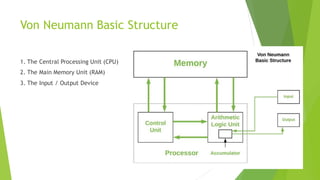
1. The Central Processing Unit (CPU)
2. The Main Memory Unit (RAM)
3. The Input / Output Device
Von Neumann Basic Structure
 Let’s consider them in details.
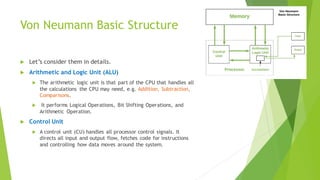
 Arithmetic and Logic Unit (ALU)
 The arithmetic logic unit is that part of the CPU that handles all
the calculations the CPU may need, e.g. Addition, Subtraction,
Comparisons.
 It performs Logical Operations, Bit Shifting Operations, and
Arithmetic Operation.
 Control Unit
 A control unit (CU) handles all processor control signals. It
directs all input and output flow, fetches code for instructions
and controlling how data moves around the system.
Instruction and CPU Registers
 Instruction:
 In computer, instruction is a single operation that can be
performed/execute by a computer.
 A computer program/software is a collection of instructions
 CPU Register
 Small amount of fast storage, quickly accessible to CPU.
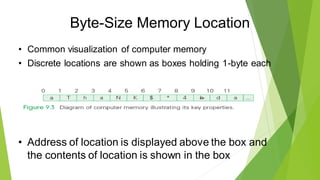
Byte-Size Memory Location
• Common visualization of computer memory
• Discrete locations are shown as boxes holding 1-byte each
• Address of location is displayed above the box and
the contents of location is shown in the box
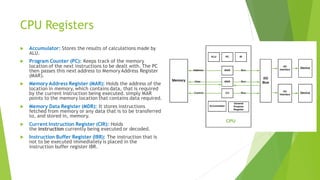
CPU Registers
 Accumulator: Stores the results of calculations made by
ALU.
 Program Counter (PC): Keeps track of the memory
location of the next instructions to be dealt with. The PC
then passes this next address to Memory Address Register
(MAR).
 Memory Address Register (MAR): Holds the address of the
location in memory, which contains data, that is required
by the current instruction being executed. simply MAR
points to the memory location that contains data required.
 Memory Data Register (MDR): It stores instructions
fetched from memory or any data that is to be transferred
to, and stored in, memory.
 Current Instruction Register (CIR): Holds
the instruction currently being executed or decoded.
 Instruction Buffer Register (IBR): The instruction that is
not to be executed immediately is placed in the
instruction buffer register IBR.
I/O Devices
 Input / Output Devices
 Program or data is read into main memory from the input device or
secondary storage under the control of CPU input instruction.
 Output devices are used to output the information from a computer. If
some results are evaluated by computer and it is stored in the computer,
then with the help of output devices, we can present it to the user.
Buses
 Buses
 Data is transmitted from one part of a computer to another, connecting all major
internal components to the CPU and memory, by the means of Buses.
 Types:
 Data Bus: It carries data among the memory unit, the I/O devices, and the
processor.
 Address Bus: It carries the address of data (not the actual data) between memory
and processor.
 Control Bus: It carries control commands from the CPU (and status signals from
other devices) in order to control and coordinate all the activities within the
computer.
Instruction Set
 The complete set of all the instructions in machine code that can be
recognized and executed by a central processing unit.
What Computers Can and Cannot Do
• What computers can do
– Deterministically perform or execute instructions to process
information
–Deterministically…the computer determines which instruction to do
next…it does only what it is “told” to do
– They have no imagination, are not creative or purposeful. No
sense of irony, subtlety, etc.
– Computers only execute instructions
9-12
The Fetch/Execute Cycle
• “Instruction Execution Engine”…a machine that
cycles through a series of operations
• Series is called: Fetch/Execute Cycle
– Get the next instruction
– Figure out what to do
– Gathering the data needed to do it
– Do it
– Save the result, and
– Repeat (billions of times/second)!
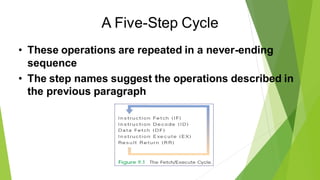
A Five-Step Cycle
• These operations are repeated in a never-ending
sequence
• The step names suggest the operations described in
the previous paragraph
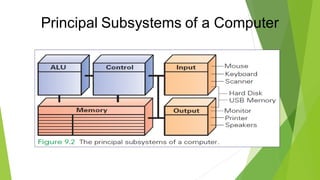
Anatomy of a Computer
• All computers, regardless of their implementing
technology, have five basic parts or subsystems:
1. Memory,
2. Control unit,
3. Arithmetic/logic unit (ALU),
4. Input unit, and
5. Output unit
Principal Subsystems of a Computer
1. Memory
• Memory stores both the program while it is running
and the data on which the program operates
• Properties of memory:
– Discrete locations
–Memory is organized as a sequence of discrete locations
–In modern memory, each location is composed of 1 byte (8 bits)
1. Memory
• Addresses
– Every memory location has an address, whole numbers starting
at 0
• Values
– Memory locations record or store values
• Finite capacity
– Memory locations have a finite capacity (limited size),
– Data may not “fit” in the memory location
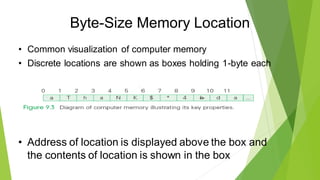
Byte-Size Memory Location
• Common visualization of computer memory
• Discrete locations are shown as boxes holding 1-byte each
• Address of location is displayed above the box and
the contents of location is shown in the box
Byte-Size Memory Location
• That 1-byte memory location can store one ASCII
character or a number less than 256
• Blocks of four bytes are used as a unit so often that
they are called memory words
Random Access Memory
• Computer memory is called random access memory
(RAM)
– “Random access” is out-of-date and simply means that the
computer can refer to the memory locations in any order
• RAM is measured in megabytes (MB) or gigabytes
(GB)
• Lots of memory is need to handle the space required
of programs and data
2. Control Unit
• The control unit of a computer is where the
Fetch/Execute Cycle occurs
• Its circuitry fetches an instruction from memory and
performs the other operations of the Fetch/Execute
Cycle on it
• A typical machine instruction has the form
ADD 4000, 2000, 2080
2. Control Unit
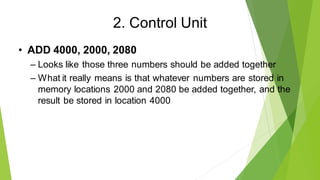
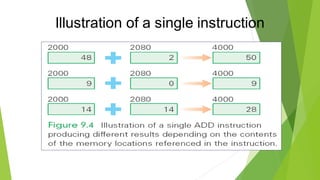
• ADD 4000, 2000, 2080
– Looks like those three numbers should be added together
– What it really means is that whatever numbers are stored in
memory locations 2000 and 2080 be added together, and the
result be stored in location 4000
Illustration of a single instruction
3. Arithmetic/Logic Unit (ALU)
• “Does the math”
• A circuit in the ALU can add two numbers
• The circuit uses logic gates or simpler circuits that
implement operations like AND and OR
• There are also circuits for multiplying, for comparing
two numbers, etc.
• The ALU carries out each machine instruction with a
separate circuit
4. And 5. Input and Output Units
• These two components are the wires and circuits
through which information moves into and out of a
computer
• A computer without input or output is useless
The Peripherals
• Peripherals connect to the computer input/output
(I/O) ports
• They provide input or receiving its output
• They are not considered part of the computer:
– They are only specialized gadgets that encode or decode
information between the computer and the physical world
The Peripherals
• The keyboard encodes our keystrokes into binary
form for the computer
• The monitor decodes information from the
computer’s memory and displays it on a screen
• The peripherals handle the physical part of the
operation
Portable Memory & Hard Drives
• Some peripherals are used by computers for both
input and output:
– USB memory
– Hard disks/drives
• They are storage devices
Hard Disk
• Hard disk is essential
• Programs and their data must reside in the
computer’s memory when programs run
• The hard disk can be seen as an extension of the
computer’s memory
• Typically it is a hundred times larger
and several thousand times slower
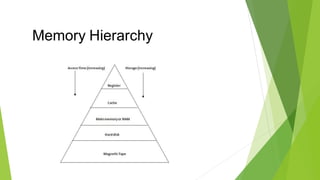
Memory Hierarchy
The Program Counter (PC)
• How does the computer determine which instruction
it should execute next?
• Address of the Next Instruction
– The instruction is stored in memory and the computer has its
address
– Computers use the address (known as the program counter or
PC) to keep track of the next instruction
The Program Counter
• The computer gets ready to process the next instruction
• It assumes that the next instruction is the next instruction
in sequence
• Because instructions use 4 bytes of memory, the next
instruction must be at the memory address PC + 4 or 4
bytes further along the sequence
Instruction Interpretation
• The process of executing a program is also called
instruction interpretation.
• The term derives from the idea that the computer
interprets our commands, but in its own language.
The Fetch/Execute Cycle
• A five-step cycle:
1. Instruction Fetch (IF)
2. Instruction Decode (ID)
3. Data Fetch (DF) / Operand Fetch (OF)
4. Instruction Execution (EX)
5. Result Return (RR) / Store (ST)
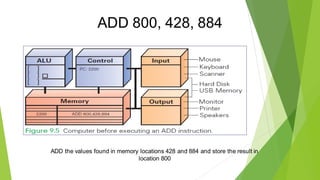
ADD 800, 428, 884
ADD the values found in memory locations 428 and 884 and store the result in
location 800
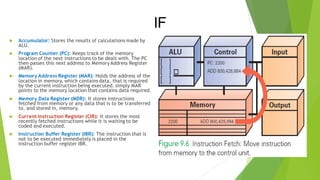
Instruction Fetch (IF)
• Execution begins by moving the instruction at the
address given by the PC (PC 2200) from memory
to the control unit
• Once instruction is fetched, the PC can be readied
for fetching the next instruction
IF
 Accumulator: Stores the results of calculations made by
ALU.
 Program Counter (PC): Keeps track of the memory
location of the next instructions to be dealt with. The PC
then passes this next address to Memory Address Register
(MAR).
 Memory Address Register (MAR): Holds the address of the
location in memory, which contains data, that is required
by the current instruction being executed. simply MAR
points to the memory location that contains data required.
 Memory Data Register (MDR): It stores instructions
fetched from memory or any data that is to be transferred
to, and stored in, memory.
 Current Instruction Register (CIR): It stores the most
recently fetched instructions while it is waiting to be
coded and executed.
 Instruction Buffer Register (IBR): The instruction that is
not to be executed immediately is placed in the
instruction buffer register IBR.
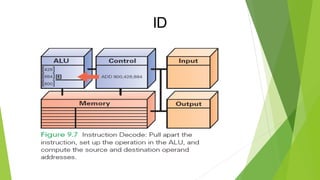
Instruction Decode (ID)
• ALU is set up for the operation
• Decoder finds the memory address of the
instruction's data (source operands)
– Most instructions operate on two data values stored in memory
(like ADD), so most instructions have addresses for two source
operands
– These addresses are passed to the circuit that fetches them
from memory during the next step
Instruction Decode (ID)
• Decoder finds the destination address for the
Result Return step and places the address in
the RR circuit
• Decoder determines what operation the ALU
will perform (ADD), and sets up the ALU
ID
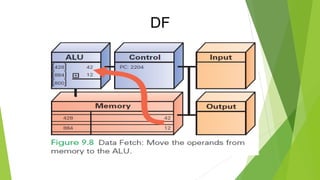
Data Fetch (DF)
• The data values to be operated on are retrieved
from memory
• Bits at specified memory locations are copied
into locations in the ALU circuitry
• Data values remain in memory (they are not
destroyed)
DF
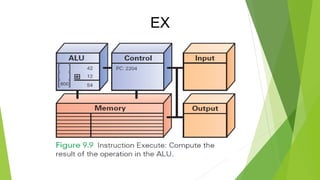
Instruction Execution (EX)
• For this ADD instruction, the addition circuit
adds the two source operands together to
produce their sum
• Sum is held in the ALU circuitry
• This is the actual computation
EX
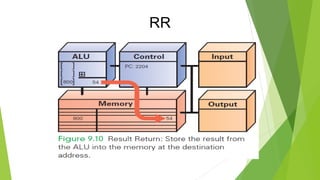
Return Result (RR)
• RR returns the result of EX to the memory location
specified by the destination address.
• Once the result is stored, the cycle begins again
RR
Many, Many Simple Operations
• Computers “know” very few instructions
• The decoder hardware in the controller recognizes, and the
ALU performs, only about 100 different instructions (with a
lot of duplication)
• There are only about 20 different kinds of operations.
• Everything that computers do must be reduced to some
combination of these primitive, hardwired instructions
Cycling the Fetch/Execute Cycle
• ADD is representative of the complexity of
computer instructions…some are slightly
simpler, some slightly more complex
• Computers achieve success at what they can do
with speed.
• They show their impressive capabilities by
executing many simple instructions per second
The Computer Clock
• Computers are instruction execution engines.
• Since the computer does one instruction per
cycle in principle, the speed of a computer
depends on the number of Fetch/Execute
Cycles it completes per second.
The Computer Clock
• The rate of the Fetch/Execute Cycle is determined by the
computer’s clock, and it is measured in megahertz, or
millions (mega) of cycles per second (hertz).
• A 1,000 MHz clock ticks a billion (in American English)
times per second, which is one gigahertz (1 GHz)
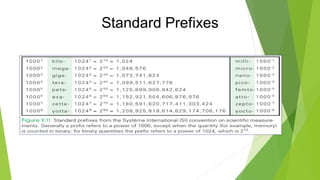
Standard Prefixes
One Cycle per Clock Tick
• A computer with a 1 GHz clock has one billionth
of a second—one nanosecond—between clock
ticks to run the Fetch/Execute Cycle.
• In that amount of time, light travels about one
foot (~30 cm).
• Modern computers try to start an instruction on
each clock tick.
Computer’s View of Software
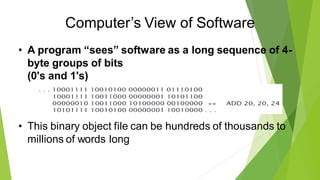
• A program “sees” software as a long sequence of 4-
byte groups of bits
(0's and 1's)
• This binary object file can be hundreds of thousands to
millions of words long
Computer’s View of Software
• Once installed, the computer runs the
software by:
• copying the binary instructions into the RAM
• interpreting them using the Fetch/Execute Cycle.
• It does whatever the instructions tell it to do

3. IICT_Lecture 03_Computer Org Personal

  • 1.
  • 2.
    Computer Organization  Itdeals with the hardware components of a computer system such as the input/output devices, CPU and memory devices
  • 3.
    Von Neumann BasicStructure 1. The Central Processing Unit (CPU) 2. The Main Memory Unit (RAM) 3. The Input / Output Device
  • 4.
    Von Neumann BasicStructure  Let’s consider them in details.  Arithmetic and Logic Unit (ALU)  The arithmetic logic unit is that part of the CPU that handles all the calculations the CPU may need, e.g. Addition, Subtraction, Comparisons.  It performs Logical Operations, Bit Shifting Operations, and Arithmetic Operation.  Control Unit  A control unit (CU) handles all processor control signals. It directs all input and output flow, fetches code for instructions and controlling how data moves around the system.
  • 5.
    Instruction and CPURegisters  Instruction:  In computer, instruction is a single operation that can be performed/execute by a computer.  A computer program/software is a collection of instructions  CPU Register  Small amount of fast storage, quickly accessible to CPU.
  • 6.
    Byte-Size Memory Location •Common visualization of computer memory • Discrete locations are shown as boxes holding 1-byte each • Address of location is displayed above the box and the contents of location is shown in the box
  • 7.
    CPU Registers  Accumulator:Stores the results of calculations made by ALU.  Program Counter (PC): Keeps track of the memory location of the next instructions to be dealt with. The PC then passes this next address to Memory Address Register (MAR).  Memory Address Register (MAR): Holds the address of the location in memory, which contains data, that is required by the current instruction being executed. simply MAR points to the memory location that contains data required.  Memory Data Register (MDR): It stores instructions fetched from memory or any data that is to be transferred to, and stored in, memory.  Current Instruction Register (CIR): Holds the instruction currently being executed or decoded.  Instruction Buffer Register (IBR): The instruction that is not to be executed immediately is placed in the instruction buffer register IBR.
  • 8.
    I/O Devices  Input/ Output Devices  Program or data is read into main memory from the input device or secondary storage under the control of CPU input instruction.  Output devices are used to output the information from a computer. If some results are evaluated by computer and it is stored in the computer, then with the help of output devices, we can present it to the user.
  • 9.
    Buses  Buses  Datais transmitted from one part of a computer to another, connecting all major internal components to the CPU and memory, by the means of Buses.  Types:  Data Bus: It carries data among the memory unit, the I/O devices, and the processor.  Address Bus: It carries the address of data (not the actual data) between memory and processor.  Control Bus: It carries control commands from the CPU (and status signals from other devices) in order to control and coordinate all the activities within the computer.
  • 10.
    Instruction Set  Thecomplete set of all the instructions in machine code that can be recognized and executed by a central processing unit.
  • 11.
    What Computers Canand Cannot Do • What computers can do – Deterministically perform or execute instructions to process information –Deterministically…the computer determines which instruction to do next…it does only what it is “told” to do – They have no imagination, are not creative or purposeful. No sense of irony, subtlety, etc. – Computers only execute instructions 9-12
  • 12.
    The Fetch/Execute Cycle •“Instruction Execution Engine”…a machine that cycles through a series of operations • Series is called: Fetch/Execute Cycle – Get the next instruction – Figure out what to do – Gathering the data needed to do it – Do it – Save the result, and – Repeat (billions of times/second)!
  • 13.
    A Five-Step Cycle •These operations are repeated in a never-ending sequence • The step names suggest the operations described in the previous paragraph
  • 14.
    Anatomy of aComputer • All computers, regardless of their implementing technology, have five basic parts or subsystems: 1. Memory, 2. Control unit, 3. Arithmetic/logic unit (ALU), 4. Input unit, and 5. Output unit
  • 15.
  • 16.
    1. Memory • Memorystores both the program while it is running and the data on which the program operates • Properties of memory: – Discrete locations –Memory is organized as a sequence of discrete locations –In modern memory, each location is composed of 1 byte (8 bits)
  • 17.
    1. Memory • Addresses –Every memory location has an address, whole numbers starting at 0 • Values – Memory locations record or store values • Finite capacity – Memory locations have a finite capacity (limited size), – Data may not “fit” in the memory location
  • 18.
    Byte-Size Memory Location •Common visualization of computer memory • Discrete locations are shown as boxes holding 1-byte each • Address of location is displayed above the box and the contents of location is shown in the box
  • 19.
    Byte-Size Memory Location •That 1-byte memory location can store one ASCII character or a number less than 256 • Blocks of four bytes are used as a unit so often that they are called memory words
  • 20.
    Random Access Memory •Computer memory is called random access memory (RAM) – “Random access” is out-of-date and simply means that the computer can refer to the memory locations in any order • RAM is measured in megabytes (MB) or gigabytes (GB) • Lots of memory is need to handle the space required of programs and data
  • 21.
    2. Control Unit •The control unit of a computer is where the Fetch/Execute Cycle occurs • Its circuitry fetches an instruction from memory and performs the other operations of the Fetch/Execute Cycle on it • A typical machine instruction has the form ADD 4000, 2000, 2080
  • 22.
    2. Control Unit •ADD 4000, 2000, 2080 – Looks like those three numbers should be added together – What it really means is that whatever numbers are stored in memory locations 2000 and 2080 be added together, and the result be stored in location 4000
  • 23.
    Illustration of asingle instruction
  • 24.
    3. Arithmetic/Logic Unit(ALU) • “Does the math” • A circuit in the ALU can add two numbers • The circuit uses logic gates or simpler circuits that implement operations like AND and OR • There are also circuits for multiplying, for comparing two numbers, etc. • The ALU carries out each machine instruction with a separate circuit
  • 25.
    4. And 5.Input and Output Units • These two components are the wires and circuits through which information moves into and out of a computer • A computer without input or output is useless
  • 26.
    The Peripherals • Peripheralsconnect to the computer input/output (I/O) ports • They provide input or receiving its output • They are not considered part of the computer: – They are only specialized gadgets that encode or decode information between the computer and the physical world
  • 27.
    The Peripherals • Thekeyboard encodes our keystrokes into binary form for the computer • The monitor decodes information from the computer’s memory and displays it on a screen • The peripherals handle the physical part of the operation
  • 28.
    Portable Memory &Hard Drives • Some peripherals are used by computers for both input and output: – USB memory – Hard disks/drives • They are storage devices
  • 29.
    Hard Disk • Harddisk is essential • Programs and their data must reside in the computer’s memory when programs run • The hard disk can be seen as an extension of the computer’s memory • Typically it is a hundred times larger and several thousand times slower
  • 30.
  • 31.
    The Program Counter(PC) • How does the computer determine which instruction it should execute next? • Address of the Next Instruction – The instruction is stored in memory and the computer has its address – Computers use the address (known as the program counter or PC) to keep track of the next instruction
  • 32.
    The Program Counter •The computer gets ready to process the next instruction • It assumes that the next instruction is the next instruction in sequence • Because instructions use 4 bytes of memory, the next instruction must be at the memory address PC + 4 or 4 bytes further along the sequence
  • 33.
    Instruction Interpretation • Theprocess of executing a program is also called instruction interpretation. • The term derives from the idea that the computer interprets our commands, but in its own language.
  • 34.
    The Fetch/Execute Cycle •A five-step cycle: 1. Instruction Fetch (IF) 2. Instruction Decode (ID) 3. Data Fetch (DF) / Operand Fetch (OF) 4. Instruction Execution (EX) 5. Result Return (RR) / Store (ST)
  • 35.
    ADD 800, 428,884 ADD the values found in memory locations 428 and 884 and store the result in location 800
  • 36.
    Instruction Fetch (IF) •Execution begins by moving the instruction at the address given by the PC (PC 2200) from memory to the control unit • Once instruction is fetched, the PC can be readied for fetching the next instruction
  • 37.
    IF  Accumulator: Storesthe results of calculations made by ALU.  Program Counter (PC): Keeps track of the memory location of the next instructions to be dealt with. The PC then passes this next address to Memory Address Register (MAR).  Memory Address Register (MAR): Holds the address of the location in memory, which contains data, that is required by the current instruction being executed. simply MAR points to the memory location that contains data required.  Memory Data Register (MDR): It stores instructions fetched from memory or any data that is to be transferred to, and stored in, memory.  Current Instruction Register (CIR): It stores the most recently fetched instructions while it is waiting to be coded and executed.  Instruction Buffer Register (IBR): The instruction that is not to be executed immediately is placed in the instruction buffer register IBR.
  • 38.
    Instruction Decode (ID) •ALU is set up for the operation • Decoder finds the memory address of the instruction's data (source operands) – Most instructions operate on two data values stored in memory (like ADD), so most instructions have addresses for two source operands – These addresses are passed to the circuit that fetches them from memory during the next step
  • 39.
    Instruction Decode (ID) •Decoder finds the destination address for the Result Return step and places the address in the RR circuit • Decoder determines what operation the ALU will perform (ADD), and sets up the ALU
  • 40.
  • 41.
    Data Fetch (DF) •The data values to be operated on are retrieved from memory • Bits at specified memory locations are copied into locations in the ALU circuitry • Data values remain in memory (they are not destroyed)
  • 42.
  • 43.
    Instruction Execution (EX) •For this ADD instruction, the addition circuit adds the two source operands together to produce their sum • Sum is held in the ALU circuitry • This is the actual computation
  • 44.
  • 45.
    Return Result (RR) •RR returns the result of EX to the memory location specified by the destination address. • Once the result is stored, the cycle begins again
  • 46.
  • 47.
    Many, Many SimpleOperations • Computers “know” very few instructions • The decoder hardware in the controller recognizes, and the ALU performs, only about 100 different instructions (with a lot of duplication) • There are only about 20 different kinds of operations. • Everything that computers do must be reduced to some combination of these primitive, hardwired instructions
  • 48.
    Cycling the Fetch/ExecuteCycle • ADD is representative of the complexity of computer instructions…some are slightly simpler, some slightly more complex • Computers achieve success at what they can do with speed. • They show their impressive capabilities by executing many simple instructions per second
  • 49.
    The Computer Clock •Computers are instruction execution engines. • Since the computer does one instruction per cycle in principle, the speed of a computer depends on the number of Fetch/Execute Cycles it completes per second.
  • 50.
    The Computer Clock •The rate of the Fetch/Execute Cycle is determined by the computer’s clock, and it is measured in megahertz, or millions (mega) of cycles per second (hertz). • A 1,000 MHz clock ticks a billion (in American English) times per second, which is one gigahertz (1 GHz)
  • 51.
  • 52.
    One Cycle perClock Tick • A computer with a 1 GHz clock has one billionth of a second—one nanosecond—between clock ticks to run the Fetch/Execute Cycle. • In that amount of time, light travels about one foot (~30 cm). • Modern computers try to start an instruction on each clock tick.
  • 53.
    Computer’s View ofSoftware • A program “sees” software as a long sequence of 4- byte groups of bits (0's and 1's) • This binary object file can be hundreds of thousands to millions of words long
  • 54.
    Computer’s View ofSoftware • Once installed, the computer runs the software by: • copying the binary instructions into the RAM • interpreting them using the Fetch/Execute Cycle. • It does whatever the instructions tell it to do