IE 20303
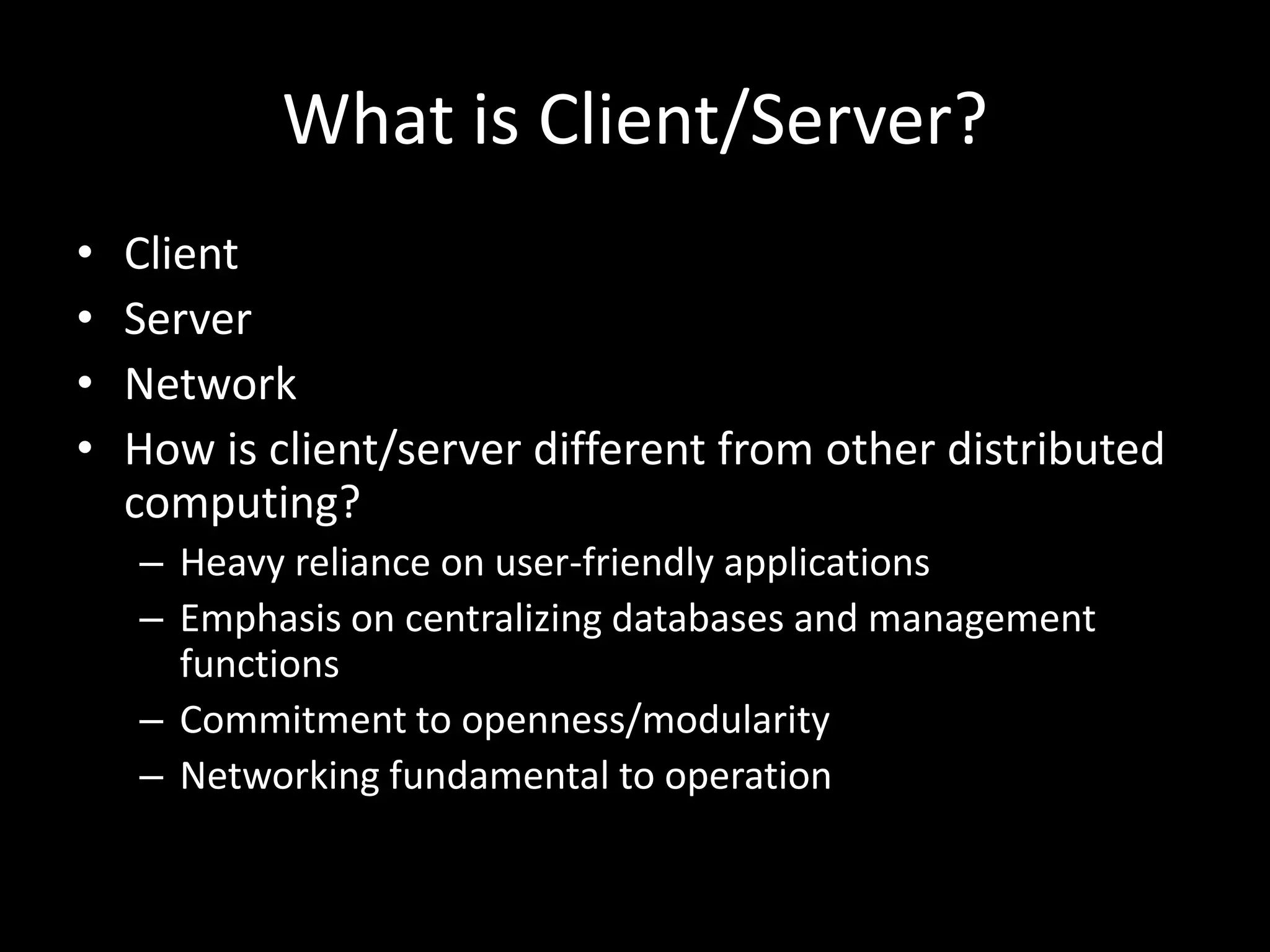
What is Client/Server?ClientServerNetworkHow is client/server different from other distributed computing?Heavy reliance on user-friendly applicationsEmphasis on centralizing databases and management functionsCommitment to openness/modularityNetworking fundamental to operation
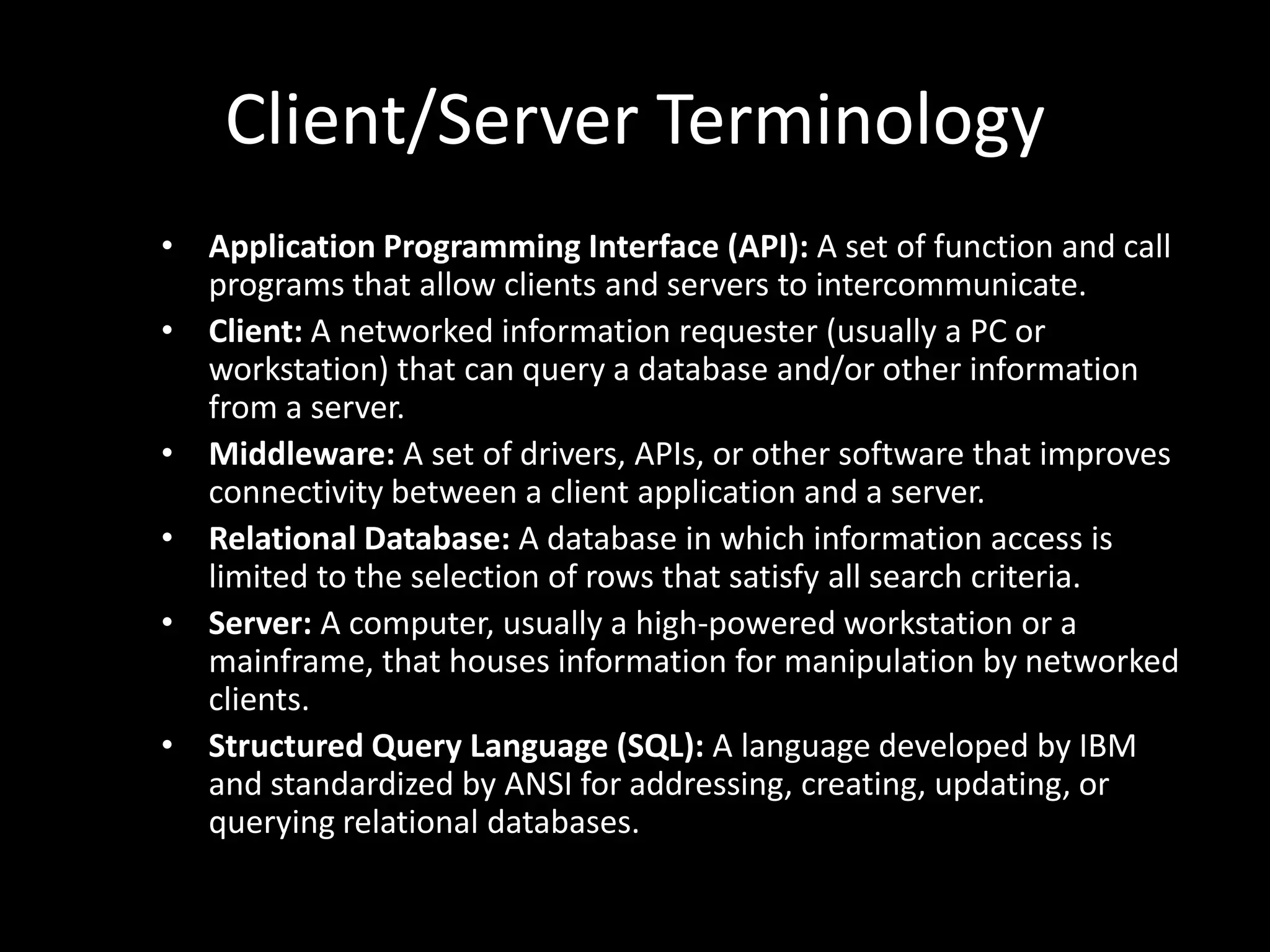
Client/Server TerminologyApplication Programming Interface (API): A set of function and call programs that allow clients and servers to intercommunicate.Client: A networked information requester (usually a PC or workstation) that can query a database and/or other information from a server.Middleware: A set of drivers, APIs, or other software that improves connectivity between a client application and a server.Relational Database: A database in which information access is limited to the selection of rows that satisfy all search criteria.Server: A computer, usually a high-powered workstation or a mainframe, that houses information for manipulation by networked clients.Structured Query Language (SQL): A language developed by IBM and standardized by ANSI for addressing, creating, updating, or querying relational databases.
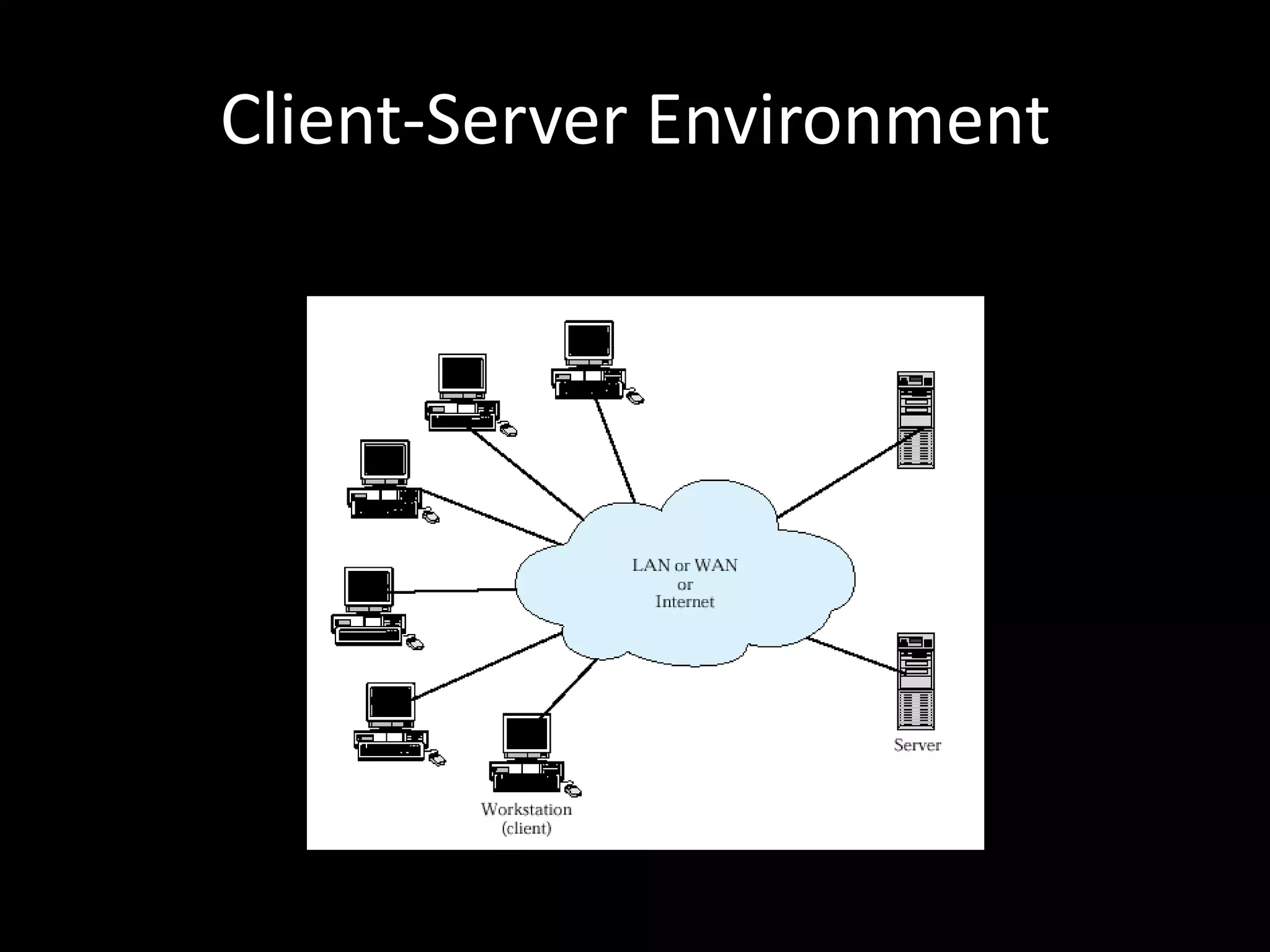
Client-Server Environment
Why is Client-Server Different?Emphasis on user-friendly client applicationsFocus on access to centralized databasesCommitment to open and modular applicationsNetworking is fundamental to the organization
Client/Server ApplicationsEmphasis on GUI for usersDatabase ExampleDatabase on server, applications for access on client, “glue” (like SQL) enables requests)Application logic can be client-only, or split between client and server
Classes of Client-Server ApplicationsHost-based processingServer-based processingClient-based processingCooperative processing“Thick client” vs“Thin server”
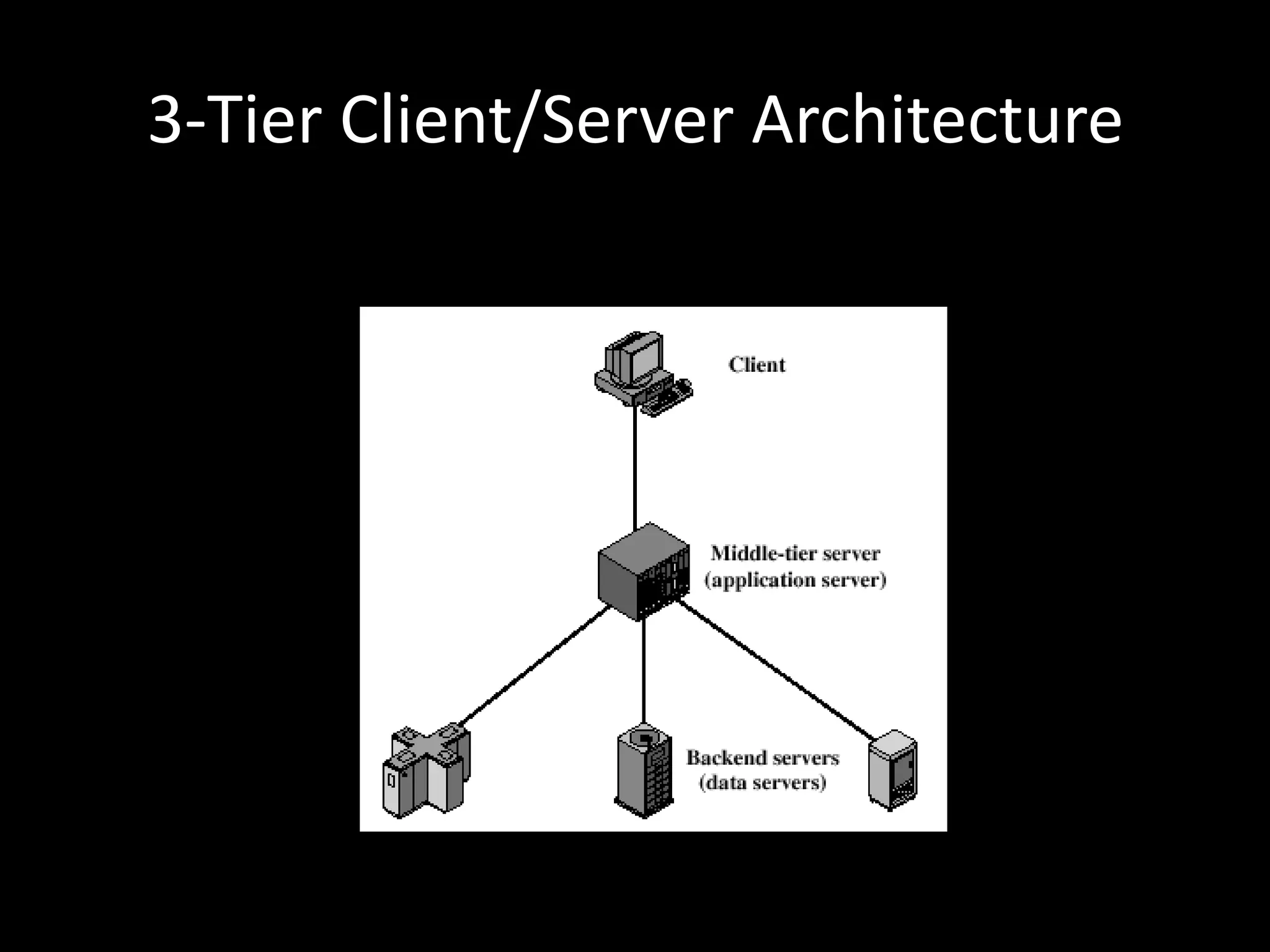
3-Tier Client/Server Architecture
MiddlewareStandardized interfaces and protocols between clients and back-end databasesHides complexity of data sources from the end-userCompatible with a range of client and server optionsAll applications operate over a uniform applications programming interface (API).
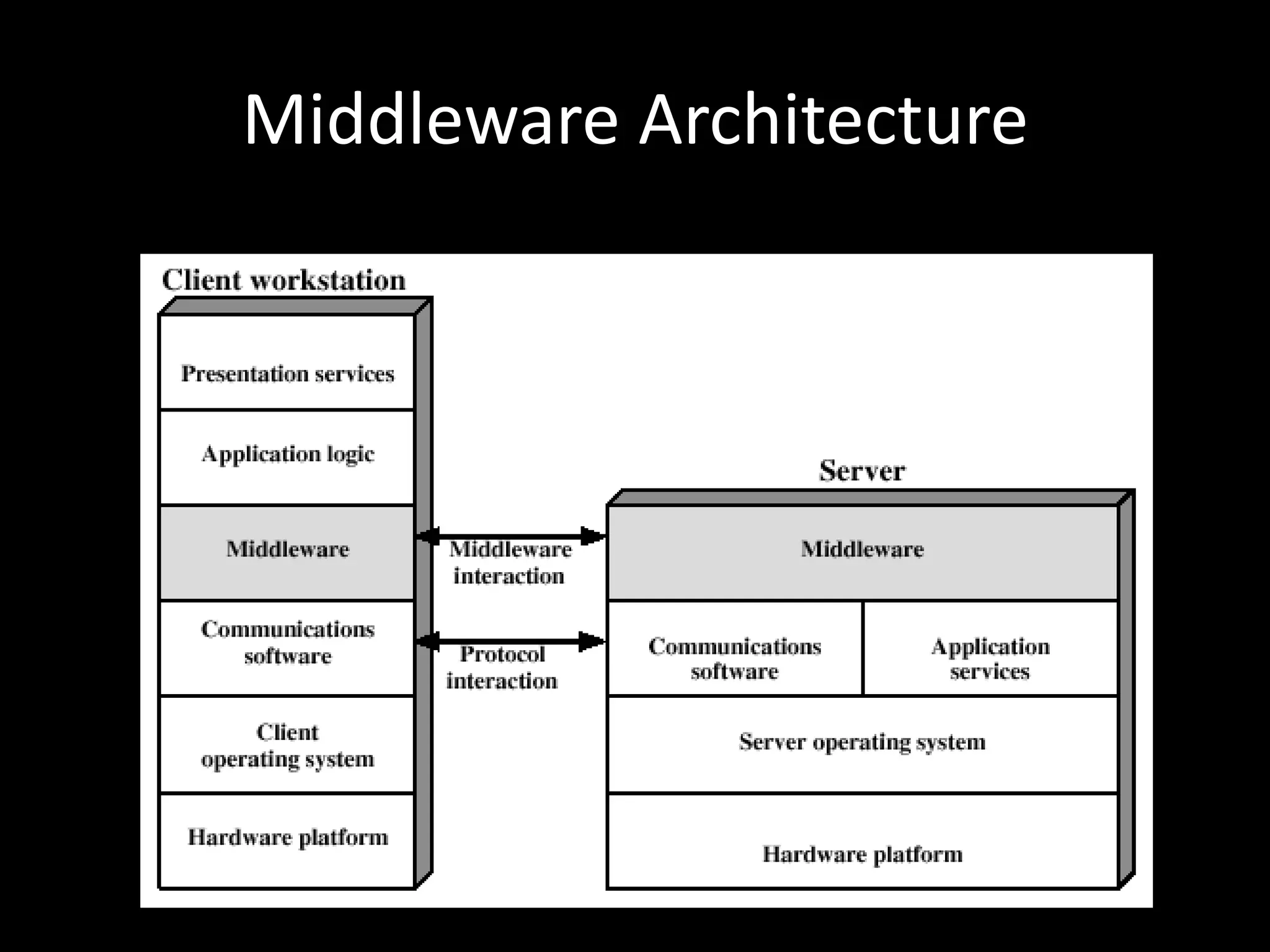
Middleware Architecture
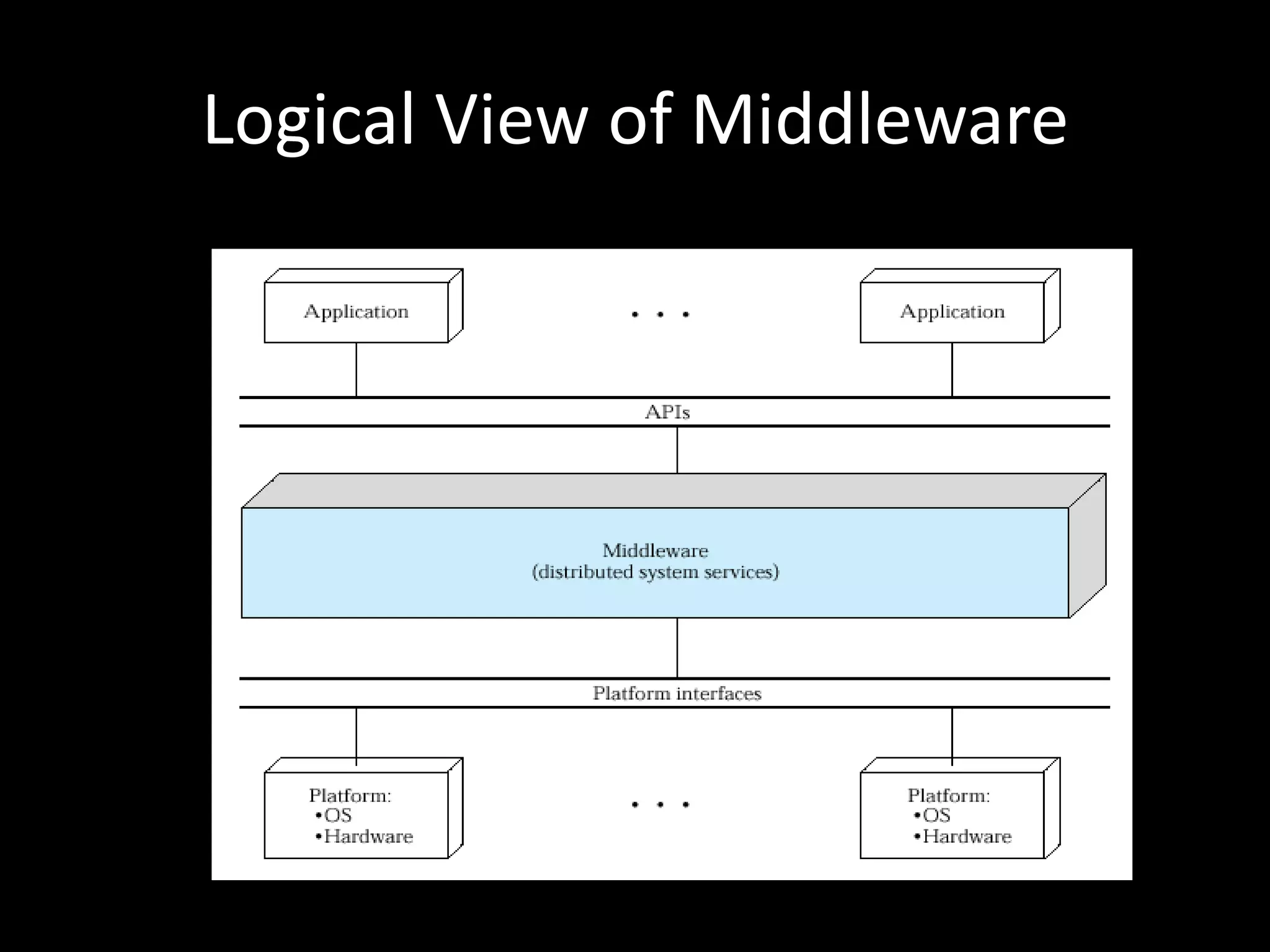
Logical View of Middleware
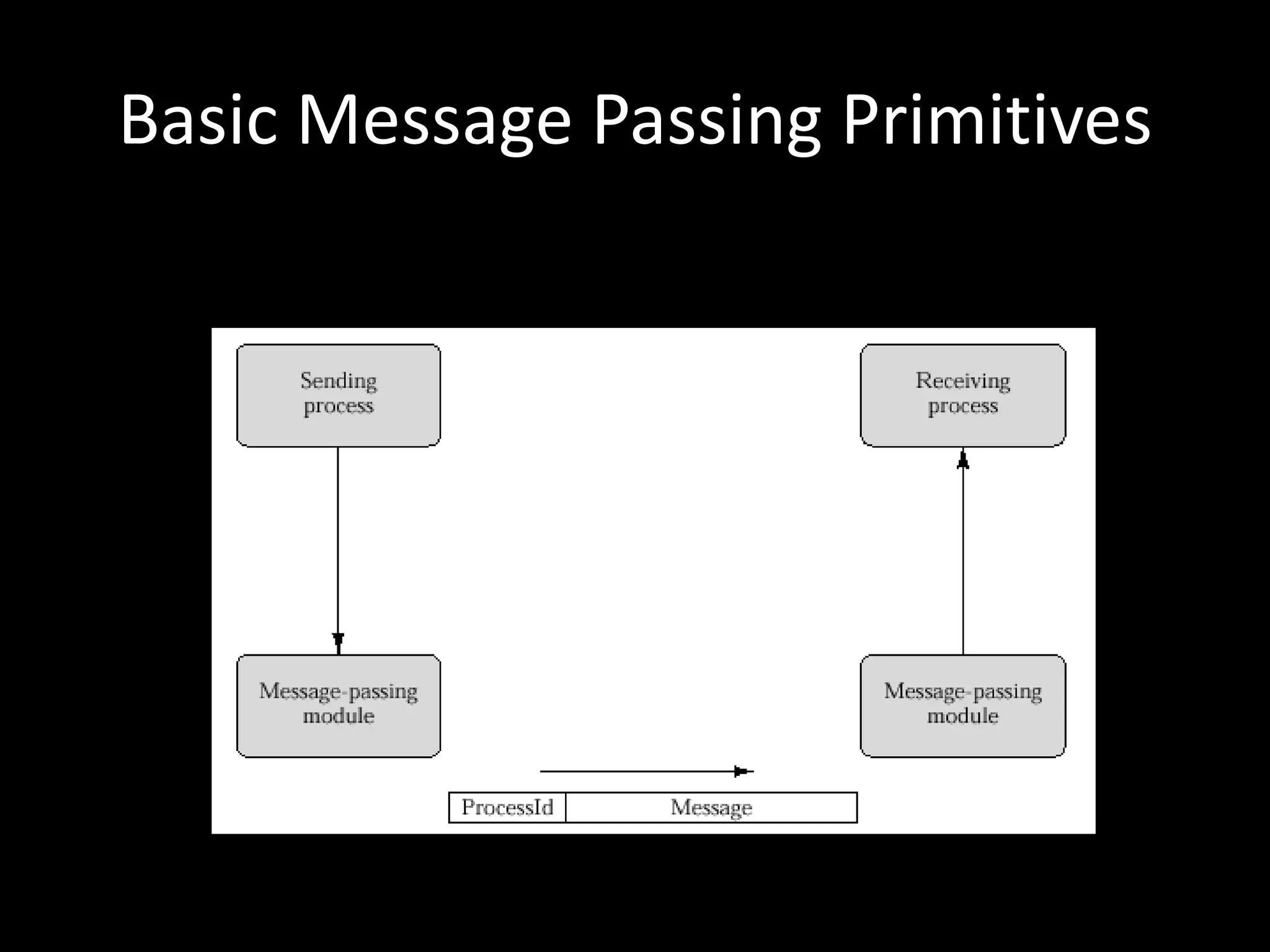
Basic Message Passing Primitives
Message Passing IssuesReliability vs UnreliabilityReliable facilities guarantee delivery, provide error-checking, retransmission, etcAlternatively, the message can be sent without success/failure; reduces complexity and overhead, passes responsibility for confirmation to applicationBlocking vs NonblockingNon-blocking more efficient, but difficult to test and debug programsBlocking (synchronous) retains control until acknowledgment is received
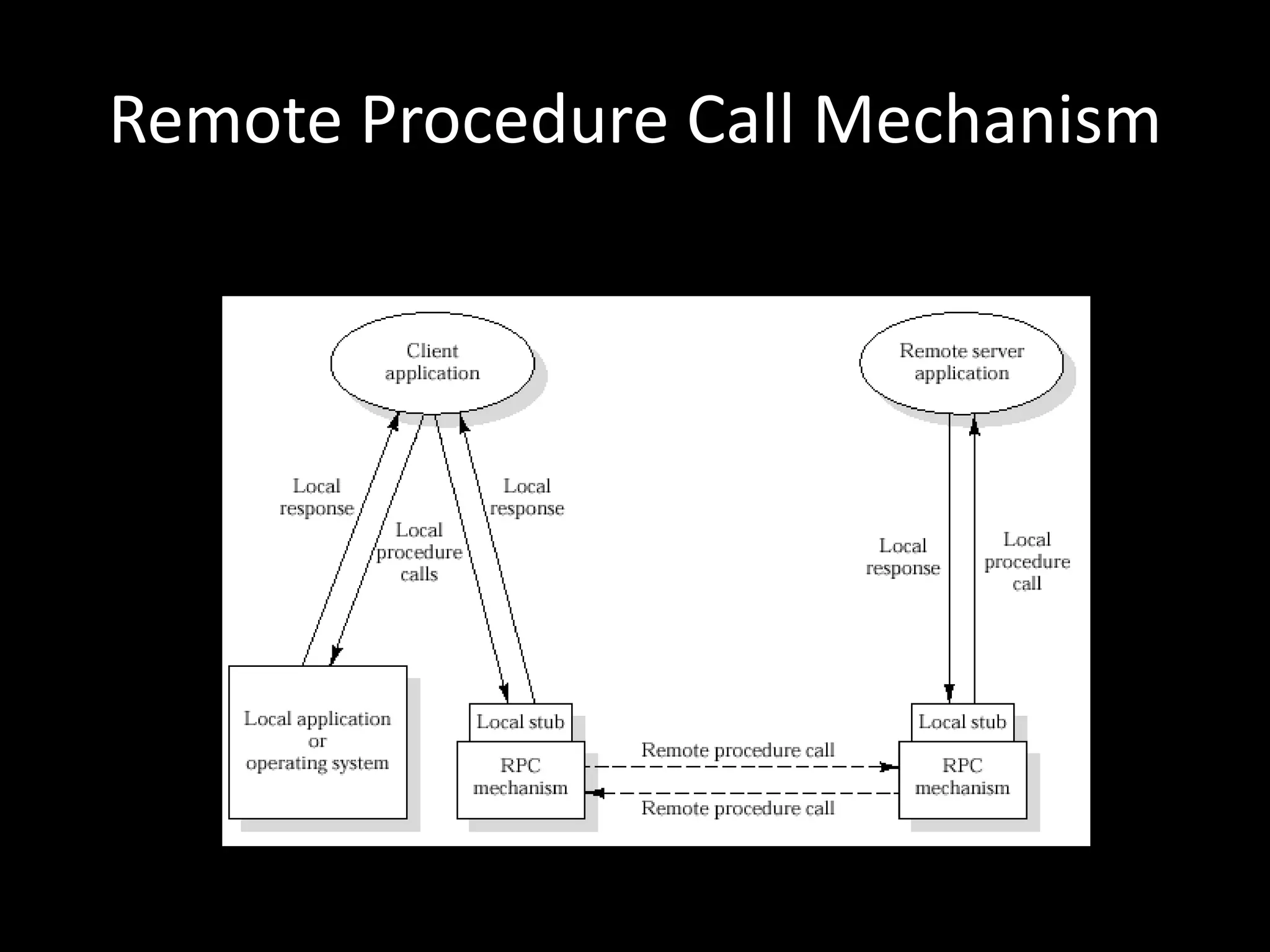
Remote Procedure Call Mechanism
Client/Server BindingNonpersistent bindingDoes not maintain state information, connections re-established as necessaryInappropriate for RPCs used frequently by same callerPersistent bindingConnection sustained until procedure returnUseful for applications making repeated calls to remote procedures
Object-Oriented MechanismsClients and servers ship messages between objects.May rely on an underlying message or RPC structure or be developed directly on top of object-oriented capabilities in the operating systemSuccess depends on standardization of the object mechanism, but competing models existCOM, OLE, CORBA
IntranetsImplementation of Internet-based technologies within an organization, rather than for global connectivityImmensely successful in corporate computing contexts
Advantages of IntranetsRapid prototypingScales effectivelyLittle training requiredCan be implemented on variety of systemsOpen architecture allows interaction across platformsSupports a range of distributed serversAllows integration of legacy systems on client and server sideSupports a range of media typesInexpensive to implement
The Intranet WebWeb ContentThe web can be used to effectively distribute content in a way that requires no new training for end-usersWeb/Database ConnectivityMultiple tools exist to serve as middleware between web servers and data sourcesElectronic MailNetwork News
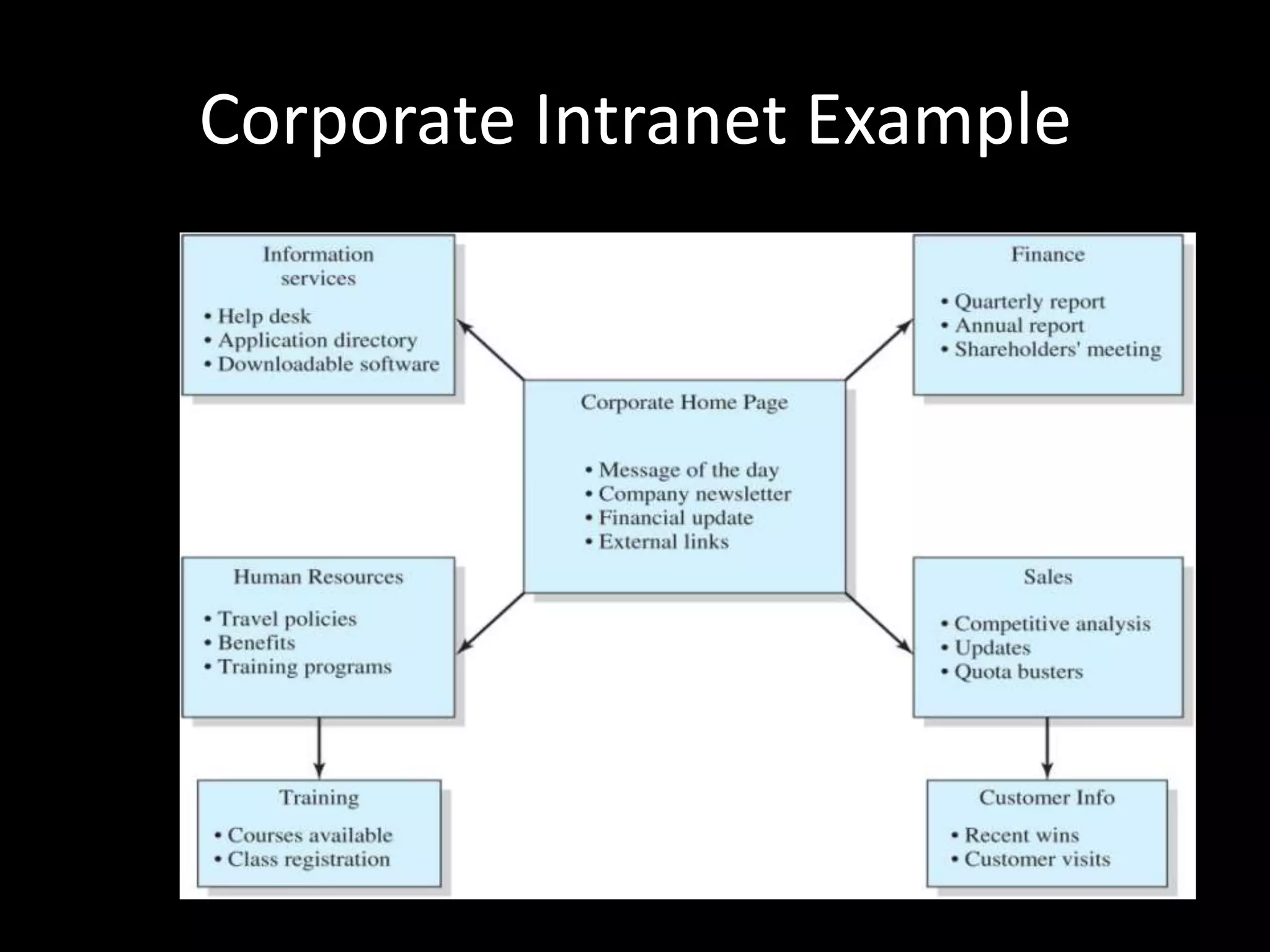
Corporate Intranet Example
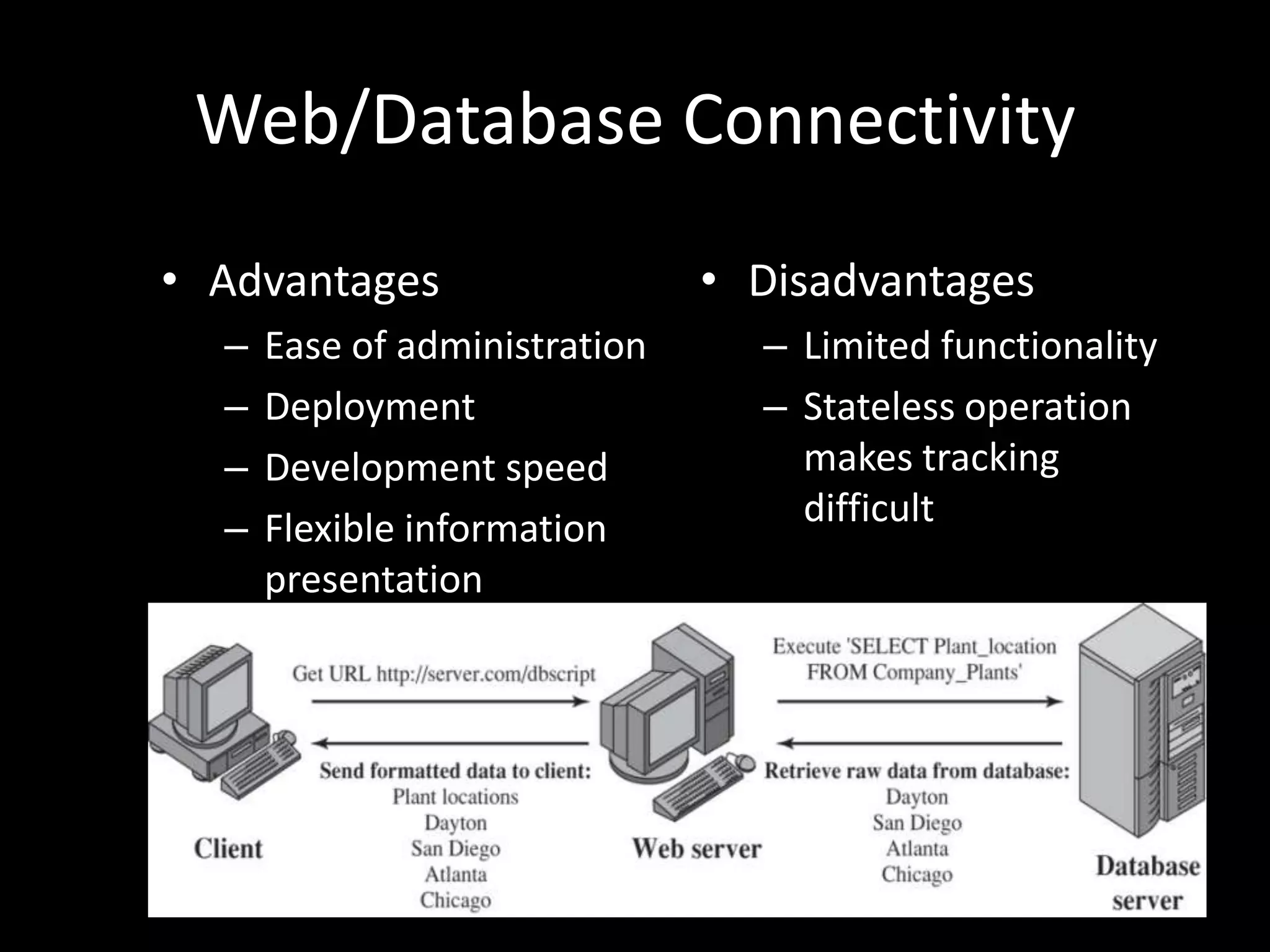
Web/Database ConnectivityAdvantagesEase of administrationDeploymentDevelopment speedFlexible information presentationDisadvantagesLimited functionalityStateless operation makes tracking difficult
Intranet Webs vs Traditional Client/ServerClient/Server Disadvantages Include:1. Long development cycles2. Difficulty in partitioning applications, and modifying based on user feedback3. Effort in distributing upgrades to clients4. Difficult in scaling servers to respond to increased load5. Continuous requirement for more powerful desktop machines
Other Intranet TechnologiesElectronic MailClosed internal mail systems (delivery verification, etc)Internal mailing listsNetwork news (USENET)Can be adopted for internal intranet uses
ExtranetsExtends the intranet concept to provide information and services to selected outside populations, such as customers and suppliersEnables the sharing of information between companiesA TCP/IP enabled form of EDI
Advantages of ExtranetsReduced costsCoordinationCustomer SatisfactionExpedited communication
Methods for Converting Intranets to ExtranetsLong-distance dial-up accessInternet access to intranet with securityInternet access to an external server that duplicates some of a company’s intranet dataInternet access to an external server that originates database queries to internal serversVirtual private network
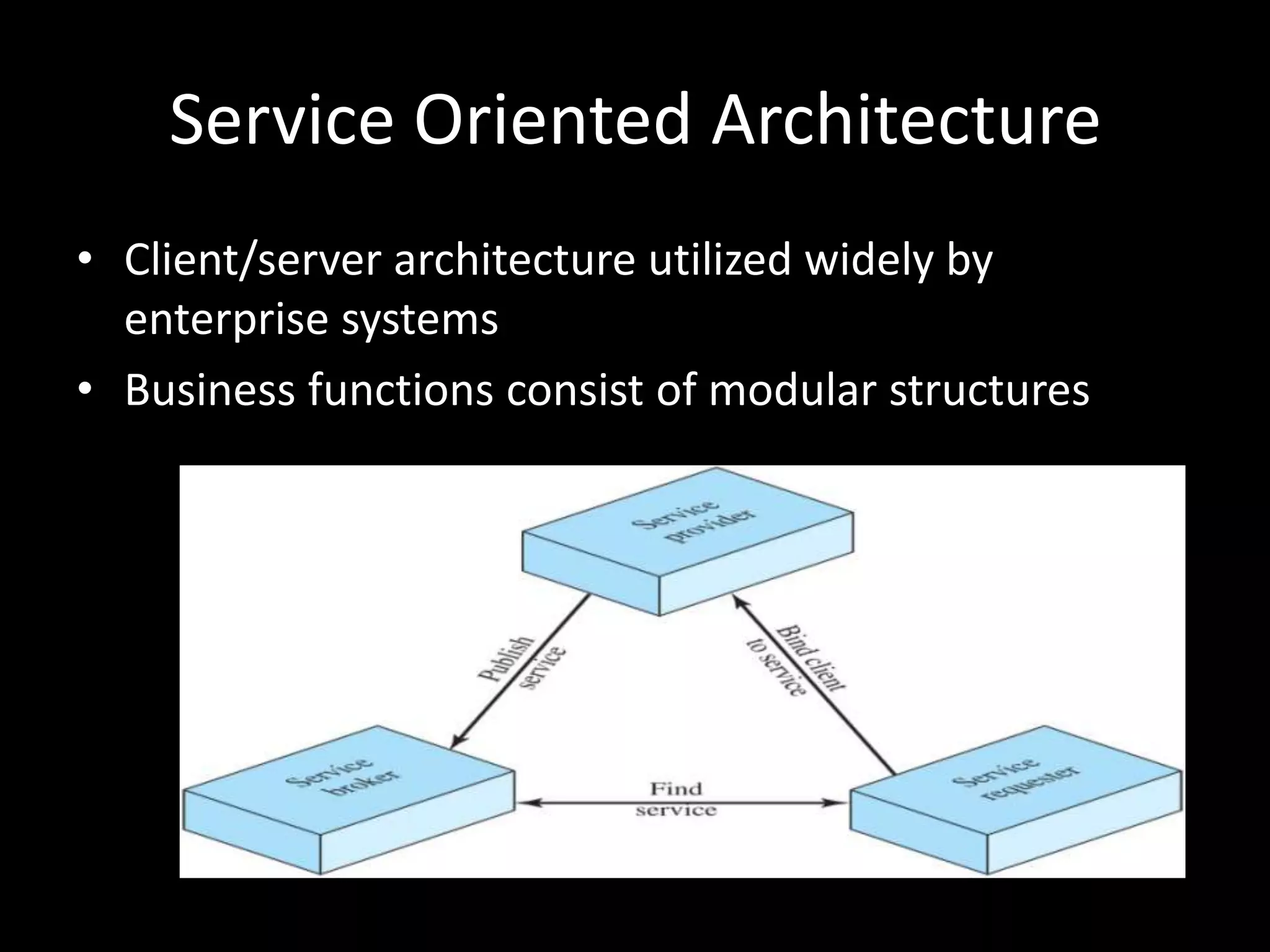
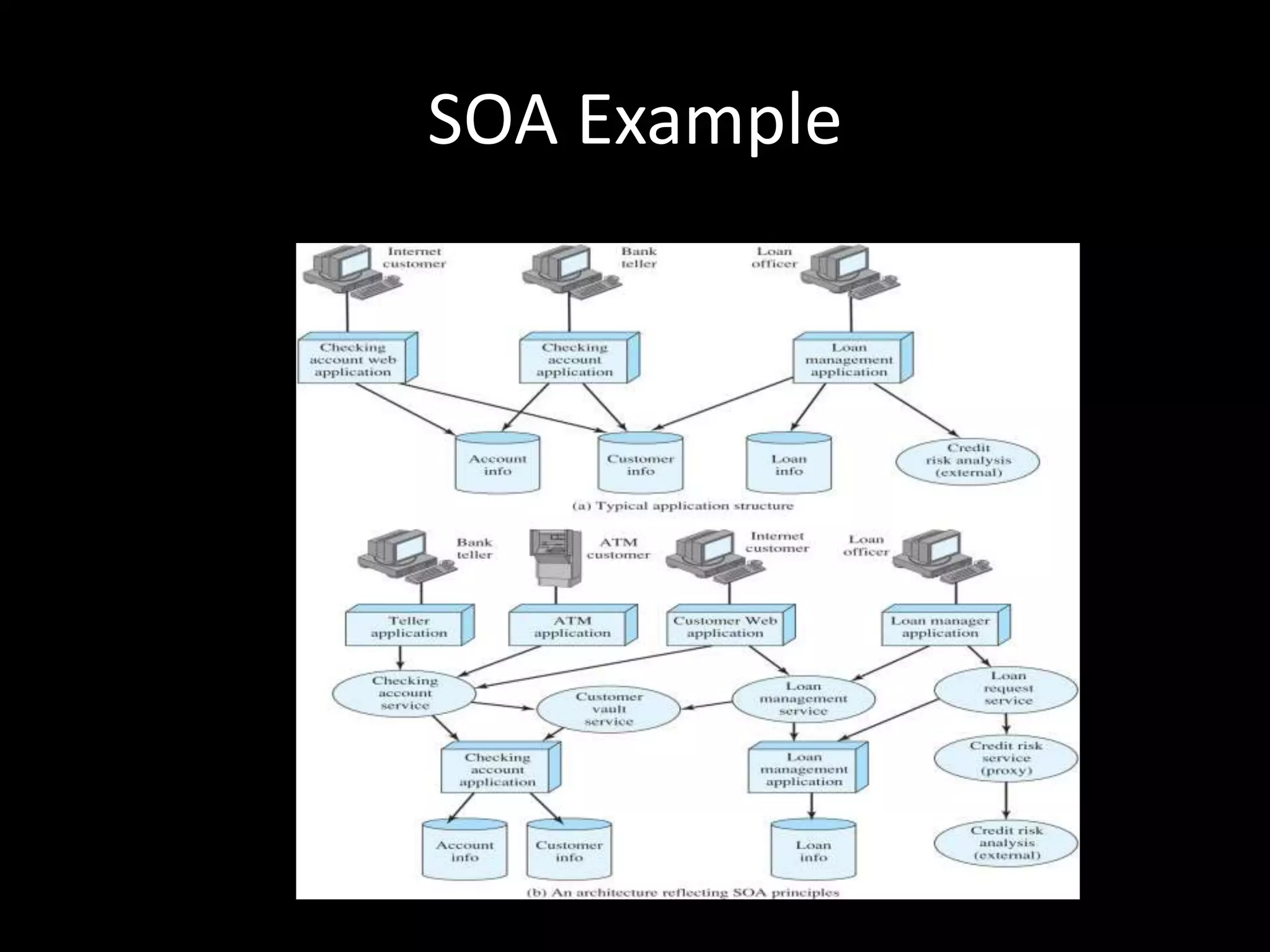
Service Oriented Architecture Client/server architecture utilized widely by enterprise systemsBusiness functions consist of modular structures
SOA Architectural ElementsService provider: network node that provides a service interface for a software asset that manages a specific set of tasks.Service requestor: network node that discovers and invokes other software services.Service broker: specific kind of service provider that acts as a registry and allows lookup of service provider interfaces and service locations.
Key Characterisitics for Effective Services UseCoarse-grainedInterface-based designDiscoverableSingle InstanceLoosely CoupledAsynchronous
SOA Example

Presentation6

  • 1.
  • 2.
    What is Client/Server?ClientServerNetworkHowis client/server different from other distributed computing?Heavy reliance on user-friendly applicationsEmphasis on centralizing databases and management functionsCommitment to openness/modularityNetworking fundamental to operation
  • 3.
    Client/Server TerminologyApplication ProgrammingInterface (API): A set of function and call programs that allow clients and servers to intercommunicate.Client: A networked information requester (usually a PC or workstation) that can query a database and/or other information from a server.Middleware: A set of drivers, APIs, or other software that improves connectivity between a client application and a server.Relational Database: A database in which information access is limited to the selection of rows that satisfy all search criteria.Server: A computer, usually a high-powered workstation or a mainframe, that houses information for manipulation by networked clients.Structured Query Language (SQL): A language developed by IBM and standardized by ANSI for addressing, creating, updating, or querying relational databases.
  • 4.
  • 5.
    Why is Client-ServerDifferent?Emphasis on user-friendly client applicationsFocus on access to centralized databasesCommitment to open and modular applicationsNetworking is fundamental to the organization
  • 6.
    Client/Server ApplicationsEmphasis onGUI for usersDatabase ExampleDatabase on server, applications for access on client, “glue” (like SQL) enables requests)Application logic can be client-only, or split between client and server
  • 7.
    Classes of Client-ServerApplicationsHost-based processingServer-based processingClient-based processingCooperative processing“Thick client” vs“Thin server”
  • 8.
  • 9.
    MiddlewareStandardized interfaces andprotocols between clients and back-end databasesHides complexity of data sources from the end-userCompatible with a range of client and server optionsAll applications operate over a uniform applications programming interface (API).
  • 10.
  • 11.
    Logical View ofMiddleware
  • 12.
  • 13.
    Message Passing IssuesReliabilityvs UnreliabilityReliable facilities guarantee delivery, provide error-checking, retransmission, etcAlternatively, the message can be sent without success/failure; reduces complexity and overhead, passes responsibility for confirmation to applicationBlocking vs NonblockingNon-blocking more efficient, but difficult to test and debug programsBlocking (synchronous) retains control until acknowledgment is received
  • 14.
  • 15.
    Client/Server BindingNonpersistent bindingDoesnot maintain state information, connections re-established as necessaryInappropriate for RPCs used frequently by same callerPersistent bindingConnection sustained until procedure returnUseful for applications making repeated calls to remote procedures
  • 16.
    Object-Oriented MechanismsClients andservers ship messages between objects.May rely on an underlying message or RPC structure or be developed directly on top of object-oriented capabilities in the operating systemSuccess depends on standardization of the object mechanism, but competing models existCOM, OLE, CORBA
  • 17.
    IntranetsImplementation of Internet-basedtechnologies within an organization, rather than for global connectivityImmensely successful in corporate computing contexts
  • 18.
    Advantages of IntranetsRapidprototypingScales effectivelyLittle training requiredCan be implemented on variety of systemsOpen architecture allows interaction across platformsSupports a range of distributed serversAllows integration of legacy systems on client and server sideSupports a range of media typesInexpensive to implement
  • 19.
    The Intranet WebWebContentThe web can be used to effectively distribute content in a way that requires no new training for end-usersWeb/Database ConnectivityMultiple tools exist to serve as middleware between web servers and data sourcesElectronic MailNetwork News
  • 20.
  • 21.
    Web/Database ConnectivityAdvantagesEase ofadministrationDeploymentDevelopment speedFlexible information presentationDisadvantagesLimited functionalityStateless operation makes tracking difficult
  • 22.
    Intranet Webs vsTraditional Client/ServerClient/Server Disadvantages Include:1. Long development cycles2. Difficulty in partitioning applications, and modifying based on user feedback3. Effort in distributing upgrades to clients4. Difficult in scaling servers to respond to increased load5. Continuous requirement for more powerful desktop machines
  • 23.
    Other Intranet TechnologiesElectronicMailClosed internal mail systems (delivery verification, etc)Internal mailing listsNetwork news (USENET)Can be adopted for internal intranet uses
  • 24.
    ExtranetsExtends the intranetconcept to provide information and services to selected outside populations, such as customers and suppliersEnables the sharing of information between companiesA TCP/IP enabled form of EDI
  • 25.
    Advantages of ExtranetsReducedcostsCoordinationCustomer SatisfactionExpedited communication
  • 26.
    Methods for ConvertingIntranets to ExtranetsLong-distance dial-up accessInternet access to intranet with securityInternet access to an external server that duplicates some of a company’s intranet dataInternet access to an external server that originates database queries to internal serversVirtual private network
  • 27.
    Service Oriented ArchitectureClient/server architecture utilized widely by enterprise systemsBusiness functions consist of modular structures
  • 28.
    SOA Architectural ElementsServiceprovider: network node that provides a service interface for a software asset that manages a specific set of tasks.Service requestor: network node that discovers and invokes other software services.Service broker: specific kind of service provider that acts as a registry and allows lookup of service provider interfaces and service locations.
  • 29.
    Key Characterisitics forEffective Services UseCoarse-grainedInterface-based designDiscoverableSingle InstanceLoosely CoupledAsynchronous
  • 30.