City University
13/A, Pantapath, Dhaka – 1215
Assignment Name: Computer Hardware, Software & Firmware
Department: Computer Science and Engineering
Course Name: Computer Networks
Course Code: CSE 317
Submission Date: 19th
May 2021
Submitted By: Submitted To:
Name: Md Rabiul Islam Shaon
ID: 181472541
Section: A
Batch: 49th
Name: Pranab Bandhu Nath
Senior Lecturer of CSE
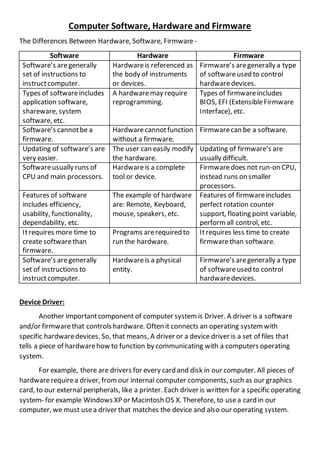
Computer Software, Hardware and Firmware
The Differences Between Hardware, Software, Firmware -
Software Hardware Firmware
Software’s aregenerally
set of instructions to
instructcomputer.
Hardwareis referenced as
the body of instruments
or devices.
Firmware’s aregenerally a type
of softwareused to control
hardwaredevices.
Types of softwareincludes
application software,
shareware, system
software, etc.
A hardwaremay require
reprogramming.
Types of firmwareincludes
BIOS, EFI (ExtensibleFirmware
Interface), etc.
Software’s cannotbe a
firmware.
Hardwarecannotfunction
without a firmware.
Firmwarecan be a software.
Updating of software’s are
very easier.
The user can easily modify
the hardware.
Updating of firmware’s are
usually difficult.
Softwareusually runs of
CPU and main processors.
Hardwareis a complete
tool or device.
Firmwaredoes not run-on CPU,
instead runs on smaller
processors.
Features of software
includes efficiency,
usability, functionality,
dependability, etc.
The example of hardware
are: Remote, Keyboard,
mouse, speakers, etc.
Features of firmwareincludes
perfect rotation counter
support, floating point variable,
perform all control, etc.
Itrequires more time to
create softwarethan
firmware.
Programs arerequired to
run the hardware.
Itrequires less time to create
firmwarethan software.
Software’s aregenerally
set of instructions to
instructcomputer.
Hardwareis a physical
entity.
Firmware’s aregenerally a type
of softwareused to control
hardwaredevices.
Device Driver:
Another importantcomponent of computer system is Driver. A driver is a software
and/or firmwarethat controls hardware. Often it connects an operating system with
specific hardwaredevices. So, that means, A driver or a device driver is a set of files that
tells a piece of hardwarehow to function by communicating with a computers operating
system.
For example, there are drivers for every card and disk in our computer. All pieces of
hardwarerequirea driver, fromour internal computer components, such as our graphics
card, to our external peripherals, like a printer. Each driver is written for a specific operating
system- for example Windows XP or Macintosh OS X. Therefore, to usea card in our
computer, we must usea driver that matches the device and also our operating system.
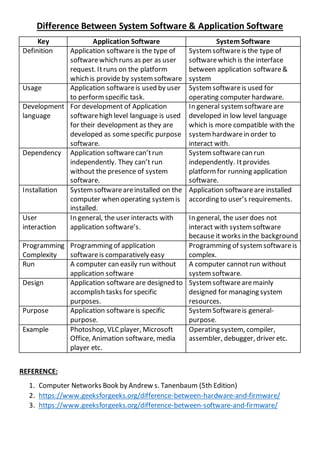
Difference Between System Software & Application Software
Key Application Software System Software
Definition Application softwareis the type of
softwarewhich runs as per as user
request. Itruns on the platform
which is provideby system software
System softwareis the type of
softwarewhich is the interface
between application software&
system
Usage Application softwareis used by user
to performspecific task.
System softwareis used for
operating computer hardware.
Development
language
For development of Application
softwarehigh level language is used
for their development as they are
developed as somespecific purpose
software.
In general system softwareare
developed in low level language
which is more compatible with the
system hardwarein order to
interact with.
Dependency Application softwarecan’trun
independently. They can’t run
without the presence of system
software.
System softwarecan run
independently. Itprovides
platform for running application
software.
Installation Systemsoftwareareinstalled on the
computer when operating system is
installed.
Application softwareare installed
according to user’s requirements.
User
interaction
In general, the user interacts with
application software’s.
In general, the user does not
interact with system software
because it works in the background
Programming
Complexity
Programming of application
softwareis comparatively easy
Programming of system softwareis
complex.
Run A computer can easily run without
application software
A computer cannotrun without
system software.
Design Application softwareare designed to
accomplish tasks for specific
purposes.
System softwarearemainly
designed for managing system
resources.
Purpose Application softwareis specific
purpose.
System Softwareis general-
purpose.
Example Photoshop, VLC player, Microsoft
Office, Animation software, media
player etc.
Operating system, compiler,
assembler, debugger, driver etc.
REFERENCE:
1. Computer Networks Book by Andrew s. Tanenbaum (5th Edition)
2. https://www.geeksforgeeks.org/difference-between-hardware-and-firmware/
3. https://www.geeksforgeeks.org/difference-between-software-and-firmware/

Computer Hardware, Software and Firmware

  • 1.
    City University 13/A, Pantapath,Dhaka – 1215 Assignment Name: Computer Hardware, Software & Firmware Department: Computer Science and Engineering Course Name: Computer Networks Course Code: CSE 317 Submission Date: 19th May 2021 Submitted By: Submitted To: Name: Md Rabiul Islam Shaon ID: 181472541 Section: A Batch: 49th Name: Pranab Bandhu Nath Senior Lecturer of CSE
  • 2.
    Computer Software, Hardwareand Firmware The Differences Between Hardware, Software, Firmware - Software Hardware Firmware Software’s aregenerally set of instructions to instructcomputer. Hardwareis referenced as the body of instruments or devices. Firmware’s aregenerally a type of softwareused to control hardwaredevices. Types of softwareincludes application software, shareware, system software, etc. A hardwaremay require reprogramming. Types of firmwareincludes BIOS, EFI (ExtensibleFirmware Interface), etc. Software’s cannotbe a firmware. Hardwarecannotfunction without a firmware. Firmwarecan be a software. Updating of software’s are very easier. The user can easily modify the hardware. Updating of firmware’s are usually difficult. Softwareusually runs of CPU and main processors. Hardwareis a complete tool or device. Firmwaredoes not run-on CPU, instead runs on smaller processors. Features of software includes efficiency, usability, functionality, dependability, etc. The example of hardware are: Remote, Keyboard, mouse, speakers, etc. Features of firmwareincludes perfect rotation counter support, floating point variable, perform all control, etc. Itrequires more time to create softwarethan firmware. Programs arerequired to run the hardware. Itrequires less time to create firmwarethan software. Software’s aregenerally set of instructions to instructcomputer. Hardwareis a physical entity. Firmware’s aregenerally a type of softwareused to control hardwaredevices. Device Driver: Another importantcomponent of computer system is Driver. A driver is a software and/or firmwarethat controls hardware. Often it connects an operating system with specific hardwaredevices. So, that means, A driver or a device driver is a set of files that tells a piece of hardwarehow to function by communicating with a computers operating system. For example, there are drivers for every card and disk in our computer. All pieces of hardwarerequirea driver, fromour internal computer components, such as our graphics card, to our external peripherals, like a printer. Each driver is written for a specific operating system- for example Windows XP or Macintosh OS X. Therefore, to usea card in our computer, we must usea driver that matches the device and also our operating system.
  • 3.
    Difference Between SystemSoftware & Application Software Key Application Software System Software Definition Application softwareis the type of softwarewhich runs as per as user request. Itruns on the platform which is provideby system software System softwareis the type of softwarewhich is the interface between application software& system Usage Application softwareis used by user to performspecific task. System softwareis used for operating computer hardware. Development language For development of Application softwarehigh level language is used for their development as they are developed as somespecific purpose software. In general system softwareare developed in low level language which is more compatible with the system hardwarein order to interact with. Dependency Application softwarecan’trun independently. They can’t run without the presence of system software. System softwarecan run independently. Itprovides platform for running application software. Installation Systemsoftwareareinstalled on the computer when operating system is installed. Application softwareare installed according to user’s requirements. User interaction In general, the user interacts with application software’s. In general, the user does not interact with system software because it works in the background Programming Complexity Programming of application softwareis comparatively easy Programming of system softwareis complex. Run A computer can easily run without application software A computer cannotrun without system software. Design Application softwareare designed to accomplish tasks for specific purposes. System softwarearemainly designed for managing system resources. Purpose Application softwareis specific purpose. System Softwareis general- purpose. Example Photoshop, VLC player, Microsoft Office, Animation software, media player etc. Operating system, compiler, assembler, debugger, driver etc. REFERENCE: 1. Computer Networks Book by Andrew s. Tanenbaum (5th Edition) 2. https://www.geeksforgeeks.org/difference-between-hardware-and-firmware/ 3. https://www.geeksforgeeks.org/difference-between-software-and-firmware/