 Network design should be a complete process that
 matches business needs to available technology to
 deliver a system that will maximize an organization’s
 success
   In the LAN area it is more than just buying a few
    devices
   In the WAN area it is more than just calling the phone
    company
 Don’t just start connecting the dots
 Analyze business and technical goals first
 Explore divisional and group structures to find out
  who the network serves and where they reside
 Determine what applications will run on the
  network and how those applications behave on a
  network
 Focus on Layer 7 and above first
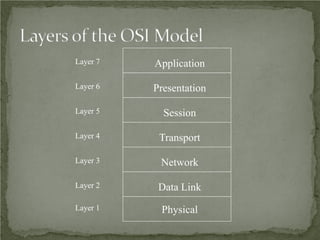
Layer 7   Application

Layer 6   Presentation

Layer 5     Session

Layer 4    Transport

Layer 3    Network

Layer 2    Data Link
Layer 1    Physical
 A focus is placed on understanding data flow, data types,
  and processes that access or change the data.
 A focus is placed on understanding the location and needs
  of user communities that access or change data and
  processes.
 Several techniques and models can be used to characterize
  the existing system, new user requirements, and a structure
  for the future system.
 A logical model is developed before the physical model.
   The logical model represents the basic building blocks, divided by
    function, and the structure of the system.
   The physical model represents devices and specific technologies and
    implementations.
 SDLC: Does it mean Synchronous Data Link Control
  or Systems Development Life Cycle?
 The latter for the purposes of this class!
 Typical systems are developed and continue to exist
  over a period of time, often called a systems
  development life cycle (SDLC)
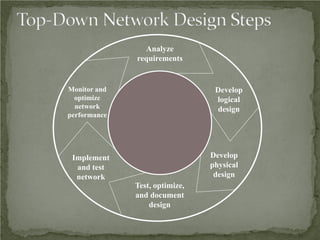
Analyze
              requirements


Monitor and                      Develop
  optimize                       logical
  network                        design
performance


 Implement                      Develop
  and test                      physical
  network                        design
              Test, optimize,
              and document
                  design
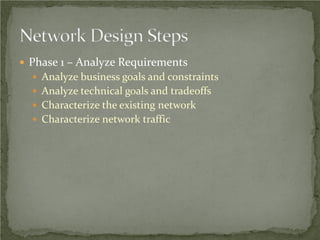
 Phase 1 – Analyze Requirements
   Analyze business goals and constraints
   Analyze technical goals and tradeoffs
   Characterize the existing network
   Characterize network traffic
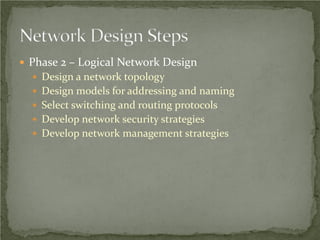
 Phase 2 – Logical Network Design
   Design a network topology
   Design models for addressing and naming
   Select switching and routing protocols
   Develop network security strategies
   Develop network management strategies
 Phase 3 – Physical Network Design
   Select technologies and devices for campus networks
   Select technologies and devices for enterprise networks
 Phase 4 – Testing, Optimizing, and Documenting the
 Network Design
   Test the network design
   Optimize the network design
   Document the network design
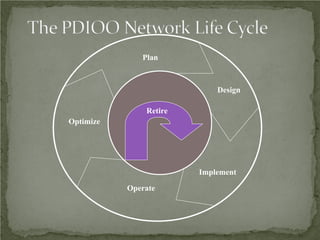
Plan


                            Design

               Retire
Optimize


                        Implement

           Operate
 Increase revenue
 Reduce operating costs
 Improve communications
 Shorten product development cycle
 Expand into worldwide markets
 Build partnerships with other companies
 Offer better customer support or new customer
 services
 Mobility
 Security
 Resiliency (fault tolerance)
 Business continuity after a disaster
 Network projects must be prioritized based on
  fiscal goals
 Networks must offer the low delay required for real-
  time applications such as VoIP
 Budget
 Staffing
 Schedule
 Politics and policies
 Before meeting with the client, whether internal or
  external, collect some basic business-related
  information
 Such as
   Products produced/Services supplied
   Financial viability
   Customers, suppliers, competitors
   Competitive advantage
 Try to get
   A concise statement of the goals of the
    project
      What problem are they trying to solve?
      How will new technology help them be more
       successful in their business?
      What must happen for the project to
       succeed?
 What will happen if the project is a failure?
   Is this a critical business function?
   Is this project visible to upper management?
   Who’s on your side?
 Discover any biases
   For example
      Will they only use certain company’s
       products?
      Do they avoid certain technologies?
      Do the data people look down on the voice
       people or vice versa?
   Talk to the technical and management
    staff
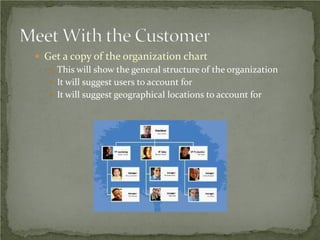
 Get a copy of the organization chart
    This will show the general structure of the organization
    It will suggest users to account for
    It will suggest geographical locations to account for
 Get a copy of the security policy
    How does the policy affect the new design?
    How does the new design affect the policy?
    Is the policy so strict that you (the network designer)
     won’t be able to do your job?
 Start cataloging network assets that security should
  protect
    Hardware, software, applications, and data
    Less obvious, but still important, intellectual property,
     trade secrets, and a company's reputation
 Small in scope?
   Allow sales people to access network via a VPN
 Large in scope?
   An entire redesign of an enterprise network
 Use the OSI model to clarify the scope
   New financial reporting application versus new routing
    protocol versus new data link (wireless, for example)
 Does the scope fit the budget, capabilities of staff and
  consultants, schedule?
 Applications
   Now and after the project is completed
   Include both productivity applications and system
    management applications
 User communities
 Data stores
 Protocols
 Current logical and physical architecture
 Current performance
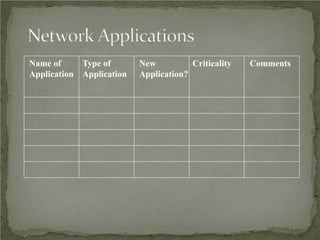
Name of     Type of       New          Criticality   Comments
Application Application   Application?
 Systematic approach
 Focus first on business requirements and constraints,
  and applications
 Gain an understanding of the customer’s corporate
  structure
 Gain an understanding of the customer’s business
  style
 What are the main phases of network design per
  the top-down network design approach?
 What are the main phases of network design per
  the PDIOO approach?
 Why is it important to understand your
  customer’s business style?
 What are some typical business goals for
  organizations today?
Top-Down Network Design

            Chapter Two

   Analyzing Technical Goals and Tradeoffs
Technical Goals
•   Scalability
•   Availability
•   Performance
•   Security
•   Manageability
•   Usability
•   Adaptability
•   Affordability
Scalability
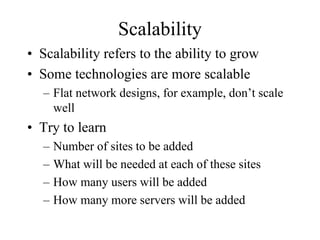
• Scalability refers to the ability to grow
• Some technologies are more scalable
  – Flat network designs, for example, don’t scale
    well
• Try to learn
  –   Number of sites to be added
  –   What will be needed at each of these sites
  –   How many users will be added
  –   How many more servers will be added
Availability
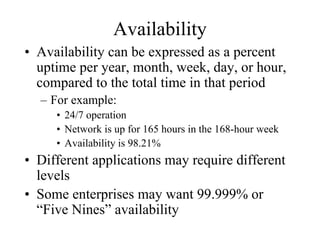
• Availability can be expressed as a percent
  uptime per year, month, week, day, or hour,
  compared to the total time in that period
  – For example:
     • 24/7 operation
     • Network is up for 165 hours in the 168-hour week
     • Availability is 98.21%
• Different applications may require different
  levels
• Some enterprises may want 99.999% or
  “Five Nines” availability
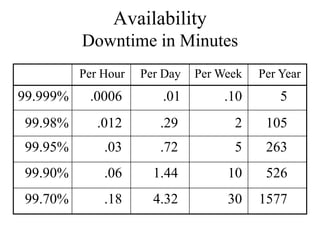
Availability
          Downtime in Minutes
          Per Hour   Per Day   Per Week   Per Year
99.999%    .0006        .01         .10       5
99.98%       .012       .29          2     105
99.95%        .03       .72          5     263
99.90%        .06      1.44         10     526
99.70%        .18      4.32         30    1577
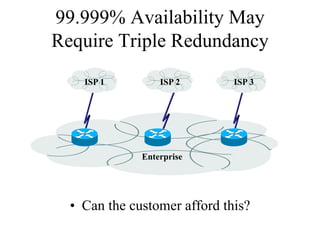
99.999% Availability May
Require Triple Redundancy
    ISP 1         ISP 2       ISP 3


              Enterprise


  • Can the customer afford this?
Availability
• Availability can also be expressed as a
  mean time between failure (MTBF) and
  mean time to repair (MTTR)
• Availability = MTBF/(MTBF + MTTR)
  – For example:
     • The network should not fail more than once every
       4,000 hours (166 days) and it should be fixed within
       one hour
     • 4,000/4,001 = 99.98% availability
Network Performance
• Common performance factors include
  –   Bandwidth
  –   Throughput
  –   Bandwidth utilization
  –   Offered load
  –   Accuracy
  –   Efficiency
  –   Delay (latency) and delay variation
  –   Response time
Bandwidth Vs. Throughput
• Bandwidth and throughput are not the same
  thing
• Bandwidth is the data carrying capacity of a
  circuit
     • Usually specified in bits per second
• Throughput is the quantity of error free data
  transmitted per unit of time
     • Measured in bps, Bps, or packets per second (pps)
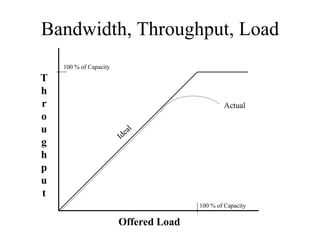
Bandwidth, Throughput, Load
    100 % of Capacity
T
h
r                                              Actual
o
u
g
h
p
u
t
                                       100 % of Capacity

                        Offered Load
Other Factors that Affect
               Throughput
•   The size of packets
•   Inter-frame gaps between packets
•   Packets-per-second ratings of devices that forward packets
•   Client speed (CPU, memory, and HD access speeds)
•   Server speed (CPU, memory, and HD access speeds)
•   Network design
•   Protocols
•   Distance
•   Errors
•   Time of day, etc., etc., etc.
Throughput Vs. Goodput
• You need to decide what you mean by
  throughput
• Are you referring to bytes per second,
  regardless of whether the bytes are user data
  bytes or packet header bytes
  – Or are you concerned with application-layer
    throughput of user bytes, sometimes called
    “goodput”
     • In that case, you have to consider that bandwidth is
       being “wasted” by the headers in every packet
Performance (continued)
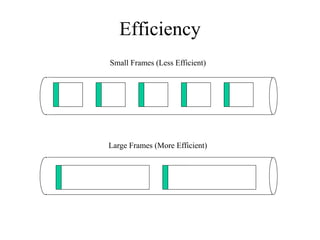
• Efficiency
  – How much overhead is required to deliver an
    amount of data?
  – How large can packets be?
     • Larger better for efficiency (and goodput)
     • But too large means too much data is lost if a packet
       is damaged
     • How many packets can be sent in one bunch without
       an acknowledgment?
Efficiency
Small Frames (Less Efficient)


Large Frames (More Efficient)
Delay from the User’s Point of
            View
               • Response Time
                 – A function of the
                   application and the
                   equipment the
                   application is
                   running on, not just
                   the network
                 – Most users expect
                   to see something on
                   the screen in 100 to
                   200 milliseconds
Delay from the Engineer’s Point
           of View
• Propagation delay
  – A signal travels in a cable at about 2/3 the
    speed of light in a vacuum
• Transmission delay (also known as
  serialization delay)
  – Time to put digital data onto a transmission line
     • For example, it takes about 5 ms to output a 1,024
       byte packet on a 1.544 Mbps T1 line
• Packet-switching delay
• Queuing delay
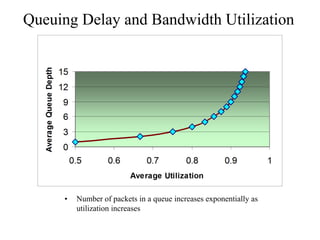
Queuing Delay and Bandwidth Utilization


     •   Number of packets in a queue increases exponentially as
         utilization increases
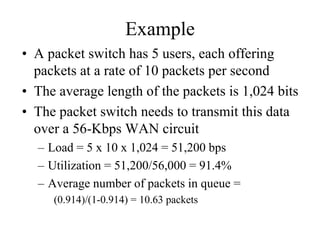
Example
• A packet switch has 5 users, each offering
  packets at a rate of 10 packets per second
• The average length of the packets is 1,024 bits
• The packet switch needs to transmit this data
  over a 56-Kbps WAN circuit
  – Load = 5 x 10 x 1,024 = 51,200 bps
  – Utilization = 51,200/56,000 = 91.4%
  – Average number of packets in queue =
     (0.914)/(1-0.914) = 10.63 packets
Delay Variation
• The amount of time average delay varies
  – Also known as jitter
• Voice, video, and audio are
  intolerant of delay variation
• So forget everything we said
  about maximizing packet sizes
  – There are always tradeoffs
  – Efficiency for high-volume applications
    versus low and non-varying delay for
    multimedia
Security

• Focus on requirements first
• Detailed security planning later (Chapter 8)
• Identify network assets
  – Including their value and the expected cost
    associated with losing them due to a security
    problem
• Analyze security risks
Network Assets
•   Hardware
•   Software
•   Applications
•   Data
•   Intellectual property
•   Trade secrets
•   Company’s reputation
Security Risks
• Hacked network devices
  – Data can be intercepted, analyzed, altered, or
    deleted
  – User passwords can be compromised
  – Device configurations can be changed
• Reconnaissance attacks
• Denial-of-service attacks
Manageability

•   Performance management
•   Fault management
•   Configuration management
•   Security management
•   Accounting management
Usability

• Usability: the ease of use with which
  network users can access the network and
  services
• Networks should make users’ jobs easier
• Some design decisions will have a negative
  affect on usability:
  – Strict security, for example
Adaptability
• Avoid incorporating any design elements
  that would make it hard to implement new
  technologies in the future
• Change can come in the form of new
  protocols, new business practices, new
  fiscal goals, new legislation
• A flexible design can adapt to changing
  traffic patterns and Quality of Service (QoS)
  requirements
Affordability
• A network should carry the maximum
  amount of traffic possible for a given
  financial cost
• Affordability is especially important in
  campus network designs
• WANs are expected to cost more, but costs
  can be reduced with the proper use of
  technology
  – Quiet routing protocols, for example
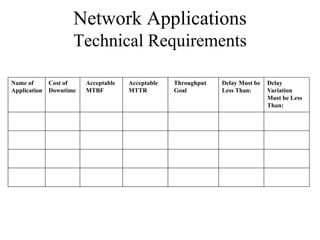
Network Applications
                   Technical Requirements

Name of     Cost of    Acceptable   Acceptable   Throughput   Delay Must be   Delay
Application Downtime   MTBF         MTTR         Goal         Less Than:      Variation
                                                                              Must be Less
                                                                              Than:
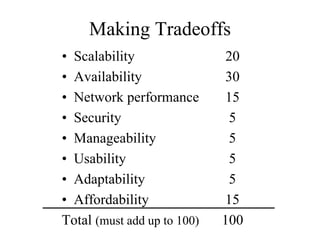
Making Tradeoffs
• Scalability                20
• Availability               30
• Network performance        15
• Security                    5
• Manageability               5
• Usability                   5
• Adaptability                5
• Affordability              15
Total (must add up to 100)   100
Summary

• Continue to use a systematic, top-down
  approach
• Don’t select products until you understand
  goals for scalability, availability, performance,
  security, manageability, usability, adaptability,
  and affordability
• Tradeoffs are almost always necessary
Review Questions

• What are some typical technical goals for
  organizations today?
• How do bandwidth and throughput differ?
• How can one improve network efficiency?
• What tradeoffs may be necessary in order to improve
  network efficiency?
Top-Down Network Design

           Chapter Three

   Characterizing the Existing Internetwork
What’s the Starting Point?
• According to Abraham Lincoln:
  – “If we could first know where we are and
    whither we are tending, we could better judge
    what to do and how to do it.”
Where Are We?
• Characterize the exiting internetwork in
  terms of:
  – Its infrastructure
       • Logical structure (modularity, hierarchy, topology)
       • Physical structure
  –   Addressing and naming
  –   Wiring and media
  –   Architectural and environmental constraints
  –   Health
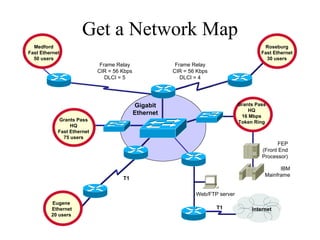
Get a Network Map
  Medford                                                                                 Roseburg
Fast Ethernet                                                                            Fast Ethernet
  50 users                                                                                 30 users
                             Frame Relay                Frame Relay
                            CIR = 56 Kbps              CIR = 56 Kbps
                               DLCI = 5                   DLCI = 4


                                            Gigabit                             Grants Pass
                                                                                    HQ
                                            Ethernet                             16 Mbps
            Grants Pass                                                         Token Ring
                 HQ
            Fast Ethernet
              75 users
                                                                                               FEP
                                                                                         (Front End
                                                                                         Processor)

                                                                                                IBM
                                                                                          Mainframe
                                     T1

                                                               Web/FTP server
         Eugene
         Ethernet                                                      T1            Internet
         20 users
Characterize Addressing and
             Naming
• IP addressing for major devices, client
  networks, server networks, and so on
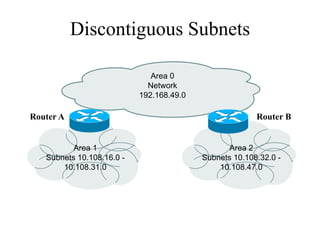
• Any addressing oddities, such as
  discontiguous subnets?
• Any strategies for addressing and naming?
  – For example, sites may be named using airport
    codes
     • San Francisco = SFO, Oakland = OAK
Discontiguous Subnets

                              Area 0
                             Network
                           192.168.49.0

Router A                                                Router B


          Area 1                                 Area 2
   Subnets 10.108.16.0 -                  Subnets 10.108.32.0 -
       10.108.31.0                            10.108.47.0
Characterize the Wiring and Media
•   Single-mode fiber
•   Multi-mode fiber
•   Shielded twisted pair (STP) copper
•   Unshielded-twisted-pair (UTP) copper
•   Coaxial cable
•   Microwave
•   Laser
•   Radio
•   Infra-red
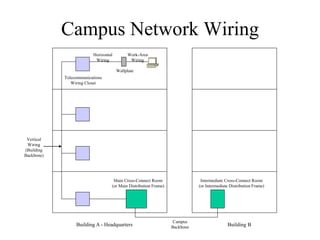
Campus Network Wiring
                         Horizontal        Work-Area
                          Wiring            Wiring

                                      Wallplate
            Telecommunications
               Wiring Closet


 Vertical
 Wiring
(Building
Backbone)


                                   Main Cross-Connect Room                   Intermediate Cross-Connect Room
                                  (or Main Distribution Frame)              (or Intermediate Distribution Frame)


                                                                  Campus
                 Building A - Headquarters                       Backbone                  Building B
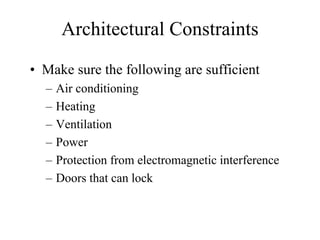
Architectural Constraints
• Make sure the following are sufficient
  –   Air conditioning
  –   Heating
  –   Ventilation
  –   Power
  –   Protection from electromagnetic interference
  –   Doors that can lock
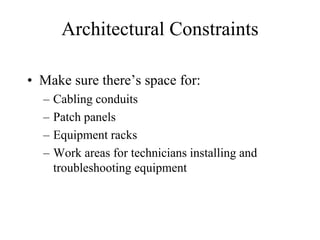
Architectural Constraints

• Make sure there’s space for:
  –   Cabling conduits
  –   Patch panels
  –   Equipment racks
  –   Work areas for technicians installing and
      troubleshooting equipment
Issues for Wireless Installations

•   Reflection
•   Absorption
•   Refraction
•   Diffraction
Check the Health of the Existing
         Internetwork
•   Performance
•   Availability
•   Bandwidth utilization
•   Accuracy
•   Efficiency
•   Response time
•   Status of major routers, switches, and
    firewalls
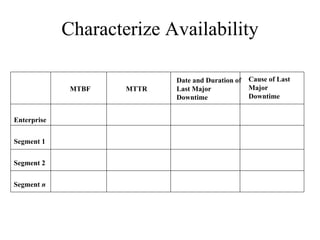
Characterize Availability

                            Date and Duration of   Cause of Last
              MTBF   MTTR   Last Major             Major
                            Downtime               Downtime


Enterprise


Segment 1


Segment 2


Segment n
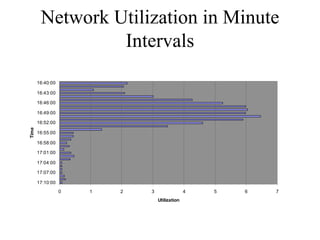
Network Utilization in Minute
                 Intervals
                              Network Utilization

       16:40:00

       16:43:00

       16:46:00

       16:49:00

       16:52:00
Time


       16:55:00                                                     Series1

       16:58:00

       17:01:00

       17:04:00

       17:07:00

       17:10:00
                  0   1   2       3                 4   5   6   7
                                      Utilization
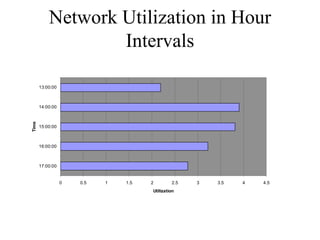
Network Utilization in Hour
                   Intervals
                                      Network Utilization


       13:00:00


       14:00:00
Time


       15:00:00                                                                 Series1


       16:00:00


       17:00:00


                  0   0.5   1   1.5        2        2.5     3   3.5   4   4.5
                                           Utilization
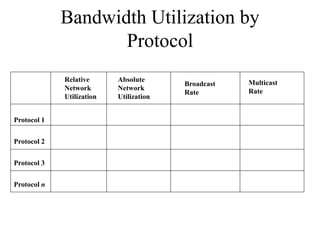
Bandwidth Utilization by
                    Protocol
             Relative      Absolute                  Multicast
                                         Broadcast
             Network       Network                   Rate
                                         Rate
             Utilization   Utilization


Protocol 1


Protocol 2


Protocol 3


Protocol n
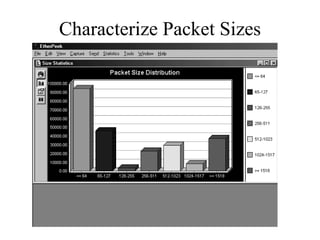
Characterize Packet Sizes
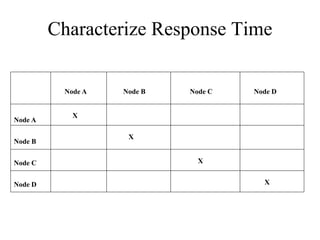
Characterize Response Time


          Node A   Node B   Node C   Node D


            X
Node A

                    X
Node B


Node C                        X


Node D                                 X
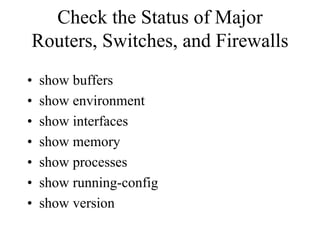
Check the Status of Major
Routers, Switches, and Firewalls
•   show buffers
•   show environment
•   show interfaces
•   show memory
•   show processes
•   show running-config
•   show version
Tools
•   Protocol analyzers
•   Multi Router Traffic Grapher (MRTG)
•   Remote monitoring (RMON) probes
•   Cisco Discovery Protocol (CDP)
•   Cisco IOS NetFlow technology
•   CiscoWorks
•   Cisco IOS Service Assurance Agent (SAA)
•   Cisco Internetwork Performance Monitor (IPM)
Summary
• Characterize the exiting internetwork before
  designing enhancements
• Helps you verify that a customer’s design
  goals are realistic
• Helps you locate where new equipment will
  go
• Helps you cover yourself if the new network
  has problems due to unresolved problems in
  the old network
Review Questions
• What factors will help you decide if the existing
  internetwork is in good enough shape to support new
  enhancements?
• When considering protocol behavior, what is the
  difference between relative network utilization and
  absolute network utilization?
• Why should you characterize the logical structure of
  an internetwork and not just the physical structure?
• What architectural and environmental factors should
  you consider for a new wireless installation?
Top-Down Network Design

         Chapter Four

     Characterizing Network Traffic
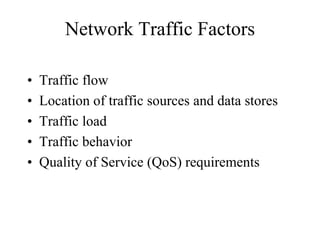
Network Traffic Factors

•   Traffic flow
•   Location of traffic sources and data stores
•   Traffic load
•   Traffic behavior
•   Quality of Service (QoS) requirements
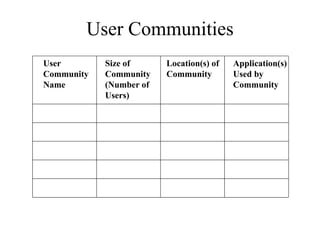
User Communities
User        Size of      Location(s) of   Application(s)
Community   Community    Community        Used by
Name        (Number of                    Community
            Users)
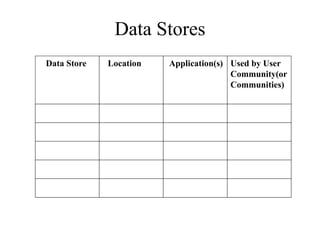
Data Stores
Data Store   Location   Application(s) Used by User
                                       Community(or
                                       Communities)
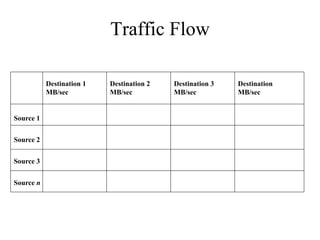
Traffic Flow

           Destination 1   Destination 2   Destination 3   Destination
           MB/sec          MB/sec          MB/sec          MB/sec


Source 1


Source 2


Source 3


Source n
Traffic Flow
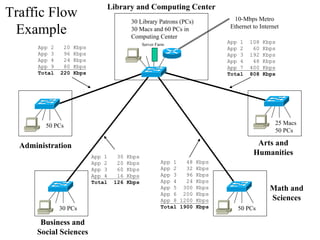
                               Library and Computing Center
                                          30 Library Patrons (PCs)          10-Mbps Metro

 Example                                  30 Macs and 60 PCs in
                                          Computing Center
                                                                           Ethernet to Internet

                                                Server Farm
                                                                           App 1   108   Kbps
      App 2    20   Kbps                                                   App 2    60   Kbps
      App 3    96   Kbps                                                   App 3   192   Kbps
      App 4    24   Kbps                                                   App 4    48   Kbps
      App 9    80   Kbps                                                   App 7   400   Kbps
      Total   220   Kbps                                                   Total   808   Kbps


         50 PCs                                                                              25 Macs
                                                                                             50 PCs

  Administration                                                                     Arts and
                           App 1    30   Kbps
                                                                                    Humanities
                           App 2    20   Kbps            App 1   48 Kbps
                           App 3    60   Kbps            App 2   32 Kbps
                           App 4    16   Kbps            App 3   96 Kbps
                           Total   126   Kbps            App 4   24 Kbps
                                                         App 5 300 Kbps                    Math and
                                                         App 6 200 Kbps
                                                         App 8 1200 Kbps                   Sciences
              30 PCs                                     Total 1900 Kbps      50 PCs

       Business and
      Social Sciences
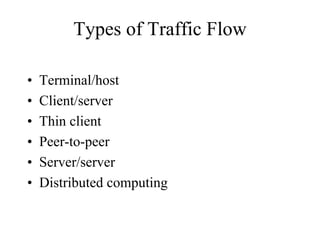
Types of Traffic Flow

•   Terminal/host
•   Client/server
•   Thin client
•   Peer-to-peer
•   Server/server
•   Distributed computing
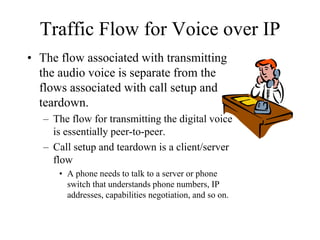
Traffic Flow for Voice over IP
• The flow associated with transmitting
  the audio voice is separate from the
  flows associated with call setup and
  teardown.
   – The flow for transmitting the digital voice
     is essentially peer-to-peer.
   – Call setup and teardown is a client/server
     flow
      • A phone needs to talk to a server or phone
        switch that understands phone numbers, IP
        addresses, capabilities negotiation, and so on.
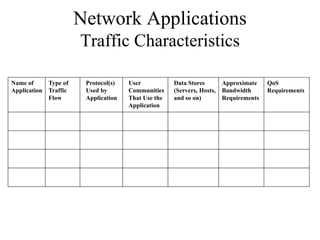
Network Applications
                      Traffic Characteristics

Name of     Type of    Protocol(s)   User           Data Stores        Approximate    QoS
Application Traffic    Used by       Communities    (Servers, Hosts,   Bandwidth      Requirements
            Flow       Application   That Use the   and so on)         Requirements
                                     Application
Traffic Load
• To calculate whether capacity is sufficient,
  you should know:
  – The number of stations
  – The average time that a station is idle between
    sending frames
  – The time required to transmit a message once
    medium access is gained
• That level of detailed information can be
  hard to gather, however
Size of Objects on Networks

•   Terminal screen: 4 Kbytes
•   Simple e-mail: 10 Kbytes
•   Simple web page: 50 Kbytes
•   High-quality image: 50,000 Kbytes
•   Database backup: 1,000,000 Kbytes or more
Traffic Behavior
• Broadcasts
   – All ones data-link layer destination address
       • FF: FF: FF: FF: FF: FF
   – Doesn’t necessarily use huge amounts of bandwidth
   – But does disturb every CPU in the broadcast domain
• Multicasts
   – First bit sent is a one
       • 01:00:0C:CC:CC:CC (Cisco Discovery Protocol)
   – Should just disturb NICs that have registered to receive
     it
   – Requires multicast routing protocol on internetworks
Network Efficiency

•   Frame size
•   Protocol interaction
•   Windowing and flow control
•   Error-recovery mechanisms
QoS Requirements

• ATM service specifications
  –   Constant bit rate (CBR)
  –   Realtime variable bit rate (rt-VBR)
  –   Non-realtime variable bit rate (nrt-VBR)
  –   Unspecified bit rate (UBR)
  –   Available bit rate (ABR)
  –   Guaranteed frame rate (GFR)
QoS Requirements per IETF

• IETF integrated services working group
  specifications
  – Controlled load service
     • Provides client data flow with a QoS closely
       approximating the QoS that same flow would
       receive on an unloaded network
  – Guaranteed service
     • Provides firm (mathematically provable) bounds on
       end-to-end packet-queuing delays
QoS Requirements per IETF

• IETF differentiated services working group
  specifications
  – RFC 2475
  – IP packets can be marked with a differentiated
    services codepoint (DSCP) to influence
    queuing and packet-dropping decisions for IP
    datagrams on an output interface of a router
Summary

• Continue to use a systematic, top-down
  approach
• Don’t select products until you understand
  network traffic in terms of:
  –   Flow
  –   Load
  –   Behavior
  –   QoS requirements
Review Questions

• List and describe six different types of traffic flows.
• What makes traffic flow in voice over IP networks
  challenging to characterize and plan for?
• Why should you be concerned about broadcast
  traffic?
• How do ATM and IETF specifications for QoS
  differ?
Top-Down Network Design

         Chapter Five

     Designing a Network Topology
Topology
• A branch of mathematics concerned with those
  properties of geometric configurations that are
  unaltered by elastic deformations such as
  stretching or twisting
• A term used in the computer networking field to
  describe the structure of a network
Network Topology Design
              Themes
•   Hierarchy
•   Redundancy
•   Modularity
•   Well-defined entries and exits
•   Protected perimeters
Why Use a Hierarchical Model?
• Reduces workload on network devices
     – Avoids devices having to communicate with
       too many other devices (reduces “CPU
       adjacencies”)
•   Constrains broadcast domains
•   Enhances simplicity and understanding
•   Facilitates changes
•   Facilitates scaling to a larger size
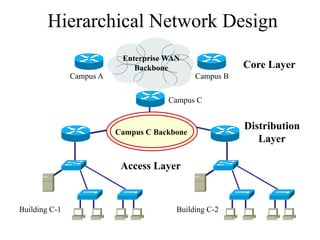
Hierarchical Network Design
                           Enterprise WAN
                              Backbone                   Core Layer
               Campus A                       Campus B


                                      Campus C


                                                         Distribution
                          Campus C Backbone
                                                            Layer

                           Access Layer


Building C-1                            Building C-2
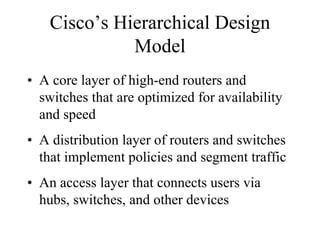
Cisco’s Hierarchical Design
              Model
• A core layer of high-end routers and
  switches that are optimized for availability
  and speed
• A distribution layer of routers and switches
  that implement policies and segment traffic
• An access layer that connects users via
  hubs, switches, and other devices
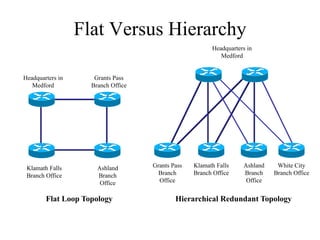
Flat Versus Hierarchy
                                                        Headquarters in
                                                           Medford


Headquarters in      Grants Pass
   Medford          Branch Office


 Klamath Falls        Ashland       Grants Pass   Klamath Falls    Ashland    White City
 Branch Office        Branch          Branch      Branch Office    Branch    Branch Office
                       Office         Office                        Office


        Flat Loop Topology                  Hierarchical Redundant Topology
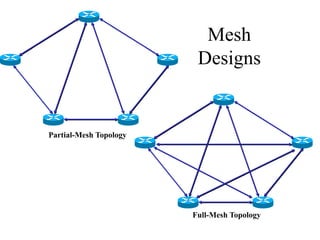
Mesh
                         Designs


Partial-Mesh Topology


                        Full-Mesh Topology
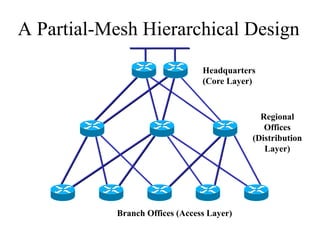
A Partial-Mesh Hierarchical Design
                                Headquarters
                                (Core Layer)


                                             Regional
                                              Offices
                                           (Distribution
                                              Layer)


           Branch Offices (Access Layer)
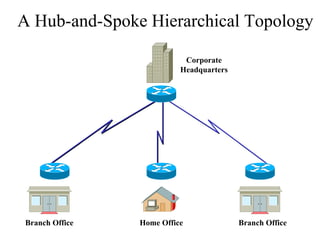
A Hub-and-Spoke Hierarchical Topology

                           Corporate
                          Headquarters


Branch Office   Home Office              Branch Office
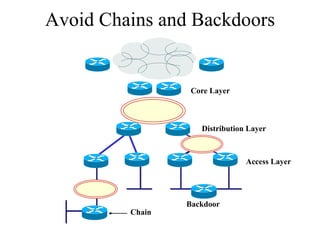
Avoid Chains and Backdoors


                  Core Layer


                    Distribution Layer


                                Access Layer


                 Backdoor
         Chain
How Do You Know When You
    Have a Good Design?
• When you already know how to add a new
  building, floor, WAN link, remote site, e-
  commerce service, and so on
• When new additions cause only local change, to
  the directly-connected devices
• When your network can double or triple in size
  without major design changes
• When troubleshooting is easy because there are no
  complex protocol interactions to wrap your brain
  around
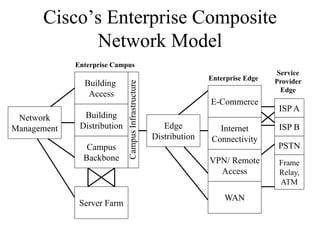
Cisco’s Enterprise Composite
            Network Model
             Enterprise Campus
                                                                                       Service
                                                                    Enterprise Edge
               Building                                                               Provider


                             Campus Infrastructure
                                                                                        Edge
                Access
                                                                    E-Commerce
                                                                                       ISP A
 Network       Building
Management    Distribution                              Edge          Internet         ISP B
                                                     Distribution   Connectivity
                Campus                                                                 PSTN
               Backbone                                             VPN/ Remote        Frame
                                                                      Access           Relay,
                                                                                       ATM

                                                                        WAN
              Server Farm
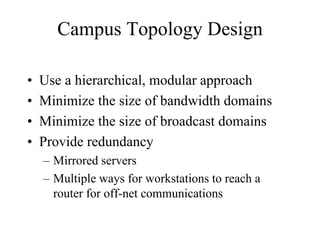
Campus Topology Design

•   Use a hierarchical, modular approach
•   Minimize the size of bandwidth domains
•   Minimize the size of broadcast domains
•   Provide redundancy
    – Mirrored servers
    – Multiple ways for workstations to reach a
      router for off-net communications
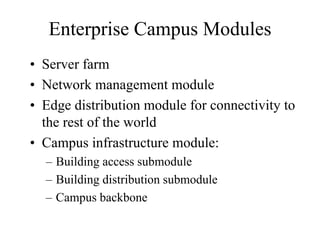
Enterprise Campus Modules
• Server farm
• Network management module
• Edge distribution module for connectivity to
  the rest of the world
• Campus infrastructure module:
  – Building access submodule
  – Building distribution submodule
  – Campus backbone
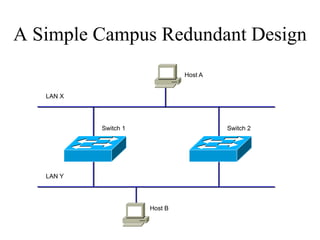
A Simple Campus Redundant Design
                               Host A


   LAN X


           Switch 1                     Switch 2


   LAN Y


                      Host B
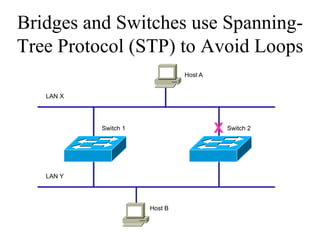
Bridges and Switches use Spanning-
Tree Protocol (STP) to Avoid Loops
                               Host A


   LAN X


           Switch 1                     X Switch 2


   LAN Y


                      Host B
Bridges (Switches) Running STP
• Participate with other bridges in the election of a single
  bridge as the Root Bridge.
• Calculate the distance of the shortest path to the Root
  Bridge and choose a port (known as the Root Port) that
  provides the shortest path to the Root Bridge.
• For each LAN segment, elect a Designated Bridge and a
  Designated Port on that bridge. The Designated Port is a
  port on the LAN segment that is closest to the Root Bridge.
  (All ports on the Root Bridge are Designated Ports.)
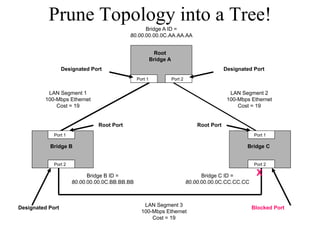
• Select bridge ports to be included in the spanning tree. The
  ports selected are the Root Ports and Designated Ports.
  These ports forward traffic. Other ports block traffic.
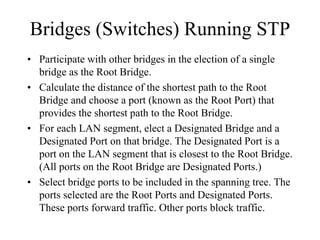
Elect a Root                                                  Lowest Bridge ID
                                       Bridge A ID =                                      Wins!
                                 80.00.00.00.0C.AA.AA.AA


                                                 Root
                                               Bridge A


                                      Port 1              Port 2


 LAN Segment 1                                                                    LAN Segment 2
100-Mbps Ethernet                                                                100-Mbps Ethernet
    Cost = 19                                                                        Cost = 19


   Port 1                                                                                    Port 1

 Bridge B                                                                                Bridge C


   Port 2                                                                                    Port 2

                  Bridge B ID =                                          Bridge C ID =
            80.00.00.00.0C.BB.BB.BB                                80.00.00.00.0C.CC.CC.CC


                                         LAN Segment 3
                                        100-Mbps Ethernet
                                            Cost = 19
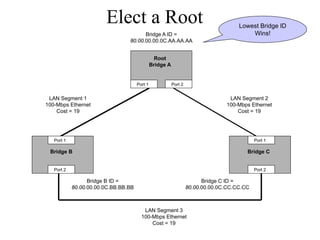
Determine Root Ports
                                       Bridge A ID =
                                 80.00.00.00.0C.AA.AA.AA


                                                 Root
                                               Bridge A
                                                                                       Lowest Cost
                                                                                          Wins!
                                      Port 1              Port 2


 LAN Segment 1                                                                      LAN Segment 2
100-Mbps Ethernet                                                                  100-Mbps Ethernet
    Cost = 19                                                                          Cost = 19


                     Root Port                                         Root Port
   Port 1                                                                                    Port 1

 Bridge B                                                                                 Bridge C


   Port 2                                                                                    Port 2

                  Bridge B ID =                                          Bridge C ID =
            80.00.00.00.0C.BB.BB.BB                                80.00.00.00.0C.CC.CC.CC


                                         LAN Segment 3
                                        100-Mbps Ethernet
                                            Cost = 19
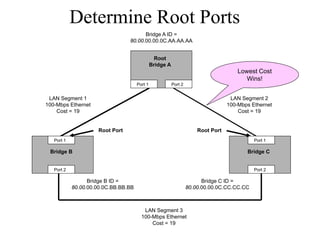
Determine Designated Ports
                                                       Bridge A ID =
                                                 80.00.00.00.0C.AA.AA.AA


                                                                Root
                                                              Bridge A
                     Designated Port                                                              Designated Port
                                                     Port 1              Port 2


            LAN Segment 1                                                                           LAN Segment 2
           100-Mbps Ethernet                                                                       100-Mbps Ethernet
               Cost = 19                                                                               Cost = 19


                                     Root Port                                        Root Port
                  Port 1                                                                                     Port 1

             Bridge B                                                                                     Bridge C


                  Port 2                                                                                     Port 2

                                 Bridge B ID =                                          Bridge C ID =
                           80.00.00.00.0C.BB.BB.BB                                80.00.00.00.0C.CC.CC.CC


                                                        LAN Segment 3
Designated Port
                                                       100-Mbps Ethernet
                           Lowest Bridge ID                Cost = 19
                               Wins!
Prune Topology into a Tree!
                                                 Bridge A ID =
                                           80.00.00.00.0C.AA.AA.AA


                                                           Root
                                                         Bridge A
                  Designated Port                                                            Designated Port
                                                Port 1              Port 2


          LAN Segment 1                                                                        LAN Segment 2
         100-Mbps Ethernet                                                                    100-Mbps Ethernet
             Cost = 19                                                                            Cost = 19


                               Root Port                                         Root Port
             Port 1                                                                                     Port 1

           Bridge B                                                                                  Bridge C


             Port 2                                                                                     Port 2

                            Bridge B ID =                                          Bridge C ID =         X
                      80.00.00.00.0C.BB.BB.BB                                80.00.00.00.0C.CC.CC.CC


                                                   LAN Segment 3
Designated Port                                                                                        Blocked Port
                                                  100-Mbps Ethernet
                                                      Cost = 19
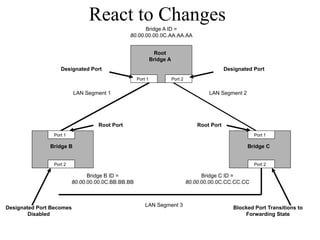
React to Changes
                                                    Bridge A ID =
                                              80.00.00.00.0C.AA.AA.AA


                                                              Root
                                                            Bridge A
                   Designated Port                                                              Designated Port
                                                   Port 1              Port 2


                          LAN Segment 1                                                 LAN Segment 2


                                  Root Port                                         Root Port
                Port 1                                                                                     Port 1

               Bridge B                                                                                 Bridge C


                Port 2                                                                                     Port 2

                               Bridge B ID =                                          Bridge C ID =
                         80.00.00.00.0C.BB.BB.BB                                80.00.00.00.0C.CC.CC.CC


                                                       LAN Segment 3
Designated Port Becomes                                                                            Blocked Port Transitions to
        Disabled                                                                                       Forwarding State
Scaling the Spanning Tree
             Protocol
• Keep the switched network small
  – It shouldn’t span more than seven switches
• Use BPDU skew detection on Cisco
  switches
• Use IEEE 802.1w
  – Provides rapid reconfiguration of the spanning
    tree
  – Also known as RSTP
Virtual LANs (VLANs)

• An emulation of a standard LAN that allows
  data transfer to take place without the
  traditional physical restraints placed on a
  network
• A set of devices that belong to an
  administrative group
• Designers use VLANs to constrain
  broadcast traffic
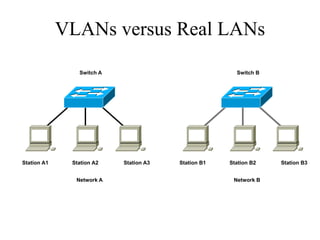
VLANs versus Real LANs

                Switch A                               Switch B


Station A1    Station A2   Station A3   Station B1   Station B2   Station B3


               Network A                              Network B
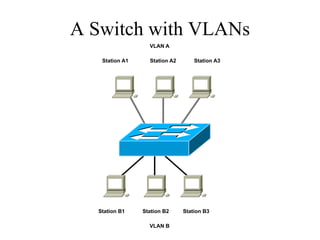
A Switch with VLANs
                  VLAN A

   Station A1     Station A2       Station A3


  Station B1    Station B2     Station B3

                  VLAN B
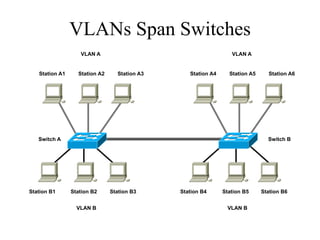
VLANs Span Switches
                   VLAN A                                        VLAN A


   Station A1     Station A2     Station A3      Station A4     Station A5     Station A6


   Switch A                                                                    Switch B


Station B1      Station B2     Station B3     Station B4      Station B5     Station B6


                  VLAN B                                       VLAN B
WLANs and VLANs
• A wireless LAN (WLAN) is often
  implemented as a VLAN
• Facilitates roaming
• Users remain in the same VLAN and IP
  subnet as they roam, so there’s no need to
  change addressing information
• Also makes it easier to set up filters (access
  control lists) to protect the wired network
  from wireless users
Workstation-to-Router
         Communication
• Proxy ARP (not a good idea)
• Listen for route advertisements (not a great
  idea either)
• ICMP router solicitations (not widely used)
• Default gateway provided by DHCP (better
  idea but no redundancy)
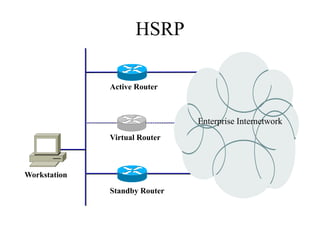
  – Use Hot Standby Router Protocol (HSRP) for
    redundancy
HSRP

              Active Router


                               Enterprise Internetwork
              Virtual Router


Workstation

              Standby Router
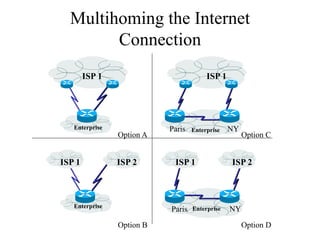
Multihoming the Internet
        Connection
        ISP 1                           ISP 1


   Enterprise              Paris   Enterprise   NY
                Option A                             Option C


ISP 1           ISP 2       ISP 1               ISP 2


   Enterprise
                           Paris   Enterprise   NY

                Option B                             Option D
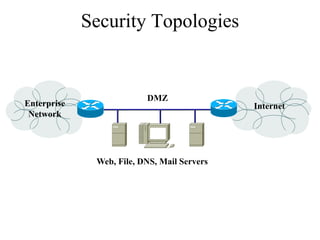
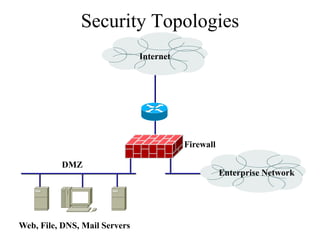
Security Topologies


                          DMZ
Enterprise                                   Internet
 Network


              Web, File, DNS, Mail Servers
Security Topologies
                               Internet


                                          Firewall

          DMZ
                                                     Enterprise Network


Web, File, DNS, Mail Servers
Summary

• Use a systematic, top-down approach
• Plan the logical design before the physical
  design
• Topology design should feature hierarchy,
  redundancy, modularity, and security
Review Questions

• Why are hierarchy and modularity important for
  network designs?
• What are the three layers of Cisco’s hierarchical
  network design?
• What are the major components of Cisco’s enterprise
  composite network model?
• What are the advantages and disadvantages of the
  various options for multihoming an Internet
  connection?
Top-Down Network Design

              Chapter Six

  Designing Models for Addressing and Naming
Guidelines for Addressing and
             Naming
• Use a structured model for addressing and
  naming
• Assign addresses and names hierarchically
• Decide in advance if you will use
  – Central or distributed authority for addressing
    and naming
  – Public or private addressing
  – Static or dynamic addressing and naming
Advantages of Structured Models
   for Addressing & Naming
• It makes it easier to
  –   Read network maps
  –   Operate network management software
  –   Recognize devices in protocol analyzer traces
  –   Meet goals for usability
  –   Design filters on firewalls and routers
  –   Implement route summarization
Public IP Addresses
• Managed by the Internet Assigned Numbers
  Authority (IANA)
• Users are assigned IP addresses by Internet
  service providers (ISPs).
• ISPs obtain allocations of IP addresses from
  their appropriate Regional Internet Registry
  (RIR)
Regional Internet Registries
               (RIR)
• APNIC (Asia Pacific Network Information Centre) –
  Asia/Pacific Region
• ARIN (American Registry for Internet Numbers) –
  North America and Sub-Sahara Africa
• LACNIC (Regional Latin-American and Caribbean
  IP Address Registry) – Latin America and some
  Caribbean Islands
• RIPE NCC (Réseaux IP Européens) – Europe, the
  Middle East, Central Asia, and African countries
  located north of the equator
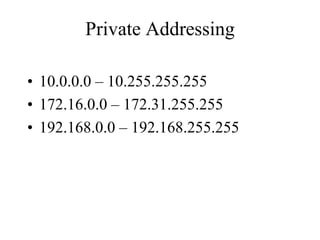
Private Addressing

• 10.0.0.0 – 10.255.255.255
• 172.16.0.0 – 172.31.255.255
• 192.168.0.0 – 192.168.255.255
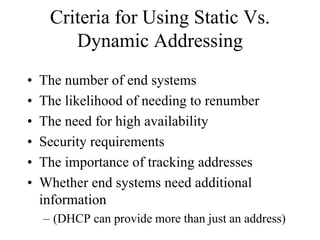
Criteria for Using Static Vs.
        Dynamic Addressing
•   The number of end systems
•   The likelihood of needing to renumber
•   The need for high availability
•   Security requirements
•   The importance of tracking addresses
•   Whether end systems need additional
    information
    – (DHCP can provide more than just an address)
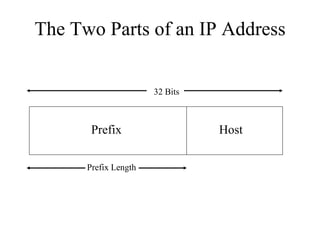
The Two Parts of an IP Address


                      32 Bits


       Prefix                   Host

      Prefix Length
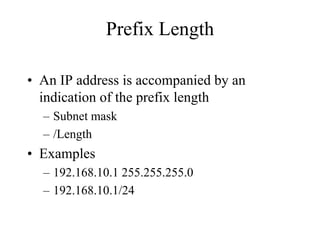
Prefix Length

• An IP address is accompanied by an
  indication of the prefix length
  – Subnet mask
  – /Length
• Examples
  – 192.168.10.1 255.255.255.0
  – 192.168.10.1/24
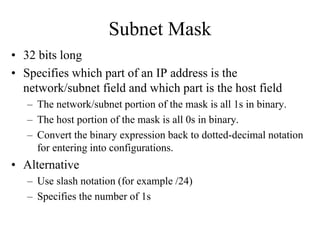
Subnet Mask
• 32 bits long
• Specifies which part of an IP address is the
  network/subnet field and which part is the host field
   – The network/subnet portion of the mask is all 1s in binary.
   – The host portion of the mask is all 0s in binary.
   – Convert the binary expression back to dotted-decimal notation
     for entering into configurations.
• Alternative
   – Use slash notation (for example /24)
   – Specifies the number of 1s
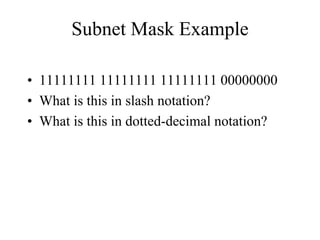
Subnet Mask Example

• 11111111 11111111 11111111 00000000
• What is this in slash notation?
• What is this in dotted-decimal notation?
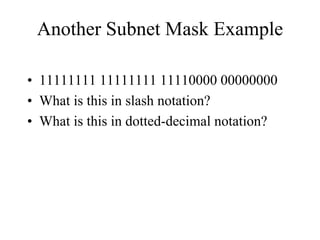
Another Subnet Mask Example

• 11111111 11111111 11110000 00000000
• What is this in slash notation?
• What is this in dotted-decimal notation?
One More Subnet Mask Example

• 11111111 11111111 11111000 00000000
• What is this in slash notation?
• What is this in dotted-decimal notation?
Designing Networks with
        Subnets
   • Determining subnet size
   • Computing subnet mask
   • Computing IP addresses
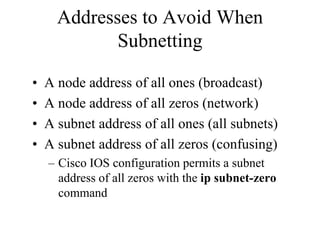
Addresses to Avoid When
             Subnetting

•   A node address of all ones (broadcast)
•   A node address of all zeros (network)
•   A subnet address of all ones (all subnets)
•   A subnet address of all zeros (confusing)
    – Cisco IOS configuration permits a subnet
      address of all zeros with the ip subnet-zero
      command
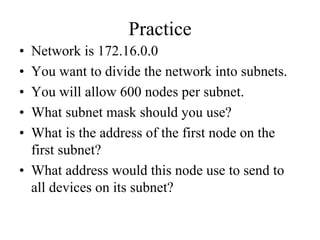
Practice
• Network is 172.16.0.0
• You want to divide the network into subnets.
• You will allow 600 nodes per subnet.
• What subnet mask should you use?
• What is the address of the first node on the
  first subnet?
• What address would this node use to send to
  all devices on its subnet?
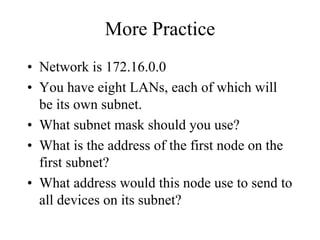
More Practice
• Network is 172.16.0.0
• You have eight LANs, each of which will
  be its own subnet.
• What subnet mask should you use?
• What is the address of the first node on the
  first subnet?
• What address would this node use to send to
  all devices on its subnet?
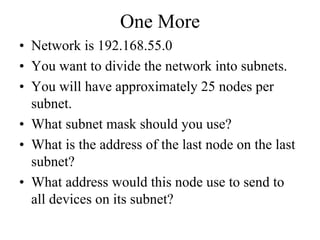
One More
• Network is 192.168.55.0
• You want to divide the network into subnets.
• You will have approximately 25 nodes per
  subnet.
• What subnet mask should you use?
• What is the address of the last node on the last
  subnet?
• What address would this node use to send to
  all devices on its subnet?
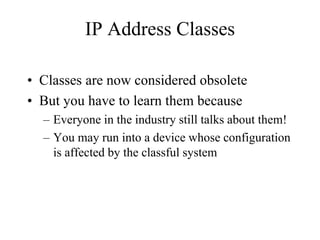
IP Address Classes

• Classes are now considered obsolete
• But you have to learn them because
  – Everyone in the industry still talks about them!
  – You may run into a device whose configuration
    is affected by the classful system
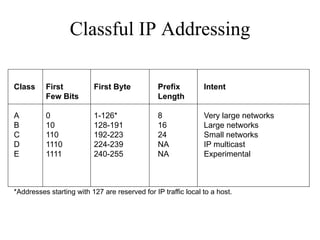
Classful IP Addressing

Class     First           First Byte            Prefix         Intent
          Few Bits                              Length

A         0               1-126*                8              Very large networks
B         10              128-191               16             Large networks
C         110             192-223               24             Small networks
D         1110            224-239               NA             IP multicast
E         1111            240-255               NA             Experimental


*Addresses starting with 127 are reserved for IP traffic local to a host.
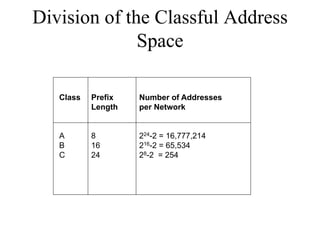
Division of the Classful Address
              Space

   Class   Prefix   Number of Addresses
           Length   per Network


   A       8        224-2 = 16,777,214
   B       16       216-2 = 65,534
   C       24       28-2 = 254
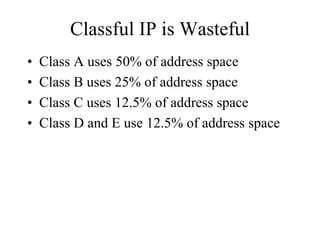
Classful IP is Wasteful
•   Class A uses 50% of address space
•   Class B uses 25% of address space
•   Class C uses 12.5% of address space
•   Class D and E use 12.5% of address space
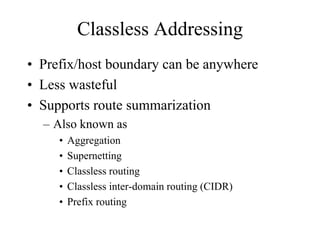
Classless Addressing
• Prefix/host boundary can be anywhere
• Less wasteful
• Supports route summarization
  – Also known as
     •   Aggregation
     •   Supernetting
     •   Classless routing
     •   Classless inter-domain routing (CIDR)
     •   Prefix routing
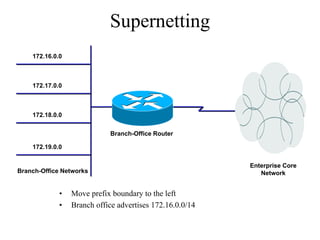
Supernetting
    172.16.0.0


    172.17.0.0


    172.18.0.0


                            Branch-Office Router

    172.19.0.0


                                                          Enterprise Core
Branch-Office Networks                                       Network


             •   Move prefix boundary to the left
             •   Branch office advertises 172.16.0.0/14
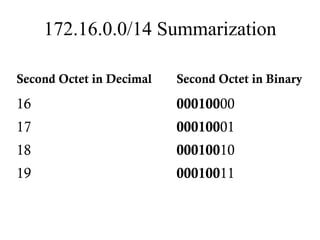
172.16.0.0/14 Summarization

Second Octet in Decimal   Second Octet in Binary

16                        00010000
17                        00010001
18                        00010010
19                        00010011
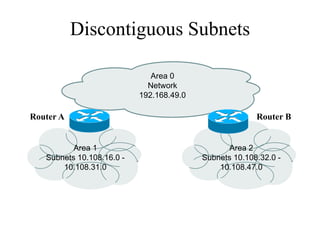
Discontiguous Subnets

                              Area 0
                             Network
                           192.168.49.0

Router A                                                Router B


          Area 1                                 Area 2
   Subnets 10.108.16.0 -                  Subnets 10.108.32.0 -
       10.108.31.0                            10.108.47.0
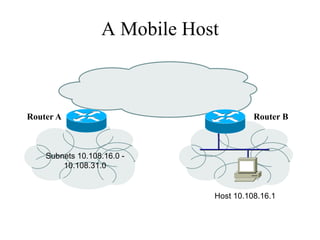
A Mobile Host


Router A                                Router B


    Subnets 10.108.16.0 -
        10.108.31.0


                              Host 10.108.16.1
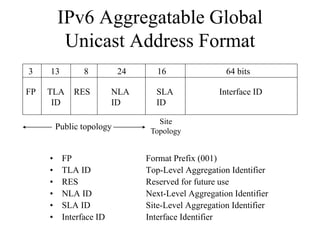
IPv6 Aggregatable Global
       Unicast Address Format
3    13      8          24      16                64 bits

FP   TLA   RES        NLA      SLA              Interface ID
      ID              ID       ID

                                Site
      Public topology         Topology


     • FP                    Format Prefix (001)
     • TLA ID                Top-Level Aggregation Identifier
     • RES                   Reserved for future use
     • NLA ID                Next-Level Aggregation Identifier
     • SLA ID                Site-Level Aggregation Identifier
     • Interface ID          Interface Identifier
Upgrading to IPv6

• Dual stack
• Tunneling
• Translation
Guidelines for Assigning Names
• Names should be
  –   Short
  –   Meaningful
  –   Unambiguous
  –   Distinct
  –   Case insensitive
• Avoid names with unusual characters
  – Hyphens, underscores, asterisks, and so on
Domain Name System (DNS)
• Maps names to IP addresses
• Supports hierarchical naming
  – example: frodo.rivendell.middle-earth.com
• A DNS server has a database of resource
  records (RRs) that maps names to addresses in
  the server’s “zone of authority”
• Client queries server
  – Uses UDP port 53 for name queries and replies
  – Uses TCP port 53 for zone transfers
DNS Details
• Client/server model
• Client is configured with the IP address
  of a DNS server
  – Manually or DHCP can provide the address
• DNS resolver software on the client
  machine sends a query to the DNS
  server. Client may ask for recursive
  lookup.
DNS Recursion
• A DNS server may offer recursion, which allows the
  server to ask other servers
   – Each server is configured with the IP address of one or
     more root DNS servers.
• When a DNS server receives a response from another
  server, it replies to the resolver client software. The
  server also caches the information for future
  requests.
   – The network administrator of the authoritative DNS server
     for a name defines the length of time that a non-
     authoritative server may cache information.
Summary

• Use a systematic, structured, top-down
  approach to addressing and naming
• Assign addresses in a hierarchical fashion
• Distribute authority for addressing and naming
  where appropriate
• IPv6 looms in our future
Review Questions

• Why is it important to use a structured model
  for addressing and naming?
• When is it appropriate to use IP private
  addressing versus public addressing?
• When is it appropriate to use static versus
  dynamic addressing?
• What are some approaches to upgrading to
  IPv6?
Top-Down Network Design

           Chapter Seven

   Selecting Switching and Routing Protocols
Switching and Routing Choices
• Switching
  –   Layer 2 transparent bridging (switching)
  –   Multilayer switching
  –   Spanning Tree Protocol enhancements
  –   VLAN technologies
• Routing
  –   Static or dynamic
  –   Distance-vector and link-state protocols
  –   Interior and exterior
  –   Etc.
Selection Criteria for Switching
        and Routing Protocols
•   Network traffic characteristics
•   Bandwidth, memory, and CPU usage
•   The number of peers supported
•   The capability to adapt to changes quickly
•   Support for authentication
Making Decisions

• Goals must be established
• Many options should be explored
• The consequences of the decision should be
  investigated
• Contingency plans should be made
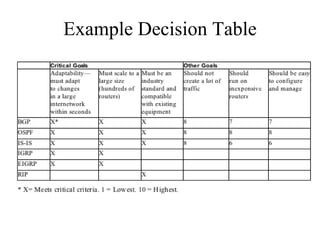
• A decision table can be used
Example Decision Table
Transparent Bridging (Switching)
             Tasks
• Forward frames transparently
• Learn which port to use for each MAC
  address
• Flood frames when the destination
  unicast address hasn’t been learned yet
• Filter frames from going out ports that
  don’t include the destination address
• Flood broadcasts and multicasts
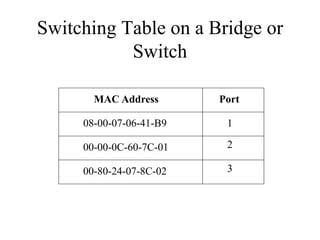
Switching Table on a Bridge or
           Switch

       MAC Address       Port

     08-00-07-06-41-B9    1

     00-00-0C-60-7C-01    2

     00-80-24-07-8C-02    3
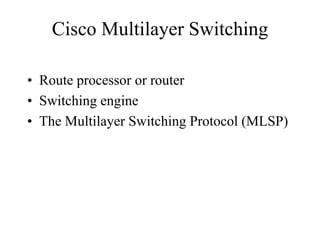
Cisco Multilayer Switching

• Route processor or router
• Switching engine
• The Multilayer Switching Protocol (MLSP)
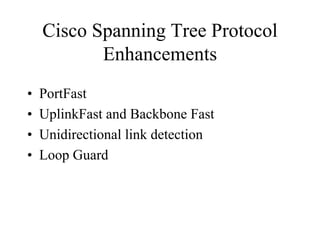
Cisco Spanning Tree Protocol
           Enhancements
•   PortFast
•   UplinkFast and Backbone Fast
•   Unidirectional link detection
•   Loop Guard
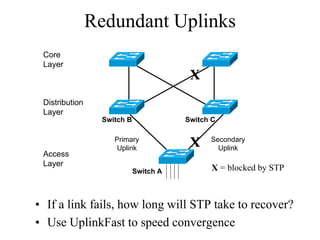
Redundant Uplinks
 Core
 Layer
                                        X
 Distribution
 Layer
                 Switch B              Switch C

                    Primary                  Secondary
                    Uplink
                                        X      Uplink
 Access
 Layer
                            Switch A         X = blocked by STP


• If a link fails, how long will STP take to recover?
• Use UplinkFast to speed convergence
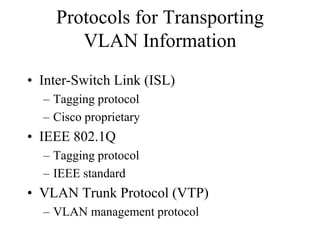
Protocols for Transporting
       VLAN Information
• Inter-Switch Link (ISL)
  – Tagging protocol
  – Cisco proprietary
• IEEE 802.1Q
  – Tagging protocol
  – IEEE standard
• VLAN Trunk Protocol (VTP)
  – VLAN management protocol
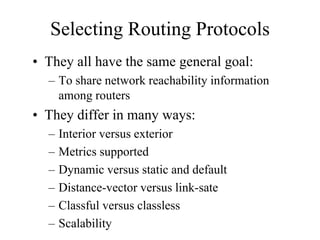
Selecting Routing Protocols
• They all have the same general goal:
  – To share network reachability information
    among routers
• They differ in many ways:
  –   Interior versus exterior
  –   Metrics supported
  –   Dynamic versus static and default
  –   Distance-vector versus link-sate
  –   Classful versus classless
  –   Scalability
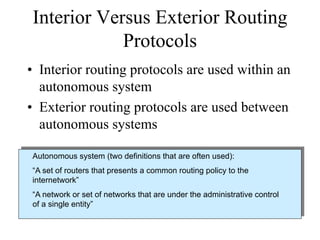
Interior Versus Exterior Routing
            Protocols
• Interior routing protocols are used within an
  autonomous system
• Exterior routing protocols are used between
  autonomous systems

Autonomous system (two definitions that are often used):
“A set of routers that presents a common routing policy to the
internetwork”
“A network or set of networks that are under the administrative control
of a single entity”
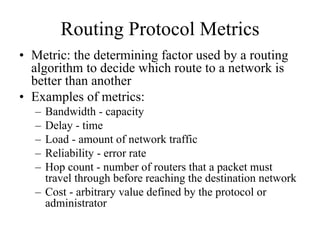
Routing Protocol Metrics
• Metric: the determining factor used by a routing
  algorithm to decide which route to a network is
  better than another
• Examples of metrics:
  – Bandwidth - capacity
  – Delay - time
  – Load - amount of network traffic
  – Reliability - error rate
  – Hop count - number of routers that a packet must
    travel through before reaching the destination network
  – Cost - arbitrary value defined by the protocol or
    administrator
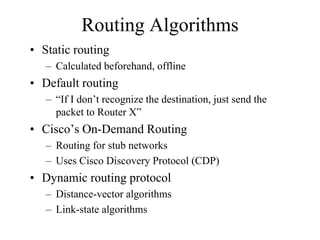
Routing Algorithms
• Static routing
   – Calculated beforehand, offline
• Default routing
   – “If I don’t recognize the destination, just send the
     packet to Router X”
• Cisco’s On-Demand Routing
   – Routing for stub networks
   – Uses Cisco Discovery Protocol (CDP)
• Dynamic routing protocol
   – Distance-vector algorithms
   – Link-state algorithms
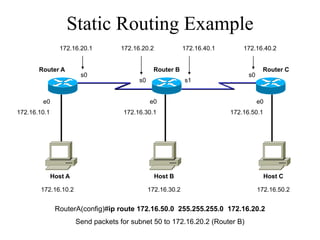
Static Routing Example
                172.16.20.1         172.16.20.2              172.16.40.1       172.16.40.2


       Router A                                 Router B                               Router C
                        s0                                                       s0
                                          s0                 s1


        e0                                     e0                                     e0
172.16.10.1                          172.16.30.1                           172.16.50.1


              Host A                              Host B                                 Host C

        172.16.10.2                            172.16.30.2                            172.16.50.2


               RouterA(config)#ip route 172.16.50.0 255.255.255.0 172.16.20.2
                       Send packets for subnet 50 to 172.16.20.2 (Router B)
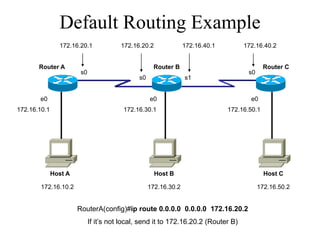
Default Routing Example
                172.16.20.1             172.16.20.2              172.16.40.1        172.16.40.2


       Router A                                     Router B                                 Router C
                        s0                                                            s0
                                              s0                 s1


       e0                                          e0                                 e0
172.16.10.1                              172.16.30.1                           172.16.50.1


              Host A                                  Host B                                 Host C

        172.16.10.2                                172.16.30.2                             172.16.50.2


                       RouterA(config)#ip route 0.0.0.0 0.0.0.0 172.16.20.2
                             If it’s not local, send it to 172.16.20.2 (Router B)
Distance-Vector Routing
• Router maintains a routing table that lists
  known networks, direction (vector) to each
  network, and the distance to each network
• Router periodically (every 30 seconds, for
  example) transmits the routing table via a
  broadcast packet that reaches all other routers
  on the local segments
• Router updates the routing table, if necessary,
  based on received broadcasts
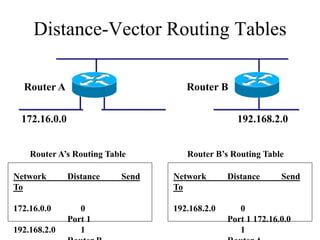
Distance-Vector Routing Tables

  Router A                          Router B


  172.16.0.0                                     192.168.2.0


    Router A’s Routing Table        Router B’s Routing Table

Network        Distance   Send   Network       Distance      Send
To                               To

172.16.0.0        0              192.168.2.0      0
               Port 1                          Port 1 172.16.0.0
192.168.2.0       1                               1
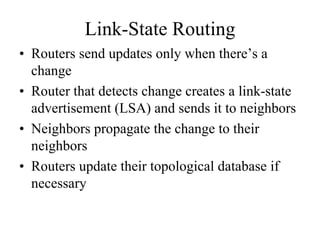
Link-State Routing
• Routers send updates only when there’s a
  change
• Router that detects change creates a link-state
  advertisement (LSA) and sends it to neighbors
• Neighbors propagate the change to their
  neighbors
• Routers update their topological database if
  necessary
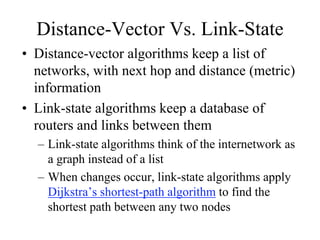
Distance-Vector Vs. Link-State
• Distance-vector algorithms keep a list of
  networks, with next hop and distance (metric)
  information
• Link-state algorithms keep a database of
  routers and links between them
  – Link-state algorithms think of the internetwork as
    a graph instead of a list
  – When changes occur, link-state algorithms apply
    Dijkstra’s shortest-path algorithm to find the
    shortest path between any two nodes
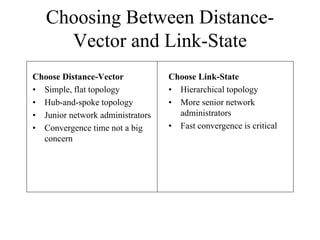
Choosing Between Distance-
     Vector and Link-State
Choose Distance-Vector            Choose Link-State
• Simple, flat topology           • Hierarchical topology
• Hub-and-spoke topology          • More senior network
• Junior network administrators     administrators
• Convergence time not a big      • Fast convergence is critical
  concern
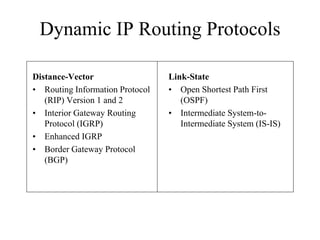
Dynamic IP Routing Protocols

Distance-Vector                  Link-State
• Routing Information Protocol   • Open Shortest Path First
   (RIP) Version 1 and 2            (OSPF)
• Interior Gateway Routing       • Intermediate System-to-
   Protocol (IGRP)                  Intermediate System (IS-IS)
• Enhanced IGRP
• Border Gateway Protocol
   (BGP)
Routing Information Protocol (RIP)
• First standard routing protocol developed for TCP/IP
  environments
   – RIP Version 1 is documented in RFC 1058 (1988)
   – RIP Version 2 is documented in RFC 2453 (1998)
• Easy to configure and troubleshoot
• Broadcasts its routing table every 30 seconds; 25 routes per
  packet
• Uses a single routing metric (hop count) to measure the
  distance to a destination network; max hop count is 15
RIP V2 Features
• Includes the subnet mask with route updates
  – Supports prefix routing (classless routing, supernetting)
  – Supports variable-length subnet masking (VLSM)

• Includes simple authentication to foil crackers
  sending routing updates
IGRP Solved Problems with RIP
• 15-hop limitation in RIP
  – IGRP supports 255 hops

• Reliance on just one metric (hop count)
  – IGRP uses bandwidth, delay, reliability, load
  – (By default just uses bandwidth and delay)

• RIP's 30-second update timer
  – IGRP uses 90 seconds
EIGRP
• Adjusts to changes in internetwork very
  quickly
• Incremental updates contain only changes,
  not full routing table
• Updates are delivered reliably
• Router keeps track of neighbors’ routing
  tables and uses them as feasible successor
• Same metric as IGRP, but more granularity
  (32 bits instead of 24 bits)
Open Shortest Path First (OSPF)

•   Open standard, defined in RFC 2328
•   Adjusts to changes quickly
•   Supports very large internetworks
•   Does not use a lot of bandwidth
•   Authenticates protocol exchanges to meet
    security goals
OSPF Metric
• A single dimensionless value called cost. A
  network administrator assigns an OSPF cost
  to each router interface on the path to a
  network. The lower the cost, the more likely
  the interface is to be used to forward data
  traffic.
• On a Cisco router, the cost of an interface
  defaults to 100,000,000 divided by the
  bandwidth for the interface. For example, a
  100-Mbps Ethernet interface has a cost of 1.
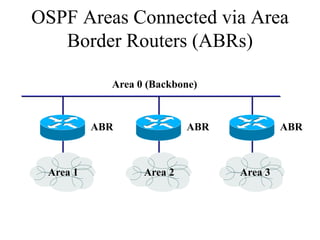
OSPF Areas Connected via Area
   Border Routers (ABRs)

            Area 0 (Backbone)


          ABR              ABR            ABR


 Area 1           Area 2         Area 3
IS-IS

• Intermediate System-to-Intermediate
  System
• Link-state routing protocol
• Designed by the ISO for the OSI protocols
• Integrated IS-IS handles IP also
Border Gateway Protocol (BGP)
• Allows routers in different autonomous
  systems to exchange routing information
  – Exterior routing protocol
  – Used on the Internet among large ISPs and major
    companies
• Supports route aggregation
• Main metric is the length of the list of
  autonomous system numbers, but BGP also
  supports routing based on policies
Summary
• The selection of switching and routing
  protocols should be based on an analysis of
  – Goals
  – Scalability and performance characteristics of the
    protocols
• Transparent bridging is used on modern
  switches
  – But other choices involve enhancements to STP
    and protocols for transporting VLAN information
• There are many types of routing protocols and
  many choices within each type
Review Questions
• What are some options for enhancing the
  Spanning Tree Protocol?
• What factors will help you decide whether
  distance-vector or link-state routing is best for
  your design customer?
• What factors will help you select a specific
  routing protocol?
• Why do static and default routing still play a
  role in many modern network designs?
Top-Down Network Design

           Chapter Eight

   Developing Network Security Strategies
Network Security Design
      The 12 Step Program
1. Identify network assets
2. Analyze security risks
3. Analyze security requirements and
   tradeoffs
4. Develop a security plan
5. Define a security policy
6. Develop procedures for applying security
   policies
The 12 Step Program (continued)
7. Develop a technical implementation strategy
8. Achieve buy-in from users, managers, and
    technical staff
9. Train users, managers, and technical staff
10. Implement the technical strategy and
    security procedures
11. Test the security and update it if any
    problems are found
12. Maintain security
Network Assets
•   Hardware
•   Software
•   Applications
•   Data
•   Intellectual property
•   Trade secrets
•   Company’s reputation
Security Risks
• Hacked network devices
  – Data can be intercepted, analyzed, altered, or
    deleted
  – User passwords can be compromised
  – Device configurations can be changed
• Reconnaissance attacks
• Denial-of-service attacks
Security Tradeoffs

• Tradeoffs must be made between security
  goals and other goals:
  –   Affordability
  –   Usability
  –   Performance
  –   Availability
  –   Manageability
A Security Plan
  • High-level document that
    proposes what an organization
    is going to do to meet security
    requirements
  • Specifies time, people, and
    other resources that will be
    required to develop a security
    policy and achieve
    implementation of the policy
A Security Policy
• Per RFC 2196, “The Site Security
  Handbook,” a security policy is a
  – “Formal statement of the rules by which people
    who are given access to an organization’s
    technology and information assets must abide.”
• The policy should address
  – Access, accountability, authentication, privacy,
    and computer technology purchasing guidelines
Security Mechanisms
•   Physical security
•   Authentication
•   Authorization
•   Accounting (Auditing)
•   Data encryption
•   Packet filters
•   Firewalls
•   Intrusion Detection Systems (IDSs)
Modularizing Security Design
• Security defense in depth
  – Network security should be multilayered with
    many different techniques used to protect the
    network
• Belt-and-suspenders approach
  – Don’t get caught with your pants down
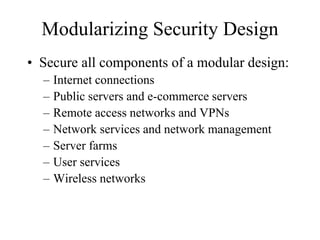
Modularizing Security Design
• Secure all components of a modular design:
  –   Internet connections
  –   Public servers and e-commerce servers
  –   Remote access networks and VPNs
  –   Network services and network management
  –   Server farms
  –   User services
  –   Wireless networks
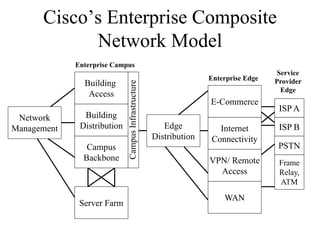
Cisco’s Enterprise Composite
            Network Model
             Enterprise Campus
                                                                                       Service
                                                                    Enterprise Edge
               Building                                                               Provider


                             Campus Infrastructure
                                                                                        Edge
                Access
                                                                    E-Commerce
                                                                                       ISP A
 Network       Building
Management    Distribution                              Edge          Internet         ISP B
                                                     Distribution   Connectivity
                Campus                                                                 PSTN
               Backbone                                             VPN/ Remote        Frame
                                                                      Access           Relay,
                                                                                       ATM

                                                                        WAN
              Server Farm
Cisco SAFE

• Cisco SAFE Blueprint addresses security in
  every module of a modular network
  architecture.
Securing Internet Connections

•   Physical security
•   Firewalls and packet filters
•   Audit logs, authentication, authorization
•   Well-defined exit and entry points
•   Routing protocols that support
    authentication
Securing Public Servers
• Place servers in a DMZ that is protected via
  firewalls
• Run a firewall on the server itself
• Enable DoS protection
  – Limit the number of connections per timeframe
• Use reliable operating systems with the
  latest security patches
• Maintain modularity
  – Front-end Web server doesn’t also run other
    services
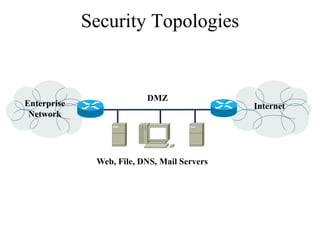
Security Topologies


                          DMZ
Enterprise                                   Internet
 Network


              Web, File, DNS, Mail Servers
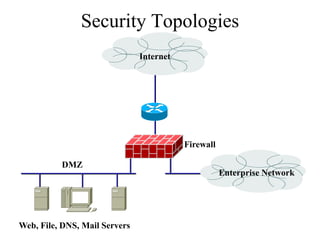
Security Topologies
                               Internet


                                          Firewall

          DMZ
                                                     Enterprise Network


Web, File, DNS, Mail Servers
Securing Remote-Access and
       Virtual Private Networks
•   Physical security
•   Firewalls
•   Authentication, authorization, and auditing
•   Encryption
•   One-time passwords
•   Security protocols
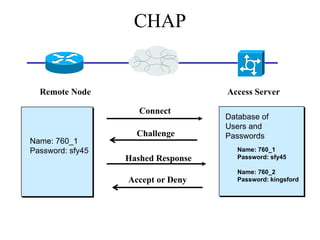
    – CHAP
    – RADIUS
    – IPSec
Securing Network Services
• Treat each network device (routers,
  switches, and so on) as a high-value host
  and harden it against possible intrusions
• Require login IDs and passwords for
  accessing devices
  – Require extra authorization for risky
    configuration commands
• Use SSH rather than Telnet
• Change the welcome banner to be less
  welcoming
Securing Server Farms
• Deploy network and host IDSs to monitor
  server subnets and individual servers
• Configure filters that limit connectivity from
  the server in case the server is compromised
• Fix known security bugs in server operating
  systems
• Require authentication and authorization for
  server access and management
• Limit root password to a few people
• Avoid guest accounts
Securing User Services
• Specify which applications are allowed to
  run on networked PCs in the security policy
• Require personal firewalls and antivirus
  software on networked PCs
  – Implement written procedures that specify how
    the software is installed and kept current
• Encourage users to log out when leaving
  their desks
• Consider using 802.1X port-based security
  on switches
Securing Wireless Networks
• Place wireless LANs (WLANs) in their own
  subnet or VLAN
  – Simplifies addressing and makes it easier to
    configure packet filters
• Require all wireless (and wired) laptops to run
  personal firewall and antivirus software
• Disable beacons that broadcast the SSID, and
  require MAC address authentication
  – Except in cases where the WLAN is used by
    visitors
WLAN Security Options
•   Wired Equivalent Privacy (WEP)
•   IEEE 802.11i
•   Wi-Fi Protected Access (WPA)
•   IEEE 802.1X Extensible Authentication
    Protocol (EAP)
    – Lightweight EAP or LEAP (Cisco)
    – Protected EAP (PEAP)
• Virtual Private Networks (VPNs)
• Any other acronyms we can think of? :-)
Wired Equivalent Privacy (WEP)
• Defined by IEEE 802.11
• Users must possess the appropriate WEP
  key that is also configured on the access
  point
  – 64 or 128-bit key (or passphrase)
• WEP encrypts the data using the RC4
  stream cipher method
• Infamous for being crackable
WEP Alternatives
• Vendor enhancements to WEP
• Temporal Key Integrity Protocol (TKIP)
  – Every frame has a new and unique WEP key
• Advanced Encryption Standard (AES)
• IEEE 802.11i
• Wi-Fi Protected Access (WPA) from the
  Wi-Fi Alliance
  – Realistic parts of IEEE 802.11i now!
Extensible Authentication
          Protocol (EAP)
• With 802.1X and EAP, devices take on one
  of three roles:
  – The supplicant resides on the wireless LAN
    client
  – The authenticator resides on the access point
  – An authentication server resides on a RADIUS
    server
EAP (Continued)
• An EAP supplicant on the client obtains
  credentials from the user, which could be a
  user ID and password
• The credentials are passed by the authenticator
  to the server and a session key is developed
• Periodically the client must reauthenticate to
  maintain network connectivity
• Reauthentication generates a new, dynamic
  WEP key
Cisco’s Lightweight EAP
              (LEAP)
• Standard EAP plus mutual authentication
  – The user and the access point must authenticate
• Used on Cisco and other vendors’ products
Other EAPs
• EAP-Transport Layer Security (EAP-TLS) was
  developed by Microsoft
  – Requires certificates for clients and servers.
• Protected EAP (PEAP) is supported by Cisco,
  Microsoft, and RSA Security
  – Uses a certificate for the client to authenticate the RADIUS
    server
  – The server uses a username and password to authenticate
    the client
• EAP-MD5 has no key management features or
  dynamic key generation
  – Uses challenge text like basic WEP authentication
  – Authentication is handled by RADIUS server
VPN Software on Wireless Clients
• Safest way to do wireless networking for
  corporations
• Wireless client requires VPN software
• Connects to VPN concentrator at HQ
• Creates a tunnel for sending all traffic
• VPN security provides:
  – User authentication
  – Strong encryption of data
  – Data integrity
Summary
• Use a top-down approach
  – Chapter 2 talks about identifying assets and risks
    and developing security requirements
  – Chapter 5 talks about logical design for security
    (secure topologies)
  – Chapter 8 talks about the security plan, policy, and
    procedures
  – Chapter 8 also covers security mechanisms and
    selecting the right mechanisms for the different
    components of a modular network design
Review Questions
• How does a security plan differ from a
  security policy?
• Why is it important to achieve buy-in from
  users, managers, and technical staff for the
  security policy?
• What are some methods for keeping hackers
  from viewing and changing router and switch
  configuration information?
• How can a network manager secure a wireless
  network?
Top-Down Network Design

            Chapter Nine

  Developing Network Management Strategies
Network Management
• Helps an organization achieve availability,
  performance, and security goals
• Helps an organization measure how well
  design goals are being met and adjust
  network parameters if they are not being
  met
• Facilitates scalability
  – Helps an organization analyze current network
    behavior, apply upgrades appropriately, and
    troubleshoot any problems with upgrades
Network Management Design
• Consider scalability, traffic patterns, data
  formats, cost/benefit tradeoffs
• Determine which resources should be
  monitored
• Determine metrics for measuring
  performance
• Determine which and how much data to
  collect
Proactive Network Management
• Plan to check the health of the network
  during normal operation, not just when
  there are problems
• Recognize potential problems as they
  develop
• Optimize performance
• Plan upgrades appropriately
Network Management Processes
    According to the ISO
•   Performance management
•   Fault management
•   Configuration management
•   Security management
•   Accounting management
Performance Management

• Monitor end-to-end performance
• Also monitor component performance
  (individual links and devices)
• Test reachability
• Measure response times
• Measure traffic flow and volume
• Record route changes
Fault Management

• Detect, isolate, diagnose, and correct
  problems
• Report status to end users and managers
• Track trends related to problems
Configuration Management

• Keep track of network devices and their
  configurations
• Maintain an inventory of network assets
• Log versions of operating systems and
  applications
Security Management
• Maintain and distribute user names and
  passwords
• Generate, distribute, and store encryption
  keys
• Analyze router, switch, and server
  configurations for compliance with security
  policies and procedures
• Collect, store, and examine security audit
  logs
Accounting Management

• Keep track of network usage by
  departments or individuals
• Facilitate usage-based billing
• Find abusers who use more resources than
  they should
Network Management Components
• A managed device is a network node that
  collects and stores management information
• An agent is network-management software
  that resides in a managed device
• A network-management system (NMS)
  runs applications to display management
  data, monitor and control managed devices,
  and communicate with agents
Network Management Architecture
                   NMS


      Agent        Agent        Agent


    Management   Management   Management
     Database     Database     Database

                 Managed
                 Devices
Architecture Concerns

• In-band versus out-of-band monitoring
  – In-band is easier to develop, but results in
    management data being impacted by network
    problems
• Centralized versus distributed monitoring
  – Centralized management is simpler to develop
    and maintain, but may require huge amounts of
    information to travel back to a centralized
    network operations center (NOC)
Simple Network Management
       Protocol (SNMP)
• Most popular network management
  protocol
• SNMPv3 should gradually supplant
  versions 1 and 2 because it offers better
  authentication
• SNMP works with Management
  Information Bases (MIBs)
Remote Monitoring (RMON)
• Developed by the IETF in the early 1990s
  to address shortcomings in standard MIBs
  – Provides information on data link and physical
    layer parameters
  – Nine groups of data for Ethernet
  – The statistics group tracks packets, octets,
    packet-size distribution, broadcasts, collisions,
    dropped packets, fragments, CRC and
    alignment errors, jabbers, and undersized and
    oversized packets
Cisco Tools

• Cisco Discovery Protocol
• NetFlow Accounting
• Service Assurance Agent (SAA)
Summary

• Determine which resources to monitor, which
  data about these resources to collect, and how
  to interpret that data
• Develop processes that address performance,
  fault, configuration, security, and accounting
  management
• Develop a network management architecture
• Select management protocols and tools
Review Questions
• Why is network management design
  important?
• Define the five types of network management
  processes according to the ISO.
• What are some advantages and disadvantages
  of using in-band network management versus
  out-of-band network management?
• What are some advantages and disadvantages
  of using centralized network management
  versus distributed network management?
Top-Down Network Design

                 Chapter Ten

Selecting Technologies and Devices for Campus Networks
Selecting Technologies and
              Devices
• We now know what the network will look like
• We also know what capabilities the network
  will need
• We are now ready to start picking out
  technologies and devices
• Chapter 10 has guidelines for campus
  networks
Campus Network Design Steps
• Develop a cabling plant
  design
• Select the types of cabling
• Select the data-link-layer
  technologies
• Select internetworking
  devices
  – Meet with vendors
Cabling Plant Design Considerations
• Campus and building cabling topologies
• The types and lengths of cables between buildings
• Within buildings
   – The location of telecommunications closets and cross-
     connect rooms
   – The types and lengths of cables for vertical cabling
     between floors
   – The types and lengths of cables for horizontal cabling
     within floors
   – The types and lengths of cables for work-area cabling
     going from telecommunications closets to workstations
Centralized Versus Distributed
       Cabling Topologies
• A centralized cabling scheme terminates
  most or all of the cable runs in one area of
  the design environment. A star topology is
  an example of a centralized system.
• A distributed cabling scheme terminates
  cable runs throughout the design
  environment. Ring, bus, and tree topologies
  are examples of distributed systems.
Centralized Campus Cabling

                   Building B   Building C   Building D


Cable Bundle


Building A
Distributed Campus Cabling

             Building B   Building C   Building D


Building A
Types of Media Used in Campus
          Networks
• Copper media
• Optical media
• Wireless media
Copper Media Advantages

•   Conducts electric current well
•   Does not rust
•   Can be drawn into thin wires
•   Easy to shape
•   Hard to break
Copper Media


Coaxial                            Twisted-Pair


Shielded Twisted-Pair (STP)   Unshielded Twisted-Pair (UTP)
Coaxial Cable
• Solid copper conductor, surrounded by:
  – Flexible plastic insulation
  – Braided copper shielding
  – Outer jacket
• Can be run without as many boosts from
  repeaters, for longer distances between
  network nodes, than either STP or UTP
  cable
  – Nonetheless, it’s no longer widely used
Twisted-Pair Cabling
• A “twisted pair” consists of two copper
  conductors twisted together
• Each conductor has plastic insulation
• Shielded Twisted Pair (STP)
  – Has metal foil or braided-mesh covering that
    encases each pair
• Unshielded Twisted Pair (UTP)
  – No metal foil or braided-mesh covering around
    pairs, so it’s less expensive
UTP Categories
• Category 1. Used for voice communication
• Category 2. Used for voice and data, up to 4 Mbps
• Category 3. Used for data, up to 10 Mbps
   – Required to have at least 3 twists per foot
   – Standard cable for most telephone systems
   – Also used in 10-Mbps Ethernet (10Base-T Ethernet)
• Category 4. Used for data, up to 16 Mbps
   – Must also have at least 3 twists per foot as well as other features
   – Used in Token Ring
• Category 5. Used for data, up to 100 Mbps
   – Must have 3 twists per inch!
• Category 5e. Used in Gigabit Ethernet
• Category 6. Used in Gigabit Ethernet and future technologies
Optical Media


Multimode Fiber (MMF)              Single-mode Fiber (SMF)
Copper Vs Fiber-Optic Cabling
• Twisted-pair and coax cable transmit network
  signals in the form of current
• Fiber-optic cable transmits network signals in the
  form of light
• Fiber-optic cable is made of glass
   – Not susceptible to electromagnetic or radio frequency
     interference
   – Not as susceptible to attenuation, which means longer
     cables are possible
   – Supports very high bandwidth (10 Gbps or greater)
   – For long distances, fiber costs less than copper
Multimode                 Single-mode
• Larger core diameter       • Smaller core diameter
• Beams of light bounce      • Less bouncing around;
  off cladding in multiple     single, focused beam of
  ways                         light
• Usually uses LED           • Usually uses LASER
  source                       source
• Less expensive             • More expensive
• Shorter distances          • Very long distances
Wireless Media

•   IEEE 802.11a, b, and g
•   Laser
•   Microwave
•   Cellular
•   Satellite
Cabling Guidelines
• At the access layer use
  – Copper UTP rated for Category 5 or 5e, unless
    there is a good reason not to
  – To future proof the network
     • Use 5e instead of 5
     • Install UTP Category 6 rated cable and terminate the
       cable with Cat 5 or 5e connectors
     • Then only the connectors need to be changed to
       move up in speed
  – In special cases
     • Use MMF for bandwidth intensive applications
     • Or install fiber along with the copper
Cabling Guidelines
• At the distribution layer use
  – MMF if distance allows
  – SMF otherwise
  – Unless unusual circumstances occur and cable
    cannot be run, then use a wireless method
  – To future proof the network
     • Run both MMF and SMF
LAN Technologies
•   Half-duplex Ethernet (becoming obsolete)
•   Full-duplex Ethernet
•   10-Mbps Ethernet (becoming obsolete)
•   100-Mbps Ethernet
•   1000-Mbps (1-Gbps or Gigabit) Ethernet
•   10-Gbps Ethernet
•   Metro Ethernet
•   Long Range Ethernet (LRE)
•   Cisco’s EtherChannel
IEEE 802.3 10-Mbps Ethernet
                                     10 Mbps Ethernet


 10Base5                                 10BaseT                               10BaseF

                                            2 pairs                            2 multimode
Thick coax cable
                                         Category-3 or                         optical fibers
  500 meters
                                          better UTP
                    10Base2               100 meters       10Broad36

                   Thin coax cable                          3 channels of a
                     185 meters                          private CATV system
                                                             3600 meters
IEEE 802.3 100-Mbps Ethernet
                                             100BaseT


                    100BaseX
                                                        100BaseT4       100BaseT2

                                                           4 pairs          2 pairs
                                                        Category-3 or    Category-3 or
                                                         better UTP       better UTP
                                                         100 meters       100 meters

 100BaseTX                     100BaseFX
2 pairs Category-5 or     2 multimode optical fibers
     better UTP           2000 meters (full duplex)
     100 meters
IEEE 802.3 Gigabit Ethernet
                                                 1000BaseX


    1000BaseSX                  1000BaseLX                     1000BaseCX         1000BaseT

 2 multimode optical fibers    2 multimode or single-mode        2 pairs STP   4 pairs Category-5 UTP
using shortwave laser optics   optical fibers using longwave      25 meters          100 meters
        550 meters                       laser optics
                               550 meters multimode, 5000
                                    meters single-mode
IEEE 802.3 10-Gbps Ethernet
                                      10GBaseX


  10GBaseLX4               10GBaseS              10GBaseL         10GBaseE

Multimode or single-mode   Multimode optical     Single-mode      Single-mode
      optical fibers             fibers          optical fibers   optical fibers
 300 meters multimode,       300 meters             10 km            40 km
   10 km single-mode
Metro Ethernet

• Service offered by providers and carriers
  that traditionally had only classic WAN
  offerings
• The customer can use a standard Ethernet
  interface to reach a MAN or WAN
• The customer can add bandwidth as needed
  with a simple configuration change
Long-Reach Ethernet
• Enables the use of Ethernet over existing,
  unconditioned, voice-grade copper twisted-
  pair cabling
• Used to connect buildings and rooms within
  buildings
  – Rural areas
  – Old cities where upgrading cabling is
    impractical
  – Multi-unit structures such as hotels, apartment
    complexes, business complexes, and
    government agencies
Cisco’s EtherChannel
                      Data Center Switch


                    800 Mbps EtherChannel


 West Fiber Run                            East Fiber Run
   400 Mbps                                  400 Mbps


                  Wiring Closet Switch
Internetworking Devices for
          Campus Networks
•   Hubs (becoming obsolete)
•   Switches
•   Routers
•   Wireless access points
•   Wireless bridges
Selection Criteria for
       Internetworking Devices
•   The number of ports
•   Processing speed
•   The amount of memory
•   Latency when device relays data
•   Throughput when device relays data
•   LAN and WAN technologies supported
•   Media supported
More Selection Criteria for
     Internetworking Devices
• Cost
• Ease of configuration and management
• MTBF and MTTR
• Support for hot-swappable components
• Support for redundant power supplies
• Quality of technical support,
  documentation, and training
• Etc.
Summary
• Once the logical design is completed, the
  physical design can start
• A major task during physical design is
  selecting technologies and devices for campus
  networks
  – Media
  – Data-link layer technology
  – Internetworking devices
• Also, at this point, the logical topology design
  can be developed further by specifying
  cabling topologies
Review Questions
• What are three fundamental media types used
  in campus networks?
• What selection criteria can you use to select
  an Ethernet variety for your design customer?
• What selection criteria can you use when
  purchasing internetworking devices for your
  design customer?
• Some people think Metro Ethernet will
  replace traditional WANs. Do you agree or
  disagree and why?
Top-Down Network Design

                Chapter Eleven

Selecting Technologies and Devices for Enterprise Networks
Enterprise Technologies and
                Devices
• Remote access networks
• Wide area networks (WANs)
• Devices
  –   End user remote access devices
  –   Central site remote access devices
  –   VPN concentrators
  –   Routers
Selection Criteria
•   Business requirements and constraints
•   Cost
•   Technical goals
•   Bandwidth requirements
•   QoS requirements
•   Network topology
•   Traffic flow and load
•   Etc.
Remote Access Technologies

•   The Point-to-Point Protocol (PPP)
•   Integrated Services Digital Network (ISDN)
•   Cable modems
•   Digital Subscriber Line (DSL)
Point-to-Point Protocol (PPP)
• Used with synchronous, asynchronous, dial-
  up, and ISDN links
• Defines encapsulation scheme for transport of
  different network-layer protocols
• Supports authentication:
  – Password Authentication Protocol (PAP)
  – Challenge Handshake Authentication Protocol
    (CHAP)
     • CHAP more secure than PAP
PPP Layers

      Network Control Protocol (NCP)

        Link Control Protocol (LCP)

           Encapsulation based on
High-Level Data-Link Control Protocol (HDLC)

               Physical Layer
Multichassis Multilink PPP

                     Stack group


        ISDN                       Offload
                                   server

        Analog
CHAP


  Remote Node                       Access Server

                     Connect
                                    Database of
                                    Users and
                    Challenge       Passwords
Name: 760_1
Password: sfy45                        Name: 760_1
                  Hashed Response      Password: sfy45

                                       Name: 760_2
                  Accept or Deny       Password: kingsford
ISDN
• Digital data-transport service offered by
  regional telephone carriers (telcos)
• Circuit-switched service that carries voice
  and data
• Cost-effective remote-access solution for
  telecommuters and remote offices
  – Cost of an ISDN circuit is usually based on a
    monthly fee plus usage time
• Good choice as a backup link for another
  type of link, for example, Frame Relay
ISDN Interfaces
              Basic Rate Interface (BRI)

                                    64 Kbps
     2B                             64 Kbps
                                                  }   144
                                                      Kbps
      D                             16 Kbps


                Primary Rate Interface (PRI)

                                        64 Kbps           1.544 Mbps in U.S.
23B or 30B

                                        64 Kbps
                                                      }   2.048 Mbps in
                                                          Europe
          D
ISDN Components
Non-ISDN                R              S/T               U
 device                      TA                  NT1             To ISDN
  (TE2)                               4-wire           2-wire    service
                                      circuit          circuit


            ISDN                       S/T               U       To ISDN
           device                                NT1             service
            (TE1)


 ISDN               S                    T                U      To ISDN
device                       NT2                 NT1             service
 (TE1)


                                                         U
                            ISDN device (TE1)                    To ISDN
                             with built-in NT1                   service
                                                 NT1
Cable Modem Service
• Operates over the coax cable used by cable TV
• Much faster than analog modems, and usually
  much faster than ISDN (depending on how
  many users share the cable)
  – 25 to 50 Mbps downstream from the head end
  – 2 to 3 Mbps upstream from end users
• Standard = Data Over Cable Service Interface
  Specification (DOCSIS)
DSL
• High-speed digital data traffic over ordinary
  telephone wires
• Sophisticated modulation schemes mean
  higher speeds than ISDN
  – Speeds range from 1.544 to 9 Mbps
• Actual bandwidth depends on type of DSL
  service, DSL modem, and many physical-
  layer factors
• Asymmetric DSL (ADSL) very popular
  – Downstream faster than upstream
WAN Technologies

•   Leased lines
•   Synchronous Optical Network (SONET)
•   Frame Relay
•   Asynchronous Transfer Mode (ATM)
Leased Lines
• Dedicated digital, copper circuits that a
  customer leases from a carrier for a
  predetermined amount of time, usually for
  months or years
• Speeds range from 64 Kbps to 45 Mbps
• Enterprises use leased lines for both voice
  and data traffic
The North American Digital
              Hierarchy
Signal   Capacity       Number of   Colloquial Name
                        DS0s
DS0      64 Kbps        1           Channel
DS1      1.544 Mbps     24          T-1
DS1C     3.152 Mbps     48          T-1C
DS2      6.312 Mbps     96          T-2
DS3      44.736 Mbps    672         T-3
DS4      274.176 Mbps   4032        T-4
Synchronous Optical Network
           (SONET)
• Physical-layer specification for high-speed
  synchronous transmission of packets or
  cells over fiber-optic cabling
• Service providers and carriers make wide
  use of SONET in their internal networks
• Gaining popularity within private networks
SONET Optical Carrier (OC) Levels
  aka Synchronous Transport Signal (STS) Levels

   STS Rate     OC Level      Speed

   STS-1        OC-1          51.84 Mbps
   STS-3        OC-3          155.52 Mbps
   STS-12       OC-12         622.08 Mbps
   STS-24       OC-24         1.244 Gbps
   STS-48       OC-48         2.488 Gbps
   STS-96       OC-96         4.976 Gbps
   STS-192      OC-192        9.952 Gbps
Typical SONET Topology


       SONET Multiplexer


                      Backup Pair


                                    Working Pair
Frame Relay
• Industry-standard data-link-layer protocol
  for transporting traffic across wide-area
  virtual circuits
• Optimized for efficiency on circuits with
  low error rates
• Attractively-priced in most parts of the
  world
• Carriers agree to forward traffic at a
  Committed Information Rate (CIR)
Frame Relay (continued)

           To Router B:
            DLCI 100


                                                 To Router A:
                                                  DLCI 200


Router A                                                        Router B
                          Virtual Circuit (VC)
Frame Relay Hub-and-Spoke
          Uses Subinterfaces
                                 hostname centralsite
                                 interface serial 0
Central-Site Router
                                 encapsulation frame-relay
                                 interface serial 0.1

        DLCI 100      DLCI 200   ip address 10.0.1.1 255.255.255.0
                                 frame-relay interface-dlci 100
                                 interface serial 0.2
                                 ip address 10.0.2.1 255.255.255.0
                                 frame-relay interface-dlci 200
Asynchronous Transfer Mode
           (ATM)
• Used in service provider internal networks
• Gaining popularity within private networks,
  both WANs and sometimes LANs
• Supports very high bandwidth requirements
  – Copper cabling: 45 Mbps or more
  – Fiber-optic cabling: OC-192 (9.952 Gbps) and
    beyond, especially if technologies such as
    wave-division multiplexing (WDM) are used
ATM (continued)
• Provides efficient sharing of bandwidth
  among applications with various Quality of
  Service (QoS) requirements
  – Cell-based system inherently better for QoS
    than frames
• Application can specify upon connection
  establishment the QoS it requires
• Peak and minimum cell rates, cell-loss ratio,
  and cell-transfer delay
Ethernet over ATM
• ATM router interfaces are expensive
• Some providers allow a customer to use an
  Ethernet interface to access the provider’s
  ATM WAN
• May require a converter
• Expected to gain popularity because it has
  the advantages of both worlds
  – Easy-to-use LAN
  – QoS-aware WAN
Selection Criteria for Remote
           Access Devices
• Support for VPN features
• Support for NAT
• Reliability
• Cost
• Ease of configuration and management
• Support for one or more high-speed
  Ethernet interfaces
• If desired, wireless support
• Etc.
Selection Criteria for VPN
             Concentrators
• Support for:
   – Tunneling protocols such as IPSec, PPTP, and L2TP
   – Encryption algorithms such as 168-bit Triple DES,
     Microsoft Encryption (MPPE), RC4, AES
   – Authentication algorithms, including MD5, SHA-1, HMAC
   – Network system protocols, such as DNS, RADIUS,
     Kerberos, LDAP
   – Routing protocols
   – Certificate authorities
   – Network management using SSH or HTTP with SSL
   – Etc.
Selection Criteria for Enterprise
                Routers
•   Number of ports
•   Processing speed
•   Media and technologies supported
•   MTTR and MTBF
•   Throughput
•   Optimization features
•   Etc
Selection Criteria for a WAN
         Service Provider
• Extent of services and technologies
• Geographical areas covered
• Reliability and performance characteristics
  of the provider’s internal network
• The level of security offered by the provider
• The level of technical support offered by the
  provider
• The likelihood that the provider will
  continue to stay in business
Selecting a Provider (continued)
• The provider’s willingness to work with you
  to meet your needs
• The physical routing of network links
• Redundancy within the network
• The extent to which the provider relies on
  other providers for redundancy
• The level of oversubscription on the network
• QoS support
• Etc.
Summary
• A major task during the physical design phase
  is selecting technologies and devices for
  enterprise networks
  –   Remote access networks
  –   WANs
  –   Service providers
  –   Devices
       •   End user remote access devices
       •   Central site remote access devices
       •   VPN concentrators
       •   Routers
Review Questions
• Compare and contrast technologies for
  supporting remote users.
• Compare and contrast WAN technologies.
• What selection criteria can you use when
  purchasing internetworking devices for
  enterprise network customers?
• What criteria can you use when selecting a
  WAN service provider?
Top-Down Network Design

      Chapter Twelve

     Testing Your Network Design
Reasons to Test
• Verify that the design meets key business and
  technical goals
• Validate LAN and WAN technology and
  device selections
• Verify that a service provider provides the
  agreed-up service
• Identify bottlenecks or connectivity problems
• Determine optimization techniques that will be
  necessary
Testing Your Network Design
• Use industry testing services
• Build and test a prototype system
• Use third-party and Cisco tools
Industry Testing Services

• The Interoperability Lab at the University of
  New Hampshire (IOL)
• ICSA Labs
• Miercom Labs
• KeyLabs
• The Tolly Group
Scope of a Prototype System

• It’s not generally practical to implement a
  full-scale system
• A prototype should verify important
  capabilities and functions that might not
  perform adequately
• Risky functions include complex, intricate
  functions and functions that were influenced
  by the need to make tradeoffs
Components of a Test Plan

• Test objectives and acceptance criteria
• The types of tests that will be run
• Network equipment and other resources
  required
• Testing scripts
• The timeline and milestones for the testing
  project
Test Objectives and Acceptance
             Criteria
• Specific and concrete
• Based on business and technical goals
• Clear criteria for declaring that a test passed
  or failed
• Avoid biases and preconceived notions
  about outcomes
• If appropriate, reference a baseline
Types of Tests

•   Application response-time tests
•   Throughput tests
•   Availability tests
•   Regression tests
Resources Needed for Testing

• Scheduled time in a lab either at your site or
  the customer’s site
• Power, air conditioning, rack space, and
  other physical resources
• Help from coworkers or customer staff
• Help from users to test applications
• Network addresses and names
Example Test Script
   Workstations                                 Server 1


                         Firewall


Network A                                      Network B


              Protocol              Protocol
              Analyzer              Analyzer
Example Test Script (continued)

• Test objective. Assess the firewall’s capability to
  block Application ABC traffic, during both light
  and moderately heavy load conditions.
• Acceptance criterion. The firewall should block
  the TCP SYN request from every workstation on
  Network A that attempts to set up an Application
  ABC session with Server 1 on Network B. The
  firewall should send each workstation a TCP RST
  (reset) packet.
Example Test Script (continued)
1.   Start capturing network traffic on the protocol analyzer
     on Network A.
2.   Start capturing network traffic on the protocol analyzer
     on Network B.
3.   Run Application ABC on a workstation located on
     Network A and access Server 1 on Network B.
4.   Stop capturing network traffic on the protocol analyzers.
5.   Display data on Network A’s protocol analyzer and
     verify that the analyzer captured a TCP SYN packet
     from the workstation. Verify that the network layer
     destination address is Server 1 on Network B, and the
     destination port is port 1234 (the port number for
     Application ABC). Verify that the firewall responded to
     the workstation with a TCP RST packet.
Example Test Script (continued)
6.   Display data on Network B’s protocol analyzer and
     verify that the analyzer did not capture any Application-
     ABC traffic from the workstation.
7.   Log the results of the test in the project log file.
8.   Save the protocol-analyzer trace files to the project trace-
     file directory.
9.   Gradually increase the workload on the firewall, by
     increasing the number of workstations on Network A
     one at a time, until 50 workstations are running
     Application ABC and attempting to reach Server 1.
     Repeat steps 1 through 8 after each workstation is added
     to the test.
Tools for Testing a Network
                Design
•   Network-management and monitoring tools
•   Traffic generation tools
•   Modeling and simulation tools
•   QoS and service-level management tools
•   http://www.topdownbook.com/tools.html
Summary
• An untested network design probably won’t
  work
• It’s often not practical to test the entire design
• However, by using industry testing services
  and tools, as well as your own testing scripts,
  you can (and should) test the complex, risky,
  and key components of a network design
Review Questions
• Why is it important to test your network
  design?
• Why is regression testing important?
• What are some characteristics of well-written
  acceptance criteria?
• What are some characteristics of a good
  network simulation tool?
Top-Down Network Design

      Chapter Thirteen

    Optimizing Your Network Design
Reasons to Optimize

• Meet key business and technical goals
• Use bandwidth efficiently
• Control delay and jitter
• Reduce serialization delay
• Support preferential service for essential
  applications
• Meet Quality of Service (QoS) requirements
IP Multicast Helps Optimize
       Bandwidth Usage
• With IP multicast, you can send a high-
  volume multimedia stream just once instead
  of once for each user
• Requires support for
  – Multicast addressing
  – Multicast registration (IGMP)
  – Multicast routing protocols
IP Multicast Addressing
• Uses Class D multicast destination address
  – 224.0.0.0 to 239.255.255.255
• Converted to a MAC-layer multicast
  destination address
  – The low-order 23 bits of the Class D address
    become the low-order 23 bits of the MAC-layer
    address
  – The top 9 bits of the Class D address are not
    used
  – The top 25 bits of the MAC-layer address are
    0x01:00:5E followed by a binary 0
Internet Group Management
         Protocol (IGMP)
• Allows a host to join a multicast group
• Host transmits a membership-report
  message to inform routers on the segment
  that traffic for a group should be multicast
  to the host’s segment
• IGMPv2 has support for a router more
  quickly learning that the last host on a
  segment has left a group
Multicast Routing Protocols

• Becoming obsolete
  – Multicast OSPF (MOSPF)
  – Distance Vector Multicast Routing Protocol
    (DVMRP)
• Still used
  – Protocol Independent Multicast (PIM)
     • Dense-Mode PIM
     • Sparse-Mode PIM
Reducing Serialization Delay

• Link-layer fragmentation and interleaving
  – Breaks up and reassembles frames
  – Multilink PPP
  – Frame Relay FRF.12
• Compressed Real Time Protocol
  – RTP is used for voice and video
  – Compressed RTP compresses the RTP, UDP,
    and IP header from 40 bytes to 2 to 4 bytes
A Few Technologies for Meeting
      QoS Requirements
•   IETF controlled load service
•   IETF guaranteed service
•   IP precedence
•   IP differentiated services
IP Type of Service Field

• The type of service field in the IP header is
  divided into two subfields
  – The 3-bit precedence subfield supports eight
    levels of priority
  – The 4-bit type of service subfield supports four
    types of service
• Although IP precedence is still used, the
  type of service subfield was hardly ever
  used
IP Type of Service Field
                                                      Type of Service Subfield

                            Bit 0                     3        4     5         6       7
                                                                                                  D = Delay
                                                                                                  T = Throughput
                                     Precedence       D        T     R         C       0
                                                                                                  R = Reliability
                                                                                                  C = Cost


Bit 0                                    8                                    15                            24                           31

        Version             Header                Type of Service                                       Total Length
                            Length

                                     Identification                                 Flags                              Fragment Offset


                  Time to Live                            Protocol                                   Header
                                                                                                     Checksum


                                                                          Source IP Address


                                                                         Destination IP Address


                                                      Options                                                             Padding
IP Differentiated Services (DS)
               Field
• RFC 2474 redefines the type of service field
  as the Differentiated Services (DS) field
  – Bits 0 through 5 are the Differentiated Services
    Codepoint (DSCP) subfield
     • Has essentially the same goal as the precedence
       subfield
     • Influences queuing and packet dropping decisions for
       IP packets at a router output interface
  – Bits 6 and 7 are the Explicit Congestion
    Notification (ECN) subfield
IP Differentiated Services (DS)
                     Field

          0                                   6
          Differentiated Services Codepoint   Explicit Congestion Notification


0                       8                     15                      24         31
    Version   Header     Differentiated Services                Total Length
              Length
Classifying LAN Traffic

•   IEEE 802.1p
•   Classifies traffic at the data-link layer
•   Supports eight classes of service
•   A switch can have a separate queue for each
    class and service the highest-priority queues
    first
Cisco Switching Techniques

• Process switching
• Fast switching
• Autonomous, silicon, and optimum
  switching
• NetFlow switching
• Cisco Express Forwarding (CEF)
Cisco Queuing Services

•   First in, first out (FIFO) queuing
•   Priority queuing
•   Custom queuing
•   Weighted fair queuing (WFQ)
•   Class-based WFQ (CBWFQ)
•   Low latency queuing (LLQ)
START
                   Priority Queuing
                  NO
 Packet in high
    queue?

                                        NO
                  Packet in medium
 YES                   queue?

                                                             NO
                                          Packet in normal
                       YES                    queue?

                                                                                   NO
                                                              Packet in low
                                             YES                 queue?


                                                                  YES


                                     Dispatch Packet                    Continue
Custom Queuing
               START (with
               Queue 1)


               NO      Packet in
                        Queue?


                             YES


                       Reached
               YES   transmission   NO
Next Queue                               Dispatch Packet
                     window size?
Low-Latency Queuing
• One queue always gets the green light
  – Use this for voice
• Combine this with class-based
  weighted fair queuing
  – Define traffic classes based on protocols,
    access control lists, and input interfaces
  – Assign characteristics to classes such as
    bandwidth required and the maximum
    number of packets that can be queued for
    the class
Random Early Detection (RED)
• Congestion avoidance rather than
  congestion management
• Monitors traffic loads and randomly
  discards packets if congestion increases
• Source nodes detect dropped packets and
  slow down
  – Works best with TCP
• Weighted Random Early Detection
     • Cisco’s implementation uses IP precedence or the
       DS field instead of just randomly dropping packets
Traffic Shaping

• Manage and control network traffic to avoid
  bottlenecks
• Avoid overwhelming a downstream router
  or link
• Reduce outbound traffic for a flow to a
  configured bit rate
  – Queue bursts of traffic for that flow
Committed Access Rate (CAR)

• Cisco feature for classifying and policing
  traffic on an incoming interface
• Supports policies regarding how traffic that
  exceeds a certain bandwidth allocation
  should be handled
• Can drop a packet or change the IP
  precedence or DSCP bits
Summary
• Optimization provides the high bandwidth, low
  delay, and controlled jitter required by many
  critical business applications
• To minimize bandwidth utilization by
  multimedia applications, use IP multicast
• To reduce serialization delay, use link
  fragmentation and compressed RTP
• To support QoS and optimize performance, use
  IP precedence, DSCP, 802.1p. advanced
  switching and queuing methods, RED, CAR, etc.
Review Questions
• Why is it important to optimize your
  network?
• What has become of the IP type of service
  field?
• What are some methods for marking
  packets to identify the need for priority
  handling?
• Compare and contrast Cisco queuing
  services.
Top-Down Network Design

       Chapter Fourteen

    Documenting Your Network Design
Documenting Your Design
• If you are given a request for proposal (RFP),
  respond to the request in the exact format that
  the RFP specifies
• If no RFP, you should still write a design
  document
  – Describe your customer’s requirements and how
    your design meets those requirements
  – Document the budget for the project
  – Explain plans for implementing the design
Typical RFP Response Topics
• A network topology for the new design
• Information on the protocols, technologies, and
  products that form the design
• An implementation plan
• A training plan
• Support and service information
• Prices and payment options
• Qualifications of the responding vendor or
  supplier
• Recommendations from other customers
• Legal contractual terms and conditions
Contents of a Network Design
             Document
•   Executive summary
•   Project goal
•   Project scope
•   Design requirements
•   Current state of the network
•   New logical and physical design
•   Results of network design testing
•   Implementation plan
•   Project budget
Design Requirements

• Business goals explain the role the network
  design will play in helping an organization
  succeed
• Technical goals include scalability,
  performance, security, manageability,
  usability, adaptability, and affordability
Logical and Physical Design
• Logical design
  –   Topology
  –   Models for addressing and naming
  –   Switching and routing protocols
  –   Security strategies
  –   Network management strategies
• Physical design
  – Actual technologies and devices
Implementation Plan
• Recommendations for deploying the network
  design
• Project schedule
    – Including any dates and times for service provider
      installations
•   Any plans for outsourcing
•   Training
•   Risks
•   A fallback plan if the implementation should fail
•   A plan for evolving the design as new
    requirements arise
Possible Appendixes
•   Detailed topology maps
•   Device configurations
•   Addressing and naming details
•   Network design testing results
•   Contact information
•   Pricing and payment options
•   More information about the company that is
    presenting the design
    – Annual reports, product catalogs, press releases
• Legal contractual terms and conditions
Summary
• When a customer provides an RFP, make sure to
  follow the prescribed format
• When not bound by an RFP, develop a design
  document that describes requirements, the
  existing network, the logical and physical
  design, an implementation plan, and the budget
• Be sure to include an executive summary
• In some cases, you should also include
  appendixes with detailed information
Review Questions
• Why is it important to document your
  network design?
• Why is it important to submit an RFP
  proposal in the exact format prescribed?
• What are the major topics in a design
  document?
• What are some possible appendixes for a
  design document?

Top Down Network Design - ebrahma.com

  • 2.
     Network designshould be a complete process that matches business needs to available technology to deliver a system that will maximize an organization’s success  In the LAN area it is more than just buying a few devices  In the WAN area it is more than just calling the phone company
  • 3.
     Don’t juststart connecting the dots  Analyze business and technical goals first  Explore divisional and group structures to find out who the network serves and where they reside  Determine what applications will run on the network and how those applications behave on a network  Focus on Layer 7 and above first
  • 4.
    Layer 7 Application Layer 6 Presentation Layer 5 Session Layer 4 Transport Layer 3 Network Layer 2 Data Link Layer 1 Physical
  • 5.
     A focusis placed on understanding data flow, data types, and processes that access or change the data.  A focus is placed on understanding the location and needs of user communities that access or change data and processes.  Several techniques and models can be used to characterize the existing system, new user requirements, and a structure for the future system.  A logical model is developed before the physical model.  The logical model represents the basic building blocks, divided by function, and the structure of the system.  The physical model represents devices and specific technologies and implementations.
  • 6.
     SDLC: Doesit mean Synchronous Data Link Control or Systems Development Life Cycle?  The latter for the purposes of this class!  Typical systems are developed and continue to exist over a period of time, often called a systems development life cycle (SDLC)
  • 7.
    Analyze requirements Monitor and Develop optimize logical network design performance Implement Develop and test physical network design Test, optimize, and document design
  • 8.
     Phase 1– Analyze Requirements  Analyze business goals and constraints  Analyze technical goals and tradeoffs  Characterize the existing network  Characterize network traffic
  • 9.
     Phase 2– Logical Network Design  Design a network topology  Design models for addressing and naming  Select switching and routing protocols  Develop network security strategies  Develop network management strategies
  • 10.
     Phase 3– Physical Network Design  Select technologies and devices for campus networks  Select technologies and devices for enterprise networks
  • 11.
     Phase 4– Testing, Optimizing, and Documenting the Network Design  Test the network design  Optimize the network design  Document the network design
  • 12.
    Plan Design Retire Optimize Implement Operate
  • 13.
     Increase revenue Reduce operating costs  Improve communications  Shorten product development cycle  Expand into worldwide markets  Build partnerships with other companies  Offer better customer support or new customer services
  • 14.
     Mobility  Security Resiliency (fault tolerance)  Business continuity after a disaster  Network projects must be prioritized based on fiscal goals  Networks must offer the low delay required for real- time applications such as VoIP
  • 15.
     Budget  Staffing Schedule  Politics and policies
  • 16.
     Before meetingwith the client, whether internal or external, collect some basic business-related information  Such as  Products produced/Services supplied  Financial viability  Customers, suppliers, competitors  Competitive advantage
  • 17.
     Try toget  A concise statement of the goals of the project  What problem are they trying to solve?  How will new technology help them be more successful in their business?  What must happen for the project to succeed?
  • 18.
     What willhappen if the project is a failure?  Is this a critical business function?  Is this project visible to upper management?  Who’s on your side?
  • 19.
     Discover anybiases  For example  Will they only use certain company’s products?  Do they avoid certain technologies?  Do the data people look down on the voice people or vice versa?  Talk to the technical and management staff
  • 20.
     Get acopy of the organization chart  This will show the general structure of the organization  It will suggest users to account for  It will suggest geographical locations to account for
  • 21.
     Get acopy of the security policy  How does the policy affect the new design?  How does the new design affect the policy?  Is the policy so strict that you (the network designer) won’t be able to do your job?  Start cataloging network assets that security should protect  Hardware, software, applications, and data  Less obvious, but still important, intellectual property, trade secrets, and a company's reputation
  • 22.
     Small inscope?  Allow sales people to access network via a VPN  Large in scope?  An entire redesign of an enterprise network  Use the OSI model to clarify the scope  New financial reporting application versus new routing protocol versus new data link (wireless, for example)  Does the scope fit the budget, capabilities of staff and consultants, schedule?
  • 23.
     Applications  Now and after the project is completed  Include both productivity applications and system management applications  User communities  Data stores  Protocols  Current logical and physical architecture  Current performance
  • 24.
    Name of Type of New Criticality Comments Application Application Application?
  • 25.
     Systematic approach Focus first on business requirements and constraints, and applications  Gain an understanding of the customer’s corporate structure  Gain an understanding of the customer’s business style
  • 26.
     What arethe main phases of network design per the top-down network design approach?  What are the main phases of network design per the PDIOO approach?  Why is it important to understand your customer’s business style?  What are some typical business goals for organizations today?
  • 27.
    Top-Down Network Design Chapter Two Analyzing Technical Goals and Tradeoffs
  • 28.
    Technical Goals • Scalability • Availability • Performance • Security • Manageability • Usability • Adaptability • Affordability
  • 29.
    Scalability • Scalability refersto the ability to grow • Some technologies are more scalable – Flat network designs, for example, don’t scale well • Try to learn – Number of sites to be added – What will be needed at each of these sites – How many users will be added – How many more servers will be added
  • 30.
    Availability • Availability canbe expressed as a percent uptime per year, month, week, day, or hour, compared to the total time in that period – For example: • 24/7 operation • Network is up for 165 hours in the 168-hour week • Availability is 98.21% • Different applications may require different levels • Some enterprises may want 99.999% or “Five Nines” availability
  • 31.
    Availability Downtime in Minutes Per Hour Per Day Per Week Per Year 99.999% .0006 .01 .10 5 99.98% .012 .29 2 105 99.95% .03 .72 5 263 99.90% .06 1.44 10 526 99.70% .18 4.32 30 1577
  • 32.
    99.999% Availability May RequireTriple Redundancy ISP 1 ISP 2 ISP 3 Enterprise • Can the customer afford this?
  • 33.
    Availability • Availability canalso be expressed as a mean time between failure (MTBF) and mean time to repair (MTTR) • Availability = MTBF/(MTBF + MTTR) – For example: • The network should not fail more than once every 4,000 hours (166 days) and it should be fixed within one hour • 4,000/4,001 = 99.98% availability
  • 34.
    Network Performance • Commonperformance factors include – Bandwidth – Throughput – Bandwidth utilization – Offered load – Accuracy – Efficiency – Delay (latency) and delay variation – Response time
  • 35.
    Bandwidth Vs. Throughput •Bandwidth and throughput are not the same thing • Bandwidth is the data carrying capacity of a circuit • Usually specified in bits per second • Throughput is the quantity of error free data transmitted per unit of time • Measured in bps, Bps, or packets per second (pps)
  • 36.
    Bandwidth, Throughput, Load 100 % of Capacity T h r Actual o u g h p u t 100 % of Capacity Offered Load
  • 37.
    Other Factors thatAffect Throughput • The size of packets • Inter-frame gaps between packets • Packets-per-second ratings of devices that forward packets • Client speed (CPU, memory, and HD access speeds) • Server speed (CPU, memory, and HD access speeds) • Network design • Protocols • Distance • Errors • Time of day, etc., etc., etc.
  • 38.
    Throughput Vs. Goodput •You need to decide what you mean by throughput • Are you referring to bytes per second, regardless of whether the bytes are user data bytes or packet header bytes – Or are you concerned with application-layer throughput of user bytes, sometimes called “goodput” • In that case, you have to consider that bandwidth is being “wasted” by the headers in every packet
  • 39.
    Performance (continued) • Efficiency – How much overhead is required to deliver an amount of data? – How large can packets be? • Larger better for efficiency (and goodput) • But too large means too much data is lost if a packet is damaged • How many packets can be sent in one bunch without an acknowledgment?
  • 40.
    Efficiency Small Frames (LessEfficient) Large Frames (More Efficient)
  • 41.
    Delay from theUser’s Point of View • Response Time – A function of the application and the equipment the application is running on, not just the network – Most users expect to see something on the screen in 100 to 200 milliseconds
  • 42.
    Delay from theEngineer’s Point of View • Propagation delay – A signal travels in a cable at about 2/3 the speed of light in a vacuum • Transmission delay (also known as serialization delay) – Time to put digital data onto a transmission line • For example, it takes about 5 ms to output a 1,024 byte packet on a 1.544 Mbps T1 line • Packet-switching delay • Queuing delay
  • 43.
    Queuing Delay andBandwidth Utilization • Number of packets in a queue increases exponentially as utilization increases
  • 44.
    Example • A packetswitch has 5 users, each offering packets at a rate of 10 packets per second • The average length of the packets is 1,024 bits • The packet switch needs to transmit this data over a 56-Kbps WAN circuit – Load = 5 x 10 x 1,024 = 51,200 bps – Utilization = 51,200/56,000 = 91.4% – Average number of packets in queue = (0.914)/(1-0.914) = 10.63 packets
  • 45.
    Delay Variation • Theamount of time average delay varies – Also known as jitter • Voice, video, and audio are intolerant of delay variation • So forget everything we said about maximizing packet sizes – There are always tradeoffs – Efficiency for high-volume applications versus low and non-varying delay for multimedia
  • 46.
    Security • Focus onrequirements first • Detailed security planning later (Chapter 8) • Identify network assets – Including their value and the expected cost associated with losing them due to a security problem • Analyze security risks
  • 47.
    Network Assets • Hardware • Software • Applications • Data • Intellectual property • Trade secrets • Company’s reputation
  • 48.
    Security Risks • Hackednetwork devices – Data can be intercepted, analyzed, altered, or deleted – User passwords can be compromised – Device configurations can be changed • Reconnaissance attacks • Denial-of-service attacks
  • 49.
    Manageability • Performance management • Fault management • Configuration management • Security management • Accounting management
  • 50.
    Usability • Usability: theease of use with which network users can access the network and services • Networks should make users’ jobs easier • Some design decisions will have a negative affect on usability: – Strict security, for example
  • 51.
    Adaptability • Avoid incorporatingany design elements that would make it hard to implement new technologies in the future • Change can come in the form of new protocols, new business practices, new fiscal goals, new legislation • A flexible design can adapt to changing traffic patterns and Quality of Service (QoS) requirements
  • 52.
    Affordability • A networkshould carry the maximum amount of traffic possible for a given financial cost • Affordability is especially important in campus network designs • WANs are expected to cost more, but costs can be reduced with the proper use of technology – Quiet routing protocols, for example
  • 53.
    Network Applications Technical Requirements Name of Cost of Acceptable Acceptable Throughput Delay Must be Delay Application Downtime MTBF MTTR Goal Less Than: Variation Must be Less Than:
  • 54.
    Making Tradeoffs • Scalability 20 • Availability 30 • Network performance 15 • Security 5 • Manageability 5 • Usability 5 • Adaptability 5 • Affordability 15 Total (must add up to 100) 100
  • 55.
    Summary • Continue touse a systematic, top-down approach • Don’t select products until you understand goals for scalability, availability, performance, security, manageability, usability, adaptability, and affordability • Tradeoffs are almost always necessary
  • 56.
    Review Questions • Whatare some typical technical goals for organizations today? • How do bandwidth and throughput differ? • How can one improve network efficiency? • What tradeoffs may be necessary in order to improve network efficiency?
  • 57.
    Top-Down Network Design Chapter Three Characterizing the Existing Internetwork
  • 58.
    What’s the StartingPoint? • According to Abraham Lincoln: – “If we could first know where we are and whither we are tending, we could better judge what to do and how to do it.”
  • 59.
    Where Are We? •Characterize the exiting internetwork in terms of: – Its infrastructure • Logical structure (modularity, hierarchy, topology) • Physical structure – Addressing and naming – Wiring and media – Architectural and environmental constraints – Health
  • 60.
    Get a NetworkMap Medford Roseburg Fast Ethernet Fast Ethernet 50 users 30 users Frame Relay Frame Relay CIR = 56 Kbps CIR = 56 Kbps DLCI = 5 DLCI = 4 Gigabit Grants Pass HQ Ethernet 16 Mbps Grants Pass Token Ring HQ Fast Ethernet 75 users FEP (Front End Processor) IBM Mainframe T1 Web/FTP server Eugene Ethernet T1 Internet 20 users
  • 61.
    Characterize Addressing and Naming • IP addressing for major devices, client networks, server networks, and so on • Any addressing oddities, such as discontiguous subnets? • Any strategies for addressing and naming? – For example, sites may be named using airport codes • San Francisco = SFO, Oakland = OAK
  • 62.
    Discontiguous Subnets Area 0 Network 192.168.49.0 Router A Router B Area 1 Area 2 Subnets 10.108.16.0 - Subnets 10.108.32.0 - 10.108.31.0 10.108.47.0
  • 63.
    Characterize the Wiringand Media • Single-mode fiber • Multi-mode fiber • Shielded twisted pair (STP) copper • Unshielded-twisted-pair (UTP) copper • Coaxial cable • Microwave • Laser • Radio • Infra-red
  • 64.
    Campus Network Wiring Horizontal Work-Area Wiring Wiring Wallplate Telecommunications Wiring Closet Vertical Wiring (Building Backbone) Main Cross-Connect Room Intermediate Cross-Connect Room (or Main Distribution Frame) (or Intermediate Distribution Frame) Campus Building A - Headquarters Backbone Building B
  • 65.
    Architectural Constraints • Makesure the following are sufficient – Air conditioning – Heating – Ventilation – Power – Protection from electromagnetic interference – Doors that can lock
  • 66.
    Architectural Constraints • Makesure there’s space for: – Cabling conduits – Patch panels – Equipment racks – Work areas for technicians installing and troubleshooting equipment
  • 67.
    Issues for WirelessInstallations • Reflection • Absorption • Refraction • Diffraction
  • 68.
    Check the Healthof the Existing Internetwork • Performance • Availability • Bandwidth utilization • Accuracy • Efficiency • Response time • Status of major routers, switches, and firewalls
  • 69.
    Characterize Availability Date and Duration of Cause of Last MTBF MTTR Last Major Major Downtime Downtime Enterprise Segment 1 Segment 2 Segment n
  • 70.
    Network Utilization inMinute Intervals Network Utilization 16:40:00 16:43:00 16:46:00 16:49:00 16:52:00 Time 16:55:00 Series1 16:58:00 17:01:00 17:04:00 17:07:00 17:10:00 0 1 2 3 4 5 6 7 Utilization
  • 71.
    Network Utilization inHour Intervals Network Utilization 13:00:00 14:00:00 Time 15:00:00 Series1 16:00:00 17:00:00 0 0.5 1 1.5 2 2.5 3 3.5 4 4.5 Utilization
  • 72.
    Bandwidth Utilization by Protocol Relative Absolute Multicast Broadcast Network Network Rate Rate Utilization Utilization Protocol 1 Protocol 2 Protocol 3 Protocol n
  • 73.
  • 74.
    Characterize Response Time Node A Node B Node C Node D X Node A X Node B Node C X Node D X
  • 75.
    Check the Statusof Major Routers, Switches, and Firewalls • show buffers • show environment • show interfaces • show memory • show processes • show running-config • show version
  • 76.
    Tools • Protocol analyzers • Multi Router Traffic Grapher (MRTG) • Remote monitoring (RMON) probes • Cisco Discovery Protocol (CDP) • Cisco IOS NetFlow technology • CiscoWorks • Cisco IOS Service Assurance Agent (SAA) • Cisco Internetwork Performance Monitor (IPM)
  • 77.
    Summary • Characterize theexiting internetwork before designing enhancements • Helps you verify that a customer’s design goals are realistic • Helps you locate where new equipment will go • Helps you cover yourself if the new network has problems due to unresolved problems in the old network
  • 78.
    Review Questions • Whatfactors will help you decide if the existing internetwork is in good enough shape to support new enhancements? • When considering protocol behavior, what is the difference between relative network utilization and absolute network utilization? • Why should you characterize the logical structure of an internetwork and not just the physical structure? • What architectural and environmental factors should you consider for a new wireless installation?
  • 79.
    Top-Down Network Design Chapter Four Characterizing Network Traffic
  • 80.
    Network Traffic Factors • Traffic flow • Location of traffic sources and data stores • Traffic load • Traffic behavior • Quality of Service (QoS) requirements
  • 81.
    User Communities User Size of Location(s) of Application(s) Community Community Community Used by Name (Number of Community Users)
  • 82.
    Data Stores Data Store Location Application(s) Used by User Community(or Communities)
  • 83.
    Traffic Flow Destination 1 Destination 2 Destination 3 Destination MB/sec MB/sec MB/sec MB/sec Source 1 Source 2 Source 3 Source n
  • 84.
    Traffic Flow Library and Computing Center 30 Library Patrons (PCs) 10-Mbps Metro Example 30 Macs and 60 PCs in Computing Center Ethernet to Internet Server Farm App 1 108 Kbps App 2 20 Kbps App 2 60 Kbps App 3 96 Kbps App 3 192 Kbps App 4 24 Kbps App 4 48 Kbps App 9 80 Kbps App 7 400 Kbps Total 220 Kbps Total 808 Kbps 50 PCs 25 Macs 50 PCs Administration Arts and App 1 30 Kbps Humanities App 2 20 Kbps App 1 48 Kbps App 3 60 Kbps App 2 32 Kbps App 4 16 Kbps App 3 96 Kbps Total 126 Kbps App 4 24 Kbps App 5 300 Kbps Math and App 6 200 Kbps App 8 1200 Kbps Sciences 30 PCs Total 1900 Kbps 50 PCs Business and Social Sciences
  • 85.
    Types of TrafficFlow • Terminal/host • Client/server • Thin client • Peer-to-peer • Server/server • Distributed computing
  • 86.
    Traffic Flow forVoice over IP • The flow associated with transmitting the audio voice is separate from the flows associated with call setup and teardown. – The flow for transmitting the digital voice is essentially peer-to-peer. – Call setup and teardown is a client/server flow • A phone needs to talk to a server or phone switch that understands phone numbers, IP addresses, capabilities negotiation, and so on.
  • 87.
    Network Applications Traffic Characteristics Name of Type of Protocol(s) User Data Stores Approximate QoS Application Traffic Used by Communities (Servers, Hosts, Bandwidth Requirements Flow Application That Use the and so on) Requirements Application
  • 88.
    Traffic Load • Tocalculate whether capacity is sufficient, you should know: – The number of stations – The average time that a station is idle between sending frames – The time required to transmit a message once medium access is gained • That level of detailed information can be hard to gather, however
  • 89.
    Size of Objectson Networks • Terminal screen: 4 Kbytes • Simple e-mail: 10 Kbytes • Simple web page: 50 Kbytes • High-quality image: 50,000 Kbytes • Database backup: 1,000,000 Kbytes or more
  • 90.
    Traffic Behavior • Broadcasts – All ones data-link layer destination address • FF: FF: FF: FF: FF: FF – Doesn’t necessarily use huge amounts of bandwidth – But does disturb every CPU in the broadcast domain • Multicasts – First bit sent is a one • 01:00:0C:CC:CC:CC (Cisco Discovery Protocol) – Should just disturb NICs that have registered to receive it – Requires multicast routing protocol on internetworks
  • 91.
    Network Efficiency • Frame size • Protocol interaction • Windowing and flow control • Error-recovery mechanisms
  • 92.
    QoS Requirements • ATMservice specifications – Constant bit rate (CBR) – Realtime variable bit rate (rt-VBR) – Non-realtime variable bit rate (nrt-VBR) – Unspecified bit rate (UBR) – Available bit rate (ABR) – Guaranteed frame rate (GFR)
  • 93.
    QoS Requirements perIETF • IETF integrated services working group specifications – Controlled load service • Provides client data flow with a QoS closely approximating the QoS that same flow would receive on an unloaded network – Guaranteed service • Provides firm (mathematically provable) bounds on end-to-end packet-queuing delays
  • 94.
    QoS Requirements perIETF • IETF differentiated services working group specifications – RFC 2475 – IP packets can be marked with a differentiated services codepoint (DSCP) to influence queuing and packet-dropping decisions for IP datagrams on an output interface of a router
  • 95.
    Summary • Continue touse a systematic, top-down approach • Don’t select products until you understand network traffic in terms of: – Flow – Load – Behavior – QoS requirements
  • 96.
    Review Questions • Listand describe six different types of traffic flows. • What makes traffic flow in voice over IP networks challenging to characterize and plan for? • Why should you be concerned about broadcast traffic? • How do ATM and IETF specifications for QoS differ?
  • 97.
    Top-Down Network Design Chapter Five Designing a Network Topology
  • 98.
    Topology • A branchof mathematics concerned with those properties of geometric configurations that are unaltered by elastic deformations such as stretching or twisting • A term used in the computer networking field to describe the structure of a network
  • 99.
    Network Topology Design Themes • Hierarchy • Redundancy • Modularity • Well-defined entries and exits • Protected perimeters
  • 100.
    Why Use aHierarchical Model? • Reduces workload on network devices – Avoids devices having to communicate with too many other devices (reduces “CPU adjacencies”) • Constrains broadcast domains • Enhances simplicity and understanding • Facilitates changes • Facilitates scaling to a larger size
  • 101.
    Hierarchical Network Design Enterprise WAN Backbone Core Layer Campus A Campus B Campus C Distribution Campus C Backbone Layer Access Layer Building C-1 Building C-2
  • 102.
    Cisco’s Hierarchical Design Model • A core layer of high-end routers and switches that are optimized for availability and speed • A distribution layer of routers and switches that implement policies and segment traffic • An access layer that connects users via hubs, switches, and other devices
  • 103.
    Flat Versus Hierarchy Headquarters in Medford Headquarters in Grants Pass Medford Branch Office Klamath Falls Ashland Grants Pass Klamath Falls Ashland White City Branch Office Branch Branch Branch Office Branch Branch Office Office Office Office Flat Loop Topology Hierarchical Redundant Topology
  • 104.
    Mesh Designs Partial-Mesh Topology Full-Mesh Topology
  • 105.
    A Partial-Mesh HierarchicalDesign Headquarters (Core Layer) Regional Offices (Distribution Layer) Branch Offices (Access Layer)
  • 106.
    A Hub-and-Spoke HierarchicalTopology Corporate Headquarters Branch Office Home Office Branch Office
  • 107.
    Avoid Chains andBackdoors Core Layer Distribution Layer Access Layer Backdoor Chain
  • 108.
    How Do YouKnow When You Have a Good Design? • When you already know how to add a new building, floor, WAN link, remote site, e- commerce service, and so on • When new additions cause only local change, to the directly-connected devices • When your network can double or triple in size without major design changes • When troubleshooting is easy because there are no complex protocol interactions to wrap your brain around
  • 109.
    Cisco’s Enterprise Composite Network Model Enterprise Campus Service Enterprise Edge Building Provider Campus Infrastructure Edge Access E-Commerce ISP A Network Building Management Distribution Edge Internet ISP B Distribution Connectivity Campus PSTN Backbone VPN/ Remote Frame Access Relay, ATM WAN Server Farm
  • 110.
    Campus Topology Design • Use a hierarchical, modular approach • Minimize the size of bandwidth domains • Minimize the size of broadcast domains • Provide redundancy – Mirrored servers – Multiple ways for workstations to reach a router for off-net communications
  • 111.
    Enterprise Campus Modules •Server farm • Network management module • Edge distribution module for connectivity to the rest of the world • Campus infrastructure module: – Building access submodule – Building distribution submodule – Campus backbone
  • 112.
    A Simple CampusRedundant Design Host A LAN X Switch 1 Switch 2 LAN Y Host B
  • 113.
    Bridges and Switchesuse Spanning- Tree Protocol (STP) to Avoid Loops Host A LAN X Switch 1 X Switch 2 LAN Y Host B
  • 114.
    Bridges (Switches) RunningSTP • Participate with other bridges in the election of a single bridge as the Root Bridge. • Calculate the distance of the shortest path to the Root Bridge and choose a port (known as the Root Port) that provides the shortest path to the Root Bridge. • For each LAN segment, elect a Designated Bridge and a Designated Port on that bridge. The Designated Port is a port on the LAN segment that is closest to the Root Bridge. (All ports on the Root Bridge are Designated Ports.) • Select bridge ports to be included in the spanning tree. The ports selected are the Root Ports and Designated Ports. These ports forward traffic. Other ports block traffic.
  • 115.
    Elect a Root Lowest Bridge ID Bridge A ID = Wins! 80.00.00.00.0C.AA.AA.AA Root Bridge A Port 1 Port 2 LAN Segment 1 LAN Segment 2 100-Mbps Ethernet 100-Mbps Ethernet Cost = 19 Cost = 19 Port 1 Port 1 Bridge B Bridge C Port 2 Port 2 Bridge B ID = Bridge C ID = 80.00.00.00.0C.BB.BB.BB 80.00.00.00.0C.CC.CC.CC LAN Segment 3 100-Mbps Ethernet Cost = 19
  • 116.
    Determine Root Ports Bridge A ID = 80.00.00.00.0C.AA.AA.AA Root Bridge A Lowest Cost Wins! Port 1 Port 2 LAN Segment 1 LAN Segment 2 100-Mbps Ethernet 100-Mbps Ethernet Cost = 19 Cost = 19 Root Port Root Port Port 1 Port 1 Bridge B Bridge C Port 2 Port 2 Bridge B ID = Bridge C ID = 80.00.00.00.0C.BB.BB.BB 80.00.00.00.0C.CC.CC.CC LAN Segment 3 100-Mbps Ethernet Cost = 19
  • 117.
    Determine Designated Ports Bridge A ID = 80.00.00.00.0C.AA.AA.AA Root Bridge A Designated Port Designated Port Port 1 Port 2 LAN Segment 1 LAN Segment 2 100-Mbps Ethernet 100-Mbps Ethernet Cost = 19 Cost = 19 Root Port Root Port Port 1 Port 1 Bridge B Bridge C Port 2 Port 2 Bridge B ID = Bridge C ID = 80.00.00.00.0C.BB.BB.BB 80.00.00.00.0C.CC.CC.CC LAN Segment 3 Designated Port 100-Mbps Ethernet Lowest Bridge ID Cost = 19 Wins!
  • 118.
    Prune Topology intoa Tree! Bridge A ID = 80.00.00.00.0C.AA.AA.AA Root Bridge A Designated Port Designated Port Port 1 Port 2 LAN Segment 1 LAN Segment 2 100-Mbps Ethernet 100-Mbps Ethernet Cost = 19 Cost = 19 Root Port Root Port Port 1 Port 1 Bridge B Bridge C Port 2 Port 2 Bridge B ID = Bridge C ID = X 80.00.00.00.0C.BB.BB.BB 80.00.00.00.0C.CC.CC.CC LAN Segment 3 Designated Port Blocked Port 100-Mbps Ethernet Cost = 19
  • 119.
    React to Changes Bridge A ID = 80.00.00.00.0C.AA.AA.AA Root Bridge A Designated Port Designated Port Port 1 Port 2 LAN Segment 1 LAN Segment 2 Root Port Root Port Port 1 Port 1 Bridge B Bridge C Port 2 Port 2 Bridge B ID = Bridge C ID = 80.00.00.00.0C.BB.BB.BB 80.00.00.00.0C.CC.CC.CC LAN Segment 3 Designated Port Becomes Blocked Port Transitions to Disabled Forwarding State
  • 120.
    Scaling the SpanningTree Protocol • Keep the switched network small – It shouldn’t span more than seven switches • Use BPDU skew detection on Cisco switches • Use IEEE 802.1w – Provides rapid reconfiguration of the spanning tree – Also known as RSTP
  • 121.
    Virtual LANs (VLANs) •An emulation of a standard LAN that allows data transfer to take place without the traditional physical restraints placed on a network • A set of devices that belong to an administrative group • Designers use VLANs to constrain broadcast traffic
  • 122.
    VLANs versus RealLANs Switch A Switch B Station A1 Station A2 Station A3 Station B1 Station B2 Station B3 Network A Network B
  • 123.
    A Switch withVLANs VLAN A Station A1 Station A2 Station A3 Station B1 Station B2 Station B3 VLAN B
  • 124.
    VLANs Span Switches VLAN A VLAN A Station A1 Station A2 Station A3 Station A4 Station A5 Station A6 Switch A Switch B Station B1 Station B2 Station B3 Station B4 Station B5 Station B6 VLAN B VLAN B
  • 125.
    WLANs and VLANs •A wireless LAN (WLAN) is often implemented as a VLAN • Facilitates roaming • Users remain in the same VLAN and IP subnet as they roam, so there’s no need to change addressing information • Also makes it easier to set up filters (access control lists) to protect the wired network from wireless users
  • 126.
    Workstation-to-Router Communication • Proxy ARP (not a good idea) • Listen for route advertisements (not a great idea either) • ICMP router solicitations (not widely used) • Default gateway provided by DHCP (better idea but no redundancy) – Use Hot Standby Router Protocol (HSRP) for redundancy
  • 127.
    HSRP Active Router Enterprise Internetwork Virtual Router Workstation Standby Router
  • 128.
    Multihoming the Internet Connection ISP 1 ISP 1 Enterprise Paris Enterprise NY Option A Option C ISP 1 ISP 2 ISP 1 ISP 2 Enterprise Paris Enterprise NY Option B Option D
  • 129.
    Security Topologies DMZ Enterprise Internet Network Web, File, DNS, Mail Servers
  • 130.
    Security Topologies Internet Firewall DMZ Enterprise Network Web, File, DNS, Mail Servers
  • 131.
    Summary • Use asystematic, top-down approach • Plan the logical design before the physical design • Topology design should feature hierarchy, redundancy, modularity, and security
  • 132.
    Review Questions • Whyare hierarchy and modularity important for network designs? • What are the three layers of Cisco’s hierarchical network design? • What are the major components of Cisco’s enterprise composite network model? • What are the advantages and disadvantages of the various options for multihoming an Internet connection?
  • 133.
    Top-Down Network Design Chapter Six Designing Models for Addressing and Naming
  • 134.
    Guidelines for Addressingand Naming • Use a structured model for addressing and naming • Assign addresses and names hierarchically • Decide in advance if you will use – Central or distributed authority for addressing and naming – Public or private addressing – Static or dynamic addressing and naming
  • 135.
    Advantages of StructuredModels for Addressing & Naming • It makes it easier to – Read network maps – Operate network management software – Recognize devices in protocol analyzer traces – Meet goals for usability – Design filters on firewalls and routers – Implement route summarization
  • 136.
    Public IP Addresses •Managed by the Internet Assigned Numbers Authority (IANA) • Users are assigned IP addresses by Internet service providers (ISPs). • ISPs obtain allocations of IP addresses from their appropriate Regional Internet Registry (RIR)
  • 137.
    Regional Internet Registries (RIR) • APNIC (Asia Pacific Network Information Centre) – Asia/Pacific Region • ARIN (American Registry for Internet Numbers) – North America and Sub-Sahara Africa • LACNIC (Regional Latin-American and Caribbean IP Address Registry) – Latin America and some Caribbean Islands • RIPE NCC (Réseaux IP Européens) – Europe, the Middle East, Central Asia, and African countries located north of the equator
  • 138.
    Private Addressing • 10.0.0.0– 10.255.255.255 • 172.16.0.0 – 172.31.255.255 • 192.168.0.0 – 192.168.255.255
  • 139.
    Criteria for UsingStatic Vs. Dynamic Addressing • The number of end systems • The likelihood of needing to renumber • The need for high availability • Security requirements • The importance of tracking addresses • Whether end systems need additional information – (DHCP can provide more than just an address)
  • 140.
    The Two Partsof an IP Address 32 Bits Prefix Host Prefix Length
  • 141.
    Prefix Length • AnIP address is accompanied by an indication of the prefix length – Subnet mask – /Length • Examples – 192.168.10.1 255.255.255.0 – 192.168.10.1/24
  • 142.
    Subnet Mask • 32bits long • Specifies which part of an IP address is the network/subnet field and which part is the host field – The network/subnet portion of the mask is all 1s in binary. – The host portion of the mask is all 0s in binary. – Convert the binary expression back to dotted-decimal notation for entering into configurations. • Alternative – Use slash notation (for example /24) – Specifies the number of 1s
  • 143.
    Subnet Mask Example •11111111 11111111 11111111 00000000 • What is this in slash notation? • What is this in dotted-decimal notation?
  • 144.
    Another Subnet MaskExample • 11111111 11111111 11110000 00000000 • What is this in slash notation? • What is this in dotted-decimal notation?
  • 145.
    One More SubnetMask Example • 11111111 11111111 11111000 00000000 • What is this in slash notation? • What is this in dotted-decimal notation?
  • 146.
    Designing Networks with Subnets • Determining subnet size • Computing subnet mask • Computing IP addresses
  • 147.
    Addresses to AvoidWhen Subnetting • A node address of all ones (broadcast) • A node address of all zeros (network) • A subnet address of all ones (all subnets) • A subnet address of all zeros (confusing) – Cisco IOS configuration permits a subnet address of all zeros with the ip subnet-zero command
  • 148.
    Practice • Network is172.16.0.0 • You want to divide the network into subnets. • You will allow 600 nodes per subnet. • What subnet mask should you use? • What is the address of the first node on the first subnet? • What address would this node use to send to all devices on its subnet?
  • 149.
    More Practice • Networkis 172.16.0.0 • You have eight LANs, each of which will be its own subnet. • What subnet mask should you use? • What is the address of the first node on the first subnet? • What address would this node use to send to all devices on its subnet?
  • 150.
    One More • Networkis 192.168.55.0 • You want to divide the network into subnets. • You will have approximately 25 nodes per subnet. • What subnet mask should you use? • What is the address of the last node on the last subnet? • What address would this node use to send to all devices on its subnet?
  • 151.
    IP Address Classes •Classes are now considered obsolete • But you have to learn them because – Everyone in the industry still talks about them! – You may run into a device whose configuration is affected by the classful system
  • 152.
    Classful IP Addressing Class First First Byte Prefix Intent Few Bits Length A 0 1-126* 8 Very large networks B 10 128-191 16 Large networks C 110 192-223 24 Small networks D 1110 224-239 NA IP multicast E 1111 240-255 NA Experimental *Addresses starting with 127 are reserved for IP traffic local to a host.
  • 153.
    Division of theClassful Address Space Class Prefix Number of Addresses Length per Network A 8 224-2 = 16,777,214 B 16 216-2 = 65,534 C 24 28-2 = 254
  • 154.
    Classful IP isWasteful • Class A uses 50% of address space • Class B uses 25% of address space • Class C uses 12.5% of address space • Class D and E use 12.5% of address space
  • 155.
    Classless Addressing • Prefix/hostboundary can be anywhere • Less wasteful • Supports route summarization – Also known as • Aggregation • Supernetting • Classless routing • Classless inter-domain routing (CIDR) • Prefix routing
  • 156.
    Supernetting 172.16.0.0 172.17.0.0 172.18.0.0 Branch-Office Router 172.19.0.0 Enterprise Core Branch-Office Networks Network • Move prefix boundary to the left • Branch office advertises 172.16.0.0/14
  • 157.
    172.16.0.0/14 Summarization Second Octetin Decimal Second Octet in Binary 16 00010000 17 00010001 18 00010010 19 00010011
  • 158.
    Discontiguous Subnets Area 0 Network 192.168.49.0 Router A Router B Area 1 Area 2 Subnets 10.108.16.0 - Subnets 10.108.32.0 - 10.108.31.0 10.108.47.0
  • 159.
    A Mobile Host RouterA Router B Subnets 10.108.16.0 - 10.108.31.0 Host 10.108.16.1
  • 160.
    IPv6 Aggregatable Global Unicast Address Format 3 13 8 24 16 64 bits FP TLA RES NLA SLA Interface ID ID ID ID Site Public topology Topology • FP Format Prefix (001) • TLA ID Top-Level Aggregation Identifier • RES Reserved for future use • NLA ID Next-Level Aggregation Identifier • SLA ID Site-Level Aggregation Identifier • Interface ID Interface Identifier
  • 161.
    Upgrading to IPv6 •Dual stack • Tunneling • Translation
  • 162.
    Guidelines for AssigningNames • Names should be – Short – Meaningful – Unambiguous – Distinct – Case insensitive • Avoid names with unusual characters – Hyphens, underscores, asterisks, and so on
  • 163.
    Domain Name System(DNS) • Maps names to IP addresses • Supports hierarchical naming – example: frodo.rivendell.middle-earth.com • A DNS server has a database of resource records (RRs) that maps names to addresses in the server’s “zone of authority” • Client queries server – Uses UDP port 53 for name queries and replies – Uses TCP port 53 for zone transfers
  • 164.
    DNS Details • Client/servermodel • Client is configured with the IP address of a DNS server – Manually or DHCP can provide the address • DNS resolver software on the client machine sends a query to the DNS server. Client may ask for recursive lookup.
  • 165.
    DNS Recursion • ADNS server may offer recursion, which allows the server to ask other servers – Each server is configured with the IP address of one or more root DNS servers. • When a DNS server receives a response from another server, it replies to the resolver client software. The server also caches the information for future requests. – The network administrator of the authoritative DNS server for a name defines the length of time that a non- authoritative server may cache information.
  • 166.
    Summary • Use asystematic, structured, top-down approach to addressing and naming • Assign addresses in a hierarchical fashion • Distribute authority for addressing and naming where appropriate • IPv6 looms in our future
  • 167.
    Review Questions • Whyis it important to use a structured model for addressing and naming? • When is it appropriate to use IP private addressing versus public addressing? • When is it appropriate to use static versus dynamic addressing? • What are some approaches to upgrading to IPv6?
  • 168.
    Top-Down Network Design Chapter Seven Selecting Switching and Routing Protocols
  • 169.
    Switching and RoutingChoices • Switching – Layer 2 transparent bridging (switching) – Multilayer switching – Spanning Tree Protocol enhancements – VLAN technologies • Routing – Static or dynamic – Distance-vector and link-state protocols – Interior and exterior – Etc.
  • 170.
    Selection Criteria forSwitching and Routing Protocols • Network traffic characteristics • Bandwidth, memory, and CPU usage • The number of peers supported • The capability to adapt to changes quickly • Support for authentication
  • 171.
    Making Decisions • Goalsmust be established • Many options should be explored • The consequences of the decision should be investigated • Contingency plans should be made • A decision table can be used
  • 172.
  • 173.
    Transparent Bridging (Switching) Tasks • Forward frames transparently • Learn which port to use for each MAC address • Flood frames when the destination unicast address hasn’t been learned yet • Filter frames from going out ports that don’t include the destination address • Flood broadcasts and multicasts
  • 174.
    Switching Table ona Bridge or Switch MAC Address Port 08-00-07-06-41-B9 1 00-00-0C-60-7C-01 2 00-80-24-07-8C-02 3
  • 175.
    Cisco Multilayer Switching •Route processor or router • Switching engine • The Multilayer Switching Protocol (MLSP)
  • 176.
    Cisco Spanning TreeProtocol Enhancements • PortFast • UplinkFast and Backbone Fast • Unidirectional link detection • Loop Guard
  • 177.
    Redundant Uplinks Core Layer X Distribution Layer Switch B Switch C Primary Secondary Uplink X Uplink Access Layer Switch A X = blocked by STP • If a link fails, how long will STP take to recover? • Use UplinkFast to speed convergence
  • 178.
    Protocols for Transporting VLAN Information • Inter-Switch Link (ISL) – Tagging protocol – Cisco proprietary • IEEE 802.1Q – Tagging protocol – IEEE standard • VLAN Trunk Protocol (VTP) – VLAN management protocol
  • 179.
    Selecting Routing Protocols •They all have the same general goal: – To share network reachability information among routers • They differ in many ways: – Interior versus exterior – Metrics supported – Dynamic versus static and default – Distance-vector versus link-sate – Classful versus classless – Scalability
  • 180.
    Interior Versus ExteriorRouting Protocols • Interior routing protocols are used within an autonomous system • Exterior routing protocols are used between autonomous systems Autonomous system (two definitions that are often used): “A set of routers that presents a common routing policy to the internetwork” “A network or set of networks that are under the administrative control of a single entity”
  • 181.
    Routing Protocol Metrics •Metric: the determining factor used by a routing algorithm to decide which route to a network is better than another • Examples of metrics: – Bandwidth - capacity – Delay - time – Load - amount of network traffic – Reliability - error rate – Hop count - number of routers that a packet must travel through before reaching the destination network – Cost - arbitrary value defined by the protocol or administrator
  • 182.
    Routing Algorithms • Staticrouting – Calculated beforehand, offline • Default routing – “If I don’t recognize the destination, just send the packet to Router X” • Cisco’s On-Demand Routing – Routing for stub networks – Uses Cisco Discovery Protocol (CDP) • Dynamic routing protocol – Distance-vector algorithms – Link-state algorithms
  • 183.
    Static Routing Example 172.16.20.1 172.16.20.2 172.16.40.1 172.16.40.2 Router A Router B Router C s0 s0 s0 s1 e0 e0 e0 172.16.10.1 172.16.30.1 172.16.50.1 Host A Host B Host C 172.16.10.2 172.16.30.2 172.16.50.2 RouterA(config)#ip route 172.16.50.0 255.255.255.0 172.16.20.2 Send packets for subnet 50 to 172.16.20.2 (Router B)
  • 184.
    Default Routing Example 172.16.20.1 172.16.20.2 172.16.40.1 172.16.40.2 Router A Router B Router C s0 s0 s0 s1 e0 e0 e0 172.16.10.1 172.16.30.1 172.16.50.1 Host A Host B Host C 172.16.10.2 172.16.30.2 172.16.50.2 RouterA(config)#ip route 0.0.0.0 0.0.0.0 172.16.20.2 If it’s not local, send it to 172.16.20.2 (Router B)
  • 185.
    Distance-Vector Routing • Routermaintains a routing table that lists known networks, direction (vector) to each network, and the distance to each network • Router periodically (every 30 seconds, for example) transmits the routing table via a broadcast packet that reaches all other routers on the local segments • Router updates the routing table, if necessary, based on received broadcasts
  • 186.
    Distance-Vector Routing Tables Router A Router B 172.16.0.0 192.168.2.0 Router A’s Routing Table Router B’s Routing Table Network Distance Send Network Distance Send To To 172.16.0.0 0 192.168.2.0 0 Port 1 Port 1 172.16.0.0 192.168.2.0 1 1
  • 187.
    Link-State Routing • Routerssend updates only when there’s a change • Router that detects change creates a link-state advertisement (LSA) and sends it to neighbors • Neighbors propagate the change to their neighbors • Routers update their topological database if necessary
  • 188.
    Distance-Vector Vs. Link-State •Distance-vector algorithms keep a list of networks, with next hop and distance (metric) information • Link-state algorithms keep a database of routers and links between them – Link-state algorithms think of the internetwork as a graph instead of a list – When changes occur, link-state algorithms apply Dijkstra’s shortest-path algorithm to find the shortest path between any two nodes
  • 189.
    Choosing Between Distance- Vector and Link-State Choose Distance-Vector Choose Link-State • Simple, flat topology • Hierarchical topology • Hub-and-spoke topology • More senior network • Junior network administrators administrators • Convergence time not a big • Fast convergence is critical concern
  • 190.
    Dynamic IP RoutingProtocols Distance-Vector Link-State • Routing Information Protocol • Open Shortest Path First (RIP) Version 1 and 2 (OSPF) • Interior Gateway Routing • Intermediate System-to- Protocol (IGRP) Intermediate System (IS-IS) • Enhanced IGRP • Border Gateway Protocol (BGP)
  • 191.
    Routing Information Protocol(RIP) • First standard routing protocol developed for TCP/IP environments – RIP Version 1 is documented in RFC 1058 (1988) – RIP Version 2 is documented in RFC 2453 (1998) • Easy to configure and troubleshoot • Broadcasts its routing table every 30 seconds; 25 routes per packet • Uses a single routing metric (hop count) to measure the distance to a destination network; max hop count is 15
  • 192.
    RIP V2 Features •Includes the subnet mask with route updates – Supports prefix routing (classless routing, supernetting) – Supports variable-length subnet masking (VLSM) • Includes simple authentication to foil crackers sending routing updates
  • 193.
    IGRP Solved Problemswith RIP • 15-hop limitation in RIP – IGRP supports 255 hops • Reliance on just one metric (hop count) – IGRP uses bandwidth, delay, reliability, load – (By default just uses bandwidth and delay) • RIP's 30-second update timer – IGRP uses 90 seconds
  • 194.
    EIGRP • Adjusts tochanges in internetwork very quickly • Incremental updates contain only changes, not full routing table • Updates are delivered reliably • Router keeps track of neighbors’ routing tables and uses them as feasible successor • Same metric as IGRP, but more granularity (32 bits instead of 24 bits)
  • 195.
    Open Shortest PathFirst (OSPF) • Open standard, defined in RFC 2328 • Adjusts to changes quickly • Supports very large internetworks • Does not use a lot of bandwidth • Authenticates protocol exchanges to meet security goals
  • 196.
    OSPF Metric • Asingle dimensionless value called cost. A network administrator assigns an OSPF cost to each router interface on the path to a network. The lower the cost, the more likely the interface is to be used to forward data traffic. • On a Cisco router, the cost of an interface defaults to 100,000,000 divided by the bandwidth for the interface. For example, a 100-Mbps Ethernet interface has a cost of 1.
  • 197.
    OSPF Areas Connectedvia Area Border Routers (ABRs) Area 0 (Backbone) ABR ABR ABR Area 1 Area 2 Area 3
  • 198.
    IS-IS • Intermediate System-to-Intermediate System • Link-state routing protocol • Designed by the ISO for the OSI protocols • Integrated IS-IS handles IP also
  • 199.
    Border Gateway Protocol(BGP) • Allows routers in different autonomous systems to exchange routing information – Exterior routing protocol – Used on the Internet among large ISPs and major companies • Supports route aggregation • Main metric is the length of the list of autonomous system numbers, but BGP also supports routing based on policies
  • 200.
    Summary • The selectionof switching and routing protocols should be based on an analysis of – Goals – Scalability and performance characteristics of the protocols • Transparent bridging is used on modern switches – But other choices involve enhancements to STP and protocols for transporting VLAN information • There are many types of routing protocols and many choices within each type
  • 201.
    Review Questions • Whatare some options for enhancing the Spanning Tree Protocol? • What factors will help you decide whether distance-vector or link-state routing is best for your design customer? • What factors will help you select a specific routing protocol? • Why do static and default routing still play a role in many modern network designs?
  • 202.
    Top-Down Network Design Chapter Eight Developing Network Security Strategies
  • 203.
    Network Security Design The 12 Step Program 1. Identify network assets 2. Analyze security risks 3. Analyze security requirements and tradeoffs 4. Develop a security plan 5. Define a security policy 6. Develop procedures for applying security policies
  • 204.
    The 12 StepProgram (continued) 7. Develop a technical implementation strategy 8. Achieve buy-in from users, managers, and technical staff 9. Train users, managers, and technical staff 10. Implement the technical strategy and security procedures 11. Test the security and update it if any problems are found 12. Maintain security
  • 205.
    Network Assets • Hardware • Software • Applications • Data • Intellectual property • Trade secrets • Company’s reputation
  • 206.
    Security Risks • Hackednetwork devices – Data can be intercepted, analyzed, altered, or deleted – User passwords can be compromised – Device configurations can be changed • Reconnaissance attacks • Denial-of-service attacks
  • 207.
    Security Tradeoffs • Tradeoffsmust be made between security goals and other goals: – Affordability – Usability – Performance – Availability – Manageability
  • 208.
    A Security Plan • High-level document that proposes what an organization is going to do to meet security requirements • Specifies time, people, and other resources that will be required to develop a security policy and achieve implementation of the policy
  • 209.
    A Security Policy •Per RFC 2196, “The Site Security Handbook,” a security policy is a – “Formal statement of the rules by which people who are given access to an organization’s technology and information assets must abide.” • The policy should address – Access, accountability, authentication, privacy, and computer technology purchasing guidelines
  • 210.
    Security Mechanisms • Physical security • Authentication • Authorization • Accounting (Auditing) • Data encryption • Packet filters • Firewalls • Intrusion Detection Systems (IDSs)
  • 211.
    Modularizing Security Design •Security defense in depth – Network security should be multilayered with many different techniques used to protect the network • Belt-and-suspenders approach – Don’t get caught with your pants down
  • 212.
    Modularizing Security Design •Secure all components of a modular design: – Internet connections – Public servers and e-commerce servers – Remote access networks and VPNs – Network services and network management – Server farms – User services – Wireless networks
  • 213.
    Cisco’s Enterprise Composite Network Model Enterprise Campus Service Enterprise Edge Building Provider Campus Infrastructure Edge Access E-Commerce ISP A Network Building Management Distribution Edge Internet ISP B Distribution Connectivity Campus PSTN Backbone VPN/ Remote Frame Access Relay, ATM WAN Server Farm
  • 214.
    Cisco SAFE • CiscoSAFE Blueprint addresses security in every module of a modular network architecture.
  • 215.
    Securing Internet Connections • Physical security • Firewalls and packet filters • Audit logs, authentication, authorization • Well-defined exit and entry points • Routing protocols that support authentication
  • 216.
    Securing Public Servers •Place servers in a DMZ that is protected via firewalls • Run a firewall on the server itself • Enable DoS protection – Limit the number of connections per timeframe • Use reliable operating systems with the latest security patches • Maintain modularity – Front-end Web server doesn’t also run other services
  • 217.
    Security Topologies DMZ Enterprise Internet Network Web, File, DNS, Mail Servers
  • 218.
    Security Topologies Internet Firewall DMZ Enterprise Network Web, File, DNS, Mail Servers
  • 219.
    Securing Remote-Access and Virtual Private Networks • Physical security • Firewalls • Authentication, authorization, and auditing • Encryption • One-time passwords • Security protocols – CHAP – RADIUS – IPSec
  • 220.
    Securing Network Services •Treat each network device (routers, switches, and so on) as a high-value host and harden it against possible intrusions • Require login IDs and passwords for accessing devices – Require extra authorization for risky configuration commands • Use SSH rather than Telnet • Change the welcome banner to be less welcoming
  • 221.
    Securing Server Farms •Deploy network and host IDSs to monitor server subnets and individual servers • Configure filters that limit connectivity from the server in case the server is compromised • Fix known security bugs in server operating systems • Require authentication and authorization for server access and management • Limit root password to a few people • Avoid guest accounts
  • 222.
    Securing User Services •Specify which applications are allowed to run on networked PCs in the security policy • Require personal firewalls and antivirus software on networked PCs – Implement written procedures that specify how the software is installed and kept current • Encourage users to log out when leaving their desks • Consider using 802.1X port-based security on switches
  • 223.
    Securing Wireless Networks •Place wireless LANs (WLANs) in their own subnet or VLAN – Simplifies addressing and makes it easier to configure packet filters • Require all wireless (and wired) laptops to run personal firewall and antivirus software • Disable beacons that broadcast the SSID, and require MAC address authentication – Except in cases where the WLAN is used by visitors
  • 224.
    WLAN Security Options • Wired Equivalent Privacy (WEP) • IEEE 802.11i • Wi-Fi Protected Access (WPA) • IEEE 802.1X Extensible Authentication Protocol (EAP) – Lightweight EAP or LEAP (Cisco) – Protected EAP (PEAP) • Virtual Private Networks (VPNs) • Any other acronyms we can think of? :-)
  • 225.
    Wired Equivalent Privacy(WEP) • Defined by IEEE 802.11 • Users must possess the appropriate WEP key that is also configured on the access point – 64 or 128-bit key (or passphrase) • WEP encrypts the data using the RC4 stream cipher method • Infamous for being crackable
  • 226.
    WEP Alternatives • Vendorenhancements to WEP • Temporal Key Integrity Protocol (TKIP) – Every frame has a new and unique WEP key • Advanced Encryption Standard (AES) • IEEE 802.11i • Wi-Fi Protected Access (WPA) from the Wi-Fi Alliance – Realistic parts of IEEE 802.11i now!
  • 227.
    Extensible Authentication Protocol (EAP) • With 802.1X and EAP, devices take on one of three roles: – The supplicant resides on the wireless LAN client – The authenticator resides on the access point – An authentication server resides on a RADIUS server
  • 228.
    EAP (Continued) • AnEAP supplicant on the client obtains credentials from the user, which could be a user ID and password • The credentials are passed by the authenticator to the server and a session key is developed • Periodically the client must reauthenticate to maintain network connectivity • Reauthentication generates a new, dynamic WEP key
  • 229.
    Cisco’s Lightweight EAP (LEAP) • Standard EAP plus mutual authentication – The user and the access point must authenticate • Used on Cisco and other vendors’ products
  • 230.
    Other EAPs • EAP-TransportLayer Security (EAP-TLS) was developed by Microsoft – Requires certificates for clients and servers. • Protected EAP (PEAP) is supported by Cisco, Microsoft, and RSA Security – Uses a certificate for the client to authenticate the RADIUS server – The server uses a username and password to authenticate the client • EAP-MD5 has no key management features or dynamic key generation – Uses challenge text like basic WEP authentication – Authentication is handled by RADIUS server
  • 231.
    VPN Software onWireless Clients • Safest way to do wireless networking for corporations • Wireless client requires VPN software • Connects to VPN concentrator at HQ • Creates a tunnel for sending all traffic • VPN security provides: – User authentication – Strong encryption of data – Data integrity
  • 232.
    Summary • Use atop-down approach – Chapter 2 talks about identifying assets and risks and developing security requirements – Chapter 5 talks about logical design for security (secure topologies) – Chapter 8 talks about the security plan, policy, and procedures – Chapter 8 also covers security mechanisms and selecting the right mechanisms for the different components of a modular network design
  • 233.
    Review Questions • Howdoes a security plan differ from a security policy? • Why is it important to achieve buy-in from users, managers, and technical staff for the security policy? • What are some methods for keeping hackers from viewing and changing router and switch configuration information? • How can a network manager secure a wireless network?
  • 234.
    Top-Down Network Design Chapter Nine Developing Network Management Strategies
  • 235.
    Network Management • Helpsan organization achieve availability, performance, and security goals • Helps an organization measure how well design goals are being met and adjust network parameters if they are not being met • Facilitates scalability – Helps an organization analyze current network behavior, apply upgrades appropriately, and troubleshoot any problems with upgrades
  • 236.
    Network Management Design •Consider scalability, traffic patterns, data formats, cost/benefit tradeoffs • Determine which resources should be monitored • Determine metrics for measuring performance • Determine which and how much data to collect
  • 237.
    Proactive Network Management •Plan to check the health of the network during normal operation, not just when there are problems • Recognize potential problems as they develop • Optimize performance • Plan upgrades appropriately
  • 238.
    Network Management Processes According to the ISO • Performance management • Fault management • Configuration management • Security management • Accounting management
  • 239.
    Performance Management • Monitorend-to-end performance • Also monitor component performance (individual links and devices) • Test reachability • Measure response times • Measure traffic flow and volume • Record route changes
  • 240.
    Fault Management • Detect,isolate, diagnose, and correct problems • Report status to end users and managers • Track trends related to problems
  • 241.
    Configuration Management • Keeptrack of network devices and their configurations • Maintain an inventory of network assets • Log versions of operating systems and applications
  • 242.
    Security Management • Maintainand distribute user names and passwords • Generate, distribute, and store encryption keys • Analyze router, switch, and server configurations for compliance with security policies and procedures • Collect, store, and examine security audit logs
  • 243.
    Accounting Management • Keeptrack of network usage by departments or individuals • Facilitate usage-based billing • Find abusers who use more resources than they should
  • 244.
    Network Management Components •A managed device is a network node that collects and stores management information • An agent is network-management software that resides in a managed device • A network-management system (NMS) runs applications to display management data, monitor and control managed devices, and communicate with agents
  • 245.
    Network Management Architecture NMS Agent Agent Agent Management Management Management Database Database Database Managed Devices
  • 246.
    Architecture Concerns • In-bandversus out-of-band monitoring – In-band is easier to develop, but results in management data being impacted by network problems • Centralized versus distributed monitoring – Centralized management is simpler to develop and maintain, but may require huge amounts of information to travel back to a centralized network operations center (NOC)
  • 247.
    Simple Network Management Protocol (SNMP) • Most popular network management protocol • SNMPv3 should gradually supplant versions 1 and 2 because it offers better authentication • SNMP works with Management Information Bases (MIBs)
  • 248.
    Remote Monitoring (RMON) •Developed by the IETF in the early 1990s to address shortcomings in standard MIBs – Provides information on data link and physical layer parameters – Nine groups of data for Ethernet – The statistics group tracks packets, octets, packet-size distribution, broadcasts, collisions, dropped packets, fragments, CRC and alignment errors, jabbers, and undersized and oversized packets
  • 249.
    Cisco Tools • CiscoDiscovery Protocol • NetFlow Accounting • Service Assurance Agent (SAA)
  • 250.
    Summary • Determine whichresources to monitor, which data about these resources to collect, and how to interpret that data • Develop processes that address performance, fault, configuration, security, and accounting management • Develop a network management architecture • Select management protocols and tools
  • 251.
    Review Questions • Whyis network management design important? • Define the five types of network management processes according to the ISO. • What are some advantages and disadvantages of using in-band network management versus out-of-band network management? • What are some advantages and disadvantages of using centralized network management versus distributed network management?
  • 252.
    Top-Down Network Design Chapter Ten Selecting Technologies and Devices for Campus Networks
  • 253.
    Selecting Technologies and Devices • We now know what the network will look like • We also know what capabilities the network will need • We are now ready to start picking out technologies and devices • Chapter 10 has guidelines for campus networks
  • 254.
    Campus Network DesignSteps • Develop a cabling plant design • Select the types of cabling • Select the data-link-layer technologies • Select internetworking devices – Meet with vendors
  • 255.
    Cabling Plant DesignConsiderations • Campus and building cabling topologies • The types and lengths of cables between buildings • Within buildings – The location of telecommunications closets and cross- connect rooms – The types and lengths of cables for vertical cabling between floors – The types and lengths of cables for horizontal cabling within floors – The types and lengths of cables for work-area cabling going from telecommunications closets to workstations
  • 256.
    Centralized Versus Distributed Cabling Topologies • A centralized cabling scheme terminates most or all of the cable runs in one area of the design environment. A star topology is an example of a centralized system. • A distributed cabling scheme terminates cable runs throughout the design environment. Ring, bus, and tree topologies are examples of distributed systems.
  • 257.
    Centralized Campus Cabling Building B Building C Building D Cable Bundle Building A
  • 258.
    Distributed Campus Cabling Building B Building C Building D Building A
  • 259.
    Types of MediaUsed in Campus Networks • Copper media • Optical media • Wireless media
  • 260.
    Copper Media Advantages • Conducts electric current well • Does not rust • Can be drawn into thin wires • Easy to shape • Hard to break
  • 261.
    Copper Media Coaxial Twisted-Pair Shielded Twisted-Pair (STP) Unshielded Twisted-Pair (UTP)
  • 262.
    Coaxial Cable • Solidcopper conductor, surrounded by: – Flexible plastic insulation – Braided copper shielding – Outer jacket • Can be run without as many boosts from repeaters, for longer distances between network nodes, than either STP or UTP cable – Nonetheless, it’s no longer widely used
  • 263.
    Twisted-Pair Cabling • A“twisted pair” consists of two copper conductors twisted together • Each conductor has plastic insulation • Shielded Twisted Pair (STP) – Has metal foil or braided-mesh covering that encases each pair • Unshielded Twisted Pair (UTP) – No metal foil or braided-mesh covering around pairs, so it’s less expensive
  • 264.
    UTP Categories • Category1. Used for voice communication • Category 2. Used for voice and data, up to 4 Mbps • Category 3. Used for data, up to 10 Mbps – Required to have at least 3 twists per foot – Standard cable for most telephone systems – Also used in 10-Mbps Ethernet (10Base-T Ethernet) • Category 4. Used for data, up to 16 Mbps – Must also have at least 3 twists per foot as well as other features – Used in Token Ring • Category 5. Used for data, up to 100 Mbps – Must have 3 twists per inch! • Category 5e. Used in Gigabit Ethernet • Category 6. Used in Gigabit Ethernet and future technologies
  • 265.
    Optical Media Multimode Fiber(MMF) Single-mode Fiber (SMF)
  • 266.
    Copper Vs Fiber-OpticCabling • Twisted-pair and coax cable transmit network signals in the form of current • Fiber-optic cable transmits network signals in the form of light • Fiber-optic cable is made of glass – Not susceptible to electromagnetic or radio frequency interference – Not as susceptible to attenuation, which means longer cables are possible – Supports very high bandwidth (10 Gbps or greater) – For long distances, fiber costs less than copper
  • 267.
    Multimode Single-mode • Larger core diameter • Smaller core diameter • Beams of light bounce • Less bouncing around; off cladding in multiple single, focused beam of ways light • Usually uses LED • Usually uses LASER source source • Less expensive • More expensive • Shorter distances • Very long distances
  • 268.
    Wireless Media • IEEE 802.11a, b, and g • Laser • Microwave • Cellular • Satellite
  • 269.
    Cabling Guidelines • Atthe access layer use – Copper UTP rated for Category 5 or 5e, unless there is a good reason not to – To future proof the network • Use 5e instead of 5 • Install UTP Category 6 rated cable and terminate the cable with Cat 5 or 5e connectors • Then only the connectors need to be changed to move up in speed – In special cases • Use MMF for bandwidth intensive applications • Or install fiber along with the copper
  • 270.
    Cabling Guidelines • Atthe distribution layer use – MMF if distance allows – SMF otherwise – Unless unusual circumstances occur and cable cannot be run, then use a wireless method – To future proof the network • Run both MMF and SMF
  • 271.
    LAN Technologies • Half-duplex Ethernet (becoming obsolete) • Full-duplex Ethernet • 10-Mbps Ethernet (becoming obsolete) • 100-Mbps Ethernet • 1000-Mbps (1-Gbps or Gigabit) Ethernet • 10-Gbps Ethernet • Metro Ethernet • Long Range Ethernet (LRE) • Cisco’s EtherChannel
  • 272.
    IEEE 802.3 10-MbpsEthernet 10 Mbps Ethernet 10Base5 10BaseT 10BaseF 2 pairs 2 multimode Thick coax cable Category-3 or optical fibers 500 meters better UTP 10Base2 100 meters 10Broad36 Thin coax cable 3 channels of a 185 meters private CATV system 3600 meters
  • 273.
    IEEE 802.3 100-MbpsEthernet 100BaseT 100BaseX 100BaseT4 100BaseT2 4 pairs 2 pairs Category-3 or Category-3 or better UTP better UTP 100 meters 100 meters 100BaseTX 100BaseFX 2 pairs Category-5 or 2 multimode optical fibers better UTP 2000 meters (full duplex) 100 meters
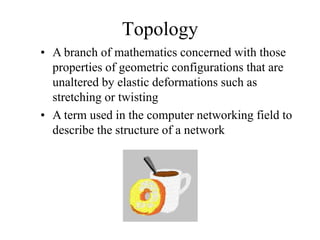
  • 274.
    IEEE 802.3 GigabitEthernet 1000BaseX 1000BaseSX 1000BaseLX 1000BaseCX 1000BaseT 2 multimode optical fibers 2 multimode or single-mode 2 pairs STP 4 pairs Category-5 UTP using shortwave laser optics optical fibers using longwave 25 meters 100 meters 550 meters laser optics 550 meters multimode, 5000 meters single-mode
  • 275.
    IEEE 802.3 10-GbpsEthernet 10GBaseX 10GBaseLX4 10GBaseS 10GBaseL 10GBaseE Multimode or single-mode Multimode optical Single-mode Single-mode optical fibers fibers optical fibers optical fibers 300 meters multimode, 300 meters 10 km 40 km 10 km single-mode
  • 276.
    Metro Ethernet • Serviceoffered by providers and carriers that traditionally had only classic WAN offerings • The customer can use a standard Ethernet interface to reach a MAN or WAN • The customer can add bandwidth as needed with a simple configuration change
  • 277.
    Long-Reach Ethernet • Enablesthe use of Ethernet over existing, unconditioned, voice-grade copper twisted- pair cabling • Used to connect buildings and rooms within buildings – Rural areas – Old cities where upgrading cabling is impractical – Multi-unit structures such as hotels, apartment complexes, business complexes, and government agencies
  • 278.
    Cisco’s EtherChannel Data Center Switch 800 Mbps EtherChannel West Fiber Run East Fiber Run 400 Mbps 400 Mbps Wiring Closet Switch
  • 279.
    Internetworking Devices for Campus Networks • Hubs (becoming obsolete) • Switches • Routers • Wireless access points • Wireless bridges
  • 280.
    Selection Criteria for Internetworking Devices • The number of ports • Processing speed • The amount of memory • Latency when device relays data • Throughput when device relays data • LAN and WAN technologies supported • Media supported
  • 281.
    More Selection Criteriafor Internetworking Devices • Cost • Ease of configuration and management • MTBF and MTTR • Support for hot-swappable components • Support for redundant power supplies • Quality of technical support, documentation, and training • Etc.
  • 282.
    Summary • Once thelogical design is completed, the physical design can start • A major task during physical design is selecting technologies and devices for campus networks – Media – Data-link layer technology – Internetworking devices • Also, at this point, the logical topology design can be developed further by specifying cabling topologies
  • 283.
    Review Questions • Whatare three fundamental media types used in campus networks? • What selection criteria can you use to select an Ethernet variety for your design customer? • What selection criteria can you use when purchasing internetworking devices for your design customer? • Some people think Metro Ethernet will replace traditional WANs. Do you agree or disagree and why?
  • 284.
    Top-Down Network Design Chapter Eleven Selecting Technologies and Devices for Enterprise Networks
  • 285.
    Enterprise Technologies and Devices • Remote access networks • Wide area networks (WANs) • Devices – End user remote access devices – Central site remote access devices – VPN concentrators – Routers
  • 286.
    Selection Criteria • Business requirements and constraints • Cost • Technical goals • Bandwidth requirements • QoS requirements • Network topology • Traffic flow and load • Etc.
  • 287.
    Remote Access Technologies • The Point-to-Point Protocol (PPP) • Integrated Services Digital Network (ISDN) • Cable modems • Digital Subscriber Line (DSL)
  • 288.
    Point-to-Point Protocol (PPP) •Used with synchronous, asynchronous, dial- up, and ISDN links • Defines encapsulation scheme for transport of different network-layer protocols • Supports authentication: – Password Authentication Protocol (PAP) – Challenge Handshake Authentication Protocol (CHAP) • CHAP more secure than PAP
  • 289.
    PPP Layers Network Control Protocol (NCP) Link Control Protocol (LCP) Encapsulation based on High-Level Data-Link Control Protocol (HDLC) Physical Layer
  • 290.
    Multichassis Multilink PPP Stack group ISDN Offload server Analog
  • 291.
    CHAP RemoteNode Access Server Connect Database of Users and Challenge Passwords Name: 760_1 Password: sfy45 Name: 760_1 Hashed Response Password: sfy45 Name: 760_2 Accept or Deny Password: kingsford
  • 292.
    ISDN • Digital data-transportservice offered by regional telephone carriers (telcos) • Circuit-switched service that carries voice and data • Cost-effective remote-access solution for telecommuters and remote offices – Cost of an ISDN circuit is usually based on a monthly fee plus usage time • Good choice as a backup link for another type of link, for example, Frame Relay
  • 293.
    ISDN Interfaces Basic Rate Interface (BRI) 64 Kbps 2B 64 Kbps } 144 Kbps D 16 Kbps Primary Rate Interface (PRI) 64 Kbps 1.544 Mbps in U.S. 23B or 30B 64 Kbps } 2.048 Mbps in Europe D
  • 294.
    ISDN Components Non-ISDN R S/T U device TA NT1 To ISDN (TE2) 4-wire 2-wire service circuit circuit ISDN S/T U To ISDN device NT1 service (TE1) ISDN S T U To ISDN device NT2 NT1 service (TE1) U ISDN device (TE1) To ISDN with built-in NT1 service NT1
  • 295.
    Cable Modem Service •Operates over the coax cable used by cable TV • Much faster than analog modems, and usually much faster than ISDN (depending on how many users share the cable) – 25 to 50 Mbps downstream from the head end – 2 to 3 Mbps upstream from end users • Standard = Data Over Cable Service Interface Specification (DOCSIS)
  • 296.
    DSL • High-speed digitaldata traffic over ordinary telephone wires • Sophisticated modulation schemes mean higher speeds than ISDN – Speeds range from 1.544 to 9 Mbps • Actual bandwidth depends on type of DSL service, DSL modem, and many physical- layer factors • Asymmetric DSL (ADSL) very popular – Downstream faster than upstream
  • 297.
    WAN Technologies • Leased lines • Synchronous Optical Network (SONET) • Frame Relay • Asynchronous Transfer Mode (ATM)
  • 298.
    Leased Lines • Dedicateddigital, copper circuits that a customer leases from a carrier for a predetermined amount of time, usually for months or years • Speeds range from 64 Kbps to 45 Mbps • Enterprises use leased lines for both voice and data traffic
  • 299.
    The North AmericanDigital Hierarchy Signal Capacity Number of Colloquial Name DS0s DS0 64 Kbps 1 Channel DS1 1.544 Mbps 24 T-1 DS1C 3.152 Mbps 48 T-1C DS2 6.312 Mbps 96 T-2 DS3 44.736 Mbps 672 T-3 DS4 274.176 Mbps 4032 T-4
  • 300.
    Synchronous Optical Network (SONET) • Physical-layer specification for high-speed synchronous transmission of packets or cells over fiber-optic cabling • Service providers and carriers make wide use of SONET in their internal networks • Gaining popularity within private networks
  • 301.
    SONET Optical Carrier(OC) Levels aka Synchronous Transport Signal (STS) Levels STS Rate OC Level Speed STS-1 OC-1 51.84 Mbps STS-3 OC-3 155.52 Mbps STS-12 OC-12 622.08 Mbps STS-24 OC-24 1.244 Gbps STS-48 OC-48 2.488 Gbps STS-96 OC-96 4.976 Gbps STS-192 OC-192 9.952 Gbps
  • 302.
    Typical SONET Topology SONET Multiplexer Backup Pair Working Pair
  • 303.
    Frame Relay • Industry-standarddata-link-layer protocol for transporting traffic across wide-area virtual circuits • Optimized for efficiency on circuits with low error rates • Attractively-priced in most parts of the world • Carriers agree to forward traffic at a Committed Information Rate (CIR)
  • 304.
    Frame Relay (continued) To Router B: DLCI 100 To Router A: DLCI 200 Router A Router B Virtual Circuit (VC)
  • 305.
    Frame Relay Hub-and-Spoke Uses Subinterfaces hostname centralsite interface serial 0 Central-Site Router encapsulation frame-relay interface serial 0.1 DLCI 100 DLCI 200 ip address 10.0.1.1 255.255.255.0 frame-relay interface-dlci 100 interface serial 0.2 ip address 10.0.2.1 255.255.255.0 frame-relay interface-dlci 200
  • 306.
    Asynchronous Transfer Mode (ATM) • Used in service provider internal networks • Gaining popularity within private networks, both WANs and sometimes LANs • Supports very high bandwidth requirements – Copper cabling: 45 Mbps or more – Fiber-optic cabling: OC-192 (9.952 Gbps) and beyond, especially if technologies such as wave-division multiplexing (WDM) are used
  • 307.
    ATM (continued) • Providesefficient sharing of bandwidth among applications with various Quality of Service (QoS) requirements – Cell-based system inherently better for QoS than frames • Application can specify upon connection establishment the QoS it requires • Peak and minimum cell rates, cell-loss ratio, and cell-transfer delay
  • 308.
    Ethernet over ATM •ATM router interfaces are expensive • Some providers allow a customer to use an Ethernet interface to access the provider’s ATM WAN • May require a converter • Expected to gain popularity because it has the advantages of both worlds – Easy-to-use LAN – QoS-aware WAN
  • 309.
    Selection Criteria forRemote Access Devices • Support for VPN features • Support for NAT • Reliability • Cost • Ease of configuration and management • Support for one or more high-speed Ethernet interfaces • If desired, wireless support • Etc.
  • 310.
    Selection Criteria forVPN Concentrators • Support for: – Tunneling protocols such as IPSec, PPTP, and L2TP – Encryption algorithms such as 168-bit Triple DES, Microsoft Encryption (MPPE), RC4, AES – Authentication algorithms, including MD5, SHA-1, HMAC – Network system protocols, such as DNS, RADIUS, Kerberos, LDAP – Routing protocols – Certificate authorities – Network management using SSH or HTTP with SSL – Etc.
  • 311.
    Selection Criteria forEnterprise Routers • Number of ports • Processing speed • Media and technologies supported • MTTR and MTBF • Throughput • Optimization features • Etc
  • 312.
    Selection Criteria fora WAN Service Provider • Extent of services and technologies • Geographical areas covered • Reliability and performance characteristics of the provider’s internal network • The level of security offered by the provider • The level of technical support offered by the provider • The likelihood that the provider will continue to stay in business
  • 313.
    Selecting a Provider(continued) • The provider’s willingness to work with you to meet your needs • The physical routing of network links • Redundancy within the network • The extent to which the provider relies on other providers for redundancy • The level of oversubscription on the network • QoS support • Etc.
  • 314.
    Summary • A majortask during the physical design phase is selecting technologies and devices for enterprise networks – Remote access networks – WANs – Service providers – Devices • End user remote access devices • Central site remote access devices • VPN concentrators • Routers
  • 315.
    Review Questions • Compareand contrast technologies for supporting remote users. • Compare and contrast WAN technologies. • What selection criteria can you use when purchasing internetworking devices for enterprise network customers? • What criteria can you use when selecting a WAN service provider?
  • 316.
    Top-Down Network Design Chapter Twelve Testing Your Network Design
  • 317.
    Reasons to Test •Verify that the design meets key business and technical goals • Validate LAN and WAN technology and device selections • Verify that a service provider provides the agreed-up service • Identify bottlenecks or connectivity problems • Determine optimization techniques that will be necessary
  • 318.
    Testing Your NetworkDesign • Use industry testing services • Build and test a prototype system • Use third-party and Cisco tools
  • 319.
    Industry Testing Services •The Interoperability Lab at the University of New Hampshire (IOL) • ICSA Labs • Miercom Labs • KeyLabs • The Tolly Group
  • 320.
    Scope of aPrototype System • It’s not generally practical to implement a full-scale system • A prototype should verify important capabilities and functions that might not perform adequately • Risky functions include complex, intricate functions and functions that were influenced by the need to make tradeoffs
  • 321.
    Components of aTest Plan • Test objectives and acceptance criteria • The types of tests that will be run • Network equipment and other resources required • Testing scripts • The timeline and milestones for the testing project
  • 322.
    Test Objectives andAcceptance Criteria • Specific and concrete • Based on business and technical goals • Clear criteria for declaring that a test passed or failed • Avoid biases and preconceived notions about outcomes • If appropriate, reference a baseline
  • 323.
    Types of Tests • Application response-time tests • Throughput tests • Availability tests • Regression tests
  • 324.
    Resources Needed forTesting • Scheduled time in a lab either at your site or the customer’s site • Power, air conditioning, rack space, and other physical resources • Help from coworkers or customer staff • Help from users to test applications • Network addresses and names
  • 325.
    Example Test Script Workstations Server 1 Firewall Network A Network B Protocol Protocol Analyzer Analyzer
  • 326.
    Example Test Script(continued) • Test objective. Assess the firewall’s capability to block Application ABC traffic, during both light and moderately heavy load conditions. • Acceptance criterion. The firewall should block the TCP SYN request from every workstation on Network A that attempts to set up an Application ABC session with Server 1 on Network B. The firewall should send each workstation a TCP RST (reset) packet.
  • 327.
    Example Test Script(continued) 1. Start capturing network traffic on the protocol analyzer on Network A. 2. Start capturing network traffic on the protocol analyzer on Network B. 3. Run Application ABC on a workstation located on Network A and access Server 1 on Network B. 4. Stop capturing network traffic on the protocol analyzers. 5. Display data on Network A’s protocol analyzer and verify that the analyzer captured a TCP SYN packet from the workstation. Verify that the network layer destination address is Server 1 on Network B, and the destination port is port 1234 (the port number for Application ABC). Verify that the firewall responded to the workstation with a TCP RST packet.
  • 328.
    Example Test Script(continued) 6. Display data on Network B’s protocol analyzer and verify that the analyzer did not capture any Application- ABC traffic from the workstation. 7. Log the results of the test in the project log file. 8. Save the protocol-analyzer trace files to the project trace- file directory. 9. Gradually increase the workload on the firewall, by increasing the number of workstations on Network A one at a time, until 50 workstations are running Application ABC and attempting to reach Server 1. Repeat steps 1 through 8 after each workstation is added to the test.
  • 329.
    Tools for Testinga Network Design • Network-management and monitoring tools • Traffic generation tools • Modeling and simulation tools • QoS and service-level management tools • http://www.topdownbook.com/tools.html
  • 330.
    Summary • An untestednetwork design probably won’t work • It’s often not practical to test the entire design • However, by using industry testing services and tools, as well as your own testing scripts, you can (and should) test the complex, risky, and key components of a network design
  • 331.
    Review Questions • Whyis it important to test your network design? • Why is regression testing important? • What are some characteristics of well-written acceptance criteria? • What are some characteristics of a good network simulation tool?
  • 332.
    Top-Down Network Design Chapter Thirteen Optimizing Your Network Design
  • 333.
    Reasons to Optimize •Meet key business and technical goals • Use bandwidth efficiently • Control delay and jitter • Reduce serialization delay • Support preferential service for essential applications • Meet Quality of Service (QoS) requirements
  • 334.
    IP Multicast HelpsOptimize Bandwidth Usage • With IP multicast, you can send a high- volume multimedia stream just once instead of once for each user • Requires support for – Multicast addressing – Multicast registration (IGMP) – Multicast routing protocols
  • 335.
    IP Multicast Addressing •Uses Class D multicast destination address – 224.0.0.0 to 239.255.255.255 • Converted to a MAC-layer multicast destination address – The low-order 23 bits of the Class D address become the low-order 23 bits of the MAC-layer address – The top 9 bits of the Class D address are not used – The top 25 bits of the MAC-layer address are 0x01:00:5E followed by a binary 0
  • 336.
    Internet Group Management Protocol (IGMP) • Allows a host to join a multicast group • Host transmits a membership-report message to inform routers on the segment that traffic for a group should be multicast to the host’s segment • IGMPv2 has support for a router more quickly learning that the last host on a segment has left a group
  • 337.
    Multicast Routing Protocols •Becoming obsolete – Multicast OSPF (MOSPF) – Distance Vector Multicast Routing Protocol (DVMRP) • Still used – Protocol Independent Multicast (PIM) • Dense-Mode PIM • Sparse-Mode PIM
  • 338.
    Reducing Serialization Delay •Link-layer fragmentation and interleaving – Breaks up and reassembles frames – Multilink PPP – Frame Relay FRF.12 • Compressed Real Time Protocol – RTP is used for voice and video – Compressed RTP compresses the RTP, UDP, and IP header from 40 bytes to 2 to 4 bytes
  • 339.
    A Few Technologiesfor Meeting QoS Requirements • IETF controlled load service • IETF guaranteed service • IP precedence • IP differentiated services
  • 340.
    IP Type ofService Field • The type of service field in the IP header is divided into two subfields – The 3-bit precedence subfield supports eight levels of priority – The 4-bit type of service subfield supports four types of service • Although IP precedence is still used, the type of service subfield was hardly ever used
  • 341.
    IP Type ofService Field Type of Service Subfield Bit 0 3 4 5 6 7 D = Delay T = Throughput Precedence D T R C 0 R = Reliability C = Cost Bit 0 8 15 24 31 Version Header Type of Service Total Length Length Identification Flags Fragment Offset Time to Live Protocol Header Checksum Source IP Address Destination IP Address Options Padding
  • 342.
    IP Differentiated Services(DS) Field • RFC 2474 redefines the type of service field as the Differentiated Services (DS) field – Bits 0 through 5 are the Differentiated Services Codepoint (DSCP) subfield • Has essentially the same goal as the precedence subfield • Influences queuing and packet dropping decisions for IP packets at a router output interface – Bits 6 and 7 are the Explicit Congestion Notification (ECN) subfield
  • 343.
    IP Differentiated Services(DS) Field 0 6 Differentiated Services Codepoint Explicit Congestion Notification 0 8 15 24 31 Version Header Differentiated Services Total Length Length
  • 344.
    Classifying LAN Traffic • IEEE 802.1p • Classifies traffic at the data-link layer • Supports eight classes of service • A switch can have a separate queue for each class and service the highest-priority queues first
  • 345.
    Cisco Switching Techniques •Process switching • Fast switching • Autonomous, silicon, and optimum switching • NetFlow switching • Cisco Express Forwarding (CEF)
  • 346.
    Cisco Queuing Services • First in, first out (FIFO) queuing • Priority queuing • Custom queuing • Weighted fair queuing (WFQ) • Class-based WFQ (CBWFQ) • Low latency queuing (LLQ)
  • 347.
    START Priority Queuing NO Packet in high queue? NO Packet in medium YES queue? NO Packet in normal YES queue? NO Packet in low YES queue? YES Dispatch Packet Continue
  • 348.
    Custom Queuing START (with Queue 1) NO Packet in Queue? YES Reached YES transmission NO Next Queue Dispatch Packet window size?
  • 349.
    Low-Latency Queuing • Onequeue always gets the green light – Use this for voice • Combine this with class-based weighted fair queuing – Define traffic classes based on protocols, access control lists, and input interfaces – Assign characteristics to classes such as bandwidth required and the maximum number of packets that can be queued for the class
  • 350.
    Random Early Detection(RED) • Congestion avoidance rather than congestion management • Monitors traffic loads and randomly discards packets if congestion increases • Source nodes detect dropped packets and slow down – Works best with TCP • Weighted Random Early Detection • Cisco’s implementation uses IP precedence or the DS field instead of just randomly dropping packets
  • 351.
    Traffic Shaping • Manageand control network traffic to avoid bottlenecks • Avoid overwhelming a downstream router or link • Reduce outbound traffic for a flow to a configured bit rate – Queue bursts of traffic for that flow
  • 352.
    Committed Access Rate(CAR) • Cisco feature for classifying and policing traffic on an incoming interface • Supports policies regarding how traffic that exceeds a certain bandwidth allocation should be handled • Can drop a packet or change the IP precedence or DSCP bits
  • 353.
    Summary • Optimization providesthe high bandwidth, low delay, and controlled jitter required by many critical business applications • To minimize bandwidth utilization by multimedia applications, use IP multicast • To reduce serialization delay, use link fragmentation and compressed RTP • To support QoS and optimize performance, use IP precedence, DSCP, 802.1p. advanced switching and queuing methods, RED, CAR, etc.
  • 354.
    Review Questions • Whyis it important to optimize your network? • What has become of the IP type of service field? • What are some methods for marking packets to identify the need for priority handling? • Compare and contrast Cisco queuing services.
  • 355.
    Top-Down Network Design Chapter Fourteen Documenting Your Network Design
  • 356.
    Documenting Your Design •If you are given a request for proposal (RFP), respond to the request in the exact format that the RFP specifies • If no RFP, you should still write a design document – Describe your customer’s requirements and how your design meets those requirements – Document the budget for the project – Explain plans for implementing the design
  • 357.
    Typical RFP ResponseTopics • A network topology for the new design • Information on the protocols, technologies, and products that form the design • An implementation plan • A training plan • Support and service information • Prices and payment options • Qualifications of the responding vendor or supplier • Recommendations from other customers • Legal contractual terms and conditions
  • 358.
    Contents of aNetwork Design Document • Executive summary • Project goal • Project scope • Design requirements • Current state of the network • New logical and physical design • Results of network design testing • Implementation plan • Project budget
  • 359.
    Design Requirements • Businessgoals explain the role the network design will play in helping an organization succeed • Technical goals include scalability, performance, security, manageability, usability, adaptability, and affordability
  • 360.
    Logical and PhysicalDesign • Logical design – Topology – Models for addressing and naming – Switching and routing protocols – Security strategies – Network management strategies • Physical design – Actual technologies and devices
  • 361.
    Implementation Plan • Recommendationsfor deploying the network design • Project schedule – Including any dates and times for service provider installations • Any plans for outsourcing • Training • Risks • A fallback plan if the implementation should fail • A plan for evolving the design as new requirements arise
  • 362.
    Possible Appendixes • Detailed topology maps • Device configurations • Addressing and naming details • Network design testing results • Contact information • Pricing and payment options • More information about the company that is presenting the design – Annual reports, product catalogs, press releases • Legal contractual terms and conditions
  • 363.
    Summary • When acustomer provides an RFP, make sure to follow the prescribed format • When not bound by an RFP, develop a design document that describes requirements, the existing network, the logical and physical design, an implementation plan, and the budget • Be sure to include an executive summary • In some cases, you should also include appendixes with detailed information
  • 364.
    Review Questions • Whyis it important to document your network design? • Why is it important to submit an RFP proposal in the exact format prescribed? • What are the major topics in a design document? • What are some possible appendixes for a design document?