Pre-Production
Style sheet
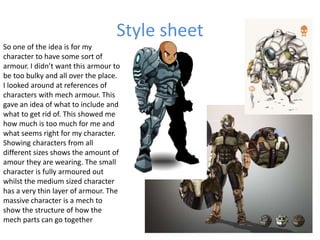
So one of the idea is for my
character to have some sort of
armour. I didn’t want this armour to
be too bulky and all over the place.
I looked around at references of
characters with mech armour. This
gave an idea of what to include and
what to get rid of. This showed me
how much is too much for me and
what seems right for my character.
Showing characters from all
different sizes shows the amount of
amour they are wearing. The small
character is fully armoured out
whilst the medium sized character
has a very thin layer of armour. The
massive character is a mech to
show the structure of how the
mech parts can go together
Style sheet
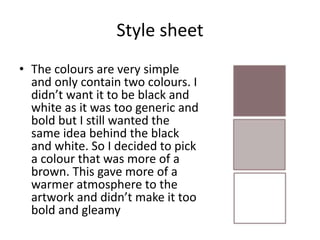
• The colours are very simple
and only contain two colours. I
didn’t want it to be black and
white as it was too generic and
bold but I still wanted the
same idea behind the black
and white. So I decided to pick
a colour that was more of a
brown. This gave more of a
warmer atmosphere to the
artwork and didn’t make it too
bold and gleamy
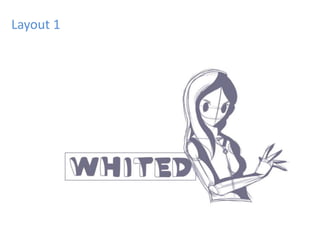
Layout 1
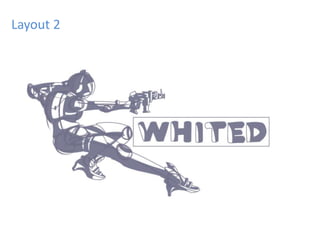
Layout 2
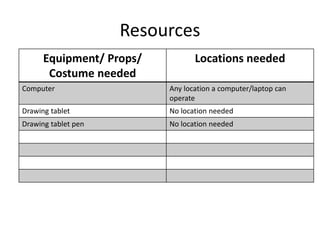
Resources
Equipment/ Props/
Costume needed
Locations needed
Computer Any location a computer/laptop can
operate
Drawing tablet No location needed
Drawing tablet pen No location needed
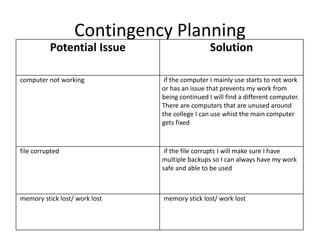
Contingency Planning
Potential Issue Solution
computer not working if the computer I mainly use starts to not work
or has an issue that prevents my work from
being continued I will find a different computer.
There are computers that are unused around
the college I can use whist the main computer
gets fixed
file corrupted if the file corrupts I will make sure I have
multiple backups so I can always have my work
safe and able to be used
memory stick lost/ work lost memory stick lost/ work lost
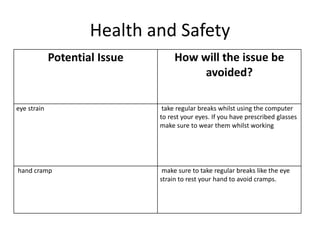
Health and Safety
Potential Issue How will the issue be
avoided?
eye strain take regular breaks whilst using the computer
to rest your eyes. If you have prescribed glasses
make sure to wear them whilst working
hand cramp make sure to take regular breaks like the eye
strain to rest your hand to avoid cramps.

Pre production (lvl 3 fmp)

  • 1.
  • 2.
    Style sheet So oneof the idea is for my character to have some sort of armour. I didn’t want this armour to be too bulky and all over the place. I looked around at references of characters with mech armour. This gave an idea of what to include and what to get rid of. This showed me how much is too much for me and what seems right for my character. Showing characters from all different sizes shows the amount of amour they are wearing. The small character is fully armoured out whilst the medium sized character has a very thin layer of armour. The massive character is a mech to show the structure of how the mech parts can go together
  • 3.
    Style sheet • Thecolours are very simple and only contain two colours. I didn’t want it to be black and white as it was too generic and bold but I still wanted the same idea behind the black and white. So I decided to pick a colour that was more of a brown. This gave more of a warmer atmosphere to the artwork and didn’t make it too bold and gleamy
  • 4.
  • 5.
  • 6.
    Resources Equipment/ Props/ Costume needed Locationsneeded Computer Any location a computer/laptop can operate Drawing tablet No location needed Drawing tablet pen No location needed
  • 7.
    Contingency Planning Potential IssueSolution computer not working if the computer I mainly use starts to not work or has an issue that prevents my work from being continued I will find a different computer. There are computers that are unused around the college I can use whist the main computer gets fixed file corrupted if the file corrupts I will make sure I have multiple backups so I can always have my work safe and able to be used memory stick lost/ work lost memory stick lost/ work lost
  • 8.
    Health and Safety PotentialIssue How will the issue be avoided? eye strain take regular breaks whilst using the computer to rest your eyes. If you have prescribed glasses make sure to wear them whilst working hand cramp make sure to take regular breaks like the eye strain to rest your hand to avoid cramps.

Editor's Notes

  • #3 Explore colours, fonts and image styles similar to what you want to produce. Discuss all three elements in relation to why you chose them and where you may use them in your project. Go over as many pages as you need to
  • #5 Mock up of a potential design using the colours and fonts established in your style sheet and sourced images Alter this slide to make it appropriate for your planned product types. Add further layout slides to create at least one for each product you plan to make.
  • #6 Mock up of a potential design using the colours and fonts established in your style sheet and sourced images. Alter this slide to make it appropriate for your planned product types. Add further layout slides to create at least one for each product you plan to make.