Pre-Production
Jack Hickman
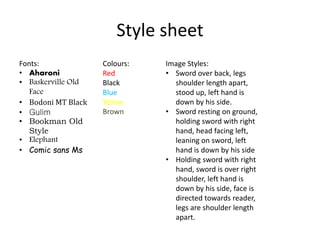
Style sheet
Fonts:
• Aharoni
• Baskerville Old
Face
• Bodoni MT Black
• Gulim
• Bookman Old
Style
• Elephant
• Comic sans Ms
Colours:
Red
Black
Blue
Yellow
Brown
Image Styles:
• Sword over back, legs
shoulder length apart,
stood up, left hand is
down by his side.
• Sword resting on ground,
holding sword with right
hand, head facing left,
leaning on sword, left
hand is down by his side
• Holding sword with right
hand, sword is over right
shoulder, left hand is
down by his side, face is
directed towards reader,
legs are shoulder length
apart.
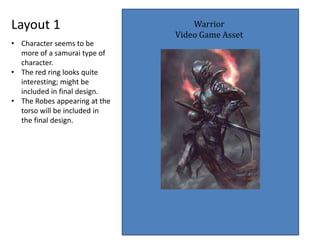
Layout 1 Warrior
Video Game Asset
• Character seems to be
more of a samurai type of
character.
• The red ring looks quite
interesting; might be
included in final design.
• The Robes appearing at the
torso will be included in
the final design.
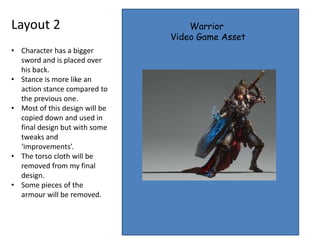
Layout 2 Warrior
Video Game Asset
• Character has a bigger
sword and is placed over
his back.
• Stance is more like an
action stance compared to
the previous one.
• Most of this design will be
copied down and used in
final design but with some
tweaks and
‘improvements’.
• The torso cloth will be
removed from my final
design.
• Some pieces of the
armour will be removed.
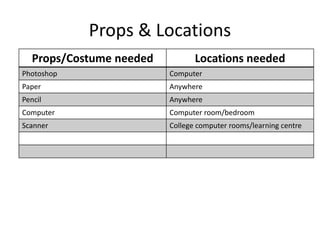
Props & Locations
Props/Costume needed Locations needed
Photoshop Computer
Paper Anywhere
Pencil Anywhere
Computer Computer room/bedroom
Scanner College computer rooms/learning centre
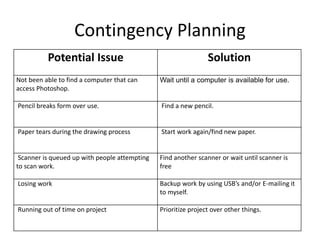
Contingency Planning
Potential Issue Solution
Not been able to find a computer that can
access Photoshop.
Wait until a computer is available for use.
Pencil breaks form over use. Find a new pencil.
Paper tears during the drawing process Start work again/find new paper.
Scanner is queued up with people attempting
to scan work.
Find another scanner or wait until scanner is
free
Losing work Backup work by using USB’s and/or E-mailing it
to myself.
Running out of time on project Prioritize project over other things.
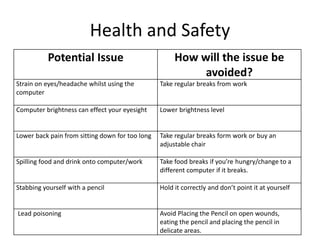
Health and Safety
Potential Issue How will the issue be
avoided?
Strain on eyes/headache whilst using the
computer
Take regular breaks from work
Computer brightness can effect your eyesight Lower brightness level
Lower back pain from sitting down for too long Take regular breaks form work or buy an
adjustable chair
Spilling food and drink onto computer/work Take food breaks if you’re hungry/change to a
different computer if it breaks.
Stabbing yourself with a pencil Hold it correctly and don’t point it at yourself
Lead poisoning Avoid Placing the Pencil on open wounds,
eating the pencil and placing the pencil in
delicate areas.
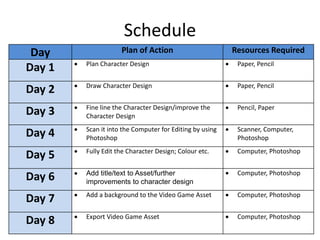
Schedule
Day Plan of Action Resources Required
Day 1  Plan Character Design  Paper, Pencil
Day 2  Draw Character Design  Paper, Pencil
Day 3  Fine line the Character Design/improve the
Character Design
 Pencil, Paper
Day 4  Scan it into the Computer for Editing by using
Photoshop
 Scanner, Computer,
Photoshop
Day 5  Fully Edit the Character Design; Colour etc.  Computer, Photoshop
Day 6  Add title/text to Asset/further
improvements to character design
 Computer, Photoshop
Day 7  Add a background to the Video Game Asset  Computer, Photoshop
Day 8  Export Video Game Asset  Computer, Photoshop

5. pre production

  • 1.
  • 2.
    Style sheet Fonts: • Aharoni •Baskerville Old Face • Bodoni MT Black • Gulim • Bookman Old Style • Elephant • Comic sans Ms Colours: Red Black Blue Yellow Brown Image Styles: • Sword over back, legs shoulder length apart, stood up, left hand is down by his side. • Sword resting on ground, holding sword with right hand, head facing left, leaning on sword, left hand is down by his side • Holding sword with right hand, sword is over right shoulder, left hand is down by his side, face is directed towards reader, legs are shoulder length apart.
  • 3.
    Layout 1 Warrior VideoGame Asset • Character seems to be more of a samurai type of character. • The red ring looks quite interesting; might be included in final design. • The Robes appearing at the torso will be included in the final design.
  • 4.
    Layout 2 Warrior VideoGame Asset • Character has a bigger sword and is placed over his back. • Stance is more like an action stance compared to the previous one. • Most of this design will be copied down and used in final design but with some tweaks and ‘improvements’. • The torso cloth will be removed from my final design. • Some pieces of the armour will be removed.
  • 5.
    Props & Locations Props/Costumeneeded Locations needed Photoshop Computer Paper Anywhere Pencil Anywhere Computer Computer room/bedroom Scanner College computer rooms/learning centre
  • 6.
    Contingency Planning Potential IssueSolution Not been able to find a computer that can access Photoshop. Wait until a computer is available for use. Pencil breaks form over use. Find a new pencil. Paper tears during the drawing process Start work again/find new paper. Scanner is queued up with people attempting to scan work. Find another scanner or wait until scanner is free Losing work Backup work by using USB’s and/or E-mailing it to myself. Running out of time on project Prioritize project over other things.
  • 7.
    Health and Safety PotentialIssue How will the issue be avoided? Strain on eyes/headache whilst using the computer Take regular breaks from work Computer brightness can effect your eyesight Lower brightness level Lower back pain from sitting down for too long Take regular breaks form work or buy an adjustable chair Spilling food and drink onto computer/work Take food breaks if you’re hungry/change to a different computer if it breaks. Stabbing yourself with a pencil Hold it correctly and don’t point it at yourself Lead poisoning Avoid Placing the Pencil on open wounds, eating the pencil and placing the pencil in delicate areas.
  • 8.
    Schedule Day Plan ofAction Resources Required Day 1  Plan Character Design  Paper, Pencil Day 2  Draw Character Design  Paper, Pencil Day 3  Fine line the Character Design/improve the Character Design  Pencil, Paper Day 4  Scan it into the Computer for Editing by using Photoshop  Scanner, Computer, Photoshop Day 5  Fully Edit the Character Design; Colour etc.  Computer, Photoshop Day 6  Add title/text to Asset/further improvements to character design  Computer, Photoshop Day 7  Add a background to the Video Game Asset  Computer, Photoshop Day 8  Export Video Game Asset  Computer, Photoshop

Editor's Notes

  • #3 Explore colours, fonts and image styles similar to what you want to produce. Discuss all three elements in relation to why you chose them and where you may use them in your project. Go over as many pages as you need to
  • #4 Mock up of a potential design using the colours and fonts established in your style sheet and sourced images
  • #5 Mock up of a potential design using the colours and fonts established in your style sheet and sourced images