




Maintenance of analyzer Sysmex-CA 1500 Presented by  Saima fazal B.S (3 rd  yr )
INTRODUCTION The Sysmex CA-1500 System is a fully-automated blood coagulation analyzer It can quickly analyze large quantities of samples with a high-degree of accuracy  The analyzed data can be retained as stored data, displayed, or printed  ABOUT INSTRUMENT
 
Features Flexible communication options for new and current users of CA systems. •  Up to 120 tests per hour  •  Authentic random access analysis. •  Complete quality control software  Detection for clotting, chromogenic and immunoturbidimetric assays
Maintenance Why maintenance is necessary? To insure the instrument in optimal operating condition it requires periodic maintenance which includes : Daily maintenance Weekly maintenance As-needed maintenance
Daily maintenance clean the probes Discard the used reaction tubes Discard waste Remove condensation from the reagent tray Check and discard trap chamber fluid Run controls
Weekly maintenance Prime the hydraulic line with rinse solution Clean the instrument As-needed maintenance Adjust the pressure
Daily maintenance Cleaning the probes: From the main menu screen ,press rinse probe key, the rinse probe screen will appear Set CA clean 1 to both the reagent holder A2 and A3 Probe cleaning will start
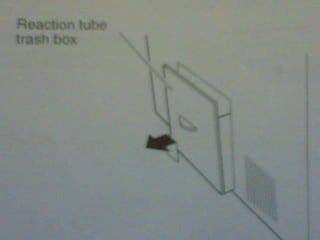
Discarding the used reaction tubes The used reaction tubes are automatically thrown in the trash box At completion of every 250 tests, or at least once every 24 hours, discard the used reaction tubes from the trash box and clean it with tap water
 
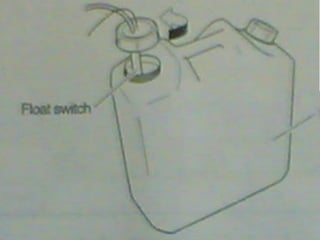
Discarding waste At completion of the day analysis, discard the waste fluid that has collected in the waste tank. If tank has becomes  full it will alarm a sound and a confirmation screen will appear Open the waste tank and discard the waste
 
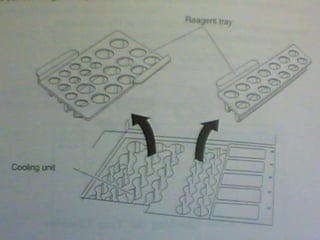
Removing condensation from tray After completion of the day’s analysis or at least once every 24 hours, check to see if condensation has formed on the reagent tray. Before cleaning the reagent trays, turn the power  OFF Failure to do so can result in electric shock
 
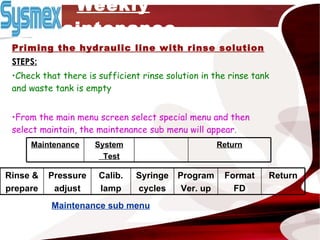
Weekly maintenance Priming the hydraulic line with rinse solution STEPS: Check that there is sufficient rinse solution in the rinse tank and waste tank is empty From the main menu screen select special menu and then select maintain, the maintenance sub menu will appear . Maintenance sub menu System Test Return Maintenance Return Format FD Program Ver. up Syringe cycles Calib. lamp Pressure adjust Rinse & prepare
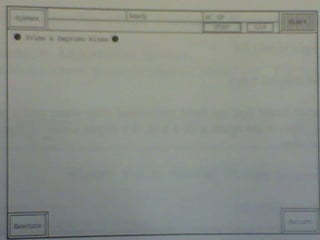
Select the Rinse and prepare key, the prime and Deprime execution  screen will appear. Then select execute key, priming will be start.
 
Cleaning the instrument Why we clean  the instrument? To ensure the instrument will be maintained in a good condition, clean it once a week . Which includes :  Cleaning instrument from exterior Cleaning instrument from interior
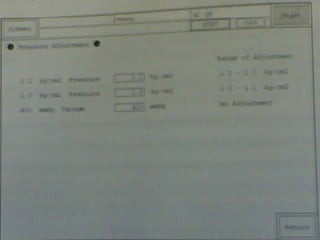
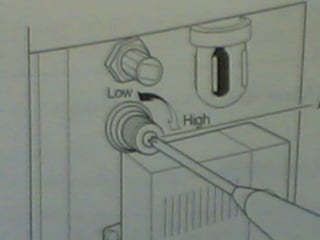
As needed maintenance Adjusting the pressure The pressure are adjusted 2.2 kg/cm and 0.1 kg/cm The pressure are constantly monitored by pressure sensor If an abnormality is detected, an error message will appear It any pressure related error message is displayed, check the  tubing connections for leaks. It nothing is found, adjust the pressure
 
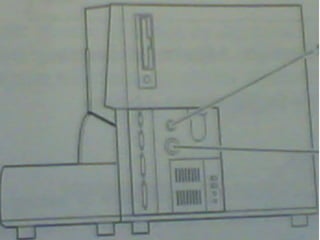
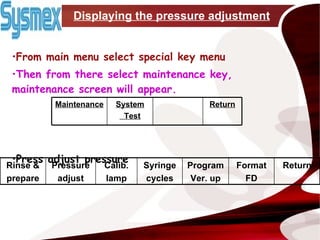
Displaying the pressure adjustment From main menu select special key menu Then from there select maintenance key, maintenance screen will appear.   Press adjust pressure System Test Return Maintenance Return Format FD Program Ver. up Syringe cycles Calib. lamp Pressure adjust Rinse & prepare
 
 
THANK YOU

Ppt

  • 1.
    Maintenance of analyzerSysmex-CA 1500 Presented by Saima fazal B.S (3 rd yr )
  • 2.
    INTRODUCTION The SysmexCA-1500 System is a fully-automated blood coagulation analyzer It can quickly analyze large quantities of samples with a high-degree of accuracy The analyzed data can be retained as stored data, displayed, or printed ABOUT INSTRUMENT
  • 3.
  • 4.
    Features Flexible communicationoptions for new and current users of CA systems. • Up to 120 tests per hour • Authentic random access analysis. • Complete quality control software Detection for clotting, chromogenic and immunoturbidimetric assays
  • 5.
    Maintenance Why maintenanceis necessary? To insure the instrument in optimal operating condition it requires periodic maintenance which includes : Daily maintenance Weekly maintenance As-needed maintenance
  • 6.
    Daily maintenance cleanthe probes Discard the used reaction tubes Discard waste Remove condensation from the reagent tray Check and discard trap chamber fluid Run controls
  • 7.
    Weekly maintenance Primethe hydraulic line with rinse solution Clean the instrument As-needed maintenance Adjust the pressure
  • 8.
    Daily maintenance Cleaningthe probes: From the main menu screen ,press rinse probe key, the rinse probe screen will appear Set CA clean 1 to both the reagent holder A2 and A3 Probe cleaning will start
  • 9.
    Discarding the usedreaction tubes The used reaction tubes are automatically thrown in the trash box At completion of every 250 tests, or at least once every 24 hours, discard the used reaction tubes from the trash box and clean it with tap water
  • 10.
  • 11.
    Discarding waste Atcompletion of the day analysis, discard the waste fluid that has collected in the waste tank. If tank has becomes full it will alarm a sound and a confirmation screen will appear Open the waste tank and discard the waste
  • 12.
  • 13.
    Removing condensation fromtray After completion of the day’s analysis or at least once every 24 hours, check to see if condensation has formed on the reagent tray. Before cleaning the reagent trays, turn the power OFF Failure to do so can result in electric shock
  • 14.
  • 15.
    Weekly maintenance Primingthe hydraulic line with rinse solution STEPS: Check that there is sufficient rinse solution in the rinse tank and waste tank is empty From the main menu screen select special menu and then select maintain, the maintenance sub menu will appear . Maintenance sub menu System Test Return Maintenance Return Format FD Program Ver. up Syringe cycles Calib. lamp Pressure adjust Rinse & prepare
  • 16.
    Select the Rinseand prepare key, the prime and Deprime execution screen will appear. Then select execute key, priming will be start.
  • 17.
  • 18.
    Cleaning the instrumentWhy we clean the instrument? To ensure the instrument will be maintained in a good condition, clean it once a week . Which includes : Cleaning instrument from exterior Cleaning instrument from interior
  • 19.
    As needed maintenanceAdjusting the pressure The pressure are adjusted 2.2 kg/cm and 0.1 kg/cm The pressure are constantly monitored by pressure sensor If an abnormality is detected, an error message will appear It any pressure related error message is displayed, check the tubing connections for leaks. It nothing is found, adjust the pressure
  • 20.
  • 21.
    Displaying the pressureadjustment From main menu select special key menu Then from there select maintenance key, maintenance screen will appear. Press adjust pressure System Test Return Maintenance Return Format FD Program Ver. up Syringe cycles Calib. lamp Pressure adjust Rinse & prepare
  • 22.
  • 23.
  • 24.