Online Conference
June 17th and 18th 2015
WWW.COLLAB365.EVENTS
Power Users Guide to Office 365
WWW.COLLAB365.EVENTS
Chirag Patel
Patel Consulting
chirag@patelconsulting.co.uk
Twitter : @techChirag
Facebook : Patel Consulting
LinkedIn : techChirag
 Worked with Office 365 since 2012,
SharePoint & SQL Server since 2001
 Business Applications, Upgrades,
Migrations, Solution Architecture
 Trusted Associate for Microsoft Partners
 Completed many London to Brighton
bike rides and London Duathlon events
WWW.COLLAB365.EVENTS
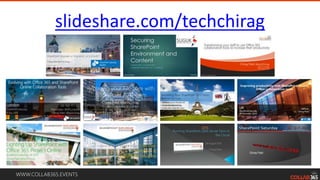
slideshare.com/techchirag
WWW.COLLAB365.EVENTS
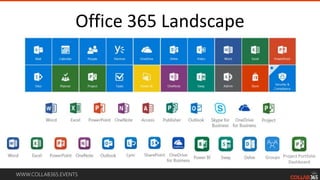
Office 365 Landscape
Groups Project Portfolio
Dashboard
WWW.COLLAB365.EVENTS
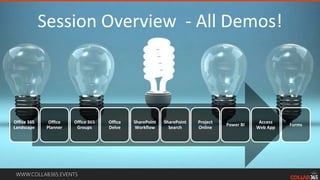
Session Overview - All Demos!
Office 365
Landscape
Office
Planner
Office 365
Groups
Office
Delve
SharePoint
Workflow
SharePoint
Search
Project
Online
Power BI
Access
Web App
Forms
WWW.COLLAB365.EVENTS
Power User?
I LIKE OFFICE 365
CONFIGURATION
COZ CUSTOMISATION HURTS
WWW.COLLAB365.EVENTS
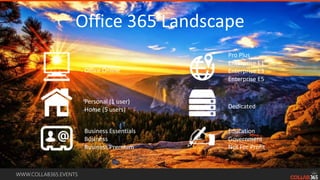
Office 365 Landscape
Office Online
Personal (1 user)
Home (5 users)
Business Essentials
Business
Business Premium
Dedicated
Pro Plus
Enterprise E1
Enterprise E3
Enterprise E5
Education
Government
Not For Profit
WWW.COLLAB365.EVENTS
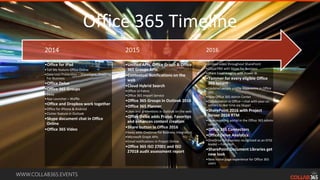
Office 365 Timeline
•Embed video throughout SharePoint
•Cloud PBX with Skype for Business
•Share Excel insights with Power BI
•Yammer for every eligible Office
365 tenant
•Updated people profile experience in Office
365
•New Office 365 Admin Center
•Collaboration in Office—chat with your co-
editors in real time via Skype!
•SharePoint 2016 with Project
Server 2016 RTM
•New reporting portal in the Office 365 admin
center
•Office 365 Connectors
•Office Delve Analytics
•OneDrive for Business recognized as an EFSS
leader – Forrester
•SharePoint Document Libraries get
new look
•New home page experience for Office 365
users
2016
•Unified APIs, Office Graph & Office
365 Groups APIs
•Contextual Notifications on the
web
•Cloud Hybrid Search
•Office UI Fabric
•Office 365 Import Service
•Office 365 Groups in Outlook 2016
•Office 365 Planner
•Likes and @Mentions in Outlook on the web
•Office Delve adds Praise, Favorites
and enhances content creation
•Share button in Office 2016
•Sway adds OneDrive for Business integration
•Microsoft Graph APIs
•Email notifications in Project Online
•Office 365 ISO 27001 and ISO
27018 audit assessment report
2015
•Office for iPad
•Tell Me feature Office Online
•Data Loss Prevention – SharePoint, OneDrive
For Business
•Office Delve
•Office 365 Groups
•Sway
•App Launcher – Waffle
•Office and Dropbox work together
•Office for iPhone & Android
•Clutter feature in Outlook
•Skype document chat in Office
Online
•Office 365 Video
2014
WWW.COLLAB365.EVENTS
Office Planner
WWW.COLLAB365.EVENTS
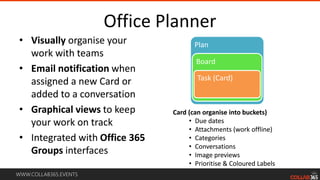
Office Planner
Plan
Board
Task (Card)
• Visually organise your
work with teams
• Email notification when
assigned a new Card or
added to a conversation
• Graphical views to keep
your work on track
• Integrated with Office 365
Groups interfaces
Card (can organise into buckets)
• Due dates
• Attachments (work offline)
• Categories
• Conversations
• Image previews
• Prioritise & Coloured Labels
• Visually organise your
work with teams
• Email notification when
assigned a new Card or
added to a conversation
• Graphical views to keep
your work on track
• Integrated with Office 365
Groups interfaces
Card (can organise into buckets)
• Due dates
• Attachments (work offline)
• Categories
• Conversations
• Image previews
• Prioritise & Coloured Labels
WWW.COLLAB365.EVENTS
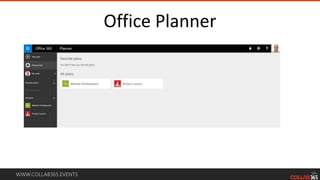
Office Planner
WWW.COLLAB365.EVENTS
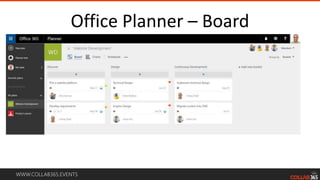
Office Planner – Board
WWW.COLLAB365.EVENTS
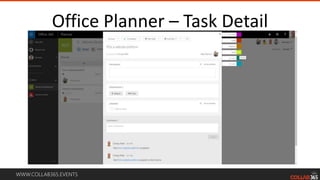
Office Planner – Task Detail
WWW.COLLAB365.EVENTS
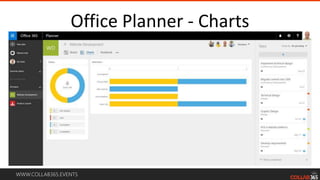
Office Planner - Charts
WWW.COLLAB365.EVENTS
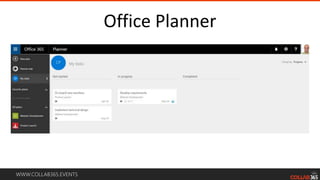
Office Planner
WWW.COLLAB365.EVENTS
Office 365 Groups
WWW.COLLAB365.EVENTS
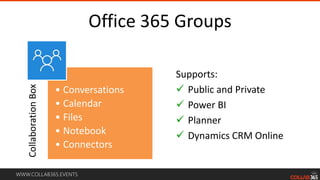
Office 365 Groups
Supports:
 Public and Private
 Power BI
 Planner
 Dynamics CRM Online
CollaborationBox
• Conversations
• Calendar
• Files
• Notebook
• Connectors
WWW.COLLAB365.EVENTS
Office 365 Groups
WWW.COLLAB365.EVENTS
Office 365 Groups
WWW.COLLAB365.EVENTS
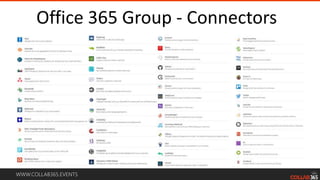
Office 365 Group - Connectors
WWW.COLLAB365.EVENTS
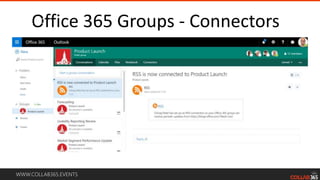
Office 365 Groups - ConnectorsDEMO
WWW.COLLAB365.EVENTS
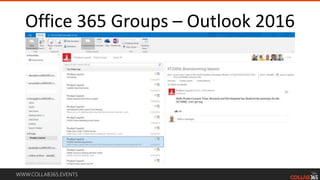
Office 365 Groups – Outlook 2016
WWW.COLLAB365.EVENTS
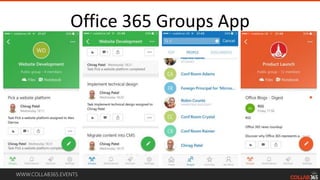
Office 365 Groups App
WWW.COLLAB365.EVENTS
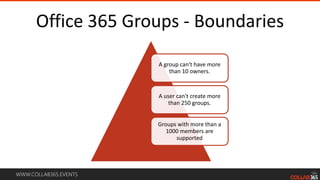
Office 365 Groups - Boundaries
A group can't have more
than 10 owners.
A user can't create more
than 250 groups.
Groups with more than a
1000 members are
supported
WWW.COLLAB365.EVENTS
Office Delve
WWW.COLLAB365.EVENTS
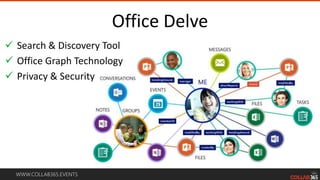
Office Delve
 Search & Discovery Tool
 Office Graph Technology
 Privacy & Security
WWW.COLLAB365.EVENTS
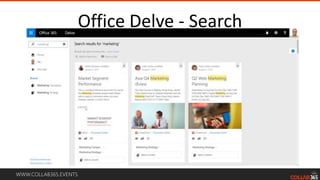
Office Delve - Search
WWW.COLLAB365.EVENTS
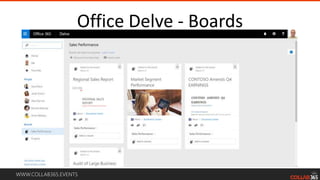
Office Delve - Boards
WWW.COLLAB365.EVENTS
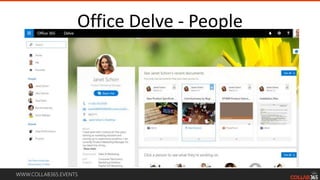
Office Delve - PeopleDEM
WWW.COLLAB365.EVENTS
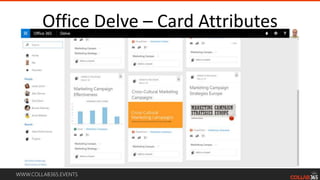
Office Delve – Card Attributes
WWW.COLLAB365.EVENTS
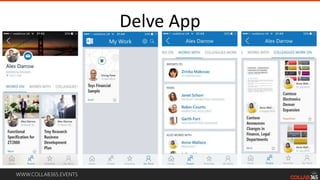
Delve App
WWW.COLLAB365.EVENTS
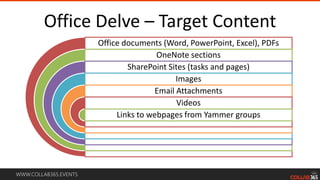
Office Delve – Target Content
Office documents (Word, PowerPoint, Excel), PDFs
OneNote sections
SharePoint Sites (tasks and pages)
Images
Email Attachments
Videos
Links to webpages from Yammer groups
WWW.COLLAB365.EVENTS
SharePoint Workflow
WWW.COLLAB365.EVENTS
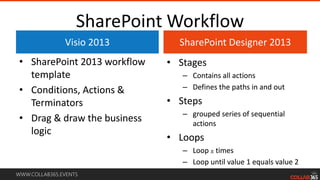
SharePoint Workflow
Visio 2013
• SharePoint 2013 workflow
template
• Conditions, Actions &
Terminators
• Drag & draw the business
logic
SharePoint Designer 2013
• Stages
– Contains all actions
– Defines the paths in and out
• Steps
– grouped series of sequential
actions
• Loops
– Loop x times
– Loop until value 1 equals value 2
Visio 2013
• SharePoint 2013 workflow
template
• Conditions, Actions &
Terminators
• Drag & draw the business
logic
SharePoint Designer 2013
• Stages
– Contains all actions
– Defines the paths in and out
• Steps
– grouped series of sequential
actions
• Loops
– Loop x times
– Loop until value 1 equals value 2
WWW.COLLAB365.EVENTS
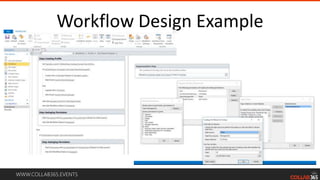
Workflow Design Example
WWW.COLLAB365.EVENTS
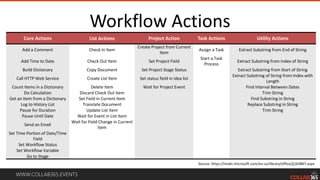
Workflow Actions
Core Actions List Actions Project Action Task Actions Utility Actions
Add a Comment Check In Item
Create Project from Current
Item
Assign a Task Extract Substring from End of String
Add Time to Date Check Out Item Set Project Field
Start a Task
Process
Extract Substring from Index of String
Build Dictionary Copy Document Set Project Stage Status Extract Substring from Start of String
Call HTTP Web Service Create List Item Set status field in idea list
Extract Substring of String from Index with
Length
Count Items in a Dictionary Delete Item Wait for Project Event Find Interval Between Dates
Do Calculation Discard Check Out Item Trim String
Get an Item from a Dictionary Set Field in Current Item Find Substring in String
Log to History List Translate Document Replace Substring in String
Pause for Duration Update List Item Trim String
Pause Until Date Wait for Event in List Item
Send an Email
Wait for Field Change in Current
Item
Set Time Portion of Date/Time
Field
Set Workflow Status
Set Workflow Variable
Go to Stage
Source: https://msdn.microsoft.com/en-us/library/office/jj163867.aspx
WWW.COLLAB365.EVENTS
SharePoint Search
WWW.COLLAB365.EVENTS
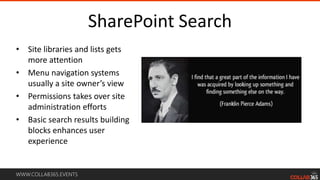
SharePoint Search
• Site libraries and lists gets
more attention
• Menu navigation systems
usually a site owner’s view
• Permissions takes over site
administration efforts
• Basic search results building
blocks enhances user
experience
WWW.COLLAB365.EVENTS
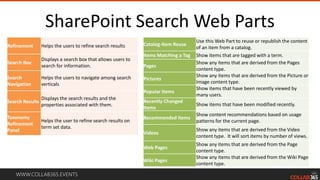
SharePoint Search Web Parts
Refinement Helps the users to refine search results
Search Box
Displays a search box that allows users to
search for information.
Search
Navigation
Helps the users to navigate among search
verticals
Search Results
Displays the search results and the
properties associated with them.
Taxonomy
Refinement
Panel
Helps the user to refine search results on
term set data.
Catalog-Item Reuse
Use this Web Part to reuse or republish the content
of an item from a catalog.
Items Matching a Tag Show items that are tagged with a term.
Pages
Show any items that are derived from the Pages
content type.
Pictures
Show any items that are derived from the Picture or
Image content type.
Popular Items
Show items that have been recently viewed by
many users.
Recently Changed
Items
Show items that have been modified recently.
Recommended Items
Show content recommendations based on usage
patterns for the current page.
Videos
Show any items that are derived from the Video
content type. It will sort items by number of views.
Web Pages
Show any items that are derived from the Page
content type.
Wiki Pages
Show any items that are derived from the Wiki Page
content type.
Refinement Helps the users to refine search results
Search Box
Displays a search box that allows users to
search for information.
Search
Navigation
Helps the users to navigate among search
verticals
Search Results
Displays the search results and the
properties associated with them.
Taxonomy
Refinement
Panel
Helps the user to refine search results on
term set data.
Catalog-Item Reuse
Use this Web Part to reuse or republish the content
of an item from a catalog.
Items Matching a Tag Show items that are tagged with a term.
Pages
Show any items that are derived from the Pages
content type.
Pictures
Show any items that are derived from the Picture or
Image content type.
Popular Items
Show items that have been recently viewed by
many users.
Recently Changed
Items
Show items that have been modified recently.
Recommended Items
Show content recommendations based on usage
patterns for the current page.
Videos
Show any items that are derived from the Video
content type. It will sort items by number of views.
Web Pages
Show any items that are derived from the Page
content type.
Wiki Pages
Show any items that are derived from the Wiki Page
content type.
WWW.COLLAB365.EVENTS
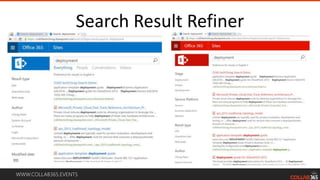
Search Result Refiner
WWW.COLLAB365.EVENTS
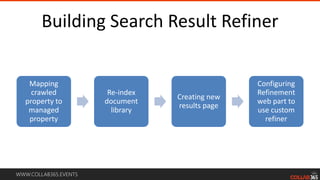
Building Search Result Refiner
Mapping
crawled
property to
managed
property
Re-index
document
library
Creating new
results page
Configuring
Refinement
web part to
use custom
refiner
WWW.COLLAB365.EVENTS
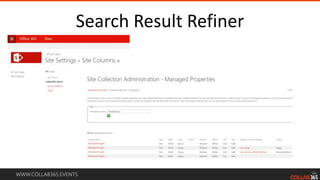
Search Result Refiner
WWW.COLLAB365.EVENTS
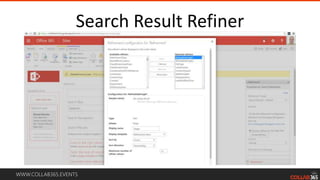
Search Result Refiner
WWW.COLLAB365.EVENTS
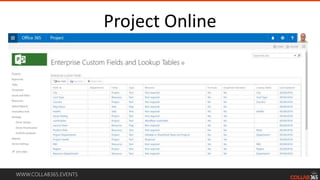
Project Online
WWW.COLLAB365.EVENTS
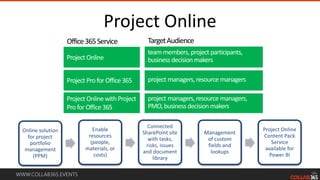
Project Online
Online solution
for project
portfolio
management
(PPM)
Enable
resources
(people,
materials, or
costs)
Connected
SharePoint site
with tasks,
risks, issues
and document
library
Management
of custom
fields and
lookups
Project Online
Content Pack
Service
available for
Power BI
TargetAudience
teammembers, project participants,
businessdecision makersProject Online
Office365Service
Project Pro for Office365
project managers,resource managers,
PMO,businessdecision makers
project managers,resource managers
WWW.COLLAB365.EVENTS
Project Online
WWW.COLLAB365.EVENTS
Project Online
WWW.COLLAB365.EVENTS
Project Online
WWW.COLLAB365.EVENTS
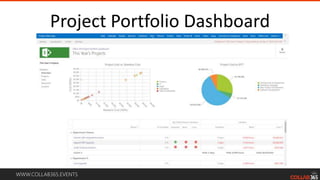
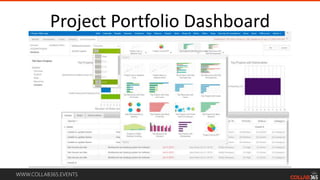
Project Portfolio Dashboard
WWW.COLLAB365.EVENTS
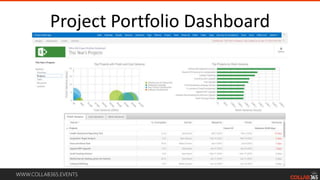
Project Portfolio Dashboard
WWW.COLLAB365.EVENTS
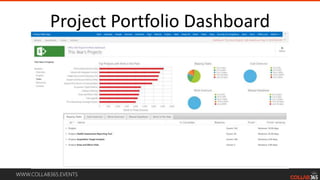
Project Portfolio Dashboard
WWW.COLLAB365.EVENTS
Project Portfolio Dashboard
WWW.COLLAB365.EVENTS
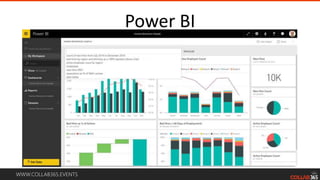
Power BI
WWW.COLLAB365.EVENTS
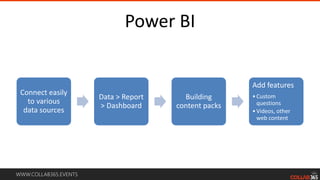
Power BI
Connect easily
to various
data sources
Data > Report
> Dashboard
Building
content packs
Add features
•Custom
questions
•Videos, other
web content
WWW.COLLAB365.EVENTS
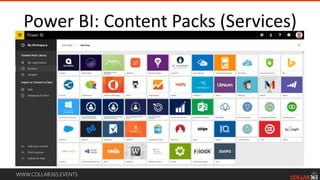
Power BI: Content Packs (Services)
WWW.COLLAB365.EVENTS
Power BI
WWW.COLLAB365.EVENTS
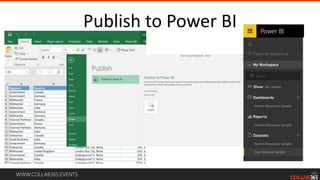
Publish to Power BI
WWW.COLLAB365.EVENTS
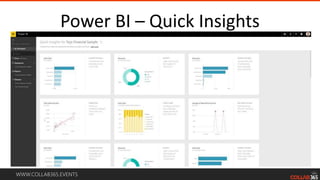
Power BI – Quick Insights
WWW.COLLAB365.EVENTS
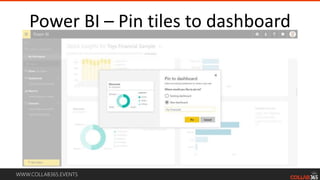
Power BI – Pin tiles to dashboard
WWW.COLLAB365.EVENTS
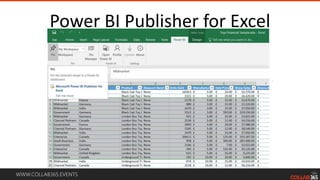
Power BI Publisher for Excel
WWW.COLLAB365.EVENTS
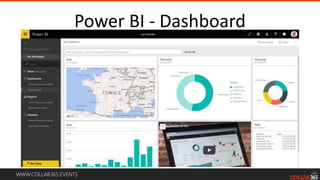
Power BI - Dashboard
WWW.COLLAB365.EVENTS
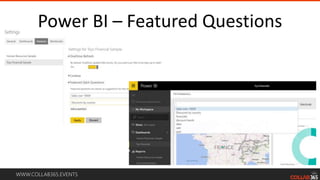
Power BI – Featured Questions
WWW.COLLAB365.EVENTS
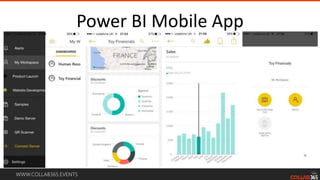
Power BI Mobile App
WWW.COLLAB365.EVENTS
Access Web App
WWW.COLLAB365.EVENTS
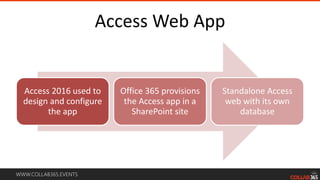
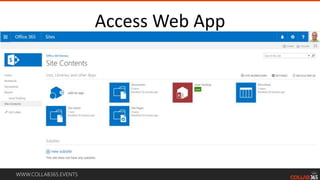
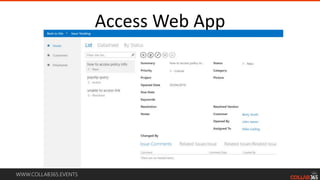
Access Web App
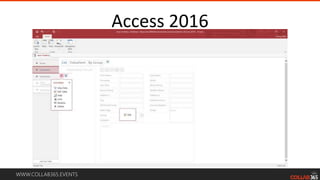
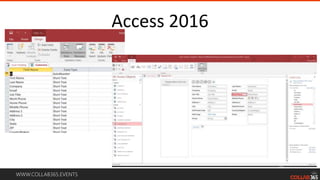
Access 2016 used to
design and configure
the app
Office 365 provisions
the Access app in a
SharePoint site
Standalone Access
web with its own
database
WWW.COLLAB365.EVENTS
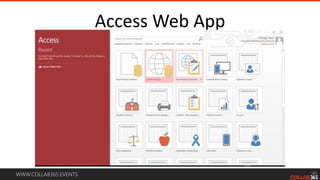
Access Web App
WWW.COLLAB365.EVENTS
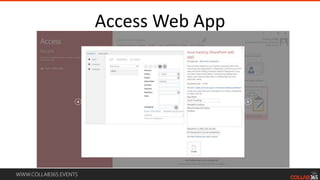
Access Web App
WWW.COLLAB365.EVENTS
Access Web App
WWW.COLLAB365.EVENTS
Access Web App
WWW.COLLAB365.EVENTS
Access 2016
WWW.COLLAB365.EVENTS
Access 2016
WWW.COLLAB365.EVENTS
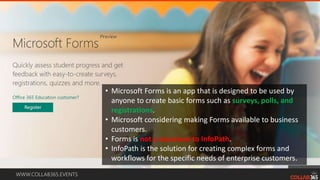
Forms?
WWW.COLLAB365.EVENTS
• Microsoft Forms is an app that is designed to be used by
anyone to create basic forms such as surveys, polls, and
registrations.
• Microsoft considering making Forms available to business
customers.
• Forms is not a successor to InfoPath.
• InfoPath is the solution for creating complex forms and
workflows for the specific needs of enterprise customers.
WWW.COLLAB365.EVENTS
Stay Connected
 Be part of First Release
 Office 365 Scenario-based training
 Office Blog
 Office 365 Roadmap
 FastTrack for Office365
 Office 365 Network (Yammer)
WWW.COLLAB365.EVENTS
Stay tuned for more great sessions …
Session Recording Available
http://techchir.ag/collab365summit2016

Power Users Guide to Office 365 - Collab365 Summit 2016

Editor's Notes

  • #2 You can access the session recording on YouTube: http://techchir.ag/collab365summit2016
  • #3 MCSE SharePoint, Data Platform BCS Chartered IT Professional
  • #4 Speaker at SharePoint User Group UK, SPS Events (SharePoint Saturdays) and Collab365 events.
  • #5 Office 365 collaboration tools Mail Calendar People Yammer OneDrive Sites Planner Project Tasks Power BI Delve Groups Video Word Excel PowerPoint OneNote Sway Project Portfolio Dashboard
  • #6 Office 365 is powered by more productive apps than ever before when compared with SharePoint on-premises. In addition to the user interface and evolving collaboration landscape, this session will cover all the Office 365 collaboration tools and technologies such as Delve, Office 365 Groups, Power BI, Access and SharePoint with no-code and browser based configurations. You will gain invaluable insights and how-to determine what tools to use for what business requirements or scenarios.
  • #7 Power User’s role is a duty of care towards enhancing Office 365 platform through browser configurations and supported tools instead of hacking around with snippets of code!
  • #21 List of Office 365 Connectors Aha! – Manage work with a visual roadmap. Airbrake – Captures errors and aggregates the results for developer review. Alerts by MarketSpace – Company monitoring for marketing, PR, development and investment teams. AppSignal – Track throughput, response times, and error rates in your apps. Asana – Task and Project Management. BeanStalk – A code hosting workflow Bing News – Search news for your work and personalize email update. BitBucket – Manage and collaborate on your code projects. Biztera – Biztera simplifies decision-making with cloud software that streamlines approval workflows BMC TrueSight Pulse (Boundary) – Monitor cloud and server infrastructure with real-time visibility. Brandfolder – Gain great controls of your brand assets, all from Office 365. Bugsnap – Track issues for your web and mobile apps. Buildkite – Smart automation for your software development processes Caller Zen – Create an SMS call center in seconds. Chatra – Modern Live Chat Software. CircleCl – Build, test, and deploy software continuously. Clearlogin – Integrate Clearlogin with your GroupMail to receive real time notifications about use activity. Cloud 66 – Build, deploy, and manage applications. Codeship – Automate the workflow for development and deployment. Crashlytics – Track errors in mobile apps. Datadog – for Dynamics CRM Delighted – The fastest way to gather actionable feedback from your customers. Dynamics CRM Online – Manager your customer sales, marketing, and service relationships. Enchant – Provide customer support with chat and email. Envoy – The new standard for visitor registration GhostInspector – Build or record automated testes for your web site. GitHub – Manage and collaborate on code projects. GoSquared – Simple, yet powerful analytics for your online business Groove – Provide customer support with tem collaboration. HelpScout – Provide customer support through email messages. Heroku – Build and run applications in the cloud. HoneyBadger – Exception and uptime monitoring for your web apps Incoming Webhook – Send data from a service to your Office 365 group in real time (this is how you can bring in your own data to Office 365 groups) IQBoxy – Intelligent Expense Management with Real-Time Receipt Processing and Expense Reports JIRA – Gather, organize, and assign issues detected in your software. JustReply – Simple time tracking for teams. Librato – Real-Time Cloud Monitoring Logentries – Search and monitor log data from any environment. Magnum Cl – Build, test, and deploy software continuously. MailChimp – Email marketing service MeisterTask – An intuitive task management and collaboration tool for agile projects OpsGenie – Alert and Notification solution PagerDuty – Track and manage incidents, and define escalation policies. Papertrail – Track and manage incidents and downtime issues. Pingdom – Track uptime/downtime and performance of web sites. Pivotal Tracker – Track progress in agile projects. Raygun – Monitor crashes in web and mobile apps. RSS – Get RSS feeds for your group. Runscope – Log, monitor, and measure your API usage. Salesforce – Manage sales opportunities Sentry – Capture and aggregate exceptions in code. Stack Overflow – Follow tagged questions and provide answers. StatusPage.io – Statues page for App or Website Subversion – An open-source revision control system TestFairy – Test mobile apps and retrace events that precipitate errors. Travis Cl – Run tests and deploy apps. Trello – Manage to-do lists and tasks all in one place. Twitter – Received messages called Tweets. UserLike – Provide live chat support for web sites and mobile apps. UserVoice – Product management and customer support tool. WakaTime – Get updates about your team’s daily coding activity from GitHub, GitLab, or Bitbucket. Wunderlist – Organize and share your to-do lists. Yo – Communicate with others in simple fashion. Zendesk – Zendesk brings companies and their customers closer together. ZootRock – Curated Content in your niche to share to your Groups.
  • #28 Searching for marketing
  • #29 Delve Boards
  • #30 Delve Favorites
  • #31 File types Source of program (i.e. Word, Excel, etc.) Source of information area (i.e. Document Library, OneDrive For Business, etc.) Generate email with link Security access info Share in Yammer Number of views Boards Add to a board
  • #44 Refinement configuration for Refinement
  • #56 Get data from content packs through online services
  • #76 Blog: www.techchirag.com Web: www.patelconsulting.co.uk