Online Conference
June 17th and 18th 2015
WWW.COLLAB365.EVENTS
Business Productivity with SharePoint
Online
WWW.COLLAB365.EVENTS
John Naguib
HP
Twitter : @johnnaguib
LinkedIn:
https://eg.linkedin.com/pub/joh
n-naguib/5/b30/a69
TechNet:
https://social.technet.microsoft.
com/profile/john%20naguib/
Collaboration & SharePoint Consultant and
Architect with deep knowledge in SharePoint,
including architecture, installation,
configuration, testing, maintenance and
development. In addition to being Consultant
I have a strong application development back
ground in .NET applications. I am holder of
MCP, MCTS, MCITP, MCPD, MCT and TOGAF.
9 Foundation certificates.
WWW.COLLAB365.EVENTS
Office 365/ SharePoint Online
• Office 365 is Microsoft Brand Name for group of software service
they provide over cloud.
• Beta Test in 2010.
• Launched in June 2011.
• Software as a service.
• It contains Bundle of (SharePoint, Mail, Skype for business, yammer,
Delve, Sway, OneDrive, Videos).
• There are several Plans when subscribing (link)
WWW.COLLAB365.EVENTS
Co Authoring
• In Office 365, you can coauthor documents in Word, PowerPoint,
and OneNote or a collection of documents with others
simultaneously.
• For Word and PowerPoint, enable both major and minor version
tracking in the document library before you start coauthoring.
• For OneNote notebooks, you should only enable major versions.
• If you use the Excel Web App , you can make real-time coauthoring
with others in Excel.
• Don’t turn Check Out on.
WWW.COLLAB365.EVENTS
Workflows
• SharePoint facilitate collaboration among workers.
• Workflows apply business process.
• Built In workflows (check the plan).
– Approval.
– Collect Feedback.
– Collect Signatures.
– Disposition.
– Three state.
• Build your workflow with SharePoint Designer.
• https://msdn.microsoft.com/en-us/library/office/jj860365.aspx
WWW.COLLAB365.EVENTS
Visio
• Microsoft Visio is designed for creating process flows and diagrams.
• SharePoint Visio Services offers a fast and simple way to work with Visio
diagrams
• using Visio, you can create org charts, manufacturing processes.
• With Visio Services you can embed Visio documents directly in a
SharePoint page.
• Developing Advanced BI Visualizations with Microsoft Visio and SharePoint
in the Cloud
WWW.COLLAB365.EVENTS
Delve
• Delve is a new way to discover relevant information and
connections from across your work life.
• Delve displays information that is most relevant for each person
based on the work they are doing and the people with whom they
are engaging
• Delve is powered by Office Graph which uses machine learning
techniques to map the relationships between people, content and
activity that occurs across Office 365
WWW.COLLAB365.EVENTS
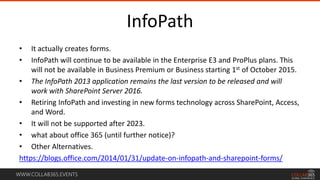
InfoPath
• It actually creates forms.
• InfoPath will continue to be available in the Enterprise E3 and ProPlus plans. This
will not be available in Business Premium or Business starting 1st of October 2015.
• The InfoPath 2013 application remains the last version to be released and will
work with SharePoint Server 2016.
• Retiring InfoPath and investing in new forms technology across SharePoint, Access,
and Word.
• It will not be supported after 2023.
• what about office 365 (until further notice)?
• Other Alternatives.
https://blogs.office.com/2014/01/31/update-on-infopath-and-sharepoint-forms/
WWW.COLLAB365.EVENTS
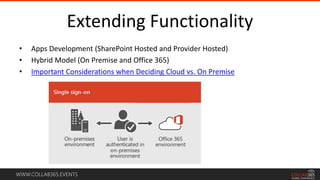
Extending Functionality
• Apps Development (SharePoint Hosted and Provider Hosted)
• Hybrid Model (On Premise and Office 365)
• Important Considerations when Deciding Cloud vs. On Premise
WWW.COLLAB365.EVENTS
Important Links
• https://portal.office.com/Home
• http://success.office.com/en-us/roadmap
• https://technet.microsoft.com/en-us/library/office-365-plan-options.aspx
• https://products.office.com/en-us/business/explore-office-365-for-business
• https://technet.microsoft.com/en-us/office/dn788774.aspx
• http://www.microsoftvirtualacademy.com/product-training/office-365
WWW.COLLAB365.EVENTS
Demos
• Office 365.
• Co Authoring.
• InfoPath.
• Workflows.
• Visio
• Delve.
WWW.COLLAB365.EVENTS
My Blogs
HP Blogs
• Efficient and Effective Communication with SharePoint
• SharePoint Capacity Management Are you Hot, Cold or Warm
• Social Networking: Getting your company online
• For the record: Handling Records Management
• Important Considerations when Deciding Cloud vs. On Premise
Personal Blog
• http://johnnaguib.blogspot.com
WWW.COLLAB365.EVENTS
Some of My TechNet Articles
• SharePoint Tools and Codes
• SharePoint Vanity URLs
• SharePoint Sites are not deleted
• Remove WFE Role from Farm
• SharePoint 2013 HNSC
• Configure OWA with Certificates
• AAM and SharePoint 2013 SSL web applications
• Create Self Signed Certificates
• SharePoint 2013 and Kerberos
• SharePoint 2013 Capacity Management
• Workflow Manager Disaster Recovery
WWW.COLLAB365.EVENTS
My TechNet Gallery Sharing's
• SharePoint 2013 Performance
• Add IIS Response Header
• Get SharePoint Site Permissions
• Workflow Manager Disaster Recovery
WWW.COLLAB365.EVENTS
Stay tuned for more great sessions …

Busines productivity with SharePoint Online

  • 1.
    Online Conference June 17thand 18th 2015 WWW.COLLAB365.EVENTS Business Productivity with SharePoint Online
  • 2.
    WWW.COLLAB365.EVENTS John Naguib HP Twitter :@johnnaguib LinkedIn: https://eg.linkedin.com/pub/joh n-naguib/5/b30/a69 TechNet: https://social.technet.microsoft. com/profile/john%20naguib/ Collaboration & SharePoint Consultant and Architect with deep knowledge in SharePoint, including architecture, installation, configuration, testing, maintenance and development. In addition to being Consultant I have a strong application development back ground in .NET applications. I am holder of MCP, MCTS, MCITP, MCPD, MCT and TOGAF. 9 Foundation certificates.
  • 3.
    WWW.COLLAB365.EVENTS Office 365/ SharePointOnline • Office 365 is Microsoft Brand Name for group of software service they provide over cloud. • Beta Test in 2010. • Launched in June 2011. • Software as a service. • It contains Bundle of (SharePoint, Mail, Skype for business, yammer, Delve, Sway, OneDrive, Videos). • There are several Plans when subscribing (link)
  • 4.
    WWW.COLLAB365.EVENTS Co Authoring • InOffice 365, you can coauthor documents in Word, PowerPoint, and OneNote or a collection of documents with others simultaneously. • For Word and PowerPoint, enable both major and minor version tracking in the document library before you start coauthoring. • For OneNote notebooks, you should only enable major versions. • If you use the Excel Web App , you can make real-time coauthoring with others in Excel. • Don’t turn Check Out on.
  • 5.
    WWW.COLLAB365.EVENTS Workflows • SharePoint facilitatecollaboration among workers. • Workflows apply business process. • Built In workflows (check the plan). – Approval. – Collect Feedback. – Collect Signatures. – Disposition. – Three state. • Build your workflow with SharePoint Designer. • https://msdn.microsoft.com/en-us/library/office/jj860365.aspx
  • 6.
    WWW.COLLAB365.EVENTS Visio • Microsoft Visiois designed for creating process flows and diagrams. • SharePoint Visio Services offers a fast and simple way to work with Visio diagrams • using Visio, you can create org charts, manufacturing processes. • With Visio Services you can embed Visio documents directly in a SharePoint page. • Developing Advanced BI Visualizations with Microsoft Visio and SharePoint in the Cloud
  • 7.
    WWW.COLLAB365.EVENTS Delve • Delve isa new way to discover relevant information and connections from across your work life. • Delve displays information that is most relevant for each person based on the work they are doing and the people with whom they are engaging • Delve is powered by Office Graph which uses machine learning techniques to map the relationships between people, content and activity that occurs across Office 365
  • 8.
    WWW.COLLAB365.EVENTS InfoPath • It actuallycreates forms. • InfoPath will continue to be available in the Enterprise E3 and ProPlus plans. This will not be available in Business Premium or Business starting 1st of October 2015. • The InfoPath 2013 application remains the last version to be released and will work with SharePoint Server 2016. • Retiring InfoPath and investing in new forms technology across SharePoint, Access, and Word. • It will not be supported after 2023. • what about office 365 (until further notice)? • Other Alternatives. https://blogs.office.com/2014/01/31/update-on-infopath-and-sharepoint-forms/
  • 9.
    WWW.COLLAB365.EVENTS Extending Functionality • AppsDevelopment (SharePoint Hosted and Provider Hosted) • Hybrid Model (On Premise and Office 365) • Important Considerations when Deciding Cloud vs. On Premise
  • 10.
    WWW.COLLAB365.EVENTS Important Links • https://portal.office.com/Home •http://success.office.com/en-us/roadmap • https://technet.microsoft.com/en-us/library/office-365-plan-options.aspx • https://products.office.com/en-us/business/explore-office-365-for-business • https://technet.microsoft.com/en-us/office/dn788774.aspx • http://www.microsoftvirtualacademy.com/product-training/office-365
  • 11.
    WWW.COLLAB365.EVENTS Demos • Office 365. •Co Authoring. • InfoPath. • Workflows. • Visio • Delve.
  • 12.
    WWW.COLLAB365.EVENTS My Blogs HP Blogs •Efficient and Effective Communication with SharePoint • SharePoint Capacity Management Are you Hot, Cold or Warm • Social Networking: Getting your company online • For the record: Handling Records Management • Important Considerations when Deciding Cloud vs. On Premise Personal Blog • http://johnnaguib.blogspot.com
  • 13.
    WWW.COLLAB365.EVENTS Some of MyTechNet Articles • SharePoint Tools and Codes • SharePoint Vanity URLs • SharePoint Sites are not deleted • Remove WFE Role from Farm • SharePoint 2013 HNSC • Configure OWA with Certificates • AAM and SharePoint 2013 SSL web applications • Create Self Signed Certificates • SharePoint 2013 and Kerberos • SharePoint 2013 Capacity Management • Workflow Manager Disaster Recovery
  • 14.
    WWW.COLLAB365.EVENTS My TechNet GallerySharing's • SharePoint 2013 Performance • Add IIS Response Header • Get SharePoint Site Permissions • Workflow Manager Disaster Recovery
  • 15.
    WWW.COLLAB365.EVENTS Stay tuned formore great sessions …