The Future of SharePoint – SharePoint 2016
Work Smarter with SharePoint: A HelpSystems Roadshow – May 27th, 2015
Donald Donais
Avtex Solutions Architect and SharePoint Consultant
ddonais@avtex.com
Blog – Tales from IT Side
http://talesfromitside.wordpress.com
Twitter
@dondonais
3
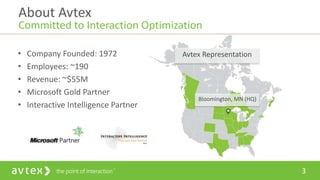
• Company Founded: 1972
• Employees: ~190
• Revenue: ~$55M
• Microsoft Gold Partner
• Interactive Intelligence Partner
About Avtex
Committed to Interaction Optimization
Avtex Representation
Bloomington, MN (HQ)
4
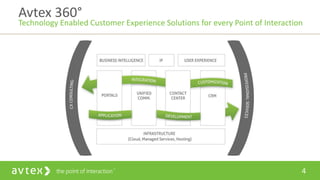
Avtex 360°
Technology Enabled Customer Experience Solutions for every Point of Interaction
Agenda
• What’s New with SharePoint 2016
• Changes Coming to OneDrive for Business
• NextGen Portals – Why You Will Care?
• Office 365 Groups – The Next Big Collaboration Tool?
WHAT’S NEW WITH SHAREPOINT 2016
It Is Still Early!
• There is Currently No Technical Preview for SharePoint 2016
• Timeline
 Beta Q4 2015, RTM Q2 of 2016
Final Feature Set Will Change Before
Release!
Code Base for SharePoint 2016
• Starting with Snapshot in Time
 Based On SharePoint Online Code
• Feature Sets Backported for On-Premises
• If Backporting Not Successful then Leverage Hybrid With
Cloud
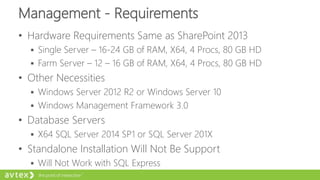
Management - Requirements
• Hardware Requirements Same as SharePoint 2013
 Single Server – 16-24 GB of RAM, X64, 4 Procs, 80 GB HD
 Farm Server – 12 – 16 GB of RAM, X64, 4 Procs, 80 GB HD
• Other Necessities
 Windows Server 2012 R2 or Windows Server 10
 Windows Management Framework 3.0
• Database Servers
 X64 SQL Server 2014 SP1 or SQL Server 201X
• Standalone Installation Will Not Be Support
 Will Not Work with SQL Express
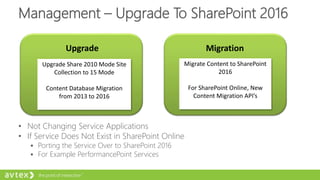
Management – Upgrade To SharePoint 2016
Upgrade
Upgrade Share 2010 Mode Site
Collection to 15 Mode
Content Database Migration
from 2013 to 2016
Migration
Migrate Content to SharePoint
2016
For SharePoint Online, New
Content Migration API’s
• Not Changing Service Applications
• If Service Does Not Exist in SharePoint Online
 Porting the Service Over to SharePoint 2016
 For Example PerformancePoint Services
Management - New Migration API
• Used To Migrate to SharePoint Online
• Using Azure Temporarily Store Content During Move
• Increased Migration Speed by 5X
• During Microsoft Ignite
 4 Vendors Are Already Adjusting to the New API’s
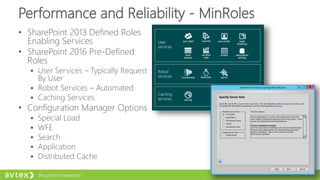
Performance and Reliability - MinRoles
• SharePoint 2013 Defined Roles
Enabling Services
• SharePoint 2016 Pre-Defined
Roles
 User Services – Typically Request
By User
 Robot Services – Automated
 Caching Services
• Configuration Manager Options
 Special Load
 WFE
 Search
 Application
 Distributed Cache
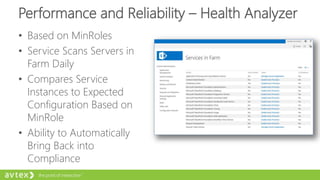
Performance and Reliability – Health Analyzer
• Based on MinRoles
• Service Scans Servers in
Farm Daily
• Compares Service
Instances to Expected
Configuration Based on
MinRole
• Ability to Automatically
Bring Back into
Compliance
Performance and Reliability - Patching
• SharePoint 2013 Updates
 Typically 37 MSI’s with Additional Language Patches
 Cutting These Down to 2 MIS and 2 Language Patches
• Performance for Updates Substantially Quicker
• Zero Downtime Patches
 Because of Size This Will Run Online
• MinRole Makes This Easier
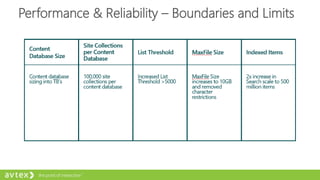
Performance & Reliability – Boundaries and Limits
Performance and Reliability – Other Notes
• File Transfer Using BITS Protocol
 Used to Improve Performance
with Download and Upload of
Files
• Fast Site Creation
 Uses Master Copy of Site
Collection
 Will Already Have Features
Enabled
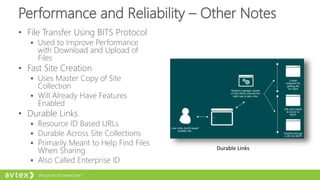
• Durable Links
 Resource ID Based URLs
 Durable Across Site Collections
 Primarily Meant to Help Find Files
When Sharing
 Also Called Enterprise ID
Durable Links
Performance and Reliability – User Profile Service
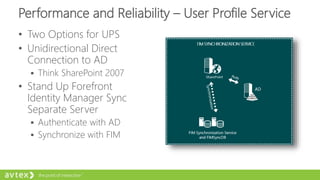
• Two Options for UPS
• Unidirectional Direct
Connection to AD
 Think SharePoint 2007
• Stand Up Forefront
Identity Manager Sync
Separate Server
 Authenticate with AD
 Synchronize with FIM
Insights and Data – Real Time Telemetry
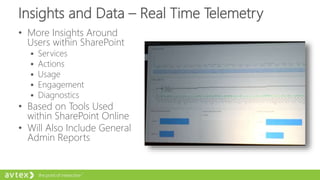
• More Insights Around
Users within SharePoint
 Services
 Actions
 Usage
 Engagement
 Diagnostics
• Based on Tools Used
within SharePoint Online
• Will Also Include General
Admin Reports
Insights and Data - Search
• Cloud Search Service Application
• Organizations Can Offload Search to Cloud
• Supports Using Office Graph/Delve On-Premises
• Will Also Be Available for SharePoint 2013 EOY
One Search To Rule Them All!
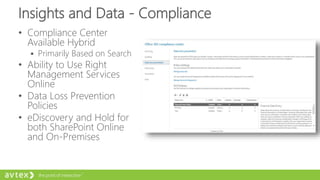
Insights and Data - Compliance
• Compliance Center
Available Hybrid
 Primarily Based on Search
• Ability to Use Right
Management Services
Online
• Data Loss Prevention
Policies
• eDiscovery and Hold for
both SharePoint Online
and On-Premises
Other Tidbits
• Hybrid Scenario
 Following Allowed for Sites, Documents and People
 Managed Metadata Service
 Promoted Sites
 Self-Service Site Creation
• Hybrid Configuration Based on Wizard Tool
CHANGES COMING TO ONEDRIVE FOR BUSINESS
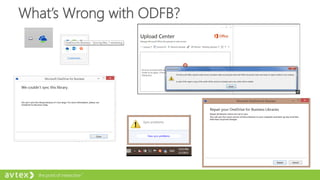
What’s Wrong with ODFB?
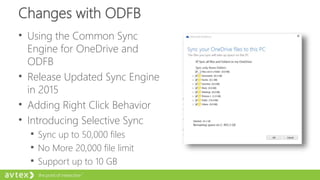
Changes with ODFB
• Using the Common Sync
Engine for OneDrive and
ODFB
• Release Updated Sync Engine
in 2015
• Adding Right Click Behavior
• Introducing Selective Sync
 Sync up to 50,000 files
 No More 20,000 file limit
 Support up to 10 GB
More Changes with ODFB
• Version Control Will Be Added
• Delve Integration Will Be Available
• Future releases will support characters in URL and longer
paths
• Eventually will be able to sync files that are Shared With
Me
• Management Will Include Available to Disable External
Sharing for Specific Users
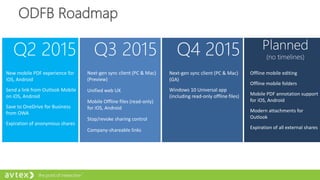
ODFB Roadmap
Q2 2015 Q3 2015 Q4 2015 Planned
(no timelines)
Next-gen sync client (PC & Mac)
(Preview)
Unified web UX
Mobile Offline files (read-only)
for iOS, Android
Stop/revoke sharing control
Company-shareable links
New mobile PDF experience for
iOS, Android
Send a link from Outlook Mobile
on iOS, Android
Save to OneDrive for Business
from OWA
Expiration of anonymous shares
Next-gen sync client (PC & Mac)
(GA)
Windows 10 Universal app
(including read-only offline files)
Offline mobile editing
Offline mobile folders
Mobile PDF annotation support
for iOS, Android
Modern attachments for
Outlook
Expiration of all external shares
NEXTGEN PORTALS – WHY YOU WILL CARE?
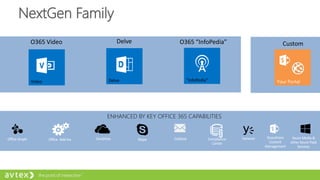
NextGen Family
ENHANCED BY KEY OFFICE 365 CAPABILITIES
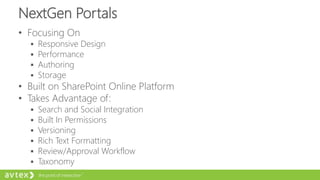
NextGen Portals
• Focusing On
 Responsive Design
 Performance
 Authoring
 Storage
• Built on SharePoint Online Platform
• Takes Advantage of:
 Search and Social Integration
 Built In Permissions
 Versioning
 Rich Text Formatting
 Review/Approval Workflow
 Taxonomy
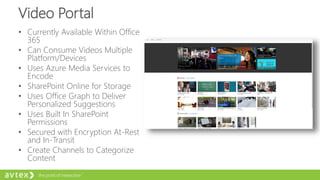
Video Portal
• Currently Available Within Office
365
• Can Consume Videos Multiple
Platform/Devices
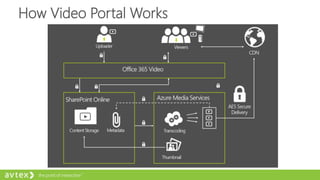
• Uses Azure Media Services to
Encode
• SharePoint Online for Storage
• Uses Office Graph to Deliver
Personalized Suggestions
• Uses Built In SharePoint
Permissions
• Secured with Encryption At-Rest
and In-Transit
• Create Channels to Categorize
Content
How Video Portal Works
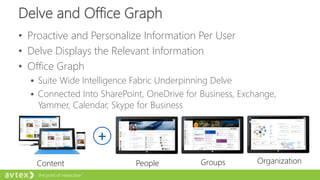
Delve and Office Graph
• Proactive and Personalize Information Per User
• Delve Displays the Relevant Information
• Office Graph
 Suite Wide Intelligence Fabric Underpinning Delve
 Connected Into SharePoint, OneDrive for Business, Exchange,
Yammer, Calendar, Skype for Business
Content
+
People Groups Organization
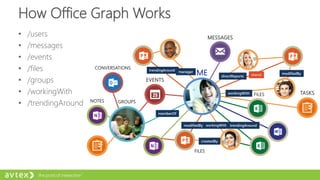
How Office Graph Works
• /users
• /messages
• /events
• /files
• /groups
• /workingWith
• /trendingAround
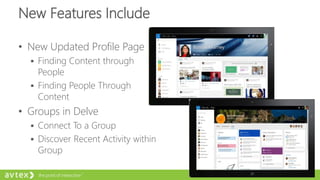
New Features Include
• New Updated Profile Page
 Finding Content through
People
 Finding People Through
Content
• Groups in Delve
 Connect To a Group
 Discover Recent Activity within
Group
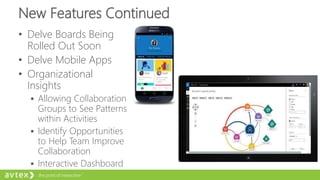
New Features Continued
• Delve Boards Being
Rolled Out Soon
• Delve Mobile Apps
• Organizational
Insights
 Allowing Collaboration
Groups to See Patterns
within Activities
 Identify Opportunities
to Help Team Improve
Collaboration
 Interactive Dashboard
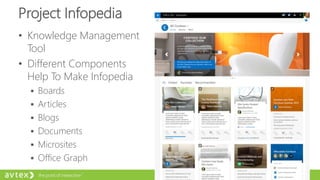
Project Infopedia
• Knowledge Management
Tool
• Different Components
Help To Make Infopedia
 Boards
 Articles
 Blogs
 Documents
 Microsites
 Office Graph
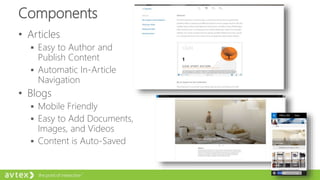
Components
• Articles
 Easy to Author and
Publish Content
 Automatic In-Article
Navigation
• Blogs
 Mobile Friendly
 Easy to Add Documents,
Images, and Videos
 Content is Auto-Saved
OFFICE GROUPS – THE NEXT BIG
COLLABORATION TOOL?
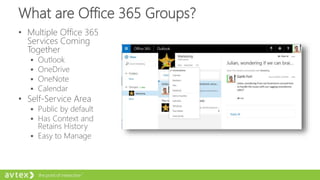
What are Office 365 Groups?
• Multiple Office 365
Services Coming
Together
 Outlook
 OneDrive
 OneNote
 Calendar
• Self-Service Area
 Public by default
 Has Context and
Retains History
 Easy to Manage
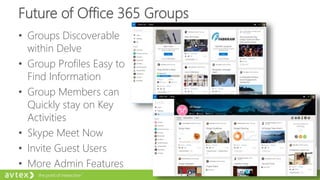
Future of Office 365 Groups
• Groups Discoverable
within Delve
• Group Profiles Easy to
Find Information
• Group Members can
Quickly stay on Key
Activities
• Skype Meet Now
• Invite Guest Users
• More Admin Features
Q & A
Avtex IT Pro Consultant
ddonais@avtex.com
Blog – Tales from IT Side
http://talesfromitside.wordpress.com
Twitter
@dondonais

The Future of SharePoint - SharePoint 2016

  • 1.
    The Future ofSharePoint – SharePoint 2016 Work Smarter with SharePoint: A HelpSystems Roadshow – May 27th, 2015
  • 2.
    Donald Donais Avtex SolutionsArchitect and SharePoint Consultant ddonais@avtex.com Blog – Tales from IT Side http://talesfromitside.wordpress.com Twitter @dondonais
  • 3.
    3 • Company Founded:1972 • Employees: ~190 • Revenue: ~$55M • Microsoft Gold Partner • Interactive Intelligence Partner About Avtex Committed to Interaction Optimization Avtex Representation Bloomington, MN (HQ)
  • 4.
    4 Avtex 360° Technology EnabledCustomer Experience Solutions for every Point of Interaction
  • 5.
    Agenda • What’s Newwith SharePoint 2016 • Changes Coming to OneDrive for Business • NextGen Portals – Why You Will Care? • Office 365 Groups – The Next Big Collaboration Tool?
  • 6.
    WHAT’S NEW WITHSHAREPOINT 2016
  • 7.
    It Is StillEarly! • There is Currently No Technical Preview for SharePoint 2016 • Timeline  Beta Q4 2015, RTM Q2 of 2016 Final Feature Set Will Change Before Release!
  • 8.
    Code Base forSharePoint 2016 • Starting with Snapshot in Time  Based On SharePoint Online Code • Feature Sets Backported for On-Premises • If Backporting Not Successful then Leverage Hybrid With Cloud
  • 9.
    Management - Requirements •Hardware Requirements Same as SharePoint 2013  Single Server – 16-24 GB of RAM, X64, 4 Procs, 80 GB HD  Farm Server – 12 – 16 GB of RAM, X64, 4 Procs, 80 GB HD • Other Necessities  Windows Server 2012 R2 or Windows Server 10  Windows Management Framework 3.0 • Database Servers  X64 SQL Server 2014 SP1 or SQL Server 201X • Standalone Installation Will Not Be Support  Will Not Work with SQL Express
  • 10.
    Management – UpgradeTo SharePoint 2016 Upgrade Upgrade Share 2010 Mode Site Collection to 15 Mode Content Database Migration from 2013 to 2016 Migration Migrate Content to SharePoint 2016 For SharePoint Online, New Content Migration API’s • Not Changing Service Applications • If Service Does Not Exist in SharePoint Online  Porting the Service Over to SharePoint 2016  For Example PerformancePoint Services
  • 11.
    Management - NewMigration API • Used To Migrate to SharePoint Online • Using Azure Temporarily Store Content During Move • Increased Migration Speed by 5X • During Microsoft Ignite  4 Vendors Are Already Adjusting to the New API’s
  • 12.
    Performance and Reliability- MinRoles • SharePoint 2013 Defined Roles Enabling Services • SharePoint 2016 Pre-Defined Roles  User Services – Typically Request By User  Robot Services – Automated  Caching Services • Configuration Manager Options  Special Load  WFE  Search  Application  Distributed Cache
  • 13.
    Performance and Reliability– Health Analyzer • Based on MinRoles • Service Scans Servers in Farm Daily • Compares Service Instances to Expected Configuration Based on MinRole • Ability to Automatically Bring Back into Compliance
  • 14.
    Performance and Reliability- Patching • SharePoint 2013 Updates  Typically 37 MSI’s with Additional Language Patches  Cutting These Down to 2 MIS and 2 Language Patches • Performance for Updates Substantially Quicker • Zero Downtime Patches  Because of Size This Will Run Online • MinRole Makes This Easier
  • 15.
    Performance & Reliability– Boundaries and Limits
  • 16.
    Performance and Reliability– Other Notes • File Transfer Using BITS Protocol  Used to Improve Performance with Download and Upload of Files • Fast Site Creation  Uses Master Copy of Site Collection  Will Already Have Features Enabled • Durable Links  Resource ID Based URLs  Durable Across Site Collections  Primarily Meant to Help Find Files When Sharing  Also Called Enterprise ID Durable Links
  • 17.
    Performance and Reliability– User Profile Service • Two Options for UPS • Unidirectional Direct Connection to AD  Think SharePoint 2007 • Stand Up Forefront Identity Manager Sync Separate Server  Authenticate with AD  Synchronize with FIM
  • 18.
    Insights and Data– Real Time Telemetry • More Insights Around Users within SharePoint  Services  Actions  Usage  Engagement  Diagnostics • Based on Tools Used within SharePoint Online • Will Also Include General Admin Reports
  • 19.
    Insights and Data- Search • Cloud Search Service Application • Organizations Can Offload Search to Cloud • Supports Using Office Graph/Delve On-Premises • Will Also Be Available for SharePoint 2013 EOY One Search To Rule Them All!
  • 20.
    Insights and Data- Compliance • Compliance Center Available Hybrid  Primarily Based on Search • Ability to Use Right Management Services Online • Data Loss Prevention Policies • eDiscovery and Hold for both SharePoint Online and On-Premises
  • 21.
    Other Tidbits • HybridScenario  Following Allowed for Sites, Documents and People  Managed Metadata Service  Promoted Sites  Self-Service Site Creation • Hybrid Configuration Based on Wizard Tool
  • 22.
    CHANGES COMING TOONEDRIVE FOR BUSINESS
  • 23.
  • 24.
    Changes with ODFB •Using the Common Sync Engine for OneDrive and ODFB • Release Updated Sync Engine in 2015 • Adding Right Click Behavior • Introducing Selective Sync  Sync up to 50,000 files  No More 20,000 file limit  Support up to 10 GB
  • 25.
    More Changes withODFB • Version Control Will Be Added • Delve Integration Will Be Available • Future releases will support characters in URL and longer paths • Eventually will be able to sync files that are Shared With Me • Management Will Include Available to Disable External Sharing for Specific Users
  • 26.
    ODFB Roadmap Q2 2015Q3 2015 Q4 2015 Planned (no timelines) Next-gen sync client (PC & Mac) (Preview) Unified web UX Mobile Offline files (read-only) for iOS, Android Stop/revoke sharing control Company-shareable links New mobile PDF experience for iOS, Android Send a link from Outlook Mobile on iOS, Android Save to OneDrive for Business from OWA Expiration of anonymous shares Next-gen sync client (PC & Mac) (GA) Windows 10 Universal app (including read-only offline files) Offline mobile editing Offline mobile folders Mobile PDF annotation support for iOS, Android Modern attachments for Outlook Expiration of all external shares
  • 27.
    NEXTGEN PORTALS –WHY YOU WILL CARE?
  • 28.
    NextGen Family ENHANCED BYKEY OFFICE 365 CAPABILITIES
  • 29.
    NextGen Portals • FocusingOn  Responsive Design  Performance  Authoring  Storage • Built on SharePoint Online Platform • Takes Advantage of:  Search and Social Integration  Built In Permissions  Versioning  Rich Text Formatting  Review/Approval Workflow  Taxonomy
  • 30.
    Video Portal • CurrentlyAvailable Within Office 365 • Can Consume Videos Multiple Platform/Devices • Uses Azure Media Services to Encode • SharePoint Online for Storage • Uses Office Graph to Deliver Personalized Suggestions • Uses Built In SharePoint Permissions • Secured with Encryption At-Rest and In-Transit • Create Channels to Categorize Content
  • 31.
  • 32.
    Delve and OfficeGraph • Proactive and Personalize Information Per User • Delve Displays the Relevant Information • Office Graph  Suite Wide Intelligence Fabric Underpinning Delve  Connected Into SharePoint, OneDrive for Business, Exchange, Yammer, Calendar, Skype for Business Content + People Groups Organization
  • 33.
    How Office GraphWorks • /users • /messages • /events • /files • /groups • /workingWith • /trendingAround
  • 34.
    New Features Include •New Updated Profile Page  Finding Content through People  Finding People Through Content • Groups in Delve  Connect To a Group  Discover Recent Activity within Group
  • 35.
    New Features Continued •Delve Boards Being Rolled Out Soon • Delve Mobile Apps • Organizational Insights  Allowing Collaboration Groups to See Patterns within Activities  Identify Opportunities to Help Team Improve Collaboration  Interactive Dashboard
  • 36.
    Project Infopedia • KnowledgeManagement Tool • Different Components Help To Make Infopedia  Boards  Articles  Blogs  Documents  Microsites  Office Graph
  • 37.
    Components • Articles  Easyto Author and Publish Content  Automatic In-Article Navigation • Blogs  Mobile Friendly  Easy to Add Documents, Images, and Videos  Content is Auto-Saved
  • 38.
    OFFICE GROUPS –THE NEXT BIG COLLABORATION TOOL?
  • 39.
    What are Office365 Groups? • Multiple Office 365 Services Coming Together  Outlook  OneDrive  OneNote  Calendar • Self-Service Area  Public by default  Has Context and Retains History  Easy to Manage
  • 40.
    Future of Office365 Groups • Groups Discoverable within Delve • Group Profiles Easy to Find Information • Group Members can Quickly stay on Key Activities • Skype Meet Now • Invite Guest Users • More Admin Features
  • 41.
  • 42.
    Avtex IT ProConsultant ddonais@avtex.com Blog – Tales from IT Side http://talesfromitside.wordpress.com Twitter @dondonais