The newest form of Social Bookmarking
                           Tara Mueller
What is
Pinterest?

•Social Bookmarking
Site

•Allows users to pin
pictures to their pin
board more commonly
known as the users wall

•Link to sites where
consumers can buy
products or learn to
make them

•Many   of the sites
pictures link to are blogs
where people talk about
crafts or food
What is the
Homepage?

•All of the pictures your
friends pin to their
boards

•Listed in chronological
order

•After logging in on the
homepage you will see
your friends most recent
pins

•Allows you to see what
your friends like in one
page rather than going
from profile to profile
                            The Pinterest hompage
Pinterest Profile

•An example of the
profile set up by any
user

•As many pin boards
can be added or
removed at any time

•You become friends
with someone by
following their pin
boards


                        Pinterest profile page
Pinning Pictures

•When you see a picture you
want to add to your profile
scroll over the picture and click
Repin

•You will then see the second
screen where you can choose
which board to pin it on and
add a new caption if you
choose

•Simply click Pin It and your
done


•Similar to Twitter you are able
to mention people when
putting a caption under a
picture
New Pins

•You can add new pins or
pictures from any website

•On your Pinterest site simply
click the Add button in the
upper right corner

•You are then able to Add a Pin,
Upload a Pin from your
computer or Create a new
Board

•When adding a pin drop the
URL in the bar and it will pull all
of the pictures from the site.
Choose the picture and board
and add a comment.

•Simply click pin it and you are
done
Searching

•There are many topics
to search on Pinterest

•You can search for
things according to
your personal interest

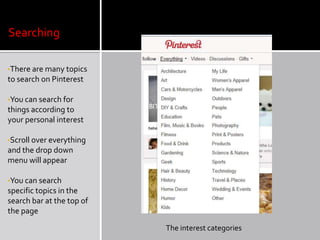
•Scroll over everything
and the drop down
menu will appear

•You can search
specific topics in the
search bar at the top of
the page

                           The interest categories
There are many other social bookmarking sites. A few are explained in the
 next few slides.


•Stumble Upon
    •Generates random sites
    according to your interest
    •With Stumble Upon simply
    click Stumble Your Interest
    •Stumble Upon has a tool bar
    that is on the top of each
    webpage
    •You can like or dislike a page
    and click stumble when you
    are done with a page and you
    will be taken to a new page
•Delicious
    •Create stacks filled with
    information on a particular
    topic
    •Can create as many stacks as
    needed
    •How To Create Stacks
•Newsvine
    •Generates news stories
•Digg
    •Create groupings of topics
    •RSS Feed of top news or topics
•Trip Advisor
    •Advice about traveling
•Angie’s List
    •Advice about businesses specifically
    doctors and service businesses
•Urban Spoon
    •Generates random restaurants to
    eat at according to location, amount
    of money and type of food you
    choose.
•Igoogle or Google Reader
•MyYahoo!
Oh, How Pinteresting!


•Pinterest has a blog that discusses anything that has to do with Pinterest.
They use this to communicate with users.
•Topic Categories include:
      •Pinterviews
      •Site Features & Tips
      •Pinteresting Trends
      •Guest Post
      •Events
•They talk about how you can use Pinterest and how other people use it.
•If you are new to Pinterest this can be a great resource.
The Blog Stylist

•This blog post discusses
how bloggers need to be
adding the Pinterest pin it
button to their blog

•This can be beneficial to
bloggers because more
people will visit their blog
due to liking pictures from
their blog

•She discusses not only
how to add the button to
your blog but how to use it
and how to use Pinterest as
a whole.

•The Backlight blog also
does the same thing on
their blog.
•Click the links to see tutorials of Pinterest


•Pinterest Tutorial
•Blogging Bookshelf
•Pinterest is a great way to share things you love with your friends
•You can link to sites that you find interesting
•You can learn how to make things that you find pictures   of including
crafts, food and more
•Takes Facebook sharing to the next level
•Have fun Pinning!

Pinterest Presentation

  • 1.
    The newest formof Social Bookmarking Tara Mueller
  • 2.
    What is Pinterest? •Social Bookmarking Site •Allowsusers to pin pictures to their pin board more commonly known as the users wall •Link to sites where consumers can buy products or learn to make them •Many of the sites pictures link to are blogs where people talk about crafts or food
  • 3.
    What is the Homepage? •Allof the pictures your friends pin to their boards •Listed in chronological order •After logging in on the homepage you will see your friends most recent pins •Allows you to see what your friends like in one page rather than going from profile to profile The Pinterest hompage
  • 4.
    Pinterest Profile •An exampleof the profile set up by any user •As many pin boards can be added or removed at any time •You become friends with someone by following their pin boards Pinterest profile page
  • 5.
    Pinning Pictures •When yousee a picture you want to add to your profile scroll over the picture and click Repin •You will then see the second screen where you can choose which board to pin it on and add a new caption if you choose •Simply click Pin It and your done •Similar to Twitter you are able to mention people when putting a caption under a picture
  • 6.
    New Pins •You canadd new pins or pictures from any website •On your Pinterest site simply click the Add button in the upper right corner •You are then able to Add a Pin, Upload a Pin from your computer or Create a new Board •When adding a pin drop the URL in the bar and it will pull all of the pictures from the site. Choose the picture and board and add a comment. •Simply click pin it and you are done
  • 7.
    Searching •There are manytopics to search on Pinterest •You can search for things according to your personal interest •Scroll over everything and the drop down menu will appear •You can search specific topics in the search bar at the top of the page The interest categories
  • 8.
    There are manyother social bookmarking sites. A few are explained in the next few slides. •Stumble Upon •Generates random sites according to your interest •With Stumble Upon simply click Stumble Your Interest •Stumble Upon has a tool bar that is on the top of each webpage •You can like or dislike a page and click stumble when you are done with a page and you will be taken to a new page
  • 9.
    •Delicious •Create stacks filled with information on a particular topic •Can create as many stacks as needed •How To Create Stacks •Newsvine •Generates news stories •Digg •Create groupings of topics •RSS Feed of top news or topics
  • 10.
    •Trip Advisor •Advice about traveling •Angie’s List •Advice about businesses specifically doctors and service businesses •Urban Spoon •Generates random restaurants to eat at according to location, amount of money and type of food you choose. •Igoogle or Google Reader •MyYahoo!
  • 11.
    Oh, How Pinteresting! •Pinteresthas a blog that discusses anything that has to do with Pinterest. They use this to communicate with users. •Topic Categories include: •Pinterviews •Site Features & Tips •Pinteresting Trends •Guest Post •Events •They talk about how you can use Pinterest and how other people use it. •If you are new to Pinterest this can be a great resource.
  • 12.
    The Blog Stylist •Thisblog post discusses how bloggers need to be adding the Pinterest pin it button to their blog •This can be beneficial to bloggers because more people will visit their blog due to liking pictures from their blog •She discusses not only how to add the button to your blog but how to use it and how to use Pinterest as a whole. •The Backlight blog also does the same thing on their blog.
  • 13.
    •Click the linksto see tutorials of Pinterest •Pinterest Tutorial •Blogging Bookshelf
  • 14.
    •Pinterest is agreat way to share things you love with your friends •You can link to sites that you find interesting •You can learn how to make things that you find pictures of including crafts, food and more •Takes Facebook sharing to the next level •Have fun Pinning!