Mary Lyons
Ashley Taylor
Overview
 What is Pinterest?
 A Brief Overview
 Chapter 4: Opposites Attract
 Pinterest Analytics
 Pinterest for Businesses
 Pinterest and Orsburn’s Formula
 The Good and the Bad
 Conclusion
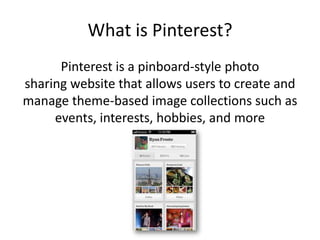
What is Pinterest?
Pinterest is a pinboard-style photo
sharing website that allows users to create and
manage theme-based image collections such as
events, interests, hobbies, and more
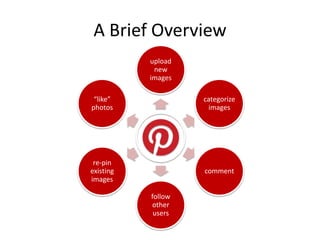
A Brief Overview
upload
new
images
categorize
images
comment
follow
other
users
re-pin
existing
images
“like”
photos
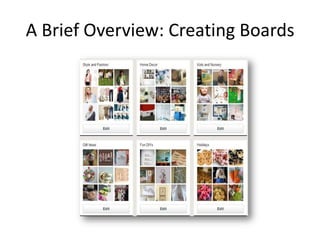
A Brief Overview: Creating Boards
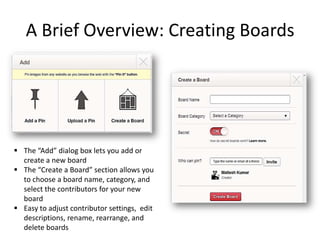
 The “Add” dialog box lets you add or
create a new board
 The “Create a Board” section allows you
to choose a board name, category, and
select the contributors for your new
board
 Easy to adjust contributor settings, edit
descriptions, rename, rearrange, and
delete boards
A Brief Overview: Contributors
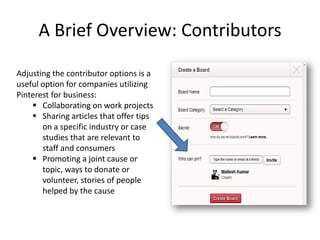
Adjusting the contributor options is a
useful option for companies utilizing
Pinterest for business:
 Collaborating on work projects
 Sharing articles that offer tips
on a specific industry or case
studies that are relevant to
staff and consumers
 Promoting a joint cause or
topic, ways to donate or
volunteer, stories of people
helped by the cause
A Brief Overview: Pinning
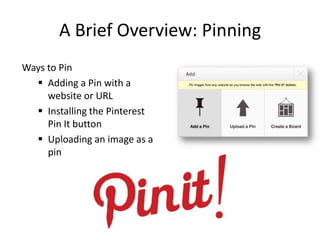
Ways to Pin
 Adding a Pin with a
website or URL
 Installing the Pinterest
Pin It button
 Uploading an image as a
pin
A Brief Overview: Pinning
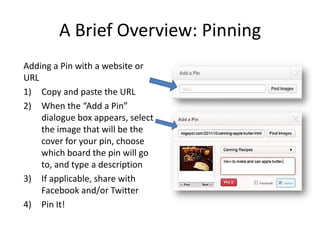
Adding a Pin with a website or
URL
1) Copy and paste the URL
2) When the “Add a Pin”
dialogue box appears, select
the image that will be the
cover for your pin, choose
which board the pin will go
to, and type a description
3) If applicable, share with
Facebook and/or Twitter
4) Pin It!
A Brief Overview: Pinning
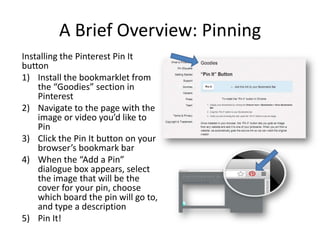
Installing the Pinterest Pin It
button
1) Install the bookmarklet from
the “Goodies” section in
Pinterest
2) Navigate to the page with the
image or video you’d like to
Pin
3) Click the Pin It button on your
browser’s bookmark bar
4) When the “Add a Pin”
dialogue box appears, select
the image that will be the
cover for your pin, choose
which board the pin will go to,
and type a description
5) Pin It!
A Brief Overview: Pinning
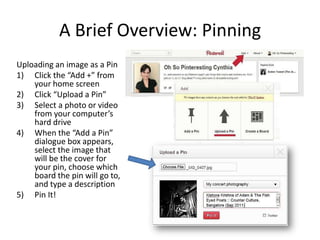
Uploading an image as a Pin
1) Click the “Add +” from
your home screen
2) Click “Upload a Pin”
3) Select a photo or video
from your computer’s
hard drive
4) When the “Add a Pin”
dialogue box appears,
select the image that
will be the cover for
your pin, choose which
board the pin will go to,
and type a description
5) Pin It!
A Brief Overview: Repinning
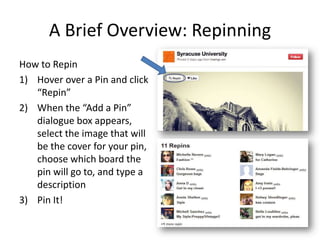
How to Repin
1) Hover over a Pin and click
“Repin”
2) When the “Add a Pin”
dialogue box appears,
select the image that will
be the cover for your pin,
choose which board the
pin will go to, and type a
description
3) Pin It!
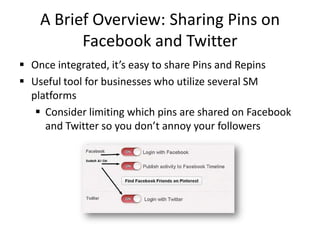
A Brief Overview: Sharing Pins on
Facebook and Twitter
 Once integrated, it’s easy to share Pins and Repins
 Useful tool for businesses who utilize several SM
platforms
 Consider limiting which pins are shared on Facebook
and Twitter so you don’t annoy your followers
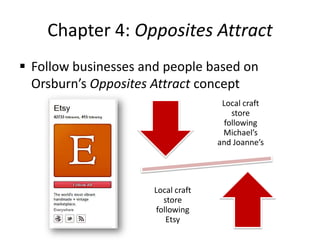
Chapter 4: Opposites Attract
 Follow businesses and people based on
Orsburn’s Opposites Attract concept
Local craft
store
following
Michael’s
and Joanne’s
Local craft
store
following
Etsy
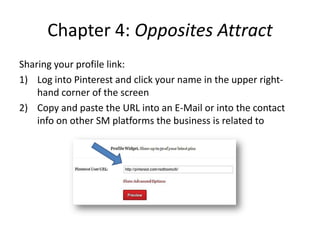
Chapter 4: Opposites Attract
Sharing your profile link:
1) Log into Pinterest and click your name in the upper right-
hand corner of the screen
2) Copy and paste the URL into an E-Mail or into the contact
info on other SM platforms the business is related to
Pinterest Analytics
 Pinterest receives 1.36 million site visits per day
 28.1% of Pinterest users are well off
 Only 25% of Pinterest users have earned a bachelors or higher
degree and the majority live off a household income of $25-75K
 The average user spends 15.8 minutes on Pinterest (While
Facebook users spend 12.1)
 50% of users have children
 In America, 68.2% of users are women, while 56% of users in the UK
are male
 Most users are between 25-34 years old, making up 27.4%
Mashable.com
Pinterest for Business
1) Pinterest buyers spend more money, more
often, and on more items than any of the other
top 5 social media sites. (Source: comScore)
2) U.S. consumers who use Pinterest follow an
average of 9.3 retail companies on the site.
(Source: shop.org)
3) Pinterest pins which include prices receive 36%
more likes than those which do not.
(Source: Shopify)
4) The number of daily Pinterest users has
increased by 145% since January 2012.
(Source: Shopify)
5) Pinterest leads in both awareness and
visitation among social image sharing sites, with
36% of online consumers aware and 19% visiting.
(Source: BizRate Insights)
6) Pinterest generates over 4x as much revenue
per click (attributable to first touch) as Twitter
and 27% more revenue per click than Facebook.
(Source: Converto)
Pinterest for Business
7) 47% of U.S. online consumers have made a
purchase based on recommendations from
Pinterest. (Source: BlogHer)
8) 81% of U.S. online consumers trust information
and advice from Pinterest. (BlogHer)
9) Pinterest attracts 1,090 visitors per minute.
(Source: Soci@l Jumpstart)
10) Pinterest is retaining and engaging users as
much as 2-3x as efficiently as Twitter was at a
similar time in its history. (Source: RJ Metrics)
11) Pinterest drives sales directly from its website
— of people with Pinterest accounts, 21% have
purchased an item after seeing it on Pinterest.
(Sources: comScore andNielsen)
12) Pinterest generated more referral traffic for
businesses than Google+, YouTube, and LinkedIn
combined. (Source: Shareaholic)
Frank Reed, Marketing Pilgrim 2012.
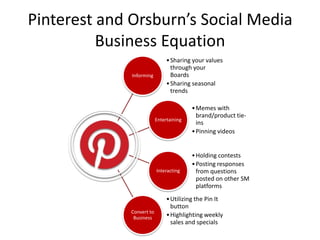
Pinterest and Orsburn’s Social Media
Business Equation
Informing
•Sharing your values
through your
Boards
•Sharing seasonal
trends
Entertaining
•Memes with
brand/product tie-
ins
•Pinning videos
Interacting
•Holding contests
•Posting responses
from questions
posted on other SM
platforms
Convert to
Business
•Utilizing the Pin It
button
•Highlighting weekly
sales and specials
Pinterest and Orsburn’s Social Media
Business Equation: Informing
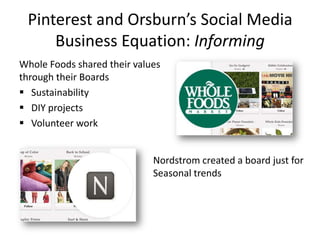
Whole Foods shared their values
through their Boards
 Sustainability
 DIY projects
 Volunteer work
Nordstrom created a board just for
Seasonal trends
Pinterest and Orsburn’s Social Media
Business Equation: Entertaining
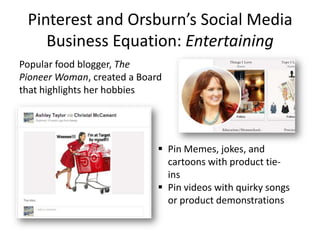
Popular food blogger, The
Pioneer Woman, created a Board
that highlights her hobbies
 Pin Memes, jokes, and
cartoons with product tie-
ins
 Pin videos with quirky songs
or product demonstrations
Pinterest and Orsburn’s Social Media
Business Equation: Interacting
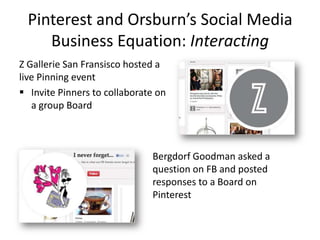
Z Gallerie San Fransisco hosted a
live Pinning event
 Invite Pinners to collaborate on
a group Board
Bergdorf Goodman asked a
question on FB and posted
responses to a Board on
Pinterest
Pinterest and Orsburn’s Social Media
Business Equation: Interacting
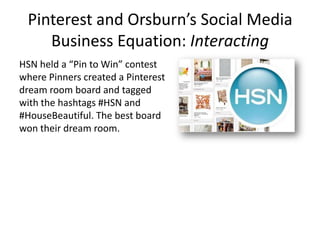
HSN held a “Pin to Win” contest
where Pinners created a Pinterest
dream room board and tagged
with the hashtags #HSN and
#HouseBeautiful. The best board
won their dream room.
Pinterest and Orsburn’s Social Media
Business Equation: Convert to Business
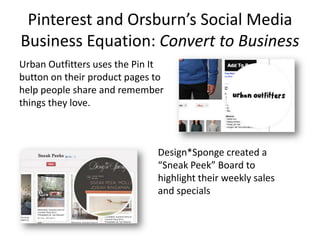
Urban Outfitters uses the Pin It
button on their product pages to
help people share and remember
things they love.
Design*Sponge created a
“Sneak Peek” Board to
highlight their weekly sales
and specials
The Good and the Bad
The Good
 Users find ideas and
inspiration
 Businesses can showcase
their products and services
 Businesses can effectively
apply Orsburn’s Social
Media Business Equation
 Great when used in
conjunction with another
SM platform, like FB or
Twitter
The Bad
 Spam Pins and Pins that link
to incorrect or
inappropriate material
Overview
 What is Pinterest?
 A Brief Overview
 Chapter 4: Opposites Attract
 Pinterest Analytics
 Pinterest for Businesses
 Pinterest and Orsburn’s Formula
 The Good and the Bad
 Conclusion
Sources
Carr, Kelby. Pinterest for Dummies. Hoboken, N.J.: John Wiley & Sons, 2012.
Print.
Erickson, Christine. "13 'Pinteresting' Facts About Pinterest Users
[INFOGRAPHIC]." Mashable. N.p., n.d. Web. 11 Mar. 2013.
<http://mashable.com/2012/02/25/pinterest-user-demographics/>.
Orsburn, Eve Mayer. The Social Media Business Equation: Using Online
Connections to Grow Your Bottom Line. Boston: Course Technology/Cengage
Learning, 2012. Print.
Reed, Frank . "Sponsor: 12 Statistics that Make the Business Case for
Pinterest."Internet Marketing News | Marketing Pilgrim —. N.p., n.d. Web. 11
Mar. 2013. <http://www.marketingpilgrim.com/2012/11/sponsor-12-
statistics-that-make-the-business-case-for-pinterest.html>.

Pinterest presentation

  • 1.
  • 2.
    Overview  What isPinterest?  A Brief Overview  Chapter 4: Opposites Attract  Pinterest Analytics  Pinterest for Businesses  Pinterest and Orsburn’s Formula  The Good and the Bad  Conclusion
  • 3.
    What is Pinterest? Pinterestis a pinboard-style photo sharing website that allows users to create and manage theme-based image collections such as events, interests, hobbies, and more
  • 4.
  • 5.
    A Brief Overview:Creating Boards
  • 6.
    A Brief Overview:Creating Boards  The “Add” dialog box lets you add or create a new board  The “Create a Board” section allows you to choose a board name, category, and select the contributors for your new board  Easy to adjust contributor settings, edit descriptions, rename, rearrange, and delete boards
  • 7.
    A Brief Overview:Contributors Adjusting the contributor options is a useful option for companies utilizing Pinterest for business:  Collaborating on work projects  Sharing articles that offer tips on a specific industry or case studies that are relevant to staff and consumers  Promoting a joint cause or topic, ways to donate or volunteer, stories of people helped by the cause
  • 8.
    A Brief Overview:Pinning Ways to Pin  Adding a Pin with a website or URL  Installing the Pinterest Pin It button  Uploading an image as a pin
  • 9.
    A Brief Overview:Pinning Adding a Pin with a website or URL 1) Copy and paste the URL 2) When the “Add a Pin” dialogue box appears, select the image that will be the cover for your pin, choose which board the pin will go to, and type a description 3) If applicable, share with Facebook and/or Twitter 4) Pin It!
  • 10.
    A Brief Overview:Pinning Installing the Pinterest Pin It button 1) Install the bookmarklet from the “Goodies” section in Pinterest 2) Navigate to the page with the image or video you’d like to Pin 3) Click the Pin It button on your browser’s bookmark bar 4) When the “Add a Pin” dialogue box appears, select the image that will be the cover for your pin, choose which board the pin will go to, and type a description 5) Pin It!
  • 11.
    A Brief Overview:Pinning Uploading an image as a Pin 1) Click the “Add +” from your home screen 2) Click “Upload a Pin” 3) Select a photo or video from your computer’s hard drive 4) When the “Add a Pin” dialogue box appears, select the image that will be the cover for your pin, choose which board the pin will go to, and type a description 5) Pin It!
  • 12.
    A Brief Overview:Repinning How to Repin 1) Hover over a Pin and click “Repin” 2) When the “Add a Pin” dialogue box appears, select the image that will be the cover for your pin, choose which board the pin will go to, and type a description 3) Pin It!
  • 13.
    A Brief Overview:Sharing Pins on Facebook and Twitter  Once integrated, it’s easy to share Pins and Repins  Useful tool for businesses who utilize several SM platforms  Consider limiting which pins are shared on Facebook and Twitter so you don’t annoy your followers
  • 14.
    Chapter 4: OppositesAttract  Follow businesses and people based on Orsburn’s Opposites Attract concept Local craft store following Michael’s and Joanne’s Local craft store following Etsy
  • 15.
    Chapter 4: OppositesAttract Sharing your profile link: 1) Log into Pinterest and click your name in the upper right- hand corner of the screen 2) Copy and paste the URL into an E-Mail or into the contact info on other SM platforms the business is related to
  • 16.
    Pinterest Analytics  Pinterestreceives 1.36 million site visits per day  28.1% of Pinterest users are well off  Only 25% of Pinterest users have earned a bachelors or higher degree and the majority live off a household income of $25-75K  The average user spends 15.8 minutes on Pinterest (While Facebook users spend 12.1)  50% of users have children  In America, 68.2% of users are women, while 56% of users in the UK are male  Most users are between 25-34 years old, making up 27.4% Mashable.com
  • 17.
    Pinterest for Business 1)Pinterest buyers spend more money, more often, and on more items than any of the other top 5 social media sites. (Source: comScore) 2) U.S. consumers who use Pinterest follow an average of 9.3 retail companies on the site. (Source: shop.org) 3) Pinterest pins which include prices receive 36% more likes than those which do not. (Source: Shopify) 4) The number of daily Pinterest users has increased by 145% since January 2012. (Source: Shopify) 5) Pinterest leads in both awareness and visitation among social image sharing sites, with 36% of online consumers aware and 19% visiting. (Source: BizRate Insights) 6) Pinterest generates over 4x as much revenue per click (attributable to first touch) as Twitter and 27% more revenue per click than Facebook. (Source: Converto)
  • 18.
    Pinterest for Business 7)47% of U.S. online consumers have made a purchase based on recommendations from Pinterest. (Source: BlogHer) 8) 81% of U.S. online consumers trust information and advice from Pinterest. (BlogHer) 9) Pinterest attracts 1,090 visitors per minute. (Source: Soci@l Jumpstart) 10) Pinterest is retaining and engaging users as much as 2-3x as efficiently as Twitter was at a similar time in its history. (Source: RJ Metrics) 11) Pinterest drives sales directly from its website — of people with Pinterest accounts, 21% have purchased an item after seeing it on Pinterest. (Sources: comScore andNielsen) 12) Pinterest generated more referral traffic for businesses than Google+, YouTube, and LinkedIn combined. (Source: Shareaholic) Frank Reed, Marketing Pilgrim 2012.
  • 19.
    Pinterest and Orsburn’sSocial Media Business Equation Informing •Sharing your values through your Boards •Sharing seasonal trends Entertaining •Memes with brand/product tie- ins •Pinning videos Interacting •Holding contests •Posting responses from questions posted on other SM platforms Convert to Business •Utilizing the Pin It button •Highlighting weekly sales and specials
  • 20.
    Pinterest and Orsburn’sSocial Media Business Equation: Informing Whole Foods shared their values through their Boards  Sustainability  DIY projects  Volunteer work Nordstrom created a board just for Seasonal trends
  • 21.
    Pinterest and Orsburn’sSocial Media Business Equation: Entertaining Popular food blogger, The Pioneer Woman, created a Board that highlights her hobbies  Pin Memes, jokes, and cartoons with product tie- ins  Pin videos with quirky songs or product demonstrations
  • 22.
    Pinterest and Orsburn’sSocial Media Business Equation: Interacting Z Gallerie San Fransisco hosted a live Pinning event  Invite Pinners to collaborate on a group Board Bergdorf Goodman asked a question on FB and posted responses to a Board on Pinterest
  • 23.
    Pinterest and Orsburn’sSocial Media Business Equation: Interacting HSN held a “Pin to Win” contest where Pinners created a Pinterest dream room board and tagged with the hashtags #HSN and #HouseBeautiful. The best board won their dream room.
  • 24.
    Pinterest and Orsburn’sSocial Media Business Equation: Convert to Business Urban Outfitters uses the Pin It button on their product pages to help people share and remember things they love. Design*Sponge created a “Sneak Peek” Board to highlight their weekly sales and specials
  • 25.
    The Good andthe Bad The Good  Users find ideas and inspiration  Businesses can showcase their products and services  Businesses can effectively apply Orsburn’s Social Media Business Equation  Great when used in conjunction with another SM platform, like FB or Twitter The Bad  Spam Pins and Pins that link to incorrect or inappropriate material
  • 26.
    Overview  What isPinterest?  A Brief Overview  Chapter 4: Opposites Attract  Pinterest Analytics  Pinterest for Businesses  Pinterest and Orsburn’s Formula  The Good and the Bad  Conclusion
  • 27.
    Sources Carr, Kelby. Pinterestfor Dummies. Hoboken, N.J.: John Wiley & Sons, 2012. Print. Erickson, Christine. "13 'Pinteresting' Facts About Pinterest Users [INFOGRAPHIC]." Mashable. N.p., n.d. Web. 11 Mar. 2013. <http://mashable.com/2012/02/25/pinterest-user-demographics/>. Orsburn, Eve Mayer. The Social Media Business Equation: Using Online Connections to Grow Your Bottom Line. Boston: Course Technology/Cengage Learning, 2012. Print. Reed, Frank . "Sponsor: 12 Statistics that Make the Business Case for Pinterest."Internet Marketing News | Marketing Pilgrim —. N.p., n.d. Web. 11 Mar. 2013. <http://www.marketingpilgrim.com/2012/11/sponsor-12- statistics-that-make-the-business-case-for-pinterest.html>.

Editor's Notes

  • #4 From that, spawned a….