

SHEKHAWATI INSTITUTE OF
ENGINEERING AND
TECHNOLOGY
A Seminar Presentation
On
RANSOMWARE
Submitted to:-
Mrs. Suman Singh
HOD of CSE Dept.
Submitted by:-
Vikash Saini
B.Tech CSE 8th sem
CONTENTS
 What is Ransomware?
 Impact of this attack
 Some Facts About Ransomware
 Bitcoins
 TOR (Anonymity Network)
 If you're a victim, should you pay the ransom?
 Ransomware infection
 How to protect yourself?
 Conclusion
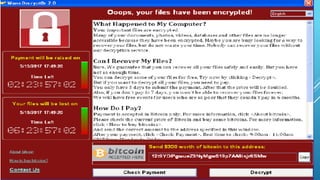
WHAT IS RANSOMWARE?
 It is a type of malware that restricts access to the
infected computer system in some way, and demands
that the user pay a ransom to the malware operators to
remove the restriction.
 This malware locked all the data in the computer and
displayed a message.
 demanding a ransom in exchange to unblock the data.
IMPACT OF THIS ATTACK
 WannaCry shutdown many businesses across the globe, including
the European manufacturing plants of automotive giants Nissan
 $17,000 Amount paid by the Hollywood Presbyterian Medical
Center in 2016 to unlock files and return to business as usual.
 209 million Amount paid in 2016 to cyber-criminals using
ransomware
 On 12 May 2017, a massive ransomware attack
occurred across a wide range of sectors, including
health care, government, telecommunications and
gas.
 WannaCry has spread to over 300,000 systems in
over 150 countries
Some Facts About Ransomware
 TYPICAL RANSOMWARE SOFTWARE USES RSA
2048 ENCRYPTION TO ENCRYPT FILES.
AN AVERAGE DESKTOP COMPUTER IS
ESTIMATED TO TAKE AROUND 6.4
QUADRILLION YEARS TO CRACK AN RSA 2048
KEY.
BITCOINS
Bitcoins are a form of cryptocurrency, meaning
they do not have a physical representation.
they are stored in anonymous digital wallets.
They can be transferred anywhere in the world via
the Internet. They can be paid from anywhere, to
anywhere with total anonymity.
TOR (ANONYMITY NETWORK)
 TOR, which stands for “The Onion Router” is a network
and browser developed to enhance and anonymize
Internet traffic.
 All traffic is encrypted .
 developed by the U.S. Naval Research Laboratory and
Defense Advanced Research Projects Agency (DARPA).
IF YOU'RE A VICTIM, SHOULD YOU
PAY THE RANSOM?
 Never pay Ransom.
 The best option is to restore the data from backup.
 try decrypting the files using recovery tools.
 Work with data recovery experts who can reverse engineer
malware and help gain access to your data.
RANSOMWARE INFECTION
 Opens an infected email attachment
 Clicks on an infected link
 Installs an infected app – from a third-party app store
 Visits a legitimate website that has been infected
HOW TO PROTECT YOURSELF?
 Update your Windows software to the latest edition.
 Backing up data is key! Make a copy and secure it.
 Scan your systems for viruses and malwares using the latest
anti-virus software in the market.
 To protect against WannaCry, apply the latest Microsoft
security patches.
 Backup all your data and store it in a secure
location.
 Scan all outgoing and incoming emails with
attachments.
 Update anti-virus software and conduct regular
scans.
 Spread awareness among employees to identify
scams, malicious links and emails.
 Segment the company network
CONCLUSION
 Ransomware is a type of malicious
software from cryptovirology that threatens to publish the
victim's data or perpetually block access to it unless a ransom is
paid
 more advanced malware uses a technique called cryptoviral
extortion, in which it encrypts the victim's files, making them
inaccessible, and demands a ransom payment to decrypt them.
seminar report on What is ransomware

seminar report on What is ransomware

  • 1.
    SHEKHAWATI INSTITUTE OF ENGINEERINGAND TECHNOLOGY A Seminar Presentation On RANSOMWARE Submitted to:- Mrs. Suman Singh HOD of CSE Dept. Submitted by:- Vikash Saini B.Tech CSE 8th sem
  • 2.
    CONTENTS  What isRansomware?  Impact of this attack  Some Facts About Ransomware  Bitcoins  TOR (Anonymity Network)  If you're a victim, should you pay the ransom?  Ransomware infection  How to protect yourself?  Conclusion
  • 3.
    WHAT IS RANSOMWARE? It is a type of malware that restricts access to the infected computer system in some way, and demands that the user pay a ransom to the malware operators to remove the restriction.  This malware locked all the data in the computer and displayed a message.  demanding a ransom in exchange to unblock the data.
  • 5.
    IMPACT OF THISATTACK  WannaCry shutdown many businesses across the globe, including the European manufacturing plants of automotive giants Nissan  $17,000 Amount paid by the Hollywood Presbyterian Medical Center in 2016 to unlock files and return to business as usual.  209 million Amount paid in 2016 to cyber-criminals using ransomware
  • 6.
     On 12May 2017, a massive ransomware attack occurred across a wide range of sectors, including health care, government, telecommunications and gas.  WannaCry has spread to over 300,000 systems in over 150 countries
  • 7.
    Some Facts AboutRansomware  TYPICAL RANSOMWARE SOFTWARE USES RSA 2048 ENCRYPTION TO ENCRYPT FILES. AN AVERAGE DESKTOP COMPUTER IS ESTIMATED TO TAKE AROUND 6.4 QUADRILLION YEARS TO CRACK AN RSA 2048 KEY.
  • 8.
    BITCOINS Bitcoins are aform of cryptocurrency, meaning they do not have a physical representation. they are stored in anonymous digital wallets. They can be transferred anywhere in the world via the Internet. They can be paid from anywhere, to anywhere with total anonymity.
  • 9.
    TOR (ANONYMITY NETWORK) TOR, which stands for “The Onion Router” is a network and browser developed to enhance and anonymize Internet traffic.  All traffic is encrypted .  developed by the U.S. Naval Research Laboratory and Defense Advanced Research Projects Agency (DARPA).
  • 10.
    IF YOU'RE AVICTIM, SHOULD YOU PAY THE RANSOM?  Never pay Ransom.  The best option is to restore the data from backup.  try decrypting the files using recovery tools.  Work with data recovery experts who can reverse engineer malware and help gain access to your data.
  • 11.
    RANSOMWARE INFECTION  Opensan infected email attachment  Clicks on an infected link  Installs an infected app – from a third-party app store  Visits a legitimate website that has been infected
  • 12.
    HOW TO PROTECTYOURSELF?  Update your Windows software to the latest edition.  Backing up data is key! Make a copy and secure it.  Scan your systems for viruses and malwares using the latest anti-virus software in the market.  To protect against WannaCry, apply the latest Microsoft security patches.
  • 13.
     Backup allyour data and store it in a secure location.  Scan all outgoing and incoming emails with attachments.  Update anti-virus software and conduct regular scans.  Spread awareness among employees to identify scams, malicious links and emails.  Segment the company network
  • 14.
    CONCLUSION  Ransomware isa type of malicious software from cryptovirology that threatens to publish the victim's data or perpetually block access to it unless a ransom is paid  more advanced malware uses a technique called cryptoviral extortion, in which it encrypts the victim's files, making them inaccessible, and demands a ransom payment to decrypt them.