1
PARCC Computer-based Testing;
Administration Training for
Test Administrators
Role-Based Key
2
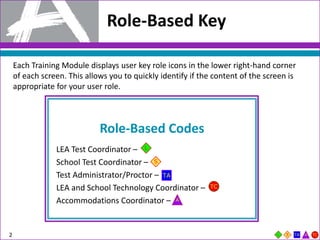
Each Training Module displays user key role icons in the lower right-hand corner
of each screen. This allows you to quickly identify if the content of the screen is
appropriate for your user role.
Role-Based Codes
LEA Test Coordinator –
School Test Coordinator –
Test Administrator/Proctor –
LEA and School Technology Coordinator –
Accommodations Coordinator –
Purpose
3
• Purpose
• Commonly Used PARCC Acronyms for Computer-based Testing
• Test Administrations, Schedules, and Testing Times
• PearsonAccessnext Managing Test Sessions
• Tasks to Complete Before, During, and After Testing
• Resources
• Support
Purpose
4
By the end of this training module, users will better understand:
• PARCC’s most commonly used acronyms;
• State-by-State Appendix;
• Test schedule and testing times;
• Security policies and protocols ;
• Tasks to complete before, during, and after testing; and
• Available resources and options to receive support.
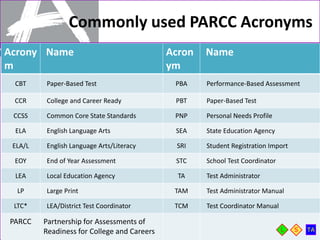
Commonly used PARCC Acronyms
5
*Note: District Test Coordinators will be referred to as
LEA Test Coordinators throughout this presentation.
Acrony
m
Name Acron
ym
Name
CBT Paper-Based Test PBA Performance-Based Assessment
CCR College and Career Ready PBT Paper-Based Test
CCSS Common Core State Standards PNP Personal Needs Profile
ELA English Language Arts SEA State Education Agency
ELA/L English Language Arts/Literacy SRI Student Registration Import
EOY End of Year Assessment STC School Test Coordinator
LEA Local Education Agency TA Test Administrator
LP Large Print TAM Test Administrator Manual
LTC* LEA/District Test Coordinator TCM Test Coordinator Manual
PARCC Partnership for Assessments of
Readiness for College and Careers
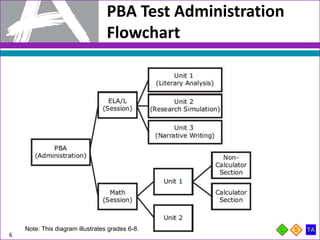
PBA Test Administration
Flowchart
6
Note: This diagram illustrates grades 6-8.
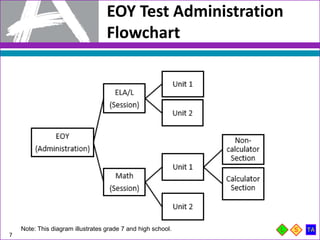
EOY Test Administration
Flowchart
7
Note: This diagram illustrates grade 7 and high school.
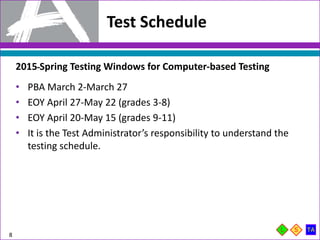
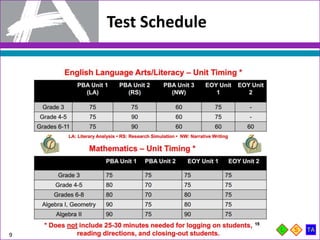
Test Schedule
8
2015 Spring Testing Windows for Computer-based Testing
• PBA March 2-March 27
• EOY April 27-May 22 (grades 3-8)
• EOY April 20-May 15 (grades 9-11)
• It is the Test Administrator’s responsibility to understand the
testing schedule.
Test Schedule
9
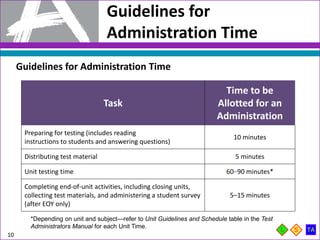
Guidelines for
Administration Time
10
Guidelines for Administration Time
Task
Time to be
Allotted for an
Administration
Preparing for testing (includes reading
instructions to students and answering questions)
10 minutes
Distributing test material 5 minutes
Unit testing time 60–90 minutes*
Completing end-of-unit activities, including closing units,
collecting test materials, and administering a student survey
(after EOY only)
5–15 minutes
*Depending on unit and subject—refer to Unit Guidelines and Schedule table in the Test
Administrators Manual for each Unit Time.
Guidelines for
Administration Time
11
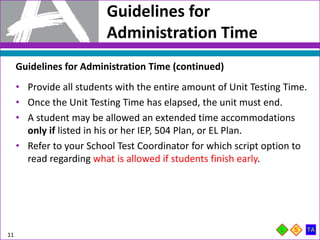
Guidelines for Administration Time (continued)
• Provide all students with the entire amount of Unit Testing Time.
• Once the Unit Testing Time has elapsed, the unit must end.
• A student may be allowed an extended time accommodations
only if listed in his or her IEP, 504 Plan, or EL Plan.
• Refer to your School Test Coordinator for which script option to
read regarding what is allowed if students finish early.
Make-Up Testing
12
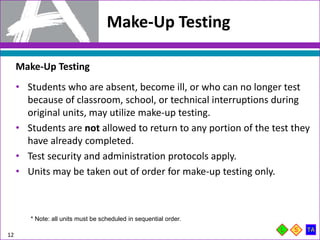
Make-Up Testing
• Students who are absent, become ill, or who can no longer test
because of classroom, school, or technical interruptions during
original units, may utilize make-up testing.
• Students are not allowed to return to any portion of the test they
have already completed.
• Test security and administration protocols apply.
• Units may be taken out of order for make-up testing only.
* Note: all units must be scheduled in sequential order.
Guidelines for Breaks
13
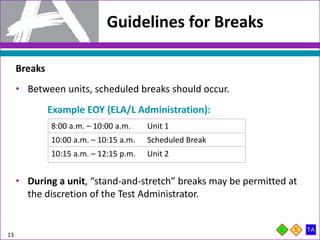
Breaks
• Between units, scheduled breaks should occur.
• During a unit, “stand-and-stretch” breaks may be permitted at
the discretion of the Test Administrator.
Example EOY (ELA/L Administration):
8:00 a.m. – 10:00 a.m. Unit 1
10:00 a.m. – 10:15 a.m. Scheduled Break
10:15 a.m. – 12:15 p.m. Unit 2
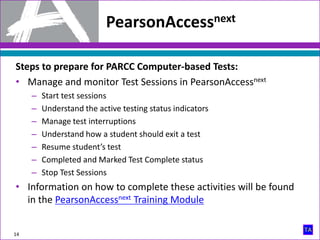
Steps to prepare for PARCC Computer-based Tests:
• Manage and monitor Test Sessions in PearsonAccessnext
– Start test sessions
– Understand the active testing status indicators
– Manage test interruptions
– Understand how a student should exit a test
– Resume student’s test
– Completed and Marked Test Complete status
– Stop Test Sessions
• Information on how to complete these activities will be found
in the PearsonAccessnext Training Module
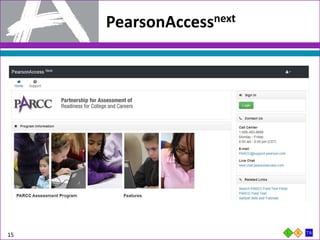
PearsonAccessnext
14
15
PearsonAccessnext
16
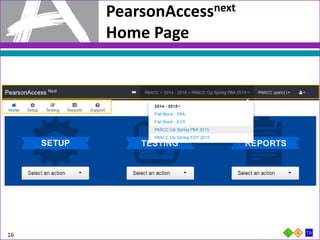
PearsonAccessnext
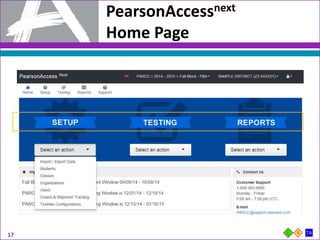
Home Page
17
PearsonAccessnext
Home Page
PearsonAccessnext
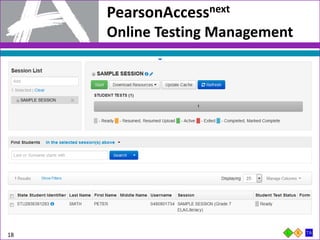
Online Testing Management
18
PearsonAccessnext
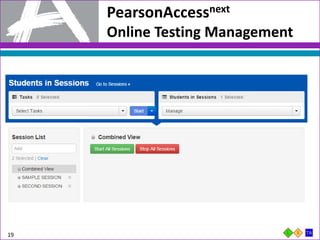
Online Testing Management
19
PearsonAccessnext
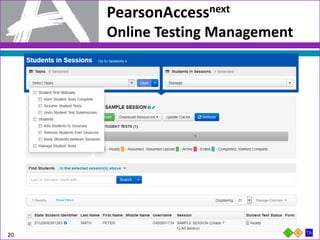
Online Testing Management
20
1. At least one week before Testing:
• Attend training to review policies and instructions for test administration.
• Sign a Security Agreement.
• Prepare to administer accommodated tests, if necessary.
• Arrange for school supplied materials.
• Participate in the Infrastructure Trial, if applicable.
• Administer the computer-based Sample Items and Tutorials.
2. One Day before Testing:
• Ensure you can access PearsonAccessnext.
• Prepare the testing environment.
21
Tasks to Complete
Before Testing
Test Administrators and Proctors Must Prepare for a Test
Administration
Tasks to Complete
Day of Testing
22
Test Administrators Activities, the Day of Testing:
1. Receive test materials.
• Note: PBA ELA requires headphones
2. Manage test sessions in PearsonAccessnext
3. Read the appropriate script.
4. Distribute test materials to students.
5. Help students log in to TestNav.
6. Keep time.
7. Supervise and monitor test activity.
8. Provide breaks, if applicable.
9. Report testing Irregularity or security breaches.
10. Troubleshoot computer-based testing issues.
Guidance for Troubleshooting
Computer-based Testing
23
• When a technology disruption affecting a single student occurs,
Test Administrators should follow these steps:
‒ Note the time of the disruption.
‒ Follow procedures on troubleshooting and support.
‒ If issue persist move the student to another testing device.
‒ Document the situation in writing.
• When a technology disruption affecting multiple students occurs,
Test Administrators should follow these steps:
‒ Pause testing.
‒ Note the time of the disruption.
‒ Follow procedures on troubleshooting and support.
‒ Resume testing.
‒ Document the situation in writing.
During Testing:
Security Breaches
24
Monitoring and Reporting Security Breaches and Testing
Irregularities
1. All instances of security breaches and testing irregularities must
be reported to the School Test Coordinator, and subsequently,
the LEA Test Coordinator, immediately.
2. The Form to Report a Testing Irregularity or Security Breach
must be completed within two school days of the incident.
3. And remember, you should be prepared to provide a written
statement of the incident to your School Test Coordinator
should a security breach or testing irregularity occur.
During Testing:
Safety Threats and Severe Weather
25
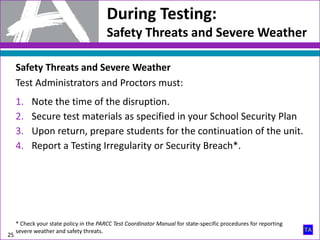
Safety Threats and Severe Weather
Test Administrators and Proctors must:
1. Note the time of the disruption.
2. Secure test materials as specified in your School Security Plan
3. Upon return, prepare students for the continuation of the unit.
4. Report a Testing Irregularity or Security Breach*.
* Check your state policy in the PARCC Test Coordinator Manual for state-specific procedures for reporting
severe weather and safety threats.
Tasks to Complete
After Testing
26
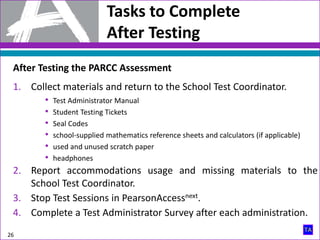
After Testing the PARCC Assessment
1. Collect materials and return to the School Test Coordinator.
• Test Administrator Manual
• Student Testing Tickets
• Seal Codes
• school-supplied mathematics reference sheets and calculators (if applicable)
• used and unused scratch paper
• headphones
2. Report accommodations usage and missing materials to the
School Test Coordinator.
3. Stop Test Sessions in PearsonAccessnext.
4. Complete a Test Administrator Survey after each administration.
Math Tools
27
Math Tools
28
Math Tools
29
Math Tools
30
Math Tools
31
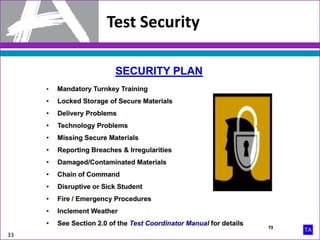
Test Security
32
Test Security
33
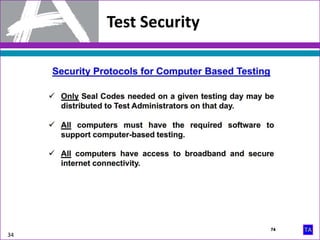
Test Security
34
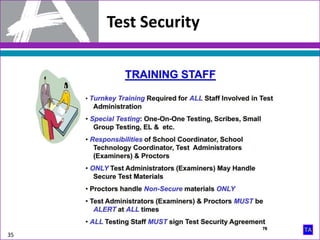
Test Security
35
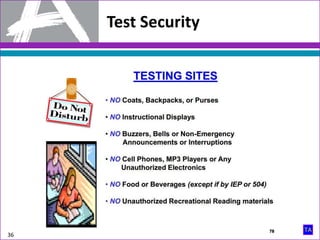
Test Security
36
Test Security
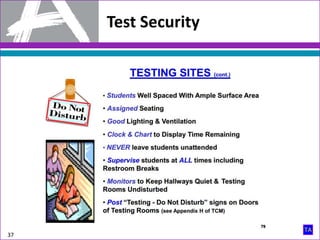
37
Test Security
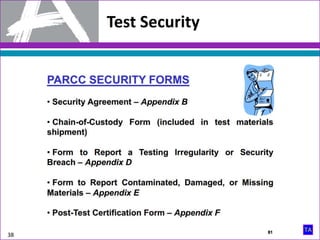
38
Test Security
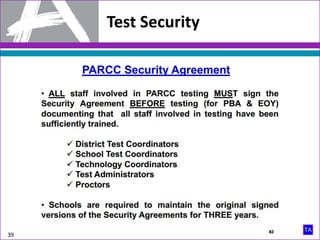
39
Test Security
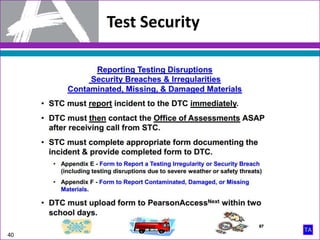
40
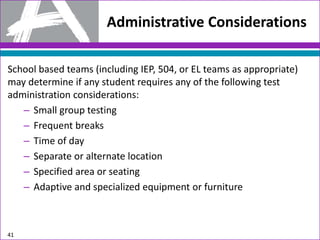
Administrative Considerations
School based teams (including IEP, 504, or EL teams as appropriate)
may determine if any student requires any of the following test
administration considerations:
– Small group testing
– Frequent breaks
– Time of day
– Separate or alternate location
– Specified area or seating
– Adaptive and specialized equipment or furniture
41
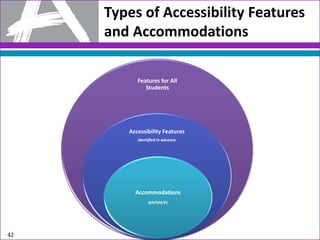
Types of Accessibility Features
and Accommodations
Features for All
Students
Accessibility Features
Identified in advance
Accommodations
IEP/504/EL
42
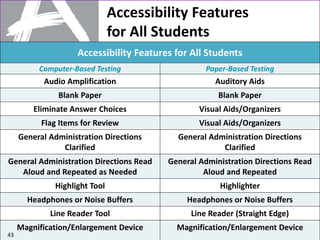
Accessibility Features
for All Students
Accessibility Features for All Students
Computer-Based Testing Paper-Based Testing
Audio Amplification Auditory Aids
Blank Paper Blank Paper
Eliminate Answer Choices Visual Aids/Organizers
Flag Items for Review Visual Aids/Organizers
General Administration Directions
Clarified
General Administration Directions
Clarified
General Administration Directions Read
Aloud and Repeated as Needed
General Administration Directions Read
Aloud and Repeated
Highlight Tool Highlighter
Headphones or Noise Buffers Headphones or Noise Buffers
Line Reader Tool Line Reader (Straight Edge)
Magnification/Enlargement Device Magnification/Enlargement Device
43
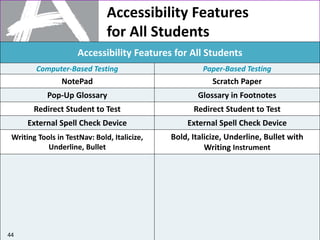
Accessibility Features
for All Students
Accessibility Features for All Students
Computer-Based Testing Paper-Based Testing
NotePad Scratch Paper
Pop-Up Glossary Glossary in Footnotes
Redirect Student to Test Redirect Student to Test
External Spell Check Device External Spell Check Device
Writing Tools in TestNav: Bold, Italicize,
Underline, Bullet
Bold, Italicize, Underline, Bullet with
Writing Instrument
44
Accessibility Features
Identified in Advance
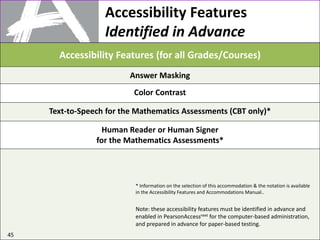
Accessibility Features (for all Grades/Courses)
Answer Masking
Color Contrast
Text-to-Speech for the Mathematics Assessments (CBT only)*
Human Reader or Human Signer
for the Mathematics Assessments*
45
Note: these accessibility features must be identified in advance and
enabled in PearsonAccessnext for the computer-based administration,
and prepared in advance for paper-based testing.
* Information on the selection of this accommodation & the notation is available
in the Accessibility Features and Accommodations Manual..
46
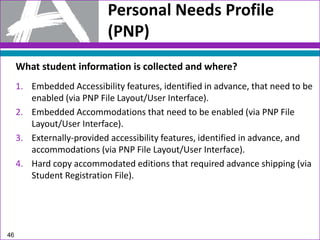
Personal Needs Profile
(PNP)
What student information is collected and where?
1. Embedded Accessibility features, identified in advance, that need to be
enabled (via PNP File Layout/User Interface).
2. Embedded Accommodations that need to be enabled (via PNP File
Layout/User Interface).
3. Externally-provided accessibility features, identified in advance, and
accommodations (via PNP File Layout/User Interface).
4. Hard copy accommodated editions that required advance shipping (via
Student Registration File).
47
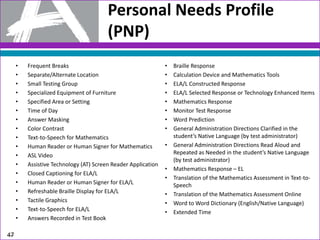
Personal Needs Profile
(PNP)
• Frequent Breaks
• Separate/Alternate Location
• Small Testing Group
• Specialized Equipment of Furniture
• Specified Area or Setting
• Time of Day
• Answer Masking
• Color Contrast
• Text-to-Speech for Mathematics
• Human Reader or Human Signer for Mathematics
• ASL Video
• Assistive Technology (AT) Screen Reader Application
• Closed Captioning for ELA/L
• Human Reader or Human Signer for ELA/L
• Refreshable Braille Display for ELA/L
• Tactile Graphics
• Text-to-Speech for ELA/L
• Answers Recorded in Test Book
• Braille Response
• Calculation Device and Mathematics Tools
• ELA/L Constructed Response
• ELA/L Selected Response or Technology Enhanced Items
• Mathematics Response
• Monitor Test Response
• Word Prediction
• General Administration Directions Clarified in the
student’s Native Language (by test administrator)
• General Administration Directions Read Aloud and
Repeated as Needed in the student’s Native Language
(by test administrator)
• Mathematics Response – EL
• Translation of the Mathematics Assessment in Text-to-
Speech
• Translation of the Mathematics Assessment Online
• Word to Word Dictionary (English/Native Language)
• Extended Time
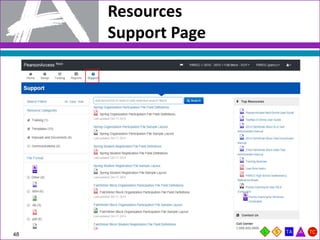
Resources
Support Page
48
Resources
Training Center
49
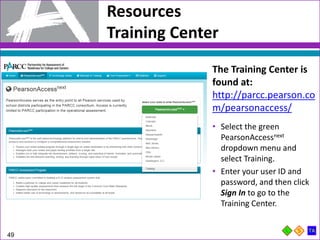
The Training Center is
found at:
http://parcc.pearson.co
m/pearsonaccess/
• Select the green
PearsonAccessnext
dropdown menu and
select Training.
• Enter your user ID and
password, and then click
Sign In to go to the
Training Center.
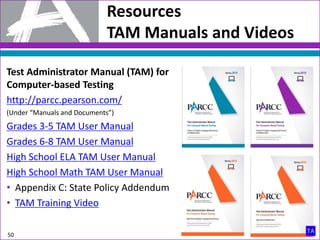
Test Administrator Manual (TAM) for
Computer-based Testing
http://parcc.pearson.com/
(Under “Manuals and Documents”)
Grades 3-5 TAM User Manual
Grades 6-8 TAM User Manual
High School ELA TAM User Manual
High School Math TAM User Manual
• Appendix C: State Policy Addendum
• TAM Training Video
Resources
TAM Manuals and Videos
50
Resources
Accessibility Features and Accommodations
Accessibility Features and
Accommodations Manual
http://www.parcconline.org/sites/parcc/file
s/parcc-accessibility-features-
accommodations-manual-11-14_final.pdf
Accessibility Features and
Accommodations Training Module:
https://parcc.tms.pearson.com
51
Contact PARCC Support for assistance with:
Support
PARCC Support
Online Support and Resources: http://parcc.pearson.com/support
Call Toll Free: 1-888-493-9888 (5:00 am – 7:00 pm CT, Mon. – Fri.)
Email: PARCC@support.pearson.com
52
 Accessing resources
 Setting up proctor caching
 Submitting additional orders
 Inquiring about shipments
 Navigating PearsonAccessnext
 Navigating the Training Center
 Managing Student Registration Data
 Setting up units
 Managing user IDs and passwords
Support
State or LEA Support
Contact your State or LEA Test Coordinator for assistance with:
53
 Testing schedule
 Testing accommodations
 Unusual circumstances on test days
 Violations of test security
 School emergencies that affect testing
 Questions about general testing policies
 Questions about state communications

Parcc Test Administration for VTSD Staff Training

  • 1.
    1 PARCC Computer-based Testing; AdministrationTraining for Test Administrators
  • 2.
    Role-Based Key 2 Each TrainingModule displays user key role icons in the lower right-hand corner of each screen. This allows you to quickly identify if the content of the screen is appropriate for your user role. Role-Based Codes LEA Test Coordinator – School Test Coordinator – Test Administrator/Proctor – LEA and School Technology Coordinator – Accommodations Coordinator –
  • 3.
    Purpose 3 • Purpose • CommonlyUsed PARCC Acronyms for Computer-based Testing • Test Administrations, Schedules, and Testing Times • PearsonAccessnext Managing Test Sessions • Tasks to Complete Before, During, and After Testing • Resources • Support
  • 4.
    Purpose 4 By the endof this training module, users will better understand: • PARCC’s most commonly used acronyms; • State-by-State Appendix; • Test schedule and testing times; • Security policies and protocols ; • Tasks to complete before, during, and after testing; and • Available resources and options to receive support.
  • 5.
    Commonly used PARCCAcronyms 5 *Note: District Test Coordinators will be referred to as LEA Test Coordinators throughout this presentation. Acrony m Name Acron ym Name CBT Paper-Based Test PBA Performance-Based Assessment CCR College and Career Ready PBT Paper-Based Test CCSS Common Core State Standards PNP Personal Needs Profile ELA English Language Arts SEA State Education Agency ELA/L English Language Arts/Literacy SRI Student Registration Import EOY End of Year Assessment STC School Test Coordinator LEA Local Education Agency TA Test Administrator LP Large Print TAM Test Administrator Manual LTC* LEA/District Test Coordinator TCM Test Coordinator Manual PARCC Partnership for Assessments of Readiness for College and Careers
  • 6.
    PBA Test Administration Flowchart 6 Note:This diagram illustrates grades 6-8.
  • 7.
    EOY Test Administration Flowchart 7 Note:This diagram illustrates grade 7 and high school.
  • 8.
    Test Schedule 8 2015 SpringTesting Windows for Computer-based Testing • PBA March 2-March 27 • EOY April 27-May 22 (grades 3-8) • EOY April 20-May 15 (grades 9-11) • It is the Test Administrator’s responsibility to understand the testing schedule.
  • 9.
  • 10.
    Guidelines for Administration Time 10 Guidelinesfor Administration Time Task Time to be Allotted for an Administration Preparing for testing (includes reading instructions to students and answering questions) 10 minutes Distributing test material 5 minutes Unit testing time 60–90 minutes* Completing end-of-unit activities, including closing units, collecting test materials, and administering a student survey (after EOY only) 5–15 minutes *Depending on unit and subject—refer to Unit Guidelines and Schedule table in the Test Administrators Manual for each Unit Time.
  • 11.
    Guidelines for Administration Time 11 Guidelinesfor Administration Time (continued) • Provide all students with the entire amount of Unit Testing Time. • Once the Unit Testing Time has elapsed, the unit must end. • A student may be allowed an extended time accommodations only if listed in his or her IEP, 504 Plan, or EL Plan. • Refer to your School Test Coordinator for which script option to read regarding what is allowed if students finish early.
  • 12.
    Make-Up Testing 12 Make-Up Testing •Students who are absent, become ill, or who can no longer test because of classroom, school, or technical interruptions during original units, may utilize make-up testing. • Students are not allowed to return to any portion of the test they have already completed. • Test security and administration protocols apply. • Units may be taken out of order for make-up testing only. * Note: all units must be scheduled in sequential order.
  • 13.
    Guidelines for Breaks 13 Breaks •Between units, scheduled breaks should occur. • During a unit, “stand-and-stretch” breaks may be permitted at the discretion of the Test Administrator. Example EOY (ELA/L Administration): 8:00 a.m. – 10:00 a.m. Unit 1 10:00 a.m. – 10:15 a.m. Scheduled Break 10:15 a.m. – 12:15 p.m. Unit 2
  • 14.
    Steps to preparefor PARCC Computer-based Tests: • Manage and monitor Test Sessions in PearsonAccessnext – Start test sessions – Understand the active testing status indicators – Manage test interruptions – Understand how a student should exit a test – Resume student’s test – Completed and Marked Test Complete status – Stop Test Sessions • Information on how to complete these activities will be found in the PearsonAccessnext Training Module PearsonAccessnext 14
  • 15.
  • 16.
  • 17.
  • 18.
  • 19.
  • 20.
  • 21.
    1. At leastone week before Testing: • Attend training to review policies and instructions for test administration. • Sign a Security Agreement. • Prepare to administer accommodated tests, if necessary. • Arrange for school supplied materials. • Participate in the Infrastructure Trial, if applicable. • Administer the computer-based Sample Items and Tutorials. 2. One Day before Testing: • Ensure you can access PearsonAccessnext. • Prepare the testing environment. 21 Tasks to Complete Before Testing Test Administrators and Proctors Must Prepare for a Test Administration
  • 22.
    Tasks to Complete Dayof Testing 22 Test Administrators Activities, the Day of Testing: 1. Receive test materials. • Note: PBA ELA requires headphones 2. Manage test sessions in PearsonAccessnext 3. Read the appropriate script. 4. Distribute test materials to students. 5. Help students log in to TestNav. 6. Keep time. 7. Supervise and monitor test activity. 8. Provide breaks, if applicable. 9. Report testing Irregularity or security breaches. 10. Troubleshoot computer-based testing issues.
  • 23.
    Guidance for Troubleshooting Computer-basedTesting 23 • When a technology disruption affecting a single student occurs, Test Administrators should follow these steps: ‒ Note the time of the disruption. ‒ Follow procedures on troubleshooting and support. ‒ If issue persist move the student to another testing device. ‒ Document the situation in writing. • When a technology disruption affecting multiple students occurs, Test Administrators should follow these steps: ‒ Pause testing. ‒ Note the time of the disruption. ‒ Follow procedures on troubleshooting and support. ‒ Resume testing. ‒ Document the situation in writing.
  • 24.
    During Testing: Security Breaches 24 Monitoringand Reporting Security Breaches and Testing Irregularities 1. All instances of security breaches and testing irregularities must be reported to the School Test Coordinator, and subsequently, the LEA Test Coordinator, immediately. 2. The Form to Report a Testing Irregularity or Security Breach must be completed within two school days of the incident. 3. And remember, you should be prepared to provide a written statement of the incident to your School Test Coordinator should a security breach or testing irregularity occur.
  • 25.
    During Testing: Safety Threatsand Severe Weather 25 Safety Threats and Severe Weather Test Administrators and Proctors must: 1. Note the time of the disruption. 2. Secure test materials as specified in your School Security Plan 3. Upon return, prepare students for the continuation of the unit. 4. Report a Testing Irregularity or Security Breach*. * Check your state policy in the PARCC Test Coordinator Manual for state-specific procedures for reporting severe weather and safety threats.
  • 26.
    Tasks to Complete AfterTesting 26 After Testing the PARCC Assessment 1. Collect materials and return to the School Test Coordinator. • Test Administrator Manual • Student Testing Tickets • Seal Codes • school-supplied mathematics reference sheets and calculators (if applicable) • used and unused scratch paper • headphones 2. Report accommodations usage and missing materials to the School Test Coordinator. 3. Stop Test Sessions in PearsonAccessnext. 4. Complete a Test Administrator Survey after each administration.
  • 27.
  • 28.
  • 29.
  • 30.
  • 31.
  • 32.
  • 33.
  • 34.
  • 35.
  • 36.
  • 37.
  • 38.
  • 39.
  • 40.
  • 41.
    Administrative Considerations School basedteams (including IEP, 504, or EL teams as appropriate) may determine if any student requires any of the following test administration considerations: – Small group testing – Frequent breaks – Time of day – Separate or alternate location – Specified area or seating – Adaptive and specialized equipment or furniture 41
  • 42.
    Types of AccessibilityFeatures and Accommodations Features for All Students Accessibility Features Identified in advance Accommodations IEP/504/EL 42
  • 43.
    Accessibility Features for AllStudents Accessibility Features for All Students Computer-Based Testing Paper-Based Testing Audio Amplification Auditory Aids Blank Paper Blank Paper Eliminate Answer Choices Visual Aids/Organizers Flag Items for Review Visual Aids/Organizers General Administration Directions Clarified General Administration Directions Clarified General Administration Directions Read Aloud and Repeated as Needed General Administration Directions Read Aloud and Repeated Highlight Tool Highlighter Headphones or Noise Buffers Headphones or Noise Buffers Line Reader Tool Line Reader (Straight Edge) Magnification/Enlargement Device Magnification/Enlargement Device 43
  • 44.
    Accessibility Features for AllStudents Accessibility Features for All Students Computer-Based Testing Paper-Based Testing NotePad Scratch Paper Pop-Up Glossary Glossary in Footnotes Redirect Student to Test Redirect Student to Test External Spell Check Device External Spell Check Device Writing Tools in TestNav: Bold, Italicize, Underline, Bullet Bold, Italicize, Underline, Bullet with Writing Instrument 44
  • 45.
    Accessibility Features Identified inAdvance Accessibility Features (for all Grades/Courses) Answer Masking Color Contrast Text-to-Speech for the Mathematics Assessments (CBT only)* Human Reader or Human Signer for the Mathematics Assessments* 45 Note: these accessibility features must be identified in advance and enabled in PearsonAccessnext for the computer-based administration, and prepared in advance for paper-based testing. * Information on the selection of this accommodation & the notation is available in the Accessibility Features and Accommodations Manual..
  • 46.
    46 Personal Needs Profile (PNP) Whatstudent information is collected and where? 1. Embedded Accessibility features, identified in advance, that need to be enabled (via PNP File Layout/User Interface). 2. Embedded Accommodations that need to be enabled (via PNP File Layout/User Interface). 3. Externally-provided accessibility features, identified in advance, and accommodations (via PNP File Layout/User Interface). 4. Hard copy accommodated editions that required advance shipping (via Student Registration File).
  • 47.
    47 Personal Needs Profile (PNP) •Frequent Breaks • Separate/Alternate Location • Small Testing Group • Specialized Equipment of Furniture • Specified Area or Setting • Time of Day • Answer Masking • Color Contrast • Text-to-Speech for Mathematics • Human Reader or Human Signer for Mathematics • ASL Video • Assistive Technology (AT) Screen Reader Application • Closed Captioning for ELA/L • Human Reader or Human Signer for ELA/L • Refreshable Braille Display for ELA/L • Tactile Graphics • Text-to-Speech for ELA/L • Answers Recorded in Test Book • Braille Response • Calculation Device and Mathematics Tools • ELA/L Constructed Response • ELA/L Selected Response or Technology Enhanced Items • Mathematics Response • Monitor Test Response • Word Prediction • General Administration Directions Clarified in the student’s Native Language (by test administrator) • General Administration Directions Read Aloud and Repeated as Needed in the student’s Native Language (by test administrator) • Mathematics Response – EL • Translation of the Mathematics Assessment in Text-to- Speech • Translation of the Mathematics Assessment Online • Word to Word Dictionary (English/Native Language) • Extended Time
  • 48.
  • 49.
    Resources Training Center 49 The TrainingCenter is found at: http://parcc.pearson.co m/pearsonaccess/ • Select the green PearsonAccessnext dropdown menu and select Training. • Enter your user ID and password, and then click Sign In to go to the Training Center.
  • 50.
    Test Administrator Manual(TAM) for Computer-based Testing http://parcc.pearson.com/ (Under “Manuals and Documents”) Grades 3-5 TAM User Manual Grades 6-8 TAM User Manual High School ELA TAM User Manual High School Math TAM User Manual • Appendix C: State Policy Addendum • TAM Training Video Resources TAM Manuals and Videos 50
  • 51.
    Resources Accessibility Features andAccommodations Accessibility Features and Accommodations Manual http://www.parcconline.org/sites/parcc/file s/parcc-accessibility-features- accommodations-manual-11-14_final.pdf Accessibility Features and Accommodations Training Module: https://parcc.tms.pearson.com 51
  • 52.
    Contact PARCC Supportfor assistance with: Support PARCC Support Online Support and Resources: http://parcc.pearson.com/support Call Toll Free: 1-888-493-9888 (5:00 am – 7:00 pm CT, Mon. – Fri.) Email: PARCC@support.pearson.com 52  Accessing resources  Setting up proctor caching  Submitting additional orders  Inquiring about shipments  Navigating PearsonAccessnext  Navigating the Training Center  Managing Student Registration Data  Setting up units  Managing user IDs and passwords
  • 53.
    Support State or LEASupport Contact your State or LEA Test Coordinator for assistance with: 53  Testing schedule  Testing accommodations  Unusual circumstances on test days  Violations of test security  School emergencies that affect testing  Questions about general testing policies  Questions about state communications