Mobile Devices and Wi-Fi 
Herman Robers 
October 2014
CONFIDENTIAL 
© Copyright 2014. Aruba Networks, Inc. 
All rights reserved 
2 #AirheadsConf 
Agenda 
How is consumer WiFi different from Enterprise 
What do we see in the field 
Handover behavior 
Relevant standards 
5GHz and DFS channels 
Client influencing summary
3 
CONFIDENTIAL 
© Copyright 2014. Aruba Networks, Inc. 
All rights reserved 
#WLPC_EU @ArubaNetworksEU 
About me 
• Herman Robers 
• Systems Engineer for Netherlands 
• Almost 3 years at Aruba Networks 
• Security background (and ClearPass experience) 
• Past: worked 13 years as security engineer / 
consultant 
• Ham radio license (PA3FYW)
4 
CONFIDENTIAL 
© Copyright 2014. Aruba Networks, Inc. 
All rights reserved 
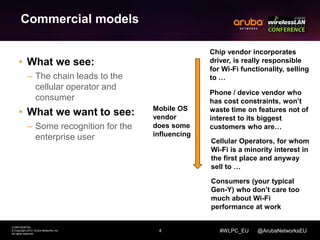
Chip vendor incorporates 
driver, is really responsible 
for Wi-Fi functionality, selling 
to … 
Phone / device vendor who 
has cost constraints, won’t 
waste time on features not of 
interest to its biggest 
customers who are… 
Cellular Operators, for whom 
Wi-Fi is a minority interest in 
the first place and anyway 
sell to … 
#WLPC_EU @ArubaNetworksEU 
Commercial models 
• What we see: 
– The chain leads to the 
cellular operator and 
consumer 
• What we want to see: 
– Some recognition for the 
enterprise user 
Consumers (your typical 
Gen-Y) who don’t care too 
much about Wi-Fi 
performance at work 
Mobile OS 
vendor 
does some 
influencing
5 
CONFIDENTIAL 
© Copyright 2014. Aruba Networks, Inc. 
All rights reserved 
#WLPC_EU @ArubaNetworksEU 
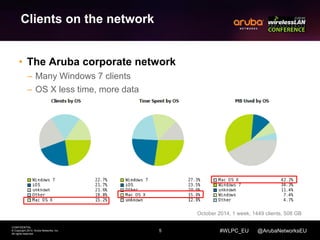
Clients on the network 
• The Aruba corporate network 
– Many Windows 7 clients 
– OS X less time, more data 
October 2014, 1 week, 1449 clients, 508 GB
6 
CONFIDENTIAL 
© Copyright 2014. Aruba Networks, Inc. 
All rights reserved 
#WLPC_EU @ArubaNetworksEU 
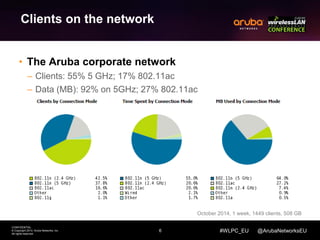
Clients on the network 
• The Aruba corporate network 
– Clients: 55% 5 GHz; 17% 802.11ac 
– Data (MB): 92% on 5GHz; 27% 802.11ac 
October 2014, 1 week, 1449 clients, 508 GB
7 
CONFIDENTIAL 
© Copyright 2014. Aruba Networks, Inc. 
All rights reserved 
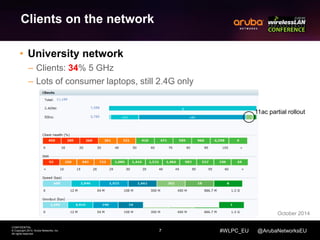
11ac partial rollout 
#WLPC_EU @ArubaNetworksEU 
Clients on the network 
• University network 
– Clients: 34% 5 GHz 
– Lots of consumer laptops, still 2.4G only 
October 2014
8 
CONFIDENTIAL 
© Copyright 2014. Aruba Networks, Inc. 
All rights reserved 
#WLPC_EU @ArubaNetworksEU 
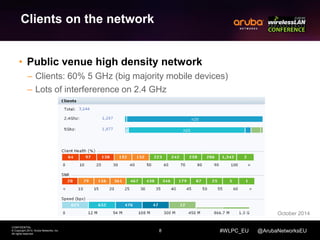
Clients on the network 
• Public venue high density network 
– Clients: 60% 5 GHz (big majority mobile devices) 
– Lots of interfererence on 2.4 GHz 
October 2014
9 
CONFIDENTIAL 
© Copyright 2014. Aruba Networks, Inc. 
All rights reserved 
#WLPC_EU @ArubaNetworksEU 
Clients on the network 
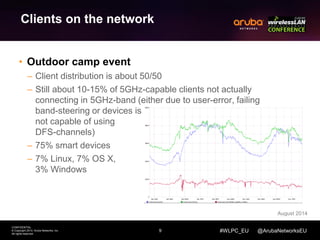
• Outdoor camp event 
– Client distribution is about 50/50 
– Still about 10-15% of 5GHz-capable clients not actually 
connecting in 5GHz-band (either due to user-error, failing 
band-steering or devices is 
not capable of using 
DFS-channels) 
– 75% smart devices 
– 7% Linux, 7% OS X, 
3% Windows 
August 2014
10 
CONFIDENTIAL 
© Copyright 2014. Aruba Networks, Inc. 
All rights reserved 
#WLPC_EU @ArubaNetworksEU 
Client summary 
• Relative number of 5 GHz clients are increasing 
• 5 GHz client transfer more data (might be better 
clients) 
• 802.11ac is on the rise 
• Smartdevices (phones, tablets) are better in 
5GHz 
• DFS support still problematic on some devices 
– Some don’t do DFS at all, some only work in US 
• Still laptops with 2.4 GHz only being sold
11 
CONFIDENTIAL 
© Copyright 2014. Aruba Networks, Inc. 
All rights reserved 
#WLPC_EU @ArubaNetworksEU 
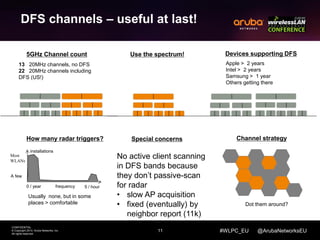
DFS channels – useful at last! 
How many radar triggers? 
frequency 
installations 
0 / year 5 / hour 
Usually none, but in some 
places > comfortable 
Devices supporting DFS 
Apple > 2 years 
Intel > 2 years 
Samsung > 1 year 
Others getting there 
Most 
WLANs 
A few 
Special concerns 
No active client scanning 
in DFS bands because 
they don’t passive-scan 
for radar 
• slow AP acquisition 
• fixed (eventually) by 
neighbor report (11k) 
5GHz Channel count 
13 20MHz channels, no DFS 
22 20MHz channels including 
DFS (US!) 
Channel strategy 
Dot them around? 
Use the spectrum!
12 
CONFIDENTIAL 
© Copyright 2014. Aruba Networks, Inc. 
All rights reserved 
#WLPC_EU @ArubaNetworksEU 
5GHz band 
• What we see: 
– Beginning to favor 5GHz 
over 2.4 
– Spreading DFS support 
• What we want to see: 
– Overweight 5GHz bias 
– 100% DFS support 
• About 18 months ago Apple supposedly 
reversed from unconditionally preferring 
2.4GHz to favoring 5GHz. 
• Unfortunately the battery-saving imperative 
(see earlier) means that when a device has 
an acceptable signal from its AP, it will stop 
scanning for a better one. Especially 
scanning in other bands. 
• This can cause difficulties when the WLAN 
seeks to move a device to a different band: 
it may refuse to scan the alternate band. 
• DFS support is improving, now available on 
all Apple devices (since iPhone 4S) and 
many Android (since early 2013: e.g. 
Samsung Note, Galaxy S4). 
• We believe this is a good time to start 
deploying DFS channels.
13 
CONFIDENTIAL 
© Copyright 2014. Aruba Networks, Inc. 
All rights reserved 
#WLPC_EU @ArubaNetworksEU 
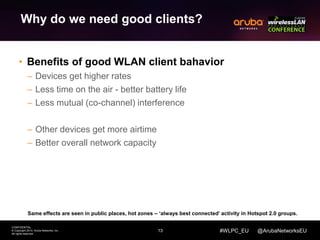
Why do we need good clients? 
• Benefits of good WLAN client bahavior 
– Devices get higher rates 
– Less time on the air - better battery life 
– Less mutual (co-channel) interference 
– Other devices get more airtime 
– Better overall network capacity 
Same effects are seen in public places, hot zones – ‘always best connected’ activity in Hotspot 2.0 groups.
14 
CONFIDENTIAL 
© Copyright 2014. Aruba Networks, Inc. 
All rights reserved 
#WLPC_EU @ArubaNetworksEU 
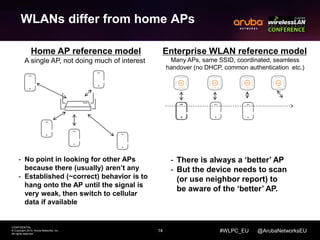
WLANs differ from home APs 
Home AP reference model 
A single AP, not doing much of interest 
Enterprise WLAN reference model 
Many APs, same SSID, coordinated, seamless 
handover (no DHCP, common authentication etc.) 
- No point in looking for other APs 
because there (usually) aren’t any 
- Established (~correct) behavior is to 
hang onto the AP until the signal is 
very weak, then switch to cellular 
data if available 
- There is always a ‘better’ AP 
- But the device needs to scan 
(or use neighbor report) to 
be aware of the ‘better’ AP.
15 
Signal Strength 
CONFIDENTIAL 
© Copyright 2014. Aruba Networks, Inc. 
All rights reserved 
#WLPC_EU @ArubaNetworksEU 
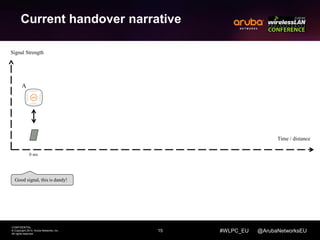
Current handover narrative 
Good signal, this is dandy! 
Time / distance 
0 sec 
A
16 
Signal Strength 
CONFIDENTIAL 
© Copyright 2014. Aruba Networks, Inc. 
All rights reserved 
#WLPC_EU @ArubaNetworksEU 
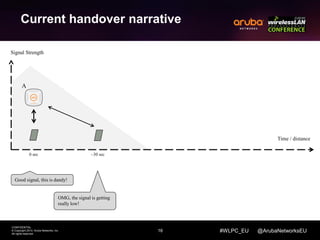
Current handover narrative 
Good signal, this is dandy! 
OMG, the signal is getting 
really low! 
Time / distance 
0 sec ~30 sec 
A
17 
Signal Strength 
CONFIDENTIAL 
© Copyright 2014. Aruba Networks, Inc. 
All rights reserved 
#WLPC_EU @ArubaNetworksEU 
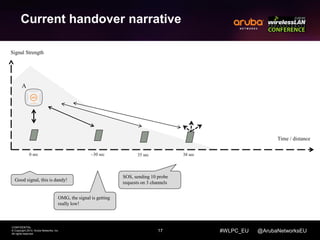
Current handover narrative 
Good signal, this is dandy! 
OMG, the signal is getting 
really low! 
SOS, sending 10 probe 
requests on 3 channels 
Time / distance 
0 sec ~30 sec 35 sec 38 sec 
A
18 
Signal Strength 
CONFIDENTIAL 
© Copyright 2014. Aruba Networks, Inc. 
All rights reserved 
#WLPC_EU @ArubaNetworksEU 
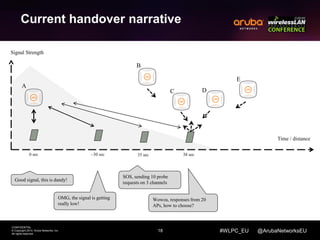
Current handover narrative 
Good signal, this is dandy! 
OMG, the signal is getting 
really low! 
SOS, sending 10 probe 
requests on 3 channels 
Wowza, responses from 20 
APs, how to choose? 
Time / distance 
0 sec ~30 sec 35 sec 38 sec 
A 
B 
C D 
E
19 
CONFIDENTIAL 
© Copyright 2014. Aruba Networks, Inc. 
All rights reserved 
#WLPC_EU @ArubaNetworksEU 
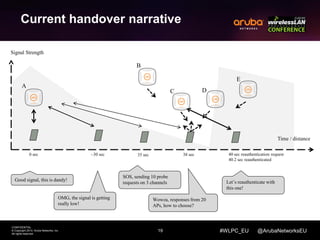
Current handover narrative 
Good signal, this is dandy! 
OMG, the signal is getting 
really low! 
SOS, sending 10 probe 
requests on 3 channels 
Wowza, responses from 20 
APs, how to choose? 
Let’s reauthenticate with 
this one! 
Time / distance 
0 sec ~30 sec 35 sec 38 sec 40 sec reauthentication request 
40.2 sec reauthenticated 
Signal Strength 
A 
B 
C D 
E
20 
CONFIDENTIAL 
© Copyright 2014. Aruba Networks, Inc. 
All rights reserved 
#WLPC_EU @ArubaNetworksEU 
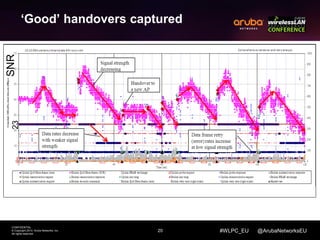
‘Good’ handovers captured 
23 SNR
21 
CONFIDENTIAL 
© Copyright 2014. Aruba Networks, Inc. 
All rights reserved 
#WLPC_EU @ArubaNetworksEU 
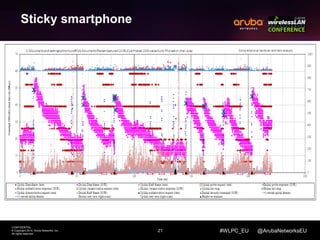
Sticky smartphone
22 
CONFIDENTIAL 
© Copyright 2014. Aruba Networks, Inc. 
All rights reserved 
#WLPC_EU @ArubaNetworksEU 
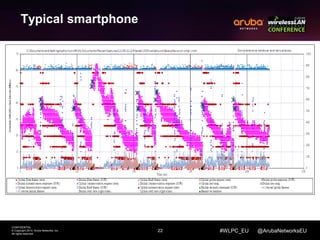
Typical smartphone
23 
CONFIDENTIAL 
© Copyright 2014. Aruba Networks, Inc. 
All rights reserved 
#WLPC_EU @ArubaNetworksEU 
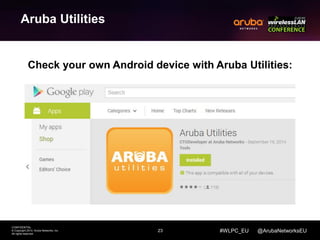
Aruba Utilities 
Check your own Android device with Aruba Utilities:
24 
CONFIDENTIAL 
© Copyright 2014. Aruba Networks, Inc. 
All rights reserved 
#WLPC_EU @ArubaNetworksEU 
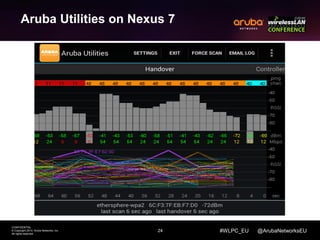
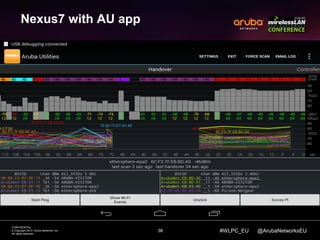
Aruba Utilities on Nexus 7
May work great when deployed well 
Works terrible if deployed poor, 
(especially at edges) 
25 
CONFIDENTIAL 
© Copyright 2014. Aruba Networks, Inc. 
All rights reserved 
#WLPC_EU @ArubaNetworksEU 
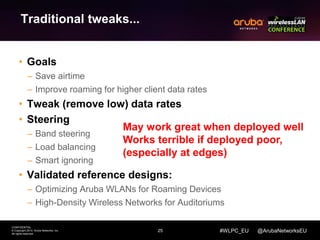
Traditional tweaks... 
• Goals 
– Save airtime 
– Improve roaming for higher client data rates 
• Tweak (remove low) data rates 
• Steering 
– Band steering 
– Load balancing 
– Smart ignoring 
• Validated reference designs: 
– Optimizing Aruba WLANs for Roaming Devices 
– High-Density Wireless Networks for Auditoriums
26 
CONFIDENTIAL 
© Copyright 2014. Aruba Networks, Inc. 
All rights reserved 
#WLPC_EU @ArubaNetworksEU 
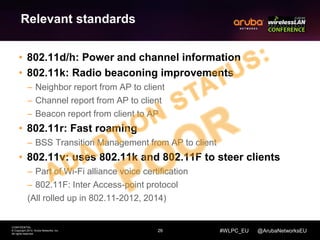
Relevant standards 
• 802.11d/h: Power and channel information 
• 802.11k: Radio beaconing improvements 
– Neighbor report from AP to client 
– Channel report from AP to client 
– Beacon report from client to AP 
• 802.11r: Fast roaming 
– BSS Transition Management from AP to client 
• 802.11v: uses 802.11k and 802.11F to steer clients 
– Part of Wi-Fi alliance voice certification 
– 802.11F: Inter Access-point protocol 
(All rolled up in 802.11-2012, 2014)
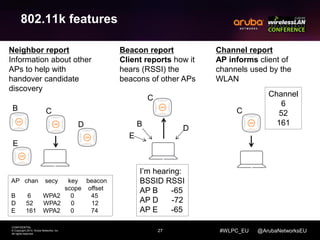
Beacon report 
Client reports how it 
hears (RSSI) the 
beacons of other APs 
27 
Neighbor report 
Information about other 
APs to help with 
handover candidate 
discovery 
CONFIDENTIAL 
© Copyright 2014. Aruba Networks, Inc. 
All rights reserved 
Channel report 
AP informs client of 
channels used by the 
WLAN 
#WLPC_EU @ArubaNetworksEU 
802.11k features 
B C 
D 
E 
AP chan secy key beacon 
scope offset 
B 6 WPA2 0 45 
D 52 WPA2 0 12 
E 161 WPA2 0 74 
C 
I’m hearing: 
BSSID RSSI 
AP B -65 
AP D -72 
AP E -65 
E 
D 
B 
C 
Channel 
6 
52 
161
28 
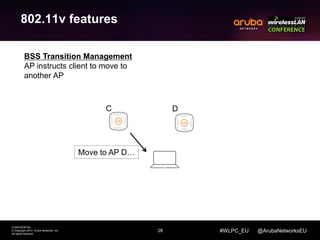
BSS Transition Management 
AP instructs client to move to 
another AP 
CONFIDENTIAL 
© Copyright 2014. Aruba Networks, Inc. 
All rights reserved 
#WLPC_EU @ArubaNetworksEU 
802.11v features 
C 
Move to AP D… 
D
29 
CONFIDENTIAL 
© Copyright 2014. Aruba Networks, Inc. 
All rights reserved 
#WLPC_EU @ArubaNetworksEU 
The evils of active scanning 
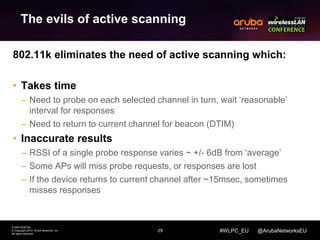
802.11k eliminates the need of active scanning which: 
• Takes time 
– Need to probe on each selected channel in turn, wait ‘reasonable’ 
interval for responses 
– Need to return to current channel for beacon (DTIM) 
• Inaccurate results 
– RSSI of a single probe response varies ~ +/- 6dB from ‘average’ 
– Some APs will miss probe requests, or responses are lost 
– If the device returns to current channel after ~15msec, sometimes 
misses responses
30 
CONFIDENTIAL 
© Copyright 2014. Aruba Networks, Inc. 
All rights reserved 
#WLPC_EU @ArubaNetworksEU 
The evils of active scanning 
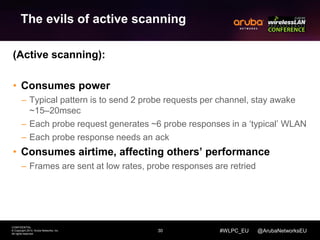
(Active scanning): 
• Consumes power 
– Typical pattern is to send 2 probe requests per channel, stay awake 
~15–20msec 
– Each probe request generates ~6 probe responses in a ‘typical’ WLAN 
– Each probe response needs an ack 
• Consumes airtime, affecting others’ performance 
– Frames are sent at low rates, probe responses are retried
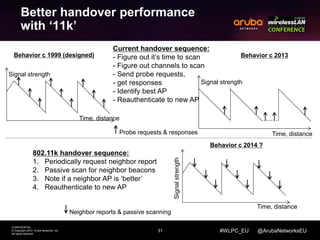
Behavior c 1999 (designed) Behavior c 2013 
Probe requests & responses 
31 
CONFIDENTIAL 
© Copyright 2014. Aruba Networks, Inc. 
All rights reserved 
#WLPC_EU @ArubaNetworksEU 
Better handover performance 
with ‘11k’ 
Current handover sequence: 
- Figure out it’s time to scan 
- Figure out channels to scan 
- Send probe requests, 
- get responses 
- Identify best AP 
- Reauthenticate to new AP 
802.11k handover sequence: 
1. Periodically request neighbor report 
2. Passive scan for neighbor beacons 
3. Note if a neighbor AP is ‘better’ 
4. Reauthenticate to new AP 
Signal strength 
Time, distance 
Signal strength 
Time, distance 
Signal strength 
Time, distance 
Neighbor reports & passive scanning 
Behavior c 2014 ?
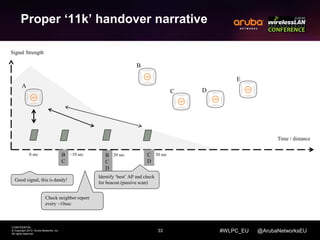
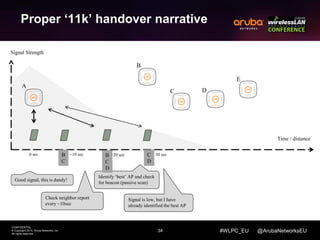
Proper ‘11k’ handover narrative 
32 
CONFIDENTIAL 
© Copyright 2014. Aruba Networks, Inc. 
All rights reserved 
#WLPC_EU @ArubaNetworksEU 
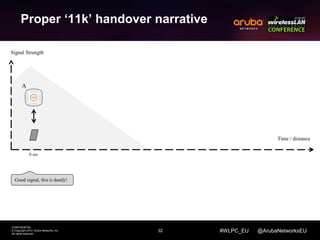
Signal Strength 
Good signal, this is dandy! 
Time / distance 
0 sec 
A
Proper ‘11k’ handover narrative 
33 
CONFIDENTIAL 
© Copyright 2014. Aruba Networks, Inc. 
All rights reserved 
#WLPC_EU @ArubaNetworksEU 
B 
C 
D 
Signal Strength 
A 
B 
C D 
E 
Good signal, this is dandy! 
Check neighbor report 
every ~10sec 
Identify ‘best’ AP and check 
for beacon (passive scan) 
Time / distance 
0 sec B ~10 sec 20 sec 30 sec 
C 
C 
D
Proper ‘11k’ handover narrative 
34 
CONFIDENTIAL 
© Copyright 2014. Aruba Networks, Inc. 
All rights reserved 
#WLPC_EU @ArubaNetworksEU 
Signal Strength 
Good signal, this is dandy! 
Check neighbor report 
every ~10sec 
Identify ‘best’ AP and check 
for beacon (passive scan) 
Signal is low, but I have 
already identified the best AP 
Time / distance 
0 sec B ~10 sec 20 sec 30 sec 
C 
B 
C 
D 
C 
D 
B 
C D 
E 
A
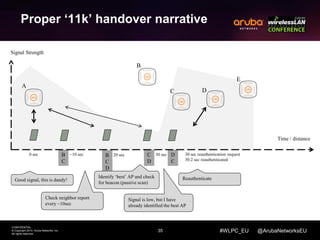
Proper ‘11k’ handover narrative 
35 
CONFIDENTIAL 
© Copyright 2014. Aruba Networks, Inc. 
All rights reserved 
#WLPC_EU @ArubaNetworksEU 
B 
C 
B 
C 
D 
C 
D 
D 
C 
Signal Strength 
Good signal, this is dandy! 
Check neighbor report 
every ~10sec 
Identify ‘best’ AP and check 
for beacon (passive scan) 
Reauthenticate 
Signal is low, but I have 
already identified the best AP 
Time / distance 
0 sec ~10 sec 20 sec 30 sec 30 sec reauthentication request 
30.2 sec reauthenticated 
B 
C D 
E 
A
Signal strength 
36 
CONFIDENTIAL 
© Copyright 2014. Aruba Networks, Inc. 
All rights reserved 
#WLPC_EU @ArubaNetworksEU 
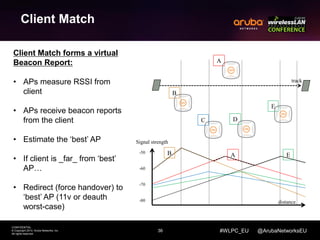
Client Match 
Client Match forms a virtual 
Beacon Report: 
• APs measure RSSI from 
client 
• APs receive beacon reports 
from the client 
• Estimate the ‘best’ AP 
• If client is _far_ from ‘best’ 
AP… 
• Redirect (force handover) to 
‘best’ AP (11v or deauth 
worst-case) 
B 
C D 
E 
A 
track 
-50 
-60 
-70 
-80 
B A E 
distance
37 
CONFIDENTIAL 
© Copyright 2014. Aruba Networks, Inc. 
All rights reserved 
#WLPC_EU @ArubaNetworksEU 
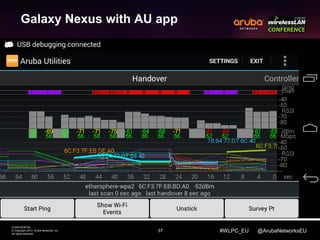
Galaxy Nexus with AU app
38 
CONFIDENTIAL 
© Copyright 2014. Aruba Networks, Inc. 
All rights reserved 
#WLPC_EU @ArubaNetworksEU 
Nexus7 with AU app
39 
CONFIDENTIAL 
© Copyright 2014. Aruba Networks, Inc. 
All rights reserved 
#WLPC_EU @ArubaNetworksEU 
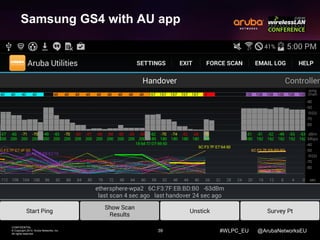
Samsung GS4 with AU app
40 
CONFIDENTIAL 
© Copyright 2014. Aruba Networks, Inc. 
All rights reserved 
#WLPC_EU @ArubaNetworksEU 
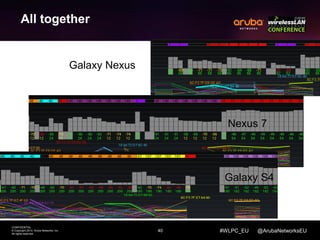
All together 
Galaxy Nexus 
Nexus 7 
Galaxy S4
41 
CONFIDENTIAL 
© Copyright 2014. Aruba Networks, Inc. 
All rights reserved 
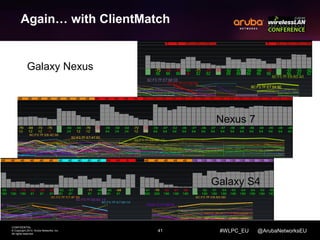
Nexus 7 
#WLPC_EU @ArubaNetworksEU 
Again… with ClientMatch 
Galaxy Nexus 
Galaxy S4
42 
CONFIDENTIAL 
© Copyright 2014. Aruba Networks, Inc. 
All rights reserved 
#WLPC_EU @ArubaNetworksEU 
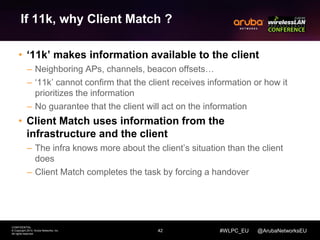
If 11k, why Client Match ? 
• ‘11k’ makes information available to the client 
– Neighboring APs, channels, beacon offsets… 
– ‘11k’ cannot confirm that the client receives information or how it 
prioritizes the information 
– No guarantee that the client will act on the information 
• Client Match uses information from the 
infrastructure and the client 
– The infra knows more about the client’s situation than the client 
does 
– Client Match completes the task by forcing a handover
43 
CONFIDENTIAL 
© Copyright 2014. Aruba Networks, Inc. 
All rights reserved 
#WLPC_EU @ArubaNetworksEU 
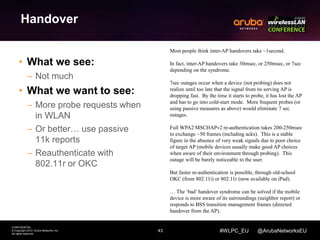
Handover 
• What we see: 
– Not much 
• What we want to see: 
– More probe requests when 
in WLAN 
– Or better… use passive 
11k reports 
– Reauthenticate with 
802.11r or OKC 
Most people think inter-AP handovers take ~1second. 
In fact, inter-AP handovers take 30msec, or 250msec, or 7sec 
depending on the syndrome. 
7sec outages occur when a device (not probing) does not 
realize until too late that the signal from its serving AP is 
dropping fast. By the time it starts to probe, it has lost the AP 
and has to go into cold-start mode. More frequent probes (or 
using passive measures as above) would eliminate 7 sec 
outages. 
Full WPA2 MSCHAPv2 re-authentication takes 200-250msec 
to exchange ~50 frames (including acks). This is a stable 
figure in the absence of very weak signals due to poor choice 
of target AP (mobile devices usually make good AP choices 
when aware of their environment through probing). This 
outage will be barely noticeable to the user. 
But faster re-authentication is possible, through old-school 
OKC (from 802.11i) or 802.11r (now available on iPad). 
… The ‘bad’ handover syndrome can be solved if the mobile 
device is more aware of its surroundings (neighbor report) or 
responds to BSS transition management frames (directed 
handover from the AP).
44 
CONFIDENTIAL 
© Copyright 2014. Aruba Networks, Inc. 
All rights reserved 
#WLPC_EU @ArubaNetworksEU 
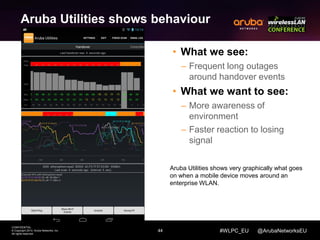
Aruba Utilities shows behaviour 
• What we see: 
– Frequent long outages 
around handover events 
• What we want to see: 
– More awareness of 
environment 
– Faster reaction to losing 
signal 
Aruba Utilities shows very graphically what goes 
on when a mobile device moves around an 
enterprise WLAN.
45 
CONFIDENTIAL 
© Copyright 2014. Aruba Networks, Inc. 
All rights reserved 
Thank You 
#AirheadsConf

Mobile Devices and Wi-Fi

  • 1.
    Mobile Devices andWi-Fi Herman Robers October 2014
  • 2.
    CONFIDENTIAL © Copyright2014. Aruba Networks, Inc. All rights reserved 2 #AirheadsConf Agenda How is consumer WiFi different from Enterprise What do we see in the field Handover behavior Relevant standards 5GHz and DFS channels Client influencing summary
  • 3.
    3 CONFIDENTIAL ©Copyright 2014. Aruba Networks, Inc. All rights reserved #WLPC_EU @ArubaNetworksEU About me • Herman Robers • Systems Engineer for Netherlands • Almost 3 years at Aruba Networks • Security background (and ClearPass experience) • Past: worked 13 years as security engineer / consultant • Ham radio license (PA3FYW)
  • 4.
    4 CONFIDENTIAL ©Copyright 2014. Aruba Networks, Inc. All rights reserved Chip vendor incorporates driver, is really responsible for Wi-Fi functionality, selling to … Phone / device vendor who has cost constraints, won’t waste time on features not of interest to its biggest customers who are… Cellular Operators, for whom Wi-Fi is a minority interest in the first place and anyway sell to … #WLPC_EU @ArubaNetworksEU Commercial models • What we see: – The chain leads to the cellular operator and consumer • What we want to see: – Some recognition for the enterprise user Consumers (your typical Gen-Y) who don’t care too much about Wi-Fi performance at work Mobile OS vendor does some influencing
  • 5.
    5 CONFIDENTIAL ©Copyright 2014. Aruba Networks, Inc. All rights reserved #WLPC_EU @ArubaNetworksEU Clients on the network • The Aruba corporate network – Many Windows 7 clients – OS X less time, more data October 2014, 1 week, 1449 clients, 508 GB
  • 6.
    6 CONFIDENTIAL ©Copyright 2014. Aruba Networks, Inc. All rights reserved #WLPC_EU @ArubaNetworksEU Clients on the network • The Aruba corporate network – Clients: 55% 5 GHz; 17% 802.11ac – Data (MB): 92% on 5GHz; 27% 802.11ac October 2014, 1 week, 1449 clients, 508 GB
  • 7.
    7 CONFIDENTIAL ©Copyright 2014. Aruba Networks, Inc. All rights reserved 11ac partial rollout #WLPC_EU @ArubaNetworksEU Clients on the network • University network – Clients: 34% 5 GHz – Lots of consumer laptops, still 2.4G only October 2014
  • 8.
    8 CONFIDENTIAL ©Copyright 2014. Aruba Networks, Inc. All rights reserved #WLPC_EU @ArubaNetworksEU Clients on the network • Public venue high density network – Clients: 60% 5 GHz (big majority mobile devices) – Lots of interfererence on 2.4 GHz October 2014
  • 9.
    9 CONFIDENTIAL ©Copyright 2014. Aruba Networks, Inc. All rights reserved #WLPC_EU @ArubaNetworksEU Clients on the network • Outdoor camp event – Client distribution is about 50/50 – Still about 10-15% of 5GHz-capable clients not actually connecting in 5GHz-band (either due to user-error, failing band-steering or devices is not capable of using DFS-channels) – 75% smart devices – 7% Linux, 7% OS X, 3% Windows August 2014
  • 10.
    10 CONFIDENTIAL ©Copyright 2014. Aruba Networks, Inc. All rights reserved #WLPC_EU @ArubaNetworksEU Client summary • Relative number of 5 GHz clients are increasing • 5 GHz client transfer more data (might be better clients) • 802.11ac is on the rise • Smartdevices (phones, tablets) are better in 5GHz • DFS support still problematic on some devices – Some don’t do DFS at all, some only work in US • Still laptops with 2.4 GHz only being sold
  • 11.
    11 CONFIDENTIAL ©Copyright 2014. Aruba Networks, Inc. All rights reserved #WLPC_EU @ArubaNetworksEU DFS channels – useful at last! How many radar triggers? frequency installations 0 / year 5 / hour Usually none, but in some places > comfortable Devices supporting DFS Apple > 2 years Intel > 2 years Samsung > 1 year Others getting there Most WLANs A few Special concerns No active client scanning in DFS bands because they don’t passive-scan for radar • slow AP acquisition • fixed (eventually) by neighbor report (11k) 5GHz Channel count 13 20MHz channels, no DFS 22 20MHz channels including DFS (US!) Channel strategy Dot them around? Use the spectrum!
  • 12.
    12 CONFIDENTIAL ©Copyright 2014. Aruba Networks, Inc. All rights reserved #WLPC_EU @ArubaNetworksEU 5GHz band • What we see: – Beginning to favor 5GHz over 2.4 – Spreading DFS support • What we want to see: – Overweight 5GHz bias – 100% DFS support • About 18 months ago Apple supposedly reversed from unconditionally preferring 2.4GHz to favoring 5GHz. • Unfortunately the battery-saving imperative (see earlier) means that when a device has an acceptable signal from its AP, it will stop scanning for a better one. Especially scanning in other bands. • This can cause difficulties when the WLAN seeks to move a device to a different band: it may refuse to scan the alternate band. • DFS support is improving, now available on all Apple devices (since iPhone 4S) and many Android (since early 2013: e.g. Samsung Note, Galaxy S4). • We believe this is a good time to start deploying DFS channels.
  • 13.
    13 CONFIDENTIAL ©Copyright 2014. Aruba Networks, Inc. All rights reserved #WLPC_EU @ArubaNetworksEU Why do we need good clients? • Benefits of good WLAN client bahavior – Devices get higher rates – Less time on the air - better battery life – Less mutual (co-channel) interference – Other devices get more airtime – Better overall network capacity Same effects are seen in public places, hot zones – ‘always best connected’ activity in Hotspot 2.0 groups.
  • 14.
    14 CONFIDENTIAL ©Copyright 2014. Aruba Networks, Inc. All rights reserved #WLPC_EU @ArubaNetworksEU WLANs differ from home APs Home AP reference model A single AP, not doing much of interest Enterprise WLAN reference model Many APs, same SSID, coordinated, seamless handover (no DHCP, common authentication etc.) - No point in looking for other APs because there (usually) aren’t any - Established (~correct) behavior is to hang onto the AP until the signal is very weak, then switch to cellular data if available - There is always a ‘better’ AP - But the device needs to scan (or use neighbor report) to be aware of the ‘better’ AP.
  • 15.
    15 Signal Strength CONFIDENTIAL © Copyright 2014. Aruba Networks, Inc. All rights reserved #WLPC_EU @ArubaNetworksEU Current handover narrative Good signal, this is dandy! Time / distance 0 sec A
  • 16.
    16 Signal Strength CONFIDENTIAL © Copyright 2014. Aruba Networks, Inc. All rights reserved #WLPC_EU @ArubaNetworksEU Current handover narrative Good signal, this is dandy! OMG, the signal is getting really low! Time / distance 0 sec ~30 sec A
  • 17.
    17 Signal Strength CONFIDENTIAL © Copyright 2014. Aruba Networks, Inc. All rights reserved #WLPC_EU @ArubaNetworksEU Current handover narrative Good signal, this is dandy! OMG, the signal is getting really low! SOS, sending 10 probe requests on 3 channels Time / distance 0 sec ~30 sec 35 sec 38 sec A
  • 18.
    18 Signal Strength CONFIDENTIAL © Copyright 2014. Aruba Networks, Inc. All rights reserved #WLPC_EU @ArubaNetworksEU Current handover narrative Good signal, this is dandy! OMG, the signal is getting really low! SOS, sending 10 probe requests on 3 channels Wowza, responses from 20 APs, how to choose? Time / distance 0 sec ~30 sec 35 sec 38 sec A B C D E
  • 19.
    19 CONFIDENTIAL ©Copyright 2014. Aruba Networks, Inc. All rights reserved #WLPC_EU @ArubaNetworksEU Current handover narrative Good signal, this is dandy! OMG, the signal is getting really low! SOS, sending 10 probe requests on 3 channels Wowza, responses from 20 APs, how to choose? Let’s reauthenticate with this one! Time / distance 0 sec ~30 sec 35 sec 38 sec 40 sec reauthentication request 40.2 sec reauthenticated Signal Strength A B C D E
  • 20.
    20 CONFIDENTIAL ©Copyright 2014. Aruba Networks, Inc. All rights reserved #WLPC_EU @ArubaNetworksEU ‘Good’ handovers captured 23 SNR
  • 21.
    21 CONFIDENTIAL ©Copyright 2014. Aruba Networks, Inc. All rights reserved #WLPC_EU @ArubaNetworksEU Sticky smartphone
  • 22.
    22 CONFIDENTIAL ©Copyright 2014. Aruba Networks, Inc. All rights reserved #WLPC_EU @ArubaNetworksEU Typical smartphone
  • 23.
    23 CONFIDENTIAL ©Copyright 2014. Aruba Networks, Inc. All rights reserved #WLPC_EU @ArubaNetworksEU Aruba Utilities Check your own Android device with Aruba Utilities:
  • 24.
    24 CONFIDENTIAL ©Copyright 2014. Aruba Networks, Inc. All rights reserved #WLPC_EU @ArubaNetworksEU Aruba Utilities on Nexus 7
  • 25.
    May work greatwhen deployed well Works terrible if deployed poor, (especially at edges) 25 CONFIDENTIAL © Copyright 2014. Aruba Networks, Inc. All rights reserved #WLPC_EU @ArubaNetworksEU Traditional tweaks... • Goals – Save airtime – Improve roaming for higher client data rates • Tweak (remove low) data rates • Steering – Band steering – Load balancing – Smart ignoring • Validated reference designs: – Optimizing Aruba WLANs for Roaming Devices – High-Density Wireless Networks for Auditoriums
  • 26.
    26 CONFIDENTIAL ©Copyright 2014. Aruba Networks, Inc. All rights reserved #WLPC_EU @ArubaNetworksEU Relevant standards • 802.11d/h: Power and channel information • 802.11k: Radio beaconing improvements – Neighbor report from AP to client – Channel report from AP to client – Beacon report from client to AP • 802.11r: Fast roaming – BSS Transition Management from AP to client • 802.11v: uses 802.11k and 802.11F to steer clients – Part of Wi-Fi alliance voice certification – 802.11F: Inter Access-point protocol (All rolled up in 802.11-2012, 2014)
  • 27.
    Beacon report Clientreports how it hears (RSSI) the beacons of other APs 27 Neighbor report Information about other APs to help with handover candidate discovery CONFIDENTIAL © Copyright 2014. Aruba Networks, Inc. All rights reserved Channel report AP informs client of channels used by the WLAN #WLPC_EU @ArubaNetworksEU 802.11k features B C D E AP chan secy key beacon scope offset B 6 WPA2 0 45 D 52 WPA2 0 12 E 161 WPA2 0 74 C I’m hearing: BSSID RSSI AP B -65 AP D -72 AP E -65 E D B C Channel 6 52 161
  • 28.
    28 BSS TransitionManagement AP instructs client to move to another AP CONFIDENTIAL © Copyright 2014. Aruba Networks, Inc. All rights reserved #WLPC_EU @ArubaNetworksEU 802.11v features C Move to AP D… D
  • 29.
    29 CONFIDENTIAL ©Copyright 2014. Aruba Networks, Inc. All rights reserved #WLPC_EU @ArubaNetworksEU The evils of active scanning 802.11k eliminates the need of active scanning which: • Takes time – Need to probe on each selected channel in turn, wait ‘reasonable’ interval for responses – Need to return to current channel for beacon (DTIM) • Inaccurate results – RSSI of a single probe response varies ~ +/- 6dB from ‘average’ – Some APs will miss probe requests, or responses are lost – If the device returns to current channel after ~15msec, sometimes misses responses
  • 30.
    30 CONFIDENTIAL ©Copyright 2014. Aruba Networks, Inc. All rights reserved #WLPC_EU @ArubaNetworksEU The evils of active scanning (Active scanning): • Consumes power – Typical pattern is to send 2 probe requests per channel, stay awake ~15–20msec – Each probe request generates ~6 probe responses in a ‘typical’ WLAN – Each probe response needs an ack • Consumes airtime, affecting others’ performance – Frames are sent at low rates, probe responses are retried
  • 31.
    Behavior c 1999(designed) Behavior c 2013 Probe requests & responses 31 CONFIDENTIAL © Copyright 2014. Aruba Networks, Inc. All rights reserved #WLPC_EU @ArubaNetworksEU Better handover performance with ‘11k’ Current handover sequence: - Figure out it’s time to scan - Figure out channels to scan - Send probe requests, - get responses - Identify best AP - Reauthenticate to new AP 802.11k handover sequence: 1. Periodically request neighbor report 2. Passive scan for neighbor beacons 3. Note if a neighbor AP is ‘better’ 4. Reauthenticate to new AP Signal strength Time, distance Signal strength Time, distance Signal strength Time, distance Neighbor reports & passive scanning Behavior c 2014 ?
  • 32.
    Proper ‘11k’ handovernarrative 32 CONFIDENTIAL © Copyright 2014. Aruba Networks, Inc. All rights reserved #WLPC_EU @ArubaNetworksEU Signal Strength Good signal, this is dandy! Time / distance 0 sec A
  • 33.
    Proper ‘11k’ handovernarrative 33 CONFIDENTIAL © Copyright 2014. Aruba Networks, Inc. All rights reserved #WLPC_EU @ArubaNetworksEU B C D Signal Strength A B C D E Good signal, this is dandy! Check neighbor report every ~10sec Identify ‘best’ AP and check for beacon (passive scan) Time / distance 0 sec B ~10 sec 20 sec 30 sec C C D
  • 34.
    Proper ‘11k’ handovernarrative 34 CONFIDENTIAL © Copyright 2014. Aruba Networks, Inc. All rights reserved #WLPC_EU @ArubaNetworksEU Signal Strength Good signal, this is dandy! Check neighbor report every ~10sec Identify ‘best’ AP and check for beacon (passive scan) Signal is low, but I have already identified the best AP Time / distance 0 sec B ~10 sec 20 sec 30 sec C B C D C D B C D E A
  • 35.
    Proper ‘11k’ handovernarrative 35 CONFIDENTIAL © Copyright 2014. Aruba Networks, Inc. All rights reserved #WLPC_EU @ArubaNetworksEU B C B C D C D D C Signal Strength Good signal, this is dandy! Check neighbor report every ~10sec Identify ‘best’ AP and check for beacon (passive scan) Reauthenticate Signal is low, but I have already identified the best AP Time / distance 0 sec ~10 sec 20 sec 30 sec 30 sec reauthentication request 30.2 sec reauthenticated B C D E A
  • 36.
    Signal strength 36 CONFIDENTIAL © Copyright 2014. Aruba Networks, Inc. All rights reserved #WLPC_EU @ArubaNetworksEU Client Match Client Match forms a virtual Beacon Report: • APs measure RSSI from client • APs receive beacon reports from the client • Estimate the ‘best’ AP • If client is _far_ from ‘best’ AP… • Redirect (force handover) to ‘best’ AP (11v or deauth worst-case) B C D E A track -50 -60 -70 -80 B A E distance
  • 37.
    37 CONFIDENTIAL ©Copyright 2014. Aruba Networks, Inc. All rights reserved #WLPC_EU @ArubaNetworksEU Galaxy Nexus with AU app
  • 38.
    38 CONFIDENTIAL ©Copyright 2014. Aruba Networks, Inc. All rights reserved #WLPC_EU @ArubaNetworksEU Nexus7 with AU app
  • 39.
    39 CONFIDENTIAL ©Copyright 2014. Aruba Networks, Inc. All rights reserved #WLPC_EU @ArubaNetworksEU Samsung GS4 with AU app
  • 40.
    40 CONFIDENTIAL ©Copyright 2014. Aruba Networks, Inc. All rights reserved #WLPC_EU @ArubaNetworksEU All together Galaxy Nexus Nexus 7 Galaxy S4
  • 41.
    41 CONFIDENTIAL ©Copyright 2014. Aruba Networks, Inc. All rights reserved Nexus 7 #WLPC_EU @ArubaNetworksEU Again… with ClientMatch Galaxy Nexus Galaxy S4
  • 42.
    42 CONFIDENTIAL ©Copyright 2014. Aruba Networks, Inc. All rights reserved #WLPC_EU @ArubaNetworksEU If 11k, why Client Match ? • ‘11k’ makes information available to the client – Neighboring APs, channels, beacon offsets… – ‘11k’ cannot confirm that the client receives information or how it prioritizes the information – No guarantee that the client will act on the information • Client Match uses information from the infrastructure and the client – The infra knows more about the client’s situation than the client does – Client Match completes the task by forcing a handover
  • 43.
    43 CONFIDENTIAL ©Copyright 2014. Aruba Networks, Inc. All rights reserved #WLPC_EU @ArubaNetworksEU Handover • What we see: – Not much • What we want to see: – More probe requests when in WLAN – Or better… use passive 11k reports – Reauthenticate with 802.11r or OKC Most people think inter-AP handovers take ~1second. In fact, inter-AP handovers take 30msec, or 250msec, or 7sec depending on the syndrome. 7sec outages occur when a device (not probing) does not realize until too late that the signal from its serving AP is dropping fast. By the time it starts to probe, it has lost the AP and has to go into cold-start mode. More frequent probes (or using passive measures as above) would eliminate 7 sec outages. Full WPA2 MSCHAPv2 re-authentication takes 200-250msec to exchange ~50 frames (including acks). This is a stable figure in the absence of very weak signals due to poor choice of target AP (mobile devices usually make good AP choices when aware of their environment through probing). This outage will be barely noticeable to the user. But faster re-authentication is possible, through old-school OKC (from 802.11i) or 802.11r (now available on iPad). … The ‘bad’ handover syndrome can be solved if the mobile device is more aware of its surroundings (neighbor report) or responds to BSS transition management frames (directed handover from the AP).
  • 44.
    44 CONFIDENTIAL ©Copyright 2014. Aruba Networks, Inc. All rights reserved #WLPC_EU @ArubaNetworksEU Aruba Utilities shows behaviour • What we see: – Frequent long outages around handover events • What we want to see: – More awareness of environment – Faster reaction to losing signal Aruba Utilities shows very graphically what goes on when a mobile device moves around an enterprise WLAN.
  • 45.
    45 CONFIDENTIAL ©Copyright 2014. Aruba Networks, Inc. All rights reserved Thank You #AirheadsConf