

WLAN Design for Location, Voice and Video
Ashutosh Dash
March 2014
CONFIDENTIAL
© Copyright 2014. Aruba Networks, Inc.
All rights reserved
2 #AirheadsConf
Agenda
• Mobility Centric Model
• Design Guidelines for WiFi grade Voice
• Design Guidelines for WiFi grade Video
• Design Guidelines for WiFi grade Location
• QOS and Traffic Optimization
• Enterprise Diagnostics and Troubleshooting
3
CONFIDENTIAL
© Copyright 2014. Aruba Networks, Inc.
All rights reserved
#AirheadsConf
Mobility Centric
4
CONFIDENTIAL
© Copyright 2014. Aruba Networks, Inc.
All rights reserved
#AirheadsConf
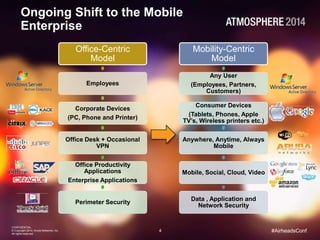
Ongoing Shift to the Mobile
Enterprise
Office-Centric
Model
Employees
Corporate Devices
(PC, Phone and Printer)
Office Desk + Occasional
VPN
Office Productivity
Applications
Enterprise Applications
Perimeter Security
Mobility-Centric
Model
Any User
(Employees, Partners,
Customers)
Consumer Devices
(Tablets, Phones, Apple
TV’s, Wireless printers etc.)
Anywhere, Anytime, Always
Mobile
Mobile, Social, Cloud, Video
Data , Application and
Network Security
5
CONFIDENTIAL
© Copyright 2014. Aruba Networks, Inc.
All rights reserved
#AirheadsConf
RF Design Guidelines for Voice & Video
6
CONFIDENTIAL
© Copyright 2014. Aruba Networks, Inc.
All rights reserved
#AirheadsConf
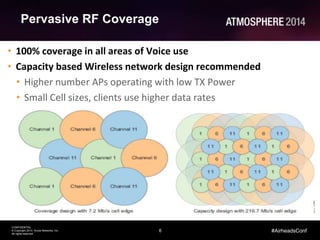
Pervasive RF Coverage
• 100% coverage in all areas of Voice use
• Capacity based Wireless network design recommended
• Higher number APs operating with low TX Power
• Small Cell sizes, clients use higher data rates
7
CONFIDENTIAL
© Copyright 2014. Aruba Networks, Inc.
All rights reserved
#AirheadsConf
ARM Features for Voice
• Interference Aware
• Band Steering
• Spectrum Load Balancing
• Voice/Video Aware Scanning
8
CONFIDENTIAL
© Copyright 2014. Aruba Networks, Inc.
All rights reserved
#AirheadsConf
Clientmatch
• Deterministic steering of clients based on the SNR and signal
level information gathered from client's perspective
• Steering decision is based on the probes request from the
client
• Periodic load balancing
• Resolves Sticky-client issue
• Distributed client health monitoring
• Single feature which makes cohesive decisions in mapping
clients to the best AP
9
CONFIDENTIAL
© Copyright 2014. Aruba Networks, Inc.
All rights reserved
#AirheadsConf
RF Design Best Practices for Voice
• Pervasive RF Coverage
• Distance between APs to not exceed 50 Ft
• Minimum RF signal (RSSI) levels of -65 dBm
• Minimum signal-to-noise ratio (SNR) of 25 dB
• Minimum and maximum AP power difference no greater than
two steps
• Disable Lower data rates
• In the Adaptive Radio Management™ (ARM) profile
• Enable voice/video/load aware scan
• ClientMatch™-enabled
10
CONFIDENTIAL
© Copyright 2014. Aruba Networks, Inc.
All rights reserved
#AirheadsConf
RF Design Best Practices for Voice
Contd ..
• Configure Supported Beacon rate to higher rate
• Enable WMM Traffic Management
• Give higher of bandwidth to Voice and Video
• Enable Fair access
• Provide high % of bandwidth to a VAP (For example, assign higher %
bandwidth to Corp VAP than Guest VAP)
11
CONFIDENTIAL
© Copyright 2014. Aruba Networks, Inc.
All rights reserved
#AirheadsConf
Best Practices for Video
• RF Best practices for Voice applies to Video as well
• Best practices for Delivering multicast video
• Enable IGMP Snooping Or IGMP Proxy
• Enable Dynamic Multicast Optimization (DMO)
• Enable Decrypt-tunnel Dynamic Multicast Optimization (D-DMO)
12
CONFIDENTIAL
© Copyright 2014. Aruba Networks, Inc.
All rights reserved
#AirheadsConf
Designing a Roaming Network
13
CONFIDENTIAL
© Copyright 2014. Aruba Networks, Inc.
All rights reserved
#AirheadsConf
Designing a Roaming Network
• Difference in power levels on the deployed APs should not too high
• Set the local probe request threshold to 25
• Airtime fairness is recommended in an environment with mobile clients,
this avoids slower clients taking too much airtime
• In a dot1x environment, enable EAPOL rate optimization
• For faster roaming use OKC and 802.11r
• Enable ClientMatch, ClientMatch will help with sticky client problem
• Match QoS markings that the devices are using
• Define two basic rates (avoid lower basic rates) . This gives the client
flexibility and smoother roaming.
14
CONFIDENTIAL
© Copyright 2014. Aruba Networks, Inc.
All rights reserved
#AirheadsConf
Authentication/Encryption Guidelines
15
CONFIDENTIAL
© Copyright 2014. Aruba Networks, Inc.
All rights reserved
#AirheadsConf
Authentication/Encryption Guidelines
• 802.1x based authentication through radius server may introduce delay
during re-association/roaming
• Use Opportunistic Key Caching with 802.1x for faster roaming
• PSK works better for voice devices (less delay), but not a preferred
method due to weak security
• EAP-TLS provides the best security and is preferred in enterprises than
EAP-PEAP
16
CONFIDENTIAL
© Copyright 2014. Aruba Networks, Inc.
All rights reserved
#AirheadsConf
End-to-End QoS
17
CONFIDENTIAL
© Copyright 2014. Aruba Networks, Inc.
All rights reserved
#AirheadsConf
QoS Segments
18
CONFIDENTIAL
© Copyright 2014. Aruba Networks, Inc.
All rights reserved
#AirheadsConf
Deep Dive into DSCP and WMM AC
19
CONFIDENTIAL
© Copyright 2014. Aruba Networks, Inc.
All rights reserved
#AirheadsConf
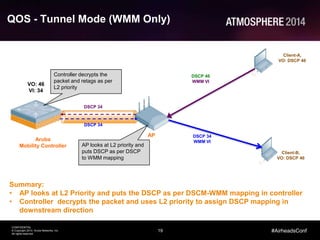
QOS - Tunnel Mode (WMM Only)
Aruba
Mobility Controller
AP
Client-A,
VO: DSCP 46
Client-B,
VO: DSCP 46
DSCP 46
WMM VI
DSCP 34
WMM VI
DSCP 34
DSCP 34
VO: 46
VI: 34
Summary:
• AP looks at L2 Priority and puts the DSCP as per DSCM-WMM mapping in controller
• Controller decrypts the packet and uses L2 priority to assign DSCP mapping in
downstream direction
Controller decrypts the
packet and retags as per
L2 priority
AP looks at L2 priority and
puts DSCP as per DSCP
to WMM mapping
20
CONFIDENTIAL
© Copyright 2014. Aruba Networks, Inc.
All rights reserved
#AirheadsConf
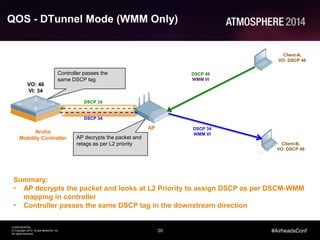
QOS - DTunnel Mode (WMM Only)
Aruba
Mobility Controller
AP
Client-A,
VO: DSCP 46
Client-B,
VO: DSCP 46
DSCP 46
WMM VI
DSCP 34
WMM VI
DSCP 34
DSCP 34
VO: 46
VI: 34
Summary:
• AP decrypts the packet and looks at L2 Priority to assign DSCP as per DSCM-WMM
mapping in controller
• Controller passes the same DSCP tag in the downstream direction
Controller passes the
same DSCP tag
AP decrypts the packet and
retags as per L2 priority
21
CONFIDENTIAL
© Copyright 2014. Aruba Networks, Inc.
All rights reserved
#AirheadsConf
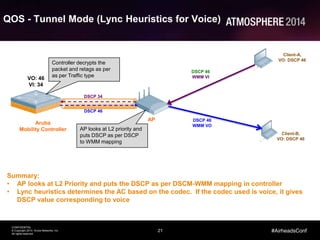
QOS - Tunnel Mode (Lync Heuristics for Voice)
Aruba
Mobility Controller
AP
Client-A,
VO: DSCP 46
Client-B,
VO: DSCP 46
DSCP 46
WMM VI
DSCP 46
WMM VO
DSCP 46
DSCP 34
VO: 46
VI: 34
Summary:
• AP looks at L2 Priority and puts the DSCP as per DSCM-WMM mapping in controller
• Lync heuristics determines the AC based on the codec. If the codec used is voice, it gives
DSCP value corresponding to voice
Controller decrypts the
packet and retags as per
as per Traffic type
AP looks at L2 priority and
puts DSCP as per DSCP
to WMM mapping
22
CONFIDENTIAL
© Copyright 2014. Aruba Networks, Inc.
All rights reserved
#AirheadsConf
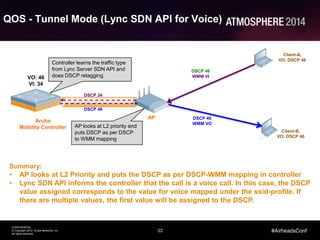
QOS - Tunnel Mode (Lync SDN API for Voice)
Aruba
Mobility Controller
AP
Client-A,
VO: DSCP 46
Client-B,
VO: DSCP 46
DSCP 46
WMM VI
DSCP 46
WMM VO
DSCP 46
DSCP 34
VO: 46
VI: 34
Summary:
• AP looks at L2 Priority and puts the DSCP as per DSCP-WMM mapping in controller
• Lync SDN API informs the controller that the call is a voice call. In this case, the DSCP
value assigned corresponds to the value for voice mapped under the ssid-profile. If
there are multiple values, the first value will be assigned to the DSCP.
Controller learns the traffic type
from Lync Server SDN API and
does DSCP retagging
AP looks at L2 priority and
puts DSCP as per DSCP
to WMM mapping
23
CONFIDENTIAL
© Copyright 2014. Aruba Networks, Inc.
All rights reserved
#AirheadsConf
Troubleshooting and Diagnostics
24
CONFIDENTIAL
© Copyright 2014. Aruba Networks, Inc.
All rights reserved
#AirheadsConf
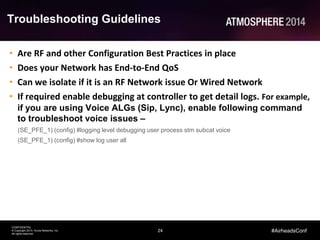
Troubleshooting Guidelines
• Are RF and other Configuration Best Practices in place
• Does your Network has End-to-End QoS
• Can we isolate if it is an RF Network issue Or Wired Network
• If required enable debugging at controller to get detail logs. For example,
if you are using Voice ALGs (Sip, Lync), enable following command
to troubleshoot voice issues –
(SE_PFE_1) (config) #logging level debugging user process stm subcat voice
(SE_PFE_1) (config) #show log user all
36
CONFIDENTIAL
© Copyright 2014. Aruba Networks, Inc.
All rights reserved
#AirheadsConf
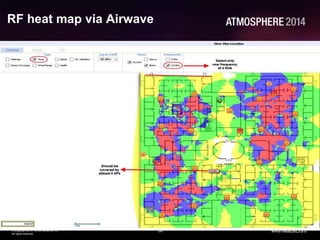
RF heat map via Airwave
37
CONFIDENTIAL
© Copyright 2014. Aruba Networks, Inc.
All rights reserved
#AirheadsConf
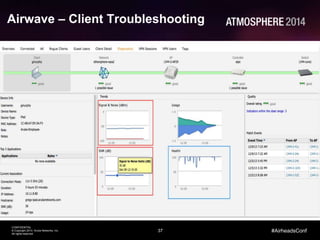
Airwave – Client Troubleshooting
38
CONFIDENTIAL
© Copyright 2014. Aruba Networks, Inc.
All rights reserved
Thank You
#AirheadsConf

WLAN Design for Location, Voice & Video

  • 1.
    WLAN Design forLocation, Voice and Video Ashutosh Dash March 2014
  • 2.
    CONFIDENTIAL © Copyright 2014.Aruba Networks, Inc. All rights reserved 2 #AirheadsConf Agenda • Mobility Centric Model • Design Guidelines for WiFi grade Voice • Design Guidelines for WiFi grade Video • Design Guidelines for WiFi grade Location • QOS and Traffic Optimization • Enterprise Diagnostics and Troubleshooting
  • 3.
    3 CONFIDENTIAL © Copyright 2014.Aruba Networks, Inc. All rights reserved #AirheadsConf Mobility Centric
  • 4.
    4 CONFIDENTIAL © Copyright 2014.Aruba Networks, Inc. All rights reserved #AirheadsConf Ongoing Shift to the Mobile Enterprise Office-Centric Model Employees Corporate Devices (PC, Phone and Printer) Office Desk + Occasional VPN Office Productivity Applications Enterprise Applications Perimeter Security Mobility-Centric Model Any User (Employees, Partners, Customers) Consumer Devices (Tablets, Phones, Apple TV’s, Wireless printers etc.) Anywhere, Anytime, Always Mobile Mobile, Social, Cloud, Video Data , Application and Network Security
  • 5.
    5 CONFIDENTIAL © Copyright 2014.Aruba Networks, Inc. All rights reserved #AirheadsConf RF Design Guidelines for Voice & Video
  • 6.
    6 CONFIDENTIAL © Copyright 2014.Aruba Networks, Inc. All rights reserved #AirheadsConf Pervasive RF Coverage • 100% coverage in all areas of Voice use • Capacity based Wireless network design recommended • Higher number APs operating with low TX Power • Small Cell sizes, clients use higher data rates
  • 7.
    7 CONFIDENTIAL © Copyright 2014.Aruba Networks, Inc. All rights reserved #AirheadsConf ARM Features for Voice • Interference Aware • Band Steering • Spectrum Load Balancing • Voice/Video Aware Scanning
  • 8.
    8 CONFIDENTIAL © Copyright 2014.Aruba Networks, Inc. All rights reserved #AirheadsConf Clientmatch • Deterministic steering of clients based on the SNR and signal level information gathered from client's perspective • Steering decision is based on the probes request from the client • Periodic load balancing • Resolves Sticky-client issue • Distributed client health monitoring • Single feature which makes cohesive decisions in mapping clients to the best AP
  • 9.
    9 CONFIDENTIAL © Copyright 2014.Aruba Networks, Inc. All rights reserved #AirheadsConf RF Design Best Practices for Voice • Pervasive RF Coverage • Distance between APs to not exceed 50 Ft • Minimum RF signal (RSSI) levels of -65 dBm • Minimum signal-to-noise ratio (SNR) of 25 dB • Minimum and maximum AP power difference no greater than two steps • Disable Lower data rates • In the Adaptive Radio Management™ (ARM) profile • Enable voice/video/load aware scan • ClientMatch™-enabled
  • 10.
    10 CONFIDENTIAL © Copyright 2014.Aruba Networks, Inc. All rights reserved #AirheadsConf RF Design Best Practices for Voice Contd .. • Configure Supported Beacon rate to higher rate • Enable WMM Traffic Management • Give higher of bandwidth to Voice and Video • Enable Fair access • Provide high % of bandwidth to a VAP (For example, assign higher % bandwidth to Corp VAP than Guest VAP)
  • 11.
    11 CONFIDENTIAL © Copyright 2014.Aruba Networks, Inc. All rights reserved #AirheadsConf Best Practices for Video • RF Best practices for Voice applies to Video as well • Best practices for Delivering multicast video • Enable IGMP Snooping Or IGMP Proxy • Enable Dynamic Multicast Optimization (DMO) • Enable Decrypt-tunnel Dynamic Multicast Optimization (D-DMO)
  • 12.
    12 CONFIDENTIAL © Copyright 2014.Aruba Networks, Inc. All rights reserved #AirheadsConf Designing a Roaming Network
  • 13.
    13 CONFIDENTIAL © Copyright 2014.Aruba Networks, Inc. All rights reserved #AirheadsConf Designing a Roaming Network • Difference in power levels on the deployed APs should not too high • Set the local probe request threshold to 25 • Airtime fairness is recommended in an environment with mobile clients, this avoids slower clients taking too much airtime • In a dot1x environment, enable EAPOL rate optimization • For faster roaming use OKC and 802.11r • Enable ClientMatch, ClientMatch will help with sticky client problem • Match QoS markings that the devices are using • Define two basic rates (avoid lower basic rates) . This gives the client flexibility and smoother roaming.
  • 14.
    14 CONFIDENTIAL © Copyright 2014.Aruba Networks, Inc. All rights reserved #AirheadsConf Authentication/Encryption Guidelines
  • 15.
    15 CONFIDENTIAL © Copyright 2014.Aruba Networks, Inc. All rights reserved #AirheadsConf Authentication/Encryption Guidelines • 802.1x based authentication through radius server may introduce delay during re-association/roaming • Use Opportunistic Key Caching with 802.1x for faster roaming • PSK works better for voice devices (less delay), but not a preferred method due to weak security • EAP-TLS provides the best security and is preferred in enterprises than EAP-PEAP
  • 16.
    16 CONFIDENTIAL © Copyright 2014.Aruba Networks, Inc. All rights reserved #AirheadsConf End-to-End QoS
  • 17.
    17 CONFIDENTIAL © Copyright 2014.Aruba Networks, Inc. All rights reserved #AirheadsConf QoS Segments
  • 18.
    18 CONFIDENTIAL © Copyright 2014.Aruba Networks, Inc. All rights reserved #AirheadsConf Deep Dive into DSCP and WMM AC
  • 19.
    19 CONFIDENTIAL © Copyright 2014.Aruba Networks, Inc. All rights reserved #AirheadsConf QOS - Tunnel Mode (WMM Only) Aruba Mobility Controller AP Client-A, VO: DSCP 46 Client-B, VO: DSCP 46 DSCP 46 WMM VI DSCP 34 WMM VI DSCP 34 DSCP 34 VO: 46 VI: 34 Summary: • AP looks at L2 Priority and puts the DSCP as per DSCM-WMM mapping in controller • Controller decrypts the packet and uses L2 priority to assign DSCP mapping in downstream direction Controller decrypts the packet and retags as per L2 priority AP looks at L2 priority and puts DSCP as per DSCP to WMM mapping
  • 20.
    20 CONFIDENTIAL © Copyright 2014.Aruba Networks, Inc. All rights reserved #AirheadsConf QOS - DTunnel Mode (WMM Only) Aruba Mobility Controller AP Client-A, VO: DSCP 46 Client-B, VO: DSCP 46 DSCP 46 WMM VI DSCP 34 WMM VI DSCP 34 DSCP 34 VO: 46 VI: 34 Summary: • AP decrypts the packet and looks at L2 Priority to assign DSCP as per DSCM-WMM mapping in controller • Controller passes the same DSCP tag in the downstream direction Controller passes the same DSCP tag AP decrypts the packet and retags as per L2 priority
  • 21.
    21 CONFIDENTIAL © Copyright 2014.Aruba Networks, Inc. All rights reserved #AirheadsConf QOS - Tunnel Mode (Lync Heuristics for Voice) Aruba Mobility Controller AP Client-A, VO: DSCP 46 Client-B, VO: DSCP 46 DSCP 46 WMM VI DSCP 46 WMM VO DSCP 46 DSCP 34 VO: 46 VI: 34 Summary: • AP looks at L2 Priority and puts the DSCP as per DSCM-WMM mapping in controller • Lync heuristics determines the AC based on the codec. If the codec used is voice, it gives DSCP value corresponding to voice Controller decrypts the packet and retags as per as per Traffic type AP looks at L2 priority and puts DSCP as per DSCP to WMM mapping
  • 22.
    22 CONFIDENTIAL © Copyright 2014.Aruba Networks, Inc. All rights reserved #AirheadsConf QOS - Tunnel Mode (Lync SDN API for Voice) Aruba Mobility Controller AP Client-A, VO: DSCP 46 Client-B, VO: DSCP 46 DSCP 46 WMM VI DSCP 46 WMM VO DSCP 46 DSCP 34 VO: 46 VI: 34 Summary: • AP looks at L2 Priority and puts the DSCP as per DSCP-WMM mapping in controller • Lync SDN API informs the controller that the call is a voice call. In this case, the DSCP value assigned corresponds to the value for voice mapped under the ssid-profile. If there are multiple values, the first value will be assigned to the DSCP. Controller learns the traffic type from Lync Server SDN API and does DSCP retagging AP looks at L2 priority and puts DSCP as per DSCP to WMM mapping
  • 23.
    23 CONFIDENTIAL © Copyright 2014.Aruba Networks, Inc. All rights reserved #AirheadsConf Troubleshooting and Diagnostics
  • 24.
    24 CONFIDENTIAL © Copyright 2014.Aruba Networks, Inc. All rights reserved #AirheadsConf Troubleshooting Guidelines • Are RF and other Configuration Best Practices in place • Does your Network has End-to-End QoS • Can we isolate if it is an RF Network issue Or Wired Network • If required enable debugging at controller to get detail logs. For example, if you are using Voice ALGs (Sip, Lync), enable following command to troubleshoot voice issues – (SE_PFE_1) (config) #logging level debugging user process stm subcat voice (SE_PFE_1) (config) #show log user all
  • 36.
    36 CONFIDENTIAL © Copyright 2014.Aruba Networks, Inc. All rights reserved #AirheadsConf RF heat map via Airwave
  • 37.
    37 CONFIDENTIAL © Copyright 2014.Aruba Networks, Inc. All rights reserved #AirheadsConf Airwave – Client Troubleshooting
  • 38.
    38 CONFIDENTIAL © Copyright 2014.Aruba Networks, Inc. All rights reserved Thank You #AirheadsConf

Editor's Notes

  • #7 30:24 – 32:44
  • #8 30:24 – 32:44
  • #9 30:24 – 32:44
  • #10 30:24 – 32:44
  • #11 30:24 – 32:44
  • #12 IGMP snooping uses the WLAN controller to monitor which clients are subscribed to multicast video groups, and only sends multicast traffic to access points when required and even then only on a per-group basis. IGMP proxy implements multicast routing by re-originating IGMP joins and leaves from the source of the controller. As an alternative to IGMP snooping, which works on a per-SSID tunnel basis and requires an external multicast router to generate the IGMP membership reports, IGMP proxy works on a per-client basis and does not require an external multicast router. DMO Over-the-air transmissions can benefit from unicast transmissions depending on the number of clients in use. If only a small number of clients are subscribed to a multicast group, it can be more efficient to convert over-the-wire multicast to over-the-air unicast due to the faster data rates and prioritization capabilities of unicast connections. As this number grows, multicast gains in efficiency over unicast. Aruba’s DMO technology dynamically selects the appropriate conversion based on real-time network and video usage information. The conversion takes place at the controller at the 802.11 layer, on a client-by-client basis, and is transparent to the higher-level client layers. - D-DMO With D-DMO, the multicast-to-unicast conversion happens at the AP instead of the controller. DMO is for VAPs in tunnel forwarding mode where the multicast-to-unicast conversion happens at the controller. For VAPs operating in decrypt-tunnel forwarding mode, the multicast-to-unicast conversion can be moved to the APs. So the VAPs that are operating in decrypt-tunnel forwarding mode implement D-DMO instead of DMO. The bandwidth consumption on the link between the controller and APs is lower with D-DMO than DMO. This is because in D-DMO the transmissions between the controller and the APs are still multicast and the actual multicast-to-unicast conversion occurs only on the AP. With D-DMO, the controller sends multicast packets to APs only through the GRE tunnels of decrypt-tunnel mode VAPs that have active subscribers. The number of multicast streams through the GRE tunnel of a decrypt-tunnel VAP on an AP is equal to the sum of the number of multicast groups with active subscribers on each VLAN on that VAP.
  • #14 30:24 – 32:44
  • #16 30:24 – 32:44
  • #18 30:24 – 32:44
  • #20 30:24 – 32:44
  • #21 30:24 – 32:44
  • #22 30:24 – 32:44
  • #23 30:24 – 32:44
  • #25 30:24 – 32:44
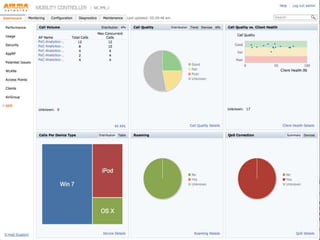
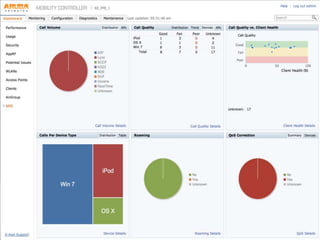
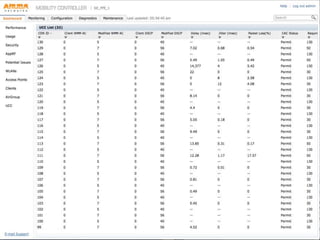
  • #26 From here we get a sense of how loaded the top AP’s are from a UC call perspective. This can aid us in figuring out if we have AP’s that are never used for UC and those that potentially are over loaded. We have tested up to 20 voice and video calls with 140Mbps background per AP. The Call Quality tab shows the distribution of call quality. Note the large unknown block. That is Video. We currently don’t have a quality metric for video. The reason is that video is more sensitive to loss, this is because Video has two types of frames that are sent. I frames that contain the entire picture and P& B frames that only contain small differences. The loss of P or B frames can go unnoticed, but the loss of an I frame can cause the picture to go all blocky. We are working on detecting these I frames and doing packet loss analysis on just those frames to determine quality. If we click on the trend tab we can see how calls are trending over time
  • #27 This shows us the call quality by device type, this is useful in debunking or proving issues with a particular device type. We can click on the AP tab to show AP’s with any poor quality calls on them
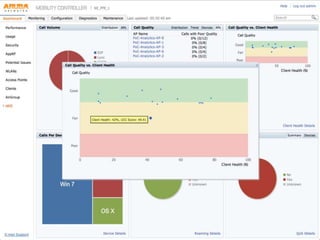
  • #28 This is sort of like a magic quadrant. Each dot represents a single call. If it’s peer to peer it is each half of the call. You would expect most of the dots to be in the upper right side of the graph. Meaning high call quality and high wifi health. We can see here that we actually have a pretty decent distribution of calls all within tolerance. Actually Lync is pretty resilient as these clients actually can have pretty bad wifi health and still get good scores. We can dismiss this graph and look over at calls per device.
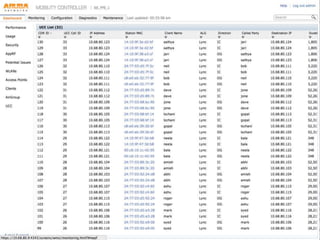
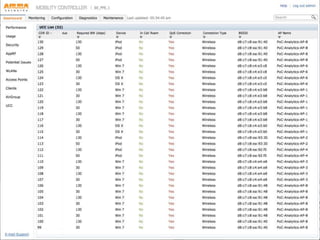
  • #29 This screen has a LOT of data – pretty much everything you need to know about every call made on the system. Some basic info is the device mac address, client name (very nice to have) what kind of call (ALG) the direction, incoming or outgoing, called party, destination (Click to scroll over)
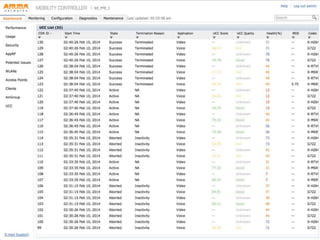
  • #30 Start time, duration etc. Note the MOS score we get for calls, This comes from the OQE server if it’s not on the QOE server, it doesn’t get displayed. (click to scroll)
  • #31 Here we can see the QOS tagging information, what the WMM from the client was, including the DCSP values and what we corrected them to. We also get jitter packet loss and delay. (click to scroll)
  • #32 The last section shows us if there was a roam event and the BSSID and ap name. If we click on a client we can get the overview of not just that call but all calls the client was in.
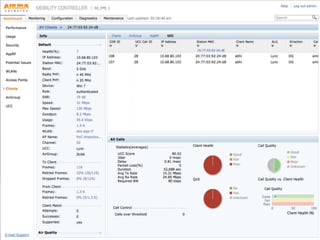
  • #33 This is a great screen. We can get here by searching in the search box as well, so if we had a user that was complaining they had all bad calls we can actually look to see what was happening. (I see you had 10 calls and only 2 were bad?) This can also tell us how healthy the client is, perhaps they are using a device that is damaged? By clicking on an individual call we can get more details.
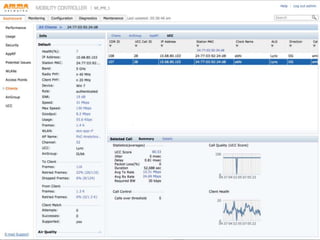
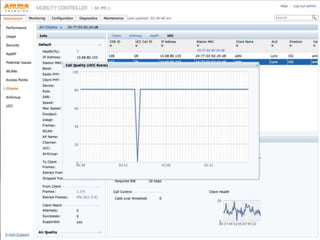
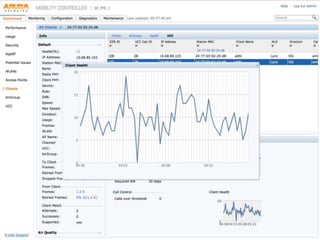
  • #34 From here we see the sampled health for call quality and client health every 30 sec.we can click on the graph to zoom in
  • #35 Here we can see this client had some call quality issue, clicking on the client health graph we can see there was a problem with client health at that same time.
  • #36 This is really powerful information that gives you deep insight into what happened during a call. This really shines a light into what used to be a black box of UC over WiFi. We can click back to the UC tab to review all the UC info