Mobile First Responsive Design


  Jason Grigsby • @grigs • jason@cloudfour.com

           http://www.flickr.com/photos/stuart-dootson/4024407198
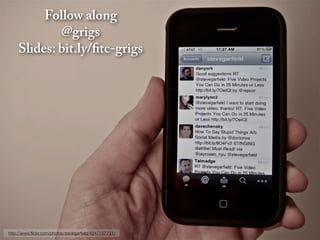
Follow along
              @grigs
      Slides: bit.ly/mf-rwd


http://www.flickr.com/photos/stevegarfield/4247757731/
The web has always been a balancing act…


http://www.flickr.com/photos/classblog/5136926303
with many competing priorities.


                                  http://www.flickr.com/photos/tudor/4324056624/
Finding that balance
is more difficult…


                       http://www.flickr.com/photos/superfantastic/50088733/
as device diversity increases.
    http://www.flickr.com/photos/lyza/7382235106
Responsive web design offers us


for a sensible way to deal with device diversity.

              http://www.flickr.com/photos/darrentunnicliff/4232232092/
And yet the one question I frequently ask myself is…
Can a one size fits all solution…


            http://www.flickr.com/photos/sldghmmr/6041481069
compete with
a tailored experience?
http://www.flickr.com/photos/helloturkeytoe/4932748746/
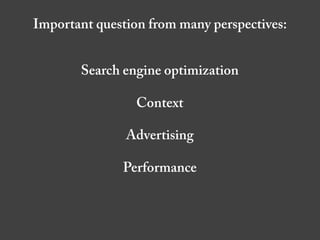
Important question from many perspectives:


       Search engine optimization

                 Context

               Advertising

              Performance
Search engines?
What about
  mobile context?


http://www.flickr.com/photos/brunauto/5062644167/
80% during
misc downtime

76% while
waiting in lines

62% while
watching TV

69% for point of
sale research


                   http://www.flickr.com/photos/missmeng/5327470961
TMI: 39% use phone
on the toilet.
Advertising?


               http://www.flickr.com/photos/
               sh1mmer/2510487525
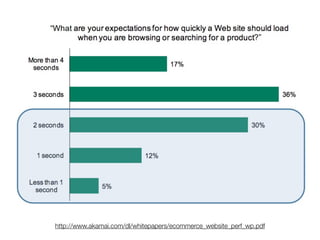
Performance?
http://www.akamai.com/dl/whitepapers/ecommerce_website_perf_wp.pdf
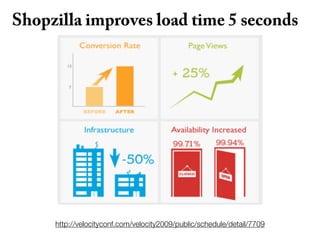
Shopzilla improves load time 5 seconds


     http://velocityconf.com/velocity2009/public/schedule/detail/7709
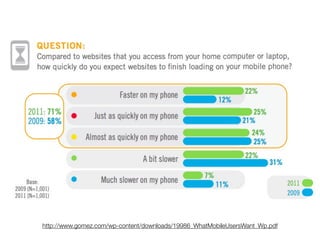
http://www.gomez.com/wp-content/downloads/19986_WhatMobileUsersWant_Wp.pdf
http://www.flickr.com/photos/wesbrowning/5316400258/
BBG: Before Boston Globe


 http://www.flickr.com/photos/69797234@N06/7203485148/
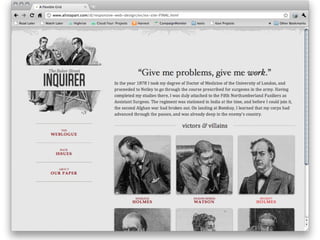
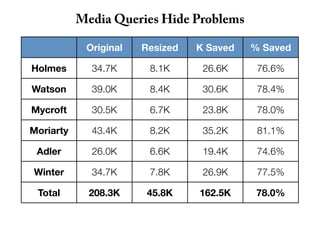
Media Queries Hide Problems

            Original   Resized   K Saved   % Saved

Holmes       34.7K      8.1K      26.6K     76.6%

Watson       39.0K      8.4K      30.6K     78.4%

Mycroft      30.5K      6.7K      23.8K     78.0%

Moriarty     43.4K      8.2K      35.2K     81.1%

 Adler       26.0K      6.6K      19.4K     74.6%

Winter       34.7K      7.8K      26.9K     77.5%

 Total       208.3K     45.8K    162.5K     78.0%
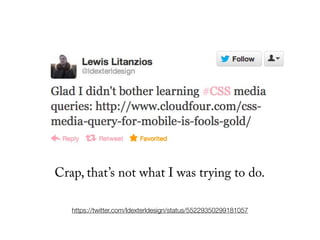
Crap, that’s not what I was trying to do.

   https://twitter.com/ldexterldesign/status/55229350299181057
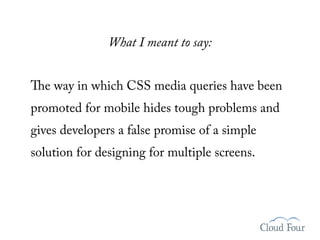
What I meant to say:


The way in which CSS media queries have been

promoted for mobile hides tough problems and
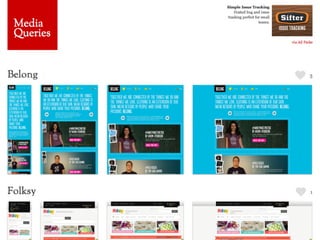
gives developers a false promise of a simple
solution for designing for multiple screens.
The resounding answer from the community:
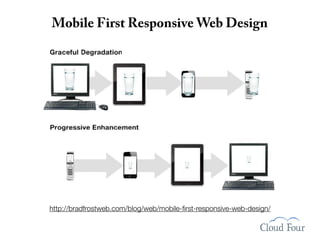
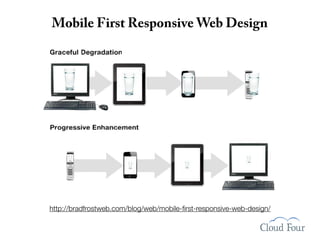
Mobile First Responsive Web Design


http://bradfrostweb.com/blog/web/mobile-first-responsive-web-design/
“Awesome. We’ll
devote a chapter to
   Mobile First
 Responsive Web
Design in our book.”
“Awesome. We’ll
devote a chapter to
   Mobile First
 Responsive Web
Design in our book.”

Famous last words.
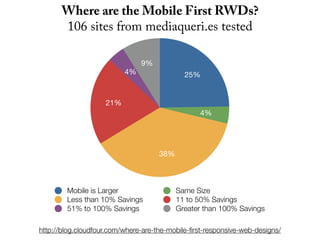
Where are the Mobile First RWDs?
      106 sites from mediaqueri.es tested

                               9%
                          4%                 25%


                    21%
                                                 4%


                                     38%


        Mobile is Larger                   Same Size
        Less than 10% Savings              11 to 50% Savings
        51% to 100% Savings                Greater than 100% Savings

http://blog.cloudfour.com/where-are-the-mobile-first-responsive-web-designs/
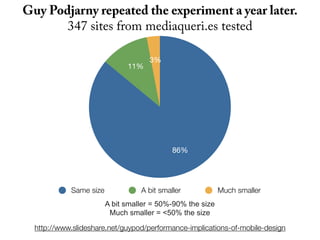
Guy Podjarny repeated the experiment a year later.
       347 sites from mediaqueri.es tested

                                     3%
                              11%


                                            86%


            Same size             A bit smaller            Much smaller
                        A bit smaller = 50%-90% the size
                         Much smaller = <50% the size

  http://www.slideshare.net/guypod/performance-implications-of-mobile-design
http://www.thefoxisblack.com/2012/10/02/the-design-thinking-behind-the-new-disney-com/
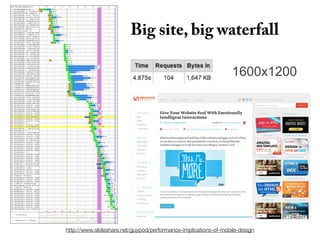
Thankfully Guy took the tests further…
Big site, big waterfall

                                                                 1600x1200


http://www.slideshare.net/guypod/performance-implications-of-mobile-design
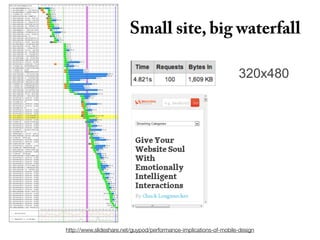
Small site, big waterfall

                                                                   320x480


http://www.slideshare.net/guypod/performance-implications-of-mobile-design
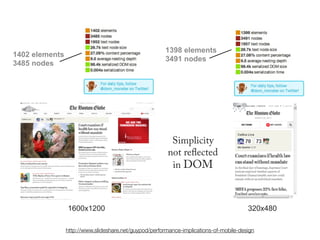
1398 elements
1402 elements
                                                       3491 nodes
3485 nodes


                                                         Simplicity
                                                        not reflected
                                                         in DOM


                1600x1200                                                              320x480

                http://www.slideshare.net/guypod/performance-implications-of-mobile-design
http://www.flickr.com/photos/beautyredefined/2643858323/
http://www.flickr.com/photos/puuikibeach/3654517679
Most responsive web designs are…
Time to pen another fool’s gold post?
       http://www.flickr.com/photos/myklroventine/3400040943/
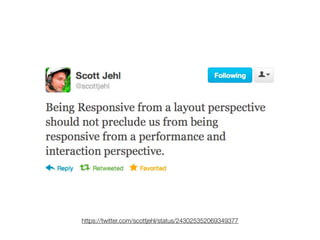
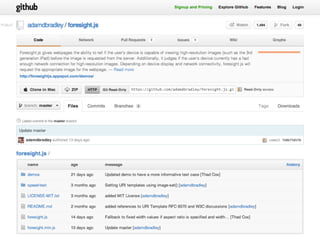
https://twitter.com/scottjehl/status/243025352069349377
5   key techniques
    for responsible
    responsive design
#1   Build Mobile First
     Responsive Designs


      http://www.flickr.com/photos/auyongcheemeng/95769332/
Different than
  Mobile First
  Design Theory


http://www.flickr.com/photos/localcelebrity/4831362933/
Mobile First Responsive Web Design


http://bradfrostweb.com/blog/web/mobile-first-responsive-web-design/
Reorder media queries so cascade goes
      from small to large screens


 /* Wider viewports/higher resolutions (e.g. desktop)      */
 @media screen and (min-width:481px) {
     [Desktop layout rules here]         M ove the mobile media query block
 }                                       above the desktop media query.
                                         By doing this, we’re making S re
                                                                     su
                                         the cascading effect of CSfiris
 /* Mobile/lower-resolution devices */
 @media screen and (max-width:480px) {                                  st
                                         consistent with our mobile oach.
     [Mobile layout rules here]           progressive enhancement appr
 }


Keep basic styles outside of media queries.
The absence of support for media
queries is in fact the first media query.
                    —Bryan Rieger, Yiibu
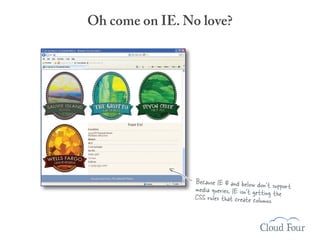
Oh come on IE. No love?


                 Because IE 8 and below don’t su
                 media queries, IE isn’t getting t pport
                 CSS rules that create columns. he
IE conditional comments


<link rel="stylesheet" type="text/css" href="taps.css" />
<link rel="stylesheet" type="text/css" href="layout.css" media="all and
(min-width: 481px)">
<!--[if (lt IE 9)&(!IEMobile)]>
<link rel="stylesheet" type="text/css" href="layout.css" media="all" />
<![endif]-->


  The conditional comment repeats the line above it
  ensuring desktop IE sees our layout.css file.
IE conditional comments


<link rel="stylesheet" type="text/css" href="taps.css" />
<link rel="stylesheet" type="text/css" href="layout.css" media="all and
(min-width: 481px)">
<!--[if (lt IE 9)&(!IEMobile)]>
<link rel="stylesheet" type="text/css" href="layout.css" media="all" />
<![endif]-->


  The conditional comment repeats the line above it
  ensuring desktop IE sees our layout.css file.


                               or use Respond.js
                             (a media query polyfill for IE)
#2       Keep CSS images
         in their place


 http://www.flickr.com/photos/lintmachine/2306383943/
Images with display:none are still downloaded


                                  K making it
       The taps.jpg file is 440.7 .
       the largest file on the page


@media screen and (max-width:480px) {
    [Other CSS rules are here]
    .header {display:none;}
}
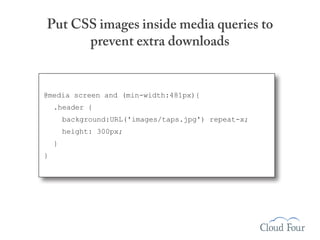
Put CSS images inside media queries to
      prevent extra downloads


@media screen and (min-width:481px){
    .header {
        background:URL('images/taps.jpg') repeat-x;
        height: 300px;
    }
}
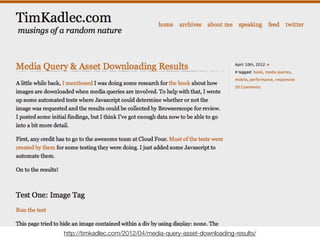
http://timkadlec.com/2012/04/media-query-asset-downloading-results/
#3                 Conditionally load JS based
                   on screen size and capabilities


http://www.flickr.com/photos/lyza/7382255242/
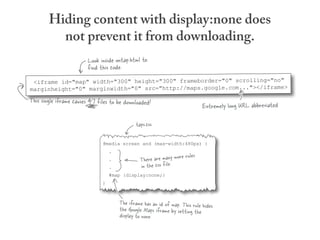
Hiding content with display:none does
          not prevent it from downloading.
                        Look inside ontap.html to
                        find this code.
 <iframe id="map" width="300" height="300" frameborder="0" scrolling="no"
marginheight="0" marginwidth="0" src="http://maps.google.com..."></iframe>
This single iframe causes 47 files to be downloaded!
                                                                              Extremely long URL abbreviated

                                              taps.css

                               @media screen and (max-width:480px) {
                                   .
                                                                      les
                                   .            There are many more ru
                                   .            in the css file.
                                   #map {display:none;}
                               }


                                       The iframe has an id of map. This rule hides
                                       the Google Maps iframe by setting the
                                       display to none.
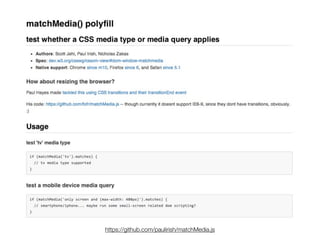
https://github.com/paulirish/matchMedia.js
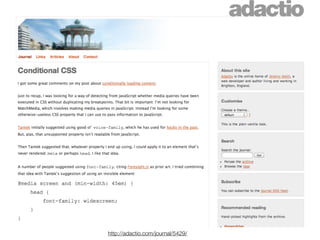
http://adactio.com/journal/5429/
AJAX Include Pattern


<a href="articles/latest/"
   data-append="articles/latest/fragment"
   data-media="(min-width: 30em)">
   Latest Articles
</a>


          https://github.com/filamentgroup/Ajax-Include-Pattern/
#4   Deliver different size <IMG>s
     at different screen sizes


           http://www.flickr.com/photos/kk/230544325/
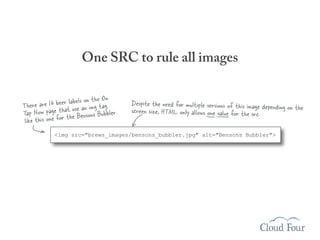
One SRC to rule all images

                                  On
                eer labels on thetag
There are 16 b hat use an img          Despite the need for multiple versions of this image depending on
                                                                                                         the
Tap Now page tr the Bensons Bubbler.   screen size, HTML only allows one value for the src.
 like this one fo
            <img src="brews_images/bensons_bubbler.jpg" alt="Bensons Bubbler">
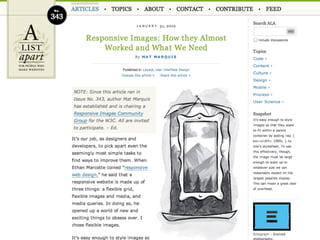
Things are still moving forward on a standards-
    based approach for responsive images.


            http://www.flickr.com/photos/johnlamb/2576062549/
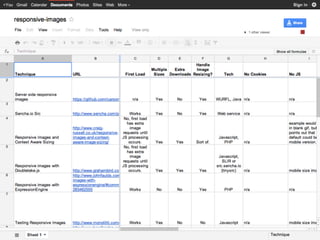
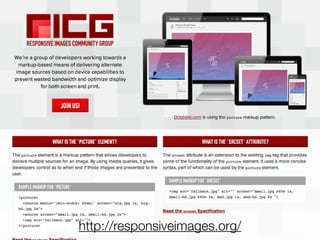
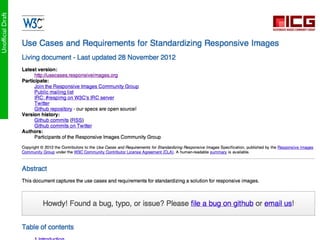
http://responsiveimages.org/
Add more on current status of spec.
Add more on the questions we still need to answer.
Picturefill JavaScript Library
<div data-picture data-alt="A giant stone face at The Bayon temple in Angkor Thom,
Cambodia">
  <div data-src="small.jpg"></div>
  <div data-src="medium.jpg" data-media="(min-width: 400px)"></div>
  <div data-src="large.jpg" data-media="(min-width: 800px)"></div>
  <div data-src="extralarge.jpg" data-media="(min-width: 1000px)"></div>


  <!-- Fallback content for non-JS browsers. -->
  <noscript>
    <img src="small.jpg" alt="A giant stone face at The Bayon
    temple in Angkor Thom, Cambodia">
  </noscript>
</div>


                  https://github.com/scottjehl/picturefill
Regardless of the img technique you choose,
Plan to deprecate it when standards
 catch up with responsive images.
#5   Handle high-density
     images carefully
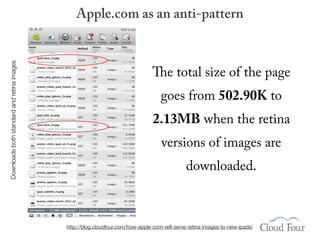
Downloads both standard and retina images       Apple.com as an anti-pattern


                                                                               The total size of the page
                                                                                   goes from 502.90K to
                                                                                2.13MB when the retina
                                                                                   versions of images are
                                                                                              downloaded.


                                            http://blog.cloudfour.com/how-apple-com-will-serve-retina-images-to-new-ipads/
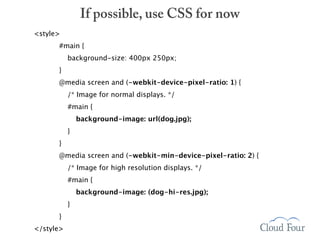
If possible, use CSS for now
<style>
      #main {
           background-size: 400px 250px;
      }
      @media screen and (-webkit-device-pixel-ratio: 1) {
           /* Image for normal displays. */
           #main {
               background-image: url(dog.jpg);
           }
      }
      @media screen and (-webkit-min-device-pixel-ratio: 2) {
           /* Image for high resolution displays. */
           #main {
               background-image: (dog-hi-res.jpg);
           }
      }
</style>
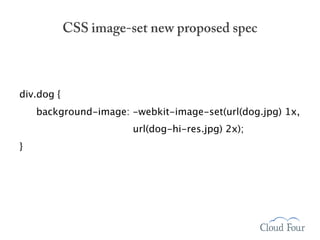
CSS image-set new proposed spec


div.dog {
    background-image: -webkit-image-set(url(dog.jpg) 1x,

                       url(dog-hi-res.jpg) 2x);
}
Picturefill User Preference Branch


    https://github.com/scottjehl/picturefill/tree/user-prefs
Large JPEGs with Low Quality Settings?


     http://blog.netvlies.nl/design-interactie/retina-revolution/
SOUTH
      L
     TIA


                    STREET


                                                              DE
 EN


                                                              LU
SS


                                                          INC
EC


                                                         AX
                                                         AJ
           https://github.com/filamentgroup/Southstreet
It’s two years later. Let’s revisit the
       my original question.
Can a one size fits all solution…


         http://www.flickr.com/photos/theyoungthousands/4025421438
compete with
a tailored experience?
http://www.flickr.com/photos/fronx/2862975043
Or will we always
end up with
something that is
too big?

  http://www.flickr.com/photos/haddadi/5971508861
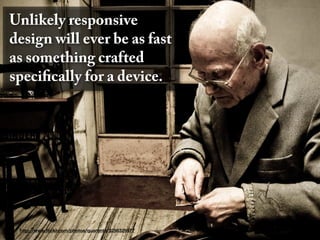
Unlikely responsive
design will ever be as fast
as something crafted
specifically for a device.


 http://www.flickr.com/photos/quarenta/3256329577
But web design is a
                                                       balancing act.


http://www.flickr.com/photos/kalexanderson/6266452817
And performance
is just one factor.
For most projects,
responsive design can be fast
enough to make sense…


                                Flickr: Uploaded February 11, 2007 by hawridger
if we do the extra work
to make mobile first
responsive designs.
Thank You!
 Special thanks to Scott Jehl, Guy
Podjarny, and all of the Flickr users
 sharing under creative commons.


  Jason Grigsby • @grigs
   jason@cloudfour.com
    Slides: bit.ly/mf-rwd

  http://www.flickr.com/photos/sualk61/4083223760/

Mobile First Responsive Design

  • 1.
    Mobile First ResponsiveDesign Jason Grigsby • @grigs • jason@cloudfour.com http://www.flickr.com/photos/stuart-dootson/4024407198
  • 2.
    Follow along @grigs Slides: bit.ly/mf-rwd http://www.flickr.com/photos/stevegarfield/4247757731/
  • 3.
    The web hasalways been a balancing act… http://www.flickr.com/photos/classblog/5136926303
  • 4.
    with many competingpriorities. http://www.flickr.com/photos/tudor/4324056624/
  • 5.
    Finding that balance ismore difficult… http://www.flickr.com/photos/superfantastic/50088733/
  • 6.
    as device diversityincreases. http://www.flickr.com/photos/lyza/7382235106
  • 7.
    Responsive web designoffers us for a sensible way to deal with device diversity. http://www.flickr.com/photos/darrentunnicliff/4232232092/
  • 8.
    And yet theone question I frequently ask myself is…
  • 9.
    Can a onesize fits all solution… http://www.flickr.com/photos/sldghmmr/6041481069
  • 10.
    compete with a tailoredexperience? http://www.flickr.com/photos/helloturkeytoe/4932748746/
  • 11.
    Important question frommany perspectives:
  • 12.
    Important question frommany perspectives: Search engine optimization Context Advertising Performance
  • 13.
  • 16.
    What about mobile context? http://www.flickr.com/photos/brunauto/5062644167/
  • 17.
    80% during misc downtime 76%while waiting in lines 62% while watching TV 69% for point of sale research http://www.flickr.com/photos/missmeng/5327470961
  • 18.
    TMI: 39% usephone on the toilet.
  • 19.
    Advertising? http://www.flickr.com/photos/ sh1mmer/2510487525
  • 21.
  • 22.
  • 23.
    Shopzilla improves loadtime 5 seconds http://velocityconf.com/velocity2009/public/schedule/detail/7709
  • 24.
  • 25.
  • 26.
    BBG: Before BostonGlobe http://www.flickr.com/photos/69797234@N06/7203485148/
  • 32.
    Media Queries HideProblems Original Resized K Saved % Saved Holmes 34.7K 8.1K 26.6K 76.6% Watson 39.0K 8.4K 30.6K 78.4% Mycroft 30.5K 6.7K 23.8K 78.0% Moriarty 43.4K 8.2K 35.2K 81.1% Adler 26.0K 6.6K 19.4K 74.6% Winter 34.7K 7.8K 26.9K 77.5% Total 208.3K 45.8K 162.5K 78.0%
  • 33.
    Crap, that’s notwhat I was trying to do. https://twitter.com/ldexterldesign/status/55229350299181057
  • 34.
    What I meantto say: The way in which CSS media queries have been promoted for mobile hides tough problems and gives developers a false promise of a simple solution for designing for multiple screens.
  • 35.
    The resounding answerfrom the community: Mobile First Responsive Web Design
  • 36.
    Mobile First ResponsiveWeb Design http://bradfrostweb.com/blog/web/mobile-first-responsive-web-design/
  • 37.
    “Awesome. We’ll devote achapter to Mobile First Responsive Web Design in our book.”
  • 38.
    “Awesome. We’ll devote achapter to Mobile First Responsive Web Design in our book.” Famous last words.
  • 40.
    Where are theMobile First RWDs? 106 sites from mediaqueri.es tested 9% 4% 25% 21% 4% 38% Mobile is Larger Same Size Less than 10% Savings 11 to 50% Savings 51% to 100% Savings Greater than 100% Savings http://blog.cloudfour.com/where-are-the-mobile-first-responsive-web-designs/
  • 41.
    Guy Podjarny repeatedthe experiment a year later. 347 sites from mediaqueri.es tested 3% 11% 86% Same size A bit smaller Much smaller A bit smaller = 50%-90% the size Much smaller = <50% the size http://www.slideshare.net/guypod/performance-implications-of-mobile-design
  • 42.
  • 44.
    Thankfully Guy tookthe tests further…
  • 45.
    Big site, bigwaterfall 1600x1200 http://www.slideshare.net/guypod/performance-implications-of-mobile-design
  • 46.
    Small site, bigwaterfall 320x480 http://www.slideshare.net/guypod/performance-implications-of-mobile-design
  • 47.
    1398 elements 1402 elements 3491 nodes 3485 nodes Simplicity not reflected in DOM 1600x1200 320x480 http://www.slideshare.net/guypod/performance-implications-of-mobile-design
  • 48.
  • 49.
  • 50.
    Most responsive webdesigns are…
  • 51.
    Time to penanother fool’s gold post? http://www.flickr.com/photos/myklroventine/3400040943/
  • 53.
  • 54.
    5 key techniques for responsible responsive design
  • 55.
    #1 Build Mobile First Responsive Designs http://www.flickr.com/photos/auyongcheemeng/95769332/
  • 56.
    Different than Mobile First Design Theory http://www.flickr.com/photos/localcelebrity/4831362933/
  • 57.
    Mobile First ResponsiveWeb Design http://bradfrostweb.com/blog/web/mobile-first-responsive-web-design/
  • 58.
    Reorder media queriesso cascade goes from small to large screens /* Wider viewports/higher resolutions (e.g. desktop) */ @media screen and (min-width:481px) { [Desktop layout rules here] M ove the mobile media query block } above the desktop media query. By doing this, we’re making S re su the cascading effect of CSfiris /* Mobile/lower-resolution devices */ @media screen and (max-width:480px) { st consistent with our mobile oach. [Mobile layout rules here] progressive enhancement appr } Keep basic styles outside of media queries.
  • 59.
    The absence ofsupport for media queries is in fact the first media query. —Bryan Rieger, Yiibu
  • 60.
    Oh come onIE. No love? Because IE 8 and below don’t su media queries, IE isn’t getting t pport CSS rules that create columns. he
  • 61.
    IE conditional comments <linkrel="stylesheet" type="text/css" href="taps.css" /> <link rel="stylesheet" type="text/css" href="layout.css" media="all and (min-width: 481px)"> <!--[if (lt IE 9)&(!IEMobile)]> <link rel="stylesheet" type="text/css" href="layout.css" media="all" /> <![endif]--> The conditional comment repeats the line above it ensuring desktop IE sees our layout.css file.
  • 62.
    IE conditional comments <linkrel="stylesheet" type="text/css" href="taps.css" /> <link rel="stylesheet" type="text/css" href="layout.css" media="all and (min-width: 481px)"> <!--[if (lt IE 9)&(!IEMobile)]> <link rel="stylesheet" type="text/css" href="layout.css" media="all" /> <![endif]--> The conditional comment repeats the line above it ensuring desktop IE sees our layout.css file. or use Respond.js (a media query polyfill for IE)
  • 63.
    #2 Keep CSS images in their place http://www.flickr.com/photos/lintmachine/2306383943/
  • 64.
    Images with display:noneare still downloaded K making it The taps.jpg file is 440.7 . the largest file on the page @media screen and (max-width:480px) { [Other CSS rules are here] .header {display:none;} }
  • 65.
    Put CSS imagesinside media queries to prevent extra downloads @media screen and (min-width:481px){ .header { background:URL('images/taps.jpg') repeat-x; height: 300px; } }
  • 66.
  • 67.
    #3 Conditionally load JS based on screen size and capabilities http://www.flickr.com/photos/lyza/7382255242/
  • 68.
    Hiding content withdisplay:none does not prevent it from downloading. Look inside ontap.html to find this code. <iframe id="map" width="300" height="300" frameborder="0" scrolling="no" marginheight="0" marginwidth="0" src="http://maps.google.com..."></iframe> This single iframe causes 47 files to be downloaded! Extremely long URL abbreviated taps.css @media screen and (max-width:480px) { . les . There are many more ru . in the css file. #map {display:none;} } The iframe has an id of map. This rule hides the Google Maps iframe by setting the display to none.
  • 69.
  • 70.
  • 71.
    AJAX Include Pattern <ahref="articles/latest/" data-append="articles/latest/fragment" data-media="(min-width: 30em)"> Latest Articles </a> https://github.com/filamentgroup/Ajax-Include-Pattern/
  • 72.
    #4 Deliver different size <IMG>s at different screen sizes http://www.flickr.com/photos/kk/230544325/
  • 73.
    One SRC torule all images On eer labels on thetag There are 16 b hat use an img Despite the need for multiple versions of this image depending on the Tap Now page tr the Bensons Bubbler. screen size, HTML only allows one value for the src. like this one fo <img src="brews_images/bensons_bubbler.jpg" alt="Bensons Bubbler">
  • 78.
    Things are stillmoving forward on a standards- based approach for responsive images. http://www.flickr.com/photos/johnlamb/2576062549/
  • 79.
  • 80.
    Add more oncurrent status of spec.
  • 81.
    Add more onthe questions we still need to answer.
  • 82.
    Picturefill JavaScript Library <divdata-picture data-alt="A giant stone face at The Bayon temple in Angkor Thom, Cambodia"> <div data-src="small.jpg"></div> <div data-src="medium.jpg" data-media="(min-width: 400px)"></div> <div data-src="large.jpg" data-media="(min-width: 800px)"></div> <div data-src="extralarge.jpg" data-media="(min-width: 1000px)"></div> <!-- Fallback content for non-JS browsers. --> <noscript> <img src="small.jpg" alt="A giant stone face at The Bayon temple in Angkor Thom, Cambodia"> </noscript> </div> https://github.com/scottjehl/picturefill
  • 83.
    Regardless of theimg technique you choose, Plan to deprecate it when standards catch up with responsive images.
  • 84.
    #5 Handle high-density images carefully
  • 85.
    Downloads both standardand retina images Apple.com as an anti-pattern The total size of the page goes from 502.90K to 2.13MB when the retina versions of images are downloaded. http://blog.cloudfour.com/how-apple-com-will-serve-retina-images-to-new-ipads/
  • 86.
    If possible, useCSS for now <style> #main { background-size: 400px 250px; } @media screen and (-webkit-device-pixel-ratio: 1) { /* Image for normal displays. */ #main { background-image: url(dog.jpg); } } @media screen and (-webkit-min-device-pixel-ratio: 2) { /* Image for high resolution displays. */ #main { background-image: (dog-hi-res.jpg); } } </style>
  • 87.
    CSS image-set newproposed spec div.dog { background-image: -webkit-image-set(url(dog.jpg) 1x, url(dog-hi-res.jpg) 2x); }

  • 89.
    Picturefill User PreferenceBranch https://github.com/scottjehl/picturefill/tree/user-prefs
  • 90.
    Large JPEGs withLow Quality Settings? http://blog.netvlies.nl/design-interactie/retina-revolution/
  • 91.
    SOUTH L TIA STREET DE EN LU SS INC EC AX AJ https://github.com/filamentgroup/Southstreet
  • 92.
    It’s two yearslater. Let’s revisit the my original question.
  • 93.
    Can a onesize fits all solution… http://www.flickr.com/photos/theyoungthousands/4025421438
  • 94.
    compete with a tailoredexperience? http://www.flickr.com/photos/fronx/2862975043
  • 95.
    Or will wealways end up with something that is too big? http://www.flickr.com/photos/haddadi/5971508861
  • 96.
    Unlikely responsive design willever be as fast as something crafted specifically for a device. http://www.flickr.com/photos/quarenta/3256329577
  • 97.
    But web designis a balancing act. http://www.flickr.com/photos/kalexanderson/6266452817
  • 98.
  • 99.
    For most projects, responsivedesign can be fast enough to make sense… Flickr: Uploaded February 11, 2007 by hawridger
  • 100.
    if we dothe extra work to make mobile first responsive designs.
  • 101.
    Thank You! Specialthanks to Scott Jehl, Guy Podjarny, and all of the Flickr users sharing under creative commons. Jason Grigsby • @grigs jason@cloudfour.com Slides: bit.ly/mf-rwd http://www.flickr.com/photos/sualk61/4083223760/