Developing Qt applications on HawkBoard Prabindh Sundareson [email_address] July 2010
Agenda Qt Introduction Quick history, Licensing model Fundamental concepts Typical application software stack Qt application classes Qt Graphics View framework Signal/Slot mechanism Configuring and Building Qt Tools Qt Creator Introduction to XgxPerf – TI Graphics Toolkit Developing a Qt application in 2 minutes with XgxPerf (Demo) Qt Development – Tips for performance Qt vs Android vs Silverlight vs Flash Conclusion & QnA
Qt History Started as an offering from Trolltech Trolltech is now part of Nokia Qt framework is available in source form, with multiple support options Works on Linux framebuffer, WinCE, X, Windows, even on Android Continuously evolving, now at 4.7.x (Beta)
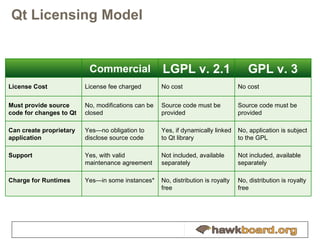
Qt Licensing Model Commercial LGPL v. 2.1 GPL v. 3 License Cost License fee charged No cost No cost Must provide source code for changes to Qt No, modifications can be closed Source code must be provided Source code must be provided Can create proprietary application Yes—no obligation to disclose source code Yes, if dynamically linked to Qt library No, application is subject to the GPL Support Yes, with valid maintenance agreement Not included, available separately Not included, available separately Charge for Runtimes Yes—in some instances* No, distribution is royalty free No, distribution is royalty free
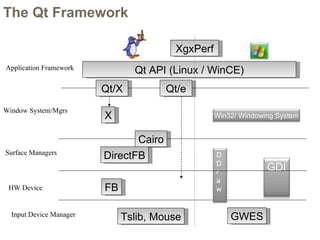
The Qt Framework FB Cairo Qt API (Linux / WinCE) DirectFB Surface Managers X Window System/Mgrs Application Framework HW Device Tslib, Mouse GWES Input Device Manager Qt/e Qt/X XgxPerf GDI DDr a w Win32/ Windowing System
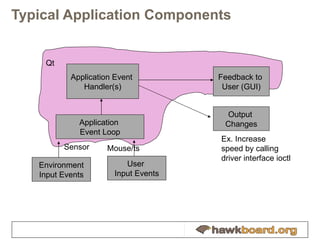
Typical Application Components Feedback to  User (GUI) Application Event  Handler(s) Application  Event Loop Environment Input Events Output  Changes Sensor User  Input Events Mouse/ts Ex. Increase speed by calling driver interface ioctl Qt
Qt - HawkBoard Qt relies on Linux frame buffer driver provided by HawkBoard linux package The frame buffer interface controls what resolutions are supported by Qt Maximum resolution supported on HawkBoard 640 x 480, 16 bpp Qt/embedded always outputs to full screen QWS is a simple window system for Qt/e Qt also works with X on Linux Touch screen, and Mouse/Keyboard supported
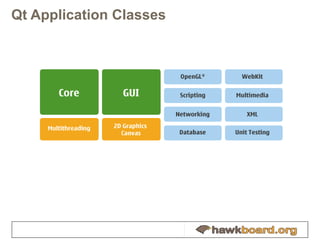
Qt Application Classes
Steps for Creating Qt based UI Build Qt for target, using provided Qt cross compile options Design the UI in Qt Designer Add necessary event handlers in CPP file Add necessary application level code Ex, Timers, Network stacks, Motor control, … Create .PRO project file Build, install to target Debug directly on target for peripheral accesses
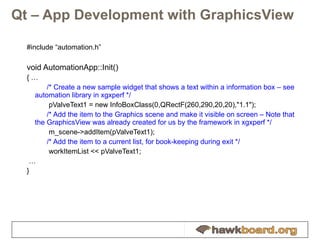
Qt – App Development with GraphicsView #include “automation.h” void AutomationApp::Init() { … /* Create a new sample widget that shows a text within a information box – see  automation library in xgxperf */   pValveText1 = new InfoBoxClass(0,QRectF(260,290,20,20),&quot;1.1&quot;); /* Add the item to the Graphics scene and make it visible on screen – Note that the GraphicsView was already created for us by the framework in xgxperf */   m_scene->addItem(pValveText1); /* Add the item to a current list, for book-keeping during exit */   workItemList << pValveText1; … }
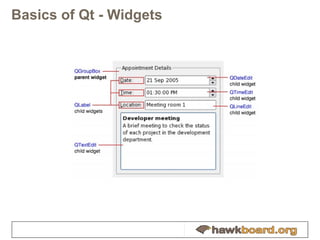
Basics of Qt - Widgets
Basics of Qt - Widgets Qt UI framework is based on widgets Widgets respond to UI events (key presses/mouse movements), and update their screen area Each widget has a parent, that affects its behaviour, and is embedded into it Can create “complex” shapes using masks See Automation Classes in Xgxperf Most Qt classes are derived from QWidget Ex, QGLWidget, QPushbutton … QPushButton * myButton = new QPushButton(…); myButton->doSomethingAPI(); Refer to online documentation at  http://doc.qt.nokia.com/4.6/qwidget.html Tip – Documentation is arranged using class names.
QGraphicsView Provides a “Canvas” for adding items (QGraphicsItems) The QGraphicsView class provides a widget for displaying the contents of a QGraphicsScene By default, QGraphicsView provides a regular QWidget for the viewport widget.  Can replace default by calling setViewport() with another widget type Provides a way to build an UI in an “actual” drawing canvas Ex, concept of “z-depth” of a QGraphicsItem
Qt - Signals/ Slots Signal / Slot mechanism provides a functionality similar to setting up “function pointers” Provides better type checking, amongst others Example Use-case: Perform blocking/ time consuming activities in separate thread Use paintEvent() to trigger/consume the result of actions happening in parallel (ex. Upload next video frame) How to communicate events ? Use SIGNAL/SLOT to communicate event completions Usage example for Signal/Slots: “ browserlib” app in xgxperf Found in /Xgxperf/browserlib/ browserlib.cpp
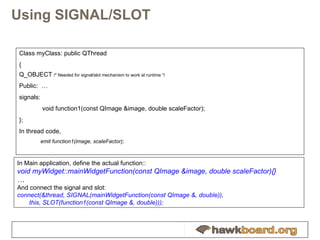
Using SIGNAL/SLOT Class myClass: public QThread { Q_OBJECT  /* Needed for signal/slot mechanism to work at runtime */ Public:  … signals:   void function1(const QImage &image, double scaleFactor); }; In thread code, emit function1(image, scaleFactor); In Main application, define the actual function:: void myWidget::mainWidgetFunction(const QImage &image, double scaleFactor){} … And connect the signal and slot: connect(&thread, SIGNAL(mainWidgetFunction(const QImage &, double)),  this, SLOT(function1(const QImage &, double)));
QPainter Low level painting API, for overriding default painting behaviour of widgets Handles Text and other Drawing primitives (very flexible API) Can perform operations that the Widget/other Class APIs do not expose (ex, create a circular window) Usage modes Subclass QWidget, and handle Paint event void paintEvent(QPaintEvent *event) QPainter can be accessed only within a paint event Usage example: “ automation” app in xgxperf
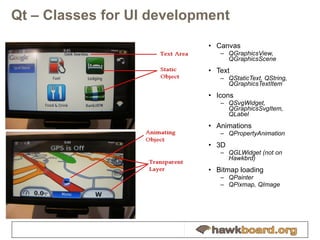
Qt – Classes for UI development Canvas QGraphicsView, QGraphicsScene Text QStaticText, QString, QGraphicsTextItem Icons QSvgWidget, QGraphicsSvgItem, QLabel Animations QPropertyAnimation 3D QGLWidget (not on Hawkbrd) Bitmap loading QPainter QPixmap, QImage
Setting up and building Qt Documented in detail for non-OpenEmbedded users at, http://processors.wiki.ti.com/index.php/Building_Qt Angstrom (OpenEmbedded based) distribution has Qt package for Hawkboard A configurable pre-built filesystem with Qt integrated, and kernel image for Hawkboard can be downloaded from  http://www.angstrom-distribution.org/narcissus/ Select “hawkboard” machine type from pull-down menu Select “Qt” – embedded or X11 based on desktop environment in addition application selection option
Debugging and Profiling Qt Applications Use Qt Creator, an integrated designer/debugger Latest version is 1.3 http://qt.nokia.com/downloads Needs GDB on Linux, and CDB for PC But usually much easier to just do  qDebug() << “printed from here”;  To get output on terminal and trace code flow Angstrom package provides oprofile to profile application code Use Xgxperf to benchmark at specific fps
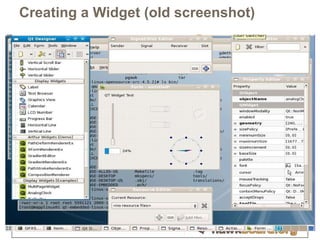
Qt Creator Used to create a new form design Output saved as a .UI file (text format) This can be imported into the Qt application via Qt classes
Creating a Widget (old screenshot)
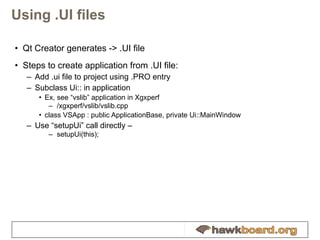
Using .UI files Qt Creator generates -> .UI file Steps to create application from .UI file: Add .ui file to project using .PRO entry Subclass Ui:: in application Ex, see “vslib” application in Xgxperf /xgxperf/vslib/vslib.cpp class VSApp : public ApplicationBase, private Ui::MainWindow Use “setupUi”   call directly –  setupUi(this);
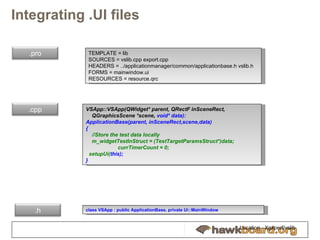
Integrating .UI files TEMPLATE = lib SOURCES = vslib.cpp export.cpp HEADERS = ../applicationmanager/common/applicationbase.h vslib.h FORMS = mainwindow.ui RESOURCES = resource.qrc VSApp::VSApp(QWidget* parent, QRectF inSceneRect,  QGraphicsScene *scene,  void* data):  ApplicationBase(parent, inSceneRect,scene,data) { //Store the test data locally m_widgetTestInStruct = (TestTargetParamsStruct*)data;  currTimerCount = 0; setupUi( this);  } c lass VSApp : public ApplicationBase, private Ui::MainWindow Location - Xgxperf/vslib .pro .cpp .h
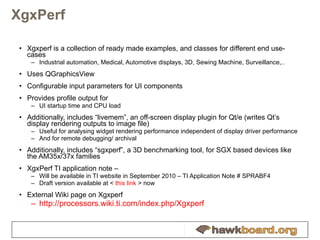
XgxPerf Xgxperf is a collection of ready made examples, and classes for different end use-cases Industrial automation, Medical, Automotive displays, 3D, Sewing Machine, Surveillance,.. Uses QGraphicsView Configurable input parameters for UI components Provides profile output for UI startup time and CPU load Additionally, includes “livemem”, an off-screen display plugin for Qt/e (writes Qt’s display rendering outputs to image file) Useful for analysing widget rendering performance independent of display driver performance And for remote debugging/ archival Additionally, includes “sgxperf”, a 3D benchmarking tool, for SGX based devices like the AM35x/37x families XgxPerf TI application note –  Will be available in TI website in September 2010 – TI Application Note #  SPRABF4 Draft version available at <  this link  > now External Wiki page on Xgxperf http://processors.wiki.ti.com/index.php/Xgxperf
XgxPerf Usage SVN access: svn checkout  http:// gforge.ti.com/svn/gleslayer Username = anonymous, password=  (blank) (or) Download and extract source tarball Non-OpenEmbedded users https://gforge.ti.com/gf/download/docmanfileversion/192/3696/xgxperf_1.1.0.tar.gz   (check SVN for latest) Update path of framework (ex. QTDIR =) in Rules.make Build - “make && make install” Open Embedded-users For Angstrom setup, use the recipes for Angstrom at https://gforge.ti.com/gf/download/docmanfileversion/195/3699/ti-xgxperf.tar   Build any image that provides Qt - X11 or Qt – Embedded package Choose the appropriate Xgxperf recipe: ti-xgxperf-qt-x11 for X11 build, or ti-xgxperf-qt-embedded. X11 build is shown below. Q^oe] sh oebb.sh bitbake ti-xgxperf-qt-x11 Q^oe] ls -l build/tmp-angstrom_2008_1/deploy/glibc/ipk/armv7a/ti-xgxperf-qt-x11_1.0.0.0-r0+svnr54.5_armv7a.ipk -rw-r--r-- 1 prabindh prabindh 4873428 2010-07-19 20:18 build/tmp-angstrom_2008_1/deploy/glibc/ipk/armv7a/ti-xgxperf-qt-x11_1.0.0.0-r0+svnr54.5_armv7a.ipk XgxPerf is now ready to use on local HW EVM ./xgxperf_app [–qws] <cookie> <fps> …
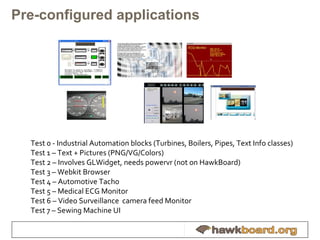
Pre-configured applications Test 0 - Industrial Automation blocks (Turbines, Boilers, Pipes, Text Info classes) Test 1 – Text + Pictures (PNG/VG/Colors) Test 2 – Involves GLWidget, needs powervr (not on HawkBoard) Test 3 – Webkit Browser Test 4 – Automotive Tacho Test 5 – Medical ECG Monitor Test 6 – Video Surveillance  camera feed Monitor Test 7 – Sewing Machine UI
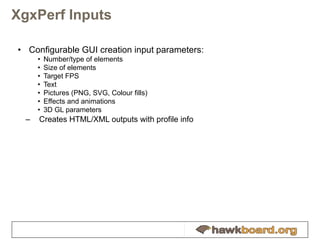
XgxPerf Inputs Configurable GUI creation input parameters: Number/type of elements Size of elements Target FPS Text Pictures (PNG, SVG, Colour fills) Effects and animations 3D GL parameters Creates HTML/XML outputs with profile info
2 minute  Qt Application Development  [live demo] Create new Xgxperf subproject from template Add items Build project Use xgxperf_app to invoke “ ./xgxperf_app –qws <args>”
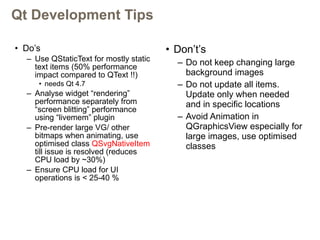
Qt Development Tips Do’s Use QStaticText for mostly static text items (50% performance impact compared to QText !!)  needs Qt 4.7 Analyse widget “rendering” performance separately from “screen blitting” performance using “livemem” plugin Pre-render large VG/ other bitmaps when animating, use optimised class  QSvgNativeItem  till issue is resolved (reduces CPU load by ~30%) Ensure CPU load for UI operations is < 25-40 % Don’t’s Do not keep changing large background images Do not update all items. Update only when needed and in specific locations Avoid Animation in QGraphicsView especially for large images, use optimised classes
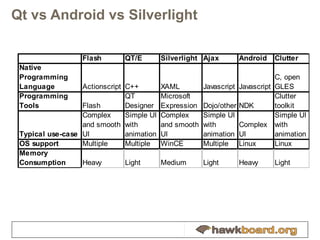
Qt vs Android vs Silverlight
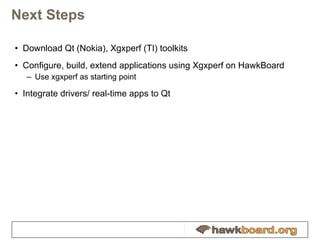
Next Steps Download Qt (Nokia), Xgxperf (TI) toolkits Configure, build, extend applications using Xgxperf on HawkBoard Use xgxperf as starting point Integrate drivers/ real-time apps to Qt
Links Qt download ftp:// ftp.qt.nokia.com /qt/source/ Qt configure and build http:// processors.wiki.ti.com/index.php/Building_Qt TI XgxPerf at Gforge (OE recipes, tar.gz code, documentation, latest updates via SVN) https:// gforge.ti.com/gf/project/gleslayer / Qt Animation with Graphics View on 4.7 http://www.slideshare.net/qtbynokia/special-effects-with-qt-graphics-view TI Graphics Blog and updates http:// tigraphics.blogspot.com TI OMAP3 Graphics SDK (CortexA8/3D engine) http://processors.wiki.ti.com/index.php/OMAP35x_Graphics_SDK_Getting_Started_Guide Hawkboard web -  http:// www.HawkBoard.org Hawkboard discussions -  http:// groups.google.com/group/hawkboard TI opensource projects -  http:// designsomething.org / Beagleboard (CortexA8) -  http:// www.BeagleBoard.org
Q&A
THANK YOU

Developing and Benchmarking Qt applications on Hawkboard with Xgxperf

  • 1.
    Developing Qt applicationson HawkBoard Prabindh Sundareson [email_address] July 2010
  • 2.
    Agenda Qt IntroductionQuick history, Licensing model Fundamental concepts Typical application software stack Qt application classes Qt Graphics View framework Signal/Slot mechanism Configuring and Building Qt Tools Qt Creator Introduction to XgxPerf – TI Graphics Toolkit Developing a Qt application in 2 minutes with XgxPerf (Demo) Qt Development – Tips for performance Qt vs Android vs Silverlight vs Flash Conclusion & QnA
  • 3.
    Qt History Startedas an offering from Trolltech Trolltech is now part of Nokia Qt framework is available in source form, with multiple support options Works on Linux framebuffer, WinCE, X, Windows, even on Android Continuously evolving, now at 4.7.x (Beta)
  • 4.
    Qt Licensing ModelCommercial LGPL v. 2.1 GPL v. 3 License Cost License fee charged No cost No cost Must provide source code for changes to Qt No, modifications can be closed Source code must be provided Source code must be provided Can create proprietary application Yes—no obligation to disclose source code Yes, if dynamically linked to Qt library No, application is subject to the GPL Support Yes, with valid maintenance agreement Not included, available separately Not included, available separately Charge for Runtimes Yes—in some instances* No, distribution is royalty free No, distribution is royalty free
  • 5.
    The Qt FrameworkFB Cairo Qt API (Linux / WinCE) DirectFB Surface Managers X Window System/Mgrs Application Framework HW Device Tslib, Mouse GWES Input Device Manager Qt/e Qt/X XgxPerf GDI DDr a w Win32/ Windowing System
  • 6.
    Typical Application ComponentsFeedback to User (GUI) Application Event Handler(s) Application Event Loop Environment Input Events Output Changes Sensor User Input Events Mouse/ts Ex. Increase speed by calling driver interface ioctl Qt
  • 7.
    Qt - HawkBoardQt relies on Linux frame buffer driver provided by HawkBoard linux package The frame buffer interface controls what resolutions are supported by Qt Maximum resolution supported on HawkBoard 640 x 480, 16 bpp Qt/embedded always outputs to full screen QWS is a simple window system for Qt/e Qt also works with X on Linux Touch screen, and Mouse/Keyboard supported
  • 8.
  • 9.
    Steps for CreatingQt based UI Build Qt for target, using provided Qt cross compile options Design the UI in Qt Designer Add necessary event handlers in CPP file Add necessary application level code Ex, Timers, Network stacks, Motor control, … Create .PRO project file Build, install to target Debug directly on target for peripheral accesses
  • 10.
    Qt – AppDevelopment with GraphicsView #include “automation.h” void AutomationApp::Init() { … /* Create a new sample widget that shows a text within a information box – see automation library in xgxperf */ pValveText1 = new InfoBoxClass(0,QRectF(260,290,20,20),&quot;1.1&quot;); /* Add the item to the Graphics scene and make it visible on screen – Note that the GraphicsView was already created for us by the framework in xgxperf */ m_scene->addItem(pValveText1); /* Add the item to a current list, for book-keeping during exit */ workItemList << pValveText1; … }
  • 11.
    Basics of Qt- Widgets
  • 12.
    Basics of Qt- Widgets Qt UI framework is based on widgets Widgets respond to UI events (key presses/mouse movements), and update their screen area Each widget has a parent, that affects its behaviour, and is embedded into it Can create “complex” shapes using masks See Automation Classes in Xgxperf Most Qt classes are derived from QWidget Ex, QGLWidget, QPushbutton … QPushButton * myButton = new QPushButton(…); myButton->doSomethingAPI(); Refer to online documentation at http://doc.qt.nokia.com/4.6/qwidget.html Tip – Documentation is arranged using class names.
  • 13.
    QGraphicsView Provides a“Canvas” for adding items (QGraphicsItems) The QGraphicsView class provides a widget for displaying the contents of a QGraphicsScene By default, QGraphicsView provides a regular QWidget for the viewport widget. Can replace default by calling setViewport() with another widget type Provides a way to build an UI in an “actual” drawing canvas Ex, concept of “z-depth” of a QGraphicsItem
  • 14.
    Qt - Signals/Slots Signal / Slot mechanism provides a functionality similar to setting up “function pointers” Provides better type checking, amongst others Example Use-case: Perform blocking/ time consuming activities in separate thread Use paintEvent() to trigger/consume the result of actions happening in parallel (ex. Upload next video frame) How to communicate events ? Use SIGNAL/SLOT to communicate event completions Usage example for Signal/Slots: “ browserlib” app in xgxperf Found in /Xgxperf/browserlib/ browserlib.cpp
  • 15.
    Using SIGNAL/SLOT ClassmyClass: public QThread { Q_OBJECT /* Needed for signal/slot mechanism to work at runtime */ Public: … signals: void function1(const QImage &image, double scaleFactor); }; In thread code, emit function1(image, scaleFactor); In Main application, define the actual function:: void myWidget::mainWidgetFunction(const QImage &image, double scaleFactor){} … And connect the signal and slot: connect(&thread, SIGNAL(mainWidgetFunction(const QImage &, double)), this, SLOT(function1(const QImage &, double)));
  • 16.
    QPainter Low levelpainting API, for overriding default painting behaviour of widgets Handles Text and other Drawing primitives (very flexible API) Can perform operations that the Widget/other Class APIs do not expose (ex, create a circular window) Usage modes Subclass QWidget, and handle Paint event void paintEvent(QPaintEvent *event) QPainter can be accessed only within a paint event Usage example: “ automation” app in xgxperf
  • 17.
    Qt – Classesfor UI development Canvas QGraphicsView, QGraphicsScene Text QStaticText, QString, QGraphicsTextItem Icons QSvgWidget, QGraphicsSvgItem, QLabel Animations QPropertyAnimation 3D QGLWidget (not on Hawkbrd) Bitmap loading QPainter QPixmap, QImage
  • 18.
    Setting up andbuilding Qt Documented in detail for non-OpenEmbedded users at, http://processors.wiki.ti.com/index.php/Building_Qt Angstrom (OpenEmbedded based) distribution has Qt package for Hawkboard A configurable pre-built filesystem with Qt integrated, and kernel image for Hawkboard can be downloaded from http://www.angstrom-distribution.org/narcissus/ Select “hawkboard” machine type from pull-down menu Select “Qt” – embedded or X11 based on desktop environment in addition application selection option
  • 19.
    Debugging and ProfilingQt Applications Use Qt Creator, an integrated designer/debugger Latest version is 1.3 http://qt.nokia.com/downloads Needs GDB on Linux, and CDB for PC But usually much easier to just do qDebug() << “printed from here”; To get output on terminal and trace code flow Angstrom package provides oprofile to profile application code Use Xgxperf to benchmark at specific fps
  • 20.
    Qt Creator Usedto create a new form design Output saved as a .UI file (text format) This can be imported into the Qt application via Qt classes
  • 21.
    Creating a Widget(old screenshot)
  • 22.
    Using .UI filesQt Creator generates -> .UI file Steps to create application from .UI file: Add .ui file to project using .PRO entry Subclass Ui:: in application Ex, see “vslib” application in Xgxperf /xgxperf/vslib/vslib.cpp class VSApp : public ApplicationBase, private Ui::MainWindow Use “setupUi” call directly – setupUi(this);
  • 23.
    Integrating .UI filesTEMPLATE = lib SOURCES = vslib.cpp export.cpp HEADERS = ../applicationmanager/common/applicationbase.h vslib.h FORMS = mainwindow.ui RESOURCES = resource.qrc VSApp::VSApp(QWidget* parent, QRectF inSceneRect, QGraphicsScene *scene, void* data): ApplicationBase(parent, inSceneRect,scene,data) { //Store the test data locally m_widgetTestInStruct = (TestTargetParamsStruct*)data; currTimerCount = 0; setupUi( this); } c lass VSApp : public ApplicationBase, private Ui::MainWindow Location - Xgxperf/vslib .pro .cpp .h
  • 24.
    XgxPerf Xgxperf isa collection of ready made examples, and classes for different end use-cases Industrial automation, Medical, Automotive displays, 3D, Sewing Machine, Surveillance,.. Uses QGraphicsView Configurable input parameters for UI components Provides profile output for UI startup time and CPU load Additionally, includes “livemem”, an off-screen display plugin for Qt/e (writes Qt’s display rendering outputs to image file) Useful for analysing widget rendering performance independent of display driver performance And for remote debugging/ archival Additionally, includes “sgxperf”, a 3D benchmarking tool, for SGX based devices like the AM35x/37x families XgxPerf TI application note – Will be available in TI website in September 2010 – TI Application Note # SPRABF4 Draft version available at < this link > now External Wiki page on Xgxperf http://processors.wiki.ti.com/index.php/Xgxperf
  • 25.
    XgxPerf Usage SVNaccess: svn checkout http:// gforge.ti.com/svn/gleslayer Username = anonymous, password= (blank) (or) Download and extract source tarball Non-OpenEmbedded users https://gforge.ti.com/gf/download/docmanfileversion/192/3696/xgxperf_1.1.0.tar.gz (check SVN for latest) Update path of framework (ex. QTDIR =) in Rules.make Build - “make && make install” Open Embedded-users For Angstrom setup, use the recipes for Angstrom at https://gforge.ti.com/gf/download/docmanfileversion/195/3699/ti-xgxperf.tar Build any image that provides Qt - X11 or Qt – Embedded package Choose the appropriate Xgxperf recipe: ti-xgxperf-qt-x11 for X11 build, or ti-xgxperf-qt-embedded. X11 build is shown below. Q^oe] sh oebb.sh bitbake ti-xgxperf-qt-x11 Q^oe] ls -l build/tmp-angstrom_2008_1/deploy/glibc/ipk/armv7a/ti-xgxperf-qt-x11_1.0.0.0-r0+svnr54.5_armv7a.ipk -rw-r--r-- 1 prabindh prabindh 4873428 2010-07-19 20:18 build/tmp-angstrom_2008_1/deploy/glibc/ipk/armv7a/ti-xgxperf-qt-x11_1.0.0.0-r0+svnr54.5_armv7a.ipk XgxPerf is now ready to use on local HW EVM ./xgxperf_app [–qws] <cookie> <fps> …
  • 26.
    Pre-configured applications Test0 - Industrial Automation blocks (Turbines, Boilers, Pipes, Text Info classes) Test 1 – Text + Pictures (PNG/VG/Colors) Test 2 – Involves GLWidget, needs powervr (not on HawkBoard) Test 3 – Webkit Browser Test 4 – Automotive Tacho Test 5 – Medical ECG Monitor Test 6 – Video Surveillance camera feed Monitor Test 7 – Sewing Machine UI
  • 27.
    XgxPerf Inputs ConfigurableGUI creation input parameters: Number/type of elements Size of elements Target FPS Text Pictures (PNG, SVG, Colour fills) Effects and animations 3D GL parameters Creates HTML/XML outputs with profile info
  • 28.
    2 minute Qt Application Development [live demo] Create new Xgxperf subproject from template Add items Build project Use xgxperf_app to invoke “ ./xgxperf_app –qws <args>”
  • 29.
    Qt Development TipsDo’s Use QStaticText for mostly static text items (50% performance impact compared to QText !!) needs Qt 4.7 Analyse widget “rendering” performance separately from “screen blitting” performance using “livemem” plugin Pre-render large VG/ other bitmaps when animating, use optimised class QSvgNativeItem till issue is resolved (reduces CPU load by ~30%) Ensure CPU load for UI operations is < 25-40 % Don’t’s Do not keep changing large background images Do not update all items. Update only when needed and in specific locations Avoid Animation in QGraphicsView especially for large images, use optimised classes
  • 30.
    Qt vs Androidvs Silverlight
  • 31.
    Next Steps DownloadQt (Nokia), Xgxperf (TI) toolkits Configure, build, extend applications using Xgxperf on HawkBoard Use xgxperf as starting point Integrate drivers/ real-time apps to Qt
  • 32.
    Links Qt downloadftp:// ftp.qt.nokia.com /qt/source/ Qt configure and build http:// processors.wiki.ti.com/index.php/Building_Qt TI XgxPerf at Gforge (OE recipes, tar.gz code, documentation, latest updates via SVN) https:// gforge.ti.com/gf/project/gleslayer / Qt Animation with Graphics View on 4.7 http://www.slideshare.net/qtbynokia/special-effects-with-qt-graphics-view TI Graphics Blog and updates http:// tigraphics.blogspot.com TI OMAP3 Graphics SDK (CortexA8/3D engine) http://processors.wiki.ti.com/index.php/OMAP35x_Graphics_SDK_Getting_Started_Guide Hawkboard web - http:// www.HawkBoard.org Hawkboard discussions - http:// groups.google.com/group/hawkboard TI opensource projects - http:// designsomething.org / Beagleboard (CortexA8) - http:// www.BeagleBoard.org
  • 33.
  • 34.