Robot Framework 2.5Robot Framework is a generic test automation framework for acceptance testing and acceptance test-driven development (ATDD).by Usov Borys
Features:Enables easy-to-use tabular syntax for creating test cases in a uniform way.Allows using keyword-driven, data-driven and behavior-driven (BDD) approaches.Provides easy-to-read reports and logs in HTML format.Is platform and application independent.Provides a simple library API for creating customized test libraries.Implemented with Python.Provides support for Selenium for web testing.
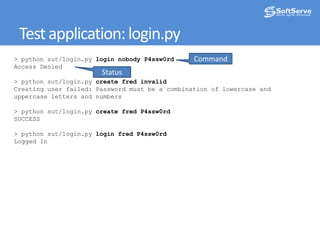
Test application: login.pyCommand> pythonsut/login.pyloginnobody P4ssw0rdAccess Denied> pythonsut/login.pycreate fredinvalidCreatinguserfailed: Passwordmustbe a combinationoflowercase anduppercase letters and numbers> pythonsut/login.pycreate fred P4ssw0rdSUCCESS> pythonsut/login.pyloginfred P4ssw0rdLogged InStatus
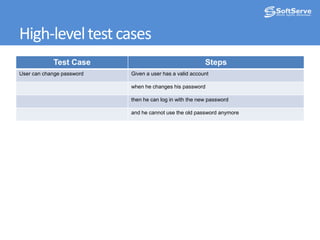
High-level test cases
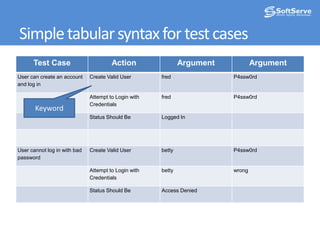
Simple tabular syntax for test casesKeyword
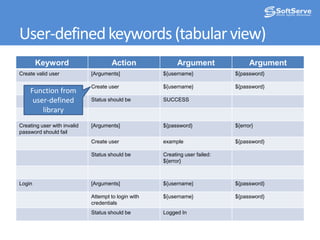
User-defined keywords (tabular view)Function from user-defined library
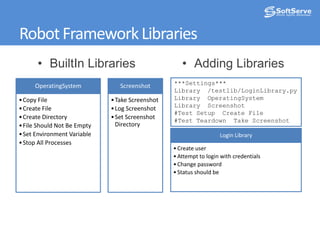
Robot Framework LibrariesBuiltIn Libraries
Adding Libraries***Settings***Library  /testlib/LoginLibrary.pyLibrary  OperatingSystemLibrary  Screenshot#Test Setup  Create File #Test Teardown  Take Screenshot
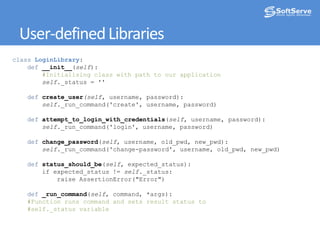
User-defined LibrariesclassLoginLibrary:def__init__(self):#Initialising class with path to our applicationself._status = '' defcreate_user(self, username, password):self._run_command('create', username, password) defattempt_to_login_with_credentials(self, username, password):self._run_command('login', username, password) defchange_password(self, username, old_pwd, new_pwd):self._run_command('change-password', username, old_pwd, new_pwd) defstatus_should_be(self, expected_status):        if expected_status != self._status:            raise AssertionError("Error") def_run_command(self, command, *args):#Function runs command and sets result status to    #self._status variable
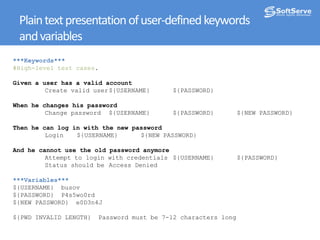
Plain text presentation of user-defined keywordsand variables***Keywords***#High-level test cases.Given a user has a valid account	Create valid user	${USERNAME}	${PASSWORD}When he changes hispassword	Change password	${USERNAME}	${PASSWORD}	${NEW PASSWORD}Then he can log in with the new password	Login	${USERNAME}	${NEW PASSWORD}And he cannot use the old password anymore 	Attempt to login with credentials	${USERNAME}	${PASSWORD}	Status should be	Access Denied***Variables***${USERNAME}  busov${PASSWORD}  P4s5wo0rd${NEW PASSWORD}  e0D3n4J${PWD INVALID LENGTH}  Password must be 7-12 characters long
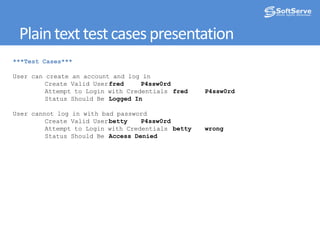
Plain text test cases presentation***Test Cases***User can create an account and log in	Create Valid User	fred	P4ssw0rd	Attempt to Login with Credentials	fred	P4ssw0rd	Status Should Be	Logged InUser cannot log in with bad password	Create Valid User	betty	P4ssw0rd	Attempt to Login with Credentials	betty	wrong	Status Should Be	Access Denied
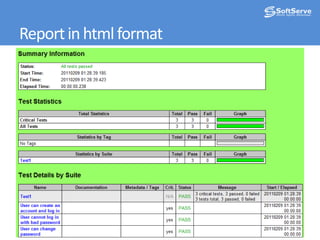
Report in html format
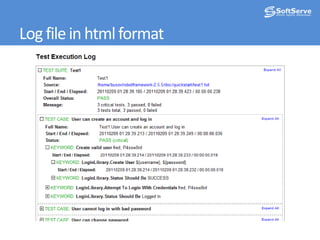
Log file in html format
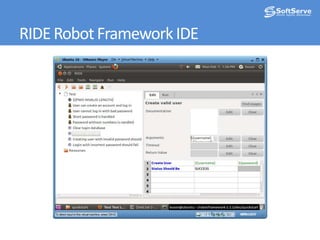
RIDE Robot Framework IDE
For more informationProject PagesThe main information hubhttp://code.google.com/p/robotframeworkUser GuideDetailed information about all features of the frameworkhttp://code.google.com/p/robotframework/wiki/UserGuide

Robot framework

  • 1.
    Robot Framework 2.5RobotFramework is a generic test automation framework for acceptance testing and acceptance test-driven development (ATDD).by Usov Borys
  • 2.
    Features:Enables easy-to-use tabularsyntax for creating test cases in a uniform way.Allows using keyword-driven, data-driven and behavior-driven (BDD) approaches.Provides easy-to-read reports and logs in HTML format.Is platform and application independent.Provides a simple library API for creating customized test libraries.Implemented with Python.Provides support for Selenium for web testing.
  • 3.
    Test application: login.pyCommand>pythonsut/login.pyloginnobody P4ssw0rdAccess Denied> pythonsut/login.pycreate fredinvalidCreatinguserfailed: Passwordmustbe a combinationoflowercase anduppercase letters and numbers> pythonsut/login.pycreate fred P4ssw0rdSUCCESS> pythonsut/login.pyloginfred P4ssw0rdLogged InStatus
  • 4.
  • 5.
    Simple tabular syntaxfor test casesKeyword
  • 6.
    User-defined keywords (tabularview)Function from user-defined library
  • 7.
  • 8.
    Adding Libraries***Settings***Library /testlib/LoginLibrary.pyLibrary OperatingSystemLibrary Screenshot#Test Setup Create File #Test Teardown Take Screenshot
  • 9.
    User-defined LibrariesclassLoginLibrary:def__init__(self):#Initialising classwith path to our applicationself._status = '' defcreate_user(self, username, password):self._run_command('create', username, password) defattempt_to_login_with_credentials(self, username, password):self._run_command('login', username, password) defchange_password(self, username, old_pwd, new_pwd):self._run_command('change-password', username, old_pwd, new_pwd) defstatus_should_be(self, expected_status): if expected_status != self._status: raise AssertionError("Error") def_run_command(self, command, *args):#Function runs command and sets result status to #self._status variable
  • 10.
    Plain text presentationof user-defined keywordsand variables***Keywords***#High-level test cases.Given a user has a valid account Create valid user ${USERNAME} ${PASSWORD}When he changes hispassword Change password ${USERNAME} ${PASSWORD} ${NEW PASSWORD}Then he can log in with the new password Login ${USERNAME} ${NEW PASSWORD}And he cannot use the old password anymore Attempt to login with credentials ${USERNAME} ${PASSWORD} Status should be Access Denied***Variables***${USERNAME} busov${PASSWORD} P4s5wo0rd${NEW PASSWORD} e0D3n4J${PWD INVALID LENGTH} Password must be 7-12 characters long
  • 11.
    Plain text testcases presentation***Test Cases***User can create an account and log in Create Valid User fred P4ssw0rd Attempt to Login with Credentials fred P4ssw0rd Status Should Be Logged InUser cannot log in with bad password Create Valid User betty P4ssw0rd Attempt to Login with Credentials betty wrong Status Should Be Access Denied
  • 12.
  • 13.
    Log file inhtml format
  • 14.
  • 15.
    For more informationProjectPagesThe main information hubhttp://code.google.com/p/robotframeworkUser GuideDetailed information about all features of the frameworkhttp://code.google.com/p/robotframework/wiki/UserGuide

Editor's Notes

  • #6 Action could be keyword or a function from library
  • #10 Return to slide number 4