Operating System 04
I/O and Memory Basics
Prof Neeraj Bhargava
Vaibhav Khanna
Department of Computer Science
School of Engineering and Systems Sciences
Maharshi Dayanand Saraswati University Ajmer
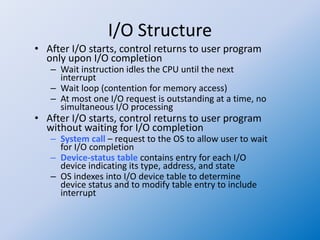
I/O Structure
• After I/O starts, control returns to user program
only upon I/O completion
– Wait instruction idles the CPU until the next
interrupt
– Wait loop (contention for memory access)
– At most one I/O request is outstanding at a time, no
simultaneous I/O processing
• After I/O starts, control returns to user program
without waiting for I/O completion
– System call – request to the OS to allow user to wait
for I/O completion
– Device-status table contains entry for each I/O
device indicating its type, address, and state
– OS indexes into I/O device table to determine
device status and to modify table entry to include
interrupt
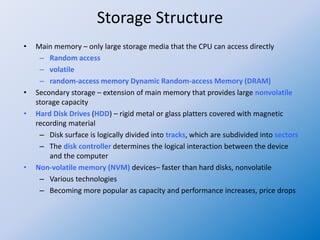
Storage Structure
• Main memory – only large storage media that the CPU can access directly
– Random access
– volatile
– random-access memory Dynamic Random-access Memory (DRAM)
• Secondary storage – extension of main memory that provides large nonvolatile
storage capacity
• Hard Disk Drives (HDD) – rigid metal or glass platters covered with magnetic
recording material
– Disk surface is logically divided into tracks, which are subdivided into sectors
– The disk controller determines the logical interaction between the device
and the computer
• Non-volatile memory (NVM) devices– faster than hard disks, nonvolatile
– Various technologies
– Becoming more popular as capacity and performance increases, price drops
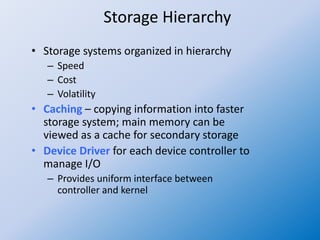
Storage Hierarchy
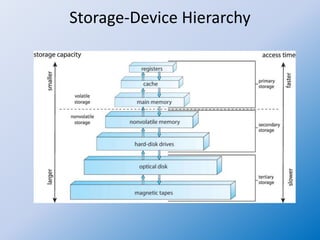
• Storage systems organized in hierarchy
– Speed
– Cost
– Volatility
• Caching – copying information into faster
storage system; main memory can be
viewed as a cache for secondary storage
• Device Driver for each device controller to
manage I/O
– Provides uniform interface between
controller and kernel
Storage-Device Hierarchy
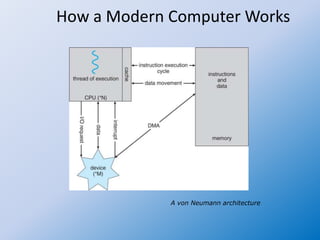
How a Modern Computer Works
A von Neumann architecture
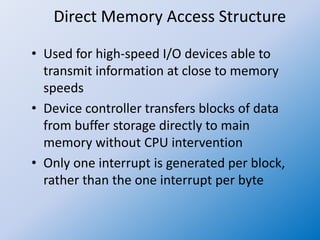
Direct Memory Access Structure
• Used for high-speed I/O devices able to
transmit information at close to memory
speeds
• Device controller transfers blocks of data
from buffer storage directly to main
memory without CPU intervention
• Only one interrupt is generated per block,
rather than the one interrupt per byte
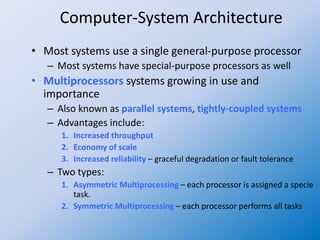
Computer-System Architecture
• Most systems use a single general-purpose processor
– Most systems have special-purpose processors as well
• Multiprocessors systems growing in use and
importance
– Also known as parallel systems, tightly-coupled systems
– Advantages include:
1. Increased throughput
2. Economy of scale
3. Increased reliability – graceful degradation or fault tolerance
– Two types:
1. Asymmetric Multiprocessing – each processor is assigned a specie
task.
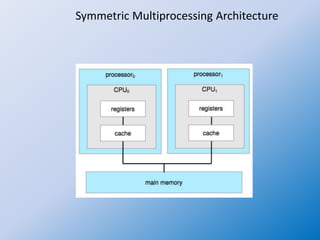
2. Symmetric Multiprocessing – each processor performs all tasks
Symmetric Multiprocessing Architecture
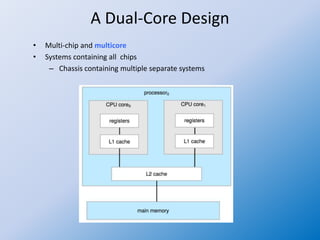
A Dual-Core Design
• Multi-chip and multicore
• Systems containing all chips
– Chassis containing multiple separate systems
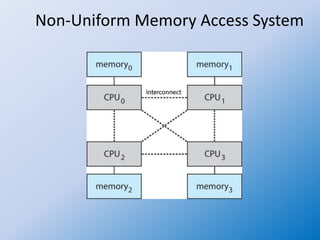
Non-Uniform Memory Access System
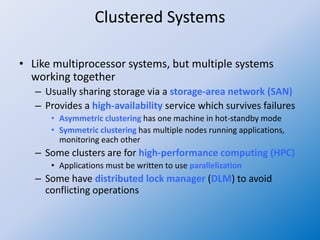
Clustered Systems
• Like multiprocessor systems, but multiple systems
working together
– Usually sharing storage via a storage-area network (SAN)
– Provides a high-availability service which survives failures
• Asymmetric clustering has one machine in hot-standby mode
• Symmetric clustering has multiple nodes running applications,
monitoring each other
– Some clusters are for high-performance computing (HPC)
• Applications must be written to use parallelization
– Some have distributed lock manager (DLM) to avoid
conflicting operations
Assignment
• 4. Draw and explain Storage systems organized
in a hierarchy by Speed, Cost and Volatility

Operating system 04 storage structure and management

  • 1.
    Operating System 04 I/Oand Memory Basics Prof Neeraj Bhargava Vaibhav Khanna Department of Computer Science School of Engineering and Systems Sciences Maharshi Dayanand Saraswati University Ajmer
  • 2.
    I/O Structure • AfterI/O starts, control returns to user program only upon I/O completion – Wait instruction idles the CPU until the next interrupt – Wait loop (contention for memory access) – At most one I/O request is outstanding at a time, no simultaneous I/O processing • After I/O starts, control returns to user program without waiting for I/O completion – System call – request to the OS to allow user to wait for I/O completion – Device-status table contains entry for each I/O device indicating its type, address, and state – OS indexes into I/O device table to determine device status and to modify table entry to include interrupt
  • 3.
    Storage Structure • Mainmemory – only large storage media that the CPU can access directly – Random access – volatile – random-access memory Dynamic Random-access Memory (DRAM) • Secondary storage – extension of main memory that provides large nonvolatile storage capacity • Hard Disk Drives (HDD) – rigid metal or glass platters covered with magnetic recording material – Disk surface is logically divided into tracks, which are subdivided into sectors – The disk controller determines the logical interaction between the device and the computer • Non-volatile memory (NVM) devices– faster than hard disks, nonvolatile – Various technologies – Becoming more popular as capacity and performance increases, price drops
  • 4.
    Storage Hierarchy • Storagesystems organized in hierarchy – Speed – Cost – Volatility • Caching – copying information into faster storage system; main memory can be viewed as a cache for secondary storage • Device Driver for each device controller to manage I/O – Provides uniform interface between controller and kernel
  • 5.
  • 6.
    How a ModernComputer Works A von Neumann architecture
  • 7.
    Direct Memory AccessStructure • Used for high-speed I/O devices able to transmit information at close to memory speeds • Device controller transfers blocks of data from buffer storage directly to main memory without CPU intervention • Only one interrupt is generated per block, rather than the one interrupt per byte
  • 8.
    Computer-System Architecture • Mostsystems use a single general-purpose processor – Most systems have special-purpose processors as well • Multiprocessors systems growing in use and importance – Also known as parallel systems, tightly-coupled systems – Advantages include: 1. Increased throughput 2. Economy of scale 3. Increased reliability – graceful degradation or fault tolerance – Two types: 1. Asymmetric Multiprocessing – each processor is assigned a specie task. 2. Symmetric Multiprocessing – each processor performs all tasks
  • 9.
  • 10.
    A Dual-Core Design •Multi-chip and multicore • Systems containing all chips – Chassis containing multiple separate systems
  • 11.
  • 12.
    Clustered Systems • Likemultiprocessor systems, but multiple systems working together – Usually sharing storage via a storage-area network (SAN) – Provides a high-availability service which survives failures • Asymmetric clustering has one machine in hot-standby mode • Symmetric clustering has multiple nodes running applications, monitoring each other – Some clusters are for high-performance computing (HPC) • Applications must be written to use parallelization – Some have distributed lock manager (DLM) to avoid conflicting operations
  • 13.
    Assignment • 4. Drawand explain Storage systems organized in a hierarchy by Speed, Cost and Volatility