COURSE NAME : OPERATING
SYSTEM COURSE CODE :
381CCS-3
CHAPTER 1 : INTRODUCTION TO OPERATING
SYSTEM
REFERENCE DETAIL FOR CHAPTER 1
Topic Text Reference Chapter No. Page No
“Operating System
Introduction to Concepts”, 10th Edition, 3-7,
Operating Abraham SilberSchatz, Chapter 1 11-21,
System Peter Baer Galvin, 63-64
Greg Gagne, Wiley, 2018
2
 Introduction
 What Operating System Do
 Computer System
Organization
 Storage structure
 I/O structure
 Computer System
Architecture
 Single Processor Systems
 Multi processor Systems
 Clustered Systems
 Distributed System
CHAPTER 1 : INTRODUCTION TO OPERATING SYSTEM
1.1 INTRODUCTION
3
1.1.1 WHAT IS AN OPERATING SYSTEM?
 A program that acts as an intermediary between a user
of a computer and the computer hardware.
 Operating system goals:
Execute user programs and make solving user problems
easier. Make the computer system convenient to use.
Use the computer hardware in an efficient manner.
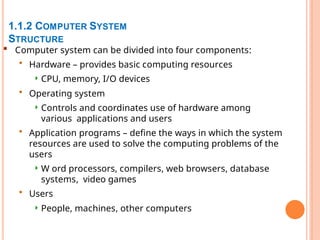
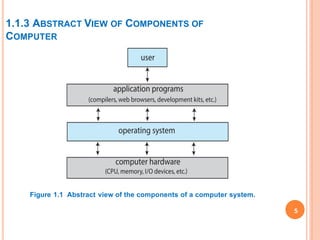
 Computer system can be divided into four components:
• Hardware – provides basic computing resources
 CPU, memory, I/O devices
• Operating system
 Controls and coordinates use of hardware among
various applications and users
• Application programs – define the ways in which the system
resources are used to solve the computing problems of the
users
 W ord processors, compilers, web browsers, database
systems, video games
• Users
 People, machines, other computers
4
1.1.2 COMPUTER SYSTEM
STRUCTURE
1.1.3 ABSTRACT VIEW OF COMPONENTS OF
COMPUTER
Figure 1.1 Abstract view of the components of a computer system.
5
1.2 WHAT OPERATING SYSTEMS DO
6
Depends on the Users point of view
 Users want convenience, ease of use and good performance
• Don’t care about resource utilization
 Mobile devices like smartphones and tablets are resource poor,
optimized for usability and battery life
• Mobile user interfaces such as touch screens, voice recognition
 Some computers have little or no user interface
Ex : Embedded computers in devices and automobiles: Operating
systems and applications are designed primarily to run without user
intervention
Depends on System View Operating System is viewed as
 Resource Allocator : A computer system has many resources to solve
a problem like CPU time, memory space, storage space, I/O devices,
and so on. The operating system acts as the manager of these
resources.
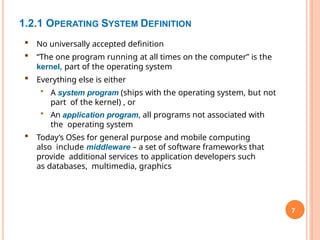
 Control Program : controls the execution of user programs and
operations of I/O devices
1.2.1 OPERATING SYSTEM DEFINITION
7
 No universally accepted definition
 “The one program running at all times on the computer” is the
kernel, part of the operating system
 Everything else is either
• A system program (ships with the operating system, but not
part of the kernel) , or
• An application program, all programs not associated with
the operating system
 Today’s OSes for general purpose and mobile computing
also include middleware – a set of software frameworks that
provide additional services to application developers such
as databases, multimedia, graphics
1.3 COMPUTER SYSTEM ORGANIZATION
8
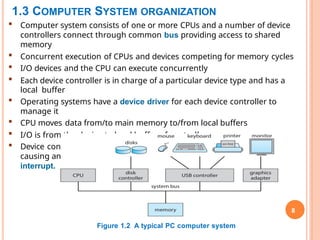
 Computer system consists of one or more CPUs and a number of device
controllers connect through common bus providing access to shared
memory
 Concurrent execution of CPUs and devices competing for memory cycles
 I/O devices and the CPU can execute concurrently
 Each device controller is in charge of a particular device type and has a
local buffer
 Operating systems have a device driver for each device controller to
manage it
 CPU moves data from/to main memory to/from local buffers
 I/O is from the device to local buffer of controller
 Device controller informs CPU that it has finished its operation by
causing an
interrupt.
Figure 1.2 A typical PC computer system
1.3.1 STORAGE STRUCTURE
9
Random access Memory (RAM) or Main Memory :
 Computers run most of their programs from this rewritable memory.
 It is the only large storage media that the CPU can access directly.
 Loses its content when power is turned off (Volatile).
 Main memory commonly is implemented in a semiconductor technology
called
dynamic random-access memory (DRAM).
BootStrap Program:
 It is Loaded at Power up or reboot.
 The first program to run on computer power-on and loads Operating System
Kernel and starts Execution
 Typically stored in ROM or EPROM, generally known as firmware
Secondary storage: Extension of main memory that provides large
nonvolatile (permanent) storage capacity
i) Hard Disk Drives (HDD)
 Rigid metal or glass platters covered with magnetic recording material
 Disk surface is logically divided into tracks, which are subdivided into
sectors
 The disk controller determines the logical interaction between the
device and the
computer
ii) Non-volatile memory (NVM) devices
 Which provide storage for both programs and
data.
1.3.1.1 STORAGE HIERARCHY
10
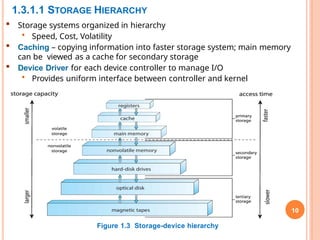
 Storage systems organized in hierarchy
• Speed, Cost, Volatility
 Caching – copying information into faster storage system; main memory
can be viewed as a cache for secondary storage
 Device Driver for each device controller to manage I/O
• Provides uniform interface between controller and kernel
Figure 1.3 Storage-device hierarchy
1.3.2 I/O STRUCTURE
 Two methods for handling I/O
After I/O starts, control returns to user program only upon I/O completion
• Wait instruction idles the CPU until the next interrupt
• Wait loop (contention for memory access)
• At most one I/O request is outstanding at a time, no
simultaneous I/O processing
After I/O starts, control returns to user program without waiting for I/O
completion
• System call – request to the OS to allow user to wait for I/O
completion
• Device-status table contains entry for each I/O device indicating its
type, address, and state
• OS indexes into I/O device table to determine device status and to
modify table
entry to include interrupt
Direct Memory Access Structure
• Used for high-speed I/O devices able to transmit information at
close to memory speeds
• Device controller transfers blocks of data from buffer storage
1.4 COMPUTER SYSTEM ARCHITECTURE
12
1. Single-Processor System
• Have only a single processor or CPU,
• Shared between users by dividing the CPU time into time-slices and
allocating one of these to each user in turn
• The time-slices are very short, giving each user the impression that
their programs are running continuously
2. Multiprocessor System(Parallel System)
• Parallel systems with more than one CPU in close communication
• Tightly coupled system – processors share memory and a clock;
communication usually takes place through the shared memory
Advantages
 Increased throughput
 Economy of scale
 Increased reliability – graceful degradation or fault tolerance
COMPUTER SYSTEM ARCHITECTURE(CONT…)
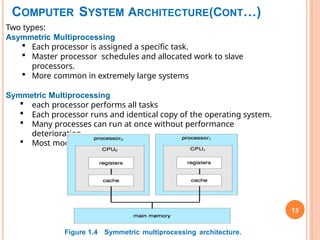
13
Two types:
Asymmetric Multiprocessing
 Each processor is assigned a specific task.
 Master processor schedules and allocated work to slave
processors.
 More common in extremely large systems
Symmetric Multiprocessing
 each processor performs all tasks
 Each processor runs and identical copy of the operating system.
 Many processes can run at once without performance
deterioration.
 Most modern operating systems support SMP
Figure 1.4 Symmetric multiprocessing architecture.
COMPUTER SYSTEM ARCHITECTURE(CONT…)
14
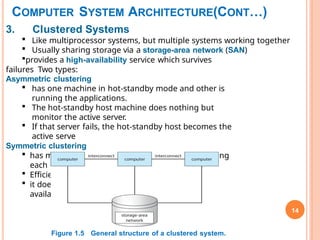
3. Clustered Systems
 Like multiprocessor systems, but multiple systems working together
 Usually sharing storage via a storage-area network (SAN)
provides a high-availability service which survives
failures Two types:
Asymmetric clustering
 has one machine in hot-standby mode and other is
running the applications.
 The hot-standby host machine does nothing but
monitor the active server.
 If that server fails, the hot-standby host becomes the
active serve
Symmetric clustering
 has multiple nodes running applications, monitoring
each other
 Efficient as it uses all of the available hardware.
 it does require that more than one application be
available to run.
Figure 1.5 General structure of a clustered system.
1.5 DISTRIBUTED SYSTEM
 Loosely coupled system – each processor has its own local memory;
processors communicate with one another through various
communications lines, such as high-speed buses or telephone lines.
 Requires Networking
infrastructure Local Area
Network (LAN) Wide Area
Network (WAN)
Metropolitan Area Network
(MAN) Personal Area Network
(PAN)
 Network Operating System - provides features between systems across
network Communication scheme allows systems to exchange messages
Illusion of a single system
 Advantages
• Resources sharing
• Computation speed up – load sharing
• Reliability
• Communications
15

381CCS_CHAPTER1_UPDATEDdatabase management .pptx

  • 1.
    COURSE NAME :OPERATING SYSTEM COURSE CODE : 381CCS-3 CHAPTER 1 : INTRODUCTION TO OPERATING SYSTEM REFERENCE DETAIL FOR CHAPTER 1 Topic Text Reference Chapter No. Page No “Operating System Introduction to Concepts”, 10th Edition, 3-7, Operating Abraham SilberSchatz, Chapter 1 11-21, System Peter Baer Galvin, 63-64 Greg Gagne, Wiley, 2018
  • 2.
    2  Introduction  WhatOperating System Do  Computer System Organization  Storage structure  I/O structure  Computer System Architecture  Single Processor Systems  Multi processor Systems  Clustered Systems  Distributed System CHAPTER 1 : INTRODUCTION TO OPERATING SYSTEM
  • 3.
    1.1 INTRODUCTION 3 1.1.1 WHATIS AN OPERATING SYSTEM?  A program that acts as an intermediary between a user of a computer and the computer hardware.  Operating system goals: Execute user programs and make solving user problems easier. Make the computer system convenient to use. Use the computer hardware in an efficient manner.
  • 4.
     Computer systemcan be divided into four components: • Hardware – provides basic computing resources  CPU, memory, I/O devices • Operating system  Controls and coordinates use of hardware among various applications and users • Application programs – define the ways in which the system resources are used to solve the computing problems of the users  W ord processors, compilers, web browsers, database systems, video games • Users  People, machines, other computers 4 1.1.2 COMPUTER SYSTEM STRUCTURE
  • 5.
    1.1.3 ABSTRACT VIEWOF COMPONENTS OF COMPUTER Figure 1.1 Abstract view of the components of a computer system. 5
  • 6.
    1.2 WHAT OPERATINGSYSTEMS DO 6 Depends on the Users point of view  Users want convenience, ease of use and good performance • Don’t care about resource utilization  Mobile devices like smartphones and tablets are resource poor, optimized for usability and battery life • Mobile user interfaces such as touch screens, voice recognition  Some computers have little or no user interface Ex : Embedded computers in devices and automobiles: Operating systems and applications are designed primarily to run without user intervention Depends on System View Operating System is viewed as  Resource Allocator : A computer system has many resources to solve a problem like CPU time, memory space, storage space, I/O devices, and so on. The operating system acts as the manager of these resources.  Control Program : controls the execution of user programs and operations of I/O devices
  • 7.
    1.2.1 OPERATING SYSTEMDEFINITION 7  No universally accepted definition  “The one program running at all times on the computer” is the kernel, part of the operating system  Everything else is either • A system program (ships with the operating system, but not part of the kernel) , or • An application program, all programs not associated with the operating system  Today’s OSes for general purpose and mobile computing also include middleware – a set of software frameworks that provide additional services to application developers such as databases, multimedia, graphics
  • 8.
    1.3 COMPUTER SYSTEMORGANIZATION 8  Computer system consists of one or more CPUs and a number of device controllers connect through common bus providing access to shared memory  Concurrent execution of CPUs and devices competing for memory cycles  I/O devices and the CPU can execute concurrently  Each device controller is in charge of a particular device type and has a local buffer  Operating systems have a device driver for each device controller to manage it  CPU moves data from/to main memory to/from local buffers  I/O is from the device to local buffer of controller  Device controller informs CPU that it has finished its operation by causing an interrupt. Figure 1.2 A typical PC computer system
  • 9.
    1.3.1 STORAGE STRUCTURE 9 Randomaccess Memory (RAM) or Main Memory :  Computers run most of their programs from this rewritable memory.  It is the only large storage media that the CPU can access directly.  Loses its content when power is turned off (Volatile).  Main memory commonly is implemented in a semiconductor technology called dynamic random-access memory (DRAM). BootStrap Program:  It is Loaded at Power up or reboot.  The first program to run on computer power-on and loads Operating System Kernel and starts Execution  Typically stored in ROM or EPROM, generally known as firmware Secondary storage: Extension of main memory that provides large nonvolatile (permanent) storage capacity i) Hard Disk Drives (HDD)  Rigid metal or glass platters covered with magnetic recording material  Disk surface is logically divided into tracks, which are subdivided into sectors  The disk controller determines the logical interaction between the device and the computer ii) Non-volatile memory (NVM) devices  Which provide storage for both programs and data.
  • 10.
    1.3.1.1 STORAGE HIERARCHY 10 Storage systems organized in hierarchy • Speed, Cost, Volatility  Caching – copying information into faster storage system; main memory can be viewed as a cache for secondary storage  Device Driver for each device controller to manage I/O • Provides uniform interface between controller and kernel Figure 1.3 Storage-device hierarchy
  • 11.
    1.3.2 I/O STRUCTURE Two methods for handling I/O After I/O starts, control returns to user program only upon I/O completion • Wait instruction idles the CPU until the next interrupt • Wait loop (contention for memory access) • At most one I/O request is outstanding at a time, no simultaneous I/O processing After I/O starts, control returns to user program without waiting for I/O completion • System call – request to the OS to allow user to wait for I/O completion • Device-status table contains entry for each I/O device indicating its type, address, and state • OS indexes into I/O device table to determine device status and to modify table entry to include interrupt Direct Memory Access Structure • Used for high-speed I/O devices able to transmit information at close to memory speeds • Device controller transfers blocks of data from buffer storage
  • 12.
    1.4 COMPUTER SYSTEMARCHITECTURE 12 1. Single-Processor System • Have only a single processor or CPU, • Shared between users by dividing the CPU time into time-slices and allocating one of these to each user in turn • The time-slices are very short, giving each user the impression that their programs are running continuously 2. Multiprocessor System(Parallel System) • Parallel systems with more than one CPU in close communication • Tightly coupled system – processors share memory and a clock; communication usually takes place through the shared memory Advantages  Increased throughput  Economy of scale  Increased reliability – graceful degradation or fault tolerance
  • 13.
    COMPUTER SYSTEM ARCHITECTURE(CONT…) 13 Twotypes: Asymmetric Multiprocessing  Each processor is assigned a specific task.  Master processor schedules and allocated work to slave processors.  More common in extremely large systems Symmetric Multiprocessing  each processor performs all tasks  Each processor runs and identical copy of the operating system.  Many processes can run at once without performance deterioration.  Most modern operating systems support SMP Figure 1.4 Symmetric multiprocessing architecture.
  • 14.
    COMPUTER SYSTEM ARCHITECTURE(CONT…) 14 3.Clustered Systems  Like multiprocessor systems, but multiple systems working together  Usually sharing storage via a storage-area network (SAN) provides a high-availability service which survives failures Two types: Asymmetric clustering  has one machine in hot-standby mode and other is running the applications.  The hot-standby host machine does nothing but monitor the active server.  If that server fails, the hot-standby host becomes the active serve Symmetric clustering  has multiple nodes running applications, monitoring each other  Efficient as it uses all of the available hardware.  it does require that more than one application be available to run. Figure 1.5 General structure of a clustered system.
  • 15.
    1.5 DISTRIBUTED SYSTEM Loosely coupled system – each processor has its own local memory; processors communicate with one another through various communications lines, such as high-speed buses or telephone lines.  Requires Networking infrastructure Local Area Network (LAN) Wide Area Network (WAN) Metropolitan Area Network (MAN) Personal Area Network (PAN)  Network Operating System - provides features between systems across network Communication scheme allows systems to exchange messages Illusion of a single system  Advantages • Resources sharing • Computation speed up – load sharing • Reliability • Communications 15