Introduction to OpenVZ
                             oej@edvina.net


      Olle E.
oej@edvina.net   Johansson * oej@edvina.net * Twitter oej
           © Copyright Edvina AB, Sollentuna, Sweden 2012. All rights reserved.
OpenVZ
• Virtualization software by Parallells, inc.
  Base for their commercial Virtuozzo
  platform

• Integrated with the virtualization
  support in the kernel - lvc

• Segmentation, not full virtualization
• Regardless, has cool features
                                       Introduction to
                                          OpenVZ
Cool features
• Migration of running system
• Backup with just a few secs stop time
• Very simple - shared filesystem in the
  host system


                                    Introduction to
                                       OpenVZ
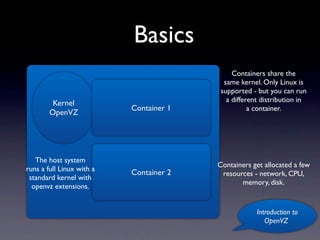
Basics
                                              Containers share the
                                           same kernel. Only Linux is
                                          supported - but you can run
         Kernel                             a different distribution in
                           Container 1              a container.
        OpenVZ


   The host system
                                         Containers get allocated a few
runs a full Linux with a
                           Container 2    resources - network, CPU,
 standard kernel with
                                                memory, disk.
  openvz extensions.


                                                      Introduction to
                                                         OpenVZ
The container is a full
        Linux system
• The container is a full Linux system
 • It has network interfaces (if configured)
 • It has a separate user account database (/etc/passwd)
 • It needs patching and updates like any other system

                                                Introduction to
                                                   OpenVZ
The Kernel
• The kernel is managed as an package for
  the distro you are using.

• For Centos, you add a new yum
  repository and install the kernel

• Reboot and you have OpenVZ support
• Now install the tools - vzsplit, vzctl and
  vzlist
                                       Introduction to
                                          OpenVZ
vzctl
• Used to manage containers
 • Create new container
 • Start container
 • Stop container
 • Change attributes (name, IP address, various limits,
    properties)
                                                  Introduction to
                                                     OpenVZ
vzlist
• Simply list containers running in a system
• Lists all container IDs


                                     Introduction to
                                        OpenVZ
vzsplit
• Used to get settings for vzctl (or the .conf
  files)

• Takes all resources in a server and divides
  them between a specific number of
  containers


                                       Introduction to
                                          OpenVZ
Beancounters
• Counters that document use
• Also document when a resource limit is
  exceeded

• cat /proc/user_beancounters
• Used to design system and manage issues
 • Watch the failcnt column!
                                    Introduction to
                                       OpenVZ
Networking
• Ethernet interface via nat or bridge
• The bridge interface enables DHCP and
  other broadcast /multicast technologies

• IPv4 and IPv6 support
• Firewall with IPtables in container or
  outside in host system (on the bridge)

• Network traffic can be managed       Introduction to
                                         OpenVZ
Script hooks
• There are hooks for scripts you can run
  when starting and stopping containers

• These can be used to mount disk drives
  into container


                                     Introduction to
                                        OpenVZ
Configuration
• Configuration file in /etc/vz/vz.conf
• Configuration for containers in /etc/vz/
  conf


                                    Introduction to
                                       OpenVZ
Advanced features
• Live migration of containers between
  systems

• Backup of running system
• Remote management with libvirt


                                    Introduction to
                                       OpenVZ
References
• www.openvz.org
 • Documentation
 • Wiki full with information, howto’s and documentation
 • Downloadable templates for containers - Centos,
    Debian, Ubuntu and other distributions


                                                 Introduction to
                                                    OpenVZ

Openvz - a quick introduction

  • 1.
    Introduction to OpenVZ oej@edvina.net Olle E. oej@edvina.net Johansson * oej@edvina.net * Twitter oej © Copyright Edvina AB, Sollentuna, Sweden 2012. All rights reserved.
  • 2.
    OpenVZ • Virtualization softwareby Parallells, inc. Base for their commercial Virtuozzo platform • Integrated with the virtualization support in the kernel - lvc • Segmentation, not full virtualization • Regardless, has cool features Introduction to OpenVZ
  • 3.
    Cool features • Migrationof running system • Backup with just a few secs stop time • Very simple - shared filesystem in the host system Introduction to OpenVZ
  • 4.
    Basics Containers share the same kernel. Only Linux is supported - but you can run Kernel a different distribution in Container 1 a container. OpenVZ The host system Containers get allocated a few runs a full Linux with a Container 2 resources - network, CPU, standard kernel with memory, disk. openvz extensions. Introduction to OpenVZ
  • 5.
    The container isa full Linux system • The container is a full Linux system • It has network interfaces (if configured) • It has a separate user account database (/etc/passwd) • It needs patching and updates like any other system Introduction to OpenVZ
  • 6.
    The Kernel • Thekernel is managed as an package for the distro you are using. • For Centos, you add a new yum repository and install the kernel • Reboot and you have OpenVZ support • Now install the tools - vzsplit, vzctl and vzlist Introduction to OpenVZ
  • 7.
    vzctl • Used tomanage containers • Create new container • Start container • Stop container • Change attributes (name, IP address, various limits, properties) Introduction to OpenVZ
  • 8.
    vzlist • Simply listcontainers running in a system • Lists all container IDs Introduction to OpenVZ
  • 9.
    vzsplit • Used toget settings for vzctl (or the .conf files) • Takes all resources in a server and divides them between a specific number of containers Introduction to OpenVZ
  • 10.
    Beancounters • Counters thatdocument use • Also document when a resource limit is exceeded • cat /proc/user_beancounters • Used to design system and manage issues • Watch the failcnt column! Introduction to OpenVZ
  • 11.
    Networking • Ethernet interfacevia nat or bridge • The bridge interface enables DHCP and other broadcast /multicast technologies • IPv4 and IPv6 support • Firewall with IPtables in container or outside in host system (on the bridge) • Network traffic can be managed Introduction to OpenVZ
  • 12.
    Script hooks • Thereare hooks for scripts you can run when starting and stopping containers • These can be used to mount disk drives into container Introduction to OpenVZ
  • 13.
    Configuration • Configuration filein /etc/vz/vz.conf • Configuration for containers in /etc/vz/ conf Introduction to OpenVZ
  • 14.
    Advanced features • Livemigration of containers between systems • Backup of running system • Remote management with libvirt Introduction to OpenVZ
  • 15.
    References • www.openvz.org •Documentation • Wiki full with information, howto’s and documentation • Downloadable templates for containers - Centos, Debian, Ubuntu and other distributions Introduction to OpenVZ