
Docker
From basics to orchestration
Credits
Special thanks to all the people who made and released
these awesome resources for free:
◎ Presentation template by SlidesCarnival
◎ Photographs by Unsplash & Death to the Stock Photo
(license)
◎ Dark wood background by The pattern library
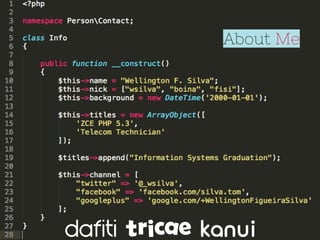
About Me
Overview
Overview
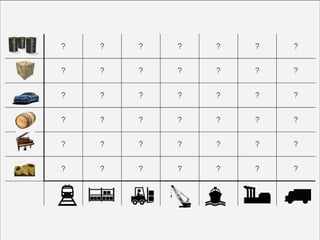
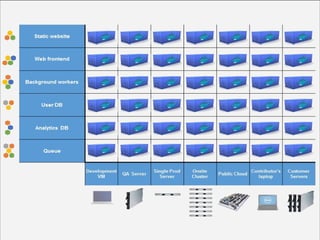
◎ Environment Issues
◎ Virtualization
◎ LXC
◎ Docker
○ features
○ demo
◎ Machine
◎ Orchestration
○ tools
○ demo
◎ Swarm
○ demo
◎ Q&A
Environment Issues
Environment Issues
◎ substr vs mb_substr functions
Environment Issues
◎ substr vs mb_substr functions
◎ short open tags: <?=
Environment Issues
◎ substr vs mb_substr functions
◎ short open tags: <?=
◎ syntax changes between versions: array(); e [];
Environment Issues
◎ substr vs mb_substr functions
◎ short open tags: <?=
◎ syntax changes between versions: array(); e [];
◎ extensions that we forget to install in
production: php-memcached, redis, amqp,
etc.
Environment Issues
◎ substr vs mb_substr functions
◎ short open tags: <?=
◎ syntax changes between versions: array(); e [];
◎ extensions that we forget to install in
production: php-memcached, redis, amqp,
etc.
◎ different upload file settings in different
servers
Virtualization
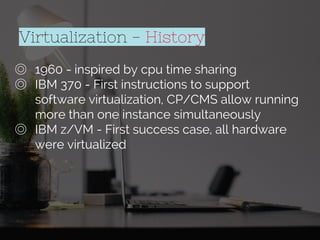
◎ 1960 - inspired by cpu time sharing
Virtualization - History
◎ 1960 - inspired by cpu time sharing
◎ IBM 370 - First instructions to support
software virtualization, CP/CMS allow running
more than one instance simultaneously
Virtualization - History
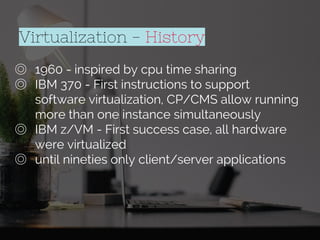
◎ 1960 - inspired by cpu time sharing
◎ IBM 370 - First instructions to support
software virtualization, CP/CMS allow running
more than one instance simultaneously
◎ IBM z/VM - First success case, all hardware
were virtualized
Virtualization - History
◎ 1960 - inspired by cpu time sharing
◎ IBM 370 - First instructions to support
software virtualization, CP/CMS allow running
more than one instance simultaneously
◎ IBM z/VM - First success case, all hardware
were virtualized
◎ until nineties only client/server applications
Virtualization - History
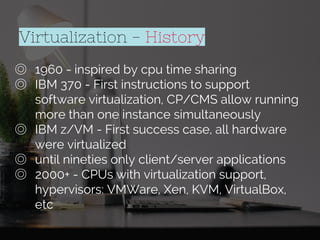
◎ 1960 - inspired by cpu time sharing
◎ IBM 370 - First instructions to support
software virtualization, CP/CMS allow running
more than one instance simultaneously
◎ IBM z/VM - First success case, all hardware
were virtualized
◎ until nineties only client/server applications
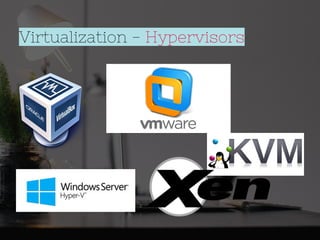
◎ 2000+ - CPUs with virtualization support,
hypervisors: VMWare, Xen, KVM, VirtualBox,
etc
Virtualization - History
Virtualization - Hypervisors
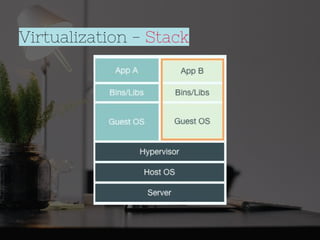
Virtualization - Stack
◎ Standard
environment
Virtualization - Pros & Cons
◎ Standard
environment
◎ Improve resources
utilization
Virtualization - Pros & Cons
◎ Standard
environment
◎ Improve resources
utilization
◎ Easy data recovery
Virtualization - Pros & Cons
◎ Standard
environment
◎ Improve resources
utilization
◎ Easy data recovery
◎ If host fails all VMs
crashes together
Virtualization - Pros & Cons
◎ Standard
environment
◎ Improve resources
utilization
◎ Easy data recovery
Virtualization - Pros & Cons
◎ If host fails all VMs
crashes together
◎ Troubleshooting
more difficult
◎ Standard
environment
◎ Improve resources
utilization
◎ Easy data recovery
Virtualization - Pros & Cons
◎ If host fails all VMs
crashes together
◎ Troubleshooting
more difficult
◎ Increase overhead
LXC - Linux Containers
◎ Exists since Jul/2008 - Kernel 2.6.26+
LXC - Linux Containers
◎ Exists since Jul/2008 - Kernel 2.6.26+
◎ Process isolation
LXC - Linux Containers
◎ Exists since Jul/2008 - Kernel 2.6.26+
◎ Process isolation
◎ Network isolation
LXC - Linux Containers
◎ Exists since Jul/2008 - Kernel 2.6.26+
◎ Process isolation
◎ Network isolation
◎ Memory limitation
LXC - Linux Containers
◎ Exists since Jul/2008 - Kernel 2.6.26+
◎ Process isolation
◎ Network isolation
◎ Memory limitation
◎ File system isolation
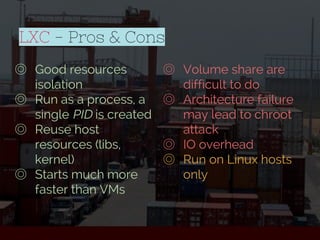
LXC - Pros & Cons
◎ Good resources
isolation
LXC - Pros & Cons
◎ Good resources
isolation
◎ Run as a process, a
single PID is created
LXC - Pros & Cons
◎ Good resources
isolation
◎ Run as a process, a
single PID is created
◎ Reuse host
resources (libs,
kernel)
LXC - Pros & Cons
◎ Good resources
isolation
◎ Run as a process, a
single PID is created
◎ Reuse host
resources (libs,
kernel)
◎ Starts much more
faster than VMs
LXC - Pros & Cons
◎ Volume share are
difficult to do
◎ Good resources
isolation
◎ Run as a process, a
single PID is created
◎ Reuse host
resources (libs,
kernel)
◎ Starts much more
faster than VMs
LXC - Pros & Cons
◎ Volume share are
difficult to do
◎ Architecture failure
may lead to chroot
attack
◎ Good resources
isolation
◎ Run as a process, a
single PID is created
◎ Reuse host
resources (libs,
kernel)
◎ Starts much more
faster than VMs
LXC - Pros & Cons
◎ Volume share are
difficult to do
◎ Architecture failure
may lead to chroot
attack
◎ IO overhead
◎ Good resources
isolation
◎ Run as a process, a
single PID is created
◎ Reuse host
resources (libs,
kernel)
◎ Starts much more
faster than VMs
LXC - Pros & Cons
◎ Volume share are
difficult to do
◎ Architecture failure
may lead to chroot
attack
◎ IO overhead
◎ Run on Linux hosts
only
◎ Good resources
isolation
◎ Run as a process, a
single PID is created
◎ Reuse host
resources (libs,
kernel)
◎ Starts much more
faster than VMs
DOCKER
Docker
Docker
Doki =>
◎ Portable
Docker - Features
◎ Portable
◎ Versionable
Docker - Features
◎ Portable
◎ Versionable
◎ Reusable
Docker - Features
◎ Portable
◎ Versionable
◎ Reusable
◎ Copy-on-write
Docker - Features
◎ Portable
◎ Versionable
◎ Reusable
◎ Copy-on-write
◎ Logging
Docker - Features
◎ Portable
◎ Versionable
◎ Reusable
◎ Copy-on-write
◎ Logging
◎ Image change management
Docker - Features
◎ Portable
◎ Versionable
◎ Reusable
◎ Copy-on-write
◎ Logging
◎ Image change management
◎ Automatic build
Docker - Features
◎ Portable
◎ Versionable
◎ Reusable
◎ Copy-on-write
◎ Logging
◎ Image change management
◎ Automatic build
◎ Easy to share
Docker - Features
Docker - Features
◎ Private and public registry
Docker - Features
◎ Private and public registry
◎ Server-client architecture
Docker - Features
◎ Private and public registry
◎ Server-client architecture
◎ Client consume engine API
Docker - Features
◎ Private and public registry
◎ Server-client architecture
◎ Client consume engine API
◎ Orchestration tools (compose, swarm,volume
networks)
Docker - Features
◎ Private and public registry
◎ Server-client architecture
◎ Client consume engine API
◎ Orchestration tools (compose, swarm,volume
networks)
◎ Always innovating
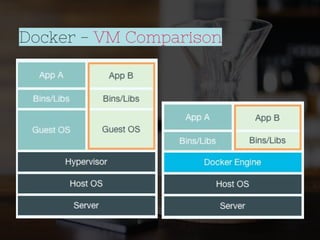
Docker - VM Comparison
Docker - Quick Tips
◎ It is a container not a VM
Docker - Quick Tips
◎ It is a container not a VM
◎ Container images are like VM boxes
Docker - Quick Tips
◎ It is a container not a VM
◎ Container images are like VM boxes
◎ Images are state, container runs it
Docker - Install
◎ Follow instructions for your OS in http://docs.
docker.com/installation
Docker - Install
◎ Follow instructions for your OS in http://docs.
docker.com/installation
◎ Several distros supported
Docker - Install
◎ Follow instructions for your OS in http://docs.
docker.com/installation
◎ Several distros supported
◎ Mac OS X and Windows needs a VM to act
like a Docker host - Boot2docker
Docker - Install
◎ Follow instructions for your OS in http://docs.
docker.com/installation
◎ Several distros supported
◎ Mac OS X and Windows needs a VM to act
like a Docker host - Boot2docker
◎ There is roadmap to run Linux container on
FreeBSD host
Docker - Install
◎ Follow instructions for your OS in http://docs.
docker.com/installation
◎ Several distros supported
◎ Mac OS X and Windows needs a VM to act
like a Docker host - Boot2docker
◎ There is roadmap to run Linux container on
FreeBSD host
◎ Windows containers running on Windows
hosts will be available on Windows Server
2016
Docker - Beggining
◎ run
◎ pull
◎ commit
◎ push
◎ exec
◎ ps
◎ images
◎ inspect
◎ rm
◎ rmi
“
Talk is cheap, show me the code.
Linus Torvalds
“
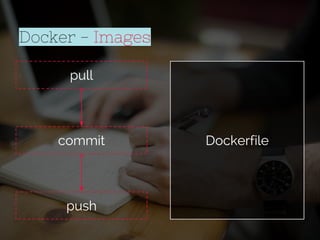
pull
commit
push
Docker - Images
Dockerfile
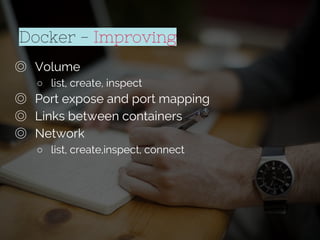
Docker - Improving
◎ Volume
○ list, create, inspect
◎ Port expose and port mapping
◎ Links between containers
◎ Network
○ list, create,inspect, connect
Second Demo
Docker - Machine
◎ Creates virtual machines ready to run
docker locally or on the cloud.
◎ drivers available:
○ Amazon Web Services, Microsoft Azure, Digital
Ocean, Exoscale, Google Compute Engine,
Microsoft Hyper-V, OpenStack, Rackspace, IBM
Softlayer, Oracle VirtualBox, VMware vCloud Air,
VMware Fusion, VMware vSphere and Generic
Docker - Orchestration
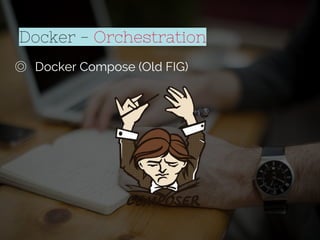
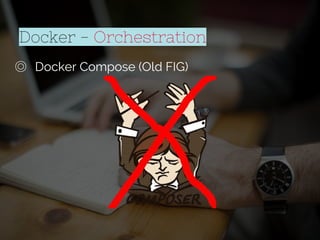
◎ Docker Compose (Old FIG)
Docker - Orchestration
◎ Docker Compose (Old FIG)
Docker - Orchestration
◎ Docker Compose (Old FIG)
Docker - Orchestration
◎ Docker Compose (Old FIG)
○ Config file: docker-compose.yml
○ Run: docker-compose up
Docker - Orchestration
◎ Docker Compose (Old FIG)
○ Config file: docker-compose.yml
○ Run: docker-compose up
◎ Crane - http://getcrane.com
○ Config file: crane.json or crane.yaml
○ Run: crane lift
Docker - Orchestration
◎ Docker Compose (Old FIG)
○ Config file: docker-compose.yml
○ Run: docker-compose up
◎ Crane - http://getcrane.com
○ Config file: crane.json or crane.yaml
○ Run: crane lift
◎ AZK - http://www.azk.io
○ Config file: Azkfile.js
○ Run: `azk agent start` and then `azk start`
Third Demo
Docker - Orchestration
◎ Docker Swarm
○ Orchestrate docker hosts
○ supports schedulers and node discovery services
Last Demo
Docker - Comming
◎ User namespaces
◎ Open Containers Initiative - by Linux Foundation:
https://www.opencontainers.org/
Voucher: php_conf2015
Q&A Slides
http://bit.ly/phpconfbr2015

Docker from basics to orchestration (PHPConfBr2015)

  • 1.
    Docker From basics toorchestration
  • 2.
    Credits Special thanks toall the people who made and released these awesome resources for free: ◎ Presentation template by SlidesCarnival ◎ Photographs by Unsplash & Death to the Stock Photo (license) ◎ Dark wood background by The pattern library
  • 3.
  • 4.
  • 5.
    Overview ◎ Environment Issues ◎Virtualization ◎ LXC ◎ Docker ○ features ○ demo ◎ Machine ◎ Orchestration ○ tools ○ demo ◎ Swarm ○ demo ◎ Q&A
  • 6.
  • 7.
    Environment Issues ◎ substrvs mb_substr functions
  • 8.
    Environment Issues ◎ substrvs mb_substr functions ◎ short open tags: <?=
  • 9.
    Environment Issues ◎ substrvs mb_substr functions ◎ short open tags: <?= ◎ syntax changes between versions: array(); e [];
  • 10.
    Environment Issues ◎ substrvs mb_substr functions ◎ short open tags: <?= ◎ syntax changes between versions: array(); e []; ◎ extensions that we forget to install in production: php-memcached, redis, amqp, etc.
  • 11.
    Environment Issues ◎ substrvs mb_substr functions ◎ short open tags: <?= ◎ syntax changes between versions: array(); e []; ◎ extensions that we forget to install in production: php-memcached, redis, amqp, etc. ◎ different upload file settings in different servers
  • 14.
  • 15.
    ◎ 1960 -inspired by cpu time sharing Virtualization - History
  • 16.
    ◎ 1960 -inspired by cpu time sharing ◎ IBM 370 - First instructions to support software virtualization, CP/CMS allow running more than one instance simultaneously Virtualization - History
  • 17.
    ◎ 1960 -inspired by cpu time sharing ◎ IBM 370 - First instructions to support software virtualization, CP/CMS allow running more than one instance simultaneously ◎ IBM z/VM - First success case, all hardware were virtualized Virtualization - History
  • 18.
    ◎ 1960 -inspired by cpu time sharing ◎ IBM 370 - First instructions to support software virtualization, CP/CMS allow running more than one instance simultaneously ◎ IBM z/VM - First success case, all hardware were virtualized ◎ until nineties only client/server applications Virtualization - History
  • 19.
    ◎ 1960 -inspired by cpu time sharing ◎ IBM 370 - First instructions to support software virtualization, CP/CMS allow running more than one instance simultaneously ◎ IBM z/VM - First success case, all hardware were virtualized ◎ until nineties only client/server applications ◎ 2000+ - CPUs with virtualization support, hypervisors: VMWare, Xen, KVM, VirtualBox, etc Virtualization - History
  • 20.
  • 21.
  • 22.
  • 23.
    ◎ Standard environment ◎ Improveresources utilization Virtualization - Pros & Cons
  • 24.
    ◎ Standard environment ◎ Improveresources utilization ◎ Easy data recovery Virtualization - Pros & Cons
  • 25.
    ◎ Standard environment ◎ Improveresources utilization ◎ Easy data recovery ◎ If host fails all VMs crashes together Virtualization - Pros & Cons
  • 26.
    ◎ Standard environment ◎ Improveresources utilization ◎ Easy data recovery Virtualization - Pros & Cons ◎ If host fails all VMs crashes together ◎ Troubleshooting more difficult
  • 27.
    ◎ Standard environment ◎ Improveresources utilization ◎ Easy data recovery Virtualization - Pros & Cons ◎ If host fails all VMs crashes together ◎ Troubleshooting more difficult ◎ Increase overhead
  • 28.
    LXC - LinuxContainers
  • 29.
    LXC - LinuxContainers ◎ Exists since Jul/2008 - Kernel 2.6.26+
  • 30.
    LXC - LinuxContainers ◎ Exists since Jul/2008 - Kernel 2.6.26+ ◎ Process isolation
  • 31.
    LXC - LinuxContainers ◎ Exists since Jul/2008 - Kernel 2.6.26+ ◎ Process isolation ◎ Network isolation
  • 32.
    LXC - LinuxContainers ◎ Exists since Jul/2008 - Kernel 2.6.26+ ◎ Process isolation ◎ Network isolation ◎ Memory limitation
  • 33.
    LXC - LinuxContainers ◎ Exists since Jul/2008 - Kernel 2.6.26+ ◎ Process isolation ◎ Network isolation ◎ Memory limitation ◎ File system isolation
  • 34.
    LXC - Pros& Cons ◎ Good resources isolation
  • 35.
    LXC - Pros& Cons ◎ Good resources isolation ◎ Run as a process, a single PID is created
  • 36.
    LXC - Pros& Cons ◎ Good resources isolation ◎ Run as a process, a single PID is created ◎ Reuse host resources (libs, kernel)
  • 37.
    LXC - Pros& Cons ◎ Good resources isolation ◎ Run as a process, a single PID is created ◎ Reuse host resources (libs, kernel) ◎ Starts much more faster than VMs
  • 38.
    LXC - Pros& Cons ◎ Volume share are difficult to do ◎ Good resources isolation ◎ Run as a process, a single PID is created ◎ Reuse host resources (libs, kernel) ◎ Starts much more faster than VMs
  • 39.
    LXC - Pros& Cons ◎ Volume share are difficult to do ◎ Architecture failure may lead to chroot attack ◎ Good resources isolation ◎ Run as a process, a single PID is created ◎ Reuse host resources (libs, kernel) ◎ Starts much more faster than VMs
  • 40.
    LXC - Pros& Cons ◎ Volume share are difficult to do ◎ Architecture failure may lead to chroot attack ◎ IO overhead ◎ Good resources isolation ◎ Run as a process, a single PID is created ◎ Reuse host resources (libs, kernel) ◎ Starts much more faster than VMs
  • 41.
    LXC - Pros& Cons ◎ Volume share are difficult to do ◎ Architecture failure may lead to chroot attack ◎ IO overhead ◎ Run on Linux hosts only ◎ Good resources isolation ◎ Run as a process, a single PID is created ◎ Reuse host resources (libs, kernel) ◎ Starts much more faster than VMs
  • 42.
  • 43.
  • 44.
  • 48.
  • 49.
  • 50.
    ◎ Portable ◎ Versionable ◎Reusable Docker - Features
  • 51.
    ◎ Portable ◎ Versionable ◎Reusable ◎ Copy-on-write Docker - Features
  • 52.
    ◎ Portable ◎ Versionable ◎Reusable ◎ Copy-on-write ◎ Logging Docker - Features
  • 53.
    ◎ Portable ◎ Versionable ◎Reusable ◎ Copy-on-write ◎ Logging ◎ Image change management Docker - Features
  • 54.
    ◎ Portable ◎ Versionable ◎Reusable ◎ Copy-on-write ◎ Logging ◎ Image change management ◎ Automatic build Docker - Features
  • 55.
    ◎ Portable ◎ Versionable ◎Reusable ◎ Copy-on-write ◎ Logging ◎ Image change management ◎ Automatic build ◎ Easy to share Docker - Features
  • 56.
    Docker - Features ◎Private and public registry
  • 57.
    Docker - Features ◎Private and public registry ◎ Server-client architecture
  • 58.
    Docker - Features ◎Private and public registry ◎ Server-client architecture ◎ Client consume engine API
  • 59.
    Docker - Features ◎Private and public registry ◎ Server-client architecture ◎ Client consume engine API ◎ Orchestration tools (compose, swarm,volume networks)
  • 60.
    Docker - Features ◎Private and public registry ◎ Server-client architecture ◎ Client consume engine API ◎ Orchestration tools (compose, swarm,volume networks) ◎ Always innovating
  • 61.
    Docker - VMComparison
  • 62.
    Docker - QuickTips ◎ It is a container not a VM
  • 63.
    Docker - QuickTips ◎ It is a container not a VM ◎ Container images are like VM boxes
  • 64.
    Docker - QuickTips ◎ It is a container not a VM ◎ Container images are like VM boxes ◎ Images are state, container runs it
  • 65.
    Docker - Install ◎Follow instructions for your OS in http://docs. docker.com/installation
  • 66.
    Docker - Install ◎Follow instructions for your OS in http://docs. docker.com/installation ◎ Several distros supported
  • 67.
    Docker - Install ◎Follow instructions for your OS in http://docs. docker.com/installation ◎ Several distros supported ◎ Mac OS X and Windows needs a VM to act like a Docker host - Boot2docker
  • 68.
    Docker - Install ◎Follow instructions for your OS in http://docs. docker.com/installation ◎ Several distros supported ◎ Mac OS X and Windows needs a VM to act like a Docker host - Boot2docker ◎ There is roadmap to run Linux container on FreeBSD host
  • 69.
    Docker - Install ◎Follow instructions for your OS in http://docs. docker.com/installation ◎ Several distros supported ◎ Mac OS X and Windows needs a VM to act like a Docker host - Boot2docker ◎ There is roadmap to run Linux container on FreeBSD host ◎ Windows containers running on Windows hosts will be available on Windows Server 2016
  • 70.
    Docker - Beggining ◎run ◎ pull ◎ commit ◎ push ◎ exec ◎ ps ◎ images ◎ inspect ◎ rm ◎ rmi
  • 71.
    “ Talk is cheap,show me the code. Linus Torvalds “
  • 72.
  • 73.
    Docker - Improving ◎Volume ○ list, create, inspect ◎ Port expose and port mapping ◎ Links between containers ◎ Network ○ list, create,inspect, connect
  • 74.
  • 75.
    Docker - Machine ◎Creates virtual machines ready to run docker locally or on the cloud. ◎ drivers available: ○ Amazon Web Services, Microsoft Azure, Digital Ocean, Exoscale, Google Compute Engine, Microsoft Hyper-V, OpenStack, Rackspace, IBM Softlayer, Oracle VirtualBox, VMware vCloud Air, VMware Fusion, VMware vSphere and Generic
  • 76.
    Docker - Orchestration ◎Docker Compose (Old FIG)
  • 77.
    Docker - Orchestration ◎Docker Compose (Old FIG)
  • 78.
    Docker - Orchestration ◎Docker Compose (Old FIG)
  • 79.
    Docker - Orchestration ◎Docker Compose (Old FIG) ○ Config file: docker-compose.yml ○ Run: docker-compose up
  • 80.
    Docker - Orchestration ◎Docker Compose (Old FIG) ○ Config file: docker-compose.yml ○ Run: docker-compose up ◎ Crane - http://getcrane.com ○ Config file: crane.json or crane.yaml ○ Run: crane lift
  • 81.
    Docker - Orchestration ◎Docker Compose (Old FIG) ○ Config file: docker-compose.yml ○ Run: docker-compose up ◎ Crane - http://getcrane.com ○ Config file: crane.json or crane.yaml ○ Run: crane lift ◎ AZK - http://www.azk.io ○ Config file: Azkfile.js ○ Run: `azk agent start` and then `azk start`
  • 82.
  • 83.
    Docker - Orchestration ◎Docker Swarm ○ Orchestrate docker hosts ○ supports schedulers and node discovery services
  • 84.
  • 85.
    Docker - Comming ◎User namespaces ◎ Open Containers Initiative - by Linux Foundation: https://www.opencontainers.org/
  • 86.