Online Counselling System
(MANUU)
Presented By Under Guidance of
Mohammad Imran-L1407010455 Dr. Muqeem Ahmed
Mohd Ashraf-1407010435 Assistant Professor
Shibly Subhani-L1407010459 School of CS & IT
Outlines
 Introduction
 Existing System
 Proposed System
 Objectives
 Modules
 Hardware & Software requirements
 Requirement Gathering & Analysis
 Functional requirements
 Non-functional requirements
 Design
 Data Flow Diagram
 Use case Diagram
 Class diagram
 ER Diagram
 Homepage Snap
Online Counselling System
 Online Counselling System is aimed at developing an online admission counselling application
for a university.
 This system is an online system that can be accessed throughout the university and outside as
well with proper login provided.
 Actors
 Central Admission Counselor
 Department Admission Counselor
 Student
 Admin
Existing System
 Today all the work at the time of admission of the students is done manually by ink and paper,
which is very slow and consuming much efforts and time.
 It is required to design of a Computerized Automated Student Admission System, to speed up
and make it easy to use system and also student can take admission by seating at home.
Existing System
Qualify the entrance
examination conducted by
the university
Go to the called
counselling center
Report and take
counselling forms and fill it
out, finally submit to
counsellor
Counsellor verifies the
documents required to
complete the admission
process
Challans is issued by
counsellor
Submit the required fees
Submit the Challans to
counsellor and take the
Admission Letter
Proposed System
 The main goal of the system is to automate the process carried out in the university with
improved performance and realize the vision of paperless admission.
 Manage large number of student details for counselling.
 Allot courses and centers according to their rank and other criteria.
 View all the details of the students during counselling.
 Reduce the work load in interview the students for selection
 Activities like updating, modification, deletion of records should be easier.
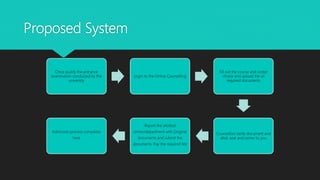
Proposed System
Once qualify the entrance
examination conducted by the
university
Login to the Online Counselling
Fill out the course and center
choice and upload the all
required documents
Counsellors verify document and
allot, seat and center to you
Report the allotted
center/department with Original
documents and submit the
documents. Pay the required fee
Admission process completes
here
Objectives
 Communicate with all the students scattered geographically.
 Reducing time in activities
 Reduce the time taken process of admitting, verify student documents, and send call letters to
selected students.
 Centralized data handling.
 Transfer the data smoothly to all the departments involved and handle the data centralized way.
 Paperless admission with reduced manpower.
 Reduce the manpower.
 Cost cutting.
Modules
 Student
 can login and fill their choices about the courses
 Departmental Admission Counsellor
 Create course and maintain fee details
 Confirm Admission and Generate Admission Letter
 Central Admission Counsellor
 Allot the seats and centers to the students
 Manage and track all the activities of admission counselling
 Admin
 Manages all the data
 Managing users
Hardware & Software Requirements
 Hardware
 Processor: 1GHz
 RAM: 2GB
 HDD: 40GB
 Software
 Windows and all latest
 NetBeans IDE 8.2
 Oracle Database
 Tomcat Server 8.0
 JDK 8.0
 Languages
 HTML
 CSS
 JavaScript
 Java
 SQL
Requirement Gathering & Analysis
 Method Used
 Brainstorming
 Requirement gathered
 Functional requirements
 Non-functional requirements
Functional requirements
 A student can login to the system, choose the center and branch preferences, upload the
documents required, check the status and pay the fee of course.
 A departmental admission counsellor can login to the system, create the courses, update the
courses, delete the courses, feed the fee details, update the fee details, confirm admission and
generate the admission letter.
 A central admission counsellor can login to the system, verify the documents, allot the seat and
center to the students, enable the payment, generate the enrollment no and generate the report.
 An admin can login to the system, create the user, update the users, delete the users, open the
admission and close the admission.
Non-functional requirements
 User can’t take counsel for two or more courses.
 User can’t pay fee before CAC approval.
 Once choice is locked, can’t be changed.
 Only qualified user can login to the system to counsel themselves.
Design
 Data Flow Diagram
 Use Case Diagram
 Class Diagram
 Entity-Relationship Diagram
Data Flow Diagram
 A data flow diagram (DFD) maps out the flow of
information for any process or system. It uses
defined symbols like rectangles, circles and
arrows, plus short text labels, to show data
inputs, outputs, storage points and the routes
between each destination.
 Components
 External Entity
 Process
 Data Store
 Data flow
0 Level DFD
Level 1 DFD
Use Case Diagram
Class Diagram
 A class is a description of a set of objects that share the same attributes, operations, relationships,
and semantics. A class implements one or more interfaces. Graphically, a class is rendered as a
rectangle, usually including its name, attributes, and operations.
Class Diagram
Entity-Relationship Diagram
 An entity relationship diagram is a graphical tool to express the overall structure of the database.
 An entity is a person, place , thing or event of interest to the organization.
 An association of several entities in an entity relationship diagram is called relationship.
ER Diagram
Homepage of OCS
Thank You

Online Counselling System-MANUU

  • 1.
    Online Counselling System (MANUU) PresentedBy Under Guidance of Mohammad Imran-L1407010455 Dr. Muqeem Ahmed Mohd Ashraf-1407010435 Assistant Professor Shibly Subhani-L1407010459 School of CS & IT
  • 2.
    Outlines  Introduction  ExistingSystem  Proposed System  Objectives  Modules  Hardware & Software requirements  Requirement Gathering & Analysis  Functional requirements  Non-functional requirements  Design  Data Flow Diagram  Use case Diagram  Class diagram  ER Diagram  Homepage Snap
  • 3.
    Online Counselling System Online Counselling System is aimed at developing an online admission counselling application for a university.  This system is an online system that can be accessed throughout the university and outside as well with proper login provided.  Actors  Central Admission Counselor  Department Admission Counselor  Student  Admin
  • 4.
    Existing System  Todayall the work at the time of admission of the students is done manually by ink and paper, which is very slow and consuming much efforts and time.  It is required to design of a Computerized Automated Student Admission System, to speed up and make it easy to use system and also student can take admission by seating at home.
  • 5.
    Existing System Qualify theentrance examination conducted by the university Go to the called counselling center Report and take counselling forms and fill it out, finally submit to counsellor Counsellor verifies the documents required to complete the admission process Challans is issued by counsellor Submit the required fees Submit the Challans to counsellor and take the Admission Letter
  • 6.
    Proposed System  Themain goal of the system is to automate the process carried out in the university with improved performance and realize the vision of paperless admission.  Manage large number of student details for counselling.  Allot courses and centers according to their rank and other criteria.  View all the details of the students during counselling.  Reduce the work load in interview the students for selection  Activities like updating, modification, deletion of records should be easier.
  • 7.
    Proposed System Once qualifythe entrance examination conducted by the university Login to the Online Counselling Fill out the course and center choice and upload the all required documents Counsellors verify document and allot, seat and center to you Report the allotted center/department with Original documents and submit the documents. Pay the required fee Admission process completes here
  • 8.
    Objectives  Communicate withall the students scattered geographically.  Reducing time in activities  Reduce the time taken process of admitting, verify student documents, and send call letters to selected students.  Centralized data handling.  Transfer the data smoothly to all the departments involved and handle the data centralized way.  Paperless admission with reduced manpower.  Reduce the manpower.  Cost cutting.
  • 9.
    Modules  Student  canlogin and fill their choices about the courses  Departmental Admission Counsellor  Create course and maintain fee details  Confirm Admission and Generate Admission Letter  Central Admission Counsellor  Allot the seats and centers to the students  Manage and track all the activities of admission counselling  Admin  Manages all the data  Managing users
  • 10.
    Hardware & SoftwareRequirements  Hardware  Processor: 1GHz  RAM: 2GB  HDD: 40GB  Software  Windows and all latest  NetBeans IDE 8.2  Oracle Database  Tomcat Server 8.0  JDK 8.0  Languages  HTML  CSS  JavaScript  Java  SQL
  • 11.
    Requirement Gathering &Analysis  Method Used  Brainstorming  Requirement gathered  Functional requirements  Non-functional requirements
  • 12.
    Functional requirements  Astudent can login to the system, choose the center and branch preferences, upload the documents required, check the status and pay the fee of course.  A departmental admission counsellor can login to the system, create the courses, update the courses, delete the courses, feed the fee details, update the fee details, confirm admission and generate the admission letter.  A central admission counsellor can login to the system, verify the documents, allot the seat and center to the students, enable the payment, generate the enrollment no and generate the report.  An admin can login to the system, create the user, update the users, delete the users, open the admission and close the admission.
  • 13.
    Non-functional requirements  Usercan’t take counsel for two or more courses.  User can’t pay fee before CAC approval.  Once choice is locked, can’t be changed.  Only qualified user can login to the system to counsel themselves.
  • 14.
    Design  Data FlowDiagram  Use Case Diagram  Class Diagram  Entity-Relationship Diagram
  • 15.
    Data Flow Diagram A data flow diagram (DFD) maps out the flow of information for any process or system. It uses defined symbols like rectangles, circles and arrows, plus short text labels, to show data inputs, outputs, storage points and the routes between each destination.  Components  External Entity  Process  Data Store  Data flow
  • 16.
  • 17.
  • 18.
  • 19.
    Class Diagram  Aclass is a description of a set of objects that share the same attributes, operations, relationships, and semantics. A class implements one or more interfaces. Graphically, a class is rendered as a rectangle, usually including its name, attributes, and operations.
  • 20.
  • 21.
    Entity-Relationship Diagram  Anentity relationship diagram is a graphical tool to express the overall structure of the database.  An entity is a person, place , thing or event of interest to the organization.  An association of several entities in an entity relationship diagram is called relationship.
  • 22.
  • 23.
  • 24.