Communication Tools Prof.S.G.Isave, Tilak College of Education, Pune-India
Be Aware ! Nothing 100% secure on internet. Read all messages shown on a screen. Look care the structure and all the elements of a present window. Don’t trust without varification.
Key words Log on – just for viewing a material e.g. web site Log in – to open an existing a/c which is used to social  networking  or  sharing  sites like blog, community, publishing / uploading material, gaming, downloading etc. (web 2.0) Sign in – to enter in existing  personal  a/c i.e. e-mail, bank a/c, internet a/c etc. Sign up – creating a/c on any site.
e-mail Electronic mail through computer network. Essential for using other facilities i.e. blog, chat, social networking, uploading etc. Id card of nettizenship. Useful for formal and informal communication.  It is like sms service of mobile.
e-mail An e-mail can be sent to more than one receiver .i.e. to, c.c., b.c.c. Any type of file can be attached like doc, ppt, pdf, xls, photo etc. File size limit is depends on host site. Generally it is 25 MB. Inbox limit also varies from host to host. Generally it is more than 500MB.
e-mail E-mail  can reach within seconds also. If not delivered after many attempts feedback provided by host to sender. Future mail can be sent. e-mail Ids along with name mob. And other details, can be saved in contacts; like mobile phone. Outbox, draft, delete, calendar, planners, connecting links to some site; e.g. Google, Face book, Orkut, invite a friend for chat.
e-mail Authentication – username and password. username@host website e.g.  [email_address] ,  [email_address] Don’t save username and password on machine or anywhere. Avoid password that can be identified. If possible, don’t use on shared computers. Read mail carefully and take proper action. Be aware from fake mail e.g. Nigerian fraud, virus, hackers, fishers etc.
Chat
Chat  Communication through visuals. Text, numbers, smilies, symbols can be used. Dialogue box where message to be written is called chat room. Chatting requires chatting software like Google talk, Yahoo messenger, msn messenger, Skype etc. Some web sites provide chat room e.g. social networking, Professional sites for chat  expert-customers chat.
Chat a/c on a site is essential. Most of time chat is provided by e-mail host itself. It is a real time activity. Sender and receivers should online on same time. One to one and one to many is possible. Simply it is talking by typing. Useful to share views, informal conversation.
Chat  Short language is used e.g. – bcz, thanx, 2de, d, s, u, r. It is a short time talk. Minimum time, minimum words and maximum communication.  Can have chat with never seen person.
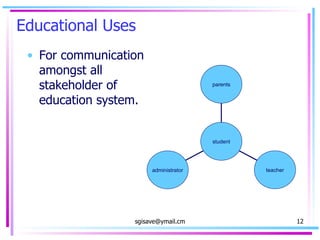
Educational Uses For communication amongst all stakeholder of education system. administrator teacher parents student
Thank you for giving your time!

on-line Communication tools

  • 1.
    Communication Tools Prof.S.G.Isave,Tilak College of Education, Pune-India
  • 2.
    Be Aware !Nothing 100% secure on internet. Read all messages shown on a screen. Look care the structure and all the elements of a present window. Don’t trust without varification.
  • 3.
    Key words Logon – just for viewing a material e.g. web site Log in – to open an existing a/c which is used to social networking or sharing sites like blog, community, publishing / uploading material, gaming, downloading etc. (web 2.0) Sign in – to enter in existing personal a/c i.e. e-mail, bank a/c, internet a/c etc. Sign up – creating a/c on any site.
  • 4.
    e-mail Electronic mailthrough computer network. Essential for using other facilities i.e. blog, chat, social networking, uploading etc. Id card of nettizenship. Useful for formal and informal communication. It is like sms service of mobile.
  • 5.
    e-mail An e-mailcan be sent to more than one receiver .i.e. to, c.c., b.c.c. Any type of file can be attached like doc, ppt, pdf, xls, photo etc. File size limit is depends on host site. Generally it is 25 MB. Inbox limit also varies from host to host. Generally it is more than 500MB.
  • 6.
    e-mail E-mail can reach within seconds also. If not delivered after many attempts feedback provided by host to sender. Future mail can be sent. e-mail Ids along with name mob. And other details, can be saved in contacts; like mobile phone. Outbox, draft, delete, calendar, planners, connecting links to some site; e.g. Google, Face book, Orkut, invite a friend for chat.
  • 7.
    e-mail Authentication –username and password. username@host website e.g. [email_address] , [email_address] Don’t save username and password on machine or anywhere. Avoid password that can be identified. If possible, don’t use on shared computers. Read mail carefully and take proper action. Be aware from fake mail e.g. Nigerian fraud, virus, hackers, fishers etc.
  • 8.
  • 9.
    Chat Communicationthrough visuals. Text, numbers, smilies, symbols can be used. Dialogue box where message to be written is called chat room. Chatting requires chatting software like Google talk, Yahoo messenger, msn messenger, Skype etc. Some web sites provide chat room e.g. social networking, Professional sites for chat expert-customers chat.
  • 10.
    Chat a/c ona site is essential. Most of time chat is provided by e-mail host itself. It is a real time activity. Sender and receivers should online on same time. One to one and one to many is possible. Simply it is talking by typing. Useful to share views, informal conversation.
  • 11.
    Chat Shortlanguage is used e.g. – bcz, thanx, 2de, d, s, u, r. It is a short time talk. Minimum time, minimum words and maximum communication. Can have chat with never seen person.
  • 12.
    Educational Uses Forcommunication amongst all stakeholder of education system. administrator teacher parents student
  • 13.
    Thank you forgiving your time!