Cyber Security Tips
in Banking
RESHAM ACHARYA
HEAD IT
Importance of Cyber Security
 Cyber Security becomes the most challenging issue in banking and
financial sectors.
 Cyber Security is considered as the one the major Risk factor in banking
sector like , Operational Risk, Market Risk & Credit Risk
 Because of :
 Rapid Digitalization on Digital Banking
 Any where and Any time banking
 Raise of Various mode of Payments
 Open Banking Concept is raising
 Office works are converting from manual to digitalization/automation process
Fundamental terms
 Malware:Malware is short for "malicious software," also known as malicious code or
"malcode." It is code or software that is specifically designed to damage, disrupt, steal,
or in general inflict some other "bad" or illegitimate action on data, hosts, or networks.
 Phishing: A type of online identity theft. It uses email and fraudulent websites that are
designed to steal your personal data or information such as credit card numbers,
passwords, account data, or other information
 BOT: is an automated process that interacts with other network services. Bots often
automate tasks and provide information or services that would otherwise be conducted
by a human being.
 Scam:
 Spyware & Adware:
 Ransomware:Ransomware is a type of malicious software that threatens to publish the
victim's data or perpetually block access to it unless a ransom is paid
 Social Engineering: It is a non-technical approach hackers use to get sensitive
information.
Fundamental terms ?
 Virus:
Virus is a computer program or software that connect itself to another
software or computer program to harm computer system. When the
computer program runs attached with virus it perform some action such as
deleting a file from the computer system. Virus can’t be controlled by remote.
 Worms:
Worms is also a computer program like virus but it does not modify the
program. It replicate itself more and more to cause slow down the computer
system. Worms can be controlled by remote.
 Trojan Horse:
Trojan Horse does not replicate itself like virus and worms. It is a hidden piece
of code which steal the important information of user. For example, Trojan
horse software observe the e-mail ID and password while entering in web
browser for logging.
How to Protect from Phishing ?
 Do not click on links or download attachments from unknown sources.
 Never reply/forward the mail in case it is found suspicious
 Be suspicious of mails even when received from known sources when you are not
expecting it.
 Do not provide any personal or financial information (like user name, password,
credit/debit card credentials etc.) over email
 Be wary and cautious of unsolicited emails that demand immediate action
 Pay attention to URL of a website. Malicious sites may look identical to a legitimate
site but the URL may use a variation in spelling such as ‘l’ may be replaced with
identical looking ‘1’ etc.
 Always think twice before clicking on any link attached in the e-mail
 Check the URL by placing (hovering) mouse pointer on the link provided in the
mail which displays the correct website / URL where the link is actually pointed.
Areas of Alert we must be
 More than 80% Security Attacks are spreading via Emails.
 Other Media of Penetrations are:
 Weak , repeated and permanent Passwords
 Sharing Personal Info. including User Id and Password
 Removable Media,
 Visit of Malicious Website
 Personal Information stealing , Phishing
 Weak and repeated Passwords
 Installation /use of not necessary app/software
 Misuse of social media
Internet Security
 Do not blindly click on pop-ups
 Do not download software's which are not Approved by Bank
 Do not Upload any data belonging to bank on Internet
 Users are responsible for protecting their Internet account and password
 Users should ensure that they do not access websites by clicking on links
provide in emails or in other websites
Browser Security
 Do not blindly click on pop-ups
 Do not download software's which are not Approved by Bank
 Do not Upload any data belonging to bank on Internet
 Users are responsible for protecting their Internet account and password
 Users should ensure that they do not access websites by clicking on links
provide in emails or in other websites
Wi-fi Security
 Don’t enable Auto-Connect to open Wi-Fi Networks
 Don’t leave broadband connectivity open when it is not utilized
 Don’t connect to unknown Wi-Fi network at office or public place
 Change Default Administrator Passwords and User names in your home
router too.
Desktop/ Laptop Security
 Shut down the desktop while leaving
 Ensure you have updated anti-virus
 Scan /ensure the attachments before opening
 Do not install any unauthorized software
 Follow the Clear Desk & Clear Screen policy
 Do not enable sharing of folders in your C: drive
 Ensure confidential documents are not kept in the open
 User Network Drive for your file security
 Not place all files in Desktop
 Do now allow remote access unless ensured and recommended .
Password Security
 Do use hard to guess Passwords
 Do not use same password for all Accounts
 Do not write passwords anywhere
 Do not use personal information as password e.g. DOB, Name, Mobile
No…
 Passwords should be unique from previously used passwords.
 You are responsible for the work carried out in your User ID. It is your
digital identity
 Passwords should be created so that they can be easily remembered
 Change your password immediately if you shared to any one.
General Security Precautions
 Consider that all privacy starts with the employees
 Lock your Computer , Close Application when you leave .
 Sing out of email and Application immediately after use.
 Think Before Click
 Watch and Notice “S” with padlock in URL for secure website
 Do not use and seek Administrator login
Do not Choose Remember Password Option
 Do not use Admin Right Accounts
 Don’t Click Links from Suspicious Source , Emails
 Disable Auto Connect
 Update the browser regularly
 NOT SHARE OFFICE EMAILS FOR PERSONAL PURPOSE IN WEBSITES AND SOCIAL MEDIA
 Avoid pop-ups, unknown emails, and links
 Talk to your IT department for any suspicious activities noticed
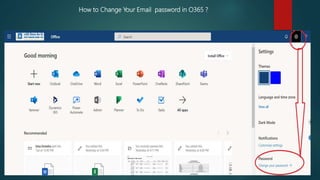
How to Change Your Email password in O365 ?
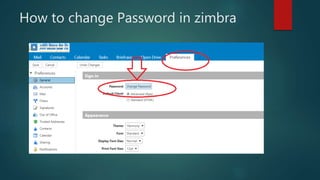
How to change Password in zimbra
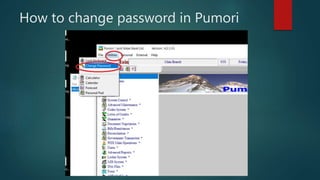
How to change password in Pumori
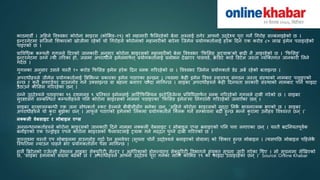
काठमाडौं । अहिले विश्िभर कोरोना भाइरस (कोभभड–१९) को मिामारी फै भलरिेको बेला अरुलाई ठगेर आफ्नो उद्देश्य पूरा गने गगरोि सल्बलाइिेको छ ।
इन्टरनेटमा सजिलो भिकारको खोिीमा रिेको यो गगरोिले कोरोनाको मिामारीको बारेमा जिमेल प्रयोगकर्ाालाई िरेक हदन एक करोड ८० लाख इमेल पठाइरिेको
पाइएको छ ।
प्राविगिक कम्पनी गुगलले हदएको िानकारी अनुसार कोरोना भाइरसको मिामारीको बेला विश्िभर ‘फफभसङ अट्याक’को बाढी नै आइरिेको छ । ‘फफभसङ’
इन्टरनेटमा ठग्ने त्यो र्ररका िो, िसमा अपरािीले इमेलमाफा र्् प्रयोगकर्ाालाई प्रलोभन देखाएर पासिडा, क्रे डडट काडा डडटेल िस्र्ा व्यजतर्गर् िानकारी भलने
गदाछ ।
गुगलका अनुसार उसले यस्र्ै १० करोड फफभसङ इमेल िरेक हदन ब्लक गरररिेको छ । विश्िभर जिमेल प्रयोगकर्ाा डेढ अबा रिेको बर्ाइन्छ ।
अपरािीिरुले िीमेल प्रयोगकर्ाालाई बबभभन्न प्रकारका इमेल पठाएका िुन्छन ् । त्यसमा के िी इमेल विश्ि स्िास््य संगठन िस्र्ा संस्थाको नामबाट पठाइएको
िुन्छ र कु नै सफ्टिेयर डाउनलोड गना उतसाइन्छ िा बिाना बनाएर चन्दा मागगन्छ । साइबर अपरािीिरुले के िी हदनयर्ा सरकारी संस्थाको नामबाट पनन फाइदा
उठाउने कोभसस गरररिेका छन ् ।
ठग्ने उद्देश्यले पठाइएका ९९ दिमलि ९ प्रनर्िर् इमेललाई आहटाफफभसयल इन्टेभलिेन्स प्रविगिमाफा र्् ब्लक गरररिेको गुगलले दाबी गरेको छ । साइबर
सुरक्षासँग सम्बजन्िर् कम्पनीिरुले पनन कोरोना भाइरसको नाममा पठाइएका ‘फफभसङ इमेल’मा ननगरानी गरररिेको िनाएका छन ् ।
साइबर सुरक्षासम्बन्िी एक िना सोिकर्ाा स्कट िेल्मले बीबीसीसँग भनेका छन ्, ‘अहिले कोरोना भाइरसको मुद्दा ननकै भािनात्मक भएको छ । साइबर
अपरािीिरुले यो कु रा बुझेका छन ् । आफू ले पठाएको इमेलको भलंकमा प्रयोगकर्ााले जतलक गने सम्भािना बढी िुन्छ भन्ने कु रामा उनीिरु विश्िस्र् छन ् ।’
नक्कली वेबसाइट र मोबाइल एप्स
अनुसन्िानकर्ाािरुले कोरोना भाइरसको िानकारी हदने नाममा नतकली िेबसाइट र मोबाइल एप्स बनाइएको पनन पत्ता लगाएका छन ् । यस्र्ै बदननयर्पूिाक
बनाइएको एक एन्रोइड एपले कोरोना भाइरसको फै लािटलाई ट्रयाक गना मद्दर् पुग्ने दाबी गररएको छ ।
िास्र्िमा यस्र्ो एप मोबाइलमा डाउनलोड गदाा रेन समिेयर (सूचना चोने उद्देश्यले बनाइएको प्रोग्राम) को भिकार िुन्छ मोबाइल । त्यसपनछ मोबाइल पहिलेकै
जस्थनर्मा ल्याउन चािने भए प्रयोगकर्ाासँग पैसा मागगन्छ ।
िालै बिटेनको एिेन्सी नेिनल साइबर सेतयुररटी सेन्टर र अमेररकाको िोमल्याण्ड सेतयुररटी विभागले संयुतर् सूचना िारी गरेका गथए । सो सूचनामा लेखखएको
छ, ‘साइबर िमलाको संख्या बढेको छ र अपरािीिरुले आफ्नो उद्देश्य पूरा गनाका लागग कोभभड १९ को फाइदा उठाइरिेका छन ् ।’ Source: Online Khabar

Cyber security tips in Banking in Nepal

  • 1.
    Cyber Security Tips inBanking RESHAM ACHARYA HEAD IT
  • 2.
    Importance of CyberSecurity  Cyber Security becomes the most challenging issue in banking and financial sectors.  Cyber Security is considered as the one the major Risk factor in banking sector like , Operational Risk, Market Risk & Credit Risk  Because of :  Rapid Digitalization on Digital Banking  Any where and Any time banking  Raise of Various mode of Payments  Open Banking Concept is raising  Office works are converting from manual to digitalization/automation process
  • 3.
    Fundamental terms  Malware:Malwareis short for "malicious software," also known as malicious code or "malcode." It is code or software that is specifically designed to damage, disrupt, steal, or in general inflict some other "bad" or illegitimate action on data, hosts, or networks.  Phishing: A type of online identity theft. It uses email and fraudulent websites that are designed to steal your personal data or information such as credit card numbers, passwords, account data, or other information  BOT: is an automated process that interacts with other network services. Bots often automate tasks and provide information or services that would otherwise be conducted by a human being.  Scam:  Spyware & Adware:  Ransomware:Ransomware is a type of malicious software that threatens to publish the victim's data or perpetually block access to it unless a ransom is paid  Social Engineering: It is a non-technical approach hackers use to get sensitive information.
  • 4.
    Fundamental terms ? Virus: Virus is a computer program or software that connect itself to another software or computer program to harm computer system. When the computer program runs attached with virus it perform some action such as deleting a file from the computer system. Virus can’t be controlled by remote.  Worms: Worms is also a computer program like virus but it does not modify the program. It replicate itself more and more to cause slow down the computer system. Worms can be controlled by remote.  Trojan Horse: Trojan Horse does not replicate itself like virus and worms. It is a hidden piece of code which steal the important information of user. For example, Trojan horse software observe the e-mail ID and password while entering in web browser for logging.
  • 5.
    How to Protectfrom Phishing ?  Do not click on links or download attachments from unknown sources.  Never reply/forward the mail in case it is found suspicious  Be suspicious of mails even when received from known sources when you are not expecting it.  Do not provide any personal or financial information (like user name, password, credit/debit card credentials etc.) over email  Be wary and cautious of unsolicited emails that demand immediate action  Pay attention to URL of a website. Malicious sites may look identical to a legitimate site but the URL may use a variation in spelling such as ‘l’ may be replaced with identical looking ‘1’ etc.  Always think twice before clicking on any link attached in the e-mail  Check the URL by placing (hovering) mouse pointer on the link provided in the mail which displays the correct website / URL where the link is actually pointed.
  • 6.
    Areas of Alertwe must be  More than 80% Security Attacks are spreading via Emails.  Other Media of Penetrations are:  Weak , repeated and permanent Passwords  Sharing Personal Info. including User Id and Password  Removable Media,  Visit of Malicious Website  Personal Information stealing , Phishing  Weak and repeated Passwords  Installation /use of not necessary app/software  Misuse of social media
  • 7.
    Internet Security  Donot blindly click on pop-ups  Do not download software's which are not Approved by Bank  Do not Upload any data belonging to bank on Internet  Users are responsible for protecting their Internet account and password  Users should ensure that they do not access websites by clicking on links provide in emails or in other websites
  • 8.
    Browser Security  Donot blindly click on pop-ups  Do not download software's which are not Approved by Bank  Do not Upload any data belonging to bank on Internet  Users are responsible for protecting their Internet account and password  Users should ensure that they do not access websites by clicking on links provide in emails or in other websites
  • 9.
    Wi-fi Security  Don’tenable Auto-Connect to open Wi-Fi Networks  Don’t leave broadband connectivity open when it is not utilized  Don’t connect to unknown Wi-Fi network at office or public place  Change Default Administrator Passwords and User names in your home router too.
  • 10.
    Desktop/ Laptop Security Shut down the desktop while leaving  Ensure you have updated anti-virus  Scan /ensure the attachments before opening  Do not install any unauthorized software  Follow the Clear Desk & Clear Screen policy  Do not enable sharing of folders in your C: drive  Ensure confidential documents are not kept in the open  User Network Drive for your file security  Not place all files in Desktop  Do now allow remote access unless ensured and recommended .
  • 11.
    Password Security  Douse hard to guess Passwords  Do not use same password for all Accounts  Do not write passwords anywhere  Do not use personal information as password e.g. DOB, Name, Mobile No…  Passwords should be unique from previously used passwords.  You are responsible for the work carried out in your User ID. It is your digital identity  Passwords should be created so that they can be easily remembered  Change your password immediately if you shared to any one.
  • 12.
    General Security Precautions Consider that all privacy starts with the employees  Lock your Computer , Close Application when you leave .  Sing out of email and Application immediately after use.  Think Before Click  Watch and Notice “S” with padlock in URL for secure website  Do not use and seek Administrator login Do not Choose Remember Password Option  Do not use Admin Right Accounts  Don’t Click Links from Suspicious Source , Emails  Disable Auto Connect  Update the browser regularly  NOT SHARE OFFICE EMAILS FOR PERSONAL PURPOSE IN WEBSITES AND SOCIAL MEDIA  Avoid pop-ups, unknown emails, and links  Talk to your IT department for any suspicious activities noticed
  • 13.
    How to ChangeYour Email password in O365 ?
  • 14.
    How to changePassword in zimbra
  • 15.
    How to changepassword in Pumori
  • 16.
    काठमाडौं । अहिलेविश्िभर कोरोना भाइरस (कोभभड–१९) को मिामारी फै भलरिेको बेला अरुलाई ठगेर आफ्नो उद्देश्य पूरा गने गगरोि सल्बलाइिेको छ । इन्टरनेटमा सजिलो भिकारको खोिीमा रिेको यो गगरोिले कोरोनाको मिामारीको बारेमा जिमेल प्रयोगकर्ाालाई िरेक हदन एक करोड ८० लाख इमेल पठाइरिेको पाइएको छ । प्राविगिक कम्पनी गुगलले हदएको िानकारी अनुसार कोरोना भाइरसको मिामारीको बेला विश्िभर ‘फफभसङ अट्याक’को बाढी नै आइरिेको छ । ‘फफभसङ’ इन्टरनेटमा ठग्ने त्यो र्ररका िो, िसमा अपरािीले इमेलमाफा र्् प्रयोगकर्ाालाई प्रलोभन देखाएर पासिडा, क्रे डडट काडा डडटेल िस्र्ा व्यजतर्गर् िानकारी भलने गदाछ । गुगलका अनुसार उसले यस्र्ै १० करोड फफभसङ इमेल िरेक हदन ब्लक गरररिेको छ । विश्िभर जिमेल प्रयोगकर्ाा डेढ अबा रिेको बर्ाइन्छ । अपरािीिरुले िीमेल प्रयोगकर्ाालाई बबभभन्न प्रकारका इमेल पठाएका िुन्छन ् । त्यसमा के िी इमेल विश्ि स्िास््य संगठन िस्र्ा संस्थाको नामबाट पठाइएको िुन्छ र कु नै सफ्टिेयर डाउनलोड गना उतसाइन्छ िा बिाना बनाएर चन्दा मागगन्छ । साइबर अपरािीिरुले के िी हदनयर्ा सरकारी संस्थाको नामबाट पनन फाइदा उठाउने कोभसस गरररिेका छन ् । ठग्ने उद्देश्यले पठाइएका ९९ दिमलि ९ प्रनर्िर् इमेललाई आहटाफफभसयल इन्टेभलिेन्स प्रविगिमाफा र्् ब्लक गरररिेको गुगलले दाबी गरेको छ । साइबर सुरक्षासँग सम्बजन्िर् कम्पनीिरुले पनन कोरोना भाइरसको नाममा पठाइएका ‘फफभसङ इमेल’मा ननगरानी गरररिेको िनाएका छन ् । साइबर सुरक्षासम्बन्िी एक िना सोिकर्ाा स्कट िेल्मले बीबीसीसँग भनेका छन ्, ‘अहिले कोरोना भाइरसको मुद्दा ननकै भािनात्मक भएको छ । साइबर अपरािीिरुले यो कु रा बुझेका छन ् । आफू ले पठाएको इमेलको भलंकमा प्रयोगकर्ााले जतलक गने सम्भािना बढी िुन्छ भन्ने कु रामा उनीिरु विश्िस्र् छन ् ।’ नक्कली वेबसाइट र मोबाइल एप्स अनुसन्िानकर्ाािरुले कोरोना भाइरसको िानकारी हदने नाममा नतकली िेबसाइट र मोबाइल एप्स बनाइएको पनन पत्ता लगाएका छन ् । यस्र्ै बदननयर्पूिाक बनाइएको एक एन्रोइड एपले कोरोना भाइरसको फै लािटलाई ट्रयाक गना मद्दर् पुग्ने दाबी गररएको छ । िास्र्िमा यस्र्ो एप मोबाइलमा डाउनलोड गदाा रेन समिेयर (सूचना चोने उद्देश्यले बनाइएको प्रोग्राम) को भिकार िुन्छ मोबाइल । त्यसपनछ मोबाइल पहिलेकै जस्थनर्मा ल्याउन चािने भए प्रयोगकर्ाासँग पैसा मागगन्छ । िालै बिटेनको एिेन्सी नेिनल साइबर सेतयुररटी सेन्टर र अमेररकाको िोमल्याण्ड सेतयुररटी विभागले संयुतर् सूचना िारी गरेका गथए । सो सूचनामा लेखखएको छ, ‘साइबर िमलाको संख्या बढेको छ र अपरािीिरुले आफ्नो उद्देश्य पूरा गनाका लागग कोभभड १९ को फाइदा उठाइरिेका छन ् ।’ Source: Online Khabar