GROUP 4 Contact
About Us
Information
Home
O N L I N E
C O M M U N I C A T I O N
L E S S O N 2 :
GROUP 4 Contact
About Us
Information
Home
W H A T I S O N L I N E
C O M M U N I C A T I O N ?
LEARN MORE
"Our online communication should drive
offline conversation."
O N L I N E C O M M U N I C A T I O N R E F E R S T O
H O W U S E R S , I N C L U D I N G C O M P U T E R S ,
E X C H A N G E I N F O R M A T I O N O R
C O M M U N I C A T E W I T H O N E A N O T H E R B Y
M E A N S O F C O M P U T E R N E T W O R K S .
H E N C E , A N Y F O R M O F C O M M U N I C A T I O N
T H A T R E Q U I R E S T H E U T I L I Z A T I O N O F T H E
I N T E R N E T C A N B E C A L L E D O N L I N E
C O M M U N I C A T I O N .
GROUP 4 Contact
About Us
Information
Home
LESSON
OUTCOMES
01
Identify common online social
networking communication
tools.
02
Describe how to be more effective
when communicating using the
Internet
GROUP 4 Contact
About Us
Information
Home
ONLINE
COMMUNICATION
In this lesson, you will know more about
some downloadable or Web-based tools
you can use to communicate online, as
well as pointers on how to socialize more
effectively through the Internet while
using them.
SNS INTERNET
COMMUNICATION TOOLS
There are many ways to communicate on
the Internet and new SNS tools are
always being released. The following are
just some of the most common tools of
online social networking communication
today.
GROUP 4 Contact
About Us
Information
Home
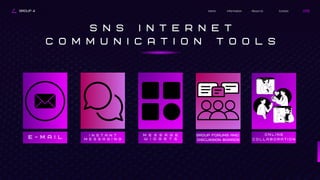
S N S I N T E R N E T
C O M M U N I C A T I O N T O O L S
E - M A I L
I n s t a n t
m e s s a g i n g
M e s s a g e
W i d g e t s
Group forums and
discussion boards
O n l i n e
c o l l a b o r a t i o n
GROUP 4 Contact
About Us
Information
Home
A great application of e-mail is the ability to send a message
with a file in the form of an attachment. To date, almost any
type of file, whether text, graphic, sound, video, or others
may be sent as an attachment to an e-mail. This may be
useful for future documentation.
E-mail may also be used to form a mailing list, which
consists of an e-mail address that forwards a copy of all
messages it receives to people who chose to subscribe to
the mailing list. Another feature of e-mail is its ability to let
you create folders that allow automatic grouping of all
messages you choose to be boxed under a certain subject.
E-mail is the oldest form of online
communication and the most widely used
service as well. To send an e-mail, all you
have to do is create an account in any e-
mailing service provider, such as Gmail
and Yahoo! mail, write a message, and
then send it to someone's e-mail
address. An e-mail can be sent to a
single person, a group of people, or even
thousands of users. It's helpful to create
a list of group of e-mail addresses if you
plan to continually send messages to a
particular group of people, such as your
family, classmates, or friends.
E - M A I L
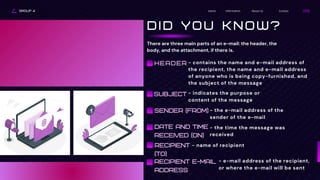
There are three main parts of an e-mail: the header, the
body, and the attachment, if there is.
GROUP 4 Contact
About Us
Information
Home
D I D Y O U K N O W ?
- contains the name and e-mail address of
the recipient, the name and e-mail address
of anyone who is being copy-furnished, and
the subject of the message
HEADER
SUBJECT - indicates the purpose or
content of the message
SENDER (FROM) - the e-mail address of the
sender of the e-mail
DATE AND TIME
RECEIVED (ON)
- the time the message was
received
RECIPIENT
(TO)
- name of recipient
RECIPIENT E-MAIL
ADDRESS
- e-mail address of the recipient,
or where the e-mail will be sent
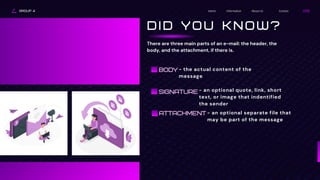
ATTACHMENT
GROUP 4 Contact
About Us
Information
Home
D I D Y O U K N O W ?
There are three main parts of an e-mail: the header, the
body, and the attachment, if there is.
BODY - the actual content of the
message
SIGNATURE - an optional quote, link, short
text, or image that indentified
the sender
- an optional separate file that
may be part of the message
GROUP 4 Contact
About Us
Information
Home
I N S T A N T M E S S A G I N G
Instant messaging allows us to communicate in real time
or synchronously. Instant messengers let us
communicate through typing text, voice, video (webcam),
or all three. No matter where you are in the world, instant
messaging allows you to chat with friends, family, or
strangers both near and far. Furthermore, most instant
messengers offer other functions like file sharing, group
instant messaging or group chat through conferences,
and mobile instant messaging. The instant nature of this
kind of communication has resulted in message shortcuts
or letter acronyms like what is used in texting with the
cell phone.
Instant messaging is an extremely
beneficial way to communicate since
most instant messengers can be
downloaded free and chatting
virtually costs nothing more than your
internet connection rates. Popular
instant messaging downloadable
programs include Yahoo! Instant
Messenger, Windows Live Messenger,
Google Hangouts, Skype, Meebo, ICQ
Messenger, and Jabber. Many social
networks also now have instant
messaging features, with some of
them allowing or providing access
using widgets, which is discussed in
the next segment.
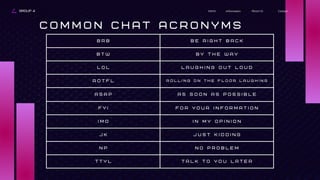
B R B B E R I G H T B A C K
B T W B Y T H E W A Y
L O L L A U G H I N G O U T L O U D
R O T F L R O L L I N G O N T H E F L O O R L A U G H I N G
A S A P A S S O O N A S P O S S I B L E
F Y I F O R Y O U R I N F O R M A T I O N
I M O I N M Y O P I N I O N
J K J U S T K I D D I N G
N P N O P R O B L E M
T T Y L T A L K T O Y O U L A T E R
GROUP 4 About Us
Information
Home
C O M M O N C H A T A C R O N Y M S
Contact
GROUP 4 Contact
About Us
Information
Home
The word "widget" is a generic term and companies give
unique names to their own widgets like webjit, badge,
module, snippet, flake, and mini. Google Blogger calls it's
widgets "gadgets " Widgets may have specific functions
other than for social networking. A variety of widgets by and
for specific SNS companies can be downloaded over the
Internet.
Some widgets are designed for mobile gadgets. These
provide the same functions as their desktop counterparts
and allow ease In keeping tabs and participating in online
exchanges even while on the go.
Instant messaging is usually done within
an SNS site or through a downloadable
SNS program like Skype. But with the
use of chunks of executable program
codes called widgets that can be added
to the operating system desktop or
embedded within a website, a compact
graphic user interface (GUI) can be
activated to monitor statuses of other
users and also provide a means of
posting messages that can be read and
responded to by visitors to your
website or other online users who use
the same widget.
M E S S A G E
W I D G E T
GROUP 4 Contact
About Us
Information
Home
G R O U P F O R U M S A N D
D I S C U S S I O N B O A R D S
Another way to communicate is to post in group forums
or discussion boards. Forums and discussion boards are
online discussion sites that are often divided into
categories and threads, depending on the subject
discussed. Most Internet forums require registration to
post. Once registered, users are now referred to as
members and are allowed to post messages in the
threads. Forums and boards often have moderators who
can access, edit, or delete any message to moderate the
discussions and ban abusive members, among other
functions.
Many online groups use discussion
boards or forums for discussions. A
member begins a thread or topic and
other are given the opportunity to
react, write their ideas, as well as
comment on the input of others. This
allows the members to benefit from a
continuous discussion where new
information is inputted as time
passes. Once closed by an
administrator, a thread can no longer
be posted on.
GROUP 4 Contact
About Us
Information
Home
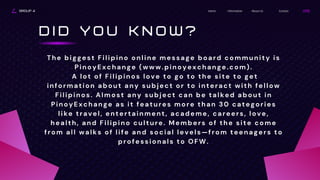
D I D Y O U K N O W ?
The biggest Filipino online message board community is
PinoyExchange (www.pinoyexchange.com).
A lot of Filipinos love to go to the site to get
information about any subject or to interact with fellow
Filipinos. Almost any subject can be talked about in
PinoyExchange as it features more than 30 categories
like travel, entertainment, academe, careers, love,
health, and Filipino culture. Members of the site come
from all walks of life and social levels—from teenagers to
professionals to OFW.
GROUP 4 Contact
About Us
Information
Home
The other current Google Apps application are Google Sites,
which lets team members share information through a
website that members can access, and Google Calendar,
which is used to manage schedules and appointments for
meetings. With such free communications and productivity
applications online, people would not need to purchase
related software or have to install them into their computers
and consume precious space. Other popular online
collaboration siteslike Trello (https://trello.com) and
MindMeister (https://www.mindmeister.com/) give options
to users who need or are partial to specific features.
One thing that makes the Internet such
as a valuable tool for working is the
capability it gives to groups to work on a
project at one time. Applications
available online such as those provided
by Google now make it easy for people in
different places to be involved in making
inputs to a document or multimedia
project without ever leaving their homes.
Google Apps (http://what's
news.googleapps.com/) enables useful
tools for collaborative work of coworkers
and classmates on documents while
keeping in touch with the others tasked
to work on them as well.
O N L I N E
C O L L A B O R A T I O N
GROUP 4 About Us
Information
Home Contact
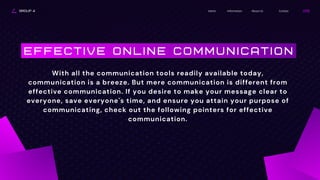
E F F E C T I V E O N L I N E C O M M U N I C A T I O N
With all the communication tools readily available today,
communication is a breeze. But mere communication is different from
effective communication. If you desire to make your message clear to
everyone, save everyone's time, and ensure you attain your purpose of
communicating, check out the following pointers for effective
communication.
GROUP 4 About Us
Information
Home Contact
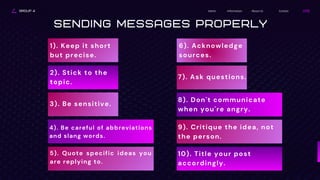
Sending Messages Properly
1). Keep it short
but precise.
2). Stick to the
topic.
3). Be sensitive.
4). Be careful of abbreviations
and slang words.
5). Quote specific ideas you
are replying to.
6). Acknowledge
sources.
7). Ask questions.
8). Don't communicate
when you're angry.
9). Critique the idea, not
the person.
10). Title your post
accordingly.
Contact
About Us
Information
Home
GROUP 4
T H A N K Y O U
P A R A G A S , R I Z Z A J E L L Y G .
d E G U Z M A N , P R I N C E S S J O Y F .
J I M E N E Z , C H A R I S S E A N N C .
T E N D E N I L L A , P R I N C E S S M A R I A N D .

Computer 10 Lesson 2: Online Communication

  • 1.
    GROUP 4 Contact AboutUs Information Home O N L I N E C O M M U N I C A T I O N L E S S O N 2 :
  • 2.
    GROUP 4 Contact AboutUs Information Home W H A T I S O N L I N E C O M M U N I C A T I O N ? LEARN MORE "Our online communication should drive offline conversation." O N L I N E C O M M U N I C A T I O N R E F E R S T O H O W U S E R S , I N C L U D I N G C O M P U T E R S , E X C H A N G E I N F O R M A T I O N O R C O M M U N I C A T E W I T H O N E A N O T H E R B Y M E A N S O F C O M P U T E R N E T W O R K S . H E N C E , A N Y F O R M O F C O M M U N I C A T I O N T H A T R E Q U I R E S T H E U T I L I Z A T I O N O F T H E I N T E R N E T C A N B E C A L L E D O N L I N E C O M M U N I C A T I O N .
  • 3.
    GROUP 4 Contact AboutUs Information Home LESSON OUTCOMES 01 Identify common online social networking communication tools. 02 Describe how to be more effective when communicating using the Internet
  • 4.
    GROUP 4 Contact AboutUs Information Home ONLINE COMMUNICATION In this lesson, you will know more about some downloadable or Web-based tools you can use to communicate online, as well as pointers on how to socialize more effectively through the Internet while using them. SNS INTERNET COMMUNICATION TOOLS There are many ways to communicate on the Internet and new SNS tools are always being released. The following are just some of the most common tools of online social networking communication today.
  • 5.
    GROUP 4 Contact AboutUs Information Home S N S I N T E R N E T C O M M U N I C A T I O N T O O L S E - M A I L I n s t a n t m e s s a g i n g M e s s a g e W i d g e t s Group forums and discussion boards O n l i n e c o l l a b o r a t i o n
  • 6.
    GROUP 4 Contact AboutUs Information Home A great application of e-mail is the ability to send a message with a file in the form of an attachment. To date, almost any type of file, whether text, graphic, sound, video, or others may be sent as an attachment to an e-mail. This may be useful for future documentation. E-mail may also be used to form a mailing list, which consists of an e-mail address that forwards a copy of all messages it receives to people who chose to subscribe to the mailing list. Another feature of e-mail is its ability to let you create folders that allow automatic grouping of all messages you choose to be boxed under a certain subject. E-mail is the oldest form of online communication and the most widely used service as well. To send an e-mail, all you have to do is create an account in any e- mailing service provider, such as Gmail and Yahoo! mail, write a message, and then send it to someone's e-mail address. An e-mail can be sent to a single person, a group of people, or even thousands of users. It's helpful to create a list of group of e-mail addresses if you plan to continually send messages to a particular group of people, such as your family, classmates, or friends. E - M A I L
  • 7.
    There are threemain parts of an e-mail: the header, the body, and the attachment, if there is. GROUP 4 Contact About Us Information Home D I D Y O U K N O W ? - contains the name and e-mail address of the recipient, the name and e-mail address of anyone who is being copy-furnished, and the subject of the message HEADER SUBJECT - indicates the purpose or content of the message SENDER (FROM) - the e-mail address of the sender of the e-mail DATE AND TIME RECEIVED (ON) - the time the message was received RECIPIENT (TO) - name of recipient RECIPIENT E-MAIL ADDRESS - e-mail address of the recipient, or where the e-mail will be sent
  • 8.
    ATTACHMENT GROUP 4 Contact AboutUs Information Home D I D Y O U K N O W ? There are three main parts of an e-mail: the header, the body, and the attachment, if there is. BODY - the actual content of the message SIGNATURE - an optional quote, link, short text, or image that indentified the sender - an optional separate file that may be part of the message
  • 9.
    GROUP 4 Contact AboutUs Information Home I N S T A N T M E S S A G I N G Instant messaging allows us to communicate in real time or synchronously. Instant messengers let us communicate through typing text, voice, video (webcam), or all three. No matter where you are in the world, instant messaging allows you to chat with friends, family, or strangers both near and far. Furthermore, most instant messengers offer other functions like file sharing, group instant messaging or group chat through conferences, and mobile instant messaging. The instant nature of this kind of communication has resulted in message shortcuts or letter acronyms like what is used in texting with the cell phone. Instant messaging is an extremely beneficial way to communicate since most instant messengers can be downloaded free and chatting virtually costs nothing more than your internet connection rates. Popular instant messaging downloadable programs include Yahoo! Instant Messenger, Windows Live Messenger, Google Hangouts, Skype, Meebo, ICQ Messenger, and Jabber. Many social networks also now have instant messaging features, with some of them allowing or providing access using widgets, which is discussed in the next segment.
  • 10.
    B R BB E R I G H T B A C K B T W B Y T H E W A Y L O L L A U G H I N G O U T L O U D R O T F L R O L L I N G O N T H E F L O O R L A U G H I N G A S A P A S S O O N A S P O S S I B L E F Y I F O R Y O U R I N F O R M A T I O N I M O I N M Y O P I N I O N J K J U S T K I D D I N G N P N O P R O B L E M T T Y L T A L K T O Y O U L A T E R GROUP 4 About Us Information Home C O M M O N C H A T A C R O N Y M S Contact
  • 11.
    GROUP 4 Contact AboutUs Information Home The word "widget" is a generic term and companies give unique names to their own widgets like webjit, badge, module, snippet, flake, and mini. Google Blogger calls it's widgets "gadgets " Widgets may have specific functions other than for social networking. A variety of widgets by and for specific SNS companies can be downloaded over the Internet. Some widgets are designed for mobile gadgets. These provide the same functions as their desktop counterparts and allow ease In keeping tabs and participating in online exchanges even while on the go. Instant messaging is usually done within an SNS site or through a downloadable SNS program like Skype. But with the use of chunks of executable program codes called widgets that can be added to the operating system desktop or embedded within a website, a compact graphic user interface (GUI) can be activated to monitor statuses of other users and also provide a means of posting messages that can be read and responded to by visitors to your website or other online users who use the same widget. M E S S A G E W I D G E T
  • 12.
    GROUP 4 Contact AboutUs Information Home G R O U P F O R U M S A N D D I S C U S S I O N B O A R D S Another way to communicate is to post in group forums or discussion boards. Forums and discussion boards are online discussion sites that are often divided into categories and threads, depending on the subject discussed. Most Internet forums require registration to post. Once registered, users are now referred to as members and are allowed to post messages in the threads. Forums and boards often have moderators who can access, edit, or delete any message to moderate the discussions and ban abusive members, among other functions. Many online groups use discussion boards or forums for discussions. A member begins a thread or topic and other are given the opportunity to react, write their ideas, as well as comment on the input of others. This allows the members to benefit from a continuous discussion where new information is inputted as time passes. Once closed by an administrator, a thread can no longer be posted on.
  • 13.
    GROUP 4 Contact AboutUs Information Home D I D Y O U K N O W ? The biggest Filipino online message board community is PinoyExchange (www.pinoyexchange.com). A lot of Filipinos love to go to the site to get information about any subject or to interact with fellow Filipinos. Almost any subject can be talked about in PinoyExchange as it features more than 30 categories like travel, entertainment, academe, careers, love, health, and Filipino culture. Members of the site come from all walks of life and social levels—from teenagers to professionals to OFW.
  • 14.
    GROUP 4 Contact AboutUs Information Home The other current Google Apps application are Google Sites, which lets team members share information through a website that members can access, and Google Calendar, which is used to manage schedules and appointments for meetings. With such free communications and productivity applications online, people would not need to purchase related software or have to install them into their computers and consume precious space. Other popular online collaboration siteslike Trello (https://trello.com) and MindMeister (https://www.mindmeister.com/) give options to users who need or are partial to specific features. One thing that makes the Internet such as a valuable tool for working is the capability it gives to groups to work on a project at one time. Applications available online such as those provided by Google now make it easy for people in different places to be involved in making inputs to a document or multimedia project without ever leaving their homes. Google Apps (http://what's news.googleapps.com/) enables useful tools for collaborative work of coworkers and classmates on documents while keeping in touch with the others tasked to work on them as well. O N L I N E C O L L A B O R A T I O N
  • 15.
    GROUP 4 AboutUs Information Home Contact E F F E C T I V E O N L I N E C O M M U N I C A T I O N With all the communication tools readily available today, communication is a breeze. But mere communication is different from effective communication. If you desire to make your message clear to everyone, save everyone's time, and ensure you attain your purpose of communicating, check out the following pointers for effective communication.
  • 16.
    GROUP 4 AboutUs Information Home Contact Sending Messages Properly 1). Keep it short but precise. 2). Stick to the topic. 3). Be sensitive. 4). Be careful of abbreviations and slang words. 5). Quote specific ideas you are replying to. 6). Acknowledge sources. 7). Ask questions. 8). Don't communicate when you're angry. 9). Critique the idea, not the person. 10). Title your post accordingly.
  • 17.
    Contact About Us Information Home GROUP 4 TH A N K Y O U P A R A G A S , R I Z Z A J E L L Y G . d E G U Z M A N , P R I N C E S S J O Y F . J I M E N E Z , C H A R I S S E A N N C . T E N D E N I L L A , P R I N C E S S M A R I A N D .