Hybrid architecturesYes ! But to do what ? 
Speaker: Patrick Guimonet 
15thNovember 2014 
Host: Matthew Hughes
O365EU Sponsors
Agenda
Why hybrid now ? 
It is all about transitioningbetween : 
On –premises infrastructures already in place in the enterprises 
New potentialities provided by Cloud offerings 
With hybrid deployments, you may get the 
best of both world.
Where are we ? 
SPC243 
IT’s losing battle against Cloud adoption
Elasticity 
On-premises Cloud 
Pro and cons of each side 
SP Infra can be 
complex 
Security can be 
a concern 
Hardly predictable 
load 
Identities 
management 
Need several env. : 
Dev, Tests, Pre-Prod, Prod 
Scalable 
multi-servers 
Progressive 
migration 
SP S2013 SP1 support 
natively hybrids archi. 
Data transfers 
and nationality 
Reversibility 
Spaces to deploy 
custom code 
Availability 
and DR 
Small or no 
investments 
Evolution at 
your own pace 
Automation 
is a premium 
Facts about 
the product 
Cloud 
Solutions 
Cloud 
Challenges
Office 365 
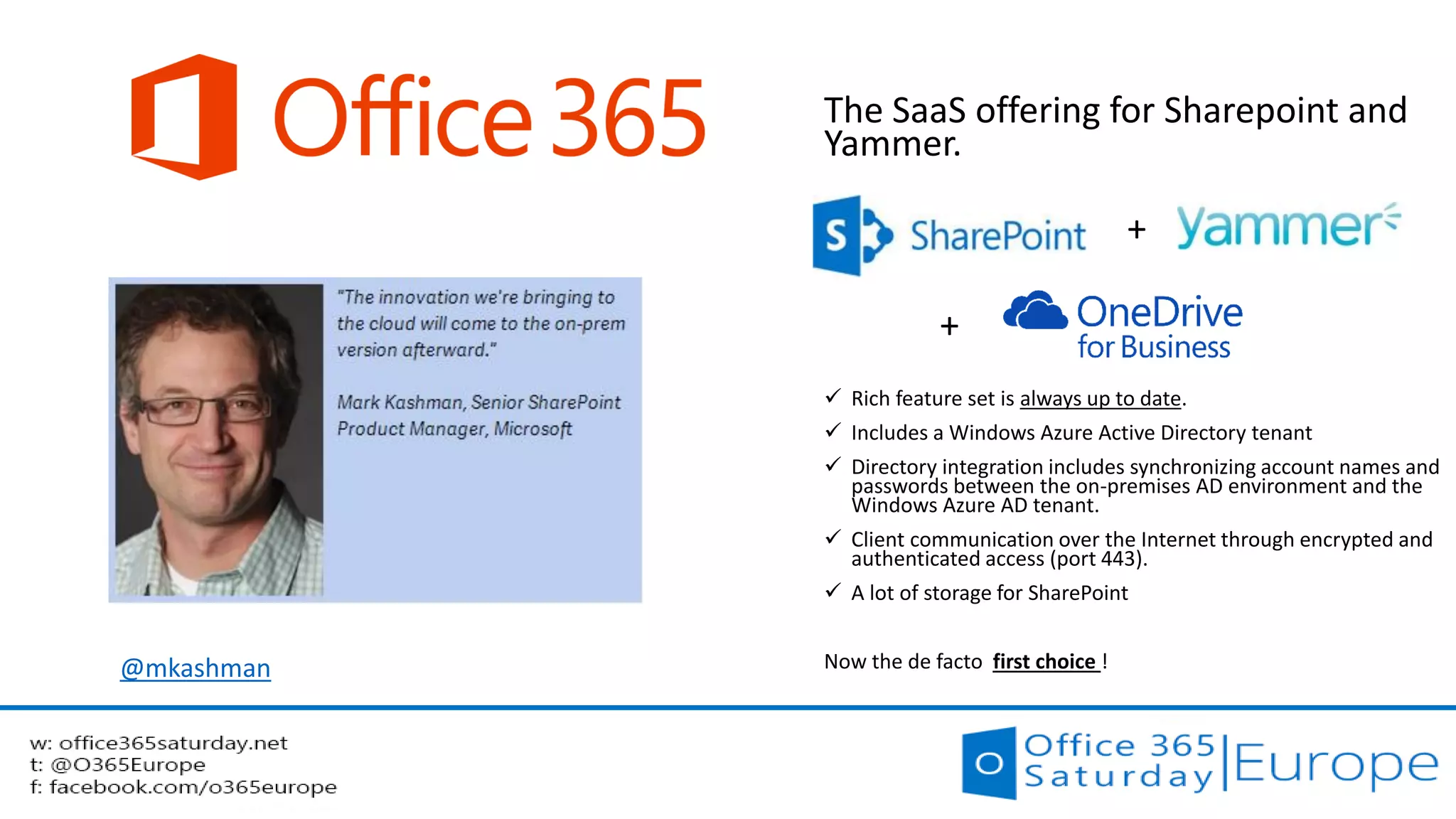
The SaaS offering for Sharepoint and Yammer. 
+ 
+ 
Rich feature set is always up to date. 
Includes a Windows Azure Active Directory tenant 
Directory integration includes synchronizing account names and passwords between the on-premises AD environment and the Windows Azure AD tenant. 
Client communication over the Internet through encrypted and authenticated access (port 443). 
A lot of storage for SharePoint 
Now the de facto first choice ! 
@mkashman
Third choice 
Microsoft 
Azure 
D12 
D3,D4 
A4, A6 
Since 2013 
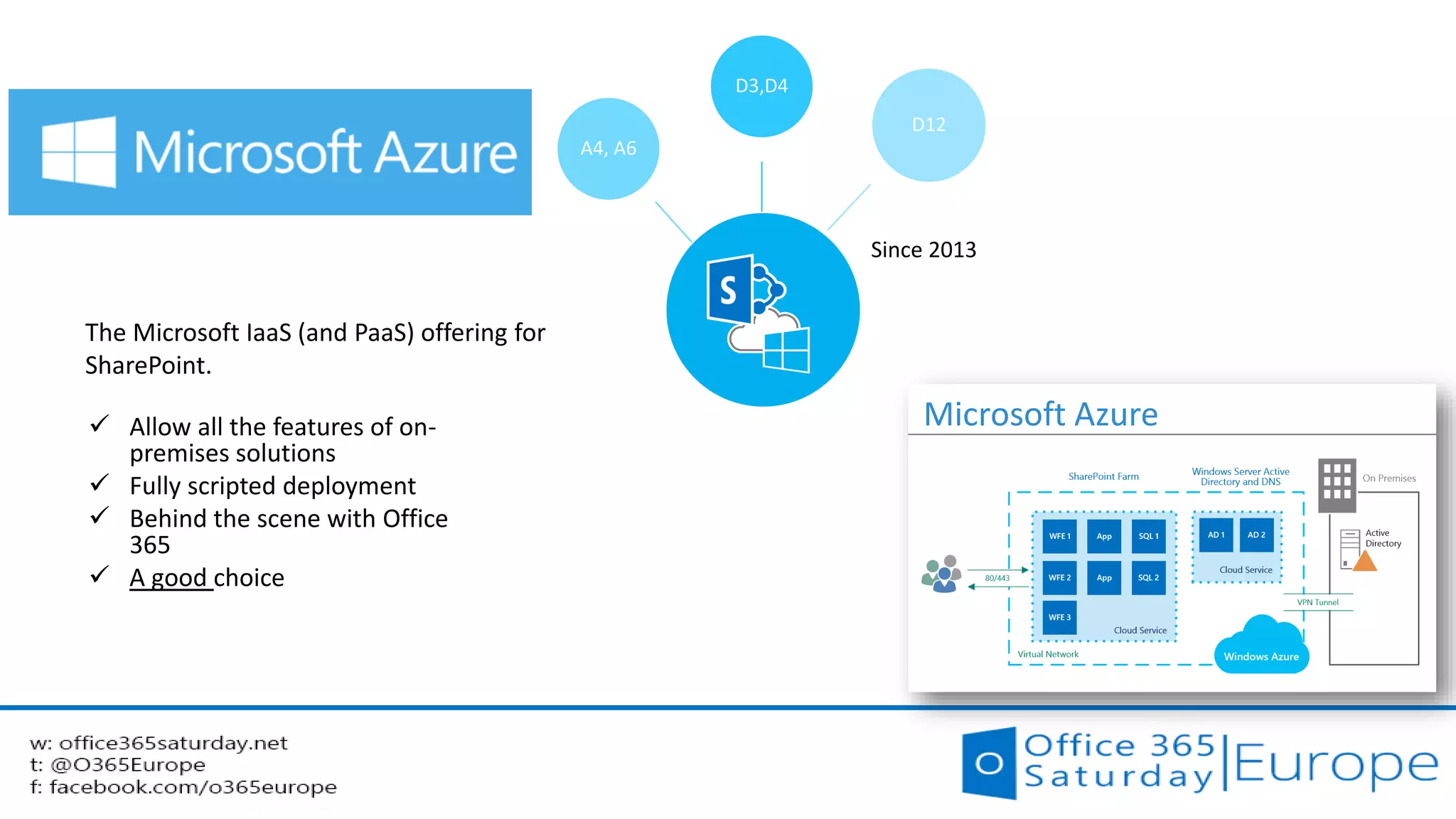
 Allow all the features of on- Microsoft Azure 
premises solutions 
 Fully scripted deployment 
 Behind the scene with Office 
365 
 A good choice 
The Microsoft IaaS (and PaaS) offering for 
SharePoint.
Hybrid solutions in the yOS worldYammer, Office 365, SharePoint
DMS / ECM 
Documents Management System 
Entreprise Content Management
SharePoint Extranet scenario 
local SP and Extranet in Office 365 
SharePoint 
2013 
Intranet 
Sites 
Internal 
documents 
Search 1 
Personal 
Sites 
Personal 
documents 
SharePoint 
Online 
Extranet 
Sites 
Documents 
to share 
Search 2 
 A simple scenario 
 No tool to synchronize or transfer from on 
side to the other 
 Identities federation is not mandatory but is 
plus. 
 Pros : 
 Simplified infrastructure 
 Sensitive data kept internally
Social
SharePoint 2013 Yammer 
Third party 
Products 
On-premises Oui Not available 
Yes 
(Sitrion, Beezy…) 
Cloud Office 365 Oui Possible 
Hybrid Possible 
What choice do we have for Social in yOS ?
Scenario #1 : all Office 365 
SharePoint 
Online 
Intranet & 
Extranet Sites 
SharePoint 
Documents 
Search 1 
Personal sites 
OneDrive 
for Business 
Personal 
storage 
Yammer 
Conversations 
Documents 
in Yammer 
Search 2 
 Pros : 
 Native integration 
 Simplified deployment 
 Cons 
 Governance is needed 
 Identities management is needed
In Office 365, 
native integration with Yammer (1)
In Office 365, 
native integration with Yammer (2) 
 Start Yammer discussions on Office documents 
For example, 
in Excel Online 
In Yammer 
Not yet fully deployed
Scenario #2 : Site data on-prem, Personal Data and 
conversations in the Cloud 
SharePoint 
2013 on-prem 
Intranet Sites 
Team 
Documents 
Search 1 
Personal 
Sites 
OneDrive for 
Business 
Personal 
documents 
Yammer 
Conversations 
Documents in 
Yammer 
Search 2 
 SharePoint on prem + Yammer et personal data in the 
Cloud 
 Pros : 
 Best of both world 
 Benefit the great functionalities of Yammer 
 Benefit storage space available on OneDrive 
 Cons 
 Extra configuration 
needed 
Redirect users to Office 365 
with OneDrive for Business: 
scenario overview
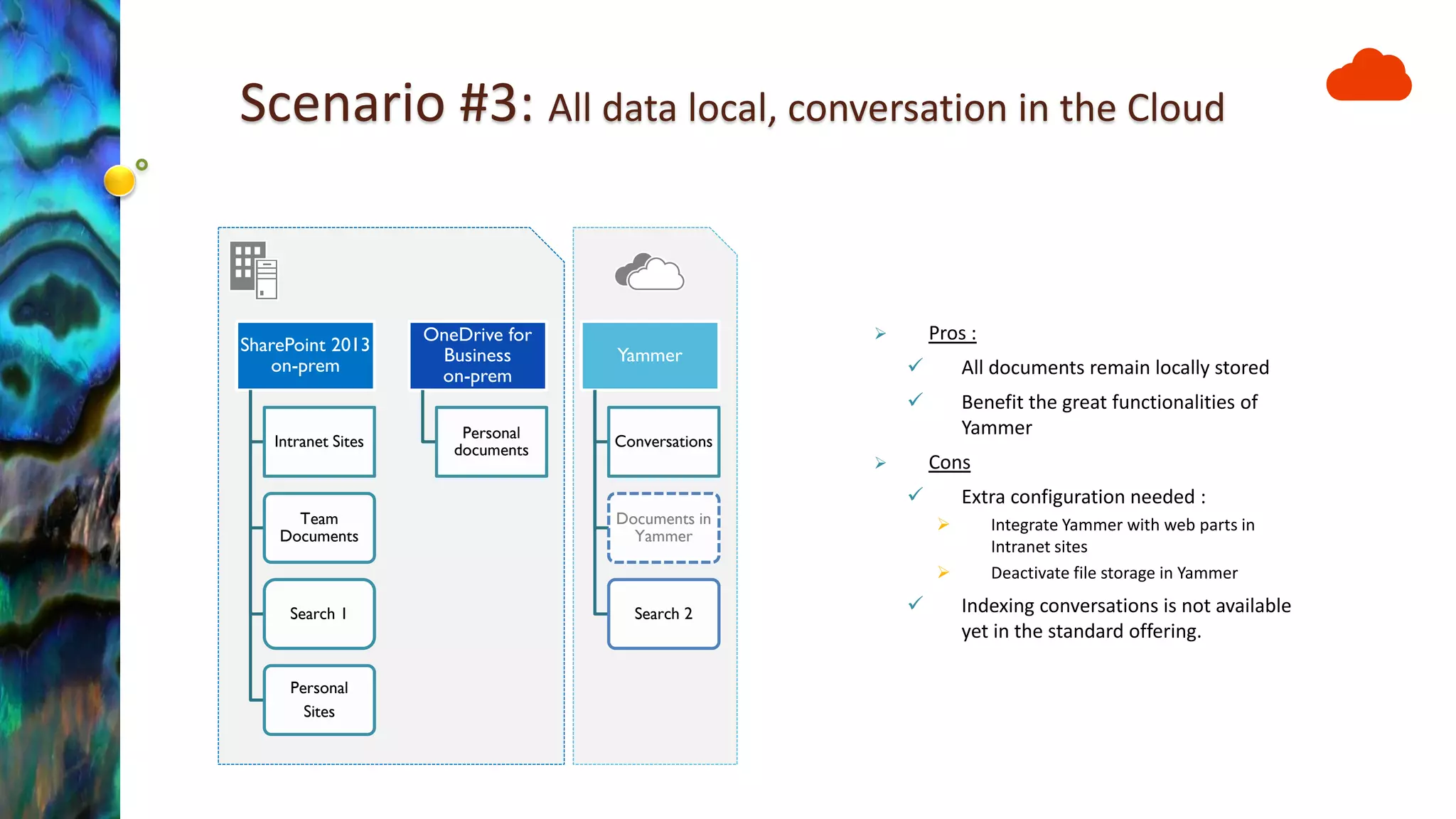
Scenario #3: All data local, conversation in the Cloud 
SharePoint 2013 on-prem 
Intranet Sites 
Team Documents 
Search 1 
Personal 
Sites 
OneDrive for Business on-prem 
Personal documents 
Yammer 
Conversations 
Documents in Yammer 
Search 2 
Pros : 
All documents remain locally stored 
Benefit the great functionalities of Yammer 
Cons 
Extra configuration needed : 
Integrate Yammer with web parts in Intranet sites 
Deactivate file storage in Yammer 
Indexing conversations is not available yet in the standard offering.
Business Intelligence
Power BI Architecture 
Power Query 
Power Pivot 
Power View 
Power Map 
Power BI 
sites 
Power BI Q&A 
Power BI 
Admin Center 
Power BI 
For iOS 
Data 
Catalog 
Internal 
DBs 
Data Management 
Gateway 
Search and 
Queries 
sharing 
Analyst 
End-users 
Publishing 
External 
DBs 
OData 
feeds 
Power BI 
For Windows 8
Search
« Classical » hybrid scenarios 
(according to Technet) 
TechNet provides guidance for deploying 3 SP 
hybrid solutions : 
 Search 
 BCS 
 Duet (SAP) 
Details on Overview of hybrid SharePoint 2013 for technical decision makers
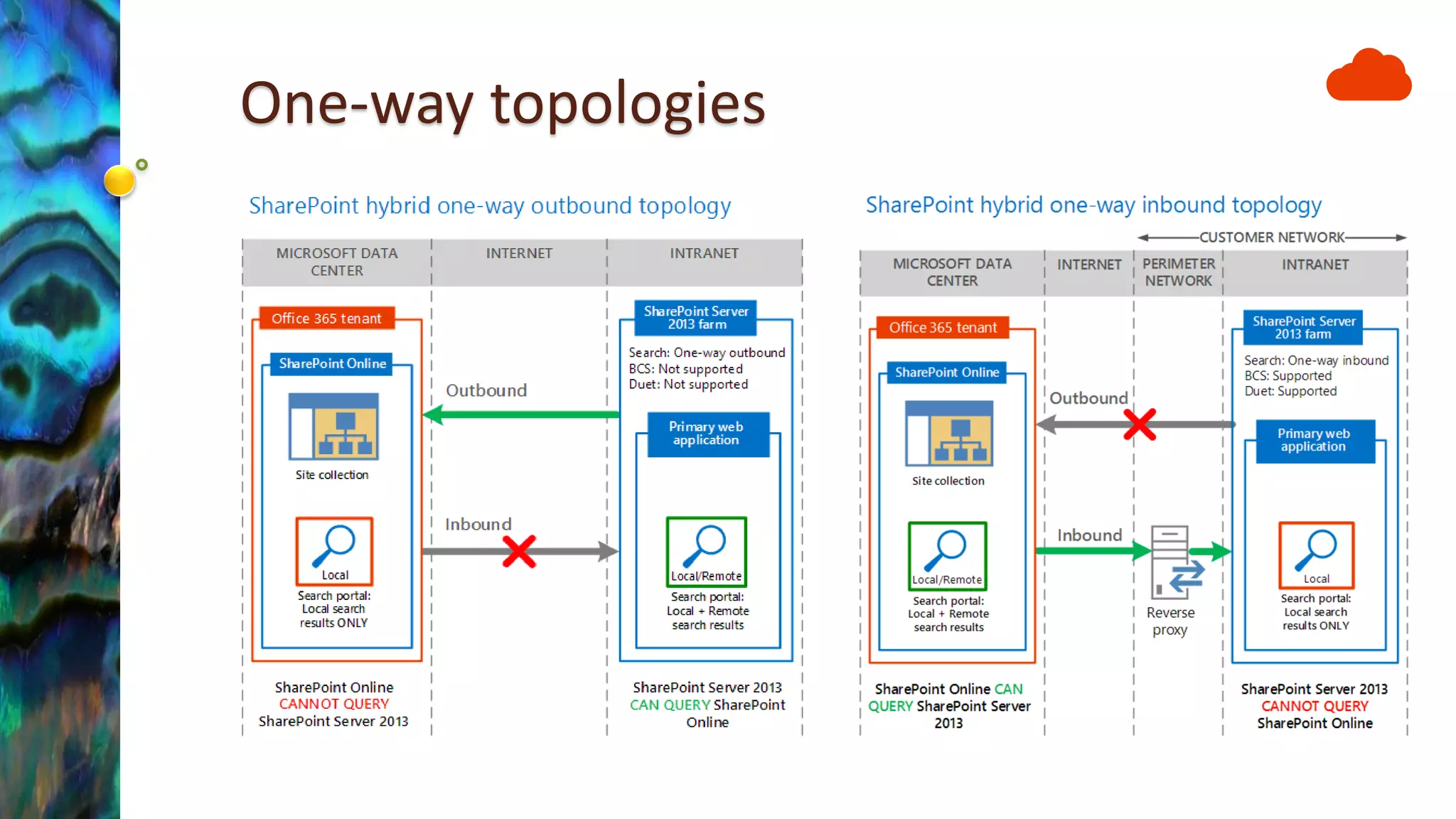
One-way topologies
User experience 
A sub optimal experience 
Hybrid Search Federation 
Common search navigation 
From Richard DiZerega 
SharePoint Online Implementation Roadmap
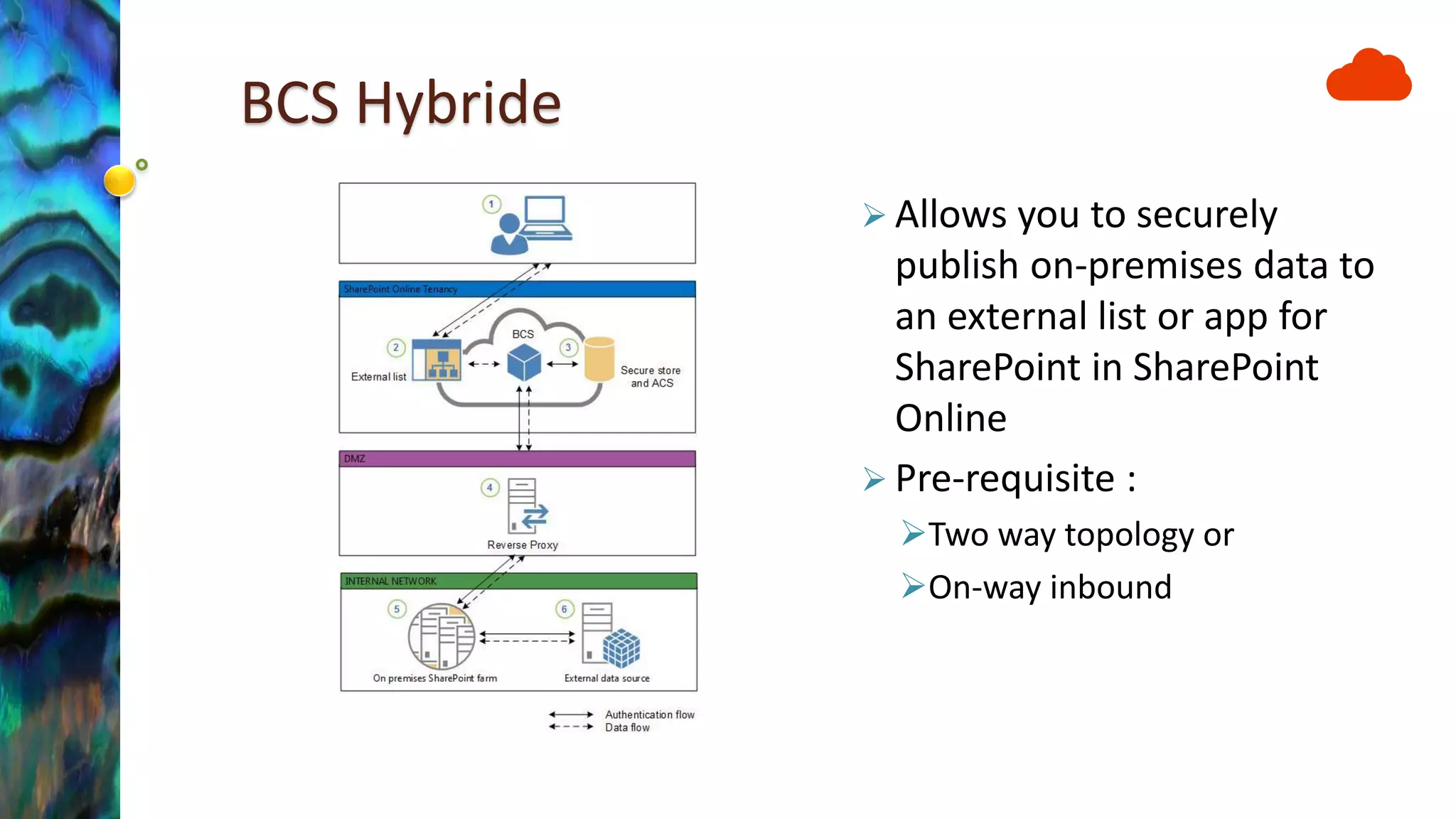
BCS Hybride 
Allows you to securely publish on-premises data to an external list or app for SharePoint in SharePoint Online 
Pre-requisite : 
Two way topology or 
On-way inbound
Internet sites
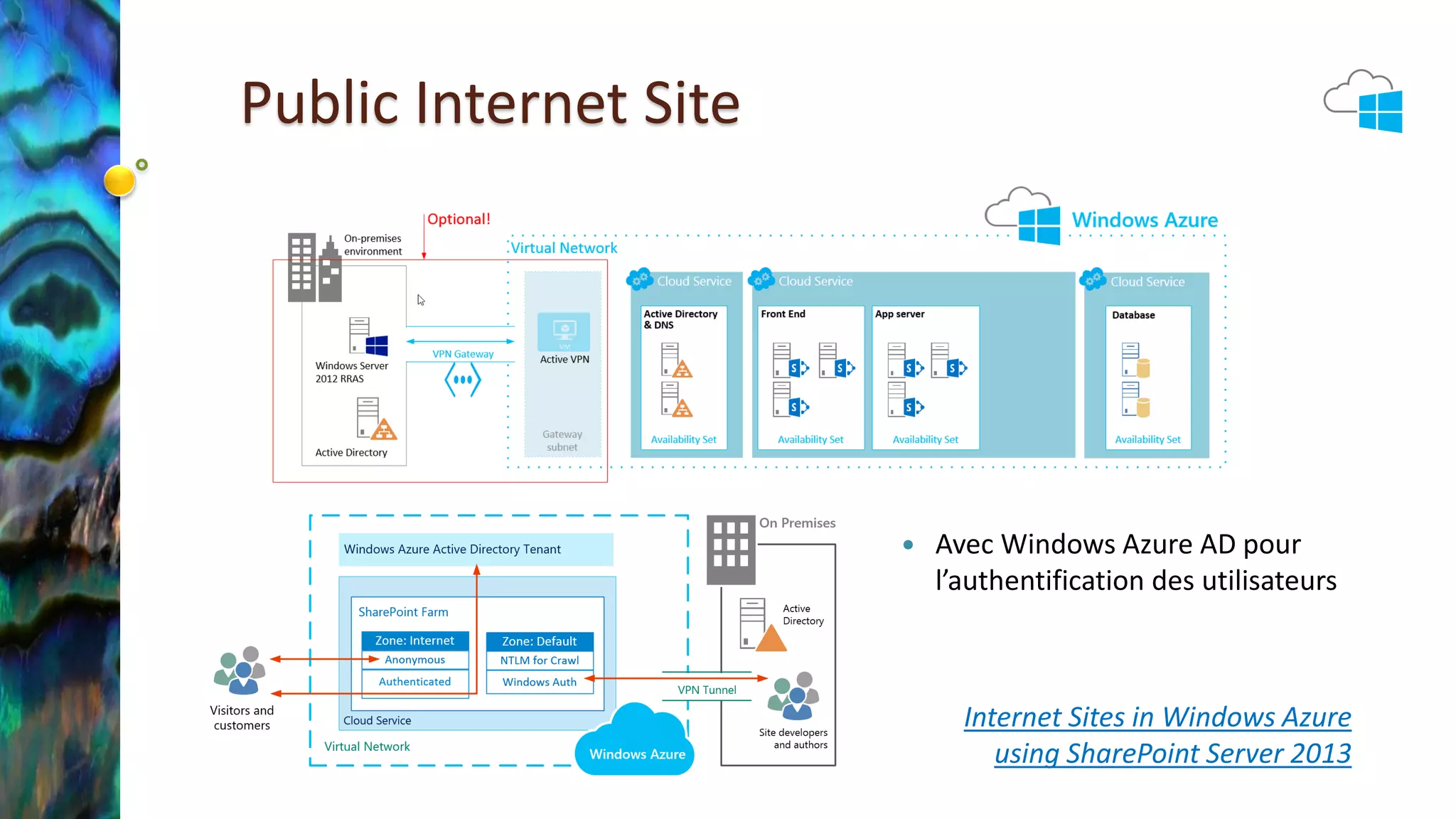
Public Internet Site 
Avec Windows Azure AD pour l’authentification des utilisateurs 
Internet Sites in Windows Azure using SharePoint Server 2013
Development and Testing
Development and tests environments 
in Microsoft Azure 
 Create SharePoint 2013 development environments 
quickly on Azure 
◦ http://blogs.msdn.com/b/sharepointdev/archive/2013/09/26/create-sharepoint- 
2013-development-environments-quickly-on-azure.aspx 
 15 to 30 minutes
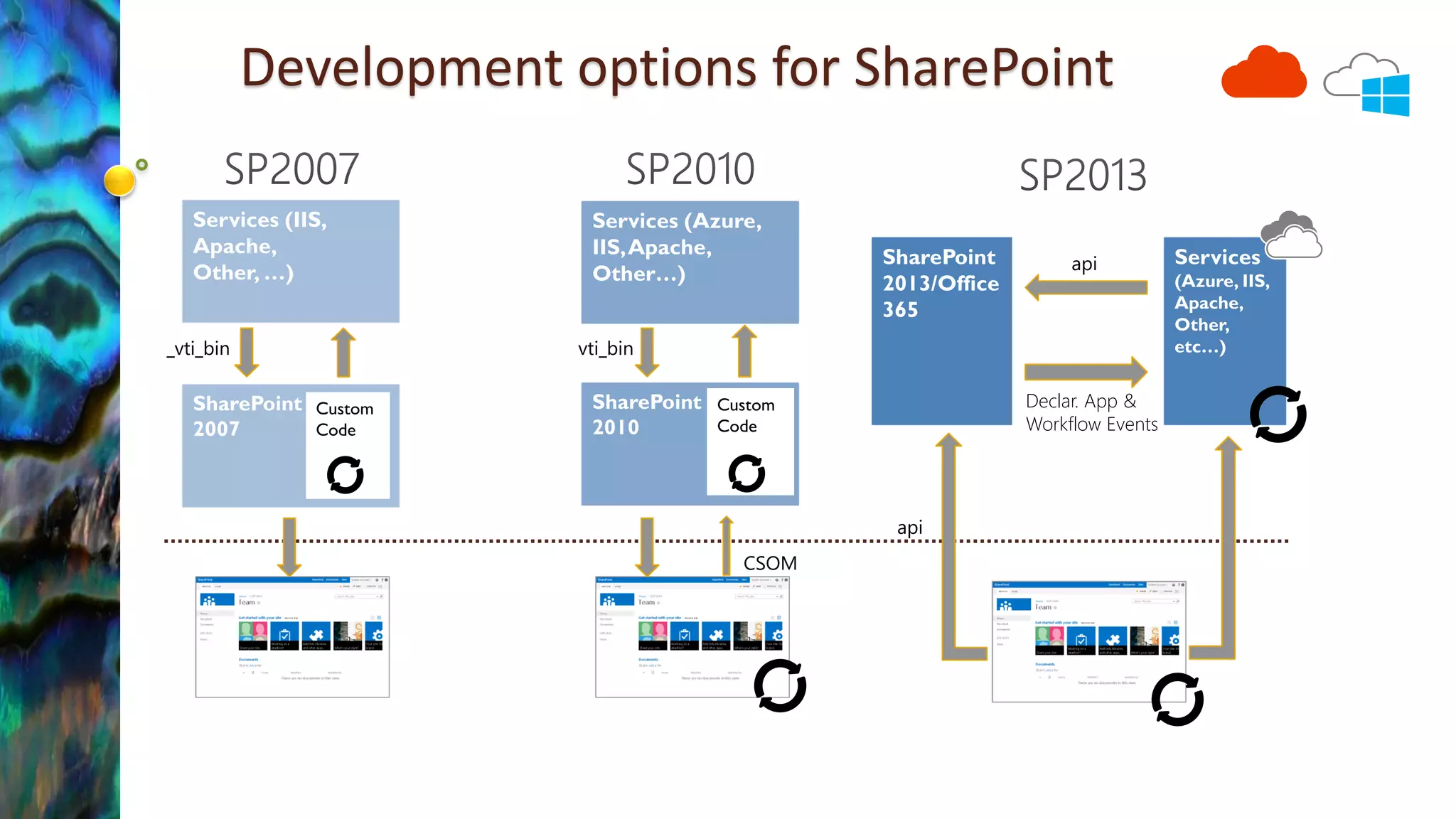
Development options for SharePoint 
Declar. App & 
Workflow Events 
CSOM 
_vti_bin 
_vti_bin 
_api 
_api
Disaster recovery
Disaster/recovery farm in Azure 
Design principles 
Network 
Office Web 
Applications Farm 
SharePoint Farm 
Directory 
Network 
Content & SA 
Data 
SPC206
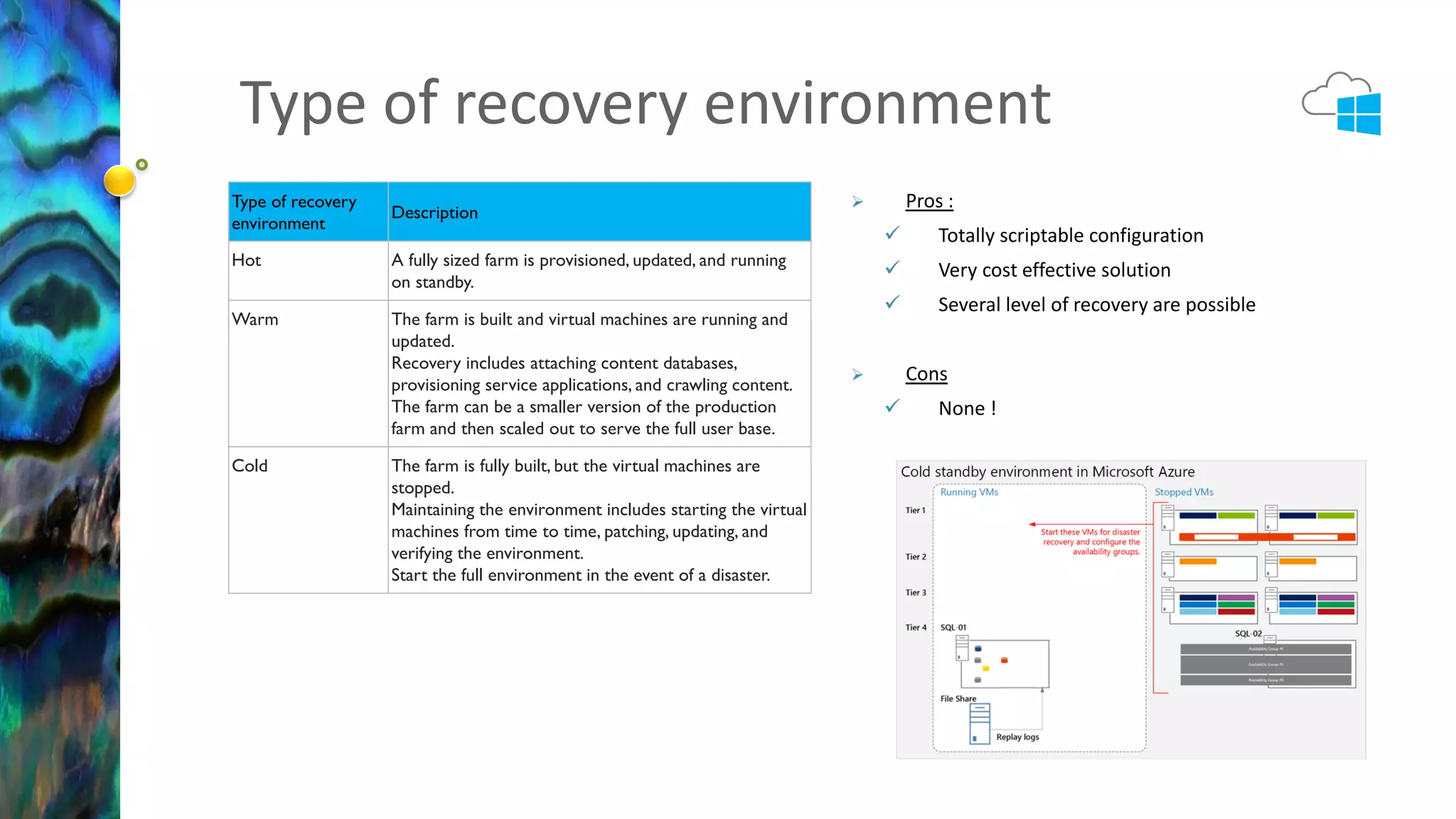
Type of recovery environment 
Type of recovery 
environment 
Description 
Hot A fully sized farm is provisioned, updated, and running 
on standby. 
Warm The farm is built and virtual machines are running and 
updated. 
Recovery includes attaching content databases, 
provisioning service applications, and crawling content. 
The farm can be a smaller version of the production 
farm and then scaled out to serve the full user base. 
Cold The farm is fully built, but the virtual machines are 
stopped. 
Maintaining the environment includes starting the virtual 
machines from time to time, patching, updating, and 
verifying the environment. 
Start the full environment in the event of a disaster. 
 Pros : 
 Totally scriptable configuration 
 Very cost effective solution 
 Several level of recovery are possible 
 Cons 
 None !
Identities management
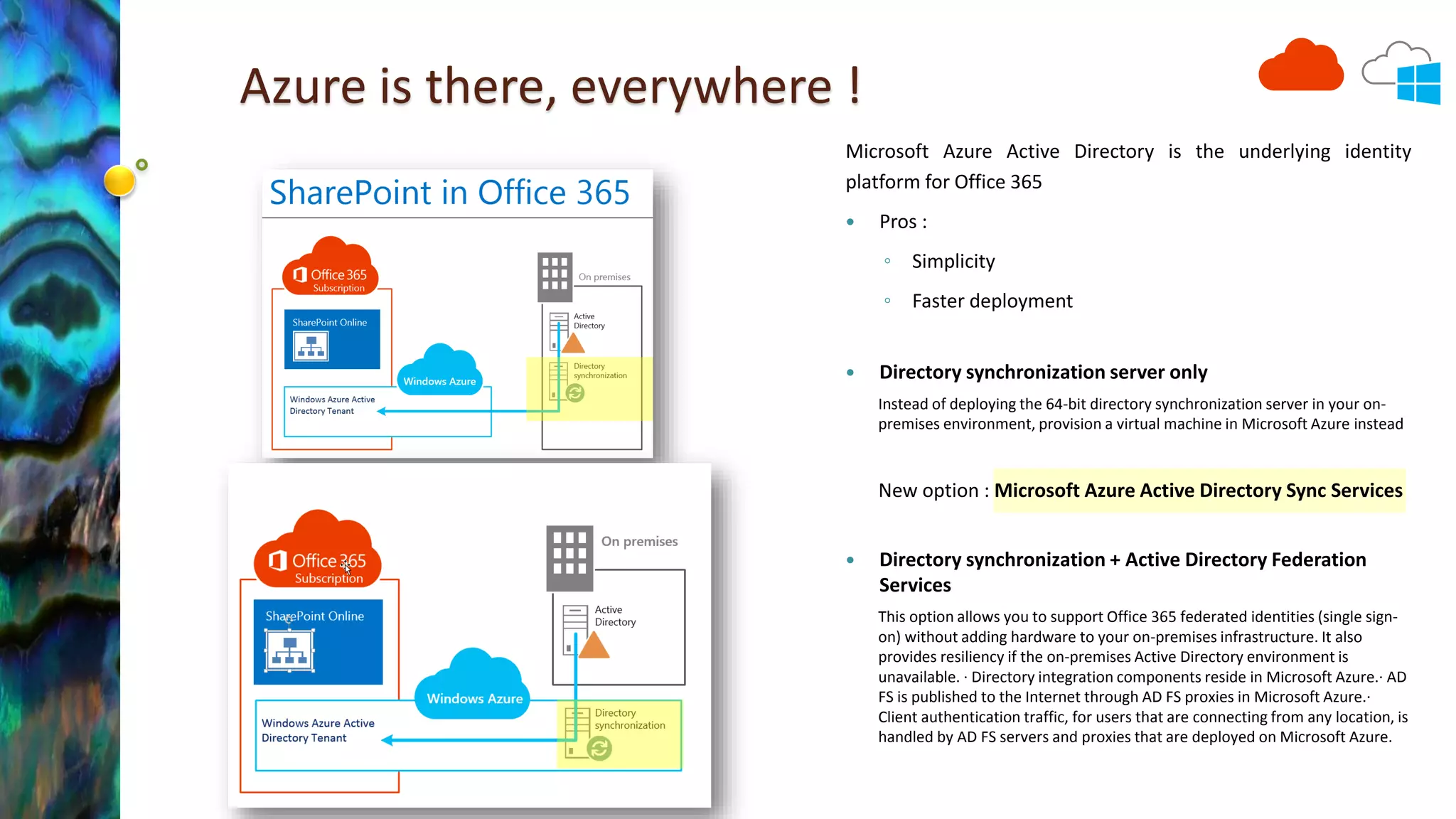
Azure is there, everywhere ! 
Microsoft Azure Active Directory is the underlying identity 
platform for Office 365 
 Pros : 
◦ Simplicity 
◦ Faster deployment 
 Directory synchronization server only 
Instead of deploying the 64-bit directory synchronization server in your on-premises 
environment, provision a virtual machine in Microsoft Azure instead 
New option : Microsoft Azure Active Directory Sync Services 
 Directory synchronization + Active Directory Federation 
Services 
This option allows you to support Office 365 federated identities (single sign-on) 
without adding hardware to your on-premises infrastructure. It also 
provides resiliency if the on-premises Active Directory environment is 
unavailable. · Directory integration components reside in Microsoft Azure.· AD 
FS is published to the Internet through AD FS proxies in Microsoft Azure.· 
Client authentication traffic, for users that are connecting from any location, is 
handled by AD FS servers and proxies that are deployed on Microsoft Azure.
Governance and beyond
Hybrid to do what ? Usage Matrix 
This isevenmore truefor Office 365 ! 
Usages Matrix (fromSPC264) 
This is a starting point, but help to create this for your technology landscape. 
SPC264
A step beyond, SharePoint workloads candidate for the Cloud 
 Cloud solutions are more and more mature for 
all workloads. 
Usages 
SharePoint 
On premises 
SharePoint Online 
(Office 365) 
IaaS Platform 
(Microsoft Azure) 
SharePoint 
hosted 
(outside Europe) 
SharePoint 
hosted 
(in Europe) 
1. Intranet 
Social & Collab 
+ +++ + + + 
2. Intranet 
Documents 
++ +++ ++ ++ ++ 
3. Intranet 
Sensitive Data 
+++ + + - +++ 
4. Intranet 
My Sites 
++ +++ ++ ++ ++ 
4. Intranet 
OneDrive 
++ +++ ++ ++ ++ 
5. Intranet 
Publishing site 
+++ ++ +++ ++ ++ 
6. Intranet 
Search 
+++ ++ ++ ++ ++ 
7. Intranet 
BI 
++ +++ ++ ++ ++ 
8. Intranet 
LOB applications 
+++ ++ ++ ++ ++ 
9. Intranet 
Video Portal 
+ +++ 
10. Extranet + +++ ++ ++ ++ 
11. Internet 
Publishing site 
++ - +++ +++ +++ 
As of November 1st, 2014. 
Environments SharePoint 
On-premises 
SharePoint Online 
(Office 365) 
IaaS 
(Microsoft 
Azure) 
SharePoint 
hosted 
(outside Europe) 
SharePoint 
hosted 
(in Europe) 
1. Production +++ +++ +++ ++ ++ 
2. Performance 
tests 
++ (costs) 
- Not replicable 
on-prem 
+++ ++ ++ 
3. User 
acceptance tests 
++ 
+ 
(if standard features) 
+++ ++ ++ 
4. Development ++ 
++ 
(apps only) 
+++ ++ ++ 
5. Disaster 
Recovery 
++ (costs) ++ +++ ++ ++ 
NB : it’s only it is a relative rating of the solutions with respect to each other.
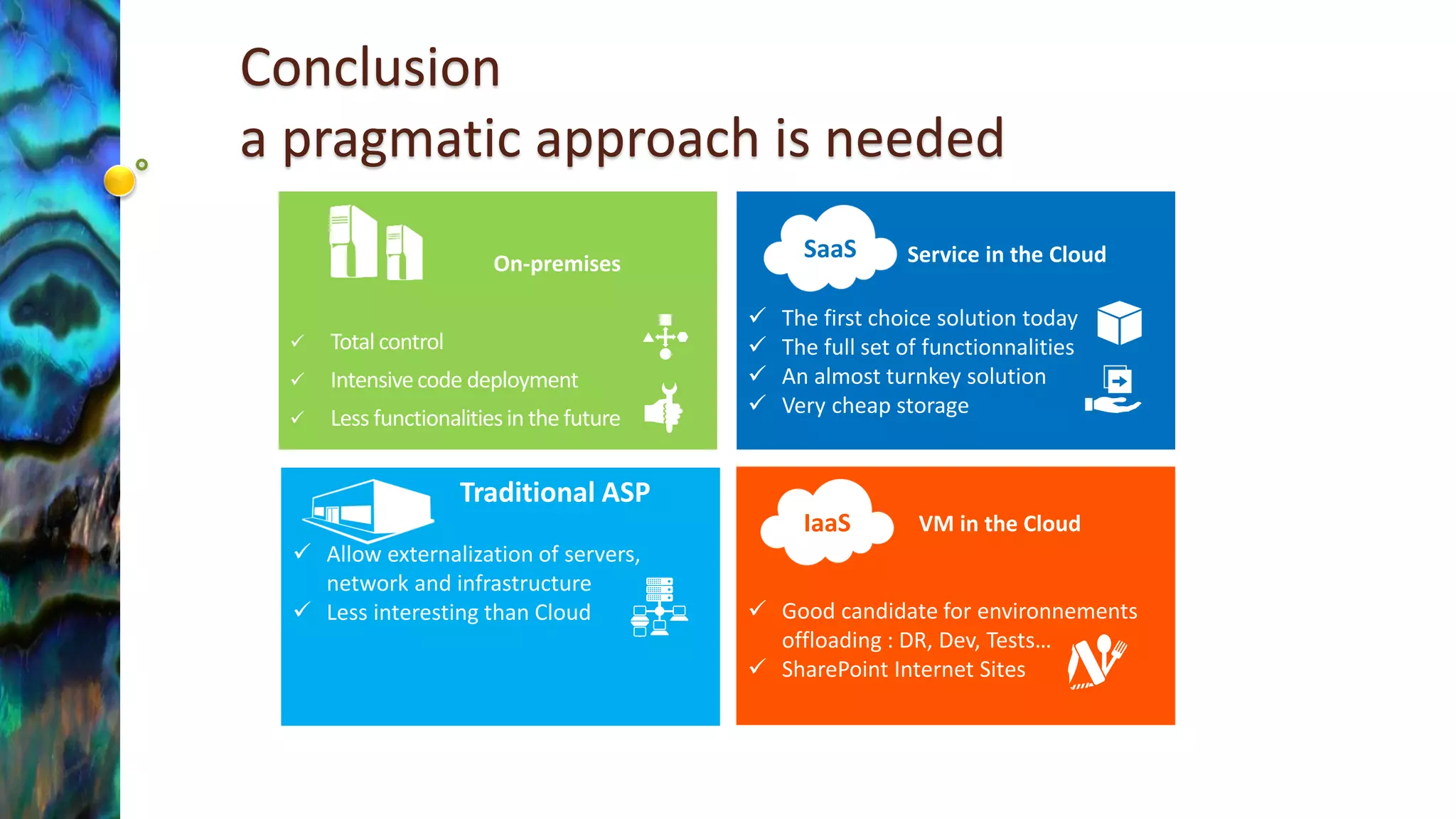
On-premises 
Total control 
Intensive code deployment 
Less functionalities in the futureConclusiona pragmatic approach is needed 
Traditional ASP 
Allow externalization of servers, network and infrastructure 
Less interesting than Cloud 
VM in the Cloud 
Good candidate for environnements offloading : DR, Dev, Tests… 
SharePoint Internet Sites 
IaaS 
Service in the Cloud 
The first choice solution today 
The full set of functionnalities 
An almost turnkey solution 
Very cheap storage 
SaaS

Office 365 Saturday Europe - Yammer, Office 365, SharePoint (yOS) : hybrid architectures yes but to do what?

  • 1.
    Hybrid architecturesYes !But to do what ? Speaker: Patrick Guimonet 15thNovember 2014 Host: Matthew Hughes
  • 2.
  • 3.
  • 4.
    Why hybrid now? It is all about transitioningbetween : On –premises infrastructures already in place in the enterprises New potentialities provided by Cloud offerings With hybrid deployments, you may get the best of both world.
  • 5.
    Where are we? SPC243 IT’s losing battle against Cloud adoption
  • 6.
    Elasticity On-premises Cloud Pro and cons of each side SP Infra can be complex Security can be a concern Hardly predictable load Identities management Need several env. : Dev, Tests, Pre-Prod, Prod Scalable multi-servers Progressive migration SP S2013 SP1 support natively hybrids archi. Data transfers and nationality Reversibility Spaces to deploy custom code Availability and DR Small or no investments Evolution at your own pace Automation is a premium Facts about the product Cloud Solutions Cloud Challenges
  • 7.
    Office 365 TheSaaS offering for Sharepoint and Yammer. + + Rich feature set is always up to date. Includes a Windows Azure Active Directory tenant Directory integration includes synchronizing account names and passwords between the on-premises AD environment and the Windows Azure AD tenant. Client communication over the Internet through encrypted and authenticated access (port 443). A lot of storage for SharePoint Now the de facto first choice ! @mkashman
  • 8.
    Third choice Microsoft Azure D12 D3,D4 A4, A6 Since 2013  Allow all the features of on- Microsoft Azure premises solutions  Fully scripted deployment  Behind the scene with Office 365  A good choice The Microsoft IaaS (and PaaS) offering for SharePoint.
  • 9.
    Hybrid solutions inthe yOS worldYammer, Office 365, SharePoint
  • 10.
    DMS / ECM Documents Management System Entreprise Content Management
  • 11.
    SharePoint Extranet scenario local SP and Extranet in Office 365 SharePoint 2013 Intranet Sites Internal documents Search 1 Personal Sites Personal documents SharePoint Online Extranet Sites Documents to share Search 2  A simple scenario  No tool to synchronize or transfer from on side to the other  Identities federation is not mandatory but is plus.  Pros :  Simplified infrastructure  Sensitive data kept internally
  • 12.
  • 13.
    SharePoint 2013 Yammer Third party Products On-premises Oui Not available Yes (Sitrion, Beezy…) Cloud Office 365 Oui Possible Hybrid Possible What choice do we have for Social in yOS ?
  • 14.
    Scenario #1 :all Office 365 SharePoint Online Intranet & Extranet Sites SharePoint Documents Search 1 Personal sites OneDrive for Business Personal storage Yammer Conversations Documents in Yammer Search 2  Pros :  Native integration  Simplified deployment  Cons  Governance is needed  Identities management is needed
  • 15.
    In Office 365, native integration with Yammer (1)
  • 16.
    In Office 365, native integration with Yammer (2)  Start Yammer discussions on Office documents For example, in Excel Online In Yammer Not yet fully deployed
  • 17.
    Scenario #2 :Site data on-prem, Personal Data and conversations in the Cloud SharePoint 2013 on-prem Intranet Sites Team Documents Search 1 Personal Sites OneDrive for Business Personal documents Yammer Conversations Documents in Yammer Search 2  SharePoint on prem + Yammer et personal data in the Cloud  Pros :  Best of both world  Benefit the great functionalities of Yammer  Benefit storage space available on OneDrive  Cons  Extra configuration needed Redirect users to Office 365 with OneDrive for Business: scenario overview
  • 18.
    Scenario #3: Alldata local, conversation in the Cloud SharePoint 2013 on-prem Intranet Sites Team Documents Search 1 Personal Sites OneDrive for Business on-prem Personal documents Yammer Conversations Documents in Yammer Search 2 Pros : All documents remain locally stored Benefit the great functionalities of Yammer Cons Extra configuration needed : Integrate Yammer with web parts in Intranet sites Deactivate file storage in Yammer Indexing conversations is not available yet in the standard offering.
  • 19.
  • 20.
    Power BI Architecture Power Query Power Pivot Power View Power Map Power BI sites Power BI Q&A Power BI Admin Center Power BI For iOS Data Catalog Internal DBs Data Management Gateway Search and Queries sharing Analyst End-users Publishing External DBs OData feeds Power BI For Windows 8
  • 21.
  • 22.
    « Classical »hybrid scenarios (according to Technet) TechNet provides guidance for deploying 3 SP hybrid solutions :  Search  BCS  Duet (SAP) Details on Overview of hybrid SharePoint 2013 for technical decision makers
  • 23.
  • 24.
    User experience Asub optimal experience Hybrid Search Federation Common search navigation From Richard DiZerega SharePoint Online Implementation Roadmap
  • 25.
    BCS Hybride Allowsyou to securely publish on-premises data to an external list or app for SharePoint in SharePoint Online Pre-requisite : Two way topology or On-way inbound
  • 26.
  • 27.
    Public Internet Site Avec Windows Azure AD pour l’authentification des utilisateurs Internet Sites in Windows Azure using SharePoint Server 2013
  • 28.
  • 29.
    Development and testsenvironments in Microsoft Azure  Create SharePoint 2013 development environments quickly on Azure ◦ http://blogs.msdn.com/b/sharepointdev/archive/2013/09/26/create-sharepoint- 2013-development-environments-quickly-on-azure.aspx  15 to 30 minutes
  • 30.
    Development options forSharePoint Declar. App & Workflow Events CSOM _vti_bin _vti_bin _api _api
  • 31.
  • 32.
    Disaster/recovery farm inAzure Design principles Network Office Web Applications Farm SharePoint Farm Directory Network Content & SA Data SPC206
  • 33.
    Type of recoveryenvironment Type of recovery environment Description Hot A fully sized farm is provisioned, updated, and running on standby. Warm The farm is built and virtual machines are running and updated. Recovery includes attaching content databases, provisioning service applications, and crawling content. The farm can be a smaller version of the production farm and then scaled out to serve the full user base. Cold The farm is fully built, but the virtual machines are stopped. Maintaining the environment includes starting the virtual machines from time to time, patching, updating, and verifying the environment. Start the full environment in the event of a disaster.  Pros :  Totally scriptable configuration  Very cost effective solution  Several level of recovery are possible  Cons  None !
  • 34.
  • 35.
    Azure is there,everywhere ! Microsoft Azure Active Directory is the underlying identity platform for Office 365  Pros : ◦ Simplicity ◦ Faster deployment  Directory synchronization server only Instead of deploying the 64-bit directory synchronization server in your on-premises environment, provision a virtual machine in Microsoft Azure instead New option : Microsoft Azure Active Directory Sync Services  Directory synchronization + Active Directory Federation Services This option allows you to support Office 365 federated identities (single sign-on) without adding hardware to your on-premises infrastructure. It also provides resiliency if the on-premises Active Directory environment is unavailable. · Directory integration components reside in Microsoft Azure.· AD FS is published to the Internet through AD FS proxies in Microsoft Azure.· Client authentication traffic, for users that are connecting from any location, is handled by AD FS servers and proxies that are deployed on Microsoft Azure.
  • 36.
  • 37.
    Hybrid to dowhat ? Usage Matrix This isevenmore truefor Office 365 ! Usages Matrix (fromSPC264) This is a starting point, but help to create this for your technology landscape. SPC264
  • 38.
    A step beyond,SharePoint workloads candidate for the Cloud  Cloud solutions are more and more mature for all workloads. Usages SharePoint On premises SharePoint Online (Office 365) IaaS Platform (Microsoft Azure) SharePoint hosted (outside Europe) SharePoint hosted (in Europe) 1. Intranet Social & Collab + +++ + + + 2. Intranet Documents ++ +++ ++ ++ ++ 3. Intranet Sensitive Data +++ + + - +++ 4. Intranet My Sites ++ +++ ++ ++ ++ 4. Intranet OneDrive ++ +++ ++ ++ ++ 5. Intranet Publishing site +++ ++ +++ ++ ++ 6. Intranet Search +++ ++ ++ ++ ++ 7. Intranet BI ++ +++ ++ ++ ++ 8. Intranet LOB applications +++ ++ ++ ++ ++ 9. Intranet Video Portal + +++ 10. Extranet + +++ ++ ++ ++ 11. Internet Publishing site ++ - +++ +++ +++ As of November 1st, 2014. Environments SharePoint On-premises SharePoint Online (Office 365) IaaS (Microsoft Azure) SharePoint hosted (outside Europe) SharePoint hosted (in Europe) 1. Production +++ +++ +++ ++ ++ 2. Performance tests ++ (costs) - Not replicable on-prem +++ ++ ++ 3. User acceptance tests ++ + (if standard features) +++ ++ ++ 4. Development ++ ++ (apps only) +++ ++ ++ 5. Disaster Recovery ++ (costs) ++ +++ ++ ++ NB : it’s only it is a relative rating of the solutions with respect to each other.
  • 39.
    On-premises Total control Intensive code deployment Less functionalities in the futureConclusiona pragmatic approach is needed Traditional ASP Allow externalization of servers, network and infrastructure Less interesting than Cloud VM in the Cloud Good candidate for environnements offloading : DR, Dev, Tests… SharePoint Internet Sites IaaS Service in the Cloud The first choice solution today The full set of functionnalities An almost turnkey solution Very cheap storage SaaS