Yana Berkovich Data Platform MVP
@yana_Berkovich
YanaBerkovich.com
Data and Analytics
Workshop
Yana Berkovich
BI Analyst & DEV, Data Platform MVP
Consultant, Product Manager
Reporting stream lead Provincial Healthcare Services
https://www.linkedin.com/in/yanaberkovich
http://yanaberkovich.com
@Yana_Berkovich
Agenda
• Analytics, Data and BI
• Why? The Business Goal
• How? - what is PowerBI?
• Getting started
• DATA
• Building the report
• UI rules
• Sharing, security and Licensing
• Where do I start?
Business Intelligence
• Google's top result, Wikipedia: "Business intelligence (BI) is a set of
theories, methodologies, processes, architectures, and technologies
that transform raw data into meaningful and useful information for
business purposes. “
Data Information Insight Decision
Data Lifecycle
Create
Store
UseShare
Archive
Delete
Data Analysis, Analytics BI AI…
Why?
Data Driven Decision Support
What is the Busienss Question we want to answer?
A suite of business analytics tools that deliver insights.
Data processing and data visualization tool
https://powerbi.microsoft.com
What is PowerBI?
Audience: Business Users & Managers
Users: IT, Finance, HR, Marketing, Manufacturing,
Data Analysts…
What is PowerBI used for?
Connect to Data
sources
Create Reports/
dashboards/
Applications
Collaborate and
Share
Data Insights
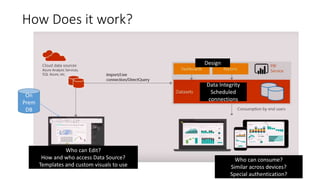
How Does it work?
Who can Edit?
How and who access Data Source?
Templates and custom visuals to use
On
Prem
DB
Who can consume?
Similar across devices?
Special authentication?
Design
Data Integrity
Scheduled
connections
What is currently part of PowerBI
Power BI desktop
Power BI Desktop is the report authoring tool - https://powerbi.microsoft.com/en-us/desktop
Access data from various data sources and transform them for your reporting needs
Power BI Service – Pro/ Premium (Capacity, Licensing and Monitoring)
Browser based portal - https://app.powerbi.com
Share and collaborate with your collogues and wider audience
PowerBI Report Server
On premise solution for organizational reporting
PowerBI Mobile
Mobile Application, can be connected to your PowerBI on pemise or the cloud
PowerBI Data Gateway
Install in your organization, to enable secure data connection (same as for PowerApps)
Embedded Analytics
PowerBI in Azure, set powerBI when needed, in the Azure portal
Use PowerBI REST API & JS to embed in your applications
Getting Started
• Downloading Desktop
• O365 and PowerBI
• The Power Platform
• What is Premium ?
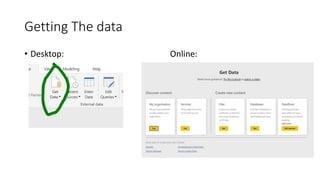
Getting The data
• Desktop: Online:
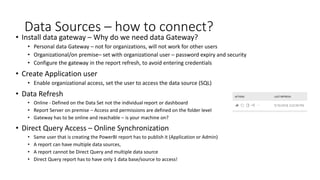
Data Sources – how to connect?
• Install data gateway – Why do we need data Gateway?
• Personal data Gateway – not for organizations, will not work for other users
• Organizational/on premise– set with organizational user – password expiry and security
• Configure the gateway in the report refresh, to avoid entering credentials
• Create Application user
• Enable organizational access, set the user to access the data source (SQL)
• Data Refresh
• Online - Defined on the Data Set not the individual report or dashboard
• Report Server on premise – Access and permissions are defined on the folder level
• Gateway has to be online and reachable – is your machine on?
• Direct Query Access – Online Synchronization
• Same user that is creating the PowerBI report has to publish it (Application or Admin)
• A report can have multiple data sources,
• A report cannot be Direct Query and multiple data source
• Direct Query report has to have only 1 data base/source to access!
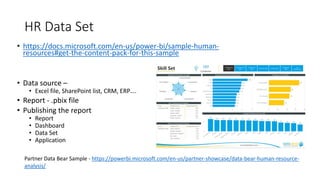
HR Data Set
• https://docs.microsoft.com/en-us/power-bi/sample-human-
resources#get-the-content-pack-for-this-sample
• Data source –
• Excel file, SharePoint list, CRM, ERP….
• Report - .pbix file
• Publishing the report
• Report
• Dashboard
• Data Set
• Application
Partner Data Bear Sample - https://powerbi.microsoft.com/en-us/partner-showcase/data-bear-human-resource-
analysis/
Creating the report
Visual Components
• The Canvas
• PowerBI visuals
• Custom Visuals
• Visuals Gallery
• Pages
• Design bar
Logical Components
• Tables- Dimensions
• Measures &
Calculations (DAX, M,
Quick measures)
• Data Sets
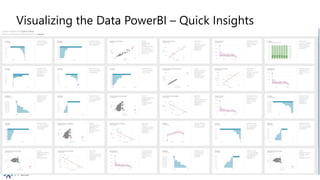
Visualizing the Data PowerBI – Quick Insights
Quick insights mode
Quick insights mode
It is Self Service BI… everyone can do everything?
Take a look at the story gallery
– Worst PowerBI report…
– Yeah that’s a thing
Self Service BI…We can make it so pretty….
From: ADOBE Blog
Recommendations for Successful UI
• Place users in control of the interface
• Easy Navigation
• Be predictable - consistency
• Be acknowledging
• Clear concise fonts, titles etc.
• Avoid clutter – clean design
• Be intuitive
Layout
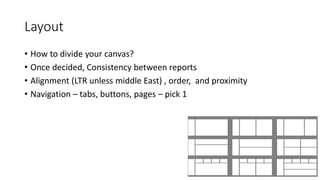
• How to divide your canvas?
• Once decided, Consistency between reports
• Alignment (LTR unless middle East) , order, and proximity
• Navigation – tabs, buttons, pages – pick 1
Branding
• Templates - Reports colors, Color scheme, fonts, frame sizes…
• Corporate Layouts – in report server
• Corporate backgrounds and guides
• Corporate Theme can be added
Data Visualization Recommended Best practices (Rules)
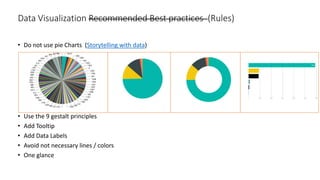
• Do not use pie Charts (Storytelling with data)
• Use the 9 gestalt principles
• Add Tooltip
• Add Data Labels
• Avoid not necessary lines / colors
• One glance
Data Visualization
Publishing
Report? Dashboard? application
Let’s start with the most celebrated topic…
(Credits: @geek_king)
Permissions
Add the permission directly to your workspace
Add O365 group
• Internal Azure AD users
• B2B users that are trusted
Permissions types:
Member
Admin
Contributor
Data Security – Who can Access my data??
• Access Management can be done through groups to the groups Workspace
• The Access management through groups can be done directly in O365 –
People or through PowerShell
• External Business Users with O365 B2B
• Premium capacity - External users including token based authentication
Premium gives
view access to
entire org
Pro – only other
Pro users can
view
B2B/ Embedded
gives external share
Publishing vs Sharing
• Using PowerBI App – Allows permissions,
push to group, selective publishing of content,
“production” environment
• Publish to your workspace
• Pin to Dashboard
• Embed in Azure
• Publish in the Report Server
Who is Important Enough??
• For more information check PowerBI.com
• Or great webinar by Ted Pattison – MVP, who starts with all the licensing options Link
• He is also speaking here 
Free Pro License Premium
License
Report Server
(SQL 2017 or
PowerBI
Reporting)
Azure on
demand
Webinars/Blogs and User groups..
PowerBI Blog
Guy in a cube
Free Training Avi Singh
https://powerbi.microsoft.com/en-
us/developers/
All source code for visuals in GitHub
PowerBI Where
Should I start? Vancouver PowerBI
User Group
Vancouver Tableau
User Group
Vancouver PASS &
SQL USER Group
PASS org

Data analytics and powerbi intro

  • 1.
    Yana Berkovich DataPlatform MVP @yana_Berkovich YanaBerkovich.com Data and Analytics Workshop
  • 2.
    Yana Berkovich BI Analyst& DEV, Data Platform MVP Consultant, Product Manager Reporting stream lead Provincial Healthcare Services https://www.linkedin.com/in/yanaberkovich http://yanaberkovich.com @Yana_Berkovich
  • 3.
    Agenda • Analytics, Dataand BI • Why? The Business Goal • How? - what is PowerBI? • Getting started • DATA • Building the report • UI rules • Sharing, security and Licensing • Where do I start?
  • 4.
    Business Intelligence • Google'stop result, Wikipedia: "Business intelligence (BI) is a set of theories, methodologies, processes, architectures, and technologies that transform raw data into meaningful and useful information for business purposes. “ Data Information Insight Decision
  • 5.
  • 6.
  • 7.
    Why? Data Driven DecisionSupport What is the Busienss Question we want to answer?
  • 9.
    A suite ofbusiness analytics tools that deliver insights. Data processing and data visualization tool https://powerbi.microsoft.com What is PowerBI? Audience: Business Users & Managers Users: IT, Finance, HR, Marketing, Manufacturing, Data Analysts…
  • 10.
    What is PowerBIused for? Connect to Data sources Create Reports/ dashboards/ Applications Collaborate and Share Data Insights
  • 11.
    How Does itwork? Who can Edit? How and who access Data Source? Templates and custom visuals to use On Prem DB Who can consume? Similar across devices? Special authentication? Design Data Integrity Scheduled connections
  • 12.
    What is currentlypart of PowerBI Power BI desktop Power BI Desktop is the report authoring tool - https://powerbi.microsoft.com/en-us/desktop Access data from various data sources and transform them for your reporting needs Power BI Service – Pro/ Premium (Capacity, Licensing and Monitoring) Browser based portal - https://app.powerbi.com Share and collaborate with your collogues and wider audience PowerBI Report Server On premise solution for organizational reporting PowerBI Mobile Mobile Application, can be connected to your PowerBI on pemise or the cloud PowerBI Data Gateway Install in your organization, to enable secure data connection (same as for PowerApps) Embedded Analytics PowerBI in Azure, set powerBI when needed, in the Azure portal Use PowerBI REST API & JS to embed in your applications
  • 13.
    Getting Started • DownloadingDesktop • O365 and PowerBI • The Power Platform • What is Premium ?
  • 14.
    Getting The data •Desktop: Online:
  • 15.
    Data Sources –how to connect? • Install data gateway – Why do we need data Gateway? • Personal data Gateway – not for organizations, will not work for other users • Organizational/on premise– set with organizational user – password expiry and security • Configure the gateway in the report refresh, to avoid entering credentials • Create Application user • Enable organizational access, set the user to access the data source (SQL) • Data Refresh • Online - Defined on the Data Set not the individual report or dashboard • Report Server on premise – Access and permissions are defined on the folder level • Gateway has to be online and reachable – is your machine on? • Direct Query Access – Online Synchronization • Same user that is creating the PowerBI report has to publish it (Application or Admin) • A report can have multiple data sources, • A report cannot be Direct Query and multiple data source • Direct Query report has to have only 1 data base/source to access!
  • 16.
    HR Data Set •https://docs.microsoft.com/en-us/power-bi/sample-human- resources#get-the-content-pack-for-this-sample • Data source – • Excel file, SharePoint list, CRM, ERP…. • Report - .pbix file • Publishing the report • Report • Dashboard • Data Set • Application Partner Data Bear Sample - https://powerbi.microsoft.com/en-us/partner-showcase/data-bear-human-resource- analysis/
  • 17.
    Creating the report VisualComponents • The Canvas • PowerBI visuals • Custom Visuals • Visuals Gallery • Pages • Design bar Logical Components • Tables- Dimensions • Measures & Calculations (DAX, M, Quick measures) • Data Sets
  • 18.
    Visualizing the DataPowerBI – Quick Insights Quick insights mode Quick insights mode
  • 19.
    It is SelfService BI… everyone can do everything? Take a look at the story gallery – Worst PowerBI report… – Yeah that’s a thing
  • 20.
    Self Service BI…Wecan make it so pretty…. From: ADOBE Blog
  • 21.
    Recommendations for SuccessfulUI • Place users in control of the interface • Easy Navigation • Be predictable - consistency • Be acknowledging • Clear concise fonts, titles etc. • Avoid clutter – clean design • Be intuitive
  • 22.
    Layout • How todivide your canvas? • Once decided, Consistency between reports • Alignment (LTR unless middle East) , order, and proximity • Navigation – tabs, buttons, pages – pick 1
  • 23.
    Branding • Templates -Reports colors, Color scheme, fonts, frame sizes… • Corporate Layouts – in report server • Corporate backgrounds and guides • Corporate Theme can be added
  • 24.
    Data Visualization RecommendedBest practices (Rules) • Do not use pie Charts (Storytelling with data) • Use the 9 gestalt principles • Add Tooltip • Add Data Labels • Avoid not necessary lines / colors • One glance
  • 25.
  • 26.
  • 27.
    Let’s start withthe most celebrated topic… (Credits: @geek_king)
  • 28.
    Permissions Add the permissiondirectly to your workspace Add O365 group • Internal Azure AD users • B2B users that are trusted Permissions types: Member Admin Contributor
  • 29.
    Data Security –Who can Access my data?? • Access Management can be done through groups to the groups Workspace • The Access management through groups can be done directly in O365 – People or through PowerShell • External Business Users with O365 B2B • Premium capacity - External users including token based authentication Premium gives view access to entire org Pro – only other Pro users can view B2B/ Embedded gives external share
  • 30.
    Publishing vs Sharing •Using PowerBI App – Allows permissions, push to group, selective publishing of content, “production” environment • Publish to your workspace • Pin to Dashboard • Embed in Azure • Publish in the Report Server
  • 32.
    Who is ImportantEnough?? • For more information check PowerBI.com • Or great webinar by Ted Pattison – MVP, who starts with all the licensing options Link • He is also speaking here  Free Pro License Premium License Report Server (SQL 2017 or PowerBI Reporting) Azure on demand
  • 33.
    Webinars/Blogs and Usergroups.. PowerBI Blog Guy in a cube Free Training Avi Singh https://powerbi.microsoft.com/en- us/developers/ All source code for visuals in GitHub PowerBI Where Should I start? Vancouver PowerBI User Group Vancouver Tableau User Group Vancouver PASS & SQL USER Group PASS org

Editor's Notes

  • #13 How to design reports in Power Bi Desktop How to publish to Power BI Service
  • #21 Show reports and see if people get what they are about The fish report Vs Performance report for tickets