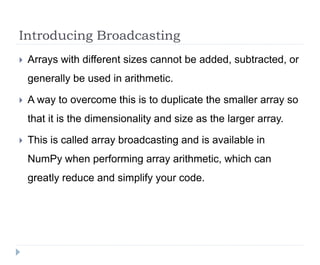
NumPy arrays can be broadcast together to perform arithmetic operations even if they have different shapes. Broadcasting duplicates smaller arrays to match the shape of larger arrays. It allows arrays with incompatible shapes to still be used together in arithmetic operations. This technique greatly simplifies code. Boolean arrays can be used to select, count, or modify values in NumPy arrays based on logical criteria using techniques like masking and fancy indexing.
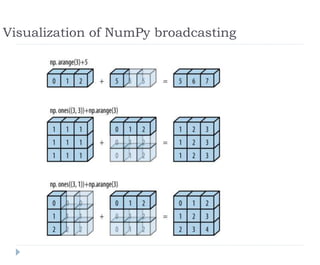
![Add a scalar to an array
In[2]: a=np.arange(3)
a
Out[2]: array([0, 1, 2])
In[3]: a + 5
Out[3]: array([5, 6, 7])](https://image.slidesharecdn.com/numpybroadcasting1-240311160018-11393b12/85/NumPy_Broadcasting-Data-Science-Python-pptx-3-320.jpg)
![Add a one-dimensional array to a two-
dimensional array
In[4]: M = np.ones((3, 3))
M
Out[4]: array([[ 1., 1., 1.],
[ 1., 1., 1.],
[ 1., 1., 1.]])
In[5]: M + a
Out[5]: array([[ 1., 2., 3.],
[ 1., 2., 3.],
[ 1., 2., 3.]])](https://image.slidesharecdn.com/numpybroadcasting1-240311160018-11393b12/85/NumPy_Broadcasting-Data-Science-Python-pptx-4-320.jpg)
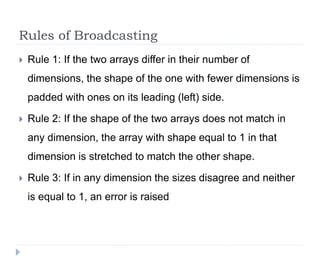
![Broadcasting example 1
In[8]: M = np.ones((2, 3))
a = np.arange(3)
The shapes of the arrays are:
M.shape = (2, 3)
a.shape = (3,)
By rule 1 the array a has fewer dimensions, so we pad it on the left with ones:
M.shape -> (2, 3)
a.shape -> (1, 3)
By rule 2, the first dimension disagrees, so we stretch this dimension to match:
M.shape -> (2, 3)
a.shape -> (2, 3)
The shapes match, the final shape will be (2, 3):
In[9]: M + a
Out[9]: array([[ 1., 2., 3.],
[ 1., 2., 3.]])](https://image.slidesharecdn.com/numpybroadcasting1-240311160018-11393b12/85/NumPy_Broadcasting-Data-Science-Python-pptx-7-320.jpg)
![Broadcasting example 2
In[10]: a = np.arange(3).reshape((3, 1))
b = np.arange(3)
the shape of the arrays:
a.shape = (3, 1)
b.shape = (3,)
Rule 1 :pad the shape of b with ones:
a.shape -> (3, 1)
b.shape -> (1, 3)
And rule 2 :upgrade each of these ones to match the corresponding size of
the other array:
a.shape -> (3, 3)
b.shape -> (3, 3)
These shapes are compatible.:
In[11]: a + b
Out[11]: array([[0, 1, 2],
[1, 2, 3],
[2, 3, 4]])](https://image.slidesharecdn.com/numpybroadcasting1-240311160018-11393b12/85/NumPy_Broadcasting-Data-Science-Python-pptx-8-320.jpg)
![Broadcasting example 3
Arrays are not compatible:
In[12]: M = np.ones((3, 2))
a = np.arange(3)
The shapes of the arrays are:
M.shape = (3, 2)
a.shape = (3,)
Again, rule 1 : pad the shape of a with ones:
M.shape -> (3, 2)
a.shape -> (1, 3)
By rule 2, the first dimension of a is stretched to match that of M:
M.shape -> (3, 2)
a.shape -> (3, 3)
Rule 3—the final shapes do not match, so these two arrays are incompatible,:
In[13]: M + a
ValueError](https://image.slidesharecdn.com/numpybroadcasting1-240311160018-11393b12/85/NumPy_Broadcasting-Data-Science-Python-pptx-9-320.jpg)
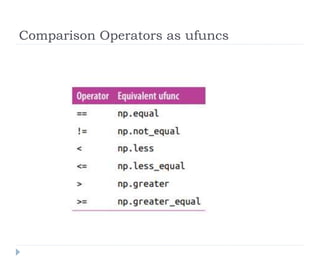
![Comparison Operators as ufuncs
In[4]: x = np.array([1, 2, 3, 4, 5])
In[5]: x < 3 # less than
Out[5]: array([ True, True, False, False, False], dtype=bool)
In[6]: x > 3 # greater than
Out[6]: array([False, False, False, True, True], dtype=bool)
In[7]: x <= 3 # less than or equal
Out[7]: array([ True, True, True, False, False], dtype=bool)
In[8]: x >= 3 # greater than or equal
Out[8]: array([False, False, True, True, True], dtype=bool)
In[9]: x != 3 # not equal
Out[9]: array([ True, True, False, True, True], dtype=bool)
In[10]: x == 3 # equal
Out[10]: array([False, False, True, False, False], dtype=bool)](https://image.slidesharecdn.com/numpybroadcasting1-240311160018-11393b12/85/NumPy_Broadcasting-Data-Science-Python-pptx-12-320.jpg)
![Comparison Operators as ufuncs
In[12]: rng = np.random.RandomState(0)
x = rng.randint(10, size=(3, 4))
x
Out[12]: array([[5, 0, 3, 3], [7, 9, 3, 5], [2, 4, 7, 6]])
In[13]: x < 6
Out[13]: array([[ True, True, True, True],
[False, False, True, True],
[ True, True, False, False]], dtype=bool)](https://image.slidesharecdn.com/numpybroadcasting1-240311160018-11393b12/85/NumPy_Broadcasting-Data-Science-Python-pptx-14-320.jpg)
![Working with Boolean Arrays
In[14]: print(x)
[[5 0 3 3]
[7 9 3 5]
[2 4 7 6]]
Counting entries
In[15]: # how many values less than 6?
np.count_nonzero(x < 6)
Out[15]: 8
:In[16]: np.sum(x < 6)
Out[16]: 8
In[17]: # how many values less than 6 in each row?
np.sum(x < 6, axis=1)
Out[17]: array([4, 2, 2])
This counts the number of values less than 6 in each row of the matrix](https://image.slidesharecdn.com/numpybroadcasting1-240311160018-11393b12/85/NumPy_Broadcasting-Data-Science-Python-pptx-15-320.jpg)
![Working with Boolean Arrays
In[18]: # are there any values greater than 8?
np.any(x > 8)
Out[18]: True
In[19]: # are there any values less than zero?
np.any(x < 0)
Out[19]: False
In[20]: # are all values less than 10?
np.all(x < 10)
Out[20]: True
In[21]: # are all values equal to 6?
np.all(x == 6)
Out[21]: False
In[22]: # are all values in each row less than 8?
np.all(x < 8, axis=1)
Out[22]: array([ True, False, True], dtype=bool)](https://image.slidesharecdn.com/numpybroadcasting1-240311160018-11393b12/85/NumPy_Broadcasting-Data-Science-Python-pptx-16-320.jpg)
![Example: Counting Rainy Days
In[1]: import numpy as np
import pandas as pd
# use Pandas to extract rainfall inches as a NumPy array
rainfall = pd.read_csv('data/Seattle2014.csv')['PRCP'].values
inches = rainfall / 254 # 1/10mm -> inches # 1 inch = 25.4
mm
inches.shape
Out[1]: (365,)
In[2]: %matplotlib inline
import matplotlib.pyplot as plt
import seaborn; seaborn.set() # set plot styles
In[3]: plt.hist(inches, 40);](https://image.slidesharecdn.com/numpybroadcasting1-240311160018-11393b12/85/NumPy_Broadcasting-Data-Science-Python-pptx-17-320.jpg)

![Working with Boolean Arrays
Find all days with rain less than 0.5 inches and greater than one inch
In[23]: np.sum((inches > 0.5) & (inches < 1))
Out[23]: 29
In[24]: np.sum(~( (inches <= 0.5) | (inches >= 1) ))
Out[24]: 29
In[25]: print("Number days without rain: ", np.sum(inches == 0))
print("Number days with rain: ", np.sum(inches != 0))
print("Days with more than 0.5 inches:", np.sum(inches > 0.5))
print("Rainy days with < 0.1 inches :", np.sum((inches > 0) & (inches <
0.2)))
Number days without rain: 215
Number days with rain: 150
Days with more than 0.5 inches: 37
Rainy days with < 0.1 inches : 75](https://image.slidesharecdn.com/numpybroadcasting1-240311160018-11393b12/85/NumPy_Broadcasting-Data-Science-Python-pptx-19-320.jpg)
![Boolean Arrays as Masks
In[26]: x
Out[26]: array([[5, 0, 3, 3],
[7, 9, 3, 5],
[2, 4, 7, 6]])
We can obtain a Boolean array for this condition :
In[27]: x < 5
Out[27]: array([[False, True, True, True],
[False, False, True, False],
[ True, True, False, False]], dtype=bool)
masking operation:
In[28]: x[x < 5]
Out[28]: array([0, 3, 3, 3, 2, 4])](https://image.slidesharecdn.com/numpybroadcasting1-240311160018-11393b12/85/NumPy_Broadcasting-Data-Science-Python-pptx-20-320.jpg)
![Boolean Arrays as Masks
In[29]:
# construct a mask of all rainy days
rainy = (inches > 0)
# construct a mask of all summer days (June 21st is the 172nd day)
days = np.arange(365) summer = (days > 172) & (days < 262)
print("Median precip on rainy days in 2014 (inches): ", np.median(inches[rainy]))
print("Median precip on summer days in 2014 (inches): ",
np.median(inches[summer]))
print("Maximum precip on summer days in 2014 (inches): ",
np.max(inches[summer]))
print("Median precip on non-summer rainy days (inches):",
np.median(inches[rainy & ~summer]))
Median precip on rainy days in 2014 (inches): 0.194881889764
Median precip on summer days in 2014 (inches): 0.0
Maximum precip on summer days in 2014 (inches): 0.850393700787
Median precip on non-summer rainy days (inches): 0.200787401575](https://image.slidesharecdn.com/numpybroadcasting1-240311160018-11393b12/85/NumPy_Broadcasting-Data-Science-Python-pptx-21-320.jpg)
![Exploring Fancy Indexing
In[1]: import numpy as np
rand = np.random.RandomState(42)
x = rand.randint(100, size=10)
print(x)
[51 92 14 71 60 20 82 86 74 74]
To access three different elements:
In[2]: [x[3], x[7], x[2]]
Out[2]: [71, 86, 14]
Alternatively, we can pass a single list or array of indices
to obtain the same result:
In[3]: ind = [3, 7, 4]
x[ind]
Out[3]: array([71, 86, 60])](https://image.slidesharecdn.com/numpybroadcasting1-240311160018-11393b12/85/NumPy_Broadcasting-Data-Science-Python-pptx-23-320.jpg)
![Exploring Fancy Indexing
Fancy indexing also works in multiple dimensions.
In[5]: X = np.arange(12).reshape((3, 4))
X
Out[5]: array([[ 0, 1, 2, 3],
[ 4, 5, 6, 7],
[ 8, 9, 10, 11]])
Like with standard indexing, the first index refers to the row, and
the second to the column:
In[6]: row = np.array([0, 1, 2])
col = np.array([2, 1, 3])
X[row, col]
Out[6]: array([ 2, 5, 11])](https://image.slidesharecdn.com/numpybroadcasting1-240311160018-11393b12/85/NumPy_Broadcasting-Data-Science-Python-pptx-24-320.jpg)
![Combined Indexing
In[9]: print(X)
[[ 0 1 2 3]
[ 4 5 6 7]
[ 8 9 10 11]]
We can combine fancy and simple indices:
In[10]: X[2, [2, 0, 1]]
Out[10]: array([10, 8, 9])
We can also combine fancy indexing with slicing:
In[11]: X[1:, [2, 0, 1]]
Out[11]: array([[ 6, 4, 5],
[10, 8, 9]])
combine fancy indexing with masking:
In[12]: mask = np.array([1, 0, 1, 0], dtype=bool)
X[row[:, np.newaxis], mask]
Out[12]: array([[ 0, 2],
[ 4, 6],
[ 8, 10]])
X[1:,]
array([[ 4, 5, 6, 7],
[ 8, 9, 10, 11]])](https://image.slidesharecdn.com/numpybroadcasting1-240311160018-11393b12/85/NumPy_Broadcasting-Data-Science-Python-pptx-25-320.jpg)
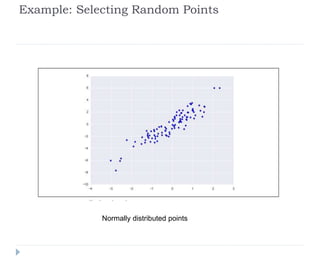
![Example: Selecting Random Points
In[13]: mean = [0, 0]
cov = [[1, 2],
[2, 5]]
X = rand.multivariate_normal(mean, cov, 100)
X.shape
Out[13]: (100, 2)
In[14]: %matplotlib inline
import matplotlib.pyplot as plt
import seaborn; seaborn.set() # for plot styling
plt.scatter(X[:, 0], X[:, 1]);](https://image.slidesharecdn.com/numpybroadcasting1-240311160018-11393b12/85/NumPy_Broadcasting-Data-Science-Python-pptx-26-320.jpg)
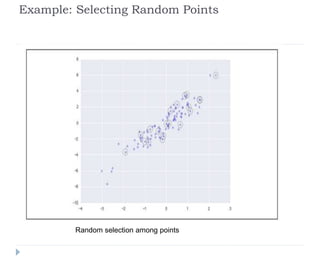
![Example: Selecting Random Points
In[15]: indices = np.random.choice(X.shape[0], 20,
replace=False) indices
Out[15]: array([93, 45, 73, 81, 50, 10, 98, 94, 4, 64, 65, 89,
47, 84, 82, 80, 25, 90, 63, 20])
In[16]: selection = X[indices] # fancy indexing here
selection.shape
Out[16]: (20, 2)
In[17]: plt.scatter(X[:, 0], X[:, 1], alpha=0.3)
plt.scatter(selection[:, 0], selection[:, 1],
facecolor='none', s=200);](https://image.slidesharecdn.com/numpybroadcasting1-240311160018-11393b12/85/NumPy_Broadcasting-Data-Science-Python-pptx-28-320.jpg)


![NUMPY [Autosaved] .pptx](https://cdn.slidesharecdn.com/ss_thumbnails/numpyautosaved-240106041504-989a0cc3-thumbnail.jpg?width=640&height=640&fit=bounds)


