Number base conversion
from denary (base10)
Peter R Breach
January 2016
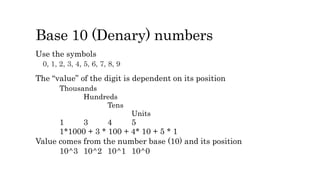
Base 10 (Denary) numbers
Use the symbols
0, 1, 2, 3, 4, 5, 6, 7, 8, 9
The “value” of the digit is dependent on its position
Thousands
Hundreds
Tens
Units
1 3 4 5
1*1000 + 3 * 100 + 4* 10 + 5 * 1
Value comes from the number base (10) and its position
10^3 10^2 10^1 10^0
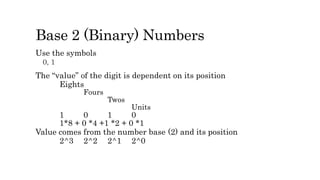
Base 2 (Binary) Numbers
Use the symbols
0, 1
The “value” of the digit is dependent on its position
Eights
Fours
Twos
Units
1 0 1 0
1*8 + 0 *4 +1 *2 + 0 *1
Value comes from the number base (2) and its position
2^3 2^2 2^1 2^0
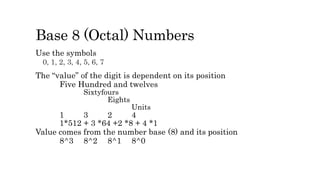
Base 8 (Octal) Numbers
Use the symbols
0, 1, 2, 3, 4, 5, 6, 7
The “value” of the digit is dependent on its position
Five Hundred and twelves
Sixtyfours
Eights
Units
1 3 2 4
1*512 + 3 *64 +2 *8 + 4 *1
Value comes from the number base (8) and its position
8^3 8^2 8^1 8^0
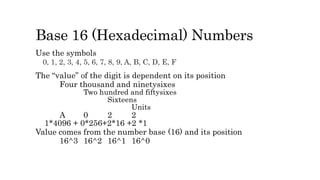
Base 16 (Hexadecimal) Numbers
Use the symbols
0, 1, 2, 3, 4, 5, 6, 7, 8, 9, A, B, C, D, E, F
The “value” of the digit is dependent on its position
Four thousand and ninetysixes
Two hundred and fiftysixes
Sixteens
Units
A 0 2 2
1*4096 + 0*256+2*16 +2 *1
Value comes from the number base (16) and its position
16^3 16^2 16^1 16^0
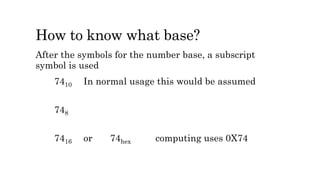
How to know what base?
After the symbols for the number base, a subscript
symbol is used
7410 In normal usage this would be assumed
748
7416 or 74hex computing uses 0X74
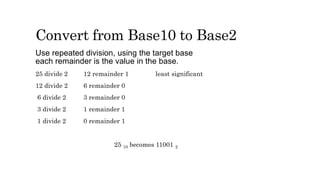
Convert from Base10 to Base2
Use repeated division, using the target base
each remainder is the value in the base.
25 divide 2 12 remainder 1 least significant
12 divide 2 6 remainder 0
6 divide 2 3 remainder 0
3 divide 2 1 remainder 1
1 divide 2 0 remainder 1
25 10 becomes 11001 2
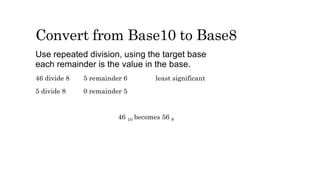
Convert from Base10 to Base8
Use repeated division, using the target base
each remainder is the value in the base.
46 divide 8 5 remainder 6 least significant
5 divide 8 0 remainder 5
46 10 becomes 56 8
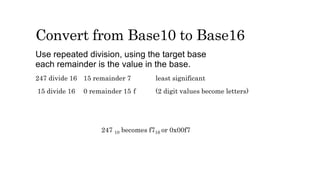
Convert from Base10 to Base16
Use repeated division, using the target base
each remainder is the value in the base.
247 divide 16 15 remainder 7 least significant
15 divide 16 0 remainder 15 f (2 digit values become letters)
247 10 becomes f716 or 0x00f7
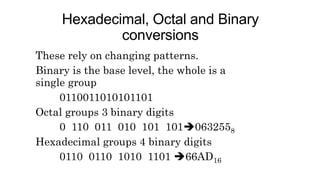
Hexadecimal, Octal and Binary
conversions
These rely on changing patterns.
Binary is the base level, the whole is a
single group
0110011010101101
Octal groups 3 binary digits
0 110 011 010 101 1010632558
Hexadecimal groups 4 binary digits
0110 0110 1010 1101 66AD16
Computer Science
xDIVy
xMODy
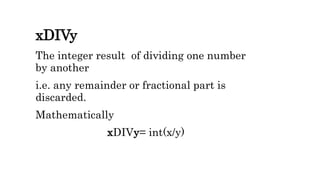
xDIVy
The integer result of dividing one number
by another
i.e. any remainder or fractional part is
discarded.
Mathematically
xDIVy= int(x/y)
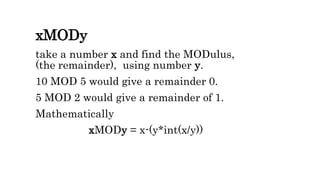
xMODy
take a number x and find the MODulus,
(the remainder), using number y.
10 MOD 5 would give a remainder 0.
5 MOD 2 would give a remainder of 1.
Mathematically
xMODy = x-(y*int(x/y))
Insert activboard video in here
Algorithm to convert bases
Initialise (Number, BaseTo, Bit, OutputStr, Quotient)
read a denary Integer and the target base; Number, BaseTo
While the Number is greater than 0
Bit = Number mod BaseTo
Quotient = Number div BaseTo
OutputStr = bit & OutputStr
Number = Quotient
Display Number in base 10 is OutputStr in BaseTo
Run this with several sets of test data and target bases.
Check the Trace-Tables to ensure it is functioning as you expect.
Develop the code in your language of choice (Pascal, Delphi, VB, VC#)

Number base conversion

  • 1.
    Number base conversion fromdenary (base10) Peter R Breach January 2016
  • 2.
    Base 10 (Denary)numbers Use the symbols 0, 1, 2, 3, 4, 5, 6, 7, 8, 9 The “value” of the digit is dependent on its position Thousands Hundreds Tens Units 1 3 4 5 1*1000 + 3 * 100 + 4* 10 + 5 * 1 Value comes from the number base (10) and its position 10^3 10^2 10^1 10^0
  • 3.
    Base 2 (Binary)Numbers Use the symbols 0, 1 The “value” of the digit is dependent on its position Eights Fours Twos Units 1 0 1 0 1*8 + 0 *4 +1 *2 + 0 *1 Value comes from the number base (2) and its position 2^3 2^2 2^1 2^0
  • 4.
    Base 8 (Octal)Numbers Use the symbols 0, 1, 2, 3, 4, 5, 6, 7 The “value” of the digit is dependent on its position Five Hundred and twelves Sixtyfours Eights Units 1 3 2 4 1*512 + 3 *64 +2 *8 + 4 *1 Value comes from the number base (8) and its position 8^3 8^2 8^1 8^0
  • 5.
    Base 16 (Hexadecimal)Numbers Use the symbols 0, 1, 2, 3, 4, 5, 6, 7, 8, 9, A, B, C, D, E, F The “value” of the digit is dependent on its position Four thousand and ninetysixes Two hundred and fiftysixes Sixteens Units A 0 2 2 1*4096 + 0*256+2*16 +2 *1 Value comes from the number base (16) and its position 16^3 16^2 16^1 16^0
  • 6.
    How to knowwhat base? After the symbols for the number base, a subscript symbol is used 7410 In normal usage this would be assumed 748 7416 or 74hex computing uses 0X74
  • 7.
    Convert from Base10to Base2 Use repeated division, using the target base each remainder is the value in the base. 25 divide 2 12 remainder 1 least significant 12 divide 2 6 remainder 0 6 divide 2 3 remainder 0 3 divide 2 1 remainder 1 1 divide 2 0 remainder 1 25 10 becomes 11001 2
  • 8.
    Convert from Base10to Base8 Use repeated division, using the target base each remainder is the value in the base. 46 divide 8 5 remainder 6 least significant 5 divide 8 0 remainder 5 46 10 becomes 56 8
  • 9.
    Convert from Base10to Base16 Use repeated division, using the target base each remainder is the value in the base. 247 divide 16 15 remainder 7 least significant 15 divide 16 0 remainder 15 f (2 digit values become letters) 247 10 becomes f716 or 0x00f7
  • 10.
    Hexadecimal, Octal andBinary conversions These rely on changing patterns. Binary is the base level, the whole is a single group 0110011010101101 Octal groups 3 binary digits 0 110 011 010 101 1010632558 Hexadecimal groups 4 binary digits 0110 0110 1010 1101 66AD16
  • 11.
  • 12.
    xDIVy The integer resultof dividing one number by another i.e. any remainder or fractional part is discarded. Mathematically xDIVy= int(x/y)
  • 13.
    xMODy take a numberx and find the MODulus, (the remainder), using number y. 10 MOD 5 would give a remainder 0. 5 MOD 2 would give a remainder of 1. Mathematically xMODy = x-(y*int(x/y))
  • 14.
  • 15.
    Algorithm to convertbases Initialise (Number, BaseTo, Bit, OutputStr, Quotient) read a denary Integer and the target base; Number, BaseTo While the Number is greater than 0 Bit = Number mod BaseTo Quotient = Number div BaseTo OutputStr = bit & OutputStr Number = Quotient Display Number in base 10 is OutputStr in BaseTo Run this with several sets of test data and target bases. Check the Trace-Tables to ensure it is functioning as you expect. Develop the code in your language of choice (Pascal, Delphi, VB, VC#)