1
Number Systems
2
Numbers
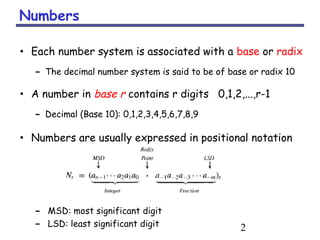
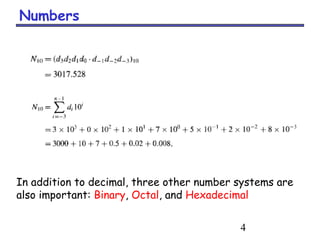
• Each number system is associated with a base or radix
– The decimal number system is said to be of base or radix 10
• A number in base r contains r digits 0,1,2,...,r-1
– Decimal (Base 10): 0,1,2,3,4,5,6,7,8,9
• Numbers are usually expressed in positional notation
– MSD: most significant digit
– LSD: least significant digit
3
Numbers
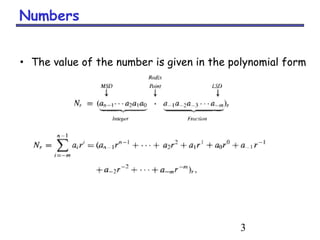
• The value of the number is given in the polynomial form
4
Numbers
In addition to decimal, three other number systems are
also important: Binary, Octal, and Hexadecimal
5
Unsigned Binary Numbers
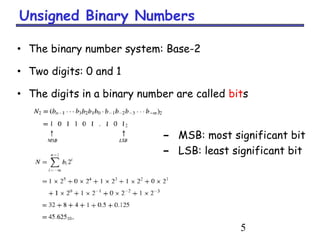
• The binary number system: Base-2
• Two digits: 0 and 1
• The digits in a binary number are called bits
– MSB: most significant bit
– LSB: least significant bit
6
Unsigned Binary Numbers
7
Unsigned Binary Numbers
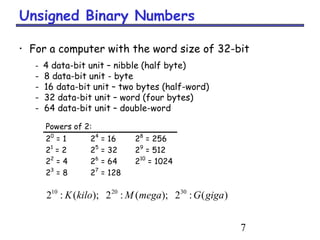
Powers of 2:
20
= 1 24
= 16 28
= 256
21
= 2 25
= 32 29
= 512
22
= 4 26
= 64 210
= 1024
23
= 8 27
= 128
)(:2);(:2);(:2 302010
gigaGmegaMkiloK
• For a computer with the word size of 32-bit
- 4 data-bit unit – nibble (half byte)
- 8 data-bit unit - byte
- 16 data-bit unit – two bytes (half-word)
- 32 data-bit unit – word (four bytes)
- 64 data-bit unit – double-word
8
Converting Binary to Decimal
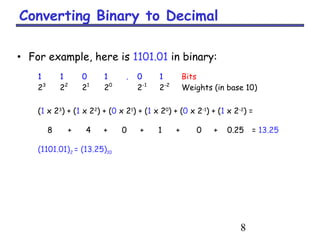
• For example, here is 1101.01 in binary:
1 1 0 1 . 0 1 Bits
23
22
21
20
2-1
2-2
Weights (in base 10)
(1 x 23
) + (1 x 22
) + (0 x 21
) + (1 x 20
) + (0 x 2-1
) + (1 x 2-2
) =
8 + 4 + 0 + 1 + 0 + 0.25 = 13.25
(1101.01)2 = (13.25)10
9
Converting Decimal to Binary
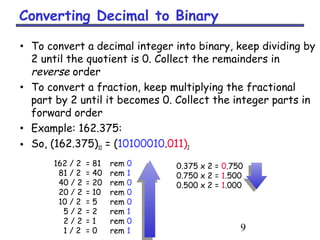
• To convert a decimal integer into binary, keep dividing by
2 until the quotient is 0. Collect the remainders in
reverse order
• To convert a fraction, keep multiplying the fractional
part by 2 until it becomes 0. Collect the integer parts in
forward order
• Example: 162.375:
• So, (162.375)10 = (10100010.011)2
162 / 2 = 81 rem 0
81 / 2 = 40 rem 1
40 / 2 = 20 rem 0
20 / 2 = 10 rem 0
10 / 2 = 5 rem 0
5 / 2 = 2 rem 1
2 / 2 = 1 rem 0
1 / 2 = 0 rem 1
0.375 x 2 = 0.750
0.750 x 2 = 1.500
0.500 x 2 = 1.000
10
Why does this work?
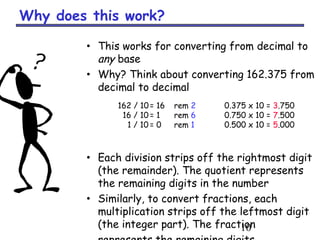
• This works for converting from decimal to
any base
• Why? Think about converting 162.375 from
decimal to decimal
• Each division strips off the rightmost digit
(the remainder). The quotient represents
the remaining digits in the number
• Similarly, to convert fractions, each
multiplication strips off the leftmost digit
(the integer part). The fraction
162 / 10= 16 rem 2
16 / 10 = 1 rem 6
1 / 10 = 0 rem 1
0.375 x 10 = 3.750
0.750 x 10 = 7.500
0.500 x 10 = 5.000
11
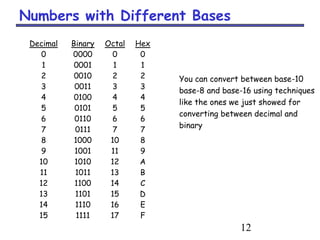
Octal and Hexadecimal Numbers
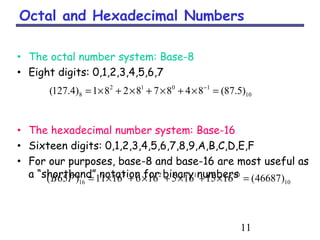
• The octal number system: Base-8
• Eight digits: 0,1,2,3,4,5,6,7
• The hexadecimal number system: Base-16
• Sixteen digits: 0,1,2,3,4,5,6,7,8,9,A,B,C,D,E,F
• For our purposes, base-8 and base-16 are most useful as
a “shorthand” notation for binary numbers
10
1012
8 )5.87(84878281)4.127( =×+×+×+×= −
10
0123
16 )46687(16151651661611)65( =×+×+×+×= −
FB
12
Decimal Binary Octal Hex
0 0000 0 0
1 0001 1 1
2 0010 2 2
3 0011 3 3
4 0100 4 4
5 0101 5 5
6 0110 6 6
7 0111 7 7
8 1000 10 8
9 1001 11 9
10 1010 12 A
11 1011 13 B
12 1100 14 C
13 1101 15 D
14 1110 16 E
15 1111 17 F
Numbers with Different Bases
You can convert between base-10
base-8 and base-16 using techniques
like the ones we just showed for
converting between decimal and
binary
13
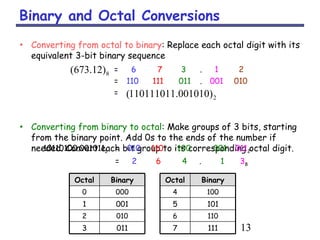
Binary and Octal Conversions
• Converting from octal to binary: Replace each octal digit with its
equivalent 3-bit binary sequence
• Converting from binary to octal: Make groups of 3 bits, starting
from the binary point. Add 0s to the ends of the number if
needed. Convert each bit group to its corresponding octal digit.
= 6 7 3 . 1 2
= 110 111 011 . 001 010
=
10110100.0010112 = 010 110 100 . 001 0112
= 2 6 4 . 1 38
11170113
11060102
10150011
10040000
BinaryOctalBinaryOctal
8)12.673(
2)001010.110111011(
14
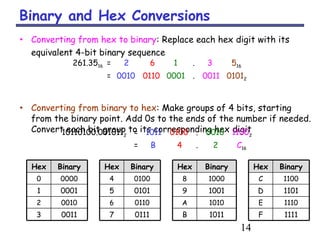
Binary and Hex Conversions
• Converting from hex to binary: Replace each hex digit with its
equivalent 4-bit binary sequence
• Converting from binary to hex: Make groups of 4 bits, starting
from the binary point. Add 0s to the ends of the number if needed.
Convert each bit group to its corresponding hex digit
261.3516 = 2 6 1 . 3 516
= 0010 0110 0001 . 0011 01012
10110100.0010112 = 1011 0100 . 0010 11002
= B 4 . 2 C16
1111F1011B0111700113
1110E1010A0110600102
1101D100190101500011
1100C100080100400000
BinaryHexBinaryHexBinaryHexBinaryHex
15
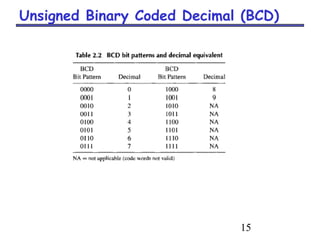
Unsigned Binary Coded Decimal (BCD)
16
Number Systems Summary
• Computers are binary devices
– We’re forced to think in terms of base 2.
– We learned how to convert numbers between binary, decimal,
octal and hexadecimal
• We’ve already seen some of the recurring themes of
architecture:
– We use 0 and 1 as abstractions for analog voltages.
– We showed how to represent numbers using just these two
signals.

02 number systems

  • 1.
  • 2.
    2 Numbers • Each numbersystem is associated with a base or radix – The decimal number system is said to be of base or radix 10 • A number in base r contains r digits 0,1,2,...,r-1 – Decimal (Base 10): 0,1,2,3,4,5,6,7,8,9 • Numbers are usually expressed in positional notation – MSD: most significant digit – LSD: least significant digit
  • 3.
    3 Numbers • The valueof the number is given in the polynomial form
  • 4.
    4 Numbers In addition todecimal, three other number systems are also important: Binary, Octal, and Hexadecimal
  • 5.
    5 Unsigned Binary Numbers •The binary number system: Base-2 • Two digits: 0 and 1 • The digits in a binary number are called bits – MSB: most significant bit – LSB: least significant bit
  • 6.
  • 7.
    7 Unsigned Binary Numbers Powersof 2: 20 = 1 24 = 16 28 = 256 21 = 2 25 = 32 29 = 512 22 = 4 26 = 64 210 = 1024 23 = 8 27 = 128 )(:2);(:2);(:2 302010 gigaGmegaMkiloK • For a computer with the word size of 32-bit - 4 data-bit unit – nibble (half byte) - 8 data-bit unit - byte - 16 data-bit unit – two bytes (half-word) - 32 data-bit unit – word (four bytes) - 64 data-bit unit – double-word
  • 8.
    8 Converting Binary toDecimal • For example, here is 1101.01 in binary: 1 1 0 1 . 0 1 Bits 23 22 21 20 2-1 2-2 Weights (in base 10) (1 x 23 ) + (1 x 22 ) + (0 x 21 ) + (1 x 20 ) + (0 x 2-1 ) + (1 x 2-2 ) = 8 + 4 + 0 + 1 + 0 + 0.25 = 13.25 (1101.01)2 = (13.25)10
  • 9.
    9 Converting Decimal toBinary • To convert a decimal integer into binary, keep dividing by 2 until the quotient is 0. Collect the remainders in reverse order • To convert a fraction, keep multiplying the fractional part by 2 until it becomes 0. Collect the integer parts in forward order • Example: 162.375: • So, (162.375)10 = (10100010.011)2 162 / 2 = 81 rem 0 81 / 2 = 40 rem 1 40 / 2 = 20 rem 0 20 / 2 = 10 rem 0 10 / 2 = 5 rem 0 5 / 2 = 2 rem 1 2 / 2 = 1 rem 0 1 / 2 = 0 rem 1 0.375 x 2 = 0.750 0.750 x 2 = 1.500 0.500 x 2 = 1.000
  • 10.
    10 Why does thiswork? • This works for converting from decimal to any base • Why? Think about converting 162.375 from decimal to decimal • Each division strips off the rightmost digit (the remainder). The quotient represents the remaining digits in the number • Similarly, to convert fractions, each multiplication strips off the leftmost digit (the integer part). The fraction 162 / 10= 16 rem 2 16 / 10 = 1 rem 6 1 / 10 = 0 rem 1 0.375 x 10 = 3.750 0.750 x 10 = 7.500 0.500 x 10 = 5.000
  • 11.
    11 Octal and HexadecimalNumbers • The octal number system: Base-8 • Eight digits: 0,1,2,3,4,5,6,7 • The hexadecimal number system: Base-16 • Sixteen digits: 0,1,2,3,4,5,6,7,8,9,A,B,C,D,E,F • For our purposes, base-8 and base-16 are most useful as a “shorthand” notation for binary numbers 10 1012 8 )5.87(84878281)4.127( =×+×+×+×= − 10 0123 16 )46687(16151651661611)65( =×+×+×+×= − FB
  • 12.
    12 Decimal Binary OctalHex 0 0000 0 0 1 0001 1 1 2 0010 2 2 3 0011 3 3 4 0100 4 4 5 0101 5 5 6 0110 6 6 7 0111 7 7 8 1000 10 8 9 1001 11 9 10 1010 12 A 11 1011 13 B 12 1100 14 C 13 1101 15 D 14 1110 16 E 15 1111 17 F Numbers with Different Bases You can convert between base-10 base-8 and base-16 using techniques like the ones we just showed for converting between decimal and binary
  • 13.
    13 Binary and OctalConversions • Converting from octal to binary: Replace each octal digit with its equivalent 3-bit binary sequence • Converting from binary to octal: Make groups of 3 bits, starting from the binary point. Add 0s to the ends of the number if needed. Convert each bit group to its corresponding octal digit. = 6 7 3 . 1 2 = 110 111 011 . 001 010 = 10110100.0010112 = 010 110 100 . 001 0112 = 2 6 4 . 1 38 11170113 11060102 10150011 10040000 BinaryOctalBinaryOctal 8)12.673( 2)001010.110111011(
  • 14.
    14 Binary and HexConversions • Converting from hex to binary: Replace each hex digit with its equivalent 4-bit binary sequence • Converting from binary to hex: Make groups of 4 bits, starting from the binary point. Add 0s to the ends of the number if needed. Convert each bit group to its corresponding hex digit 261.3516 = 2 6 1 . 3 516 = 0010 0110 0001 . 0011 01012 10110100.0010112 = 1011 0100 . 0010 11002 = B 4 . 2 C16 1111F1011B0111700113 1110E1010A0110600102 1101D100190101500011 1100C100080100400000 BinaryHexBinaryHexBinaryHexBinaryHex
  • 15.
  • 16.
    16 Number Systems Summary •Computers are binary devices – We’re forced to think in terms of base 2. – We learned how to convert numbers between binary, decimal, octal and hexadecimal • We’ve already seen some of the recurring themes of architecture: – We use 0 and 1 as abstractions for analog voltages. – We showed how to represent numbers using just these two signals.