1
NS--2 IntroductionIntroduction
byby
Venkatamangarao NampallyVenkatamangarao Nampally
KattangurKattangur
2
OutlineOutline
• BackgroundBackground
• ArchitectureArchitecture
• UsageUsage
• SimulationSimulation
• NS-programmingNS-programming
• ExampleExample
• SummarySummary
3
ns-2, the Network Simulatorns-2, the Network Simulator
• AA discrete event simulatordiscrete event simulator modellingmodelling
network protocolsnetwork protocols
– Packets, links, queues, protocolsPackets, links, queues, protocols
– Visualizer (Visualizer (NAMNAM))
– Trace playbackTrace playback
– Error modelsError models
• Targeted at networking researchTargeted at networking research
• Supports for all types of simulationsSupports for all types of simulations
4
HistoryHistory
• 1989:1989: REALREAL by Keshavby Keshav
• 1995:1995: nsns by Floyd, McCanne at LBLby Floyd, McCanne at LBL
• 1997:1997: ns-2ns-2 by the VINT projectby the VINT project
((Virtual InterNetwork TestbedVirtual InterNetwork Testbed) at) at
LBL, Xerox PARC, UCB, USC/ISILBL, Xerox PARC, UCB, USC/ISI
• 1999: Wireless models added @ CMU1999: Wireless models added @ CMU
• Now:Now: ns-2.29ns-2.29 maintained at USC/ISImaintained at USC/ISI
– ns-2.30ns-2.30 pending releasepending release
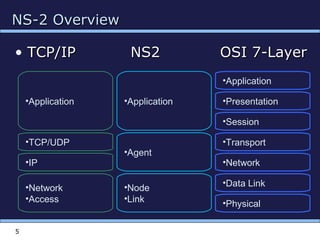
NS-2 OverviewNS-2 Overview
• TCP/IP NS2 OSI 7-LayerTCP/IP NS2 OSI 7-Layer
5
•Application
•Presentation
•Session
•Transport
•Network
•Data Link
•Physical
•Application
•Agent
•Node
•Link
•Application
•TCP/UDP
•IP
•Network
•Access
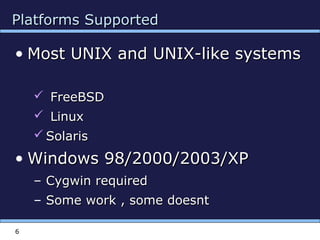
Platforms SupportedPlatforms Supported
• Most UNIX and UNIX-like systemsMost UNIX and UNIX-like systems
 FreeBSDFreeBSD
 LinuxLinux
 SolarisSolaris
• Windows 98/2000/2003/XPWindows 98/2000/2003/XP
– Cygwin requiredCygwin required
– Some work , some doesntSome work , some doesnt
6
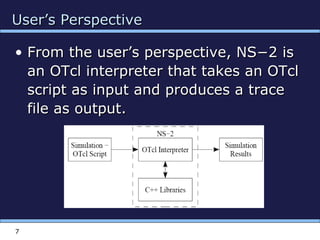
User’s PerspectiveUser’s Perspective
• From the user’s perspective, NS−2 isFrom the user’s perspective, NS−2 is
an OTcl interpreter that takes an OTclan OTcl interpreter that takes an OTcl
script as input and produces a tracescript as input and produces a trace
file as output.file as output.
7
8
NS-2 EnvironmentNS-2 Environment
•Simulation
Scenario
•Tcl Script
•C++
Implementation
•1 •2
•set ns_ [new Simulator]
•set node_(0) [$ns_ node]
•set node_(1) [$ns_ node]
•class MobileNode : public Node
•{
• friend class PositionHandler;
•public:
• MobileNode();
• •
• •
•}
9
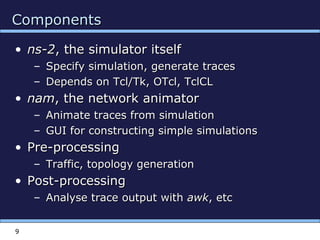
ComponentsComponents
• ns-2ns-2, the simulator itself, the simulator itself
– Specify simulation, generate tracesSpecify simulation, generate traces
– Depends on Tcl/Tk, OTcl, TclCLDepends on Tcl/Tk, OTcl, TclCL
• namnam, the network animator, the network animator
– Animate traces from simulationAnimate traces from simulation
– GUI for constructing simple simulationsGUI for constructing simple simulations
• Pre-processingPre-processing
– Traffic, topology generationTraffic, topology generation
• Post-processingPost-processing
– Analyse trace output withAnalyse trace output with awkawk, etc, etc
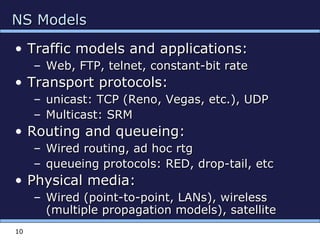
NS ModelsNS Models
• Traffic models and applications:Traffic models and applications:
– Web, FTP, telnet, constant-bit rateWeb, FTP, telnet, constant-bit rate
• Transport protocols:Transport protocols:
– unicast: TCP (Reno, Vegas, etc.), UDPunicast: TCP (Reno, Vegas, etc.), UDP
– Multicast: SRMMulticast: SRM
• Routing and queueing:Routing and queueing:
– Wired routing, ad hoc rtgWired routing, ad hoc rtg
– queueing protocols: RED, drop-tail, etcqueueing protocols: RED, drop-tail, etc
• Physical media:Physical media:
– Wired (point-to-point, LANs), wirelessWired (point-to-point, LANs), wireless
(multiple propagation models), satellite(multiple propagation models), satellite
10
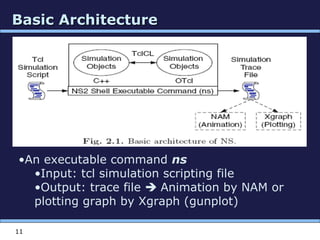
Basic ArchitectureBasic Architecture
11
•An executable command ns
•Input: tcl simulation scripting file
•Output: trace file  Animation by NAM or
plotting graph by Xgraph (gunplot)
NS2-GoalsNS2-Goals
To support networking research andTo support networking research and
educationeducation
–– Protocol design, traffic studies, etc.Protocol design, traffic studies, etc.
–– Protocol comparison;Protocol comparison;
–– New architecture designs are alsoNew architecture designs are also
supported.supported.
•• To provideTo provide collaborativecollaborative environmentenvironment
–– Freely distributed, open source;Freely distributed, open source;
–– Increase confidenceIncrease confidence in resultin result
12
13
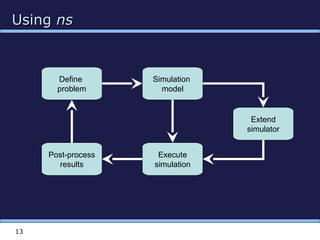
UsingUsing nsns
Simulation
model
Define
problem
Post-process
results
Execute
simulation
Extend
simulator
14
UsingUsing nsns
• Create simulationCreate simulation
– Describe network, protocols, sources, sinksDescribe network, protocols, sources, sinks
– Interface via OTcl which controls C++Interface via OTcl which controls C++
• Execute simulationExecute simulation
– Simulator maintains event list (packet list), executesSimulator maintains event list (packet list), executes
next event (packet), repeats until donenext event (packet), repeats until done
– Events happen instantly inEvents happen instantly in virtual timevirtual time but could takebut could take
arbitrarily longarbitrarily long real timereal time
– Single thread of control, no locking, races, etcSingle thread of control, no locking, races, etc
• Post-process resultsPost-process results
– Scripts (awk, perl, python) to process text outputScripts (awk, perl, python) to process text output
– No standard library but some available on webNo standard library but some available on web
15
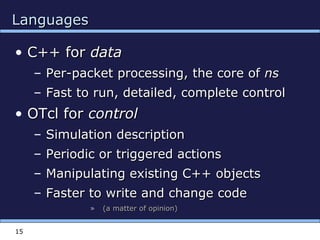
LanguagesLanguages
• C++ forC++ for datadata
– Per-packet processing, the core ofPer-packet processing, the core of nsns
– Fast to run, detailed, complete controlFast to run, detailed, complete control
• OTcl forOTcl for controlcontrol
– Simulation descriptionSimulation description
– Periodic or triggered actionsPeriodic or triggered actions
– Manipulating existing C++ objectsManipulating existing C++ objects
– Faster to write and change codeFaster to write and change code
» (a matter of opinion)(a matter of opinion)
16
Basic TclBasic Tcl
# Variables:# Variables:
setset x 10x 10
setset xx
putsputs “x is $x”“x is $x”
# Functions and expressions:# Functions and expressions:
setset y [pow x 2]y [pow x 2]
setset y [expr x*x]y [expr x*x]
# Control flow:# Control flow:
ifif {$x > 0} {{$x > 0} { returnreturn $x }$x } elseelse {{
returnreturn [expr -$x] }[expr -$x] }
whilewhile { $x > 0 } {{ $x > 0 } {
putsputs $x$x
incrincr x –1x –1
}}
forfor {{setset i 0} {$i<10} {i 0} {$i<10} {incrincr i} {i} {
putsputs “$i == $i”“$i == $i”
}}
# Procedures:# Procedures:
procproc pow {x n} {pow {x n} {
ifif {$n == 1} {{$n == 1} { returnreturn $x }$x }
setset part [part [powpow x [x [exprexpr $n-1]]$n-1]]
returnreturn [[exprexpr $x*$part]$x*$part]
}}
# Files:# Files:
setset file [file [open “open “nstrace.txt” w]nstrace.txt” w]
setset line [line [getsgets $file]$file]
puts –nonewlineputs –nonewline $file “hello!”$file “hello!”
closeclose $file$file
17
App1
Agent1
App2
Agent2
Node
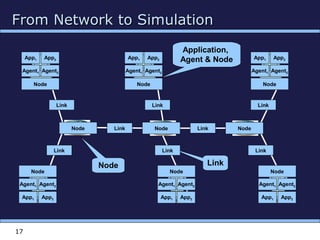
From Network to SimulationFrom Network to Simulation
Application,
Agent & Node
LinkNode
App1
Agent1
App2
Agent2
Node
App1
Agent1
App2
Agent2
Node
App1
Agent1
App2
Agent2
Node
Node Node Node
Link
Link
Link Link
Link
Link
Link
Link
App1
Agent1
App2
Agent2
Node
App1
Agent1
App2
Agent2
Node
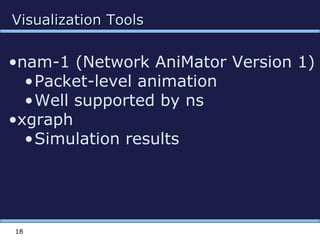
Visualization ToolsVisualization Tools
18
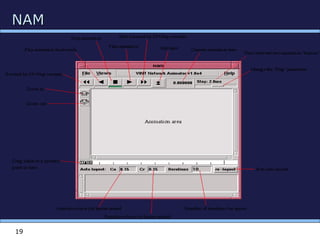
•nam-1 (Network AniMator Version 1)
•Packet-level animation
•Well supported by ns
•xgraph
•Simulation results
NAMNAM
19
Elements for NS-2 simulationElements for NS-2 simulation
20
•Create the event scheduler
•Turn on tracing
•Create network
•Setup routing
•Create transport connection
•Create traffic
•Transmit application-level data
Creating Simulation environmentCreating Simulation environment
21
 Create event scheduler
 set ns [new Simulator]
 Schedule events
 $ns at <time> <event>
 <event>: any legitimate ns/tcl commands
 Start scheduler
 $ns run
TracingTracing
22
 Turn on tracing on specific links
 $ns trace-queue $n0 $n1
 $ns namtrace-queue $n0 $n1
Creating nodes, links and queuesCreating nodes, links and queues
23
 Nodes
 set n0 [$ns node]
 set n1 [$ns node]
 Links and queuing
 $ns duplex-link $n0 $n1 <bandwidth> <delay>
<queue_type>
 <queue_type>: DropTail, RED, CBQ, FQ, SFQ,
DRR
Creating connection :UDPCreating connection :UDP
24
 UDP
 set udp [new Agent/UDP]
 set null [new Agent/Null]
 $ns attach-agent $n0 $udp
 $ns attach-agent $n1 $null
 $ns connect $udp $null
Creating Traffic : on top of UDPCreating Traffic : on top of UDP
25
 CBR
 set src [new
Application/Traffic/CBR]
Creating connection : TCPCreating connection : TCP
26
 TCP
 set tcp [new Agent/TCP]
 set tcpsink [new Agent/TCPSink]
 $ns attach-agent $n0 $tcp
 $ns attach-agent $n1 $tcpsink
 $ns connect $tcp $tcpsink
Creating Traffic : on top of TCPCreating Traffic : on top of TCP
27
 FTP
 set ftp [new Application/FTP]
 $ftp attach-agent $tcp
 Telnet
 set telnet [new
Application/Telnet]
 $telnet attach-agent $tcp
Simple Simulation ExampleSimple Simulation Example
28
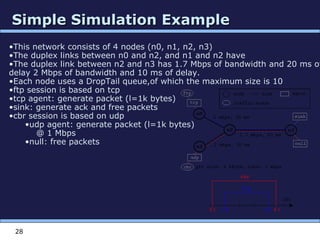
•This network consists of 4 nodes (n0, n1, n2, n3)
•The duplex links between n0 and n2, and n1 and n2 have
•The duplex link between n2 and n3 has 1.7 Mbps of bandwidth and 20 ms of
delay 2 Mbps of bandwidth and 10 ms of delay.
•Each node uses a DropTail queue,of which the maximum size is 10
•ftp session is based on tcp
•tcp agent: generate packet (l=1k bytes)
•sink: generate ack and free packets
•cbr session is based on udp
•udp agent: generate packet (l=1k bytes)
@ 1 Mbps
•null: free packets
Script structureScript structure
29
# parameters and options
set ns [new Simulator]
# [Turn on tracing]
# Create topology
# Setup packet loss, link dynamics
# Create routing agents
# Create:
# - protocol agents
# - application and/or setup traffic sources
# Post-processing procs
# Start simulation
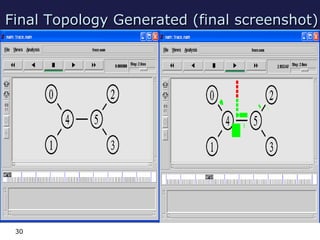
Final Topology Generated (final screenshot)Final Topology Generated (final screenshot)
30
31
SummarySummary
• BackgroundBackground
• ArchitectureArchitecture
• UsageUsage
• SimulationSimulation
• NS-programmingNS-programming
• ExampleExample
• SummarySummary
32
Thank You!Thank You!

Venkat ns2

  • 1.
  • 2.
    2 OutlineOutline • BackgroundBackground • ArchitectureArchitecture •UsageUsage • SimulationSimulation • NS-programmingNS-programming • ExampleExample • SummarySummary
  • 3.
    3 ns-2, the NetworkSimulatorns-2, the Network Simulator • AA discrete event simulatordiscrete event simulator modellingmodelling network protocolsnetwork protocols – Packets, links, queues, protocolsPackets, links, queues, protocols – Visualizer (Visualizer (NAMNAM)) – Trace playbackTrace playback – Error modelsError models • Targeted at networking researchTargeted at networking research • Supports for all types of simulationsSupports for all types of simulations
  • 4.
    4 HistoryHistory • 1989:1989: REALREALby Keshavby Keshav • 1995:1995: nsns by Floyd, McCanne at LBLby Floyd, McCanne at LBL • 1997:1997: ns-2ns-2 by the VINT projectby the VINT project ((Virtual InterNetwork TestbedVirtual InterNetwork Testbed) at) at LBL, Xerox PARC, UCB, USC/ISILBL, Xerox PARC, UCB, USC/ISI • 1999: Wireless models added @ CMU1999: Wireless models added @ CMU • Now:Now: ns-2.29ns-2.29 maintained at USC/ISImaintained at USC/ISI – ns-2.30ns-2.30 pending releasepending release
  • 5.
    NS-2 OverviewNS-2 Overview •TCP/IP NS2 OSI 7-LayerTCP/IP NS2 OSI 7-Layer 5 •Application •Presentation •Session •Transport •Network •Data Link •Physical •Application •Agent •Node •Link •Application •TCP/UDP •IP •Network •Access
  • 6.
    Platforms SupportedPlatforms Supported •Most UNIX and UNIX-like systemsMost UNIX and UNIX-like systems  FreeBSDFreeBSD  LinuxLinux  SolarisSolaris • Windows 98/2000/2003/XPWindows 98/2000/2003/XP – Cygwin requiredCygwin required – Some work , some doesntSome work , some doesnt 6
  • 7.
    User’s PerspectiveUser’s Perspective •From the user’s perspective, NS−2 isFrom the user’s perspective, NS−2 is an OTcl interpreter that takes an OTclan OTcl interpreter that takes an OTcl script as input and produces a tracescript as input and produces a trace file as output.file as output. 7
  • 8.
    8 NS-2 EnvironmentNS-2 Environment •Simulation Scenario •TclScript •C++ Implementation •1 •2 •set ns_ [new Simulator] •set node_(0) [$ns_ node] •set node_(1) [$ns_ node] •class MobileNode : public Node •{ • friend class PositionHandler; •public: • MobileNode(); • • • • •}
  • 9.
    9 ComponentsComponents • ns-2ns-2, thesimulator itself, the simulator itself – Specify simulation, generate tracesSpecify simulation, generate traces – Depends on Tcl/Tk, OTcl, TclCLDepends on Tcl/Tk, OTcl, TclCL • namnam, the network animator, the network animator – Animate traces from simulationAnimate traces from simulation – GUI for constructing simple simulationsGUI for constructing simple simulations • Pre-processingPre-processing – Traffic, topology generationTraffic, topology generation • Post-processingPost-processing – Analyse trace output withAnalyse trace output with awkawk, etc, etc
  • 10.
    NS ModelsNS Models •Traffic models and applications:Traffic models and applications: – Web, FTP, telnet, constant-bit rateWeb, FTP, telnet, constant-bit rate • Transport protocols:Transport protocols: – unicast: TCP (Reno, Vegas, etc.), UDPunicast: TCP (Reno, Vegas, etc.), UDP – Multicast: SRMMulticast: SRM • Routing and queueing:Routing and queueing: – Wired routing, ad hoc rtgWired routing, ad hoc rtg – queueing protocols: RED, drop-tail, etcqueueing protocols: RED, drop-tail, etc • Physical media:Physical media: – Wired (point-to-point, LANs), wirelessWired (point-to-point, LANs), wireless (multiple propagation models), satellite(multiple propagation models), satellite 10
  • 11.
    Basic ArchitectureBasic Architecture 11 •Anexecutable command ns •Input: tcl simulation scripting file •Output: trace file  Animation by NAM or plotting graph by Xgraph (gunplot)
  • 12.
    NS2-GoalsNS2-Goals To support networkingresearch andTo support networking research and educationeducation –– Protocol design, traffic studies, etc.Protocol design, traffic studies, etc. –– Protocol comparison;Protocol comparison; –– New architecture designs are alsoNew architecture designs are also supported.supported. •• To provideTo provide collaborativecollaborative environmentenvironment –– Freely distributed, open source;Freely distributed, open source; –– Increase confidenceIncrease confidence in resultin result 12
  • 13.
  • 14.
    14 UsingUsing nsns • CreatesimulationCreate simulation – Describe network, protocols, sources, sinksDescribe network, protocols, sources, sinks – Interface via OTcl which controls C++Interface via OTcl which controls C++ • Execute simulationExecute simulation – Simulator maintains event list (packet list), executesSimulator maintains event list (packet list), executes next event (packet), repeats until donenext event (packet), repeats until done – Events happen instantly inEvents happen instantly in virtual timevirtual time but could takebut could take arbitrarily longarbitrarily long real timereal time – Single thread of control, no locking, races, etcSingle thread of control, no locking, races, etc • Post-process resultsPost-process results – Scripts (awk, perl, python) to process text outputScripts (awk, perl, python) to process text output – No standard library but some available on webNo standard library but some available on web
  • 15.
    15 LanguagesLanguages • C++ forC++for datadata – Per-packet processing, the core ofPer-packet processing, the core of nsns – Fast to run, detailed, complete controlFast to run, detailed, complete control • OTcl forOTcl for controlcontrol – Simulation descriptionSimulation description – Periodic or triggered actionsPeriodic or triggered actions – Manipulating existing C++ objectsManipulating existing C++ objects – Faster to write and change codeFaster to write and change code » (a matter of opinion)(a matter of opinion)
  • 16.
    16 Basic TclBasic Tcl #Variables:# Variables: setset x 10x 10 setset xx putsputs “x is $x”“x is $x” # Functions and expressions:# Functions and expressions: setset y [pow x 2]y [pow x 2] setset y [expr x*x]y [expr x*x] # Control flow:# Control flow: ifif {$x > 0} {{$x > 0} { returnreturn $x }$x } elseelse {{ returnreturn [expr -$x] }[expr -$x] } whilewhile { $x > 0 } {{ $x > 0 } { putsputs $x$x incrincr x –1x –1 }} forfor {{setset i 0} {$i<10} {i 0} {$i<10} {incrincr i} {i} { putsputs “$i == $i”“$i == $i” }} # Procedures:# Procedures: procproc pow {x n} {pow {x n} { ifif {$n == 1} {{$n == 1} { returnreturn $x }$x } setset part [part [powpow x [x [exprexpr $n-1]]$n-1]] returnreturn [[exprexpr $x*$part]$x*$part] }} # Files:# Files: setset file [file [open “open “nstrace.txt” w]nstrace.txt” w] setset line [line [getsgets $file]$file] puts –nonewlineputs –nonewline $file “hello!”$file “hello!” closeclose $file$file
  • 17.
    17 App1 Agent1 App2 Agent2 Node From Network toSimulationFrom Network to Simulation Application, Agent & Node LinkNode App1 Agent1 App2 Agent2 Node App1 Agent1 App2 Agent2 Node App1 Agent1 App2 Agent2 Node Node Node Node Link Link Link Link Link Link Link Link App1 Agent1 App2 Agent2 Node App1 Agent1 App2 Agent2 Node
  • 18.
    Visualization ToolsVisualization Tools 18 •nam-1(Network AniMator Version 1) •Packet-level animation •Well supported by ns •xgraph •Simulation results
  • 19.
  • 20.
    Elements for NS-2simulationElements for NS-2 simulation 20 •Create the event scheduler •Turn on tracing •Create network •Setup routing •Create transport connection •Create traffic •Transmit application-level data
  • 21.
    Creating Simulation environmentCreatingSimulation environment 21  Create event scheduler  set ns [new Simulator]  Schedule events  $ns at <time> <event>  <event>: any legitimate ns/tcl commands  Start scheduler  $ns run
  • 22.
    TracingTracing 22  Turn ontracing on specific links  $ns trace-queue $n0 $n1  $ns namtrace-queue $n0 $n1
  • 23.
    Creating nodes, linksand queuesCreating nodes, links and queues 23  Nodes  set n0 [$ns node]  set n1 [$ns node]  Links and queuing  $ns duplex-link $n0 $n1 <bandwidth> <delay> <queue_type>  <queue_type>: DropTail, RED, CBQ, FQ, SFQ, DRR
  • 24.
    Creating connection :UDPCreatingconnection :UDP 24  UDP  set udp [new Agent/UDP]  set null [new Agent/Null]  $ns attach-agent $n0 $udp  $ns attach-agent $n1 $null  $ns connect $udp $null
  • 25.
    Creating Traffic :on top of UDPCreating Traffic : on top of UDP 25  CBR  set src [new Application/Traffic/CBR]
  • 26.
    Creating connection :TCPCreating connection : TCP 26  TCP  set tcp [new Agent/TCP]  set tcpsink [new Agent/TCPSink]  $ns attach-agent $n0 $tcp  $ns attach-agent $n1 $tcpsink  $ns connect $tcp $tcpsink
  • 27.
    Creating Traffic :on top of TCPCreating Traffic : on top of TCP 27  FTP  set ftp [new Application/FTP]  $ftp attach-agent $tcp  Telnet  set telnet [new Application/Telnet]  $telnet attach-agent $tcp
  • 28.
    Simple Simulation ExampleSimpleSimulation Example 28 •This network consists of 4 nodes (n0, n1, n2, n3) •The duplex links between n0 and n2, and n1 and n2 have •The duplex link between n2 and n3 has 1.7 Mbps of bandwidth and 20 ms of delay 2 Mbps of bandwidth and 10 ms of delay. •Each node uses a DropTail queue,of which the maximum size is 10 •ftp session is based on tcp •tcp agent: generate packet (l=1k bytes) •sink: generate ack and free packets •cbr session is based on udp •udp agent: generate packet (l=1k bytes) @ 1 Mbps •null: free packets
  • 29.
    Script structureScript structure 29 #parameters and options set ns [new Simulator] # [Turn on tracing] # Create topology # Setup packet loss, link dynamics # Create routing agents # Create: # - protocol agents # - application and/or setup traffic sources # Post-processing procs # Start simulation
  • 30.
    Final Topology Generated(final screenshot)Final Topology Generated (final screenshot) 30
  • 31.
    31 SummarySummary • BackgroundBackground • ArchitectureArchitecture •UsageUsage • SimulationSimulation • NS-programmingNS-programming • ExampleExample • SummarySummary
  • 32.

Editor's Notes

  • #4 what is it? -- history -- code stats -- tree layout goals, accomplishments, status ns architecture/history/perspective target audience, tutorial outline state of the software and distributions
  • #10 what does it do? -- tcp, higher protocols, packets, links, queuing disciplines -- visualizer (NAM) -- trace playback -- error models what does it not do? -- routing, ip, L2, routing
  • #15 basic structure -- setup simulation -- objects -&amp;gt; events -&amp;gt; schedule -&amp;gt; repeat -- trace files -&amp;gt; post processing -&amp;gt; graphs -- (example trace) Model world as events Simulator has list of events Process: take next one, run it, until done Each event happens in an instant of virtual (simulated) time, but takes an arbitrary amount of real time Ns uses simple model: single thread of control =&amp;gt; no locking or race conditions to worry about (very easy)