Network Simulator 2: Introduction 
Presented by Ke Liu 
Dept. Of Computer Science, SUNY Binghamton 
Spring, 2004 
1
NS-2 Overview 
2
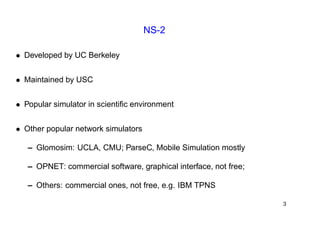
NS-2 
• Developed by UC Berkeley 
• Maintained by USC 
• Popular simulator in scientific environment 
• Other popular network simulators 
– Glomosim: UCLA, CMU; ParseC, Mobile Simulation mostly 
– OPNET: commercial software, graphical interface, not free; 
– Others: commercial ones, not free, e.g. IBM TPNS 
3
NS2 Goals 
• To support networking research and education 
– Protocol design, traffic studies, etc. 
– Protocol comparison; 
– New architecture designs are also supported. 
• To provide collaborative environment 
– Freely distributed, open source; 
– Increase confidence in result 
4
Two Languages: C++, OTcl 
OTcl: short for MIT Object Tcl, 
an extension to Tcl/Tk for object-oriented programming. 
• Used to build the network structure and topology 
which is just the surface of your simulatoion; 
• Easily to configure your network parameters; 
• Not enough for research schemes and protocol architecture adaption. 
5
Two Languages (Con’t) 
C++: Most important and kernel part of the NS2 
• To implement the kernel of the architecture of the protocol designs; 
• From the packet flow view, the processes run on a single node; 
• To change or “comment out” the existing protocols running in NS2; 
• Details of your research scheme. 
6
Why 2 Languages? 
• 2 requirements of the simulator 
– Detailed simulation of Protocol: Run-time speed; 
– Varying parameters or configuration: easy to use. 
• C++ is fast to run but slower to code and change; 
• OTcl is easy to code but runs slowly. 
7
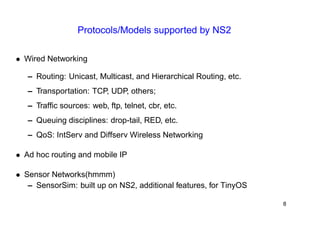
Protocols/Models supported by NS2 
• Wired Networking 
– Routing: Unicast, Multicast, and Hierarchical Routing, etc. 
– Transportation: TCP, UDP, others; 
– Traffic sources: web, ftp, telnet, cbr, etc. 
– Queuing disciplines: drop-tail, RED, etc. 
– QoS: IntServ and Diffserv Wireless Networking 
• Ad hoc routing and mobile IP 
• Sensor Networks(hmmm) 
– SensorSim: built up on NS2, additional features, for TinyOS 
8
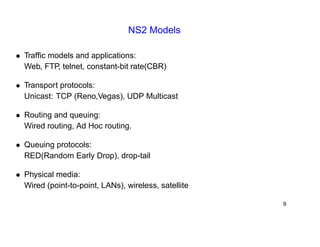
NS2 Models 
• Traffic models and applications: 
Web, FTP, telnet, constant-bit rate(CBR) 
• Transport protocols: 
Unicast: TCP (Reno,Vegas), UDP Multicast 
• Routing and queuing: 
Wired routing, Ad Hoc routing. 
• Queuing protocols: 
RED(Random Early Drop), drop-tail 
• Physical media: 
Wired (point-to-point, LANs), wireless, satellite 
9
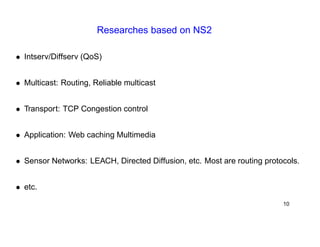
Researches based on NS2 
• Intserv/Diffserv (QoS) 
• Multicast: Routing, Reliable multicast 
• Transport: TCP Congestion control 
• Application: Web caching Multimedia 
• Sensor Networks: LEACH, Directed Diffusion, etc. Most are routing protocols. 
• etc. 
10
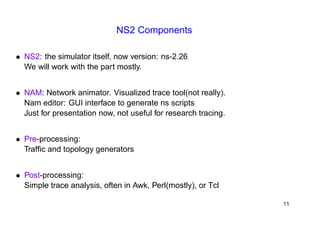
NS2 Components 
• NS2: the simulator itself, now version: ns-2.26 
We will work with the part mostly. 
• NAM: Network animator. Visualized trace tool(not really). 
Nam editor: GUI interface to generate ns scripts 
Just for presentation now, not useful for research tracing. 
• Pre-processing: 
Traffic and topology generators 
• Post-processing: 
Simple trace analysis, often in Awk, Perl(mostly), or Tcl 
11
Living under NS2 
12
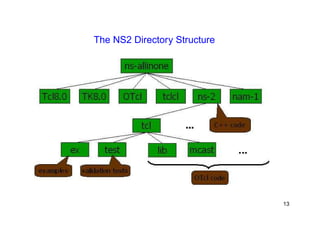
The NS2 Directory Structure 
13
A Simple Example in OTcl 
#Create a simulator object 
set ns [new Simulator] 
#Define different colors for data flows (for NAM) 
$ns color 1 Blue 
$ns color 2 Red 
#Open the NAM trace file 
set nf [open out.nam w] 
$ns namtrace-all $nf 
#Define a ’finish’ procedure proc finish {} { 
global ns nf 
$ns flush-trace 
#Close the NAM trace file 
close $nf 
#Execute NAM on the trace file 
exec nam out.nam & 
exit 0 
} 
14
A Simple Example in OTcl (Con’t) 
#Create four nodes 
set n0 [$ns node] 
set n1 [$ns node] 
set n2 [$ns node] 
set n3 [$ns node] 
#Create links between the nodes 
$ns duplex-link $n0 $n2 2Mb 10ms DropTail 
$ns duplex-link $n1 $n2 2Mb 10ms DropTail 
$ns duplex-link $n2 $n3 1.7Mb 20ms DropTail 
#Set Queue Size of link (n2-n3) to 10 
$ns queue-limit $n2 $n3 10 
#Give node position (for NAM) 
$ns duplex-link-op $n0 $n2 orient right-down 
$ns duplex-link-op $n1 $n2 orient right-up 
$ns duplex-link-op $n2 $n3 orient right 
#Monitor the queue for link (n2-n3). (for NAM) 
$ns duplex-link-op $n2 $n3 queuePos 0.5 
15
A Simple Example in OTcl (Con’t) 
#Setup a TCP connection 
set tcp [new Agent/TCP] 
$tcp set class_ 2 
$ns attach-agent $n0 $tcp 
set sink [new Agent/TCPSink] 
$ns attach-agent $n3 $sink 
$ns connect $tcp $sink 
$tcp set fid_ 1 
#Setup a FTP over TCP connection 
set ftp [new Application/FTP] 
$ftp attach-agent $tcp 
$ftp set type_ FTP 
#Setup a UDP connection 
set udp [new Agent/UDP] 
$ns attach-agent $n1 $udp 
set null [new Agent/Null] 
$ns attach-agent $n3 $null 
$ns connect $udp $null 
$udp set fid_ 2 
16
A Simple Example in OTcl (Con’t) 
#Setup a CBR over UDP connection 
set cbr [new Application/Traffic/CBR] 
$cbr attach-agent $udp $cbr 
set type_ CBR $cbr 
set packet_size_ 1000 $cbr 
set rate_ 1mb $cbr 
set random_ false 
#Schedule events for the CBR and FTP agents 
$ns at 0.1 "$cbr start" 
$ns at 1.0 "$ftp start" 
$ns at 4.0 "$ftp stop" 
$ns at 4.5 "$cbr stop" 
#Detach tcp and sink agents (not really necessary) 
$ns at 4.5 "$ns detach-agent $n0 $tcp ; 
$ns detach-agent $n3 $sink" 
#Call the finish procedure after 5 seconds of simulation time 
$ns at 5.0 "finish" 
17
A Simple Example in OTcl (Con’t) 
#Print CBR packet size and interval 
puts "CBR packet size = [$cbr set packet_size_]" 
puts "CBR interval = [$cbr set interval_]" 
#Run the simulation 
$ns run 
18
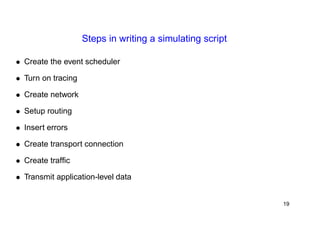
Steps in writing a simulating script 
• Create the event scheduler 
• Turn on tracing 
• Create network 
• Setup routing 
• Insert errors 
• Create transport connection 
• Create traffic 
• Transmit application-level data 
19
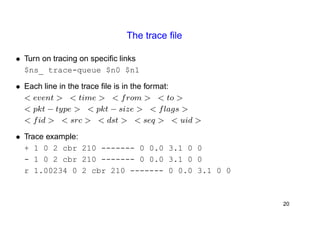
The trace file 
• Turn on tracing on specific links 
$ns_ trace-queue $n0 $n1 
• Each line in the trace file is in the format: 
< event > < time > < from > < to > 
< pkt − type > < pkt − size > < flags > 
< fid > < src > < dst > < seq > < uid > 
• Trace example: 
+ 1 0 2 cbr 210 ------- 0 0.0 3.1 0 0 
- 1 0 2 cbr 210 ------- 0 0.0 3.1 0 0 
r 1.00234 0 2 cbr 210 ------- 0 0.0 3.1 0 0 
20
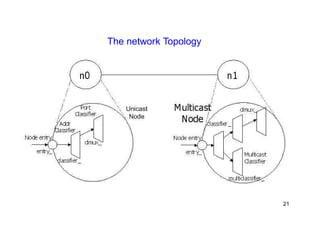
The network Topology 
21
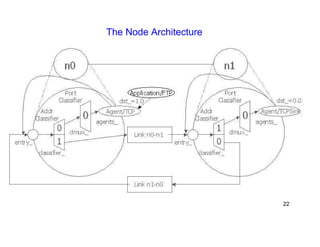
The Node Architecture 
22
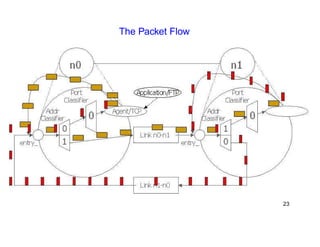
The Packet Flow 
23
Extending to NS2 
24
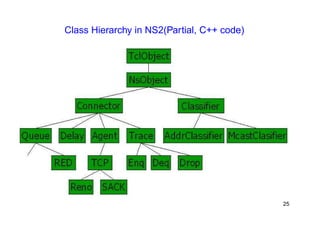
Class Hierarchy in NS2(Partial, C++ code) 
25
Create New Component for NS2 
Your research needs you to do so, no escaping(crying!!!). 
• Extending ns in Otcl 
source your changes in your simulation scripts 
• Extending ns in C++ 
– Change Makefile (if created new files) 
– make depend 
– recompile 
– Makefile is in the ”ns-2.26” directory 
26
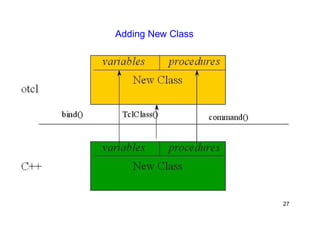
Adding New Class 
27
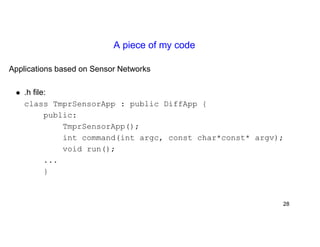
A piece of my code 
Applications based on Sensor Networks 
• .h file: 
class TmprSensorApp : public DiffApp { 
public: 
TmprSensorApp(); 
int command(int argc, const char*const* argv); 
void run(); 
... 
} 
28
A piece of my code (Con’t) 
• .cc file: 
static class TmprSensorAppClass : public TclClass { 
public: 
TmprSensorAppClass() : TclClass("Application/DiffApp/TmprSensor"){} 
TclObject* create(int, const char*const*){ 
return (new TmprSensorApp()); 
} 
} class_tmpr_sensor; 
int TmprSensorApp :: command(int argc, const char*const* argv){ 
if(argc == 2){ 
if(strcmp(argv[1], "publish") ==0){ 
run(); 
return TCL_OK; 
} 
} 
... 
29
Binding New C++Object to TclObject 
Link C++ member variables to OTcl object variables 
• C++: 
NewClass() : TclClass("class hierarchy"); 
• OTcl: 
set "object belongs to NewClass" [new "class hierarchy"] 
set src_(0) [new Application/DiffApp/TmprSensor] 
$ns_ attach-diffapp $node_(0) $src_(0) 
$ns_ at 1.23456 "$src_(0) publish" 
30
Thank You ! 
My email: kliu@cs.binghamton.edu 
31

Ns2pre

  • 1.
    Network Simulator 2:Introduction Presented by Ke Liu Dept. Of Computer Science, SUNY Binghamton Spring, 2004 1
  • 2.
  • 3.
    NS-2 • Developedby UC Berkeley • Maintained by USC • Popular simulator in scientific environment • Other popular network simulators – Glomosim: UCLA, CMU; ParseC, Mobile Simulation mostly – OPNET: commercial software, graphical interface, not free; – Others: commercial ones, not free, e.g. IBM TPNS 3
  • 4.
    NS2 Goals •To support networking research and education – Protocol design, traffic studies, etc. – Protocol comparison; – New architecture designs are also supported. • To provide collaborative environment – Freely distributed, open source; – Increase confidence in result 4
  • 5.
    Two Languages: C++,OTcl OTcl: short for MIT Object Tcl, an extension to Tcl/Tk for object-oriented programming. • Used to build the network structure and topology which is just the surface of your simulatoion; • Easily to configure your network parameters; • Not enough for research schemes and protocol architecture adaption. 5
  • 6.
    Two Languages (Con’t) C++: Most important and kernel part of the NS2 • To implement the kernel of the architecture of the protocol designs; • From the packet flow view, the processes run on a single node; • To change or “comment out” the existing protocols running in NS2; • Details of your research scheme. 6
  • 7.
    Why 2 Languages? • 2 requirements of the simulator – Detailed simulation of Protocol: Run-time speed; – Varying parameters or configuration: easy to use. • C++ is fast to run but slower to code and change; • OTcl is easy to code but runs slowly. 7
  • 8.
    Protocols/Models supported byNS2 • Wired Networking – Routing: Unicast, Multicast, and Hierarchical Routing, etc. – Transportation: TCP, UDP, others; – Traffic sources: web, ftp, telnet, cbr, etc. – Queuing disciplines: drop-tail, RED, etc. – QoS: IntServ and Diffserv Wireless Networking • Ad hoc routing and mobile IP • Sensor Networks(hmmm) – SensorSim: built up on NS2, additional features, for TinyOS 8
  • 9.
    NS2 Models •Traffic models and applications: Web, FTP, telnet, constant-bit rate(CBR) • Transport protocols: Unicast: TCP (Reno,Vegas), UDP Multicast • Routing and queuing: Wired routing, Ad Hoc routing. • Queuing protocols: RED(Random Early Drop), drop-tail • Physical media: Wired (point-to-point, LANs), wireless, satellite 9
  • 10.
    Researches based onNS2 • Intserv/Diffserv (QoS) • Multicast: Routing, Reliable multicast • Transport: TCP Congestion control • Application: Web caching Multimedia • Sensor Networks: LEACH, Directed Diffusion, etc. Most are routing protocols. • etc. 10
  • 11.
    NS2 Components •NS2: the simulator itself, now version: ns-2.26 We will work with the part mostly. • NAM: Network animator. Visualized trace tool(not really). Nam editor: GUI interface to generate ns scripts Just for presentation now, not useful for research tracing. • Pre-processing: Traffic and topology generators • Post-processing: Simple trace analysis, often in Awk, Perl(mostly), or Tcl 11
  • 12.
  • 13.
    The NS2 DirectoryStructure 13
  • 14.
    A Simple Examplein OTcl #Create a simulator object set ns [new Simulator] #Define different colors for data flows (for NAM) $ns color 1 Blue $ns color 2 Red #Open the NAM trace file set nf [open out.nam w] $ns namtrace-all $nf #Define a ’finish’ procedure proc finish {} { global ns nf $ns flush-trace #Close the NAM trace file close $nf #Execute NAM on the trace file exec nam out.nam & exit 0 } 14
  • 15.
    A Simple Examplein OTcl (Con’t) #Create four nodes set n0 [$ns node] set n1 [$ns node] set n2 [$ns node] set n3 [$ns node] #Create links between the nodes $ns duplex-link $n0 $n2 2Mb 10ms DropTail $ns duplex-link $n1 $n2 2Mb 10ms DropTail $ns duplex-link $n2 $n3 1.7Mb 20ms DropTail #Set Queue Size of link (n2-n3) to 10 $ns queue-limit $n2 $n3 10 #Give node position (for NAM) $ns duplex-link-op $n0 $n2 orient right-down $ns duplex-link-op $n1 $n2 orient right-up $ns duplex-link-op $n2 $n3 orient right #Monitor the queue for link (n2-n3). (for NAM) $ns duplex-link-op $n2 $n3 queuePos 0.5 15
  • 16.
    A Simple Examplein OTcl (Con’t) #Setup a TCP connection set tcp [new Agent/TCP] $tcp set class_ 2 $ns attach-agent $n0 $tcp set sink [new Agent/TCPSink] $ns attach-agent $n3 $sink $ns connect $tcp $sink $tcp set fid_ 1 #Setup a FTP over TCP connection set ftp [new Application/FTP] $ftp attach-agent $tcp $ftp set type_ FTP #Setup a UDP connection set udp [new Agent/UDP] $ns attach-agent $n1 $udp set null [new Agent/Null] $ns attach-agent $n3 $null $ns connect $udp $null $udp set fid_ 2 16
  • 17.
    A Simple Examplein OTcl (Con’t) #Setup a CBR over UDP connection set cbr [new Application/Traffic/CBR] $cbr attach-agent $udp $cbr set type_ CBR $cbr set packet_size_ 1000 $cbr set rate_ 1mb $cbr set random_ false #Schedule events for the CBR and FTP agents $ns at 0.1 "$cbr start" $ns at 1.0 "$ftp start" $ns at 4.0 "$ftp stop" $ns at 4.5 "$cbr stop" #Detach tcp and sink agents (not really necessary) $ns at 4.5 "$ns detach-agent $n0 $tcp ; $ns detach-agent $n3 $sink" #Call the finish procedure after 5 seconds of simulation time $ns at 5.0 "finish" 17
  • 18.
    A Simple Examplein OTcl (Con’t) #Print CBR packet size and interval puts "CBR packet size = [$cbr set packet_size_]" puts "CBR interval = [$cbr set interval_]" #Run the simulation $ns run 18
  • 19.
    Steps in writinga simulating script • Create the event scheduler • Turn on tracing • Create network • Setup routing • Insert errors • Create transport connection • Create traffic • Transmit application-level data 19
  • 20.
    The trace file • Turn on tracing on specific links $ns_ trace-queue $n0 $n1 • Each line in the trace file is in the format: < event > < time > < from > < to > < pkt − type > < pkt − size > < flags > < fid > < src > < dst > < seq > < uid > • Trace example: + 1 0 2 cbr 210 ------- 0 0.0 3.1 0 0 - 1 0 2 cbr 210 ------- 0 0.0 3.1 0 0 r 1.00234 0 2 cbr 210 ------- 0 0.0 3.1 0 0 20
  • 21.
  • 22.
  • 23.
  • 24.
  • 25.
    Class Hierarchy inNS2(Partial, C++ code) 25
  • 26.
    Create New Componentfor NS2 Your research needs you to do so, no escaping(crying!!!). • Extending ns in Otcl source your changes in your simulation scripts • Extending ns in C++ – Change Makefile (if created new files) – make depend – recompile – Makefile is in the ”ns-2.26” directory 26
  • 27.
  • 28.
    A piece ofmy code Applications based on Sensor Networks • .h file: class TmprSensorApp : public DiffApp { public: TmprSensorApp(); int command(int argc, const char*const* argv); void run(); ... } 28
  • 29.
    A piece ofmy code (Con’t) • .cc file: static class TmprSensorAppClass : public TclClass { public: TmprSensorAppClass() : TclClass("Application/DiffApp/TmprSensor"){} TclObject* create(int, const char*const*){ return (new TmprSensorApp()); } } class_tmpr_sensor; int TmprSensorApp :: command(int argc, const char*const* argv){ if(argc == 2){ if(strcmp(argv[1], "publish") ==0){ run(); return TCL_OK; } } ... 29
  • 30.
    Binding New C++Objectto TclObject Link C++ member variables to OTcl object variables • C++: NewClass() : TclClass("class hierarchy"); • OTcl: set "object belongs to NewClass" [new "class hierarchy"] set src_(0) [new Application/DiffApp/TmprSensor] $ns_ attach-diffapp $node_(0) $src_(0) $ns_ at 1.23456 "$src_(0) publish" 30
  • 31.
    Thank You ! My email: kliu@cs.binghamton.edu 31