



NDI Communications - Engineering & Training
SDN & NFV
Chapter 2 – SDN and OpenFlow
Page 2
Chapter Content
Network architecture
Network components
Tables
Applications
2
Page 3
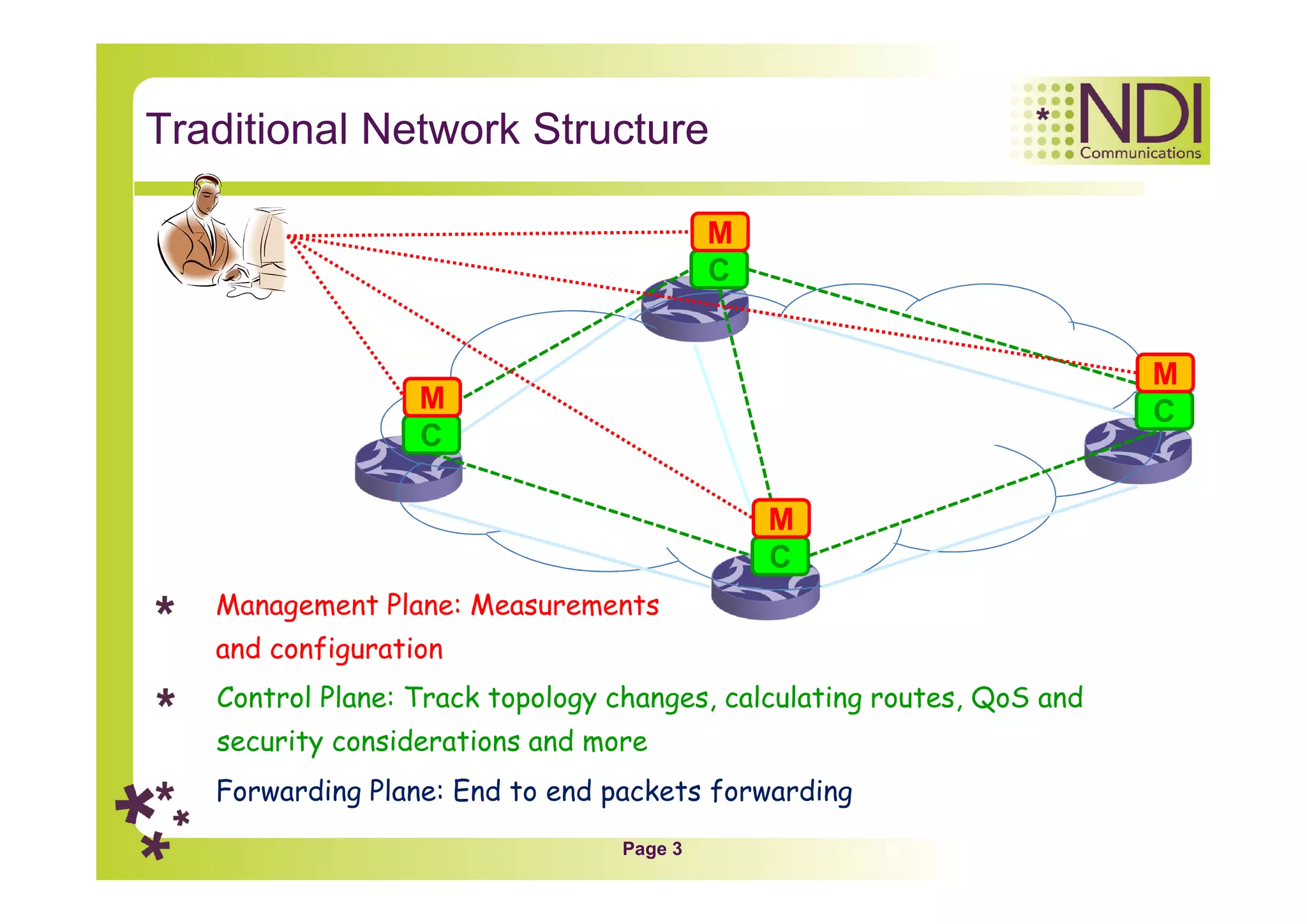
Traditional Network Structure
C
C
C
C
Forwarding Plane: End to end packets forwarding
Control Plane: Track topology changes, calculating routes, QoS and
security considerations and more
M
M
M
M
Management Plane: Measurements
and configuration
Page 4
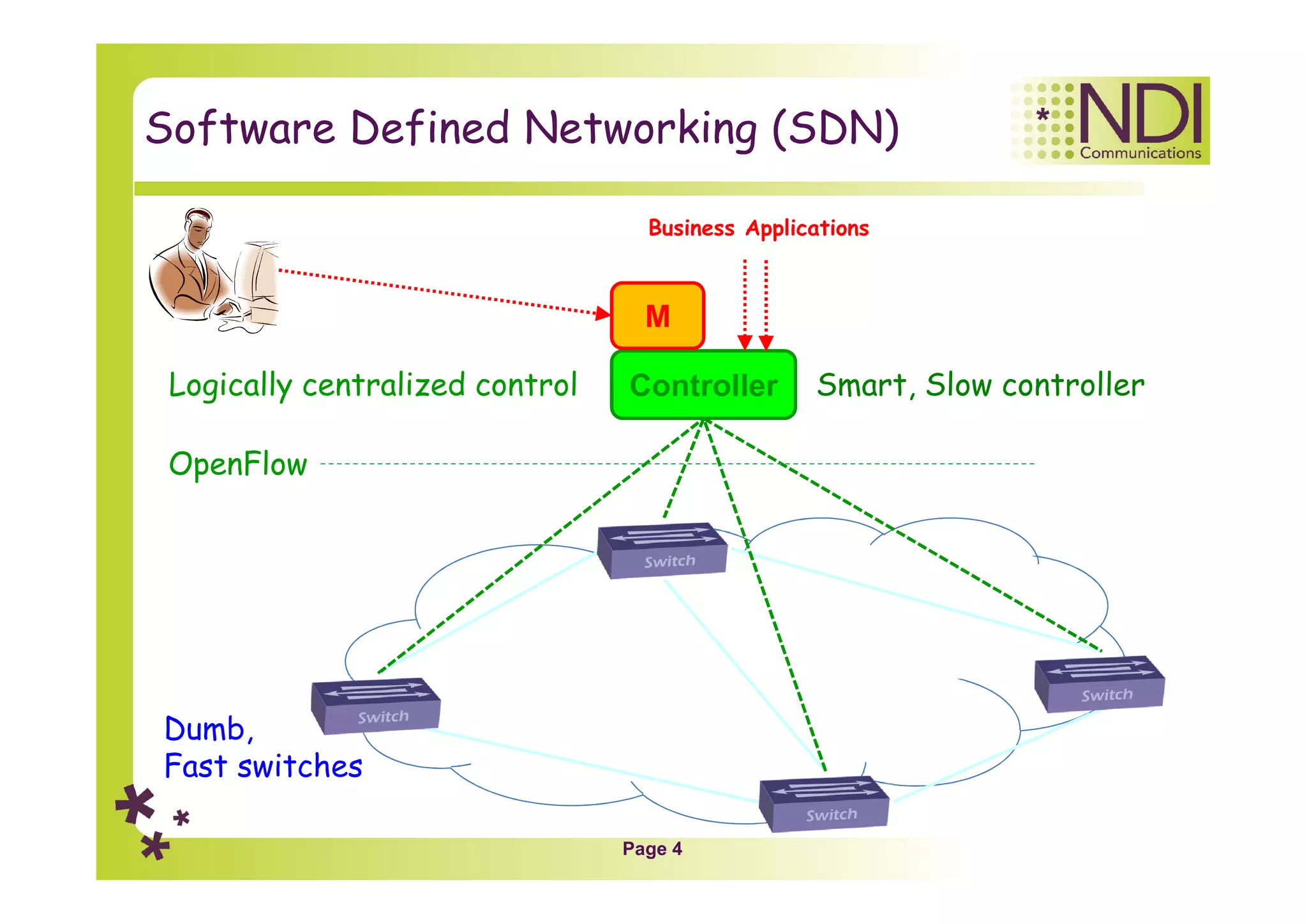
Software Defined Networking (SDN)
OpenFlow
Logically centralized control Smart, Slow controller
Dumb,
Fast switches
Controller
M
Business Applications
Page 5
Chapter Content
Network architecture
Network components
Tables
Applications
Page 6
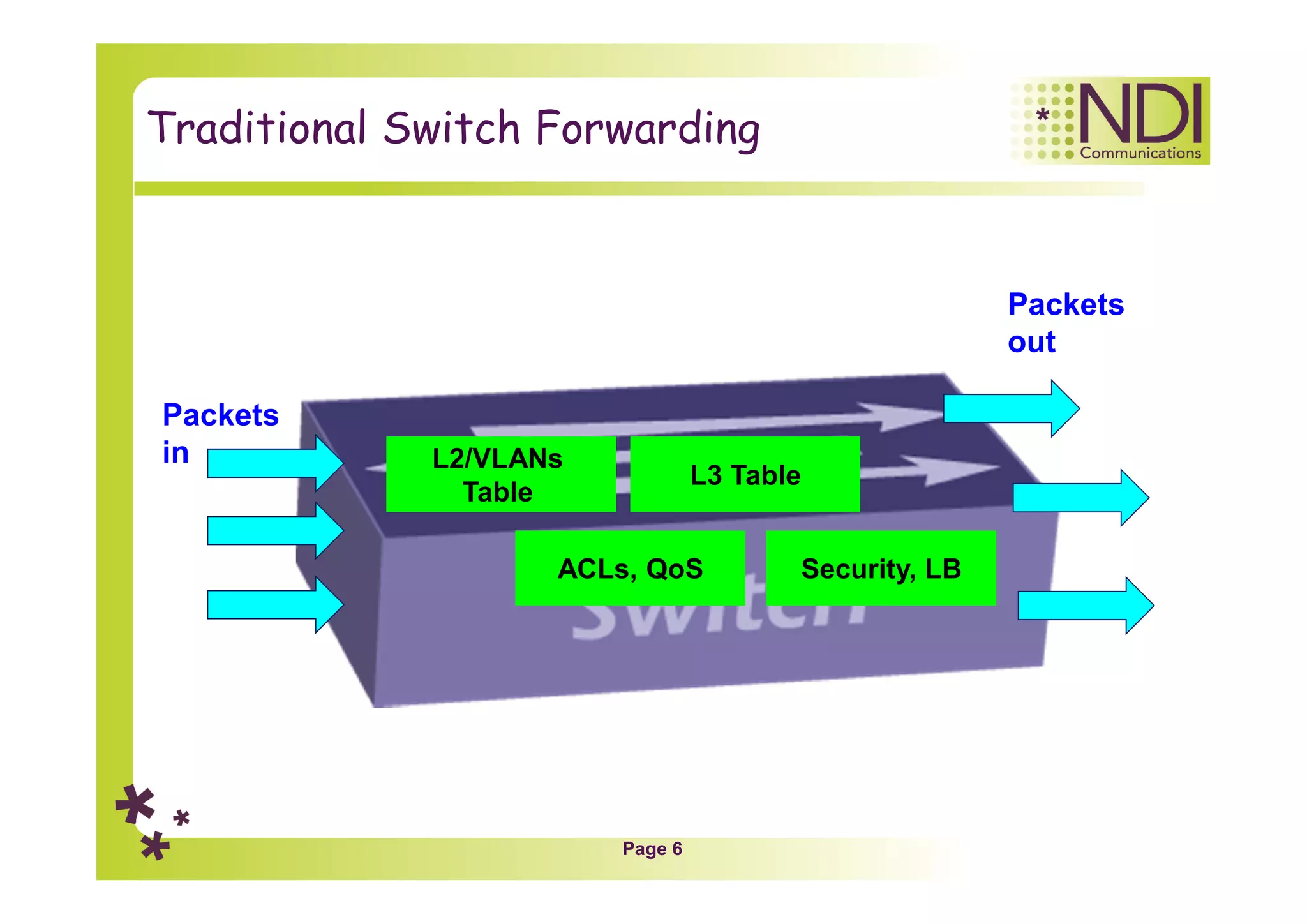
Traditional Switch Forwarding
L2/VLANs
Table
L3 Table
ACLs, QoS Security, LB
Packets
in
Packets
out
Page 7
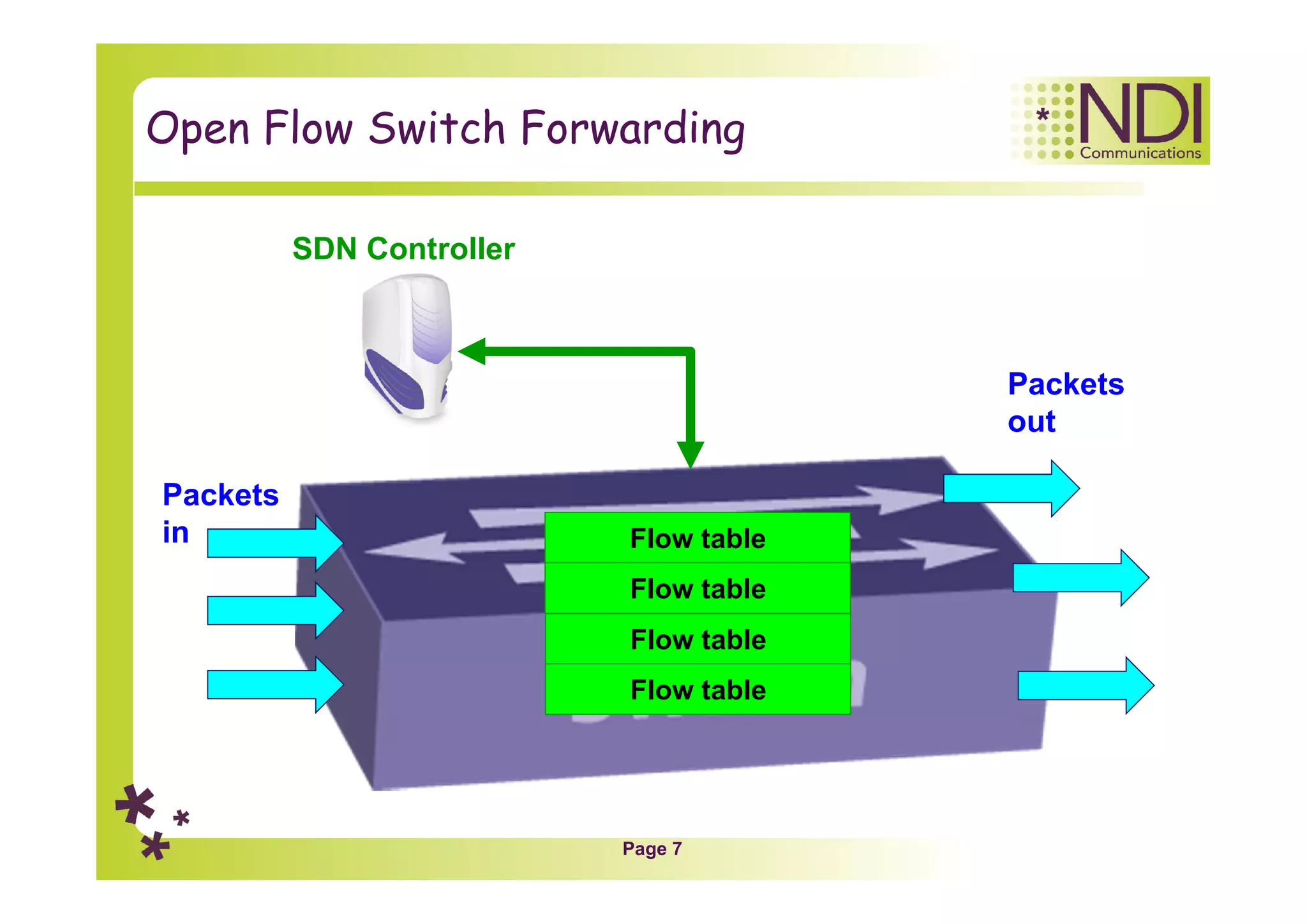
Open Flow Switch Forwarding
Flow table
Packets
in
Packets
out
Flow table
Flow table
Flow table
SDN Controller
Page 8
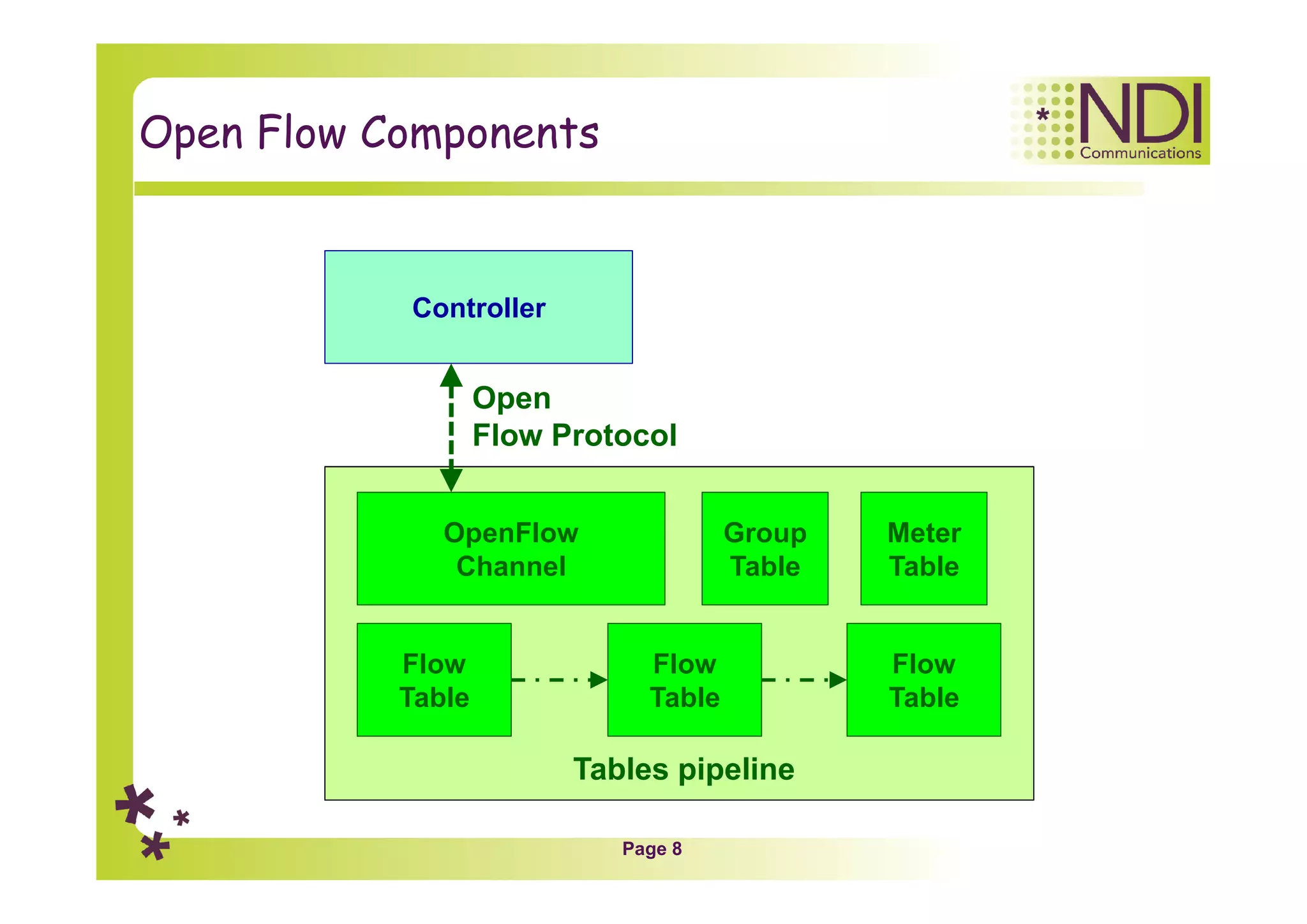
Open Flow Components
Controller
OpenFlow
Channel
Flow
Table
Flow
Table
Flow
Table
Open
Flow Protocol
Group
Table
Tables pipeline
Meter
Table
Page 9
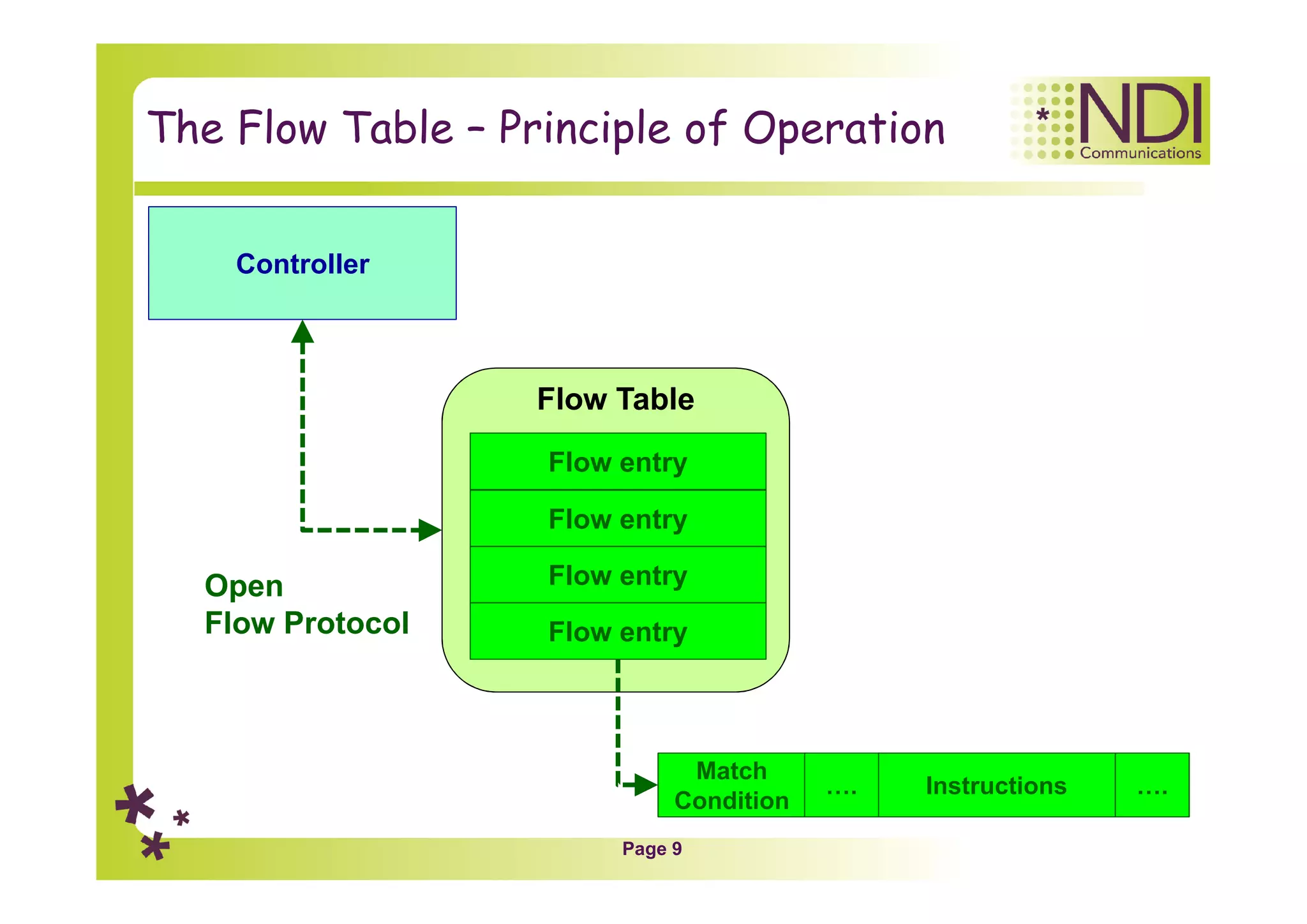
The Flow Table – Principle of Operation
Flow entry
Flow entry
Flow entry
Flow entry
Controller
Open
Flow Protocol
Flow Table
Match
Condition
Instructions…. ….
Page 10
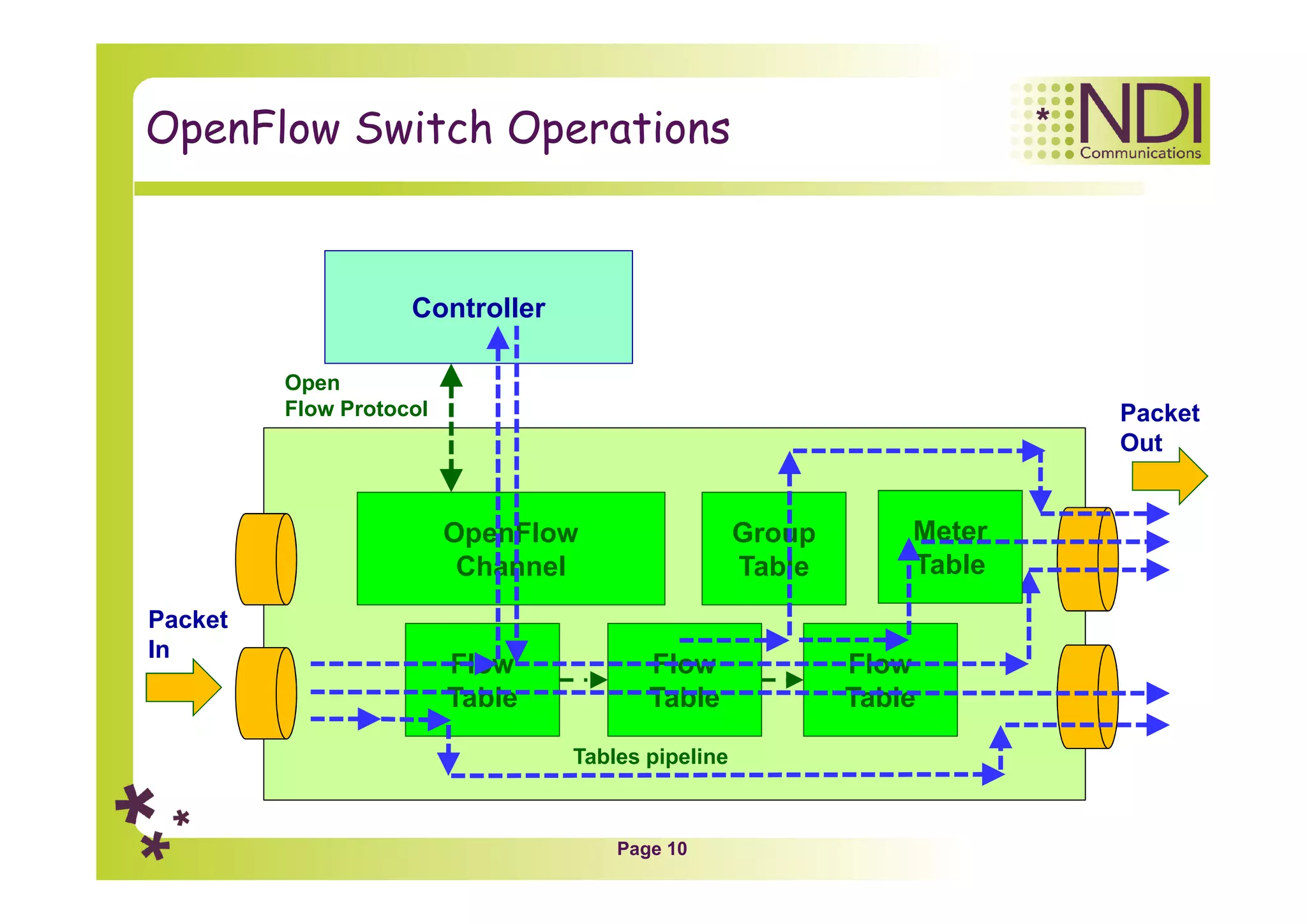
OpenFlow Switch Operations
Controller
OpenFlow
Channel
Flow
Table
Flow
Table
Flow
Table
Open
Flow Protocol
Group
Table
Tables pipeline
Packet
In
Packet
Out
Meter
Table
Page 11
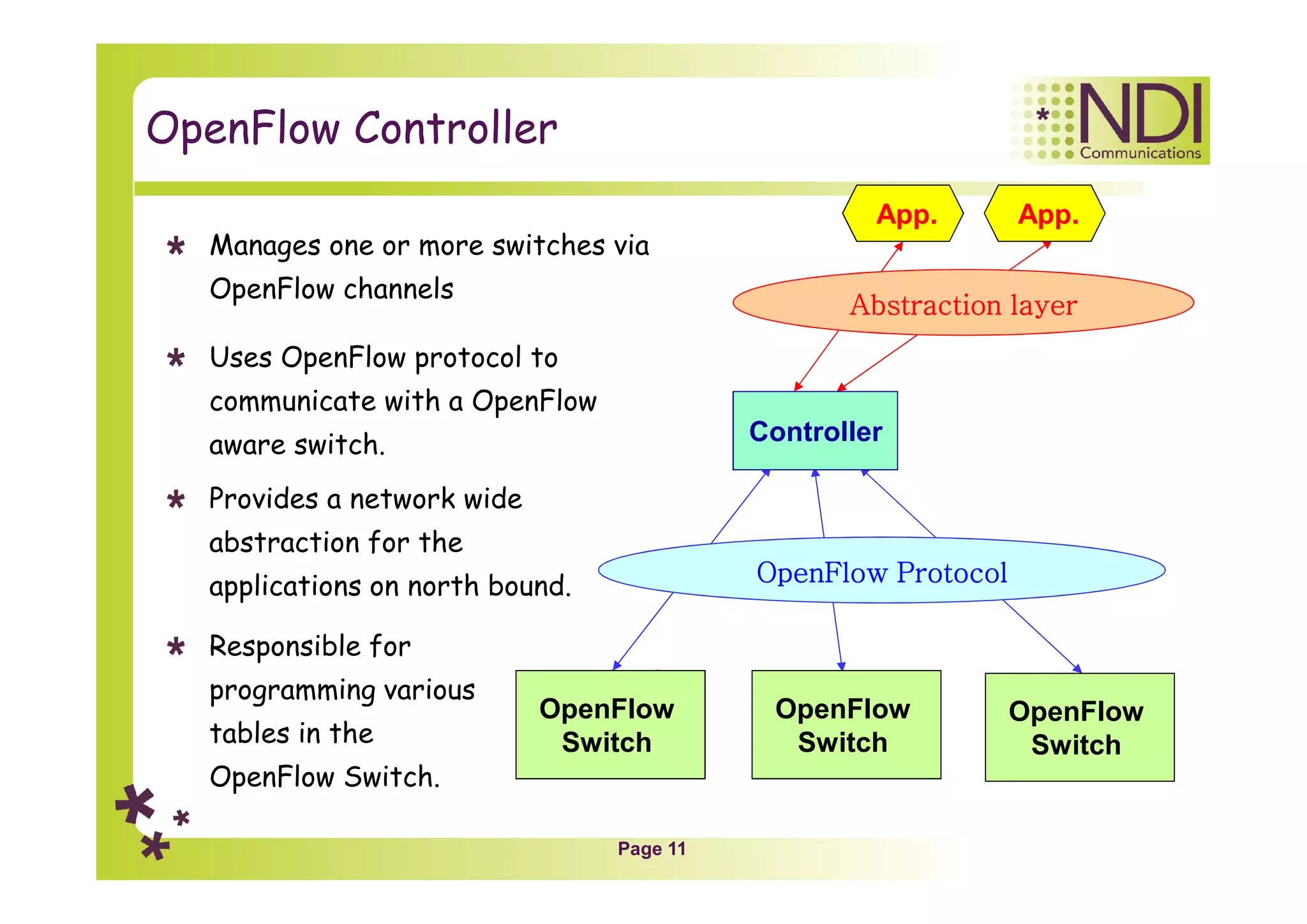
OpenFlow Controller
Manages one or more switches via
OpenFlow channels
Uses OpenFlow protocol to
communicate with a OpenFlow
aware switch.
Provides a network wide
abstraction for the
applications on north bound.
Responsible for
programming various
tables in the
OpenFlow Switch.
OpenFlow
Switch
Controller
OpenFlow
Switch
OpenFlow
Switch
App. App.
OpenFlow Protocol
Abstraction layer
Page 12
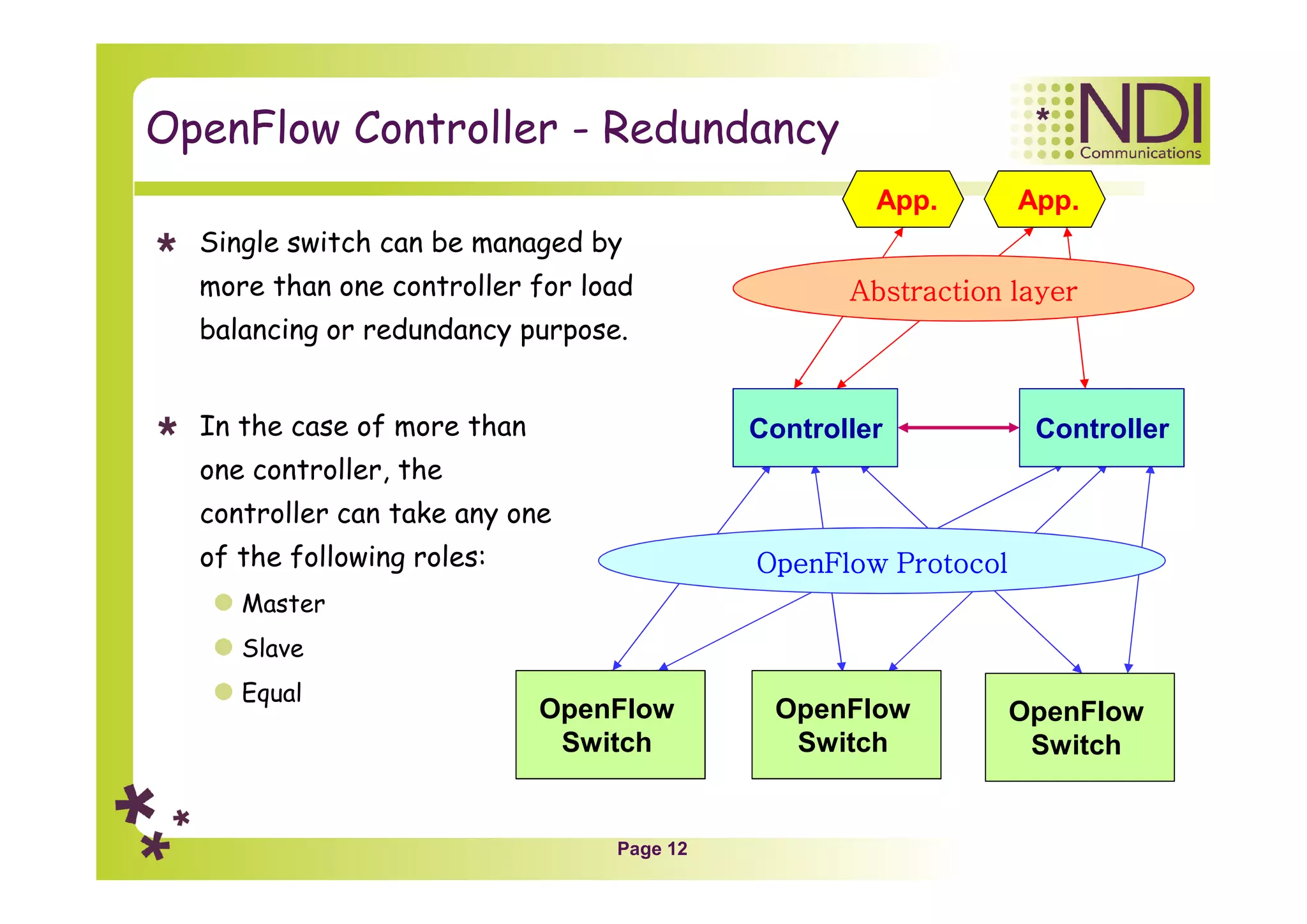
OpenFlow Controller - Redundancy
Single switch can be managed by
more than one controller for load
balancing or redundancy purpose.
In the case of more than
one controller, the
controller can take any one
of the following roles:
Master
Slave
Equal
OpenFlow
Switch
Controller
OpenFlow
Switch
OpenFlow
Switch
Controller
App. App.
OpenFlow Protocol
Abstraction layer
Page 13
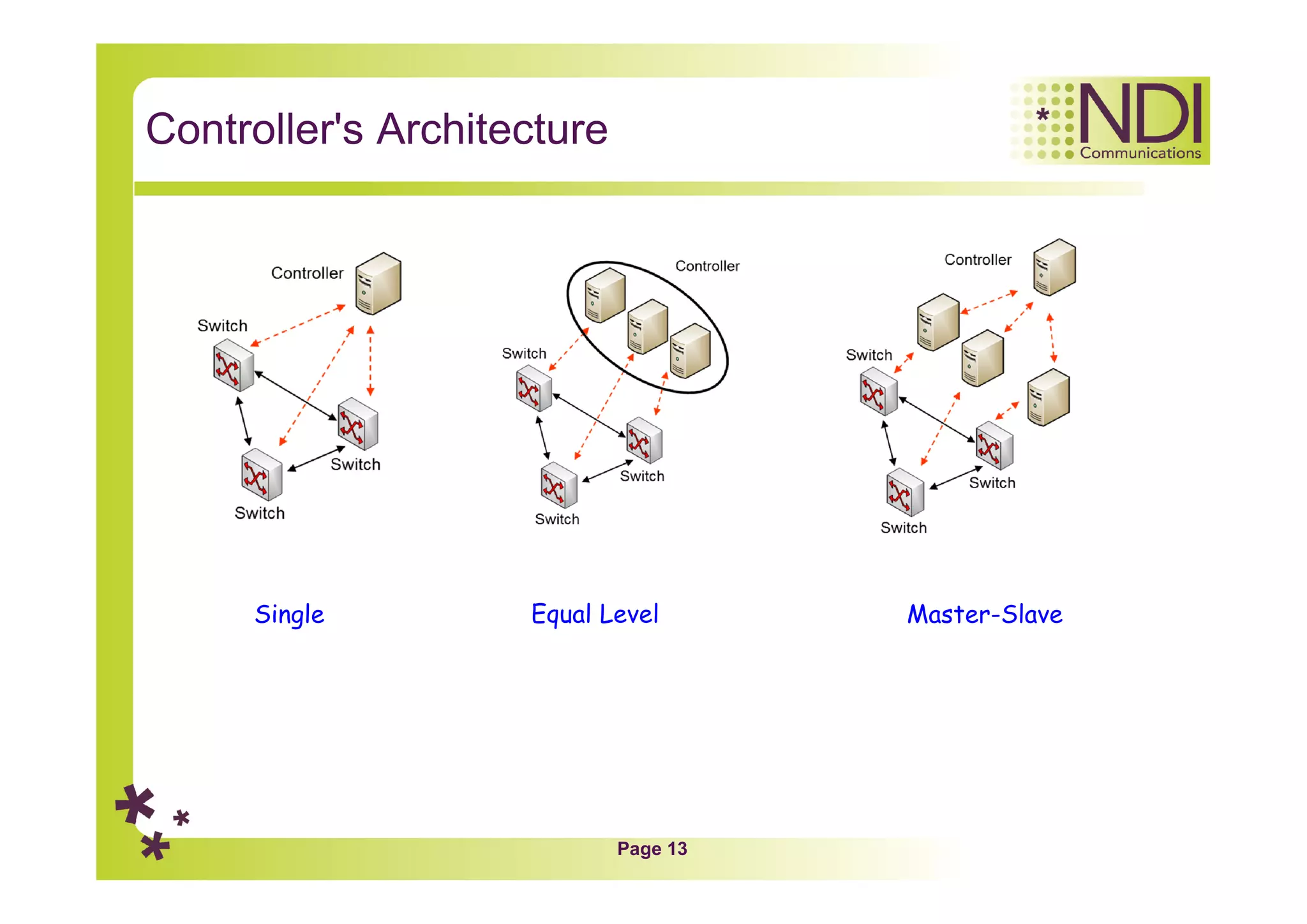
Controller's Architecture
Single Equal Level Master-Slave
Page 14
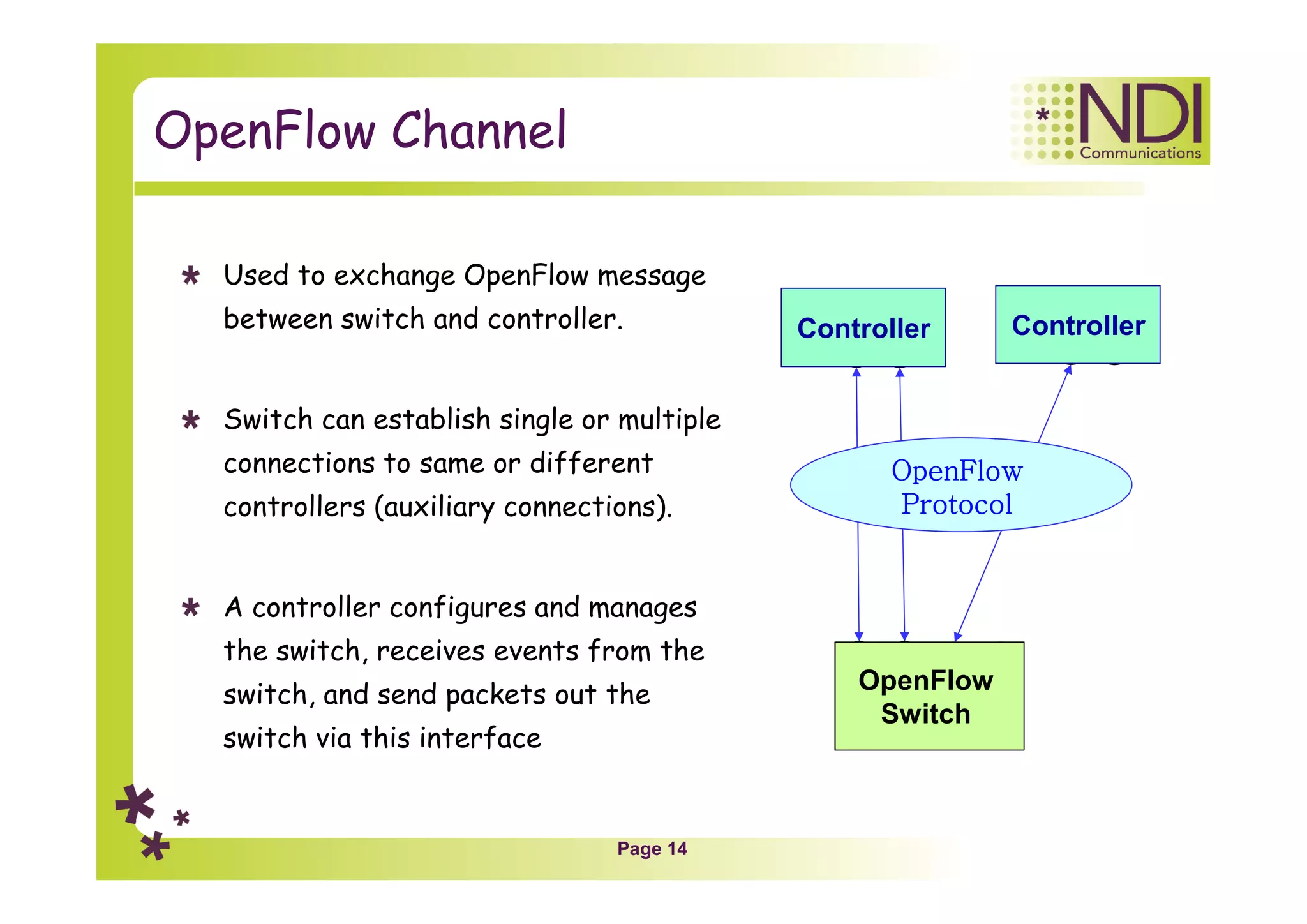
OpenFlow Channel
Used to exchange OpenFlow message
between switch and controller.
Switch can establish single or multiple
connections to same or different
controllers (auxiliary connections).
A controller configures and manages
the switch, receives events from the
switch, and send packets out the
switch via this interface
OpenFlow
Switch
Controller Controller
OpenFlow
Protocol
Page 15
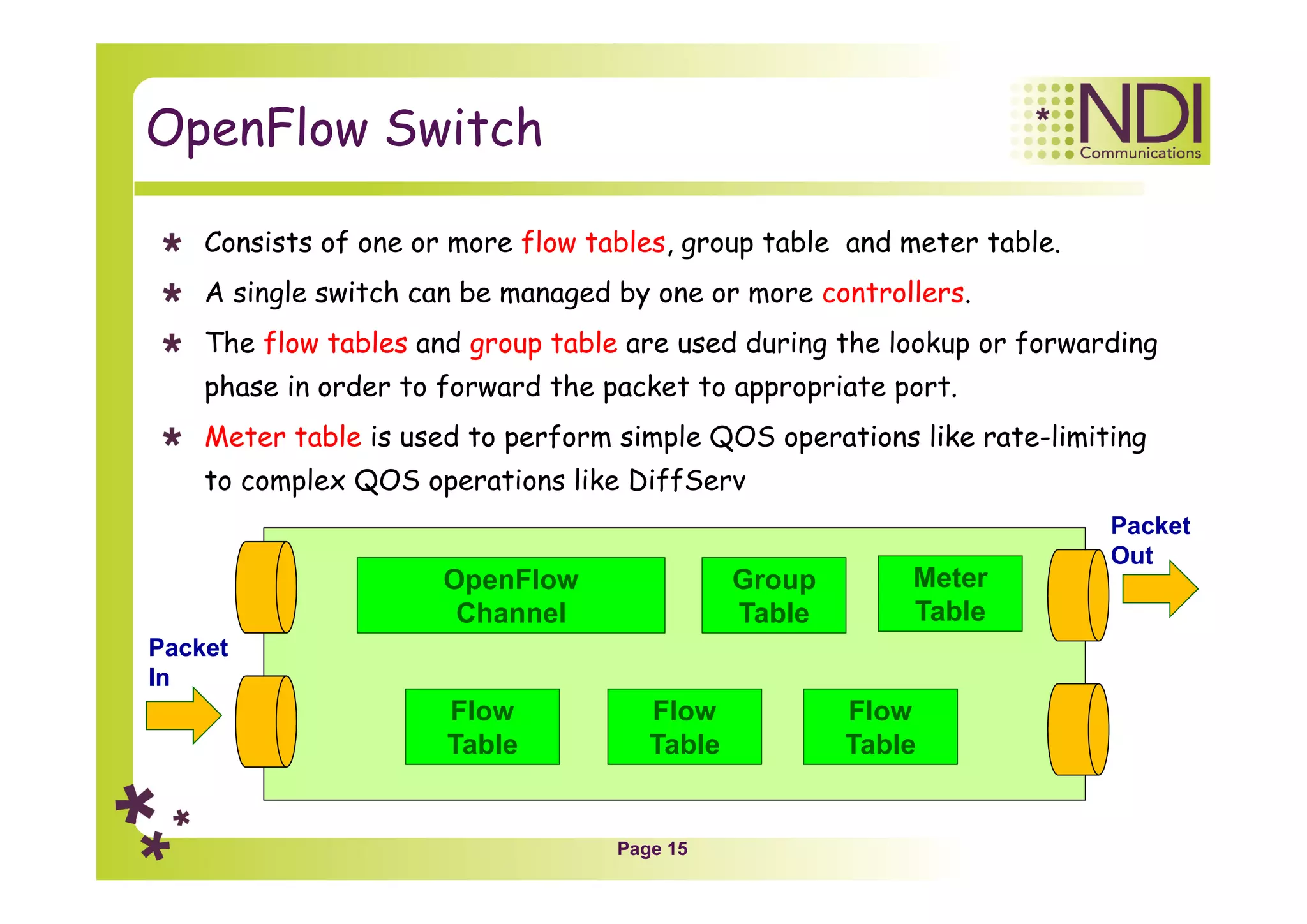
OpenFlow Switch
Consists of one or more flow tables, group table and meter table.
A single switch can be managed by one or more controllers.
The flow tables and group table are used during the lookup or forwarding
phase in order to forward the packet to appropriate port.
Meter table is used to perform simple QOS operations like rate-limiting
to complex QOS operations like DiffServ
OpenFlow
Channel
Flow
Table
Flow
Table
Flow
Table
Group
Table
Packet
In
Packet
Out
Meter
Table
Page 16
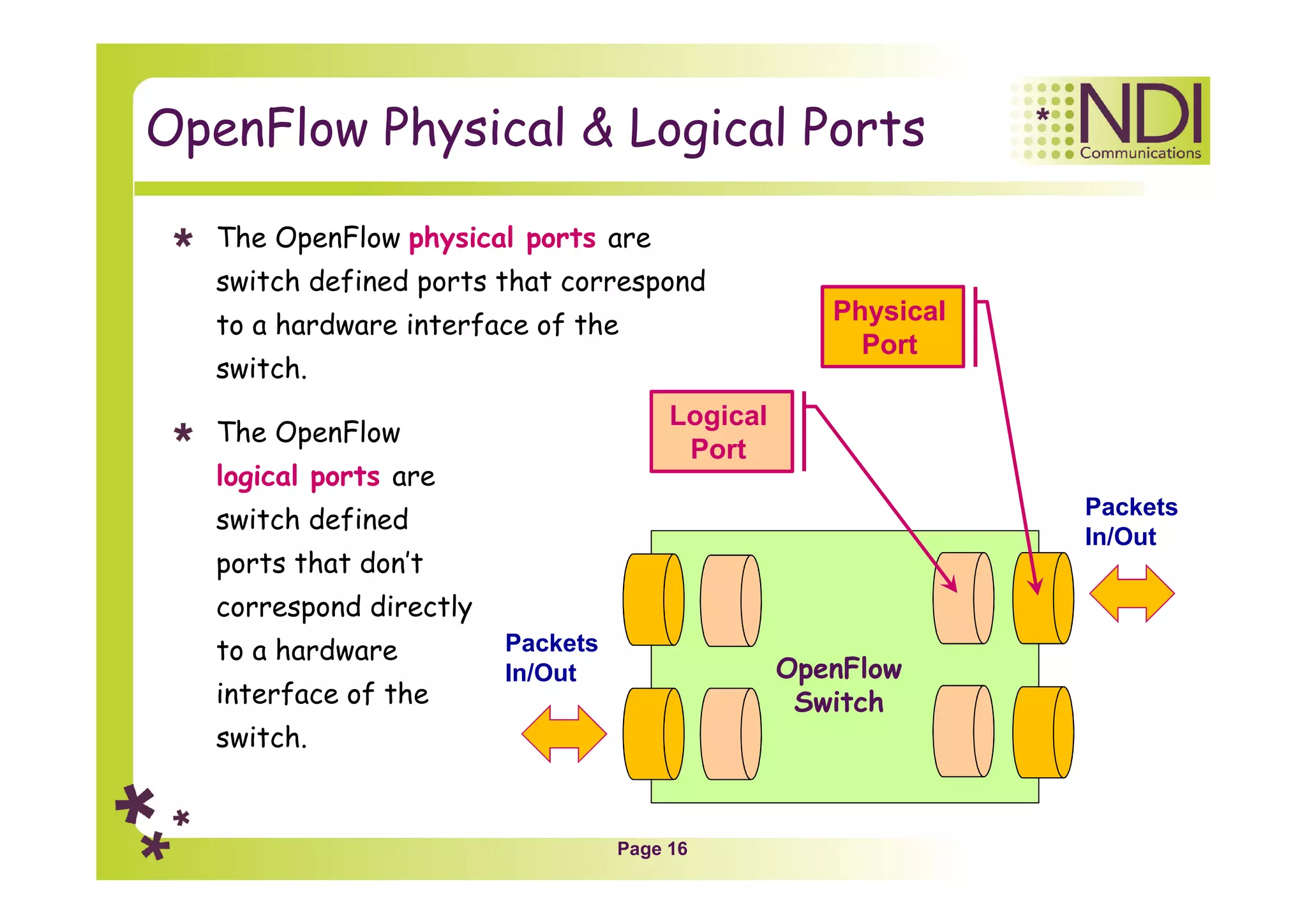
OpenFlow Physical & Logical Ports
Packets
In/Out
Packets
In/Out
OpenFlow
Switch
Logical
Port
Physical
Port
The OpenFlow physical ports are
switch defined ports that correspond
to a hardware interface of the
switch.
The OpenFlow
logical ports are
switch defined
ports that don’t
correspond directly
to a hardware
interface of the
switch.
Page 17
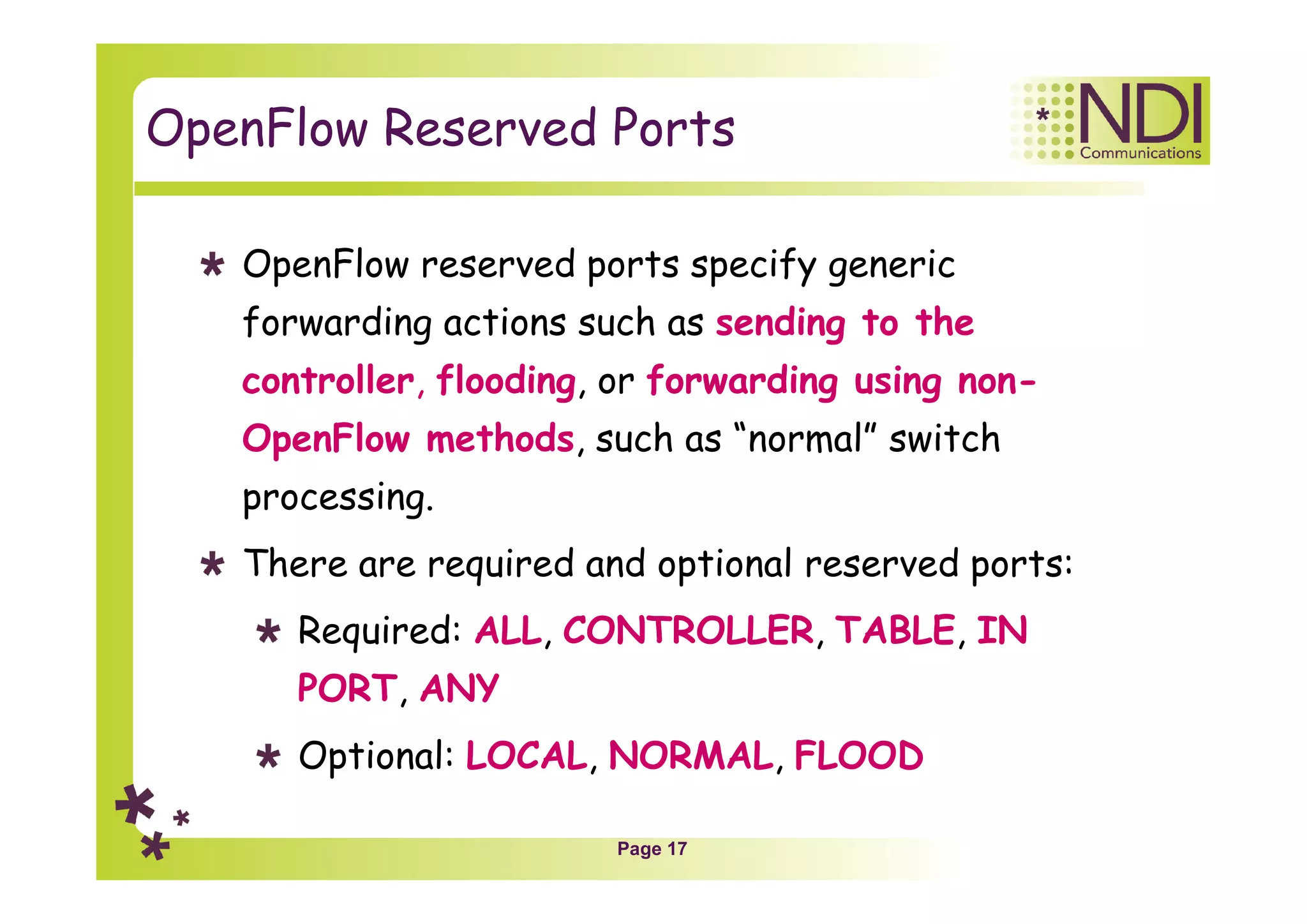
OpenFlow Reserved Ports
OpenFlow reserved ports specify generic
forwarding actions such as sending to the
controller, flooding, or forwarding using non-
OpenFlow methods, such as “normal” switch
processing.
There are required and optional reserved ports:
Required: ALL, CONTROLLER, TABLE, IN
PORT, ANY
Optional: LOCAL, NORMAL, FLOOD
Page 18
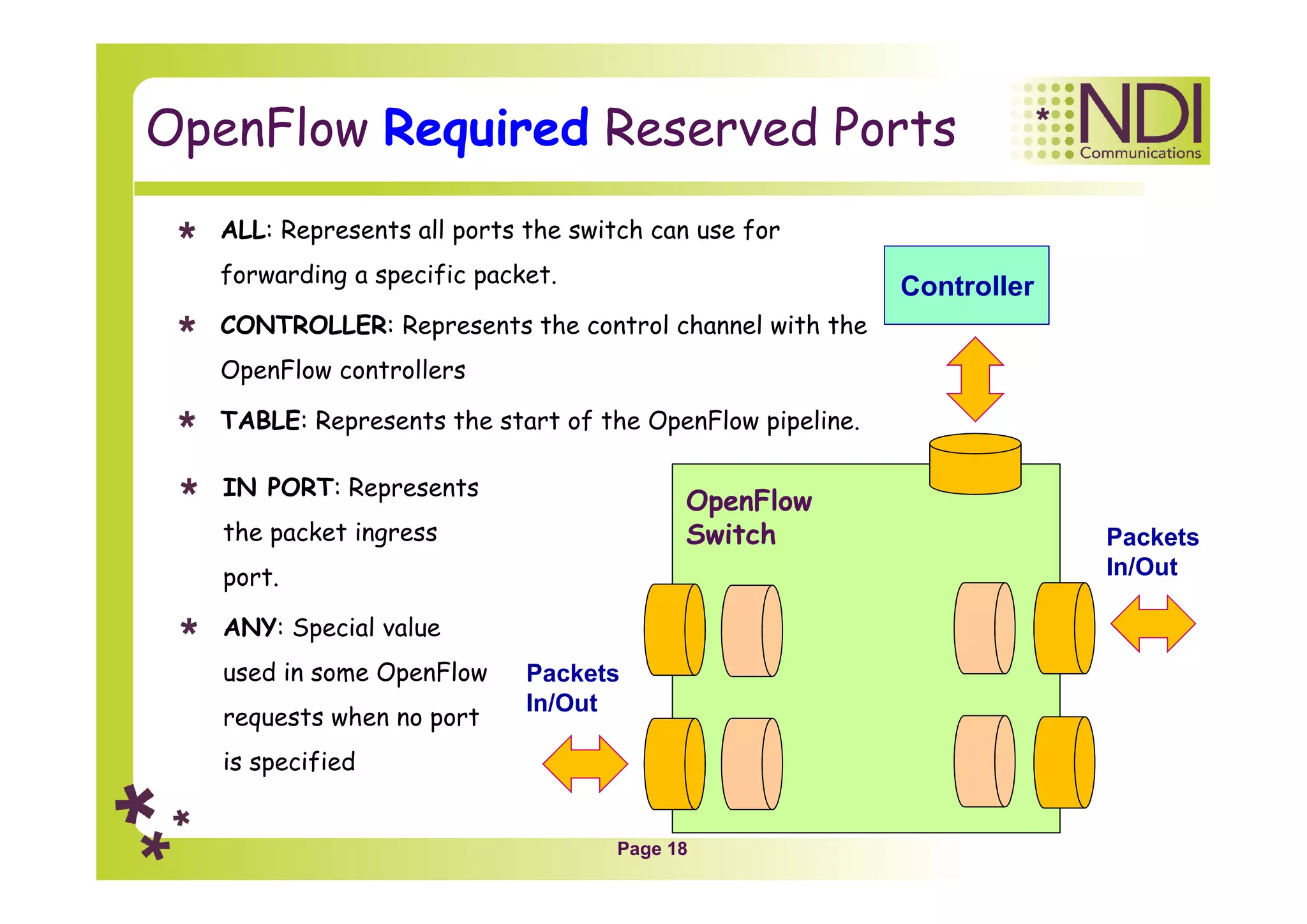
OpenFlow Required Reserved Ports
Packets
In/Out
Packets
In/Out
OpenFlow
Switch
Controller
IN PORT: Represents
the packet ingress
port.
ANY: Special value
used in some OpenFlow
requests when no port
is specified
ALL: Represents all ports the switch can use for
forwarding a specific packet.
CONTROLLER: Represents the control channel with the
OpenFlow controllers
TABLE: Represents the start of the OpenFlow pipeline.
Page 19
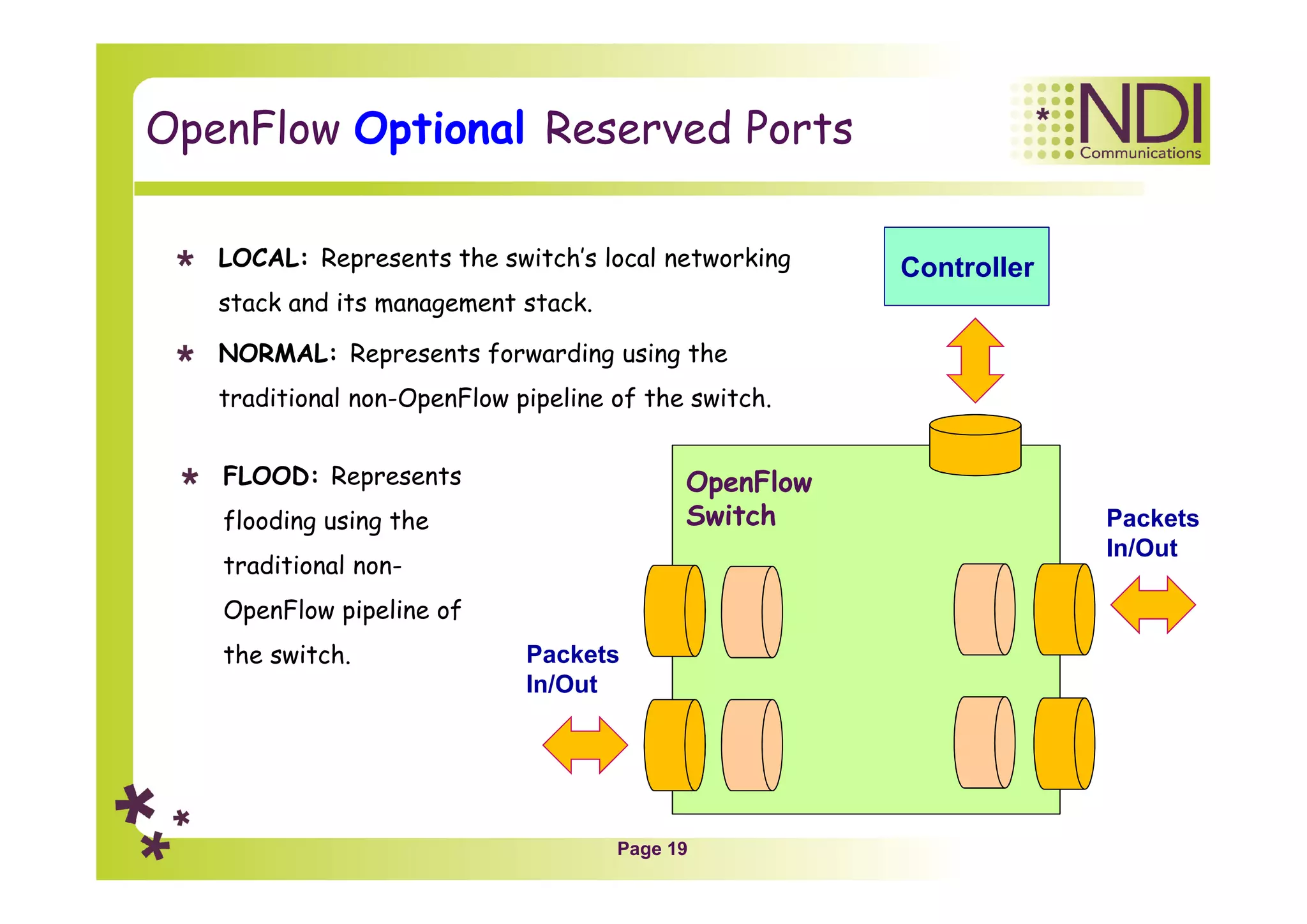
OpenFlow Optional Reserved Ports
Packets
In/Out
Packets
In/Out
OpenFlow
Switch
ControllerLOCAL: Represents the switch’s local networking
stack and its management stack.
NORMAL: Represents forwarding using the
traditional non-OpenFlow pipeline of the switch.
FLOOD: Represents
flooding using the
traditional non-
OpenFlow pipeline of
the switch.
Page 20
Chapter Content
Network architecture
Network components
Tables
Applications
Page 21
Table Types
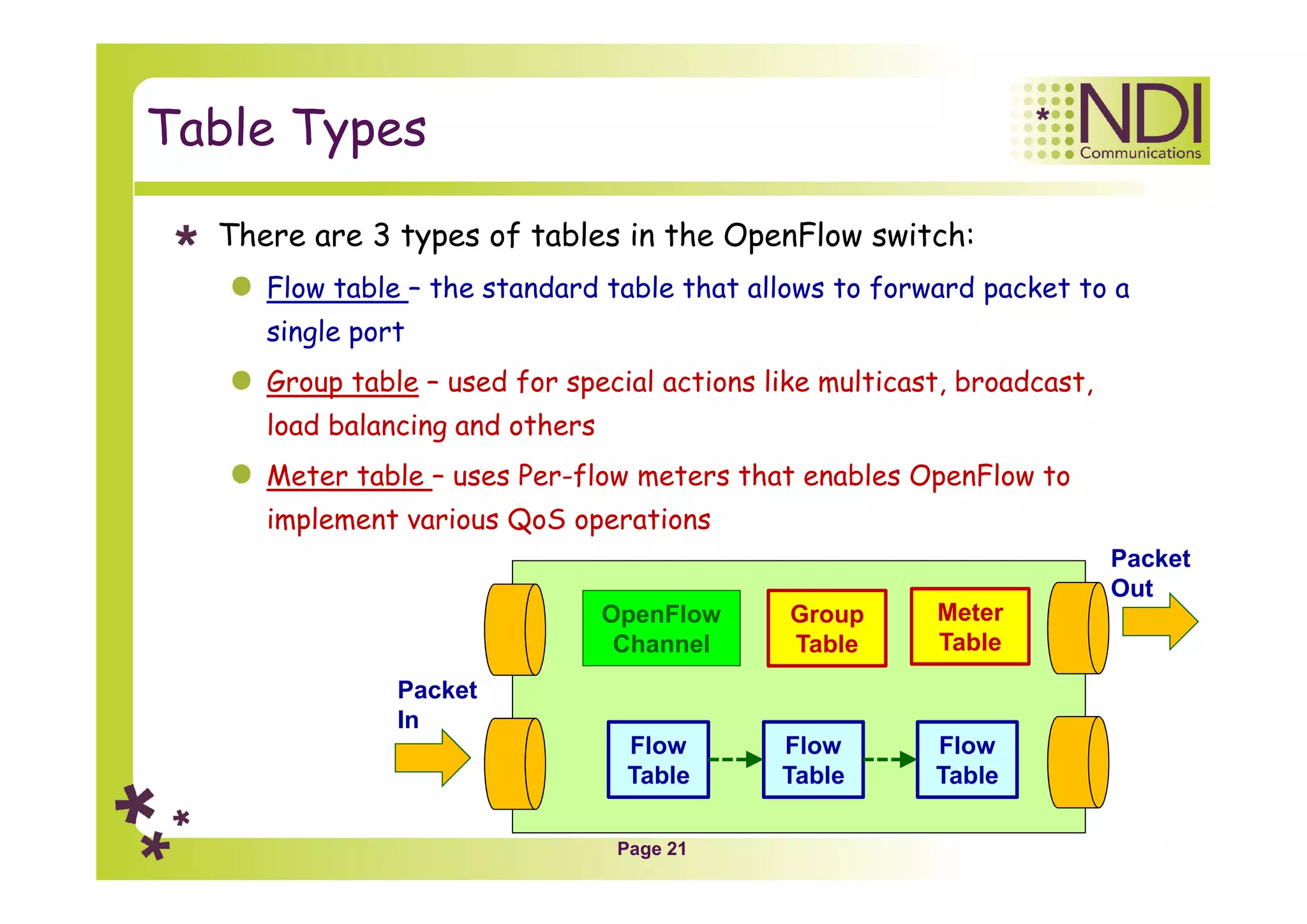
There are 3 types of tables in the OpenFlow switch:
Flow table – the standard table that allows to forward packet to a
single port
Group table – used for special actions like multicast, broadcast,
load balancing and others
Meter table – uses Per-flow meters that enables OpenFlow to
implement various QoS operations
OpenFlow
Channel
Flow
Table
Flow
Table
Flow
Table
Group
Table
Packet
In
Packet
Out
Meter
Table
Page 22
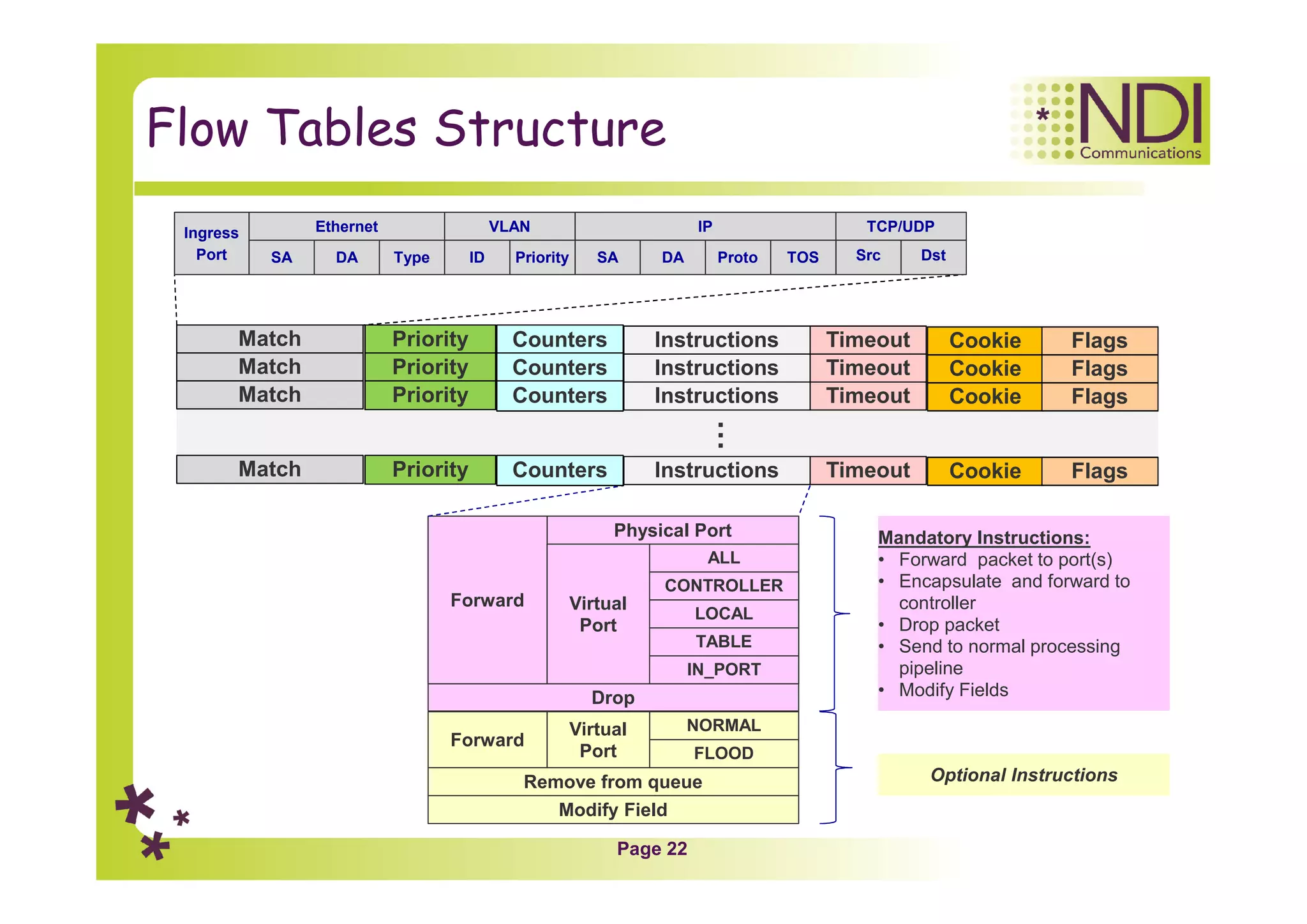
Flow Tables Structure
Match Instructions
Modify Field
Remove from queue
Forward
NORMAL
FLOOD
Virtual
Port
Physical Port
Forward
Mandatory Instructions:
• Forward packet to port(s)
• Encapsulate and forward to
controller
• Drop packet
• Send to normal processing
pipeline
• Modify Fields
Mandatory Instructions:
• Forward packet to port(s)
• Encapsulate and forward to
controller
• Drop packet
• Send to normal processing
pipeline
• Modify Fields
Optional InstructionsOptional Instructions
Timeout
Match Instructions Timeout
…
Ingress
Port
Ethernet
SA DA Type
IP
SA DA Proto
TCP/UDP
Src
VLAN
ID Priority TOS Dst
Virtual
Port
ALL
CONTROLLER
LOCAL
TABLE
IN_PORT
Drop
Priority
Priority
Priority
Priority
Counters
Counters
Counters
Counters
Cookie
Cookie
Cookie
Cookie
Flags
Flags
Flags
Flags
Page 23
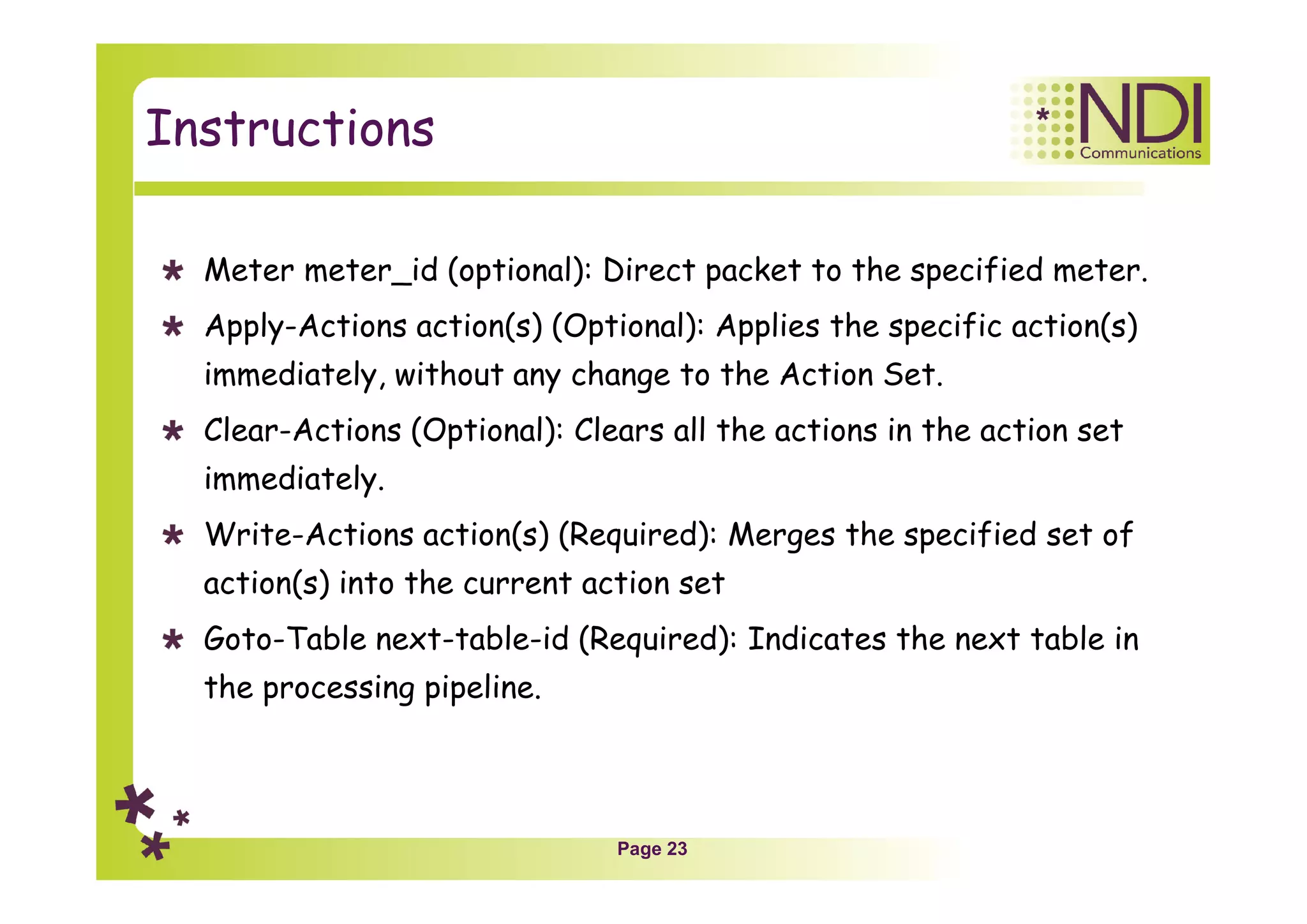
Instructions
Meter meter_id (optional): Direct packet to the specified meter.
Apply-Actions action(s) (Optional): Applies the specific action(s)
immediately, without any change to the Action Set.
Clear-Actions (Optional): Clears all the actions in the action set
immediately.
Write-Actions action(s) (Required): Merges the specified set of
action(s) into the current action set
Goto-Table next-table-id (Required): Indicates the next table in
the processing pipeline.
Page 24
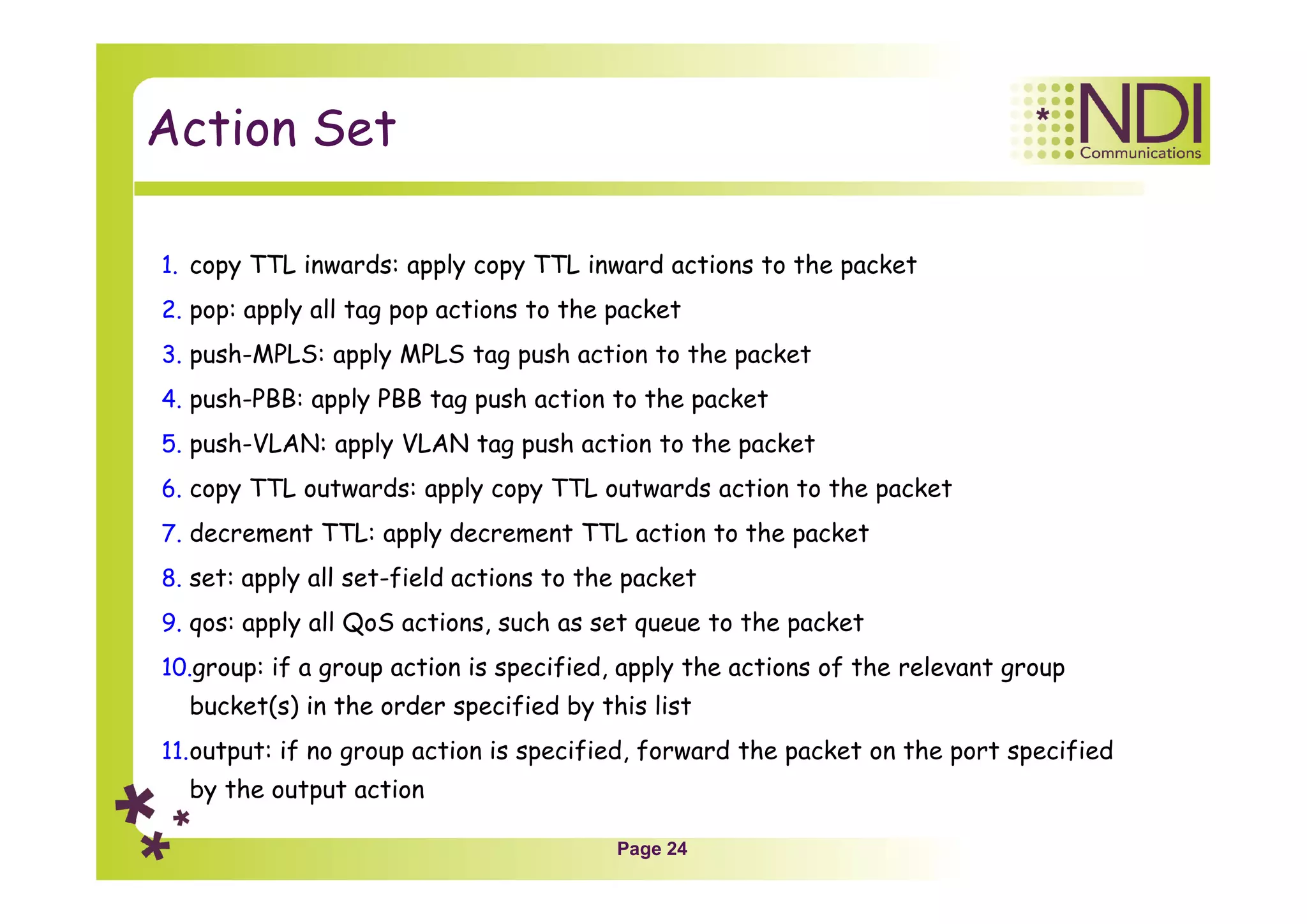
Action Set
1. copy TTL inwards: apply copy TTL inward actions to the packet
2. pop: apply all tag pop actions to the packet
3. push-MPLS: apply MPLS tag push action to the packet
4. push-PBB: apply PBB tag push action to the packet
5. push-VLAN: apply VLAN tag push action to the packet
6. copy TTL outwards: apply copy TTL outwards action to the packet
7. decrement TTL: apply decrement TTL action to the packet
8. set: apply all set-field actions to the packet
9. qos: apply all QoS actions, such as set queue to the packet
10.group: if a group action is specified, apply the actions of the relevant group
bucket(s) in the order specified by this list
11.output: if no group action is specified, forward the packet on the port specified
by the output action
Page 25
Notes Only
Page 26
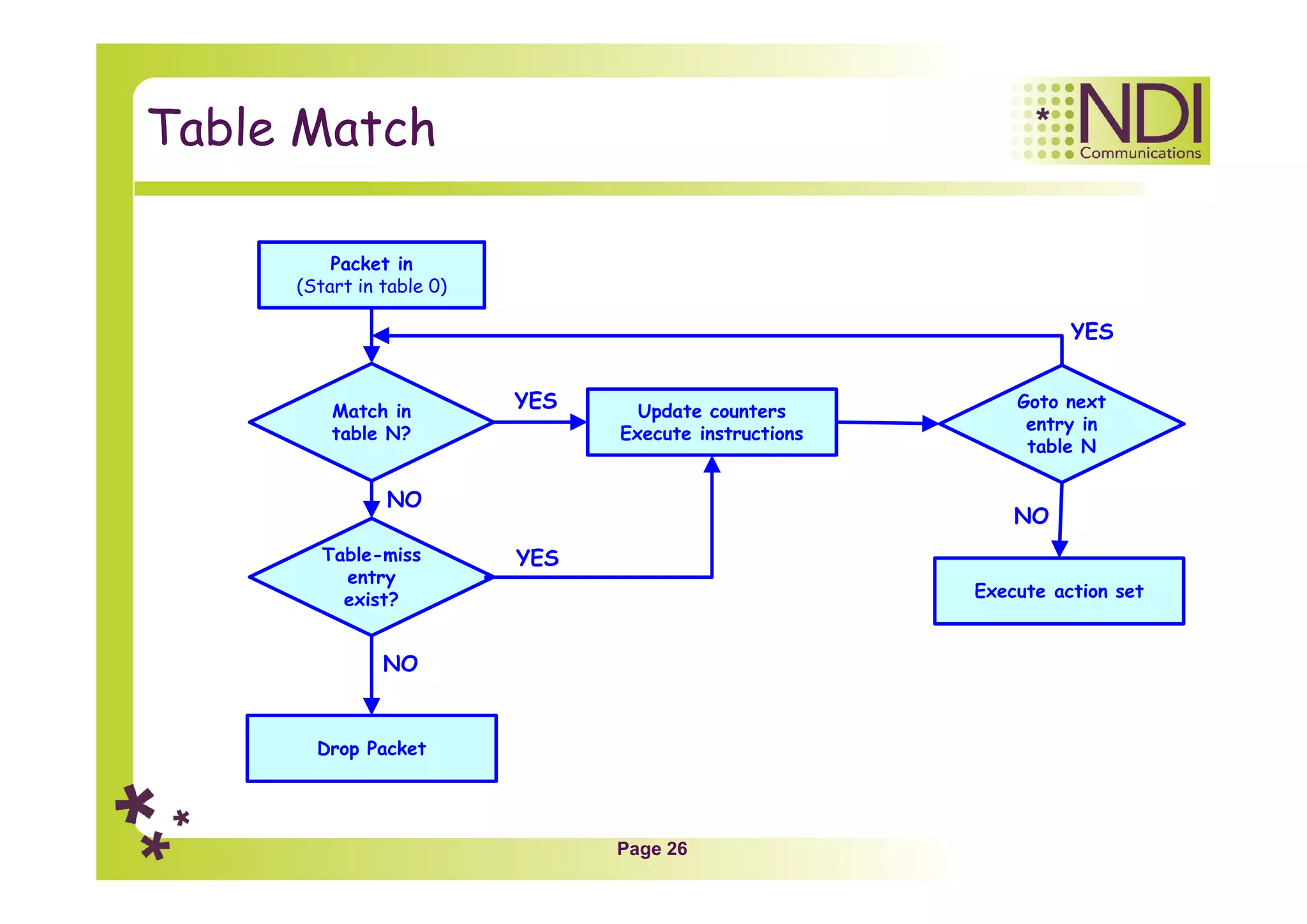
Table Match
Packet in
(Start in table 0)
Match in
table N?
Update counters
Execute instructions
YES
Table-miss
entry
exist?
Drop Packet
Goto next
entry in
table N
NO
NO
YES
Execute action set
NO
YES
Page 27
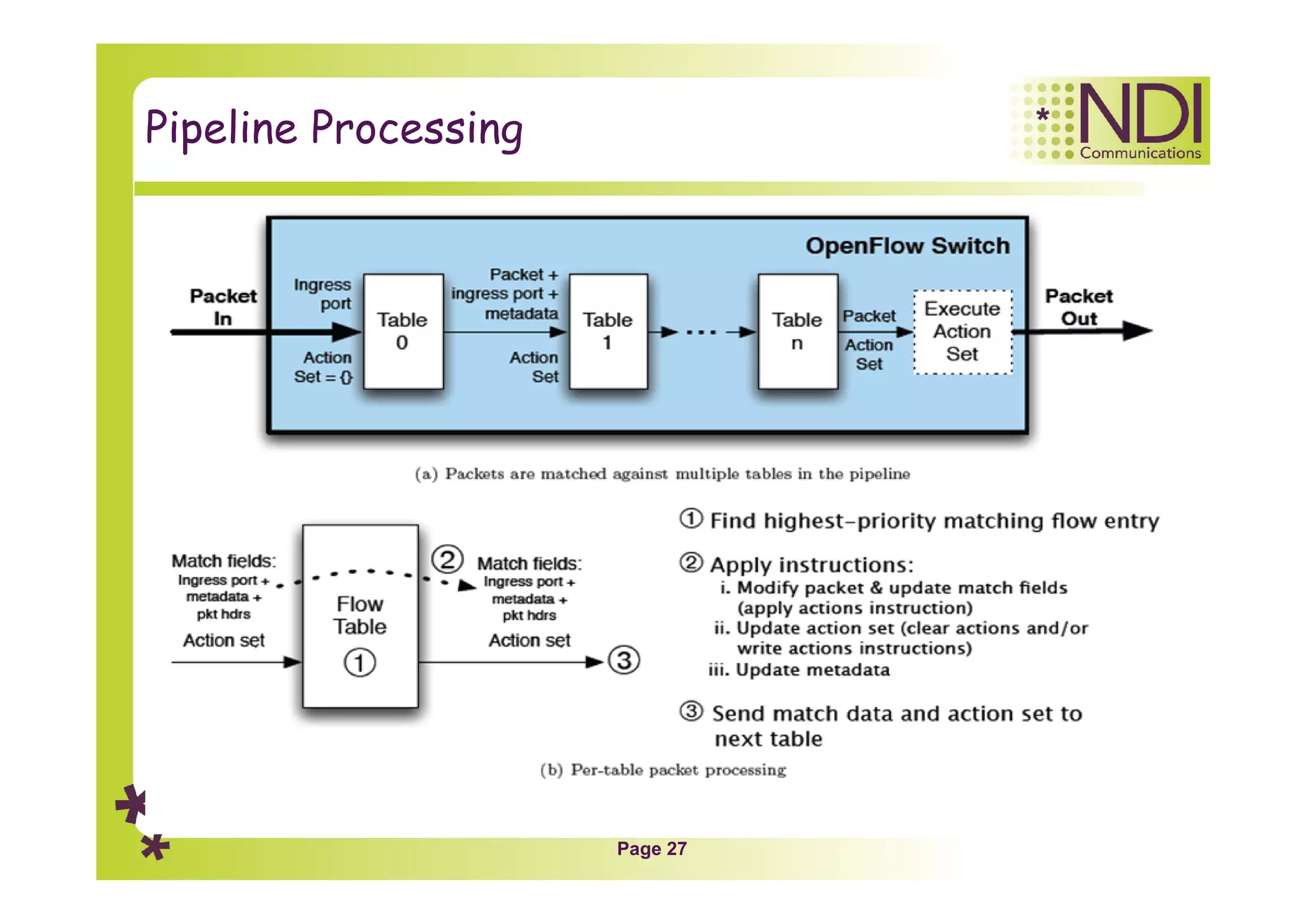
Pipeline Processing
Page 28
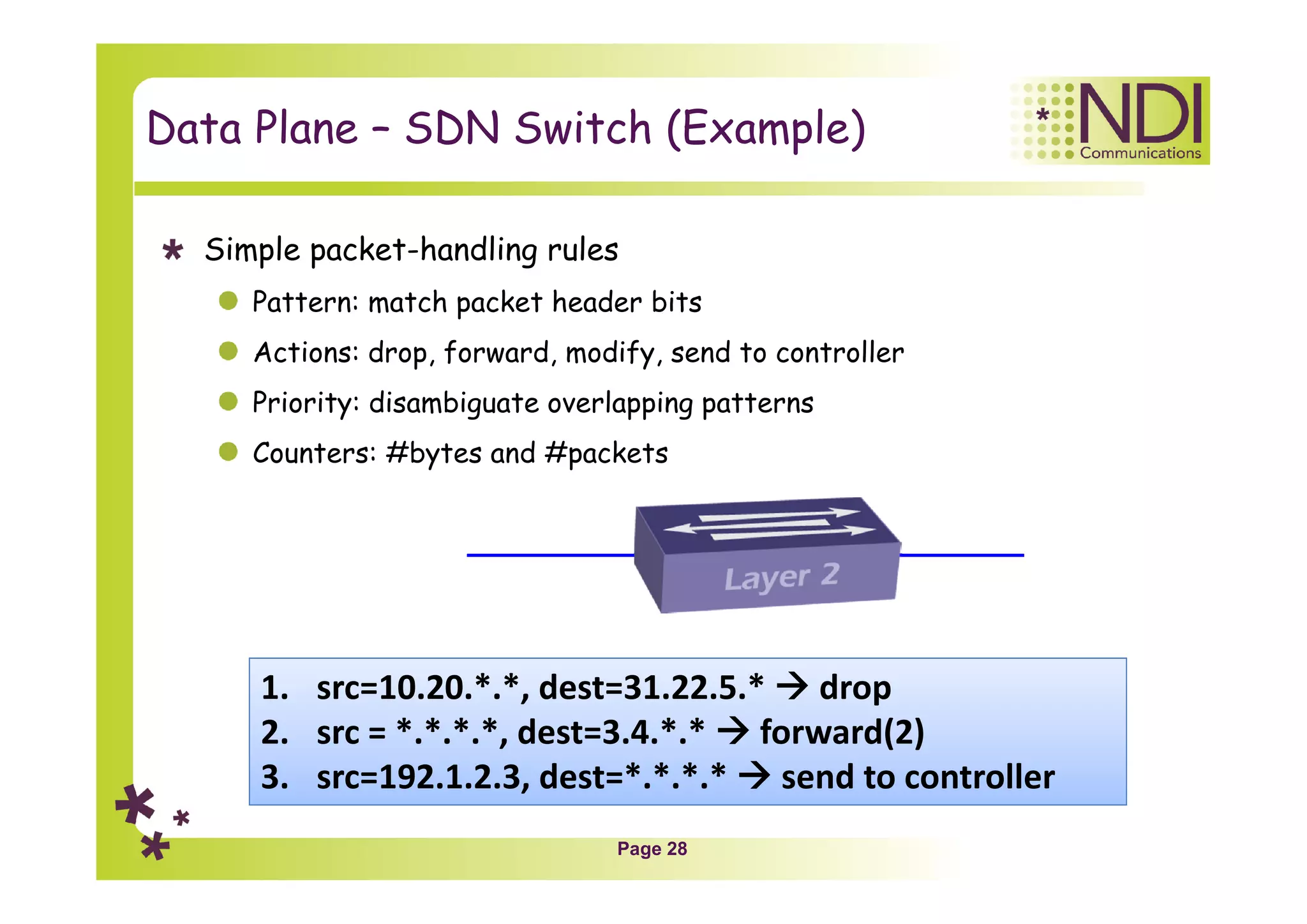
Data Plane – SDN Switch (Example)
Simple packet-handling rules
Pattern: match packet header bits
Actions: drop, forward, modify, send to controller
Priority: disambiguate overlapping patterns
Counters: #bytes and #packets
1. src=10.20.*.*, dest=31.22.5.*  drop
2. src = *.*.*.*, dest=3.4.*.*  forward(2)
3. src=192.1.2.3, dest=*.*.*.*  send to controller
Page 29
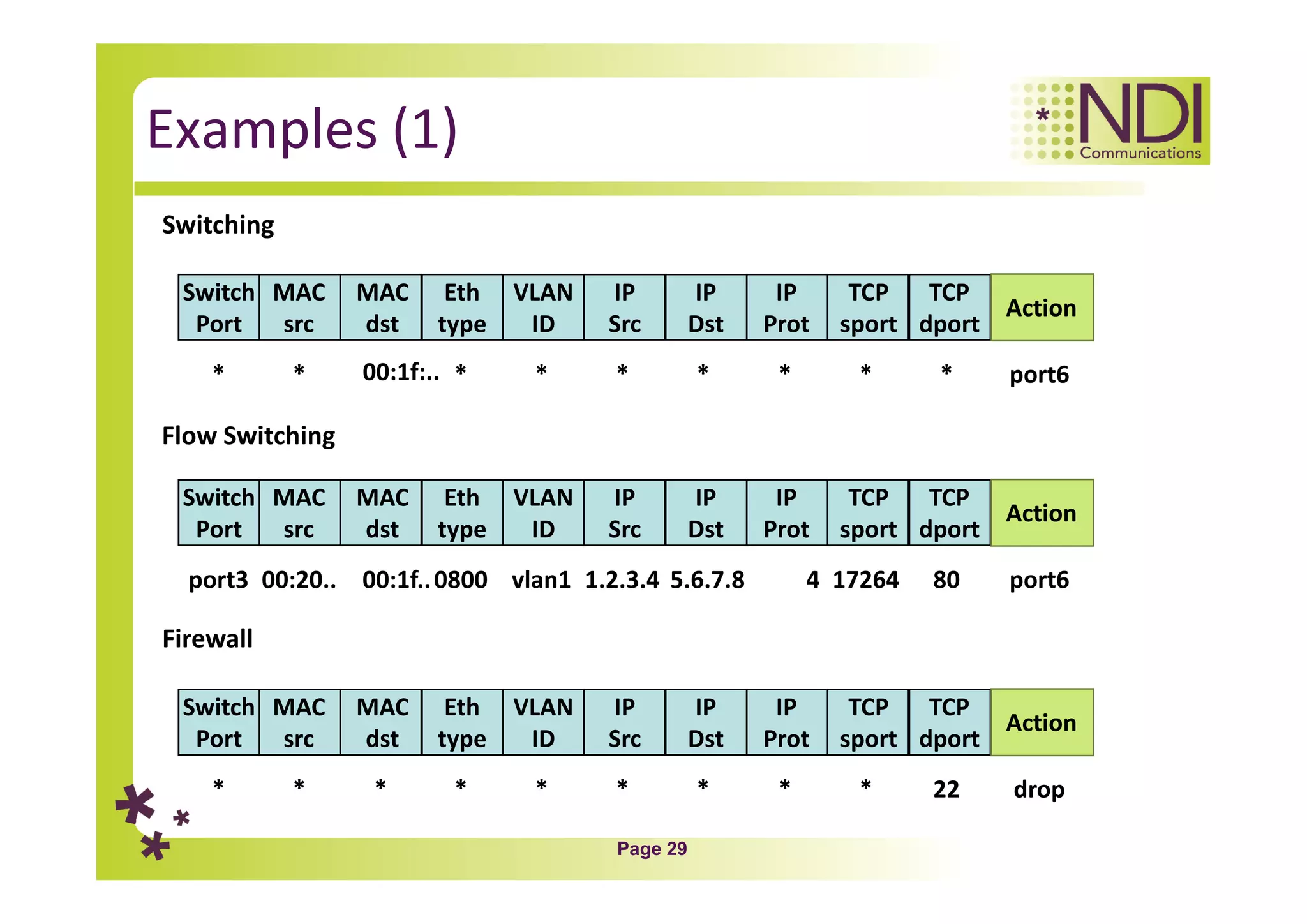
Examples (1)
Switching
*
Switch
Port
MAC
src
MAC
dst
Eth
type
VLAN
ID
IP
Src
IP
Dst
IP
Prot
TCP
sport
TCP
dport
Action
* 00:1f:.. * * * * * * * port6
Flow Switching
port3
Switch
Port
MAC
src
MAC
dst
Eth
type
VLAN
ID
IP
Src
IP
Dst
IP
Prot
TCP
sport
TCP
dport
Action
00:20.. 00:1f..0800 vlan1 1.2.3.4 5.6.7.8 4 17264 80 port6
Firewall
*
Switch
Port
MAC
src
MAC
dst
Eth
type
VLAN
ID
IP
Src
IP
Dst
IP
Prot
TCP
sport
TCP
dport
Action
* * * * * * * * 22 drop
Page 30
Examples (2)
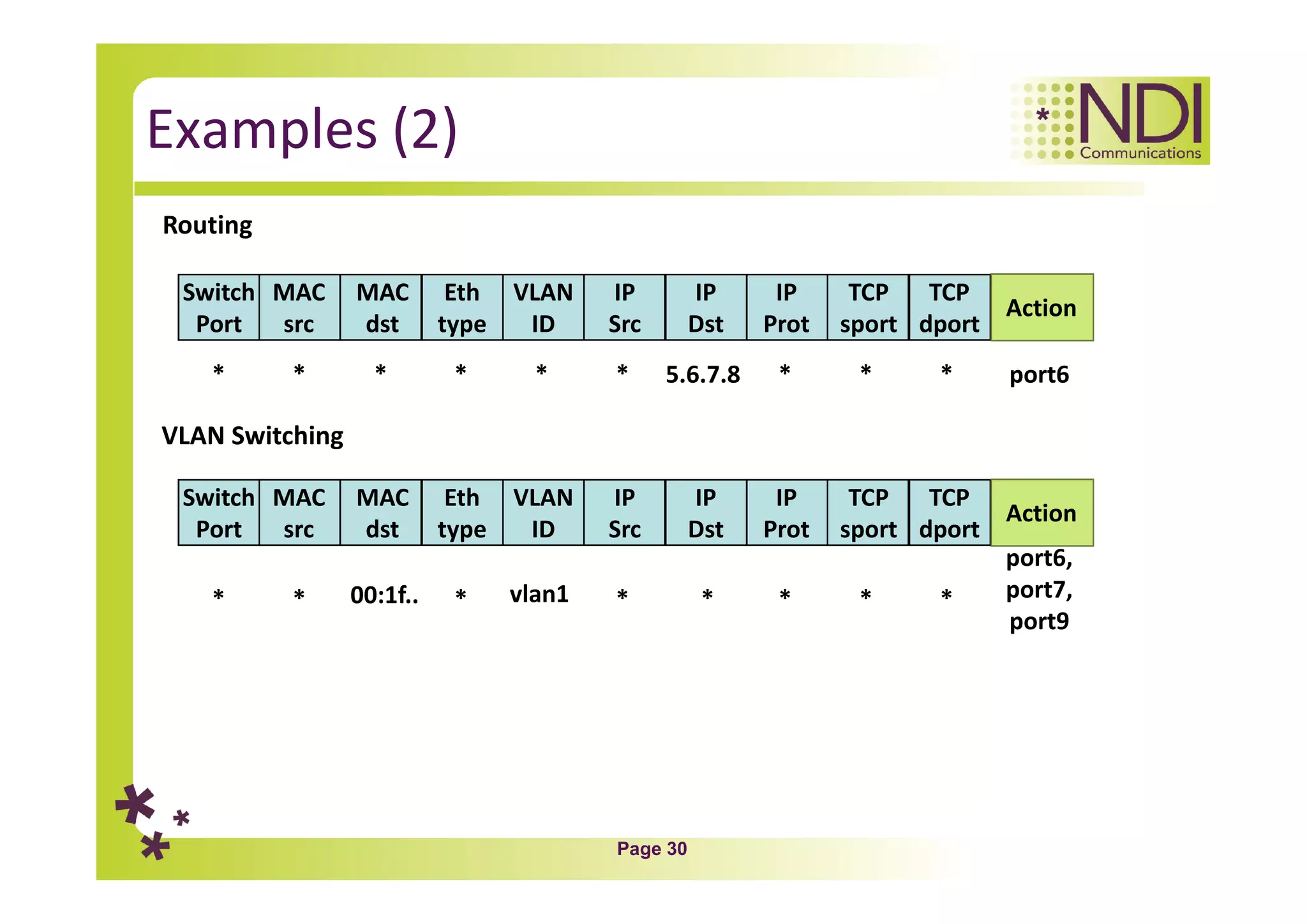
Routing
*
Switch
Port
MAC
src
MAC
dst
Eth
type
VLAN
ID
IP
Src
IP
Dst
IP
Prot
TCP
sport
TCP
dport
Action
* * * * * 5.6.7.8 * * * port6
VLAN Switching
*
Switch
Port
MAC
src
MAC
dst
Eth
type
VLAN
ID
IP
Src
IP
Dst
IP
Prot
TCP
sport
TCP
dport
Action
* * vlan1 * * * * *
port6,
port7,
port9
00:1f..
Page 31
Group Table
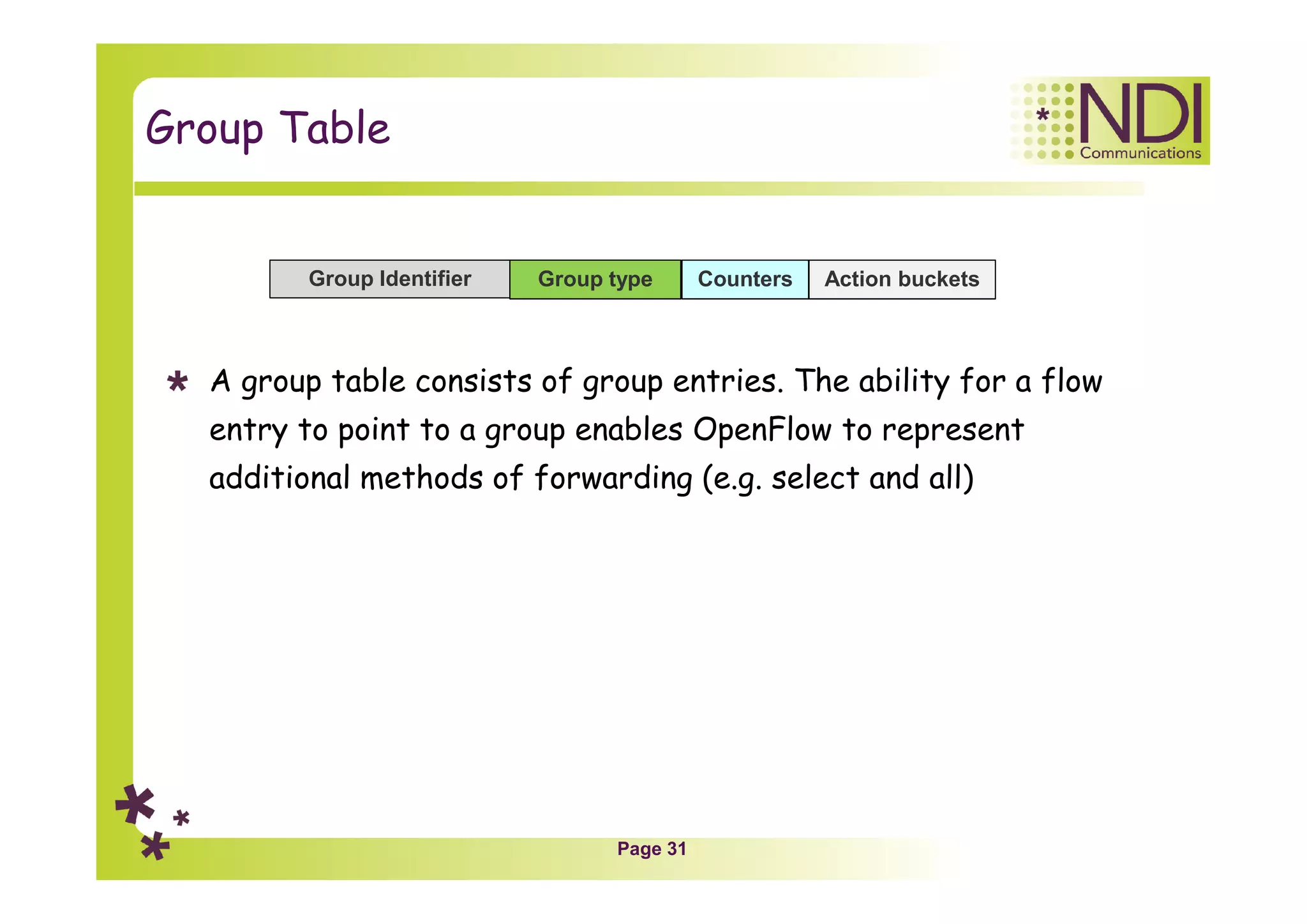
A group table consists of group entries. The ability for a flow
entry to point to a group enables OpenFlow to represent
additional methods of forwarding (e.g. select and all)
Group Identifier Action bucketsGroup type Counters
Page 32
Notes Only
Page 33
Meter Table
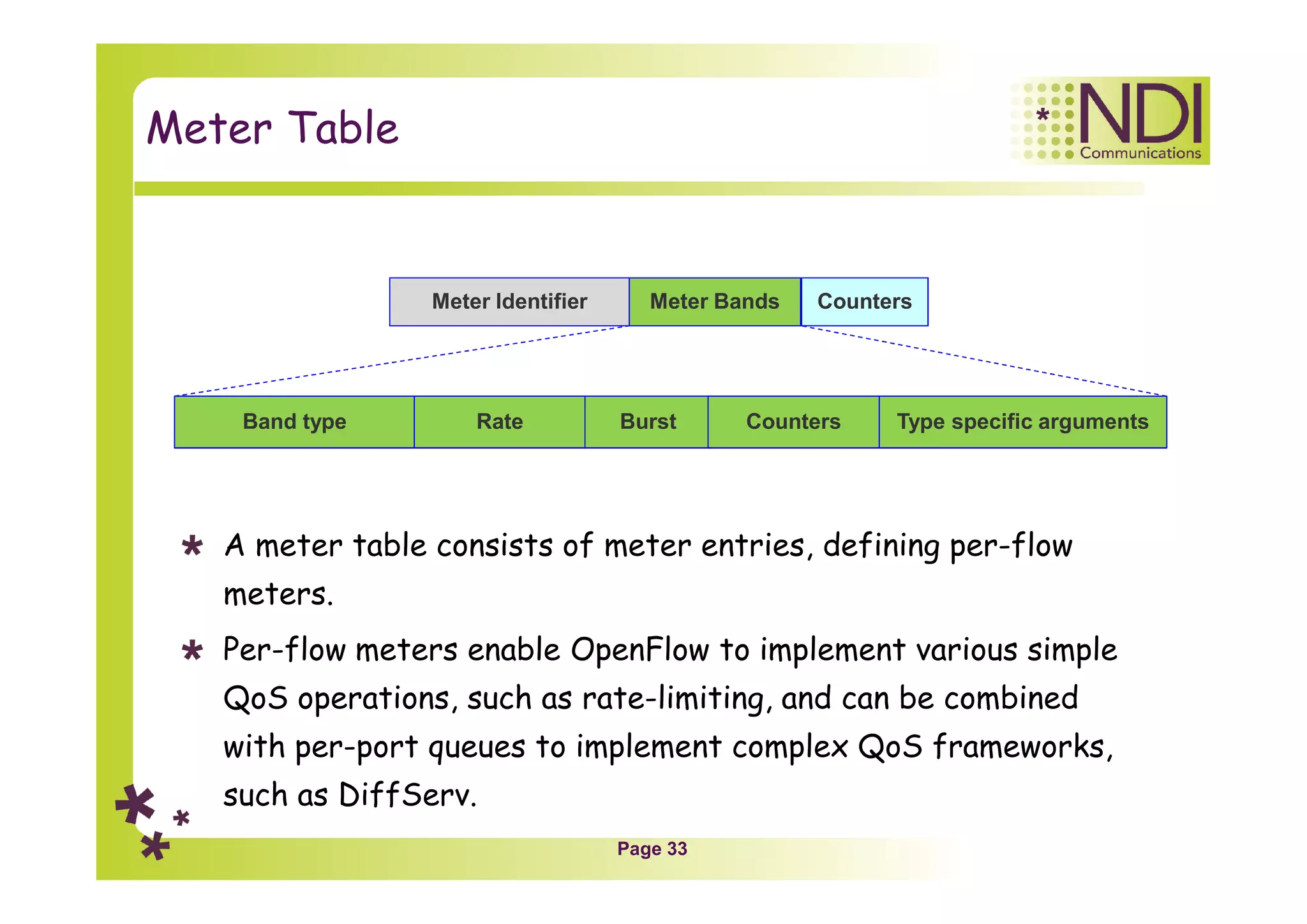
A meter table consists of meter entries, defining per-flow
meters.
Per-flow meters enable OpenFlow to implement various simple
QoS operations, such as rate-limiting, and can be combined
with per-port queues to implement complex QoS frameworks,
such as DiffServ.
Meter Identifier Meter Bands Counters
Band type Rate Burst Counters Type specific arguments
Page 34
Notes Only
Page 35
Chapter Content
Network architecture
Network components
Tables
Applications
Page 36
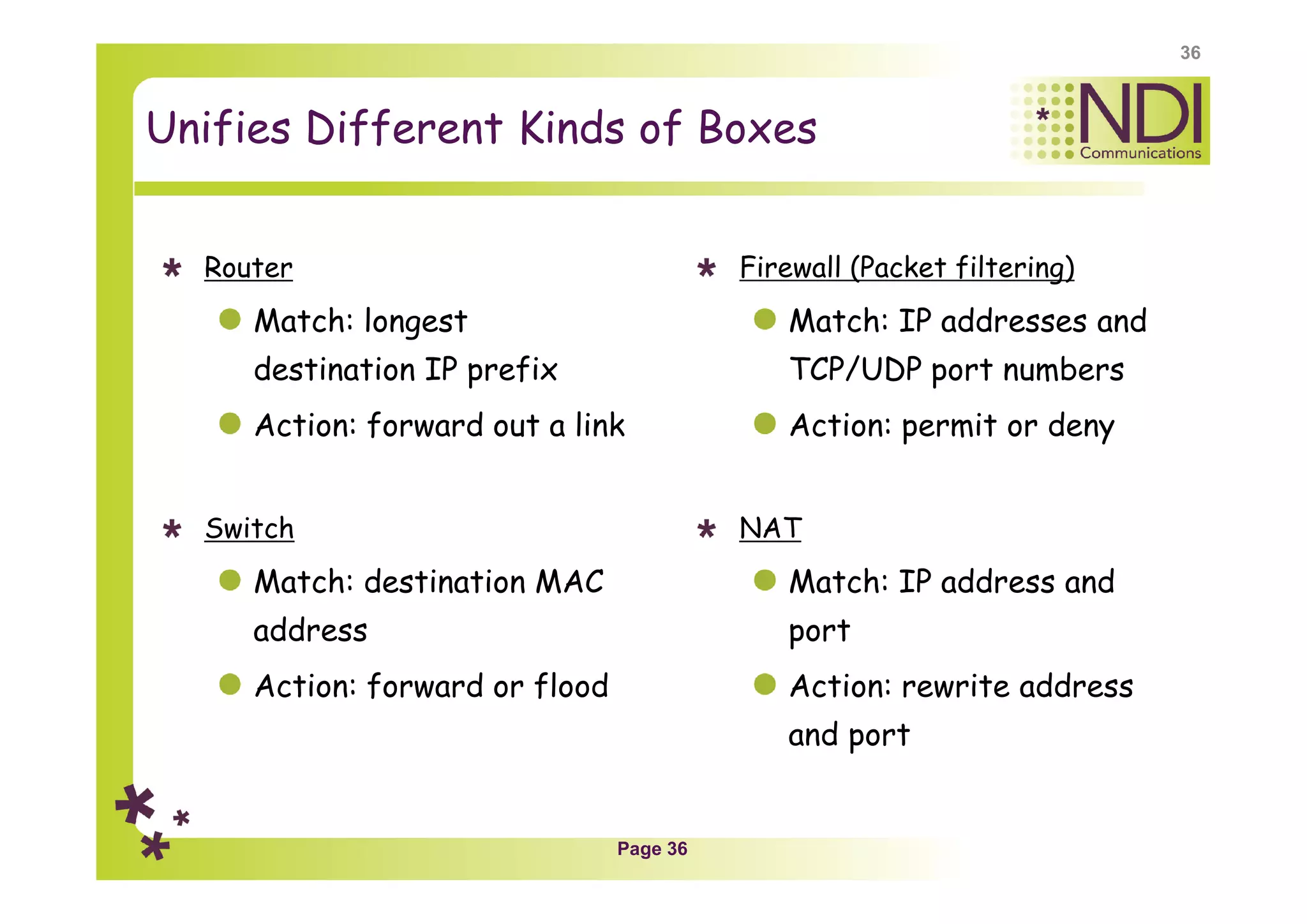
Unifies Different Kinds of Boxes
Router
Match: longest
destination IP prefix
Action: forward out a link
Switch
Match: destination MAC
address
Action: forward or flood
Firewall (Packet filtering)
Match: IP addresses and
TCP/UDP port numbers
Action: permit or deny
NAT
Match: IP address and
port
Action: rewrite address
and port
36
Page 37
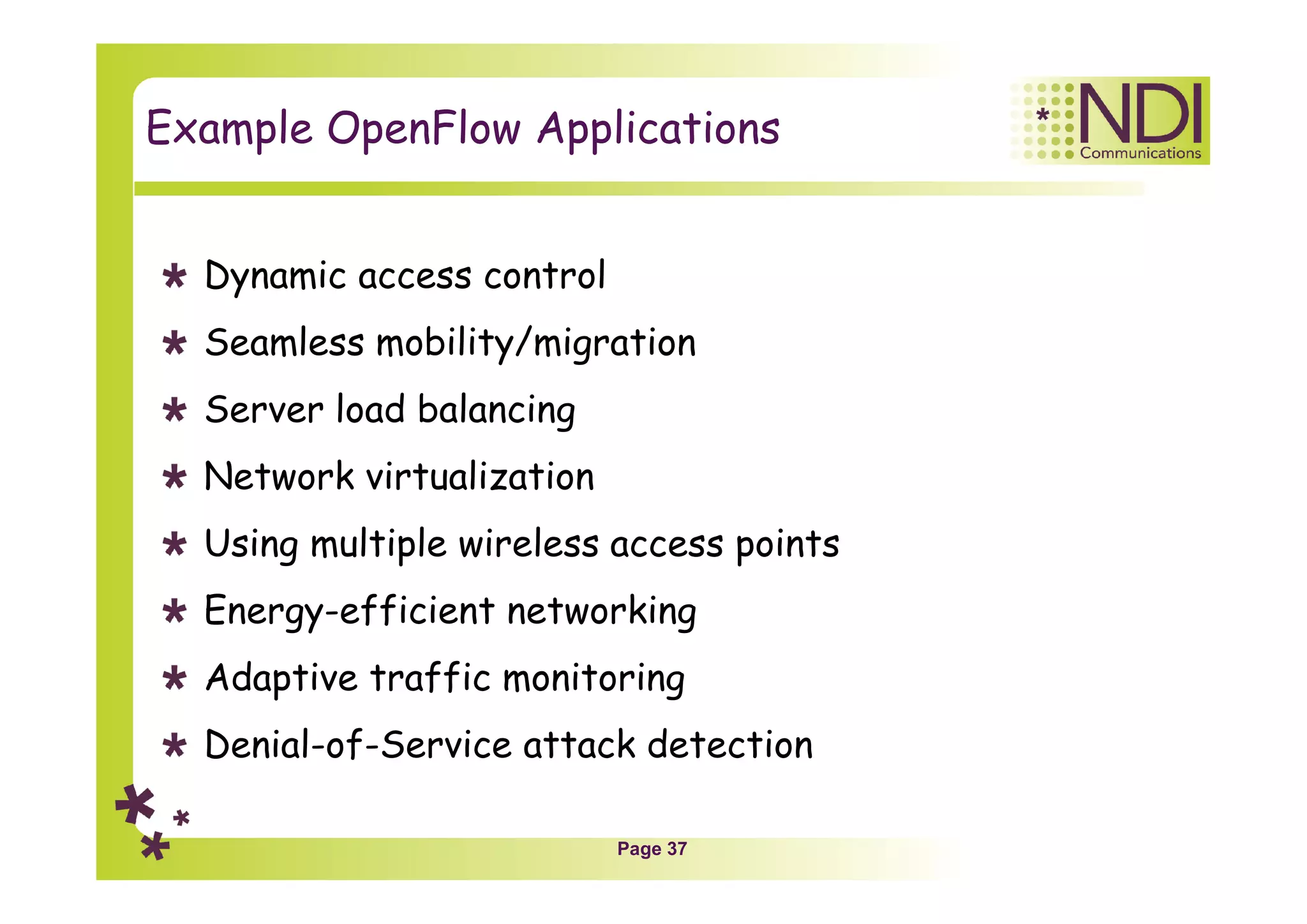
Example OpenFlow Applications
Dynamic access control
Seamless mobility/migration
Server load balancing
Network virtualization
Using multiple wireless access points
Energy-efficient networking
Adaptive traffic monitoring
Denial-of-Service attack detection
Page 38
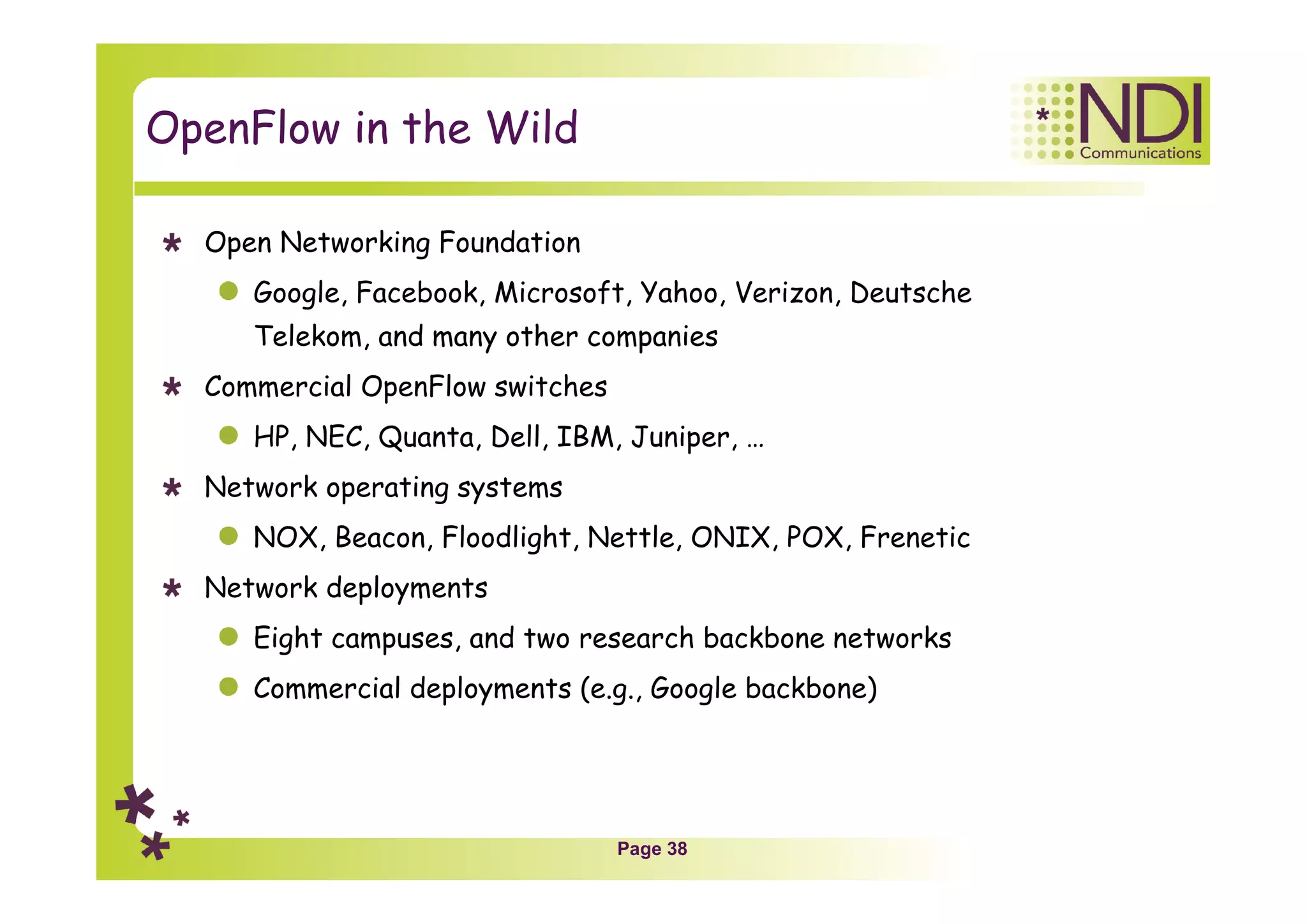
OpenFlow in the Wild
Open Networking Foundation
Google, Facebook, Microsoft, Yahoo, Verizon, Deutsche
Telekom, and many other companies
Commercial OpenFlow switches
HP, NEC, Quanta, Dell, IBM, Juniper, …
Network operating systems
NOX, Beacon, Floodlight, Nettle, ONIX, POX, Frenetic
Network deployments
Eight campuses, and two research backbone networks
Commercial deployments (e.g., Google backbone)
Page 39
Summary
Yoram Orzach
yoram@ndi-com.com
Thank You!!!
Coming soon LIVE on our NEW
e-Learning portal

Ch 02 --- sdn and openflow architecture

  • 1.
    NDI Communications -Engineering & Training SDN & NFV Chapter 2 – SDN and OpenFlow
  • 2.
    Page 2 Chapter Content Networkarchitecture Network components Tables Applications 2
  • 3.
    Page 3 Traditional NetworkStructure C C C C Forwarding Plane: End to end packets forwarding Control Plane: Track topology changes, calculating routes, QoS and security considerations and more M M M M Management Plane: Measurements and configuration
  • 4.
    Page 4 Software DefinedNetworking (SDN) OpenFlow Logically centralized control Smart, Slow controller Dumb, Fast switches Controller M Business Applications
  • 5.
    Page 5 Chapter Content Networkarchitecture Network components Tables Applications
  • 6.
    Page 6 Traditional SwitchForwarding L2/VLANs Table L3 Table ACLs, QoS Security, LB Packets in Packets out
  • 7.
    Page 7 Open FlowSwitch Forwarding Flow table Packets in Packets out Flow table Flow table Flow table SDN Controller
  • 8.
    Page 8 Open FlowComponents Controller OpenFlow Channel Flow Table Flow Table Flow Table Open Flow Protocol Group Table Tables pipeline Meter Table
  • 9.
    Page 9 The FlowTable – Principle of Operation Flow entry Flow entry Flow entry Flow entry Controller Open Flow Protocol Flow Table Match Condition Instructions…. ….
  • 10.
    Page 10 OpenFlow SwitchOperations Controller OpenFlow Channel Flow Table Flow Table Flow Table Open Flow Protocol Group Table Tables pipeline Packet In Packet Out Meter Table
  • 11.
    Page 11 OpenFlow Controller Managesone or more switches via OpenFlow channels Uses OpenFlow protocol to communicate with a OpenFlow aware switch. Provides a network wide abstraction for the applications on north bound. Responsible for programming various tables in the OpenFlow Switch. OpenFlow Switch Controller OpenFlow Switch OpenFlow Switch App. App. OpenFlow Protocol Abstraction layer
  • 12.
    Page 12 OpenFlow Controller- Redundancy Single switch can be managed by more than one controller for load balancing or redundancy purpose. In the case of more than one controller, the controller can take any one of the following roles: Master Slave Equal OpenFlow Switch Controller OpenFlow Switch OpenFlow Switch Controller App. App. OpenFlow Protocol Abstraction layer
  • 13.
  • 14.
    Page 14 OpenFlow Channel Usedto exchange OpenFlow message between switch and controller. Switch can establish single or multiple connections to same or different controllers (auxiliary connections). A controller configures and manages the switch, receives events from the switch, and send packets out the switch via this interface OpenFlow Switch Controller Controller OpenFlow Protocol
  • 15.
    Page 15 OpenFlow Switch Consistsof one or more flow tables, group table and meter table. A single switch can be managed by one or more controllers. The flow tables and group table are used during the lookup or forwarding phase in order to forward the packet to appropriate port. Meter table is used to perform simple QOS operations like rate-limiting to complex QOS operations like DiffServ OpenFlow Channel Flow Table Flow Table Flow Table Group Table Packet In Packet Out Meter Table
  • 16.
    Page 16 OpenFlow Physical& Logical Ports Packets In/Out Packets In/Out OpenFlow Switch Logical Port Physical Port The OpenFlow physical ports are switch defined ports that correspond to a hardware interface of the switch. The OpenFlow logical ports are switch defined ports that don’t correspond directly to a hardware interface of the switch.
  • 17.
    Page 17 OpenFlow ReservedPorts OpenFlow reserved ports specify generic forwarding actions such as sending to the controller, flooding, or forwarding using non- OpenFlow methods, such as “normal” switch processing. There are required and optional reserved ports: Required: ALL, CONTROLLER, TABLE, IN PORT, ANY Optional: LOCAL, NORMAL, FLOOD
  • 18.
    Page 18 OpenFlow RequiredReserved Ports Packets In/Out Packets In/Out OpenFlow Switch Controller IN PORT: Represents the packet ingress port. ANY: Special value used in some OpenFlow requests when no port is specified ALL: Represents all ports the switch can use for forwarding a specific packet. CONTROLLER: Represents the control channel with the OpenFlow controllers TABLE: Represents the start of the OpenFlow pipeline.
  • 19.
    Page 19 OpenFlow OptionalReserved Ports Packets In/Out Packets In/Out OpenFlow Switch ControllerLOCAL: Represents the switch’s local networking stack and its management stack. NORMAL: Represents forwarding using the traditional non-OpenFlow pipeline of the switch. FLOOD: Represents flooding using the traditional non- OpenFlow pipeline of the switch.
  • 20.
    Page 20 Chapter Content Networkarchitecture Network components Tables Applications
  • 21.
    Page 21 Table Types Thereare 3 types of tables in the OpenFlow switch: Flow table – the standard table that allows to forward packet to a single port Group table – used for special actions like multicast, broadcast, load balancing and others Meter table – uses Per-flow meters that enables OpenFlow to implement various QoS operations OpenFlow Channel Flow Table Flow Table Flow Table Group Table Packet In Packet Out Meter Table
  • 22.
    Page 22 Flow TablesStructure Match Instructions Modify Field Remove from queue Forward NORMAL FLOOD Virtual Port Physical Port Forward Mandatory Instructions: • Forward packet to port(s) • Encapsulate and forward to controller • Drop packet • Send to normal processing pipeline • Modify Fields Mandatory Instructions: • Forward packet to port(s) • Encapsulate and forward to controller • Drop packet • Send to normal processing pipeline • Modify Fields Optional InstructionsOptional Instructions Timeout Match Instructions Timeout Match Instructions Timeout Match Instructions Timeout … Ingress Port Ethernet SA DA Type IP SA DA Proto TCP/UDP Src VLAN ID Priority TOS Dst Virtual Port ALL CONTROLLER LOCAL TABLE IN_PORT Drop Priority Priority Priority Priority Counters Counters Counters Counters Cookie Cookie Cookie Cookie Flags Flags Flags Flags
  • 23.
    Page 23 Instructions Meter meter_id(optional): Direct packet to the specified meter. Apply-Actions action(s) (Optional): Applies the specific action(s) immediately, without any change to the Action Set. Clear-Actions (Optional): Clears all the actions in the action set immediately. Write-Actions action(s) (Required): Merges the specified set of action(s) into the current action set Goto-Table next-table-id (Required): Indicates the next table in the processing pipeline.
  • 24.
    Page 24 Action Set 1.copy TTL inwards: apply copy TTL inward actions to the packet 2. pop: apply all tag pop actions to the packet 3. push-MPLS: apply MPLS tag push action to the packet 4. push-PBB: apply PBB tag push action to the packet 5. push-VLAN: apply VLAN tag push action to the packet 6. copy TTL outwards: apply copy TTL outwards action to the packet 7. decrement TTL: apply decrement TTL action to the packet 8. set: apply all set-field actions to the packet 9. qos: apply all QoS actions, such as set queue to the packet 10.group: if a group action is specified, apply the actions of the relevant group bucket(s) in the order specified by this list 11.output: if no group action is specified, forward the packet on the port specified by the output action
  • 25.
  • 26.
    Page 26 Table Match Packetin (Start in table 0) Match in table N? Update counters Execute instructions YES Table-miss entry exist? Drop Packet Goto next entry in table N NO NO YES Execute action set NO YES
  • 27.
  • 28.
    Page 28 Data Plane– SDN Switch (Example) Simple packet-handling rules Pattern: match packet header bits Actions: drop, forward, modify, send to controller Priority: disambiguate overlapping patterns Counters: #bytes and #packets 1. src=10.20.*.*, dest=31.22.5.*  drop 2. src = *.*.*.*, dest=3.4.*.*  forward(2) 3. src=192.1.2.3, dest=*.*.*.*  send to controller
  • 29.
    Page 29 Examples (1) Switching * Switch Port MAC src MAC dst Eth type VLAN ID IP Src IP Dst IP Prot TCP sport TCP dport Action *00:1f:.. * * * * * * * port6 Flow Switching port3 Switch Port MAC src MAC dst Eth type VLAN ID IP Src IP Dst IP Prot TCP sport TCP dport Action 00:20.. 00:1f..0800 vlan1 1.2.3.4 5.6.7.8 4 17264 80 port6 Firewall * Switch Port MAC src MAC dst Eth type VLAN ID IP Src IP Dst IP Prot TCP sport TCP dport Action * * * * * * * * 22 drop
  • 30.
    Page 30 Examples (2) Routing * Switch Port MAC src MAC dst Eth type VLAN ID IP Src IP Dst IP Prot TCP sport TCP dport Action ** * * * 5.6.7.8 * * * port6 VLAN Switching * Switch Port MAC src MAC dst Eth type VLAN ID IP Src IP Dst IP Prot TCP sport TCP dport Action * * vlan1 * * * * * port6, port7, port9 00:1f..
  • 31.
    Page 31 Group Table Agroup table consists of group entries. The ability for a flow entry to point to a group enables OpenFlow to represent additional methods of forwarding (e.g. select and all) Group Identifier Action bucketsGroup type Counters
  • 32.
  • 33.
    Page 33 Meter Table Ameter table consists of meter entries, defining per-flow meters. Per-flow meters enable OpenFlow to implement various simple QoS operations, such as rate-limiting, and can be combined with per-port queues to implement complex QoS frameworks, such as DiffServ. Meter Identifier Meter Bands Counters Band type Rate Burst Counters Type specific arguments
  • 34.
  • 35.
    Page 35 Chapter Content Networkarchitecture Network components Tables Applications
  • 36.
    Page 36 Unifies DifferentKinds of Boxes Router Match: longest destination IP prefix Action: forward out a link Switch Match: destination MAC address Action: forward or flood Firewall (Packet filtering) Match: IP addresses and TCP/UDP port numbers Action: permit or deny NAT Match: IP address and port Action: rewrite address and port 36
  • 37.
    Page 37 Example OpenFlowApplications Dynamic access control Seamless mobility/migration Server load balancing Network virtualization Using multiple wireless access points Energy-efficient networking Adaptive traffic monitoring Denial-of-Service attack detection
  • 38.
    Page 38 OpenFlow inthe Wild Open Networking Foundation Google, Facebook, Microsoft, Yahoo, Verizon, Deutsche Telekom, and many other companies Commercial OpenFlow switches HP, NEC, Quanta, Dell, IBM, Juniper, … Network operating systems NOX, Beacon, Floodlight, Nettle, ONIX, POX, Frenetic Network deployments Eight campuses, and two research backbone networks Commercial deployments (e.g., Google backbone)
  • 39.
    Page 39 Summary Yoram Orzach yoram@ndi-com.com ThankYou!!! Coming soon LIVE on our NEW e-Learning portal