Wireless Networking
and Systems
CSE 590
ns2 tutorial
ns2- Network Simulator
 One of the most popular simulator among
networking researchers.
 Discrete event, Packet level simulator
 Events like ‘received an ack packet’, ‘enqueued a
data packet’
 Network protocol stack written in C++
 Tcl (Tool Command Language) used for
specifying scenarios and events.
 Unix Based. Runs also in windows using cygwin
 Simulates both wired and wireless networks.
Goal of this tutorial
 Understand how to write Tcl scripts to
simulate simple network topologies and
traffic patterns.
 Analyze the trace files and understand the
performance of the protocols.
Overview
 Wired
Creating a simple two node network topology
Adding traffic to the link
UDP traffic
TCP traffic
Fault injection
 Wireless
TCP performance on a linear chain of n nodes
Simple two node wired network
n0 n1
#Create a simulator object
set ns [new Simulator]
Step 1:
Step 2: #Open trace files
set f [open out.tr w]
$ns trace-all $f
Simple two node wired network
n0 n1
#Create two nodes
set n0 [$ns node]
set n1 [$ns node]
Step 3:
Step 4: #Create a duplex link between the nodes
$ns duplex-link $n0 $n1 1Mb 10ms DropTail
Simple two node wired network
#Create a simulator object
set ns [new Simulator]
#Open trace files
set f [open out.tr w]
$ns trace-all $f
#Define a 'finish' procedure
proc finish {} {
global ns
$ns flush-trace
exit 0
}
#Create two nodes
set n0 [$ns node]
set n1 [$ns node]
#Create a duplex link between the nodes
$ns duplex-link $n0 $n1 1Mb 10ms DropTail
#Call the finish procedure after 5 seconds of simulation time
$ns at 5.0 "finish"
#Run the simulation
$ns run
Adding traffic to the link
n0 n1
udp
#Create a UDP agent and attach it to node n0
set udp0 [new Agent/UDP]
$ns attach-agent $n0 $udp0
Adding traffic to the link
n0 n1
udp
# Create a CBR traffic source and attach it to udp0
set cbr0 [new Application/Traffic/CBR]
$cbr0 set packetSize_ 500
$cbr0 set interval_ 0.005
$cbr0 attach-agent $udp0
cbr
Adding traffic to the link
n0 n1
udp
cbr
#Create a Null agent (a traffic sink) and
attach it to node n1
set null0 [new Agent/Null]
$ns attach-agent $n1 $null0
null
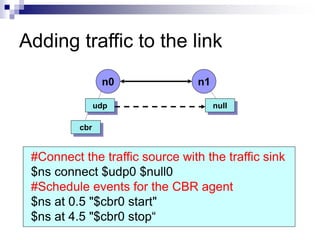
Adding traffic to the link
n0 n1
udp
cbr
#Connect the traffic source with the traffic sink
$ns connect $udp0 $null0
#Schedule events for the CBR agent
$ns at 0.5 "$cbr0 start"
$ns at 4.5 "$cbr0 stop“
null
Simulate a simple topology – UDP
Traffic #Create a simulator object
set ns [new Simulator]
#Open trace files
set f [open out.tr w]
$ns trace-all $f
#Define a 'finish' procedure
proc finish {} {
global ns
$ns flush-trace
exit 0
}
#Create four nodes
set n0 [$ns node]
set n1 [$ns node]
set n2 [$ns node]
set n3 [$ns node]
n0
n1
n2 n3
sender
sender
router receiver
Simulate a simple topology – UDP
Traffic
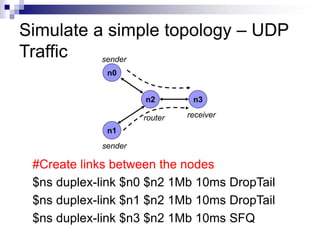
#Create links between the nodes
$ns duplex-link $n0 $n2 1Mb 10ms DropTail
$ns duplex-link $n1 $n2 1Mb 10ms DropTail
$ns duplex-link $n3 $n2 1Mb 10ms SFQ
n0
n1
n2 n3
sender
sender
router receiver
#Create a UDP agent and attach it to node n0
set udp0 [new Agent/UDP]
$udp0 set class_ 1
$ns attach-agent $n0 $udp0
Simulate a simple topology – UDP
Traffic
n0
n1
n2 n3
sender
sender
router receiver
Simulate a simple topology – UDP
Traffic
# Create a CBR traffic source and attach it to udp0
set cbr0 [new Application/Traffic/CBR]
$cbr0 set packetSize_ 500
$cbr0 set interval_ 0.005
$cbr0 attach-agent $udp0
n0
n1
n2 n3
sender
sender
router receiver
#Create a UDP agent and attach it to node n1
set udp1 [new Agent/UDP]
$udp1 set class_ 2
$ns attach-agent $n1 $udp1
Simulate a simple topology – UDP
Traffic
n0
n1
n2 n3
sender
sender
router receiver
# Create a CBR traffic source and attach it to udp1
set cbr1 [new Application/Traffic/CBR]
$cbr1 set packetSize_ 500
$cbr1 set interval_ 0.005
$cbr1 attach-agent $udp1
Simulate a simple topology – UDP
Traffic
n0
n1
n2 n3
sender
sender
router receiver
#Create a Null agent (a traffic sink) and attach it to
node n3
set null0 [new Agent/Null]
$ns attach-agent $n3 $null0
Simulate a simple topology – UDP
Traffic
n0
n1
n2 n3
sender
sender
router receiver
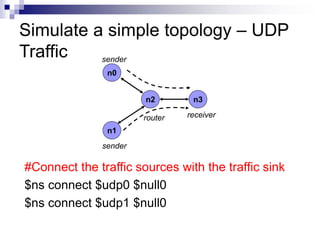
#Connect the traffic sources with the traffic sink
$ns connect $udp0 $null0
$ns connect $udp1 $null0
Simulate a simple topology – UDP
Traffic
n0
n1
n2 n3
sender
sender
router receiver
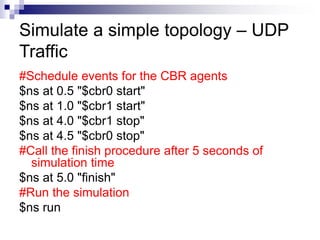
#Schedule events for the CBR agents
$ns at 0.5 "$cbr0 start"
$ns at 1.0 "$cbr1 start"
$ns at 4.0 "$cbr1 stop"
$ns at 4.5 "$cbr0 stop"
#Call the finish procedure after 5 seconds of
simulation time
$ns at 5.0 "finish"
#Run the simulation
$ns run
Simulate a simple topology – UDP
Traffic
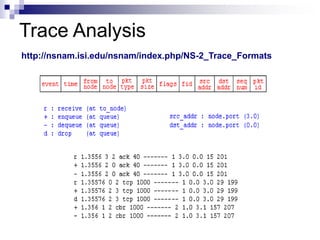
Trace Analysis
http://nsnam.isi.edu/nsnam/index.php/NS-2_Trace_Formats
TCP Traffic
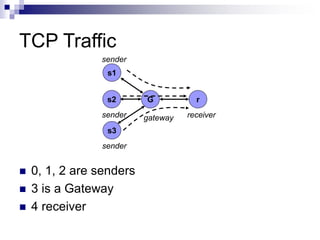
 0, 1, 2 are senders
 3 is a Gateway
 4 receiver
s1
s3
G r
sender
sender
gateway receiver
s2
sender
TCP Traffic
 #Create a TCP agent and attach it to node
s1
 set tcp1 [new Agent/TCP/Reno]
 $ns attach-agent $s1 $tcp1
 $tcp1 set window_ 8
 $tcp1 set fid_ 1
TCP Traffic
 #Create a TCP agent and attach it to node s2
 set tcp2 [new Agent/TCP/Reno]
 $ns attach-agent $s2 $tcp2
 $tcp2 set window_ 8
 $tcp2 set fid_ 2
 #Create a TCP agent and attach it to node s3
 set tcp3 [new Agent/TCP/Reno]
 $ns attach-agent $s3 $tcp3
 $tcp3 set window_ 4
 $tcp3 set fid_ 3
TCP Traffic
 #Create TCP sink agents and attach them to
node r
 set sink1 [new Agent/TCPSink]
 set sink2 [new Agent/TCPSink]
 set sink3 [new Agent/TCPSink]
 $ns attach-agent $r $sink1
 $ns attach-agent $r $sink2
 $ns attach-agent $r $sink3
TCP Traffic
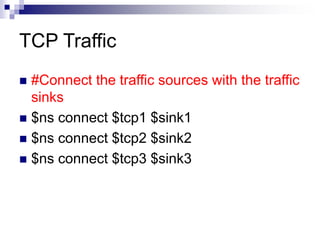
 #Connect the traffic sources with the traffic
sinks
 $ns connect $tcp1 $sink1
 $ns connect $tcp2 $sink2
 $ns connect $tcp3 $sink3
TCP Traffic
 #Create FTP applications and attach them
to agents
 set ftp1 [new Application/FTP]
 $ftp1 attach-agent $tcp1
 set ftp2 [new Application/FTP]
 $ftp2 attach-agent $tcp2
 set ftp3 [new Application/FTP]
 $ftp3 attach-agent $tcp3
TCP Traffic
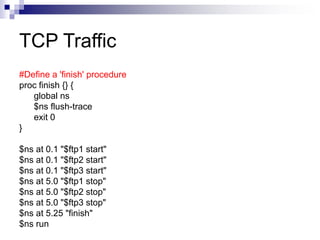
#Define a 'finish' procedure
proc finish {} {
global ns
$ns flush-trace
exit 0
}
$ns at 0.1 "$ftp1 start"
$ns at 0.1 "$ftp2 start"
$ns at 0.1 "$ftp3 start"
$ns at 5.0 "$ftp1 stop"
$ns at 5.0 "$ftp2 stop"
$ns at 5.0 "$ftp3 stop"
$ns at 5.25 "finish"
$ns run
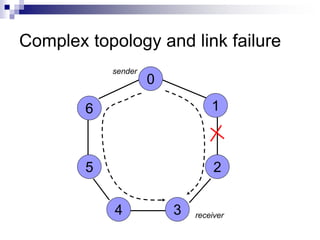
Complex topology and link failure
0
1
2
3
4
5
6
sender
receiver
Complex topology and link failure
#Create a simulator object
set ns [new Simulator]
#Tell the simulator to use dynamic routing
$ns rtproto DV
#Define a 'finish' procedure
proc finish {} {
global ns
$ns flush-trace
exit 0
}
Complex topology and link failure
#Create seven nodes
for {set i 0} {$i < 7} {incr i} {
set n($i) [$ns node]
}
#Create links between the nodes
for {set i 0} {$i < 7} {incr i} {
$ns duplex-link $n($i) $n([expr ($i+1)%7]) 1Mb
10ms DropTail
}
Complex topology and link failure
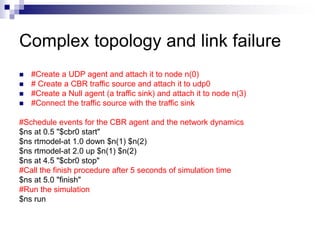
 #Create a UDP agent and attach it to node n(0)
 # Create a CBR traffic source and attach it to udp0
 #Create a Null agent (a traffic sink) and attach it to node n(3)
 #Connect the traffic source with the traffic sink
#Schedule events for the CBR agent and the network dynamics
$ns at 0.5 "$cbr0 start"
$ns rtmodel-at 1.0 down $n(1) $n(2)
$ns rtmodel-at 2.0 up $n(1) $n(2)
$ns at 4.5 "$cbr0 stop"
#Call the finish procedure after 5 seconds of simulation time
$ns at 5.0 "finish"
#Run the simulation
$ns run
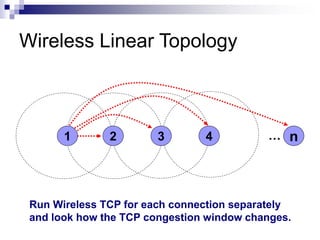
Wireless Linear Topology
1 2 3 4 n
…
Run Wireless TCP for each connection separately
and look how the TCP congestion window changes.
Have fun with ns2 !!!
 More info:
http://www.cs.sunysb.edu/~samir/cse590/ns-
simulator.htm

ns2-lecture.ppt

  • 1.
  • 2.
    ns2- Network Simulator One of the most popular simulator among networking researchers.  Discrete event, Packet level simulator  Events like ‘received an ack packet’, ‘enqueued a data packet’  Network protocol stack written in C++  Tcl (Tool Command Language) used for specifying scenarios and events.  Unix Based. Runs also in windows using cygwin  Simulates both wired and wireless networks.
  • 3.
    Goal of thistutorial  Understand how to write Tcl scripts to simulate simple network topologies and traffic patterns.  Analyze the trace files and understand the performance of the protocols.
  • 4.
    Overview  Wired Creating asimple two node network topology Adding traffic to the link UDP traffic TCP traffic Fault injection  Wireless TCP performance on a linear chain of n nodes
  • 5.
    Simple two nodewired network n0 n1 #Create a simulator object set ns [new Simulator] Step 1: Step 2: #Open trace files set f [open out.tr w] $ns trace-all $f
  • 6.
    Simple two nodewired network n0 n1 #Create two nodes set n0 [$ns node] set n1 [$ns node] Step 3: Step 4: #Create a duplex link between the nodes $ns duplex-link $n0 $n1 1Mb 10ms DropTail
  • 7.
    Simple two nodewired network #Create a simulator object set ns [new Simulator] #Open trace files set f [open out.tr w] $ns trace-all $f #Define a 'finish' procedure proc finish {} { global ns $ns flush-trace exit 0 } #Create two nodes set n0 [$ns node] set n1 [$ns node] #Create a duplex link between the nodes $ns duplex-link $n0 $n1 1Mb 10ms DropTail #Call the finish procedure after 5 seconds of simulation time $ns at 5.0 "finish" #Run the simulation $ns run
  • 8.
    Adding traffic tothe link n0 n1 udp #Create a UDP agent and attach it to node n0 set udp0 [new Agent/UDP] $ns attach-agent $n0 $udp0
  • 9.
    Adding traffic tothe link n0 n1 udp # Create a CBR traffic source and attach it to udp0 set cbr0 [new Application/Traffic/CBR] $cbr0 set packetSize_ 500 $cbr0 set interval_ 0.005 $cbr0 attach-agent $udp0 cbr
  • 10.
    Adding traffic tothe link n0 n1 udp cbr #Create a Null agent (a traffic sink) and attach it to node n1 set null0 [new Agent/Null] $ns attach-agent $n1 $null0 null
  • 11.
    Adding traffic tothe link n0 n1 udp cbr #Connect the traffic source with the traffic sink $ns connect $udp0 $null0 #Schedule events for the CBR agent $ns at 0.5 "$cbr0 start" $ns at 4.5 "$cbr0 stop“ null
  • 12.
    Simulate a simpletopology – UDP Traffic #Create a simulator object set ns [new Simulator] #Open trace files set f [open out.tr w] $ns trace-all $f #Define a 'finish' procedure proc finish {} { global ns $ns flush-trace exit 0 } #Create four nodes set n0 [$ns node] set n1 [$ns node] set n2 [$ns node] set n3 [$ns node] n0 n1 n2 n3 sender sender router receiver
  • 13.
    Simulate a simpletopology – UDP Traffic #Create links between the nodes $ns duplex-link $n0 $n2 1Mb 10ms DropTail $ns duplex-link $n1 $n2 1Mb 10ms DropTail $ns duplex-link $n3 $n2 1Mb 10ms SFQ n0 n1 n2 n3 sender sender router receiver
  • 14.
    #Create a UDPagent and attach it to node n0 set udp0 [new Agent/UDP] $udp0 set class_ 1 $ns attach-agent $n0 $udp0 Simulate a simple topology – UDP Traffic n0 n1 n2 n3 sender sender router receiver
  • 15.
    Simulate a simpletopology – UDP Traffic # Create a CBR traffic source and attach it to udp0 set cbr0 [new Application/Traffic/CBR] $cbr0 set packetSize_ 500 $cbr0 set interval_ 0.005 $cbr0 attach-agent $udp0 n0 n1 n2 n3 sender sender router receiver
  • 16.
    #Create a UDPagent and attach it to node n1 set udp1 [new Agent/UDP] $udp1 set class_ 2 $ns attach-agent $n1 $udp1 Simulate a simple topology – UDP Traffic n0 n1 n2 n3 sender sender router receiver
  • 17.
    # Create aCBR traffic source and attach it to udp1 set cbr1 [new Application/Traffic/CBR] $cbr1 set packetSize_ 500 $cbr1 set interval_ 0.005 $cbr1 attach-agent $udp1 Simulate a simple topology – UDP Traffic n0 n1 n2 n3 sender sender router receiver
  • 18.
    #Create a Nullagent (a traffic sink) and attach it to node n3 set null0 [new Agent/Null] $ns attach-agent $n3 $null0 Simulate a simple topology – UDP Traffic n0 n1 n2 n3 sender sender router receiver
  • 19.
    #Connect the trafficsources with the traffic sink $ns connect $udp0 $null0 $ns connect $udp1 $null0 Simulate a simple topology – UDP Traffic n0 n1 n2 n3 sender sender router receiver
  • 20.
    #Schedule events forthe CBR agents $ns at 0.5 "$cbr0 start" $ns at 1.0 "$cbr1 start" $ns at 4.0 "$cbr1 stop" $ns at 4.5 "$cbr0 stop" #Call the finish procedure after 5 seconds of simulation time $ns at 5.0 "finish" #Run the simulation $ns run Simulate a simple topology – UDP Traffic
  • 21.
  • 22.
    TCP Traffic  0,1, 2 are senders  3 is a Gateway  4 receiver s1 s3 G r sender sender gateway receiver s2 sender
  • 23.
    TCP Traffic  #Createa TCP agent and attach it to node s1  set tcp1 [new Agent/TCP/Reno]  $ns attach-agent $s1 $tcp1  $tcp1 set window_ 8  $tcp1 set fid_ 1
  • 24.
    TCP Traffic  #Createa TCP agent and attach it to node s2  set tcp2 [new Agent/TCP/Reno]  $ns attach-agent $s2 $tcp2  $tcp2 set window_ 8  $tcp2 set fid_ 2  #Create a TCP agent and attach it to node s3  set tcp3 [new Agent/TCP/Reno]  $ns attach-agent $s3 $tcp3  $tcp3 set window_ 4  $tcp3 set fid_ 3
  • 25.
    TCP Traffic  #CreateTCP sink agents and attach them to node r  set sink1 [new Agent/TCPSink]  set sink2 [new Agent/TCPSink]  set sink3 [new Agent/TCPSink]  $ns attach-agent $r $sink1  $ns attach-agent $r $sink2  $ns attach-agent $r $sink3
  • 26.
    TCP Traffic  #Connectthe traffic sources with the traffic sinks  $ns connect $tcp1 $sink1  $ns connect $tcp2 $sink2  $ns connect $tcp3 $sink3
  • 27.
    TCP Traffic  #CreateFTP applications and attach them to agents  set ftp1 [new Application/FTP]  $ftp1 attach-agent $tcp1  set ftp2 [new Application/FTP]  $ftp2 attach-agent $tcp2  set ftp3 [new Application/FTP]  $ftp3 attach-agent $tcp3
  • 28.
    TCP Traffic #Define a'finish' procedure proc finish {} { global ns $ns flush-trace exit 0 } $ns at 0.1 "$ftp1 start" $ns at 0.1 "$ftp2 start" $ns at 0.1 "$ftp3 start" $ns at 5.0 "$ftp1 stop" $ns at 5.0 "$ftp2 stop" $ns at 5.0 "$ftp3 stop" $ns at 5.25 "finish" $ns run
  • 29.
    Complex topology andlink failure 0 1 2 3 4 5 6 sender receiver
  • 30.
    Complex topology andlink failure #Create a simulator object set ns [new Simulator] #Tell the simulator to use dynamic routing $ns rtproto DV #Define a 'finish' procedure proc finish {} { global ns $ns flush-trace exit 0 }
  • 31.
    Complex topology andlink failure #Create seven nodes for {set i 0} {$i < 7} {incr i} { set n($i) [$ns node] } #Create links between the nodes for {set i 0} {$i < 7} {incr i} { $ns duplex-link $n($i) $n([expr ($i+1)%7]) 1Mb 10ms DropTail }
  • 32.
    Complex topology andlink failure  #Create a UDP agent and attach it to node n(0)  # Create a CBR traffic source and attach it to udp0  #Create a Null agent (a traffic sink) and attach it to node n(3)  #Connect the traffic source with the traffic sink #Schedule events for the CBR agent and the network dynamics $ns at 0.5 "$cbr0 start" $ns rtmodel-at 1.0 down $n(1) $n(2) $ns rtmodel-at 2.0 up $n(1) $n(2) $ns at 4.5 "$cbr0 stop" #Call the finish procedure after 5 seconds of simulation time $ns at 5.0 "finish" #Run the simulation $ns run
  • 33.
    Wireless Linear Topology 12 3 4 n … Run Wireless TCP for each connection separately and look how the TCP congestion window changes.
  • 34.
    Have fun withns2 !!!  More info: http://www.cs.sunysb.edu/~samir/cse590/ns- simulator.htm