Wireless Sensor Network And Its implementation
Overview 
•Introduction 
•Components of WSN 
•Wireless Sensor Network 
•Communication in Wireless Sensor Network 
•Network Architecture 
•WSN Protocol Stack 
•WSN Operating Systems 
•WSN Simulators 
•Operational Challenges of WSN 
•Wireless Sensor Networks Features 
•Applications of WSN
Introduction 
•A wireless sensor network is a collection of nodes organized into a cooperative network. 
•Each node has capability to sense data, process the data. These sensors work with each other to sense some physical phenomenon. 
•The nodes in the network are connected via Wireless communication channels.
Components of WSN 
• sensor 
–A transducer 
–converts physical phenomenon e.g. heat, light, motion, vibration, and sound into electrical signals 
•sensor node 
–basic unit in sensor network 
– contains on-board sensors, processor, memory, transceiver, and power supply 
•sensor network 
–consists of a large number of sensor nodes 
–nodes deployed either inside or very close to the sensed phenomenon
Wireless Sensor Network 
Wireless Sensor Network
Communication in Wireless Sensor Network 
TCP or UDP via Internet 
Sensing 
UDP type protocol 
Communication in Wireless Sensor Network
Network Architecture 
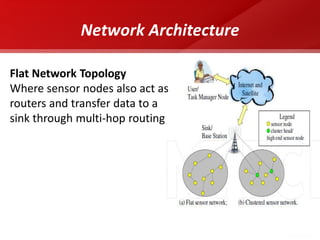
Flat Network Topology Where sensor nodes also act as routers and transfer data to a sink through multi-hop routing
Network Architecture 
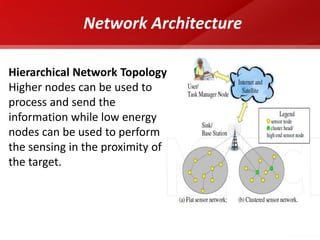
Hierarchical Network Topology Higher nodes can be used to process and send the information while low energy nodes can be used to perform the sensing in the proximity of the target.
Node Architecture 
•Hardware components of a sensor node include 
–Sensing unit 
–Processing unit 
–Communication unit 
–Power unit.
Node Architecture (Components of Node) 
sensor 
ADC 
Memory 
Processor 
Radio 
Battery 
Sensing Unit 
Processing Unit 
Communication Unit 
Power Unit 
Figure10:- Architecture of Sensor Node 
10
WSN Protocol Stack 
Application Layer 
Transport Layer 
Network Layer 
Data-Link Layer 
Physical Layer
WSN Operating Systems 
•TinyOS 
•Contiki 
•MANTIS 
•BTnut 
•SOS 
•Nano-RK
TinyOS 
•TinyOS system and its programs written in nesC 
•Its having a component-based architecture 
•TinyOS programs are composed into event handlers and tasks with run-to-completion semantics. 
•free and open-source operating system
WSN Simulators 
•NS-2 
•GloMoSim 
•OPNET 
•SensorSim 
•J-Sim 
•OMNeT++
Introduction to Network Simulator (NS2)
overview 
•NS2- Network Simulator 
•Basic Requirements: NS-2 
•Download and Installation of NS2 
•''Ns'' Components 
•Basics of using NS2 
•Steps to set up the simulation 
•Script to start nam 
•Simple two node wired network 
•Adding traffic to the link 
•Record Simulation Trace 
•Simulate a simple topology
NS2- Network Simulator 
•A package of tools that simulates behavior of networks 
•One of the most popular simulator among networking researchers 
– Open source, free 
•Discrete event simulator targeted at networking research and education 
–Protocol design, traffic studies, etc 
–Wired and wireless networks 
•Back end is in C++ and front end is in oTcl
Basic Requirements: NS-2 
•A computer which is having access to the Internet 
•Minimum 512Mb RAM 
•Operating system: Linux(Ubuntu 12.04) 
•ns-2.34 package(ns-allinone) 
•gcc-4.4.3
Download and Installation of NS2 
•http://www.isi.edu/nsnam/ns/ 
– For easy installation, download ns-allinone 
– Includes Tcl, Otcl, TclCL, ns, nam, etc. 
•Select the Operating System 
–NS2 is available for both Windows and Linux 
–Linux is desirable as C++ compiler is free and easy to debug
''Ns'' Components 
•ns, the simulator itself 
•nam, the Network AniMator 
–visualize ns (or other) output 
–GUI input simple ns scenarios 
•pre-processing: 
–traffic and topology generators 
•post-processing: 
–simple trace analysis, often in Awk, Perl, or Tcl
Basics of using NS2 
•Define Network topology in .tcl script 
•To run , 
$ ns simple.tcl 
•Output is in form of trace files
22 
Hello World – Batch mode 
#simple.tcl 
set ns [new Simulator] 
$ns at 1 “puts “Hello World!”” 
$ns at 1.5 “exit” 
$ns run 
linux21% ns simple.tcl 
Hello World! 
linux21%
Steps to set up the simulation 
•Initialize the simulator 
•Define files for output (tracing) 
•Set up the topology 
•Set up the “agents” 
•Set up the traffic between the nodes 
•Start the simulation 
•Analyze the trace files to compute the parameters of interest
Script to start nam 
#Create a simulator object 
set ns [new Simulator] 
#Open the NAM trace file 
set nf [open out.nam w] 
$ns namtrace-all $nf 
#Define a 'finish' procedure 
proc finish {} { 
global ns nf 
$ns flush-trace 
#Close the NAM trace file 
close $nf 
#Execute NAM on the trace file 
exec nam out.nam & 
exit 0 
} 
#call 'finish' procedure 
$ns at 12.0 “finish"
Simple two node wired network 
#Create a simulator object 
set ns [new Simulator] 
#Open trace files 
set f [open out.tr w] 
$ns trace-all $f 
#Define a 'finish' procedure 
proc finish {} { 
global ns 
$ns flush-trace 
close $f 
exit 0 
} 
#Create two nodes 
set n0 [$ns node] 
set n1 [$ns node] 
#Create a duplex link between the nodes 
$ns duplex-link $n0 $n1 1Mb 10ms DropTail 
#Call the finish procedure after 5 seconds of simulation time 
$ns at 5.0 "finish" 
#Run the simulation 
$ns run 
But we have no traffic !
Simple two node wired network 
# Create two nodes 
set n0 [$ns node] 
set n1 [$ns node] 
# Create a duplex link between the nodes 
$ns duplex-link $n0 $n1 1Mb 10ms DropTail 
n0 
n1
Adding traffic to the link 
# Create a UDP agent and attach it to node n0 
set udp0 [new Agent/UDP] 
$ns attach-agent $n0 $udp0 
udp 
n0 
n1 
null 
cbr
Adding traffic to the link 
# Create a CBR traffic source and attach it to udp0 
set cbr0 [new Application/Traffic/CBR] 
$cbr0 set packetSize_ 500 
$cbr0 set interval_ 0.005 
$cbr0 attach-agent $udp0 
udp 
n0 
n1 
null 
cbr
Adding traffic to the link 
# Create a Null agent (a traffic sink) and attach it to node n1 
set null0 [new Agent/Null] 
$ns attach-agent $n1 $null0 
udp 
n0 
n1 
null 
cbr
Adding traffic to the link 
#Connect the traffic source with the traffic sink 
$ns connect $udp0 $null0 
#Schedule events for the CBR agent 
$ns at 0.5 "$cbr0 start" 
$ns at 4.5 "$cbr0 stop” 
$ns at 5.0 "finish“ 
$ns run 
udp 
n0 
n1 
null 
cbr
Record Simulation Trace 
+ enqueue 
- dequeue r receive d drop 
time 
Nodes involved 
in this event 
Packet 
type 
packet 
length 
packet 
flags 
flow 
ID 
source/dest addresses 
seq number 
packet 
ID
32 
Simulate a simple topology
33 
Simulate a simple topology – (Contd.) 
#Create four nodes 
set n0 [$ns node] 
set n1 [$ns node] 
set n2 [$ns node] 
set n3 [$ns node] 
#Create links between the nodes 
$ns duplex-link $n0 $n2 2Mb 10ms DropTail 
$ns duplex-link $n1 $n2 2Mb 10ms DropTail 
$ns duplex-link $n2 $n3 1.7Mb 20ms DropTail 
#Set Queue Size of link (n2-n3) to 10 
$ns queue-limit $n2 $n3 10
34 
Simulate a simple topology – (Contd.) 
#Give node position (for NAM) 
$ns duplex-link-op $n0 $n2 orient right-down 
$ns duplex-link-op $n1 $n2 orient right-up 
$ns duplex-link-op $n2 $n3 orient right 
#Monitor the queue for link (n2-n3). (for NAM) 
$ns duplex-link-op $n2 $n3 queuePos 0.5 
#Setup a TCP connection 
set tcp [new Agent/TCP] 
$tcp set class_ 2 
$ns attach-agent $n0 $tcp 
set sink [new Agent/TCPSink] 
$ns attach-agent $n3 $sink 
$ns connect $tcp $sink 
$tcp set fid_ 1
35 
Simulate a simple topology – (Contd.) 
#Setup a FTP over TCP connection 
set ftp [new Application/FTP] 
$ftp attach-agent $tcp 
$ftp set type_ FTP 
#Setup a UDP connection 
set udp [new Agent/UDP] 
$ns attach-agent $n1 $udp 
set null [new Agent/Null] 
$ns attach-agent $n3 $null 
$ns connect $udp $null 
$udp set fid_ 2
36 
Simulate a simple topology – (Contd.) 
#Setup a CBR over UDP connection 
set cbr [new Application/Traffic/CBR] 
$cbr attach-agent $udp 
$cbr set type_ CBR 
$cbr set packet_size_ 1000 
$cbr set rate_ 1mb 
$cbr set random_ false 
#Schedule events for the CBR and FTP agents 
$ns at 0.1 "$cbr start" 
$ns at 1.0 "$ftp start" 
$ns at 4.0 "$ftp stop" 
$ns at 4.5 "$cbr stop"
37 
Simulate a simple topology – (Contd.) 
#Detach tcp and sink agents (not really necessary) 
$ns at 4.5 "$ns detach-agent $n0 $tcp ; $ns detach-agent $n3 $sink" 
#Call the finish procedure after 5 seconds of simulation time 
$ns at 5.0 "finish" 
#Print CBR packet size and interval 
puts "CBR packet size = [$cbr set packet_size_]" 
puts "CBR interval = [$cbr set interval_]" 
#Run the simulation 
$ns run
Operational Challenges of WSN 
•Heterogeneity 
•Distributed Processing 
•Low Bandwidth Communication 
•Large Scale Coordination 
•Utilization of Sensors 
•Real Time Computation
Wireless Sensor Networks Features 
•Much cheaper to deploy than wired sensors 
•Sensor nodes can be added or removed easily 
•Node location can be changed without rewiring 
•Can be configured into different network topologies 
•Large Network size 
•Self-organized 
•All nodes acts as routers 
•Potential multihop routes
Applications of WSNs 
•Intelligent (smart) buildings 
•Monitoring of structures 
•Monitoring of water quality 
•Health care 
•Disaster detection 
•Environmental monitoring 
•Social studiesPrecision agriculture 
•Habitat monitoring 
•Facility management 
•Logistics 
•Tracking of containers and boxes 
•Military applications
Applications of WSN 
Military Applications 
•Monitoring friendly forces, equipment, and ammunition 
•Battlefield surveillance 
•Reconnaissance of opposing forces and terrain 
•Targeting 
•Battle damage assessment 
•Nuclear, biological, and chemical attack detection
Applications of WSNs 
Industrial Sensing 
•To monitor the “health” of machines 
•To ensure safe operation. 
•Monitoring corrosion 
•prevent the incidents of contaminating the food supply chain 
•Eg.Rohrback Cosasco Systems (RCS) (Rohrback Cosasco Systems, n.d.) is the world leader in corrosion monitoring technology
Applications of WSNs 
Health Applications 
•Tracking and monitoring doctors and patients inside a hospital 
•Special kinds of sensors which can measure blood pressure, body temperature and electrocardiograph (ECG) can even be knitted into clothes to provide remote nursing for the elderly. 
•Drug administration in hospitals
Applications of WSNs 
Environmental Applications 
•Animal tracking 
•Weather forecasting. 
•Forest fire detection 
•Bio-complexity mapping of environment 
•Flood detection 
•Air and water pollution 
•Eg.University of Southampton have built a glacial environment monitoring system using WSNs in Norway
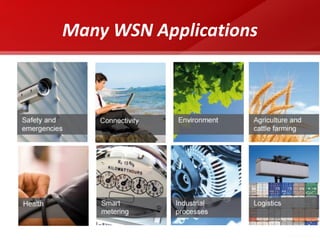
Many WSN Applications
Conclusion 
•WSNs possible today due to technological advancement in various domains 
•Envisioned to become an essential part of our lives 
• Design Constraints need to be satisfied for realization of sensor networks 
•Tremendous research efforts being made in different layers of WSNs protocol stack 
46 
WSNs possible today due to technological advancement in various domains Envisioned to become an essential part of our lives Design Constraints need to be satisfied for realization of sensor networks .ns2 can be use as one the simulation tool to analyze network behavior. Tremendous research efforts being made in different layers of WSNs protocol stack 
Conclusion
Conclusion 
•WSNs possible today due to technological advancement in various domains 
•Envisioned to become an essential part of our lives 
• Design Constraints need to be satisfied for realization of sensor networks 
•Tremendous research efforts being made in different layers of WSNs protocol stack 
47 
•Wireless Sensor Networks - An Introduction by QinghuaWang and Ilangko Balasingham. 
•System Architecture for Wireless Sensor Networks by Jason Lester Hill, University of California, Berkeley, 2003. 
•Networking Wireless Sensors by Bhaskar Krishnamachari, 2005. 
•A Survey of Wireless Sensor Networks Technology by I. Khemapech, I. Duncan and A. 
•Fundamentals of Wireless Sensor Networks: Theory and Practice, Waltenegus Dargie 
•Wireless Sensor Networks by F. L. LEWIS ,2004 
•Wikipedia 
•The VINT project, The ns manual 
•The network simulator - ns-2,( http://www.isi.edu/nsnam/ns/ ) 
•ns-2 Tutorial:( http://www.isi.edu/nsnam/ns/tutorial/nsindex.html ) 
•Marc Greis’s Tutorial (http://www.isi.edu/nsnam/ns/tutorial/index.html ) 
References

Ns2

  • 1.
    Wireless Sensor NetworkAnd Its implementation
  • 2.
    Overview •Introduction •Componentsof WSN •Wireless Sensor Network •Communication in Wireless Sensor Network •Network Architecture •WSN Protocol Stack •WSN Operating Systems •WSN Simulators •Operational Challenges of WSN •Wireless Sensor Networks Features •Applications of WSN
  • 3.
    Introduction •A wirelesssensor network is a collection of nodes organized into a cooperative network. •Each node has capability to sense data, process the data. These sensors work with each other to sense some physical phenomenon. •The nodes in the network are connected via Wireless communication channels.
  • 4.
    Components of WSN • sensor –A transducer –converts physical phenomenon e.g. heat, light, motion, vibration, and sound into electrical signals •sensor node –basic unit in sensor network – contains on-board sensors, processor, memory, transceiver, and power supply •sensor network –consists of a large number of sensor nodes –nodes deployed either inside or very close to the sensed phenomenon
  • 5.
    Wireless Sensor Network Wireless Sensor Network
  • 6.
    Communication in WirelessSensor Network TCP or UDP via Internet Sensing UDP type protocol Communication in Wireless Sensor Network
  • 7.
    Network Architecture FlatNetwork Topology Where sensor nodes also act as routers and transfer data to a sink through multi-hop routing
  • 8.
    Network Architecture HierarchicalNetwork Topology Higher nodes can be used to process and send the information while low energy nodes can be used to perform the sensing in the proximity of the target.
  • 9.
    Node Architecture •Hardwarecomponents of a sensor node include –Sensing unit –Processing unit –Communication unit –Power unit.
  • 10.
    Node Architecture (Componentsof Node) sensor ADC Memory Processor Radio Battery Sensing Unit Processing Unit Communication Unit Power Unit Figure10:- Architecture of Sensor Node 10
  • 11.
    WSN Protocol Stack Application Layer Transport Layer Network Layer Data-Link Layer Physical Layer
  • 12.
    WSN Operating Systems •TinyOS •Contiki •MANTIS •BTnut •SOS •Nano-RK
  • 13.
    TinyOS •TinyOS systemand its programs written in nesC •Its having a component-based architecture •TinyOS programs are composed into event handlers and tasks with run-to-completion semantics. •free and open-source operating system
  • 14.
    WSN Simulators •NS-2 •GloMoSim •OPNET •SensorSim •J-Sim •OMNeT++
  • 15.
    Introduction to NetworkSimulator (NS2)
  • 16.
    overview •NS2- NetworkSimulator •Basic Requirements: NS-2 •Download and Installation of NS2 •''Ns'' Components •Basics of using NS2 •Steps to set up the simulation •Script to start nam •Simple two node wired network •Adding traffic to the link •Record Simulation Trace •Simulate a simple topology
  • 17.
    NS2- Network Simulator •A package of tools that simulates behavior of networks •One of the most popular simulator among networking researchers – Open source, free •Discrete event simulator targeted at networking research and education –Protocol design, traffic studies, etc –Wired and wireless networks •Back end is in C++ and front end is in oTcl
  • 18.
    Basic Requirements: NS-2 •A computer which is having access to the Internet •Minimum 512Mb RAM •Operating system: Linux(Ubuntu 12.04) •ns-2.34 package(ns-allinone) •gcc-4.4.3
  • 19.
    Download and Installationof NS2 •http://www.isi.edu/nsnam/ns/ – For easy installation, download ns-allinone – Includes Tcl, Otcl, TclCL, ns, nam, etc. •Select the Operating System –NS2 is available for both Windows and Linux –Linux is desirable as C++ compiler is free and easy to debug
  • 20.
    ''Ns'' Components •ns,the simulator itself •nam, the Network AniMator –visualize ns (or other) output –GUI input simple ns scenarios •pre-processing: –traffic and topology generators •post-processing: –simple trace analysis, often in Awk, Perl, or Tcl
  • 21.
    Basics of usingNS2 •Define Network topology in .tcl script •To run , $ ns simple.tcl •Output is in form of trace files
  • 22.
    22 Hello World– Batch mode #simple.tcl set ns [new Simulator] $ns at 1 “puts “Hello World!”” $ns at 1.5 “exit” $ns run linux21% ns simple.tcl Hello World! linux21%
  • 23.
    Steps to setup the simulation •Initialize the simulator •Define files for output (tracing) •Set up the topology •Set up the “agents” •Set up the traffic between the nodes •Start the simulation •Analyze the trace files to compute the parameters of interest
  • 24.
    Script to startnam #Create a simulator object set ns [new Simulator] #Open the NAM trace file set nf [open out.nam w] $ns namtrace-all $nf #Define a 'finish' procedure proc finish {} { global ns nf $ns flush-trace #Close the NAM trace file close $nf #Execute NAM on the trace file exec nam out.nam & exit 0 } #call 'finish' procedure $ns at 12.0 “finish"
  • 25.
    Simple two nodewired network #Create a simulator object set ns [new Simulator] #Open trace files set f [open out.tr w] $ns trace-all $f #Define a 'finish' procedure proc finish {} { global ns $ns flush-trace close $f exit 0 } #Create two nodes set n0 [$ns node] set n1 [$ns node] #Create a duplex link between the nodes $ns duplex-link $n0 $n1 1Mb 10ms DropTail #Call the finish procedure after 5 seconds of simulation time $ns at 5.0 "finish" #Run the simulation $ns run But we have no traffic !
  • 26.
    Simple two nodewired network # Create two nodes set n0 [$ns node] set n1 [$ns node] # Create a duplex link between the nodes $ns duplex-link $n0 $n1 1Mb 10ms DropTail n0 n1
  • 27.
    Adding traffic tothe link # Create a UDP agent and attach it to node n0 set udp0 [new Agent/UDP] $ns attach-agent $n0 $udp0 udp n0 n1 null cbr
  • 28.
    Adding traffic tothe link # Create a CBR traffic source and attach it to udp0 set cbr0 [new Application/Traffic/CBR] $cbr0 set packetSize_ 500 $cbr0 set interval_ 0.005 $cbr0 attach-agent $udp0 udp n0 n1 null cbr
  • 29.
    Adding traffic tothe link # Create a Null agent (a traffic sink) and attach it to node n1 set null0 [new Agent/Null] $ns attach-agent $n1 $null0 udp n0 n1 null cbr
  • 30.
    Adding traffic tothe link #Connect the traffic source with the traffic sink $ns connect $udp0 $null0 #Schedule events for the CBR agent $ns at 0.5 "$cbr0 start" $ns at 4.5 "$cbr0 stop” $ns at 5.0 "finish“ $ns run udp n0 n1 null cbr
  • 31.
    Record Simulation Trace + enqueue - dequeue r receive d drop time Nodes involved in this event Packet type packet length packet flags flow ID source/dest addresses seq number packet ID
  • 32.
    32 Simulate asimple topology
  • 33.
    33 Simulate asimple topology – (Contd.) #Create four nodes set n0 [$ns node] set n1 [$ns node] set n2 [$ns node] set n3 [$ns node] #Create links between the nodes $ns duplex-link $n0 $n2 2Mb 10ms DropTail $ns duplex-link $n1 $n2 2Mb 10ms DropTail $ns duplex-link $n2 $n3 1.7Mb 20ms DropTail #Set Queue Size of link (n2-n3) to 10 $ns queue-limit $n2 $n3 10
  • 34.
    34 Simulate asimple topology – (Contd.) #Give node position (for NAM) $ns duplex-link-op $n0 $n2 orient right-down $ns duplex-link-op $n1 $n2 orient right-up $ns duplex-link-op $n2 $n3 orient right #Monitor the queue for link (n2-n3). (for NAM) $ns duplex-link-op $n2 $n3 queuePos 0.5 #Setup a TCP connection set tcp [new Agent/TCP] $tcp set class_ 2 $ns attach-agent $n0 $tcp set sink [new Agent/TCPSink] $ns attach-agent $n3 $sink $ns connect $tcp $sink $tcp set fid_ 1
  • 35.
    35 Simulate asimple topology – (Contd.) #Setup a FTP over TCP connection set ftp [new Application/FTP] $ftp attach-agent $tcp $ftp set type_ FTP #Setup a UDP connection set udp [new Agent/UDP] $ns attach-agent $n1 $udp set null [new Agent/Null] $ns attach-agent $n3 $null $ns connect $udp $null $udp set fid_ 2
  • 36.
    36 Simulate asimple topology – (Contd.) #Setup a CBR over UDP connection set cbr [new Application/Traffic/CBR] $cbr attach-agent $udp $cbr set type_ CBR $cbr set packet_size_ 1000 $cbr set rate_ 1mb $cbr set random_ false #Schedule events for the CBR and FTP agents $ns at 0.1 "$cbr start" $ns at 1.0 "$ftp start" $ns at 4.0 "$ftp stop" $ns at 4.5 "$cbr stop"
  • 37.
    37 Simulate asimple topology – (Contd.) #Detach tcp and sink agents (not really necessary) $ns at 4.5 "$ns detach-agent $n0 $tcp ; $ns detach-agent $n3 $sink" #Call the finish procedure after 5 seconds of simulation time $ns at 5.0 "finish" #Print CBR packet size and interval puts "CBR packet size = [$cbr set packet_size_]" puts "CBR interval = [$cbr set interval_]" #Run the simulation $ns run
  • 38.
    Operational Challenges ofWSN •Heterogeneity •Distributed Processing •Low Bandwidth Communication •Large Scale Coordination •Utilization of Sensors •Real Time Computation
  • 39.
    Wireless Sensor NetworksFeatures •Much cheaper to deploy than wired sensors •Sensor nodes can be added or removed easily •Node location can be changed without rewiring •Can be configured into different network topologies •Large Network size •Self-organized •All nodes acts as routers •Potential multihop routes
  • 40.
    Applications of WSNs •Intelligent (smart) buildings •Monitoring of structures •Monitoring of water quality •Health care •Disaster detection •Environmental monitoring •Social studiesPrecision agriculture •Habitat monitoring •Facility management •Logistics •Tracking of containers and boxes •Military applications
  • 41.
    Applications of WSN Military Applications •Monitoring friendly forces, equipment, and ammunition •Battlefield surveillance •Reconnaissance of opposing forces and terrain •Targeting •Battle damage assessment •Nuclear, biological, and chemical attack detection
  • 42.
    Applications of WSNs Industrial Sensing •To monitor the “health” of machines •To ensure safe operation. •Monitoring corrosion •prevent the incidents of contaminating the food supply chain •Eg.Rohrback Cosasco Systems (RCS) (Rohrback Cosasco Systems, n.d.) is the world leader in corrosion monitoring technology
  • 43.
    Applications of WSNs Health Applications •Tracking and monitoring doctors and patients inside a hospital •Special kinds of sensors which can measure blood pressure, body temperature and electrocardiograph (ECG) can even be knitted into clothes to provide remote nursing for the elderly. •Drug administration in hospitals
  • 44.
    Applications of WSNs Environmental Applications •Animal tracking •Weather forecasting. •Forest fire detection •Bio-complexity mapping of environment •Flood detection •Air and water pollution •Eg.University of Southampton have built a glacial environment monitoring system using WSNs in Norway
  • 45.
  • 46.
    Conclusion •WSNs possibletoday due to technological advancement in various domains •Envisioned to become an essential part of our lives • Design Constraints need to be satisfied for realization of sensor networks •Tremendous research efforts being made in different layers of WSNs protocol stack 46 WSNs possible today due to technological advancement in various domains Envisioned to become an essential part of our lives Design Constraints need to be satisfied for realization of sensor networks .ns2 can be use as one the simulation tool to analyze network behavior. Tremendous research efforts being made in different layers of WSNs protocol stack Conclusion
  • 47.
    Conclusion •WSNs possibletoday due to technological advancement in various domains •Envisioned to become an essential part of our lives • Design Constraints need to be satisfied for realization of sensor networks •Tremendous research efforts being made in different layers of WSNs protocol stack 47 •Wireless Sensor Networks - An Introduction by QinghuaWang and Ilangko Balasingham. •System Architecture for Wireless Sensor Networks by Jason Lester Hill, University of California, Berkeley, 2003. •Networking Wireless Sensors by Bhaskar Krishnamachari, 2005. •A Survey of Wireless Sensor Networks Technology by I. Khemapech, I. Duncan and A. •Fundamentals of Wireless Sensor Networks: Theory and Practice, Waltenegus Dargie •Wireless Sensor Networks by F. L. LEWIS ,2004 •Wikipedia •The VINT project, The ns manual •The network simulator - ns-2,( http://www.isi.edu/nsnam/ns/ ) •ns-2 Tutorial:( http://www.isi.edu/nsnam/ns/tutorial/nsindex.html ) •Marc Greis’s Tutorial (http://www.isi.edu/nsnam/ns/tutorial/index.html ) References