

Marcos Freccia
Data Platform MVP
http://marcosfreccia.wordpress.com
@sqlfreccia
sqlfreccia@outlook.com
Database Administration Database Development
Stretch Database Backup With
FILE_SNAPSHOT OPTION
Backup to Azure Query Store
In-Memory OLTP Always Encrypted
Row Level Security Dynamic Data Masking
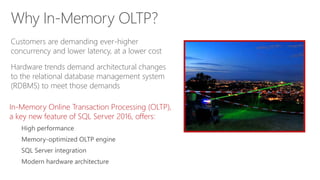
Customers are demanding ever-higher
concurrency and lower latency, at a lower cost
Hardware trends demand architectural changes
to the relational database management system
(RDBMS) to meet those demands
Why In-Memory OLTP?
In-Memory Online Transaction Processing (OLTP),
a key new feature of SQL Server 2016, offers:
High performance
Memory-optimized OLTP engine
SQL Server integration
Modern hardware architecture
Why In-Memory OLTP? (continued)
In-Memory OLTP is a memory-optimized
database engine integrated into the SQL Server
engine, optimized for OLTP, that can significantly
improve database application performance
Features of In-Memory OLTP include:
Memory-optimized tables
Natively compiled stored procedures
Why In-Memory OLTP? (continued)
Memory-optimized table
A memory-optimized table has one representation of itself in active memory, in
addition to standard representation on hard drive
Business transactions against a table run faster because they directly interact with only
representation in active memory
Natively compiled stored procedures
A natively compiled stored procedure is a SQL Server object that can access only
memory-optimized data structures (memory-optimized tables, table variables, etc.)
Natively compiled stored procedures require fewer machine instructions during runtime
than they would if they were created as traditional interpreted stored procedures
Extreme OLTP performance (up to 30x) due to two factors:
High scalability through lock- and latch-free architecture enables linear scaling
Low latency through efficient data access and query processing: memory-optimized
data structures and native compilation
Integrated into SQL Server for low total cost of ownership (TCO)
Part of Enterprise Edition
Same databases can have in-memory and on-disk
Integrated developer and DBA experience: same T-SQL, client stack, tooling,
backup/restore, AlwaysOn
In-Memory OLTP value proposition
Target scenarios: OLTP apps with high throughput and low-latency requirements
ALTER TABLE Sales.SalesOrderDetail
ALTER INDEX PK_SalesOrderID
REBUILD
WITH (BUCKET_COUNT=100000000)
T-SQL surface area: New
{LEFT|RIGHT} OUTER JOIN
Disjunction (OR, NOT)
UNION [ALL]
SELECT DISTINCT
Subqueries (EXISTS, IN, scalar)
Better T-SQL coverage, including:
Full collations support in native modules
Query surface-area improvements
Nested stored procedures (EXECUTE)
Natively compiled scalar user-defined functions
Query Store support
Other improvements:
Full schema change support: add/alter/drop
column/constraint
Increased size allowed for durable tables
ALTER TABLE support
Multiple Active Results Sets (MARS) support
In-Memory OLTP enhancements
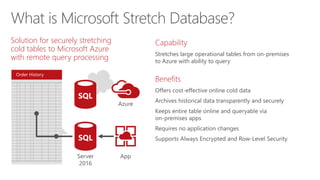
Order History
Solution for securely stretching
cold tables to Microsoft Azure
with remote query processing
Capability
Stretches large operational tables from on-premises
to Azure with ability to query
Benefits
What is Microsoft Stretch Database?
Customers
Products
Order History
Stretch to cloud
Azure
SQL
Server
2016
SQL
App
Order History
Order History
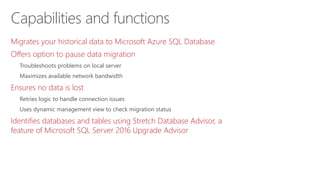
Migrates your historical data to Microsoft Azure SQL Database
Offers option to pause data migration
Troubleshoots problems on local server
Maximizes available network bandwidth
Ensures no data is lost
Retries logic to handle connection issues
Uses dynamic management view to check migration status
Identifies databases and tables using Stretch Database Advisor, a
feature of Microsoft SQL Server 2016 Upgrade Advisor
Capabilities and functions
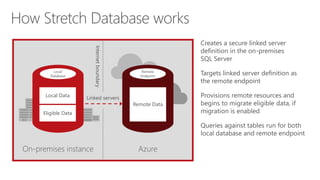
Creates a secure linked server
definition in the on-premises
SQL Server
Targets linked server definition as
the remote endpoint
Provisions remote resources and
begins to migrate eligible data, if
migration is enabled
Queries against tables run for both
local database and remote endpoint
On-premises instance Azure
Internetboundary
Linked servers
Remote
Endpoint
Remote Data
Local
Database
Eligible Data
Local Data
How Stretch Database works
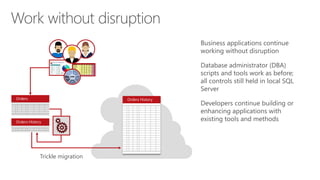
Work without disruption
Business applications continue
working without disruption
Database administrator (DBA)
scripts and tools work as before;
all controls still held in local SQL
Server
Developers continue building or
enhancing applications with
existing tools and methods
Trickle migration
Orders Orders History
Orders History
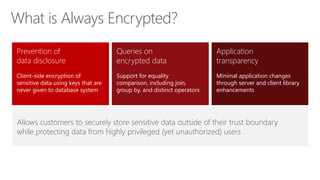
Prevention of
data disclosure
Client-side encryption of
sensitive data using keys that are
never given to database system
Queries on
encrypted data
Support for equality
comparison, including join,
group by, and distinct operators
Application
transparency
Minimal application changes
through server and client library
enhancements
Allows customers to securely store sensitive data outside of their trust boundary
while protecting data from highly privileged (yet unauthorized) users
What is Always Encrypted?
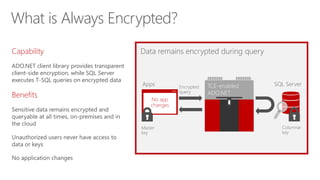
Capability
ADO.NET client library provides transparent
client-side encryption, while SQL Server
executes T-SQL queries on encrypted data
Benefits
Data remains encrypted during query
Apps TCE-enabled
ADO.NET
SQL ServerEncrypted
query
No app
changes
Master
key
Columnar
key
What is Always Encrypted?
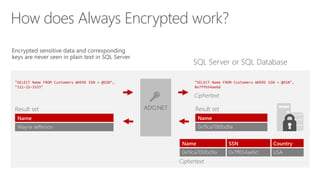
How does Always Encrypted work?
SQL Server or SQL Database
Encrypted sensitive data and corresponding
keys are never seen in plain text in SQL Server
"SELECT Name FROM Customers WHERE SSN = @SSN",
"111-22-3333"
ADO.NET
"SELECT Name FROM Customers WHERE SSN = @SSN",
0x7ff654ae6d
Ciphertext
Name SSN Country
0x19ca706fbd9a 0x7ff654ae6d USA
Name
0x19ca706fbd9a
Result setResult set
Name
Wayne Jefferson
Ciphertext
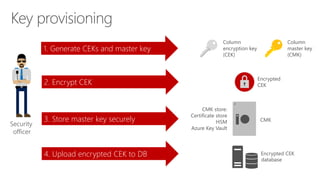
Security
officer
1. Generate CEKs and master key
2. Encrypt CEK
3. Store master key securely
4. Upload encrypted CEK to DB
CMK store:
Certificate store
HSM
Azure Key Vault
Encrypted
CEK
Column
encryption key
(CEK)
Column
master key
(CMK)
CMK
database
Encrypted CEK
Key provisioning
Query performance tools
Live Query Statistics (LQS)
Query Store
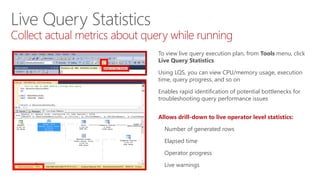
Live Query Statistics
Collect actual metrics about query while running
To view live query execution plan, from Tools menu, click
Live Query Statistics
Using LQS, you can view CPU/memory usage, execution
time, query progress, and so on
Enables rapid identification of potential bottlenecks for
troubleshooting query performance issues
Allows drill-down to live operator level statistics:
Number of generated rows
Elapsed time
Operator progress
Live warnings
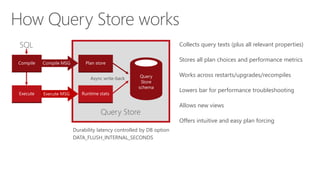
How Query Store works
Collects query texts (plus all relevant properties)
Stores all plan choices and performance metrics
Works across restarts/upgrades/recompiles
Lowers bar for performance troubleshooting
Allows new views
Offers intuitive and easy plan forcing
Durability latency controlled by DB option
DATA_FLUSH_INTERNAL_SECONDS
Query Store
Async write-back
Compile
Execute
SQL
Plan store
Runtime stats
Query
Store
schema
Compile MSG
Execute MSG
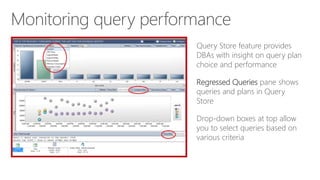
Monitoring query performance
Query Store feature provides
DBAs with insight on query plan
choice and performance
Regressed Queries pane shows
queries and plans in Query
Store
Drop-down boxes at top allow
you to select queries based on
various criteria
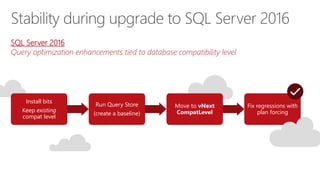
Install bits
Keep existing
compat level
Run Query Store
(create a baseline)
Move to vNext
CompatLevel
Fix regressions with
plan forcing
SQL Server 2016
Query optimization enhancements tied to database compatibility level
Stability during upgrade to SQL Server 2016
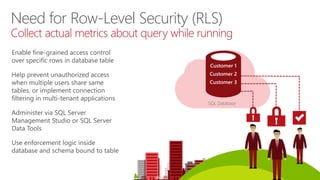
Enable fine-grained access control
over specific rows in database table
Help prevent unauthorized access
when multiple users share same
tables, or implement connection
filtering in multi-tenant applications
Administer via SQL Server
Management Studio or SQL Server
Data Tools
Use enforcement logic inside
database and schema bound to table
SQL Database
Customer 1
Customer 2
Customer 3
Need for Row-Level Security (RLS)
Collect actual metrics about query while running
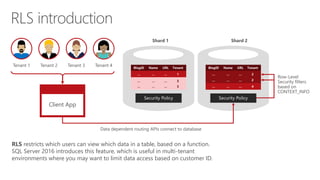
… … … 3
… … … 3
… … … 2
… … … 4
RLS introduction
Client App
Tenant 1 Tenant 2 Tenant 3 Tenant 4
Data dependent routing APIs connect to database
Row-Level
Security filters
based on
CONTEXT_INFO
Shard 2Shard 1
RLS restricts which users can view which data in a table, based on a function.
SQL Server 2016 introduces this feature, which is useful in multi-tenant
environments where you may want to limit data access based on customer ID.
One
Policy manager creates filter predicate and security policy in T-SQL, binding predicate to patient’s table
Two
App user (nurse) selects from patient’s table
Three
Security policy transparently rewrites query to apply filter predicate
Database
CREATE FUNCTION dbo.fn_securitypredicate(@wing int)
RETURNS TABLE WITH SCHEMABINDING AS
return SELECT 1 as [fn_securitypredicate_result] FROM
StaffDuties d INNER JOIN Employees e
ON (d.EmpId = e.EmpId)
WHERE e.UserSID = SUSER_SID() AND @wing = d.Wing;
CREATE SECURITY POLICY dbo.SecPol
ADD FILTER PREDICATE dbo.fn_securitypredicate(Wing) ON Patients
WITH (STATE = ON)
Filter
Predicate:
INNER
JOIN…
Security
Policy
Application Patients
SELECT * FROM Patients SELECT * FROM Patients
SEMIJOIN APPLY dbo.fn_securitypredicate(patients.Wing);
SELECT Patients.* FROM Patients,
StaffDuties d INNER JOIN Employees e ON (d.EmpId = e.EmpId)
WHERE e.UserSID = SUSER_SID() AND Patients.wing = d.Wing;
RLS in three steps
Nurse Policy manager
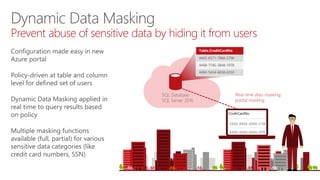
SQL Database
SQL Server 2016
Table.CreditCardNo
4465-6571-7868-5796
4468-7746-3848-1978
4484-5434-6858-6550
Real-time data masking;
partial masking
Dynamic Data Masking
Prevent abuse of sensitive data by hiding it from users
Configuration made easy in new
Azure portal
Policy-driven at table and column
level for defined set of users
Dynamic Data Masking applied in
real time to query results based
on policy
Multiple masking functions
available (full, partial) for various
sensitive data categories (like
credit card numbers, SSN)
3 ) Dynamic data-masking policy obfuscates sensitive data in query results2 ) App user selects from employee table1 ) Security officer defines dynamic data-masking policy in T-SQL over sensitive data in employee table
SELECT [Name],
[SocialSecurityNumber],
[Email],
[Salary]
FROM [Employee]
admin1 loginother login
BUSINESS
APP
BUSINESS
APP
Dynamic Data Masking walkthrough
ALTER TABLE [Employee] ALTER COLUMN
[SocialSecurityNumber]
ADD MASKED WITH (FUNCTION = ‘SSN()’)
ALTER TABLE [Employee] ALTER COLUMN [Email]
ADD MASKED WITH (FUNCTION = ‘EMAIL()’)
ALTER TABLE [Employee] ALTER COLUMN [Salary]
ADD MASKED WITH (FUNCTION = ‘RANDOM(1,20000)’)
GRANT UNMASK to admin1
Security
Officer
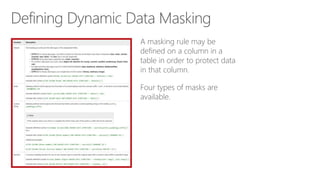
Defining Dynamic Data Masking
A masking rule may be
defined on a column in a
table in order to protect data
in that column.
Four types of masks are
available.
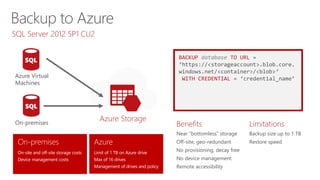
Benefits
Near “bottomless” storage
Off-site, geo-redundant
No provisioning, decay free
No device management
Remote accessibility
Limitations
Backup size up to 1 TB
Restore speed
BACKUP database TO URL =
‘https://<storageaccount>.blob.core.
windows.net/<container>/<blob>’
WITH CREDENTIAL = ‘credential_name’
Azure Storage
Azure Virtual
Machines
On-premises
On-site and off-site storage costs
Device management costs
Limit of 1 TB on Azure drive
Max of 16 drives
Management of drives and policy
SQL Server 2012 SP1 CU2
CREATE CREDENTIAL [https://<account>.blob.core.windows.net/<container>]
WITH IDENTITY = 'Shared Access Signature',
SECRET = 'sig=mw3K6dpwV%2BWUPj8L4Dq3cyNxCI'
BACKUP DATABASE database TO
URL = N'https://<account>.blob.core.windows.net/<container>/<blob1>',
URL = N'https://<account>.blob.core.windows.net/<container>/<blob2>'
Less expensive storage
Backup stripping and faster restore
Approximate maximum backup size of 12 TB
Granular access and unified credential story (SAS URIs)
Supports all existing backup and restore features (except append)
SQL Server 2016
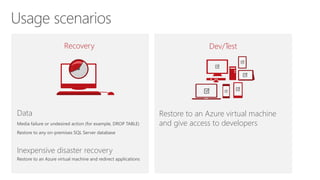
Data
Media failure or undesired action (for example, DROP TABLE)
Restore to any on-premises SQL Server database
Inexpensive disaster recovery
Restore to an Azure virtual machine and redirect applications
Recovery Dev/Test
Restore to an Azure virtual machine
and give access to developers
DB1 DB2 DB3
DB4 DB5 DB6
Azure Virtual Machines
On-premises
Azure Storage
Native support
for SQL Server
data files stored
as Azure blobs
CREATE CREDENTIAL [https://mystorage.blog.core.windows.net/data]
WITH IDENTITY = ‘Shared Access Signature',
SECRET = ‘<your SAS key>
CREATE DATABASE mydb ON
( NAME = mydb_dat,
FILENAME = 'https://mystorage.blob.core.windows.net/data/mydb.mdf' )
LOG ON
( NAME = foo_log,
FILENAME =
'https://mystorage.blob.core.windows.net/data/mydblog.ldf')
Separation of compute and storage
Database migration to other machines
Basic disaster recovery
Increased storage on Azure Virtual
Machines
Near “bottomless” storage
Off-site, geo-redundant
No provisioning
No device management
Media safety (decay free)
Remote accessibility
DB3
DB6
SQL Server 2014
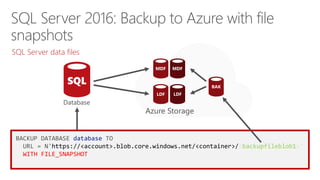
BACKUP DATABASE database TO
URL = N'https://<account>.blob.core.windows.net/<container>/<backupfileblob1>‘
WITH FILE_SNAPSHOT
MDF MDF
LDF LDF
Azure Storage
BAK
SQL Server data files
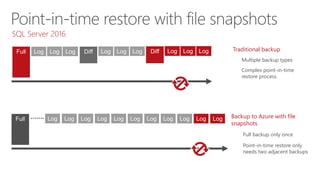
Traditional backup
Multiple backup types
Complex point-in-time
restore process
Backup to Azure with file
snapshots
Full backup only once
Point-in-time restore only
needs two adjacent backups
Full Log Log Log Diff Log Log Log Diff Log Log Log
Log Log Log Log Log Log Log Log Log Log LogFull
SQL Server 2016
Benefits
Notes
Patrocinadores
© 2015 Microsoft Corporation. All rights reserved. Microsoft, Windows, Microsoft Azure, and other product names are or may be registered trademarks and/or trademarks in the U.S. and/or other countries. The
information herein is for informational purposes only and represents the current view of Microsoft Corporation as of the date of this presentation. Because Microsoft must respond to changing market conditions,
it should not be interpreted to be a commitment on the part of Microsoft, and Microsoft cannot guarantee the accuracy of any information provided after the date of this presentation. MICROSOFT MAKES NO
WARRANTIES, EXPRESS, IMPLIED OR STATUTORY, AS TO THE INFORMATION IN THIS PRESENTATION
http://marcosfreccia.wordpress.com
sqlfreccia@outlook.com

Novidades do SQL Server 2016

  • 1.
    Marcos Freccia Data PlatformMVP http://marcosfreccia.wordpress.com @sqlfreccia sqlfreccia@outlook.com
  • 3.
  • 4.
    Stretch Database BackupWith FILE_SNAPSHOT OPTION Backup to Azure Query Store
  • 5.
    In-Memory OLTP AlwaysEncrypted Row Level Security Dynamic Data Masking
  • 7.
    Customers are demandingever-higher concurrency and lower latency, at a lower cost Hardware trends demand architectural changes to the relational database management system (RDBMS) to meet those demands Why In-Memory OLTP? In-Memory Online Transaction Processing (OLTP), a key new feature of SQL Server 2016, offers: High performance Memory-optimized OLTP engine SQL Server integration Modern hardware architecture
  • 8.
    Why In-Memory OLTP?(continued) In-Memory OLTP is a memory-optimized database engine integrated into the SQL Server engine, optimized for OLTP, that can significantly improve database application performance Features of In-Memory OLTP include: Memory-optimized tables Natively compiled stored procedures
  • 9.
    Why In-Memory OLTP?(continued) Memory-optimized table A memory-optimized table has one representation of itself in active memory, in addition to standard representation on hard drive Business transactions against a table run faster because they directly interact with only representation in active memory Natively compiled stored procedures A natively compiled stored procedure is a SQL Server object that can access only memory-optimized data structures (memory-optimized tables, table variables, etc.) Natively compiled stored procedures require fewer machine instructions during runtime than they would if they were created as traditional interpreted stored procedures
  • 10.
    Extreme OLTP performance(up to 30x) due to two factors: High scalability through lock- and latch-free architecture enables linear scaling Low latency through efficient data access and query processing: memory-optimized data structures and native compilation Integrated into SQL Server for low total cost of ownership (TCO) Part of Enterprise Edition Same databases can have in-memory and on-disk Integrated developer and DBA experience: same T-SQL, client stack, tooling, backup/restore, AlwaysOn In-Memory OLTP value proposition Target scenarios: OLTP apps with high throughput and low-latency requirements
  • 11.
    ALTER TABLE Sales.SalesOrderDetail ALTERINDEX PK_SalesOrderID REBUILD WITH (BUCKET_COUNT=100000000) T-SQL surface area: New {LEFT|RIGHT} OUTER JOIN Disjunction (OR, NOT) UNION [ALL] SELECT DISTINCT Subqueries (EXISTS, IN, scalar) Better T-SQL coverage, including: Full collations support in native modules Query surface-area improvements Nested stored procedures (EXECUTE) Natively compiled scalar user-defined functions Query Store support Other improvements: Full schema change support: add/alter/drop column/constraint Increased size allowed for durable tables ALTER TABLE support Multiple Active Results Sets (MARS) support In-Memory OLTP enhancements
  • 14.
    Order History Solution forsecurely stretching cold tables to Microsoft Azure with remote query processing Capability Stretches large operational tables from on-premises to Azure with ability to query Benefits What is Microsoft Stretch Database? Customers Products Order History Stretch to cloud Azure SQL Server 2016 SQL App Order History Order History
  • 15.
    Migrates your historicaldata to Microsoft Azure SQL Database Offers option to pause data migration Troubleshoots problems on local server Maximizes available network bandwidth Ensures no data is lost Retries logic to handle connection issues Uses dynamic management view to check migration status Identifies databases and tables using Stretch Database Advisor, a feature of Microsoft SQL Server 2016 Upgrade Advisor Capabilities and functions
  • 16.
    Creates a securelinked server definition in the on-premises SQL Server Targets linked server definition as the remote endpoint Provisions remote resources and begins to migrate eligible data, if migration is enabled Queries against tables run for both local database and remote endpoint On-premises instance Azure Internetboundary Linked servers Remote Endpoint Remote Data Local Database Eligible Data Local Data How Stretch Database works
  • 17.
    Work without disruption Businessapplications continue working without disruption Database administrator (DBA) scripts and tools work as before; all controls still held in local SQL Server Developers continue building or enhancing applications with existing tools and methods Trickle migration Orders Orders History Orders History
  • 20.
    Prevention of data disclosure Client-sideencryption of sensitive data using keys that are never given to database system Queries on encrypted data Support for equality comparison, including join, group by, and distinct operators Application transparency Minimal application changes through server and client library enhancements Allows customers to securely store sensitive data outside of their trust boundary while protecting data from highly privileged (yet unauthorized) users What is Always Encrypted?
  • 21.
    Capability ADO.NET client libraryprovides transparent client-side encryption, while SQL Server executes T-SQL queries on encrypted data Benefits Data remains encrypted during query Apps TCE-enabled ADO.NET SQL ServerEncrypted query No app changes Master key Columnar key What is Always Encrypted?
  • 22.
    How does AlwaysEncrypted work? SQL Server or SQL Database Encrypted sensitive data and corresponding keys are never seen in plain text in SQL Server "SELECT Name FROM Customers WHERE SSN = @SSN", "111-22-3333" ADO.NET "SELECT Name FROM Customers WHERE SSN = @SSN", 0x7ff654ae6d Ciphertext Name SSN Country 0x19ca706fbd9a 0x7ff654ae6d USA Name 0x19ca706fbd9a Result setResult set Name Wayne Jefferson Ciphertext
  • 23.
    Security officer 1. Generate CEKsand master key 2. Encrypt CEK 3. Store master key securely 4. Upload encrypted CEK to DB CMK store: Certificate store HSM Azure Key Vault Encrypted CEK Column encryption key (CEK) Column master key (CMK) CMK database Encrypted CEK Key provisioning
  • 26.
    Query performance tools LiveQuery Statistics (LQS) Query Store
  • 27.
    Live Query Statistics Collectactual metrics about query while running To view live query execution plan, from Tools menu, click Live Query Statistics Using LQS, you can view CPU/memory usage, execution time, query progress, and so on Enables rapid identification of potential bottlenecks for troubleshooting query performance issues Allows drill-down to live operator level statistics: Number of generated rows Elapsed time Operator progress Live warnings
  • 28.
    How Query Storeworks Collects query texts (plus all relevant properties) Stores all plan choices and performance metrics Works across restarts/upgrades/recompiles Lowers bar for performance troubleshooting Allows new views Offers intuitive and easy plan forcing Durability latency controlled by DB option DATA_FLUSH_INTERNAL_SECONDS Query Store Async write-back Compile Execute SQL Plan store Runtime stats Query Store schema Compile MSG Execute MSG
  • 29.
    Monitoring query performance QueryStore feature provides DBAs with insight on query plan choice and performance Regressed Queries pane shows queries and plans in Query Store Drop-down boxes at top allow you to select queries based on various criteria
  • 30.
    Install bits Keep existing compatlevel Run Query Store (create a baseline) Move to vNext CompatLevel Fix regressions with plan forcing SQL Server 2016 Query optimization enhancements tied to database compatibility level Stability during upgrade to SQL Server 2016
  • 33.
    Enable fine-grained accesscontrol over specific rows in database table Help prevent unauthorized access when multiple users share same tables, or implement connection filtering in multi-tenant applications Administer via SQL Server Management Studio or SQL Server Data Tools Use enforcement logic inside database and schema bound to table SQL Database Customer 1 Customer 2 Customer 3 Need for Row-Level Security (RLS) Collect actual metrics about query while running
  • 34.
    … … …3 … … … 3 … … … 2 … … … 4 RLS introduction Client App Tenant 1 Tenant 2 Tenant 3 Tenant 4 Data dependent routing APIs connect to database Row-Level Security filters based on CONTEXT_INFO Shard 2Shard 1 RLS restricts which users can view which data in a table, based on a function. SQL Server 2016 introduces this feature, which is useful in multi-tenant environments where you may want to limit data access based on customer ID.
  • 35.
    One Policy manager createsfilter predicate and security policy in T-SQL, binding predicate to patient’s table Two App user (nurse) selects from patient’s table Three Security policy transparently rewrites query to apply filter predicate Database CREATE FUNCTION dbo.fn_securitypredicate(@wing int) RETURNS TABLE WITH SCHEMABINDING AS return SELECT 1 as [fn_securitypredicate_result] FROM StaffDuties d INNER JOIN Employees e ON (d.EmpId = e.EmpId) WHERE e.UserSID = SUSER_SID() AND @wing = d.Wing; CREATE SECURITY POLICY dbo.SecPol ADD FILTER PREDICATE dbo.fn_securitypredicate(Wing) ON Patients WITH (STATE = ON) Filter Predicate: INNER JOIN… Security Policy Application Patients SELECT * FROM Patients SELECT * FROM Patients SEMIJOIN APPLY dbo.fn_securitypredicate(patients.Wing); SELECT Patients.* FROM Patients, StaffDuties d INNER JOIN Employees e ON (d.EmpId = e.EmpId) WHERE e.UserSID = SUSER_SID() AND Patients.wing = d.Wing; RLS in three steps Nurse Policy manager
  • 38.
    SQL Database SQL Server2016 Table.CreditCardNo 4465-6571-7868-5796 4468-7746-3848-1978 4484-5434-6858-6550 Real-time data masking; partial masking Dynamic Data Masking Prevent abuse of sensitive data by hiding it from users Configuration made easy in new Azure portal Policy-driven at table and column level for defined set of users Dynamic Data Masking applied in real time to query results based on policy Multiple masking functions available (full, partial) for various sensitive data categories (like credit card numbers, SSN)
  • 39.
    3 ) Dynamicdata-masking policy obfuscates sensitive data in query results2 ) App user selects from employee table1 ) Security officer defines dynamic data-masking policy in T-SQL over sensitive data in employee table SELECT [Name], [SocialSecurityNumber], [Email], [Salary] FROM [Employee] admin1 loginother login BUSINESS APP BUSINESS APP Dynamic Data Masking walkthrough ALTER TABLE [Employee] ALTER COLUMN [SocialSecurityNumber] ADD MASKED WITH (FUNCTION = ‘SSN()’) ALTER TABLE [Employee] ALTER COLUMN [Email] ADD MASKED WITH (FUNCTION = ‘EMAIL()’) ALTER TABLE [Employee] ALTER COLUMN [Salary] ADD MASKED WITH (FUNCTION = ‘RANDOM(1,20000)’) GRANT UNMASK to admin1 Security Officer
  • 40.
    Defining Dynamic DataMasking A masking rule may be defined on a column in a table in order to protect data in that column. Four types of masks are available.
  • 43.
    Benefits Near “bottomless” storage Off-site,geo-redundant No provisioning, decay free No device management Remote accessibility Limitations Backup size up to 1 TB Restore speed BACKUP database TO URL = ‘https://<storageaccount>.blob.core. windows.net/<container>/<blob>’ WITH CREDENTIAL = ‘credential_name’ Azure Storage Azure Virtual Machines On-premises On-site and off-site storage costs Device management costs Limit of 1 TB on Azure drive Max of 16 drives Management of drives and policy SQL Server 2012 SP1 CU2
  • 44.
    CREATE CREDENTIAL [https://<account>.blob.core.windows.net/<container>] WITHIDENTITY = 'Shared Access Signature', SECRET = 'sig=mw3K6dpwV%2BWUPj8L4Dq3cyNxCI' BACKUP DATABASE database TO URL = N'https://<account>.blob.core.windows.net/<container>/<blob1>', URL = N'https://<account>.blob.core.windows.net/<container>/<blob2>' Less expensive storage Backup stripping and faster restore Approximate maximum backup size of 12 TB Granular access and unified credential story (SAS URIs) Supports all existing backup and restore features (except append) SQL Server 2016
  • 45.
    Data Media failure orundesired action (for example, DROP TABLE) Restore to any on-premises SQL Server database Inexpensive disaster recovery Restore to an Azure virtual machine and redirect applications Recovery Dev/Test Restore to an Azure virtual machine and give access to developers
  • 48.
    DB1 DB2 DB3 DB4DB5 DB6 Azure Virtual Machines On-premises Azure Storage Native support for SQL Server data files stored as Azure blobs CREATE CREDENTIAL [https://mystorage.blog.core.windows.net/data] WITH IDENTITY = ‘Shared Access Signature', SECRET = ‘<your SAS key> CREATE DATABASE mydb ON ( NAME = mydb_dat, FILENAME = 'https://mystorage.blob.core.windows.net/data/mydb.mdf' ) LOG ON ( NAME = foo_log, FILENAME = 'https://mystorage.blob.core.windows.net/data/mydblog.ldf') Separation of compute and storage Database migration to other machines Basic disaster recovery Increased storage on Azure Virtual Machines Near “bottomless” storage Off-site, geo-redundant No provisioning No device management Media safety (decay free) Remote accessibility DB3 DB6 SQL Server 2014
  • 49.
    BACKUP DATABASE databaseTO URL = N'https://<account>.blob.core.windows.net/<container>/<backupfileblob1>‘ WITH FILE_SNAPSHOT MDF MDF LDF LDF Azure Storage BAK SQL Server data files
  • 50.
    Traditional backup Multiple backuptypes Complex point-in-time restore process Backup to Azure with file snapshots Full backup only once Point-in-time restore only needs two adjacent backups Full Log Log Log Diff Log Log Log Diff Log Log Log Log Log Log Log Log Log Log Log Log Log LogFull SQL Server 2016
  • 51.
  • 53.
  • 54.
    © 2015 MicrosoftCorporation. All rights reserved. Microsoft, Windows, Microsoft Azure, and other product names are or may be registered trademarks and/or trademarks in the U.S. and/or other countries. The information herein is for informational purposes only and represents the current view of Microsoft Corporation as of the date of this presentation. Because Microsoft must respond to changing market conditions, it should not be interpreted to be a commitment on the part of Microsoft, and Microsoft cannot guarantee the accuracy of any information provided after the date of this presentation. MICROSOFT MAKES NO WARRANTIES, EXPRESS, IMPLIED OR STATUTORY, AS TO THE INFORMATION IN THIS PRESENTATION http://marcosfreccia.wordpress.com sqlfreccia@outlook.com