Eladio Rincón
Mission-critical performance
with SQL Server 2016
Microsoft Stretch Database overview
Capabilities and functions
How Stretch Database works
Security, backup, and restoration features
Benefits of Stretch Database
What do we have?
Massive tables
Cold data―infrequently accessed, always online
Maintenance challenges
Business service level agreements (SLAs) at risk
What do we need?
Expanded server and storage
Consolidated datacenter
Indefinite data storage
Flexible and safe options for moving and deleting data
Ever growing data, ever shrinking IT
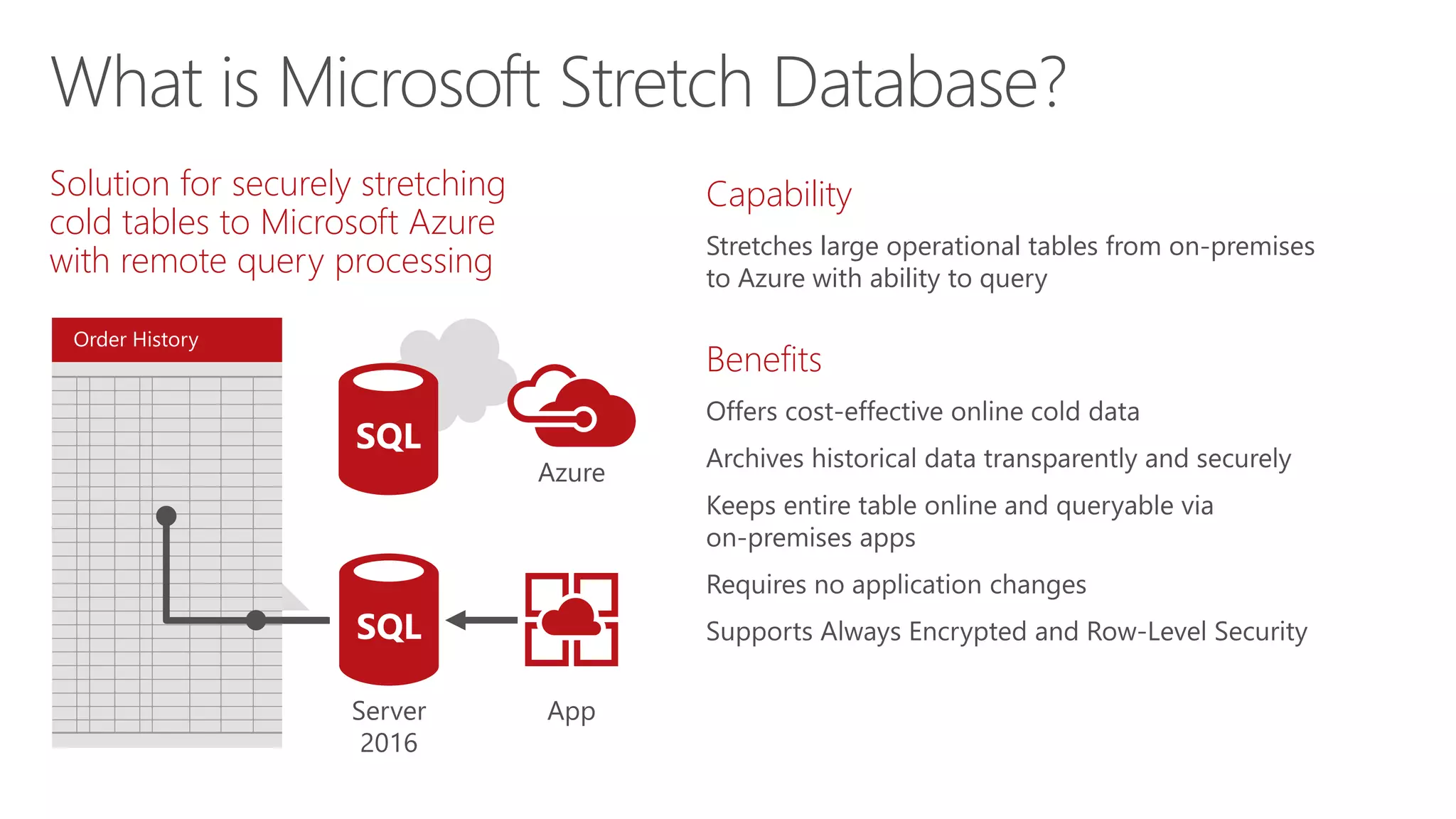
Order History
Solution for securely stretching
cold tables to Microsoft Azure
with remote query processing
Capability
Stretches large operational tables from on-premises
to Azure with ability to query
Benefits
What is Microsoft Stretch Database?
Customers
Products
Order History
Stretch to cloud
Azure
SQL
Server
2016
SQL
App
Order History
Order History
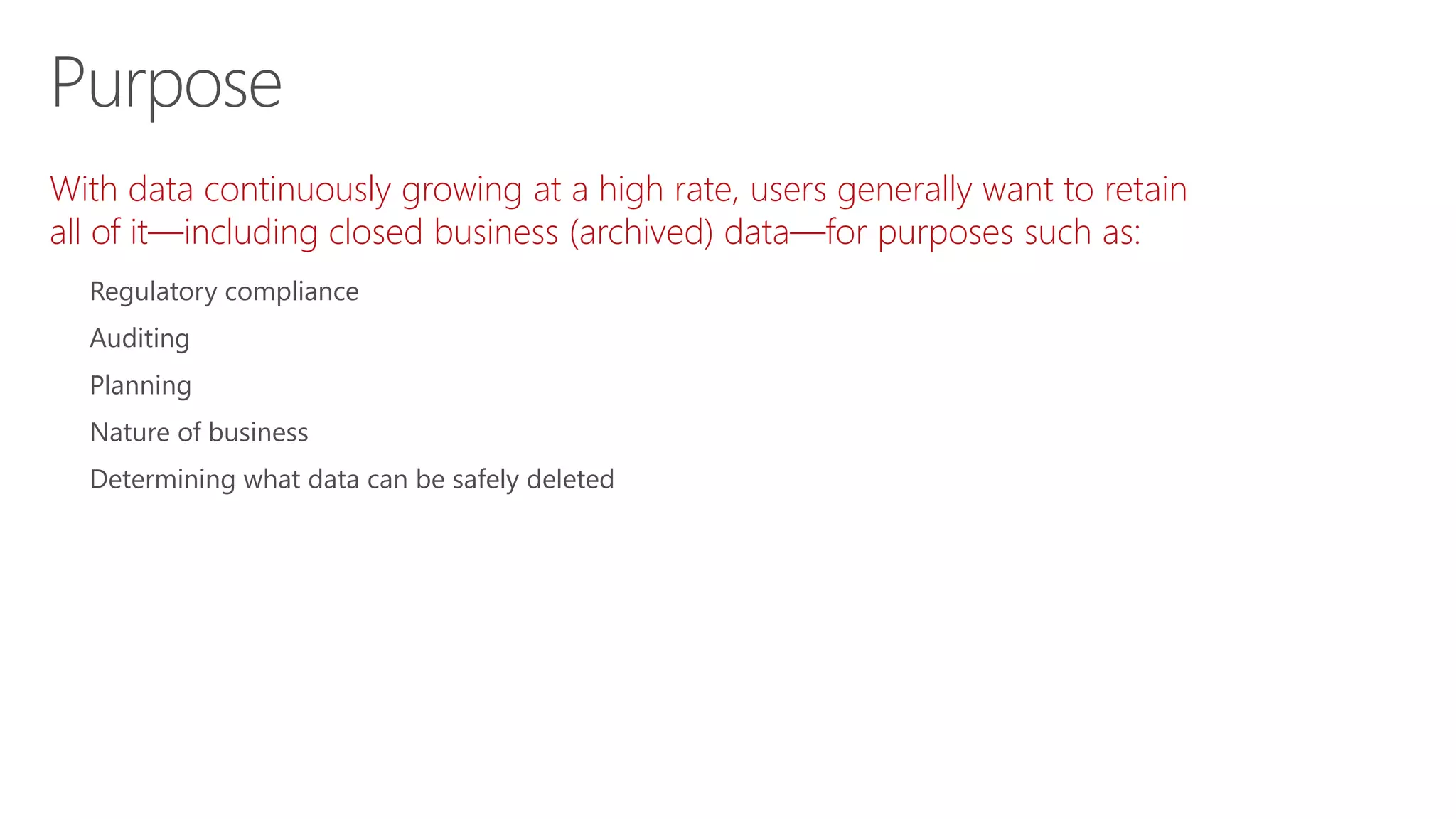
With data continuously growing at a high rate, users generally want to retain
all of it—including closed business (archived) data—for purposes such as:
Regulatory compliance
Auditing
Planning
Nature of business
Determining what data can be safely deleted
Purpose
Accountants and auditors
Fraud investigators (insurance, banks)
Inventory and supply chain managers (retailers)
Business and planning analysts
Users
Migrates your historical data to Microsoft Azure SQL Database
Offers option to pause data migration
Troubleshoots problems on local server
Maximizes available network bandwidth
Ensures no data is lost
Retries logic to handle connection issues
Uses dynamic management view to check migration status
Identifies databases and tables using Stretch Database Advisor, a
feature of Microsoft SQL Server 2016 Upgrade Advisor
Capabilities and functions
What can be used in it?
Transactional databases with large amounts of historical
data, typically stored in a small number of tables
Entire tables in Microsoft SQL Server 2016 Community
Technology Preview 3 (CTP 3.0)
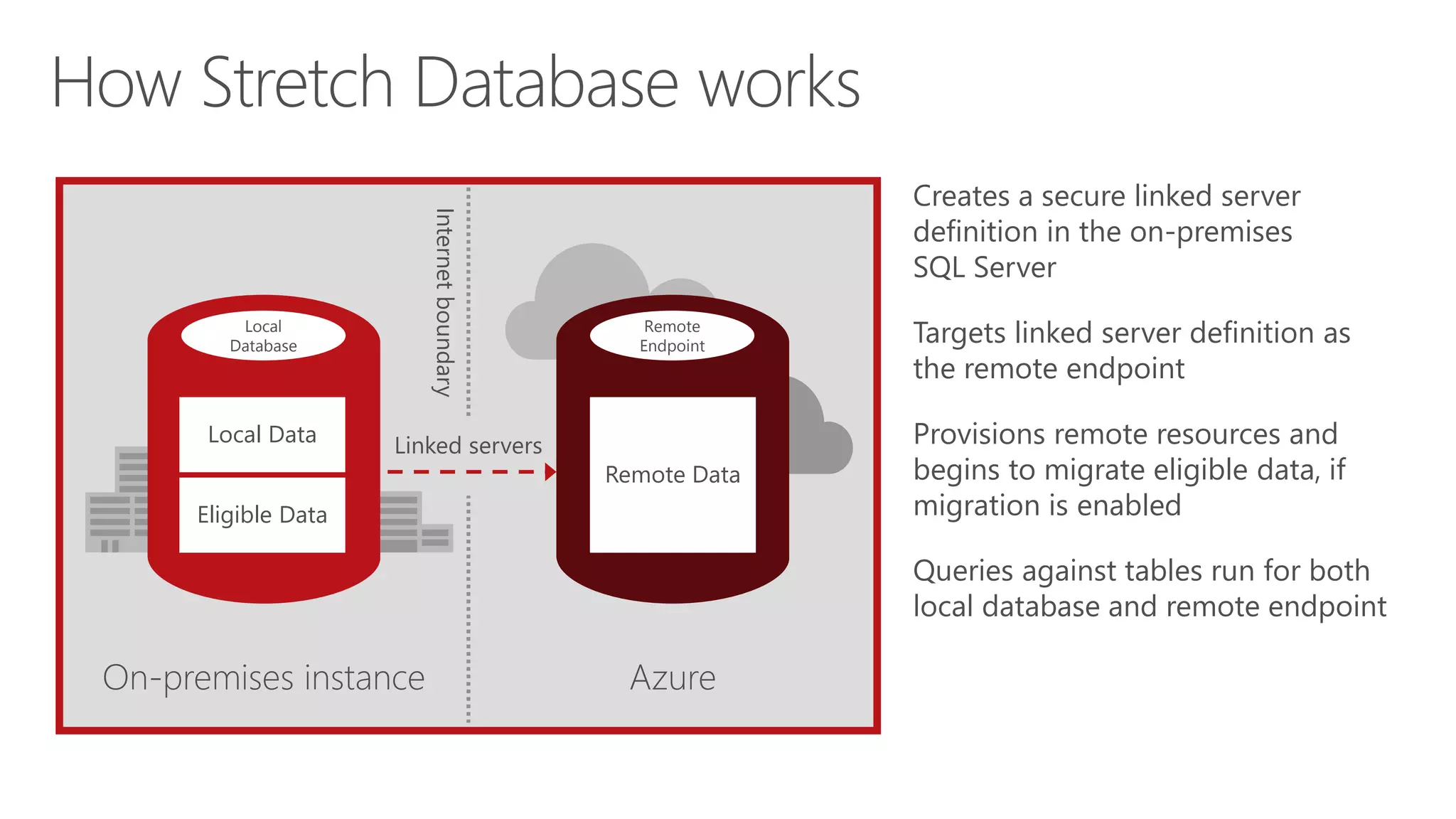
Creates a secure linked server
definition in the on-premises
SQL Server
Targets linked server definition as
the remote endpoint
Provisions remote resources and
begins to migrate eligible data, if
migration is enabled
Queries against tables run for both
local database and remote endpoint
On-premises instance Azure
Internetboundary
Linked servers
Remote
Endpoint
Remote Data
Local
Database
Eligible Data
Local Data
How Stretch Database works
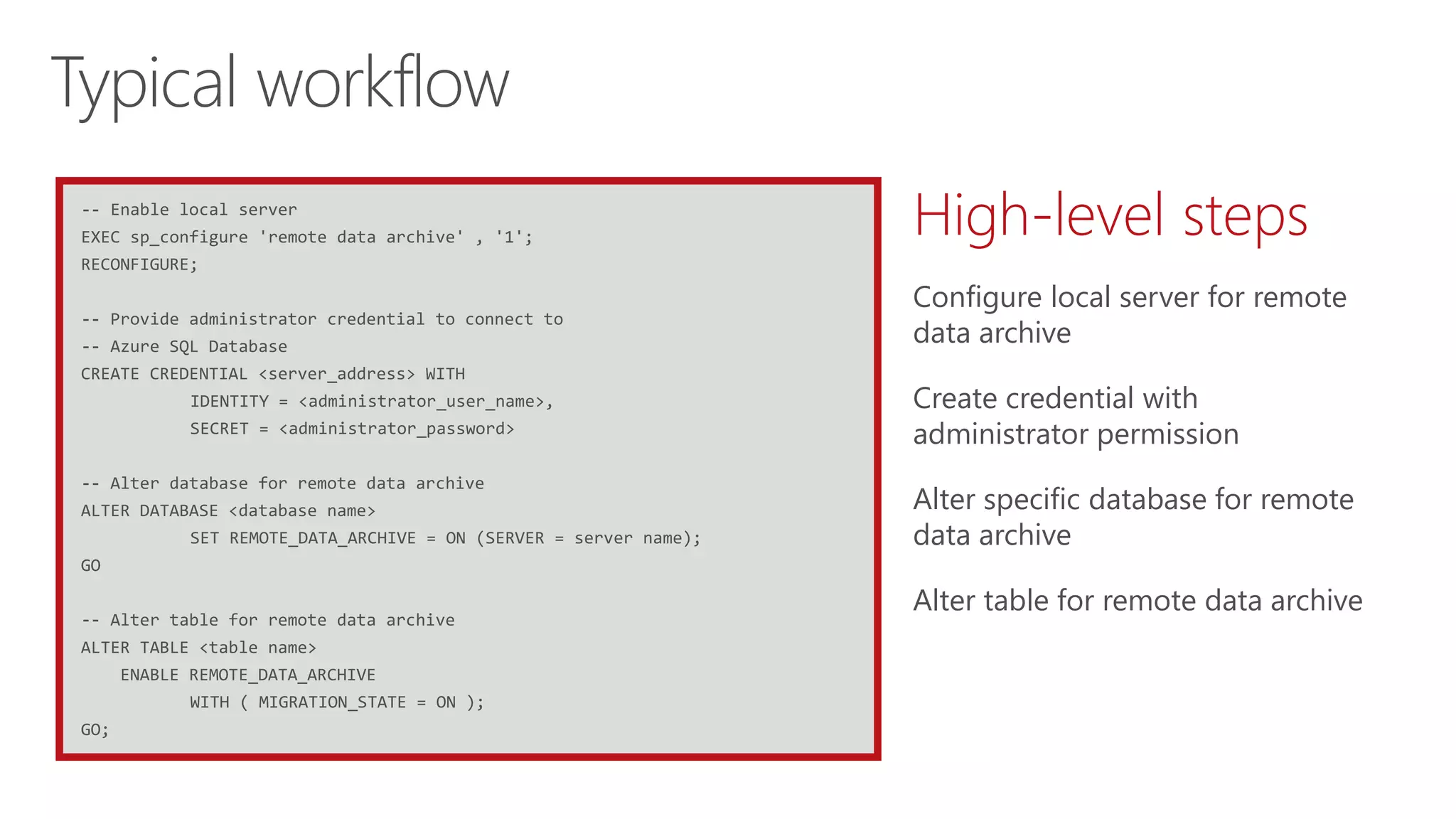
-- Enable local server
EXEC sp_configure 'remote data archive' , '1';
RECONFIGURE;
-- Provide administrator credential to connect to
-- Azure SQL Database
CREATE CREDENTIAL <server_address> WITH
IDENTITY = <administrator_user_name>,
SECRET = <administrator_password>
-- Alter database for remote data archive
ALTER DATABASE <database name>
SET REMOTE_DATA_ARCHIVE = ON (SERVER = server name);
GO
-- Alter table for remote data archive
ALTER TABLE <table name>
ENABLE REMOTE_DATA_ARCHIVE
WITH ( MIGRATION_STATE = ON );
GO;
Typical workflow
High-level steps
Configure local server for remote
data archive
Create credential with
administrator permission
Alter specific database for remote
data archive
Alter table for remote data archive
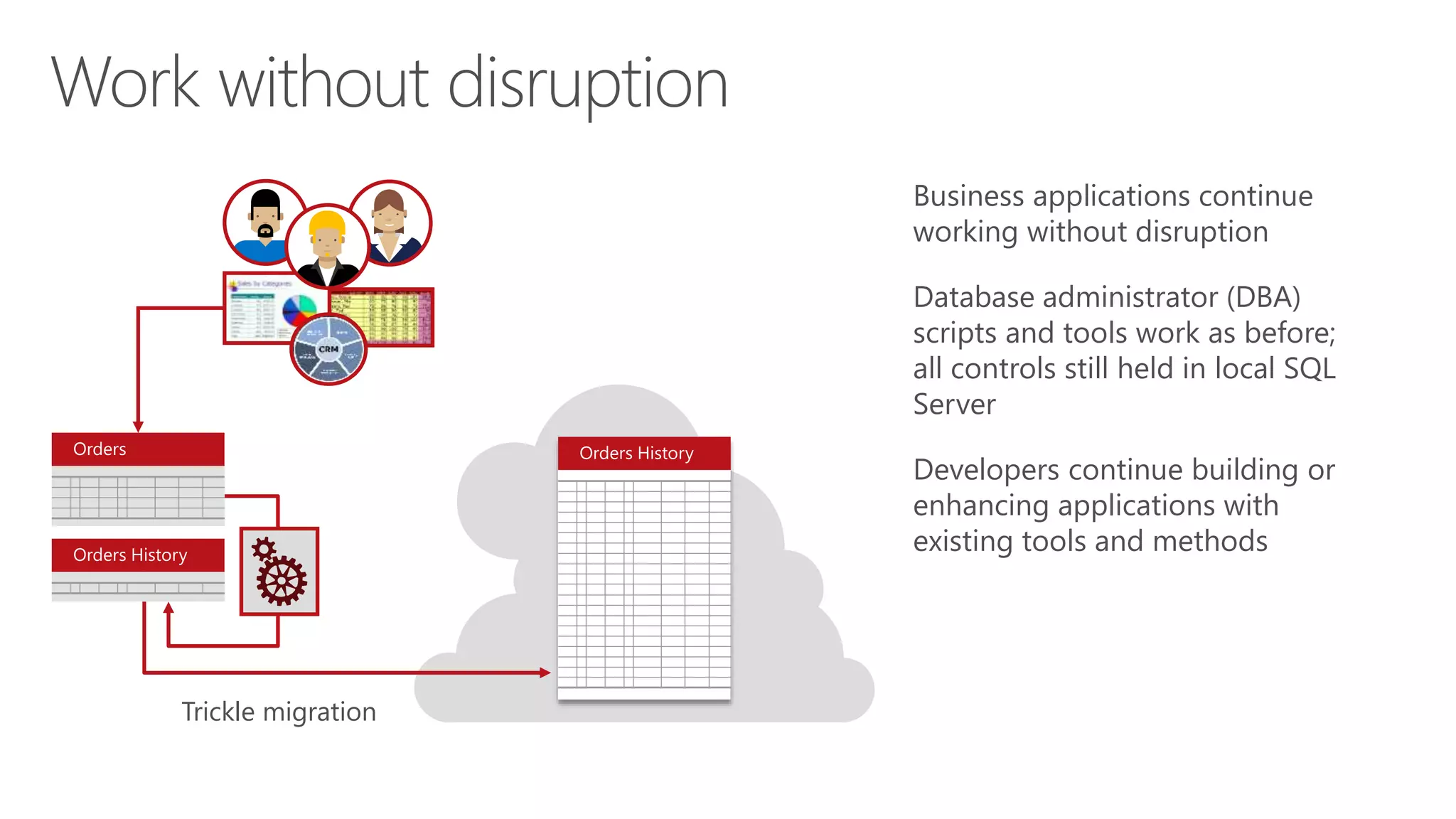
Work without disruption
Business applications continue
working without disruption
Database administrator (DBA)
scripts and tools work as before;
all controls still held in local SQL
Server
Developers continue building or
enhancing applications with
existing tools and methods
Trickle migration
Orders Orders History
Orders History
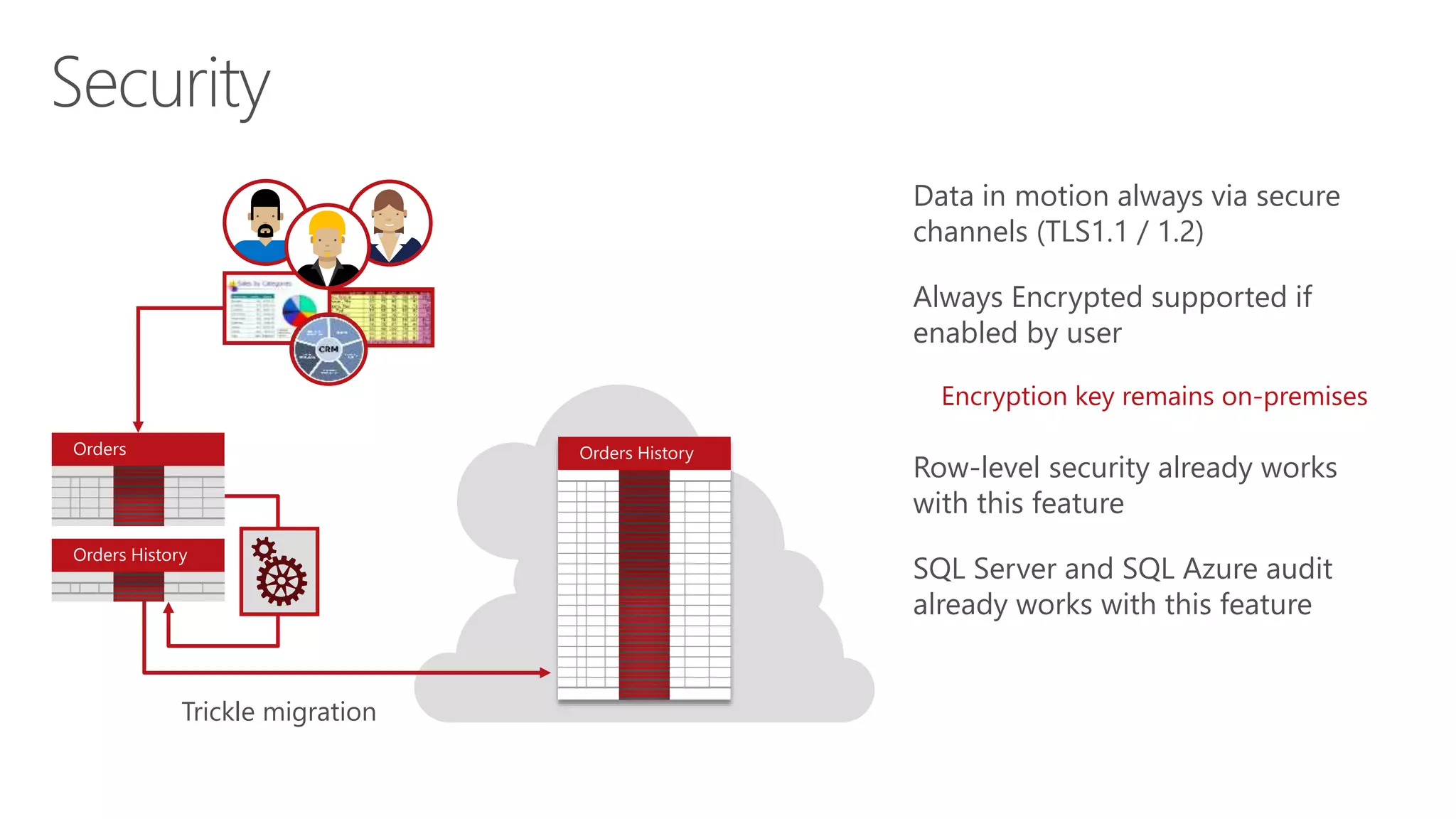
Security
Data in motion always via secure
channels (TLS1.1 / 1.2)
Always Encrypted supported if
enabled by user
Encryption key remains on-premises
Row-level security already works
with this feature
SQL Server and SQL Azure audit
already works with this feature
Trickle migration
Orders Orders History
Orders History
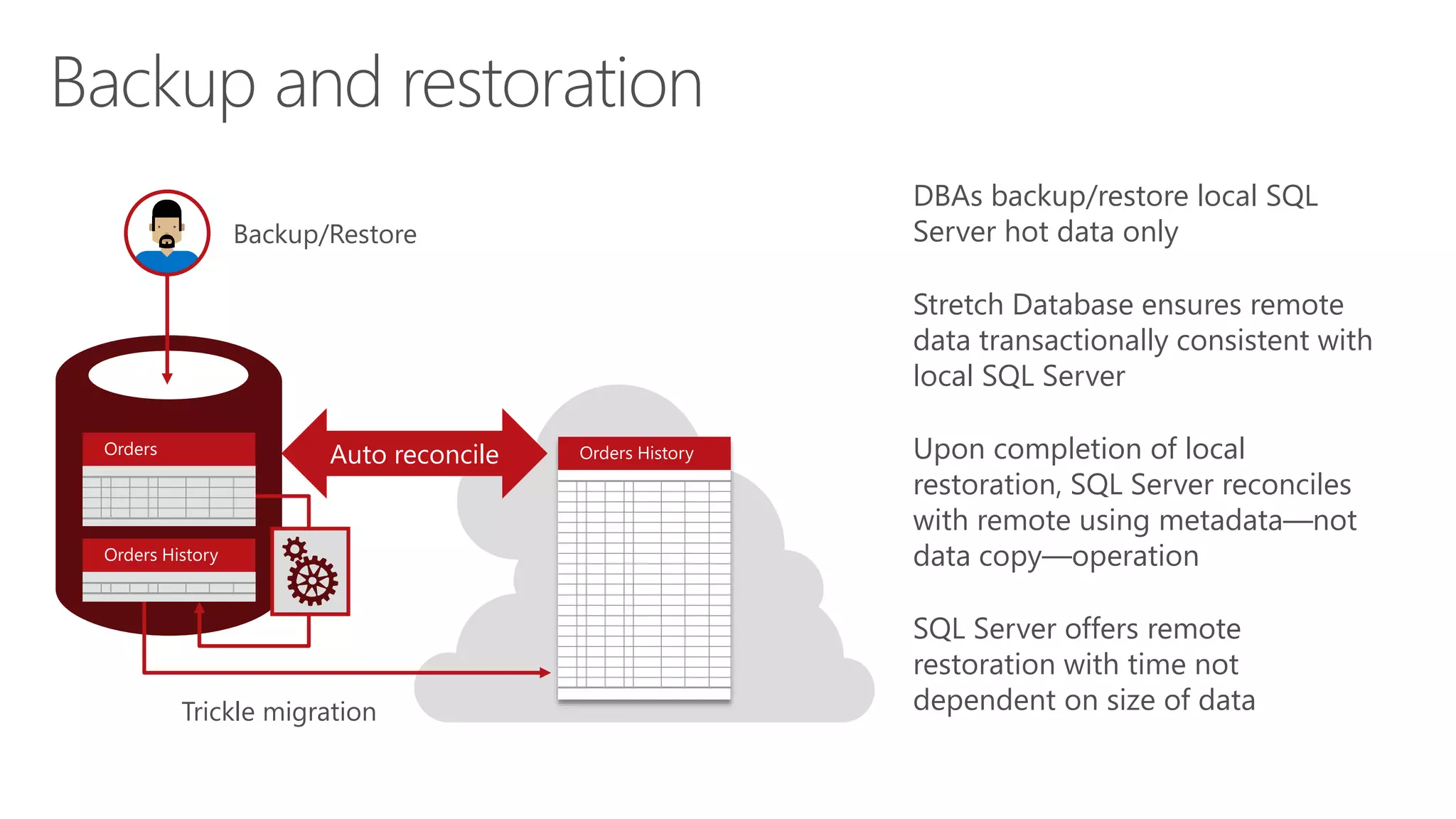
Backup and restoration
DBAs backup/restore local SQL
Server hot data only
Stretch Database ensures remote
data transactionally consistent with
local SQL Server
Upon completion of local
restoration, SQL Server reconciles
with remote using metadata―not
data copy―operation
SQL Server offers remote
restoration with time not
dependent on size of dataTrickle migration
Orders Orders History
Orders History
Backup/Restore
Auto reconcile
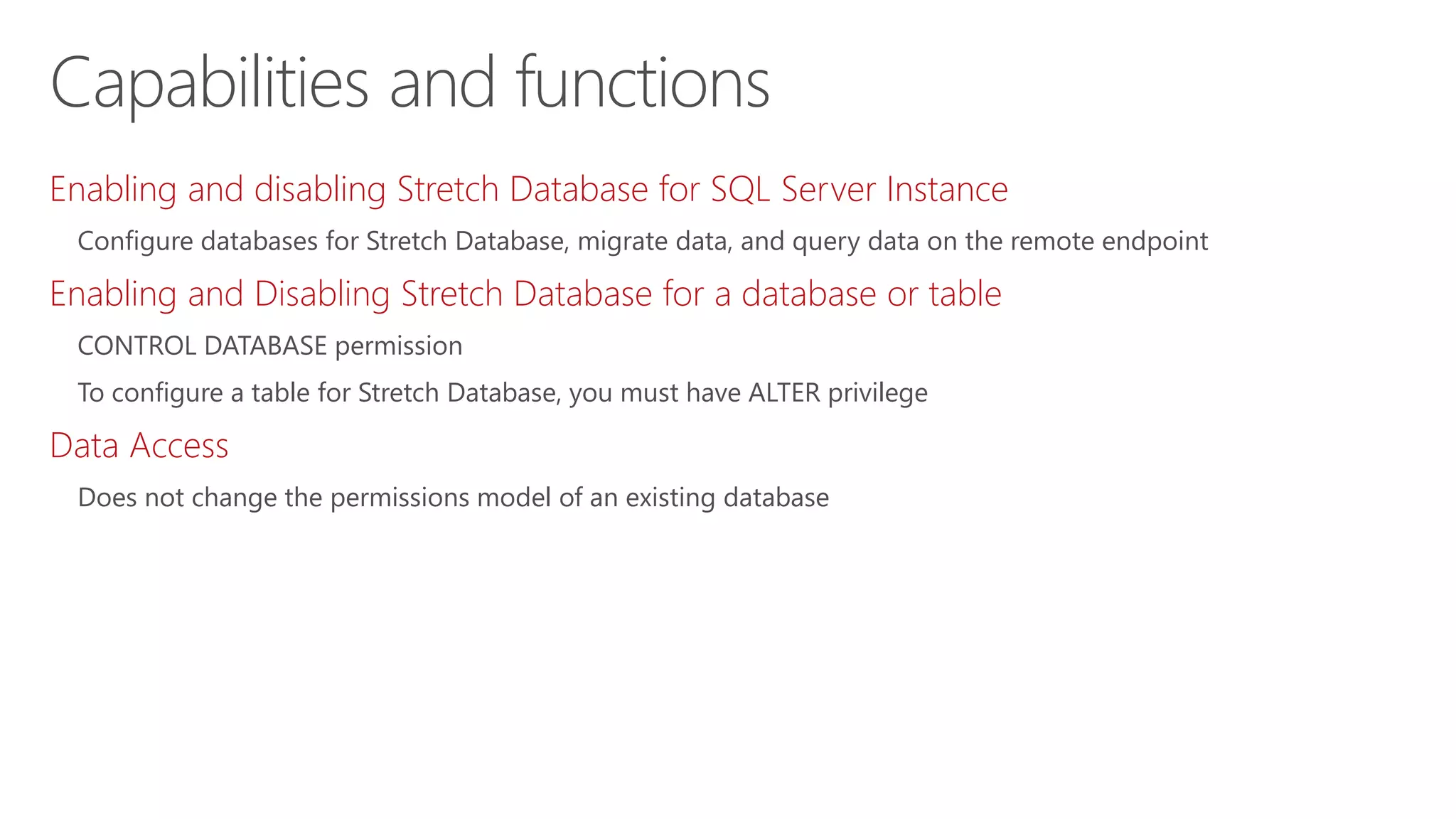
Enabling and disabling Stretch Database for SQL Server Instance
Configure databases for Stretch Database, migrate data, and query data on the remote endpoint
Enabling and Disabling Stretch Database for a database or table
CONTROL DATABASE permission
To configure a table for Stretch Database, you must have ALTER privilege
Data Access
Does not change the permissions model of an existing database
Capabilities and functions
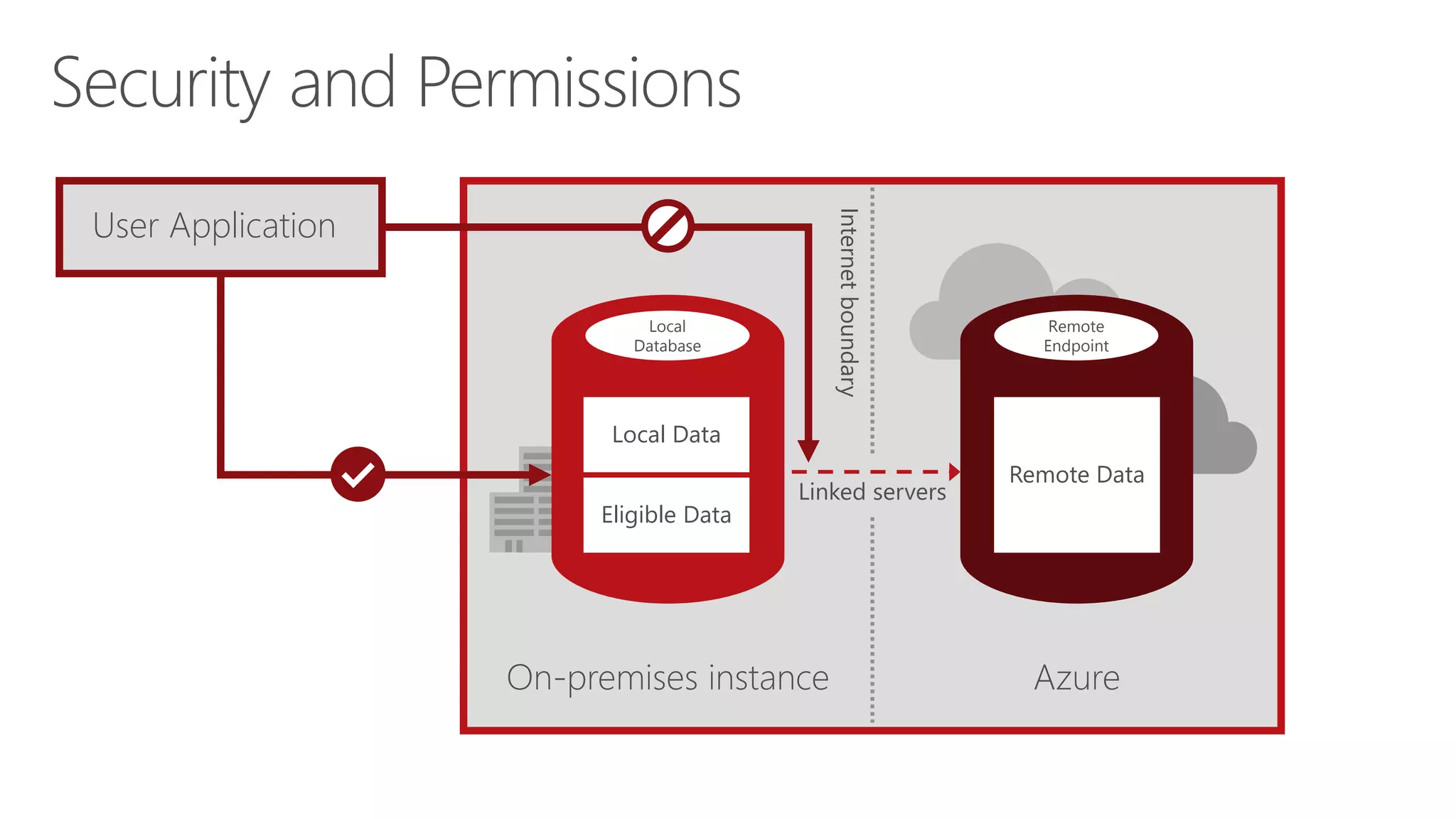
Security and Permissions
On-premises instance Azure
Internetboundary
User Application
Linked servers
Local
Database
Eligible Data
Local Data
Remote
Endpoint
Remote Data
© 2015 Microsoft Corporation. All rights reserved. Microsoft, Windows, Microsoft Azure, and other product names are or may be registered trademarks and/or trademarks in the U.S. and/or other countries. The
information herein is for informational purposes only and represents the current view of Microsoft Corporation as of the date of this presentation. Because Microsoft must respond to changing market conditions,
it should not be interpreted to be a commitment on the part of Microsoft, and Microsoft cannot guarantee the accuracy of any information provided after the date of this presentation. MICROSOFT MAKES NO
WARRANTIES, EXPRESS, IMPLIED OR STATUTORY, AS TO THE INFORMATION IN THIS PRESENTATION

Stretch Database

  • 1.
  • 2.
    Microsoft Stretch Databaseoverview Capabilities and functions How Stretch Database works Security, backup, and restoration features Benefits of Stretch Database
  • 4.
    What do wehave? Massive tables Cold data―infrequently accessed, always online Maintenance challenges Business service level agreements (SLAs) at risk What do we need? Expanded server and storage Consolidated datacenter Indefinite data storage Flexible and safe options for moving and deleting data Ever growing data, ever shrinking IT
  • 5.
    Order History Solution forsecurely stretching cold tables to Microsoft Azure with remote query processing Capability Stretches large operational tables from on-premises to Azure with ability to query Benefits What is Microsoft Stretch Database? Customers Products Order History Stretch to cloud Azure SQL Server 2016 SQL App Order History Order History
  • 6.
    With data continuouslygrowing at a high rate, users generally want to retain all of it—including closed business (archived) data—for purposes such as: Regulatory compliance Auditing Planning Nature of business Determining what data can be safely deleted Purpose
  • 7.
    Accountants and auditors Fraudinvestigators (insurance, banks) Inventory and supply chain managers (retailers) Business and planning analysts Users
  • 9.
    Migrates your historicaldata to Microsoft Azure SQL Database Offers option to pause data migration Troubleshoots problems on local server Maximizes available network bandwidth Ensures no data is lost Retries logic to handle connection issues Uses dynamic management view to check migration status Identifies databases and tables using Stretch Database Advisor, a feature of Microsoft SQL Server 2016 Upgrade Advisor Capabilities and functions
  • 10.
    What can beused in it? Transactional databases with large amounts of historical data, typically stored in a small number of tables Entire tables in Microsoft SQL Server 2016 Community Technology Preview 3 (CTP 3.0)
  • 12.
    Creates a securelinked server definition in the on-premises SQL Server Targets linked server definition as the remote endpoint Provisions remote resources and begins to migrate eligible data, if migration is enabled Queries against tables run for both local database and remote endpoint On-premises instance Azure Internetboundary Linked servers Remote Endpoint Remote Data Local Database Eligible Data Local Data How Stretch Database works
  • 13.
    -- Enable localserver EXEC sp_configure 'remote data archive' , '1'; RECONFIGURE; -- Provide administrator credential to connect to -- Azure SQL Database CREATE CREDENTIAL <server_address> WITH IDENTITY = <administrator_user_name>, SECRET = <administrator_password> -- Alter database for remote data archive ALTER DATABASE <database name> SET REMOTE_DATA_ARCHIVE = ON (SERVER = server name); GO -- Alter table for remote data archive ALTER TABLE <table name> ENABLE REMOTE_DATA_ARCHIVE WITH ( MIGRATION_STATE = ON ); GO; Typical workflow High-level steps Configure local server for remote data archive Create credential with administrator permission Alter specific database for remote data archive Alter table for remote data archive
  • 14.
    Work without disruption Businessapplications continue working without disruption Database administrator (DBA) scripts and tools work as before; all controls still held in local SQL Server Developers continue building or enhancing applications with existing tools and methods Trickle migration Orders Orders History Orders History
  • 16.
    Security Data in motionalways via secure channels (TLS1.1 / 1.2) Always Encrypted supported if enabled by user Encryption key remains on-premises Row-level security already works with this feature SQL Server and SQL Azure audit already works with this feature Trickle migration Orders Orders History Orders History
  • 17.
    Backup and restoration DBAsbackup/restore local SQL Server hot data only Stretch Database ensures remote data transactionally consistent with local SQL Server Upon completion of local restoration, SQL Server reconciles with remote using metadata―not data copy―operation SQL Server offers remote restoration with time not dependent on size of dataTrickle migration Orders Orders History Orders History Backup/Restore Auto reconcile
  • 18.
    Enabling and disablingStretch Database for SQL Server Instance Configure databases for Stretch Database, migrate data, and query data on the remote endpoint Enabling and Disabling Stretch Database for a database or table CONTROL DATABASE permission To configure a table for Stretch Database, you must have ALTER privilege Data Access Does not change the permissions model of an existing database Capabilities and functions
  • 19.
    Security and Permissions On-premisesinstance Azure Internetboundary User Application Linked servers Local Database Eligible Data Local Data Remote Endpoint Remote Data
  • 20.
    © 2015 MicrosoftCorporation. All rights reserved. Microsoft, Windows, Microsoft Azure, and other product names are or may be registered trademarks and/or trademarks in the U.S. and/or other countries. The information herein is for informational purposes only and represents the current view of Microsoft Corporation as of the date of this presentation. Because Microsoft must respond to changing market conditions, it should not be interpreted to be a commitment on the part of Microsoft, and Microsoft cannot guarantee the accuracy of any information provided after the date of this presentation. MICROSOFT MAKES NO WARRANTIES, EXPRESS, IMPLIED OR STATUTORY, AS TO THE INFORMATION IN THIS PRESENTATION

Editor's Notes

  • #4 Objective: this slide introduces the overview section. Talking points: Traditional archiving solutions typically require: Third-party software Completely different data store and application to access Some solutions depend on backups or offline storage May be acceptable for some environments, but many enterprises want their archive stored where data was born Also want archive to be accessible by using same application whenever needed, without having to wait for data to be restored or brought online
  • #5 Objective: this slide shows the current IT landscape where data is growing while IT is shrinking in terms of resources and cost to maintain. Talking points: Typically, organizations have large transaction tables with enormous amounts of historical data. Think of a massive table with hundreds of millions or billions of rows with 70–80% cold data that users need to maintain online indefinitely. However, most of the time, only 20–30% of hot data gets accessed but cold data also needs to be online even though when accessed infrequently. This possesses a challenge for IT to maintain the continuity and management of hot and cold data and business service-level agreements (SLAs) at risk. In order to retain and maintain all the data, IT must: Increase their resources, expand the server and storage capacity Consolidate the data centers to have more IT resources pool Traditional archiving solutions such as SSD + SAS + SATA for indefinite data storage But all these resources burdens with large cost and maintenance complexity, they want low cost, flexible, and safe options for moving and deleting data. Animation <<first click>> What do we have? Animation <<second click>> What do we need?
  • #6 Objective: this slide introduces the new feature of SQL Server 2016―Stretch Database, a solution for securely stretching cold tables to Microsoft Azure with remote query processing. Talking points: The Stretch Database feature securely and transparently archives your cold or historical data from a local SQL Server database to Azure SQL Database (the SQL Database service in Microsoft Azure Cloud is provided as a Platform as a Service [PaaS]) with remote query processing capability. Animation <<On First Click>> Once you enable this feature for a table, SQL Server silently and transparently moves/migrates table data to Azure SQL Database Animation <<On Second Click>> and no application change is required to access the data. You can still have a single query accessing these two types of data or tables These are some of the benefits of using this feature: Storage of cold data in Azure SQL Database is cost effective; that is, there is reduced cost and complexity in keeping cold data online in Azure SQL Database Secure and transparent movement of cold or historical data without writing a data movement module; makes local queries and other database operations run faster as they have to work on hot data or local data most of the time Archived data remains online and queryable like any other table in local SQL Server database No application change is required to access these archived tables or data; a single query accessing these two types of data or tables at a given time or in the same query The good part of this feature is (even though cold data is stored externally in Azure SQL Database but they are online), it is transitionally consistent and works with other SQL features like Always Encrypted, Row Level Security, etc.
  • #7 Objective: this slide covers the purpose and reasons where Stretch Database provides great value. Talking points: Data is continuously growing at a high rate, and users generally want to retain all data—including closed business (archive/cold) data—for many possible reasons, such as: Regulatory compliance; for example, taxes Audit; for example, fraud investigation Planning; for example, comparing past results Nature of business; for example, retailer transaction details history Inability to determine with certainty what can be safely deleted; for example, what might a government agency or major institutional investor ask for?
  • #8 Objective: this slide covers the possible usage of Stretch Database in various user roles. Talking points: For accountants and auditors, Stretch Database makes it possible to expand the historical data kept for past audits and retain an elastic amount of storage for records that may be required in compliance with Tax, Securities Exchange Commissions (SEC), and Sarbanes-Oxley (SOX). Fraud investigators are able to use Stretch Database to perform a thorough analysis of where fraud has occurred previously and determine areas of high risk. Inventory and supply chain managers can use Stretch Database to analyze demographics and purchase history, using this information to forecast inventory needs. By a similar token business and planning analysts can perform various analyses (such as statistics and forecasting) using the detailed metrics and historical data that Stretch Database helps these users archive.
  • #10 Objective: this slide shows a brief overview of Stretch Database capabilities and functions and provides an understanding of what Stretch Database does. Talking points: After you enable Stretch Database for a local server instance, a database, and at least one table, it silently begins to migrate your historical data to an Azure SQL Database. You can pause data migration to troubleshoot problems on the local server or to maximize the available network bandwidth. Stretch Database ensures that no data is lost if a failure occurs during migration. It also has retry logic to handle connection issues that may occur during migration. A dynamic management view provides the status of migration. You don't have to change existing queries and client apps. You continue to have seamless access to both local and remote data, even during data migration. There is a small amount of latency for remote queries, but you only encounter this latency when you query the historical data that's archived remotely. Use Stretch Database Advisor, a feature of SQL Server 2016 Upgrade Advisor, to identify databases and tables for Stretch Database. Stretch Database Advisor helps you to adopt Stretch Database by analyzing existing database tables based on adjustable table size thresholds to identify candidates for Stretch Database. Stretch Database Advisor also identifies blocking issues.
  • #11 Objective: this slide shows a brief overview of where Stretch Database can be used. Talking points: Archive transactional databases with large amounts of historical data, typically stored in a small number of tables. Archived transactional tables may contain more than a billion rows. Migrate entire tables in Microsoft SQL Server 2016 Community Technology Preview 3 (CTP 3.0). In migrating tables in SQL Server 2016 Community Technology Preview 3 (CTP 3.0), this assumes that you already moved historical data into a table that's separate from current data. Identify databases and tables using Stretch Database Advisor, a feature of Microsoft SQL Server 2016 Upgrade Advisor.
  • #13 Objective: this slide shows the architecture and working components of Stretch Database. This slide also introduces some new terms that needs to be understood before diving into the architecture of Stretch Database. Talking points: Below are the terms and architecture concepts to understand regarding Stretch Database. Terms Local database: The on-premises SQL Server 2016 database. Remote endpoint: The location in Microsoft Azure that contains the remote data for the database. In SQL Server 2016, this is an Azure SQL Database. This is subject to change in the future. Local data: Data in a database with Stretch Database enabled that will not be moved to Azure based on the Stretch Database configuration of the tables in the database. Eligible data: Data in a database with Stretch Database enabled that has not yet been moved, but will be moved to Azure based on the Stretch Database configuration of the tables in the database. Remote data: Data in a database with Stretch Database enabled that has already been moved to Azure. Architecture Stretch Database leverages the resources in Microsoft Azure to offload archival data storage and query processing. When you enable Stretch Database on a database, it creates a secure linked server definition in the on-premises SQL Server. This linked server definition has the remote endpoint as the target. When you enable Stretch Database on a table in the database, it provisions remote resources and begins to migrate eligible data, if migration is enabled. Queries against tables with Stretch Database enabled automatically run against both the local database and the remote endpoint. Stretch Database leverages processing power in Azure to run queries against remote data by rewriting the query. You can see this rewriting as a “remote query” operator in the new query plan. Source: https://msdn.microsoft.com/en-us/library/dn935011.aspx
  • #14 Objective: this slide depicts the typical workflow to enable Stretch Database. At high level, this is three step process. Talking points: Before you configure a database for Stretch, we recommend that you run the Stretch Database Advisor to identify databases and tables that are eligible for Stretch. The Stretch Database Advisor also identifies blocking issues. Stretch Database migrates data to an Azure SQL Database. Therefore you have to have an Azure account and a subscription for billing. Here are the steps for typical workflow to enable Stretch Database. Before you can enable Stretch Database on a database or a table, you have to enable it on the local server. This operation requires sysadmin or serveradmin permissions. Enabling Stretch Database on a database also requires CONTROL DATABASE permissions. To configure a database for Stretch Database, the database has to have a database master key. The database master key secures the credentials that Stretch Database uses to connect to the remote database. When you configure a database for Stretch Database, you have to provide an administrator credential to connect to the associated Azure SQL Database. To configure a database for Stretch Database, you need to alter the database for a remote data archive. You can also alter tables for a remote data archive. In SQL Server 2016 Community Technology Preview 3 (CTP 3.0), Stretch Database migrates entire tables. This assumes that you already moved historical data into a table that's separate from current data.
  • #15 Objective: with SQL Server 2016 Stretch Database, you can stretch large operational tables from on-premises to Azure with the ability to query with near-infinite capacity. This slide depicts that you don't have to change existing queries and client apps to work with Stretch Database. Talking points: With Stretch Database, you continue to have seamless access to both local and remote data, even during data migration. Once the selection is made, trickle data migration is used to move that data to Azure. The data can then be returned to on-premises storage. The data exchange is both transparent and bi-directional. During the stretching process, all the characteristics of the database stay intact. The code or stored procedures do not change. The user access control does not change either. This maintains the integrity of the data, while still enabling staff to work with it. Applications continue to work without code changes or any disruption Existing database administrator (DBA) skills and processes remain relevant, while the scripts and tools work as before and all controls still held in the local SQL Server Developers can continue using current tools and APIs. Developers continue building or enhancing applications with existing tools and methods
  • #17 Objective: this slide describes the various advanced security features that can combined with Stretch Database to provide a higher level of security to the data in motion or at rest.   Talking points: Stretch Database can be used in tandem with the new Always Encrypted feature for data security. This new SQL Server 2016 technology applies to resting data as well as any data being transmitted. Transparent Data Encryption secures the data. Encryption key remains on-premises. Keys used are never provided to the database system or cloud service provider. Stretch Database also works with Row Level Security. The SQL Server and SQL Azure audit is already currently working. The scenarios in which your organization may wish to use Stretch Database include a variety of data retention-related tasks, such as ensuring regulatory compliance, auditing, or business planning.
  • #18 Objective: this slide talks about how backup and restoration takes place in Stretch Database. Talking points: You can continue to back up and restore Stretch-enabled databases by using the methods that you currently use. A backup of a Stretch-enabled database is a shallow backup that does not include the data migrated to the remote serve. Backups on a database with Stretch Database enabled contain only local data and eligible data at the point in time when the backup runs. These backups also contain information about the remote endpoint where the remote data for the database resides. That means DBAs back up/restore local SQL Server hot data only. When restoring a database that is Stretch-enabled, you'll have to reconnect the local database to the remote Azure SQL Database. You do this by running the stored procedure sys.sp_reauthorize_remote_data_archive as a database owner. Upon completion of local restoration, SQL Server reconciles with remote using metadata―not data copy―operation. SQL Server offers remote restoration with time not dependent on size of data. The backups for Azure SQL Databases for Basic, Standard, and Premium service tiers are taken every hour. The backup retention period varies depending on the service tier level. At time of writing, for basic it is 7 days, standard 14 days, and premium is 35 days. You can restore Azure SQL Databases by using the Microsoft Azure web portal.
  • #19 Objective: this slide lists security and permissions considerations for Stretch Database. Talking points: Security and permissions considerations for Stretch Database include the following: Enabling and disabling Stretch Database for SQL Server Instance To begin configuring databases for Stretch Database, you must first change the “remote data archive” instance-level configuration option using sp_configure. This operation requires SYSADMIN or SERVERADMIN privileges. With this option enabled, you can configure databases for Stretch Database, migrate data, and query data on the remote endpoint. It's important to note that this option is not a switch that turns the Stretch Database feature on or off, and it's not a permission setting for configuring Stretch Database. Enabling and Disabling a Stretch Database for a database or table To configure a database for Stretch Database, you must have the CONTROL DATABASE permission. In addition, you have to have administrator permissions on the remote endpoint. (In CTP2, this means that, at configuration time, you have to provide the administrator login and password for the target Azure SQL Database.) To configure a table for Stretch Database, you must have ALTER privilege on the table, and the database must already be configured for Stretch Database. Data access Only system processes can access the linked server definition behind Stretch Database. User logins can't issue queries through the linked server definition to the remote endpoint. Stretch Database does not change the permissions model of an existing database. User logins can query the data in a table with Stretch Database enabled through the local database. The local database performs permission checks for any actions initiated by the user in the same way as it does for any other objects. If you're authorized to access the table with Stretch Database enabled, you have access to all its contents for which you're authorized regardless of where the data physically resides.  
  • #20 Objective: this slide talks about the data access and permission flow in Stretch Database. Talking points: Only system processes can access the linked server definition behind Stretch Database. User logins can't issue queries through the linked server definition to the remote endpoint. Stretch Database does not change the permissions model of an existing database. User logins can query the data in a table with Stretch Database enabled through the local database. The local database performs permission checks for any actions initiated by the user in the same way as it does for any other objects. If you're authorized to access the table with Stretch Database enabled, you have access to all its contents for which you're authorized regardless of where the data physically resides.