
SQL Server 2016
New innovations
Lukasz Grala
Microsoft MVP Data Platform
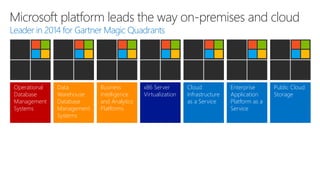
Operational
Database
Management
Systems
Data
Warehouse
Database
Management
Systems
Business
Intelligence
and Analytics
Platforms
x86 Server
Virtualization
Cloud
Infrastructure
as a Service
Enterprise
Application
Platform as a
Service
Public Cloud
Storage
Leader in 2014 for Gartner Magic Quadrants
Microsoft platform leads the way on-premises and cloud
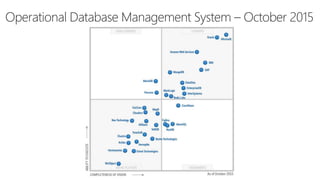
Operational Database Management System – October 2015
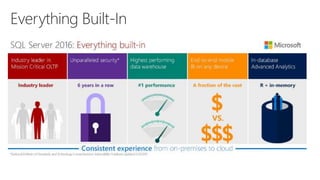
Everything Built-In
Do more. Achieve more.
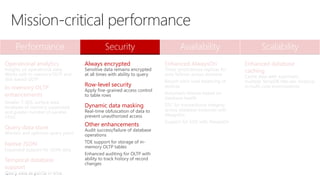
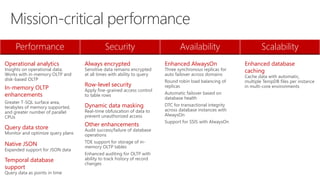
Performance Security Availability Scalability
Operational analytics
Insights on operational data;
Works with in-memory OLTP and
disk-based OLTP
In-memory OLTP
enhancements
Greater T-SQL surface area,
terabytes of memory supported,
and greater number of parallel
CPUs
Query data store
Monitor and optimize query plans
Native JSON
Expanded support for JSON data
Temporal database
support
Query data as points in time
Always encrypted
Sensitive data remains encrypted
at all times with ability to query
Row-level security
Apply fine-grained access control
to table rows
Dynamic data masking
Real-time obfuscation of data to
prevent unauthorized access
Other enhancements
Audit success/failure of database
operations
TDE support for storage of in-
memory OLTP tables
Enhanced auditing for OLTP with
ability to track history of record
changes
Enhanced AlwaysOn
Three synchronous replicas for
auto failover across domains
Round robin load balancing of
replicas
Automatic failover based on
database health
DTC for transactional integrity
across database instances with
AlwaysOn
Support for SSIS with AlwaysOn
Enhanced database
caching
Cache data with automatic,
multiple TempDB files per instance
in multi-core environments
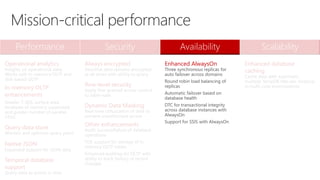
Mission-critical performance
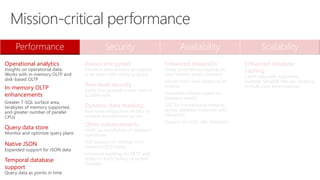
Performance Security Availability Scalability
Operational analytics
Insights on operational data;
Works with in-memory OLTP and
disk-based OLTP
In-memory OLTP
enhancements
Greater T-SQL surface area,
terabytes of memory supported,
and greater number of parallel
CPUs
Query data store
Monitor and optimize query plans
Native JSON
Expanded support for JSON data
Temporal database
support
Query data as points in time
Always encrypted
Sensitive data remains encrypted
at all times with ability to query
Row-level security
Apply fine-grained access control
to table rows
Dynamic data masking
Real-time obfuscation of data to
prevent unauthorized access
Other enhancements
Audit success/failure of database
operations
TDE support for storage of in-
memory OLTP tables
Enhanced auditing for OLTP with
ability to track history of record
changes
Enhanced AlwaysOn
Three synchronous replicas for
auto failover across domains
Round robin load balancing of
replicas
Automatic failover based on
database health
DTC for transactional integrity
across database instances with
AlwaysOn
Support for SSIS with AlwaysOn
Enhanced database
caching
Cache data with automatic,
multiple TempDB files per instance
in multi-core environments
Mission-critical performance
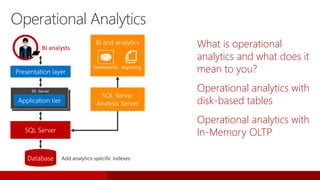
Operational Analytics
What is operational
analytics and what does it
mean to you?
Operational analytics with
disk-based tables
Operational analytics with
In-Memory OLTP
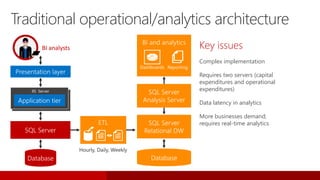
IIS Server
BI analysts
Traditional operational/analytics architecture
Key issues
Complex implementation
Requires two servers (capital
expenditures and operational
expenditures)
Data latency in analytics
More businesses demand;
requires real-time analytics
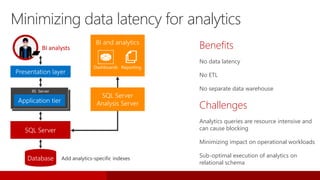
IIS Server
BI analysts
Minimizing data latency for analytics
Benefits
No data latency
No ETL
No separate data warehouse
Challenges
Analytics queries are resource intensive and
can cause blocking
Minimizing impact on operational workloads
Sub-optimal execution of analytics on
relational schema
IIS Server
BI analysts
Operational
analytics
disk-based tables
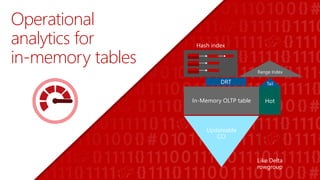
Operational
analytics for
in-memory tables
In-Memory OLTP table
Updateable
CCI
TailDRT
Hash index
Like Delta
rowgroup
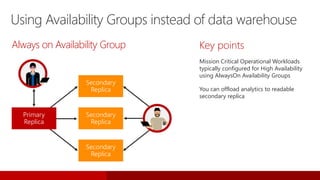
Using Availability Groups instead of data warehouse
Key points
Mission Critical Operational Workloads
typically configured for High Availability
using AlwaysOn Availability Groups
You can offload analytics to readable
secondary replica
Secondary
Replica
Secondary
Replica
Secondary
Replica
Primary
Replica
Always on Availability Group
In-memory OLTP
enhancements
ALTER TABLE Sales.SalesOrderDetail
ALTER INDEX PK_SalesOrderID
REBUILD
WITH (BUCKET_COUNT=100000000)
T-SQL surface area: New
{LEFT|RIGHT} OUTER JOIN
Disjunction (OR, NOT)
UNION [ALL]
SELECT DISTINCT
Subqueries (EXISTS, IN, scalar)
ALTER support
Full schema change support: add/alter/drop
column/constraint
Add/drop index supported
Surface area improvements
Almost full T-SQL coverage including scaler user-defined
functions
Improved scaling
Increased size allowed for durable tables; more sockets
Other improvements
MARS support
Lightweight migration reports
Improved scaling
In-memory OLTP engine
has been enhanced to
scale linearly on servers
up to 4 sockets
Other enhancements include:
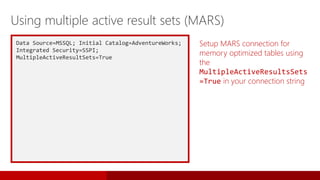
Data Source=MSSQL; Initial Catalog=AdventureWorks;
Integrated Security=SSPI;
MultipleActiveResultSets=True
Setup MARS connection for
memory optimized tables using
the
MultipleActiveResultsSets
=True in your connection string
Using multiple active result sets (MARS)
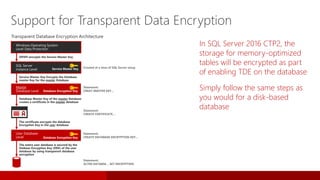
In SQL Server 2016 CTP2, the
storage for memory-optimized
tables will be encrypted as part
of enabling TDE on the database
Simply follow the same steps as
you would for a disk-based
database
Support for Transparent Data Encryption
Windows Operating System
Level Data Protection
SQL Server
Instance Level
User Database
Level Database Encryption Key
Service Master Key
DPAPI encrypts the Service Master Key
Master
Database Level Database Encryption Key
Service Master Key Encrypts the Database
master Key for the master Database
Database Master Key of the master Database
creates a certificate in the master database
The certificate encrypts the database
Encryption Key in the user database
The entire user database is secured by the
Datbase Encryption Key (DEK) of the user
database by using transparent database
encryption
Created at a time of SQL Server setup
Statement:
CREAT MASTER KEY…
Statement:
CREATE CERTIFICATE…
Statement:
CREATE DATABASE ENCRYPTION KEY…
Statement:
ALTER DATABSE… SET ENCRYPTION
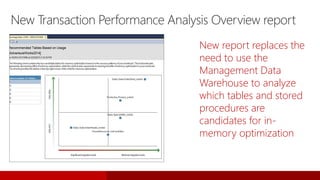
New Transaction Performance Analysis Overview report
New report replaces the
need to use the
Management Data
Warehouse to analyze
which tables and stored
procedures are
candidates for in-
memory optimization
Query Store
Your flight data recorder
for your database
Have You Ever…?
…had your system down/slowed down and everyone waiting for you to
magically fix the problem ASAP?
…upgraded an application to the latest SQL Server version
and had an issue with a plan change slowing your application down?
…had a problem with your Azure SQL Database and been unable to
determine what was going wrong?
With Query Store…
I CAN get full history of query execution
I CAN quickly pinpoint the most expensive queries
I CAN get all queries that regressed
I CAN easily force better plan from history with a single line of T-SQL
I CAN safely do server restart or upgrade
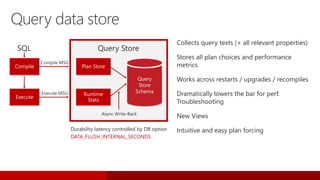
Durability latency controlled by DB option
DATA_FLUSH_INTERNAL_SECONDS
Compile
Execute
Plan Store
Runtime
Stats
Query
Store
Schema
Query data store
Collects query texts (+ all relevant properties)
Stores all plan choices and performance
metrics
Works across restarts / upgrades / recompiles
Dramatically lowers the bar for perf.
Troubleshooting
New Views
Intuitive and easy plan forcing
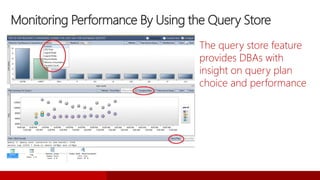
Monitoring Performance By Using the Query Store
The query store feature
provides DBAs with
insight on query plan
choice and performance
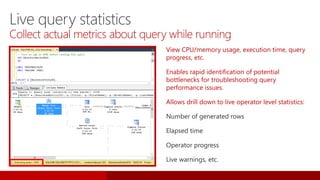
Live query statistics
Collect actual metrics about query while running
View CPU/memory usage, execution time, query
progress, etc.
Enables rapid identification of potential
bottlenecks for troubleshooting query
performance issues.
Allows drill down to live operator level statistics:
Number of generated rows
Elapsed time
Operator progress
Live warnings, etc.
Java Script Object
Notation (JSON)
JSON became ubiquitous
Compact and simple data exchange format
The choice on the web
Recommended scenario
I CAN accept JSON, easily parse and store it as relational
I CAN export relational easily as JSON
I CAN correlate relational and non-relational
[
{
"Number":"SO43659",
"Date":"2011-05-31T00:00:00"
"AccountNumber":"AW29825",
"Price":59.99,
"Quantity":1
},
{
"Number":"SO43661",
"Date":"2011-06-01T00:00:00“
"AccountNumber":"AW73565“,
"Price":24.99,
"Quantity":3
}
]
Number Date Customer Price Quantity
SO43659 2011-05-31T00:00:00 AW29825 59.99 1
SO43661 2011-06-01T00:00:00 AW73565 24.99 3
SELECT * FROM myTable
FOR JSON AUTO
SELECT * FROM
OPENJSON(@json)
Data exchange with JSON
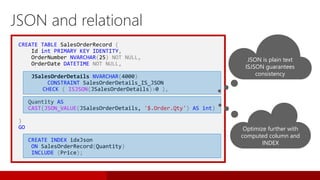
CREATE TABLE SalesOrderRecord (
Id int PRIMARY KEY IDENTITY,
OrderNumber NVARCHAR(25) NOT NULL,
OrderDate DATETIME NOT NULL,
JSalesOrderDetails NVARCHAR(4000)
CONSTRAINT SalesOrderDetails_IS_JSON
CHECK ( ISJSON(JSalesOrderDetails)>0 ),
Quantity AS
CAST(JSON_VALUE(JSalesOrderDetails, '$.Order.Qty') AS int)
)
GO
CREATE INDEX idxJson
ON SalesOrderRecord(Quantity)
INCLUDE (Price);
JSON and relational
JSON is plain text
ISJSON guarantees
consistency
Optimize further with
computed column and
INDEX
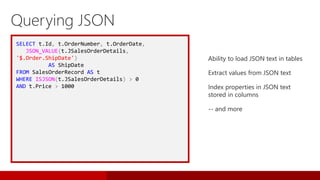
SELECT t.Id, t.OrderNumber, t.OrderDate,
JSON_VALUE(t.JSalesOrderDetails,
'$.Order.ShipDate')
AS ShipDate
FROM SalesOrderRecord AS t
WHERE ISJSON(t.JSalesOrderDetails) > 0
AND t.Price > 1000
Ability to load JSON text in tables
Extract values from JSON text
Index properties in JSON text
stored in columns
-- and more
Querying JSON
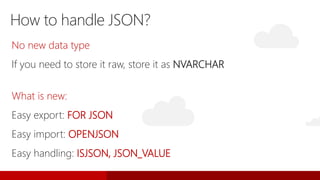
No new data type
If you need to store it raw, store it as NVARCHAR
What is new:
Easy export: FOR JSON
Easy import: OPENJSON
Easy handling: ISJSON, JSON_VALUE
How to handle JSON?
SELECT
OrderNumber AS 'Order.Number',
OrderDate AS 'Order.Date'
FROM SalesOrder
FOR JSON PATH
For JSON path
[
{
"Order":{
"Number":"SO43659",
"Date":"2011-05 31T00:00:00“
},
},
{
"Order":{
"Number":"SO43660",
"Date":"2011-06-01T00:00:00“
},
}
]
Query Result (JSON array)
SELECT SalesOrderNumber,
OrderDate,
UnitPrice,
OrderQty
FROM Sales.SalesOrderHeader H
INNER JOIN Sales.SalesOrderDetail D
ON H.SalesOrderID = D.SalesOrderID
FOR JSON AUTO
For JSON AUTO
[
{
"SalesOrderNumber":"SO43659",
"OrderDate":"2011-05-31T00:00:00",
"D":[
{"UnitPrice":24.99, "OrderQty":1
}
]
},
{
"SalesOrderNumber":"SO43659" ,
"D":[
{ "UnitPrice":34.40 },
{ "UnitPrice":134.24, "OrderQty":5
}
]
}
]
Query Result
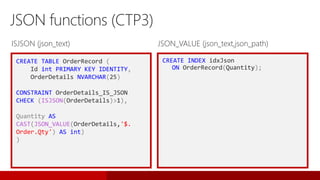
CREATE TABLE OrderRecord (
Id int PRIMARY KEY IDENTITY,
OrderDetails NVARCHAR(25)
CONSTRAINT OrderDetails_IS_JSON
CHECK (ISJSON(OrderDetails)>1),
Quantity AS
CAST(JSON_VALUE(OrderDetails,'$.
Order.Qty') AS int)
)
JSON functions (CTP3)
CREATE INDEX idxJson
ON OrderRecord(Quantity);
ISJSON (json_text) JSON_VALUE (json_text,json_path)
OPENJSON
OPENJSON (@json, N'$.Orders.OrdersArray')
WITH (
Number varchar(200) N'$.Order.Number',
Date datetime N'$.Order.Date',
Customer varchar(200) N'$.AccountNumber',
Quantity int N'$.Item.Quantity'
)
{"Orders": { "OrdersArray":
[
{
"Order": {
"Number":"SO43659",
"Date":"2011-05-31T00:00:00“
},
"AccountNumber":"AW29825“,
"Item": {
"Price":2024.9940,
"Quantity":1
}
},
{
"Order":{
“Number":"SO43661",
"Date":"2011-06-01T00:00:00“
},
"AccountNumber":"AW73565“,
"Item": {
"Price":2024.9940,
"Quantity":3
}
}
]} }
Number Date Customer Quantity
SO43659 2011-05-31T00:00:00 AW29825 1
SO43661 2011-06-01T00:00:00 AW73565 3
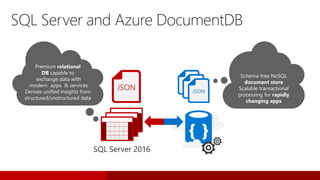
SQL Server and Azure DocumentDB
Schema-free NoSQL
document store
Scalable transactional
processing for rapidly
changing apps
Premium relational
DB capable to
exchange data with
modern apps & services
Derives unified insights from
structured/unstructured data
JSON
JS
JSJSON
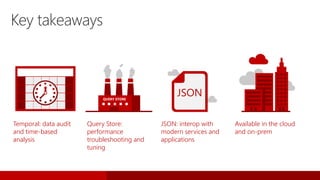
Key takeaways
Temporal: data audit
and time-based
analysis
Query Store:
performance
troubleshooting and
tuning
JSON: interop with
modern services and
applications
Available in the cloud
and on-prem
QUERY STORE
JSON
Temporal
Query back in time
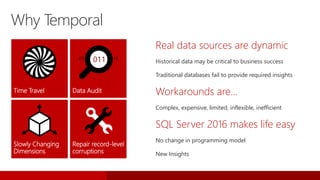
Real data sources are dynamic
Historical data may be critical to business success
Traditional databases fail to provide required insights
Workarounds are…
Complex, expensive, limited, inflexible, inefficient
SQL Server 2016 makes life easy
No change in programming model
New Insights
Why Temporal
Time Travel Data Audit
Slowly Changing
Dimensions
Repair record-level
corruptions
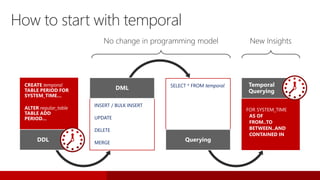
No change in programming model New Insights
INSERT / BULK INSERT
UPDATE
DELETE
MERGE
DML SELECT * FROM temporal
Querying
How to start with temporal
CREATE temporal
TABLE PERIOD FOR
SYSTEM_TIME…
ALTER regular_table
TABLE ADD
PERIOD…
DDL
FOR SYSTEM_TIME
AS OF
FROM..TO
BETWEEN..AND
CONTAINED IN
Temporal
Querying
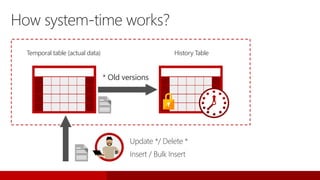
Temporal table (actual data)
Insert / Bulk Insert
* Old versions
Update */ Delete *
How system-time works?
History Table
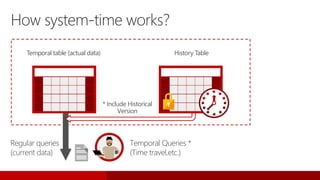
Temporal table (actual data)
Temporal Queries *
(Time travel,etc.)
How system-time works?
History Table
Regular queries
(current data)
* Include Historical
Version
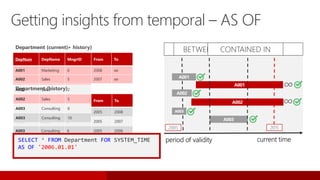
DepNum DepName MngrID From To
A001 Marketing 5 2005 2008
A002 Sales 2 2005 2007
A003 Consulting 6 2005 2006
A003 Consulting 10 2009 2012
DepNum DepName MngrID
A001 Marketing 5
A001 Marketing 6
A002 Sales 2
A002 Sales 5
A003 Consulting 6
A003 Consulting 10
DepNum DepName MngrID From To
A001 Marketing 6 2008 ∞
A002 Sales 5 2007 ∞
A001
A002
A003
period of validity current time
∞
∞
Department (current)
Department (history)
Department (current + history)
2005 2015
SELECT * FROM DepartmentSELECT * FROM Department FOR SYSTEM_TIME
BETWEEN '2006.01.01' AND '2007.01.01'
SELECT * FROM Department FOR SYSTEM_TIME
CONTAINED IN ('2007.01.01', '2009.01.01')
SELECT * FROM Department FOR SYSTEM_TIME
AS OF '2006.01.01'
Getting insights from temporal – AS OF
A001
A002
A003
“Get actual row versions”AS OFBETWEEN..ANDCONTAINED IN
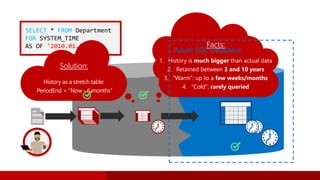
SELECT * FROM Department
FOR SYSTEM_TIME
AS OF '2010.01.01' Facts:
1. History is much bigger than actual data
2. Retained between 3 and 10 years
3. “Warm”: up to a few weeks/months
4. “Cold”: rarely queried
Solution:
History as a stretch table:
PeriodEnd < “Now - 6 months”
Azure SQL Database
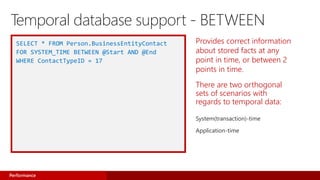
Provides correct information
about stored facts at any
point in time, or between 2
points in time.
There are two orthogonal
sets of scenarios with
regards to temporal data:
System(transaction)-time
Application-time
SELECT * FROM Person.BusinessEntityContact
FOR SYSTEM_TIME BETWEEN @Start AND @End
WHERE ContactTypeID = 17
Performance
Temporal database support - BETWEEN
Performance Security Availability Scalability
Operational analytics
Insights on operational data;
Works with in-memory OLTP and
disk-based OLTP
In-memory OLTP
enhancements
Greater T-SQL surface area,
terabytes of memory supported,
and greater number of parallel
CPUs
Query data store
Monitor and optimize query plans
Native JSON
Expanded support for JSON data
Temporal database
support
Query data as points in time
Always encrypted
Sensitive data remains encrypted
at all times with ability to query
Row-level security
Apply fine-grained access control
to table rows
Dynamic data masking
Real-time obfuscation of data to
prevent unauthorized access
Other enhancements
Audit success/failure of database
operations
TDE support for storage of in-
memory OLTP tables
Enhanced auditing for OLTP with
ability to track history of record
changes
Enhanced AlwaysOn
Three synchronous replicas for
auto failover across domains
Round robin load balancing of
replicas
Automatic failover based on
database health
DTC for transactional integrity
across database instances with
AlwaysOn
Support for SSIS with AlwaysOn
Enhanced database
caching
Cache data with automatic,
multiple TempDB files per instance
in multi-core environments
Mission-critical performance
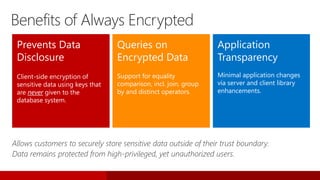
Always Encrypted
Prevents Data
Disclosure
Client-side encryption of
sensitive data using keys that
are never given to the
database system.
Queries on
Encrypted Data
Support for equality
comparison, incl. join, group
by and distinct operators.
Application
Transparency
Minimal application changes
via server and client library
enhancements.
Allows customers to securely store sensitive data outside of their trust boundary.
Data remains protected from high-privileged, yet unauthorized users.
Benefits of Always Encrypted
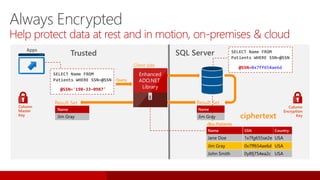
dbo.Patients
Jane Doe
Name
243-24-9812
SSN
USA
Country
Jim Gray 198-33-0987 USA
John Smith 123-82-1095 USA
dbo.Patients
Jane Doe
Name
1x7fg655se2e
SSN
USA
Jim Gray 0x7ff654ae6d USA
John Smith 0y8fj754ea2c USA
Country
Result Set
Jim Gray
Name
Jane Doe
Name
1x7fg655se2e
SSN
USA
Country
Jim Gray 0x7ff654ae6d USA
John Smith 0y8fj754ea2c USA
dbo.Patients
SQL Server
Query
Trusted
Apps
SELECT Name FROM
Patients WHERE SSN=@SSN
@SSN='198-33-0987'
Result Set
Jim Gray
Name
SELECT Name FROM
Patients WHERE SSN=@SSN
@SSN=0x7ff654ae6d
Column
Encryption
Key
Enhanced
ADO.NET
Library
Column
Master
Key
Client side
Always Encrypted
Help protect data at rest and in motion, on-premises & cloud
ciphertext
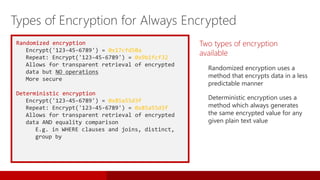
Randomized encryption
Encrypt('123-45-6789') = 0x17cfd50a
Repeat: Encrypt('123-45-6789') = 0x9b1fcf32
Allows for transparent retrieval of encrypted
data but NO operations
More secure
Deterministic encryption
Encrypt('123-45-6789') = 0x85a55d3f
Repeat: Encrypt('123-45-6789') = 0x85a55d3f
Allows for transparent retrieval of encrypted
data AND equality comparison
E.g. in WHERE clauses and joins, distinct,
group by
Two types of encryption
available
Randomized encryption uses a
method that encrypts data in a less
predictable manner
Deterministic encryption uses a
method which always generates
the same encrypted value for any
given plain text value
Types of Encryption for Always Encrypted
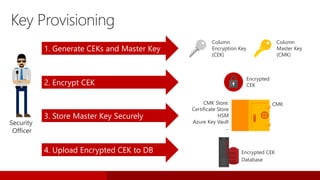
Security
Officer
1. Generate CEKs and Master Key
2. Encrypt CEK
3. Store Master Key Securely
4. Upload Encrypted CEK to DB
CMK Store:
Certificate Store
HSM
Azure Key Vault
…
Encrypted
CEK
Column
Encryption Key
(CEK)
Column
Master Key
(CMK)
Key Provisioning
CMK
Database
Encrypted CEK
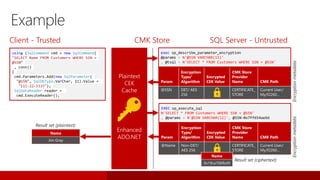
Param
Encryption
Type/
Algorithm
Encrypted
CEK Value
CMK Store
Provider
Name CMK Path
@Name Non-DET/
AES 256
CERTIFICATE_
STORE
Current User/
My/f2260…
EXEC sp_execute_sql
N'SELECT * FROM Customers WHERE SSN = @SSN'
, @params = N'@SSN VARCHAR(11)', @SSN=0x7ff654ae6d
Param
Encryption
Type/
Algorithm
Encrypted
CEK Value
CMK Store
Provider
Name CMK Path
@SSN DET/ AES
256
CERTIFICATE_
STORE
Current User/
My/f2260…
Enhanced
ADO.NET
Plaintext
CEK
Cache
exec sp_describe_parameter_encryption
@params = N'@SSN VARCHAR(11)'
, @tsql = N'SELECT * FROM Customers WHERE SSN = @SSN'
Result set (ciphertext)
Name
Jim Gray
Result set (plaintext)
using (SqlCommand cmd = new SqlCommand(
"SELECT Name FROM Customers WHERE SSN =
@SSN“
, conn))
{
cmd.Parameters.Add(new SqlParameter(
"@SSN", SqlDbType.VarChar, 11).Value =
"111-22-3333");
SqlDataReader reader =
cmd.ExecuteReader();
Client - Trusted SQL Server - Untrusted
Encryptionmetadata
Name
0x19ca706fbd9
Encryptionmetadata
CMK Store
Example
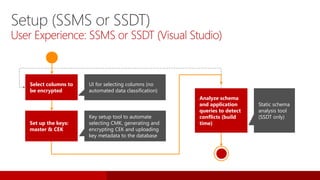
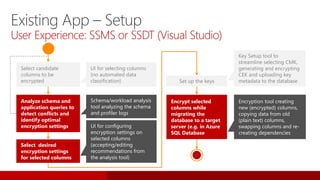
Select columns to
be encrypted
Analyze schema
and application
queries to detect
conflicts (build
time)Set up the keys:
master & CEK
Static schema
analysis tool
(SSDT only)
UI for selecting columns (no
automated data classification)
Key setup tool to automate
selecting CMK, generating and
encrypting CEK and uploading
key metadata to the database
Setup (SSMS or SSDT)
User Experience: SSMS or SSDT (Visual Studio)
Existing App – Setup
User Experience: SSMS or SSDT (Visual Studio)
UI for selecting columns
(no automated data
classification)
Select candidate
columns to be
encrypted
Analyze schema and
application queries to
detect conflicts and
identify optimal
encryption settings
Set up the keys
Encrypt selected
columns while
migrating the
database to a target
server (e.g. in Azure
SQL Database
Key Setup tool to
streamline selecting CMK,
generating and encrypting
CEK and uploading key
metadata to the database
Encryption tool creating
new (encrypted) columns,
copying data from old
(plain text) columns,
swapping columns and re-
creating dependencies
Select desired
encryption settings
for selected columns
UI for configuring
encryption settings on
selected columns
(accepting/editing
recommendations from
the analysis tool)
Schema/workload analysis
tool analyzing the schema
and profiler logs
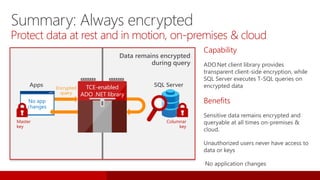
Data remains encrypted
during query
Summary: Always encrypted
Protect data at rest and in motion, on-premises & cloud
Capability
ADO.Net client library provides
transparent client-side encryption, while
SQL Server executes T-SQL queries on
encrypted data
Benefits
Apps TCE-enabled
ADO .NET library
SQL ServerEncrypted
query
Columnar
key
No app
changes
Master
key
Row-Level Security.
SQL Server 2016
SQL Database
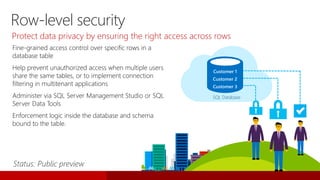
Fine-grained access control over specific rows in a
database table
Help prevent unauthorized access when multiple users
share the same tables, or to implement connection
filtering in multitenant applications
Administer via SQL Server Management Studio or SQL
Server Data Tools
Enforcement logic inside the database and schema
bound to the table.
Protect data privacy by ensuring the right access across rows
SQL Database
Customer 1
Customer 2
Customer 3
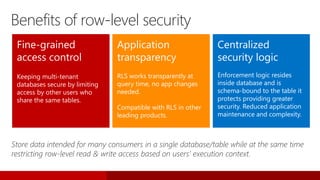
Row-level security
Fine-grained
access control
Keeping multi-tenant
databases secure by limiting
access by other users who
share the same tables.
Application
transparency
RLS works transparently at
query time, no app changes
needed.
Compatible with RLS in other
leading products.
Centralized
security logic
Enforcement logic resides
inside database and is
schema-bound to the table it
protects providing greater
security. Reduced application
maintenance and complexity.
Store data intended for many consumers in a single database/table while at the same time
restricting row-level read & write access based on users’ execution context.
Benefits of row-level security
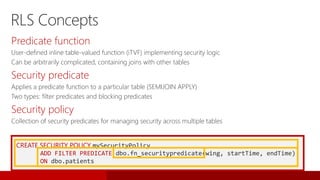
CREATE SECURITY POLICY mySecurityPolicy
ADD FILTER PREDICATE dbo.fn_securitypredicate(wing, startTime, endTime)
ON dbo.patients
Predicate function
User-defined inline table-valued function (iTVF) implementing security logic
Can be arbitrarily complicated, containing joins with other tables
Security predicate
Applies a predicate function to a particular table (SEMIJOIN APPLY)
Two types: filter predicates and blocking predicates
Security policy
Collection of security predicates for managing security across multiple tables
RLS Concepts
Dynamic Data Masking
SQL Server 2016
SQL Database
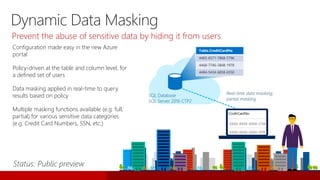
Configuration made easy in the new Azure
portal
Policy-driven at the table and column level, for
a defined set of users
Data masking applied in real-time to query
results based on policy
Multiple masking functions available (e.g. full,
partial) for various sensitive data categories
(e.g. Credit Card Numbers, SSN, etc.)
SQL Database
SQL Server 2016 CTP2
Table.CreditCardNo
4465-6571-7868-5796
4468-7746-3848-1978
4484-5434-6858-6550
Real-time data masking;
partial masking
Dynamic Data Masking
Prevent the abuse of sensitive data by hiding it from users
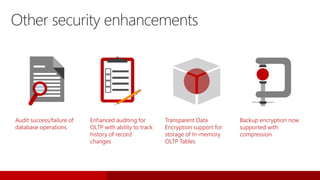
Audit success/failure of
database operations
Enhanced auditing for
OLTP with ability to track
history of record
changes
Transparent Data
Encryption support for
storage of In-memory
OLTP Tables
Backup encryption now
supported with
compression
Other security enhancements
Performance Security Availability Scalability
Operational analytics
Insights on operational data;
Works with in-memory OLTP and
disk-based OLTP
In-memory OLTP
enhancements
Greater T-SQL surface area,
terabytes of memory supported,
and greater number of parallel
CPUs
Query data store
Monitor and optimize query plans
Native JSON
Expanded support for JSON data
Temporal database
support
Query data as points in time
Always encrypted
Sensitive data remains encrypted
at all times with ability to query
Row-level security
Apply fine-grained access control
to table rows
Dynamic Data Masking
Real-time obfuscation of data to
prevent unauthorized access
Other enhancements
Audit success/failure of database
operations
TDE support for storage of in-
memory OLTP tables
Enhanced auditing for OLTP with
ability to track history of record
changes
Enhanced AlwaysOn
Three synchronous replicas for
auto failover across domains
Round robin load balancing of
replicas
Automatic failover based on
database health
DTC for transactional integrity
across database instances with
AlwaysOn
Support for SSIS with AlwaysOn
Enhanced database
caching
Cache data with automatic,
multiple TempDB files per instance
in multi-core environments
Mission-critical performance
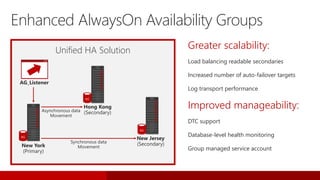
Enhanced
AlwaysOn
Greater scalability:
Load balancing readable secondaries
Increased number of auto-failover targets
Log transport performance
Improved manageability:
DTC support
Database-level health monitoring
Group managed service account
AG_Listener
New York
(Primary)
Asynchronous data
Movement
Synchronous data
Movement
Unified HA Solution
Enhanced AlwaysOn Availability Groups
AG
Hong Kong
(Secondary)
AG
New Jersey
(Secondary)
AG
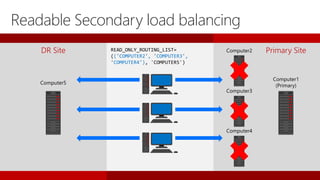
DR Site Computer2
Computer3
Computer4
Computer5
READ_ONLY_ROUTING_LIST=
(('COMPUTER2', 'COMPUTER3',
'COMPUTER4'), 'COMPUTER5')
Primary Site
Computer1
(Primary)
Readable Secondary load balancing
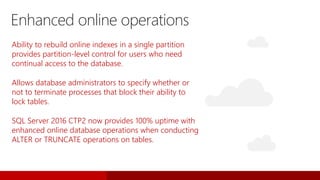
Ability to rebuild online indexes in a single partition
provides partition-level control for users who need
continual access to the database.
Allows database administrators to specify whether or
not to terminate processes that block their ability to
lock tables.
SQL Server 2016 CTP2 now provides 100% uptime with
enhanced online database operations when conducting
ALTER or TRUNCATE operations on tables.
Enhanced online operations
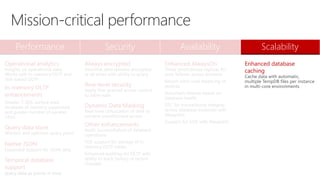
Performance Security Availability Scalability
Operational analytics
Insights on operational data;
Works with in-memory OLTP and
disk-based OLTP
In-memory OLTP
enhancements
Greater T-SQL surface area,
terabytes of memory supported,
and greater number of parallel
CPUs
Query data store
Monitor and optimize query plans
Native JSON
Expanded support for JSON data
Temporal database
support
query data as points in time
Always encrypted
Sensitive data remains encrypted
at all times with ability to query
Row-level security
Apply fine-grained access control
to table rows
Dynamic Data Masking
Real-time obfuscation of data to
prevent unauthorized access
Other enhancements
Audit success/failure of database
operations
TDE support for storage of in-
memory OLTP tables
Enhanced auditing for OLTP with
ability to track history of record
changes
Enhanced AlwaysOn
Three synchronous replicas for
auto failover across domains
Round robin load balancing of
replicas
Automatic failover based on
database health
DTC for transactional integrity
across database instances with
AlwaysOn
Support for SSIS with AlwaysOn
Enhanced database
caching
Cache data with automatic,
multiple TempDB files per instance
in multi-core environments
Mission-critical performance
Scalability
improvements
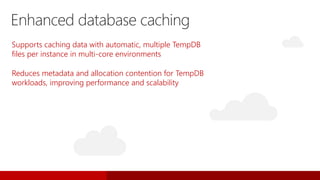
Supports caching data with automatic, multiple TempDB
files per instance in multi-core environments
Reduces metadata and allocation contention for TempDB
workloads, improving performance and scalability
Enhanced database caching
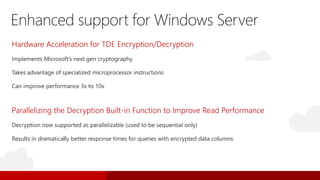
Enhanced support for Windows Server
Hardware Acceleration for TDE Encryption/Decryption
Parallelizing the Decryption Built-in Function to Improve Read Performance
Results in dramatically better response times for queries with encrypted data columns
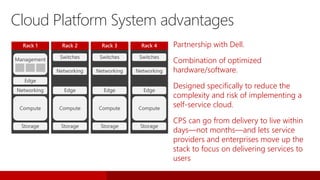
Switches
Networking
Compute
Rack 2
Edge
Storage
Networking
Compute
Rack 1
Edge
Storage
Management Switches
Networking
Compute
Rack 3
Edge
Storage
Switches
Networking
Compute
Rack 4
Edge
Storage
Cloud Platform System advantages
Partnership with Dell.
Combination of optimized
hardware/software.
Designed specifically to reduce the
complexity and risk of implementing a
self-service cloud.
CPS can go from delivery to live within
days—not months—and lets service
providers and enterprises move up the
stack to focus on delivering services to
users
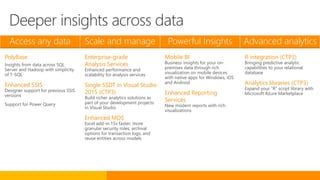
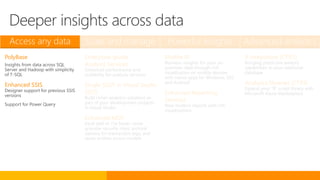
Access any data Scale and manage Powerful Insights Advanced analytics
PolyBase
Insights from data across SQL
Server and Hadoop with simplicity
of T-SQL
Enhanced SSIS
Designer support for previous SSIS
versions
Support for Power Query
Enterprise-grade
Analysis Services
Enhanced performance and
scalability for analysis services
Single SSDT in Visual Studio
2015 (CTP3)
Build richer analytics solutions as
part of your development projects
in Visual Studio
Enhanced MDS
Excel add-in 15x faster; more
granular security roles; archival
options for transaction logs; and
reuse entities across models
Mobile BI
Business insights for your on-
premises data through rich
visualization on mobile devices
with native apps for Windows, iOS
and Android
Enhanced Reporting
Services
New modern reports with rich
visualizations
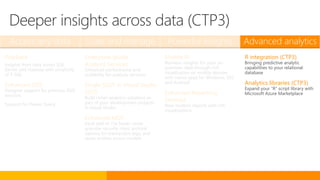
R integration (CTP3)
Bringing predictive analytic
capabilities to your relational
database
Analytics libraries (CTP3)
Expand your “R” script library with
Microsoft Azure Marketplace
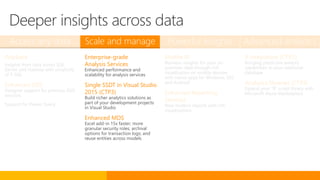
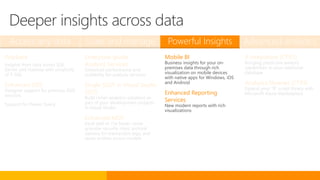
Deeper insights across data
Access any data Scale and manage Powerful Insights Advanced analytics
PolyBase
Insights from data across SQL
Server and Hadoop with simplicity
of T-SQL
Enhanced SSIS
Designer support for previous SSIS
versions
Support for Power Query
Enterprise-grade
Analysis Services
Enhanced performance and
scalability for analysis services
Single SSDT in Visual Studio
2015
Build richer analytics solutions as
part of your development projects
in Visual Studio
Enhanced MDS
Excel add-in 15x faster; more
granular security roles; archival
options for transaction logs; and
reuse entities across models
Mobile BI
Business insights for your on-
premises data through rich
visualization on mobile devices
with native apps for Windows, iOS
and Android
Enhanced Reporting
Services
New modern reports with rich
visualizations
R integration (CTP3)
Bringing predictive analytic
capabilities to your relational
database
Analytics libraries (CTP3)
Expand your “R” script library with
Microsoft Azure Marketplace
Deeper insights across data
PolyBase for
SQL Server 2016
Query relational
and non-relational
data, on-premises
and in Azure
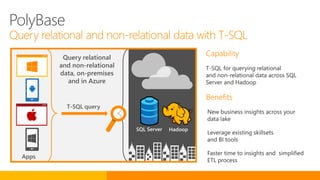
Apps
T-SQL query
SQL Server Hadoop
PolyBase
Query relational and non-relational data with T-SQL
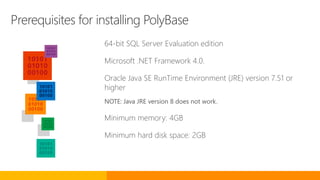
Prerequisites for installing PolyBase
64-bit SQL Server Evaluation edition
Microsoft .NET Framework 4.0.
Oracle Java SE RunTime Environment (JRE) version 7.51 or
higher
NOTE: Java JRE version 8 does not work.
Minimum memory: 4GB
Minimum hard disk space: 2GB
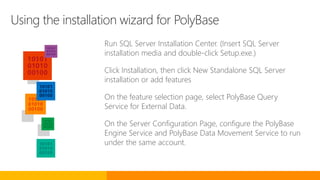
Using the installation wizard for PolyBase
Run SQL Server Installation Center. (Insert SQL Server
installation media and double-click Setup.exe.)
Click Installation, then click New Standalone SQL Server
installation or add features
On the feature selection page, select PolyBase Query
Service for External Data.
On the Server Configuration Page, configure the PolyBase
Engine Service and PolyBase Data Movement Service to run
under the same account.
-- Run sp_configure ‘hadoop connectivity’
-- and set an appropriate value
sp_configure
@configname = 'hadoop connectivity',
@configvalue = 7;
GO
RECONFIGURE
GO
-- List the configuration settings for
-- one configuration name
sp_configure @configname='hadoop connectivity';
GO
Option values
0: Disable Hadoop connectivity
1: Hortonworks HDP 1.3 on Windows Server
Azure blob storage (WASB[S])
2: Hortonworks HDP 1.3 on Linux
3: Cloudera CDH 4.3 on Linux
4: Hortonworks HDP 2.0 on Windows Server
Azure blob storage (WASB[S])
5: Hortonworks HDP 2.0 on Linux
6: Cloudera 5.1 on Linux
7: Hortonworks 2.1 and 2.2 on Linux
Hortonworks 2.2 on Windows Server
Azure blob storage (WASB[S])
Choose Hadoop data source with sp_configure
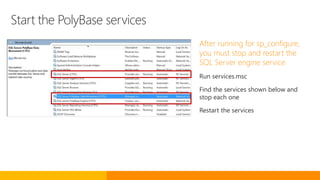
Start the PolyBase services
After running for sp_configure,
you must stop and restart the
SQL Server engine service
Run services.msc
Find the services shown below and
stop each one
Restart the services
-- Using credentials on database requires enabling
-- traceflag
DBCC TRACEON(4631,-1)
-- Create a master key
CREATE MASTER KEY ENCRYPTION BY PASSWORD = 'S0me!nfo';
CREATE CREDENTIAL WASBSecret ON DATABASE WITH
IDENTITY = 'pdw_user', Secret = 'mykey==';
-- Create an external data source (Azure Blob Storage)
-- with the credential
CREATE EXTERNAL DATA SOURCE Azure_Storage WITH
( TYPE = HADOOP,
LOCATION
='wasb[s]://mycontainer@test.blob.core.windows.net/pat
h’,
CREDENTIAL = WASBSecret
)
Type methods for providing
credentials
Core-site.xml in installation path of
SQL Server -
<SqlBinRoot>PolybaseHadoopConf
Credential object in SQL Server for
higher security
NOTE: The syntax for a database-scoped
credential (CREATE CREDENTIAL … ON
DATABASE) is temporary and will change
in the next release. This new feature is
documented only in the examples in the
CTP2 content, and will be fully
documented in the next release.
Configure PolyBase for Azure blob storage
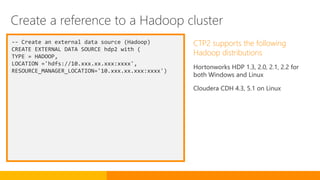
-- Create an external data source (Hadoop)
CREATE EXTERNAL DATA SOURCE hdp2 with (
TYPE = HADOOP,
LOCATION ='hdfs://10.xxx.xx.xxx:xxxx',
RESOURCE_MANAGER_LOCATION='10.xxx.xx.xxx:xxxx')
CTP2 supports the following
Hadoop distributions
Hortonworks HDP 1.3, 2.0, 2.1, 2.2 for
both Windows and Linux
Cloudera CDH 4.3, 5.1 on Linux
Create a reference to a Hadoop cluster
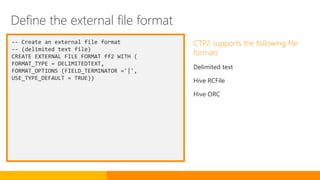
-- Create an external file format
-- (delimited text file)
CREATE EXTERNAL FILE FORMAT ff2 WITH (
FORMAT_TYPE = DELIMITEDTEXT,
FORMAT_OPTIONS (FIELD_TERMINATOR ='|',
USE_TYPE_DEFAULT = TRUE))
CTP2 supports the following file
formats
Delimited text
Hive RCFile
Hive ORC
Define the external file format
-- Create an external table pointing to file
stored in Hadoop
CREATE EXTERNAL TABLE [dbo].[CarSensor_Data] (
[SensorKey] int NOT NULL,
[CustomerKey] int NOT NULL,
[GeographyKey] int NULL,
[Speed] float NOT NULL,
[YearMeasured] int NOT NULL
)
WITH (LOCATION='/Demo/car_sensordata.tbl',
DATA_SOURCE = hdp2,
FILE_FORMAT = ff2,
REJECT_TYPE = VALUE,
REJECT_VALUE = 0
The external table provides a T-
SQL reference to the data source
used to:
Query Hadoop or Azure blob storage
data with Transact-SQL statements
Import and store data from Hadoop
or Azure blob storage into your SQL
Server database
Create an external table to the data source
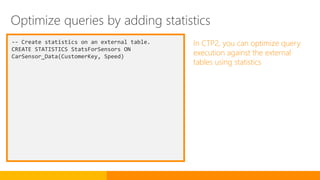
-- Create statistics on an external table.
CREATE STATISTICS StatsForSensors ON
CarSensor_Data(CustomerKey, Speed)
In CTP2, you can optimize query
execution against the external
tables using statistics
Optimize queries by adding statistics
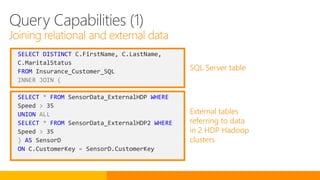
SELECT DISTINCT C.FirstName, C.LastName,
C.MaritalStatus
FROM Insurance_Customer_SQL
INNER JOIN (
SELECT * FROM SensorData_ExternalHDP WHERE
Speed > 35
UNION ALL
SELECT * FROM SensorData_ExternalHDP2 WHERE
Speed > 35
) AS SensorD
ON C.CustomerKey = SensorD.CustomerKey
External tables
referring to data
in 2 HDP Hadoop
clusters
SQL Server table
Query Capabilities (1)
Joining relational and external data
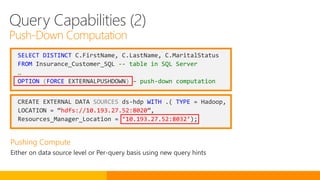
SELECT DISTINCT C.FirstName, C.LastName, C.MaritalStatus
FROM Insurance_Customer_SQL -- table in SQL Server
…
OPTION (FORCE EXTERNALPUSHDOWN) – push-down computation
CREATE EXTERNAL DATA SOURCES ds-hdp WITH .( TYPE = Hadoop,
LOCATION = “hdfs://10.193.27.52:8020”,
Resources_Manager_Location = ‘10.193.27.52:8032’);
Query Capabilities (2)
Push-Down Computation
SSIS
improvements
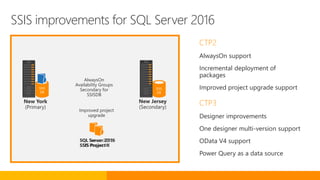
SSIS improvements for SQL Server 2016
CTP2
AlwaysOn support
Incremental deployment of
packages
Improved project upgrade support
CTP3
Designer improvements
One designer multi-version support
OData V4 support
Power Query as a data source
AlwaysOn
Availability Groups
Secondary for
SSISDB
New York
(Primary)
New Jersey
(Secondary)
SSIS
DB
SSIS
DB
SQL Server 2012
SSIS Project X
SQL Server 2016
SSIS Project X
Improved project
upgrade
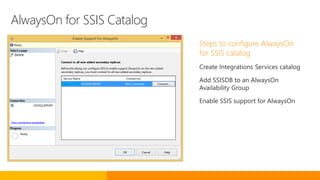
AlwaysOn for SSIS Catalog
Steps to configure AlwaysOn
for SSIS catalog
Create Integrations Services catalog
Add SSISDB to an AlwaysOn
Availability Group
Enable SSIS support for AlwaysOn
private static void Main(string[] args)
{
// Connection string to SSISDB
var connectionString = "Data Source=.;Initial Catalog=SSISDB;Integrated
Security=True;MultipleActiveResultSets=false";
using (var sqlConnection = new SqlConnection(connectionString))
{
sqlConnection.Open();
var sqlCommand = new SqlCommand
{
Connection = sqlConnection,
CommandType = CommandType.StoredProcedure,
CommandText = "[catalog].[deploy_packages]"
};
var packageData = Encoding.UTF8.GetBytes(File.ReadAllText(@"C:TestPackage.dtsx"));
// DataTable: name is the package name without extension and package_data is byte
array of package.
var packageTable = new DataTable();
packageTable.Columns.Add("name", typeof(string));
packageTable.Columns.Add("package_data", typeof(byte[]));
packageTable.Rows.Add("Package", packageData);
// Set the destination project and folder which is named Folder and Project.
sqlCommand.Parameters.Add(new SqlParameter("@folder_name", SqlDbType.NVarChar,
ParameterDirection.Input, "Folder", -1));
sqlCommand.Parameters.Add(new SqlParameter("@project_name", SqlDbType.NVarChar,
ParameterDirection.Input, "Project", -1));
sqlCommand.Parameters.Add(new SqlParameter("@packages_table", SqlDbType.Structured,
ParameterDirection.Input, packageTable, -1));
var result = sqlCommand.Parameters.Add("RetVal", SqlDbType.Int);
result.Direction = ParameterDirection.ReturnValue;
sqlCommand.ExecuteNonQuery();
}
}
Deployment options in CTP2
Integration Services Deployment
Wizard
SQL Server Management Studio
deploy_packages stored procedure
Object model API
Deployment options in CTP3
SQL Server Data Tools for Business
Intelligence
Deploy packages to Integration Services server
Access any data Scale and manage Powerful Insights Advanced analytics
PolyBase
Insights from data across SQL
Server and Hadoop with simplicity
of T-SQL
Enhanced SSIS
Designer support for previous SSIS
versions
Support for Power Query
Enterprise-grade
Analysis Services
Enhanced performance and
scalability for analysis services
Single SSDT in Visual Studio
2015 (CTP3)
Build richer analytics solutions as
part of your development projects
in Visual Studio
Enhanced MDS
Excel add-in 15x faster; more
granular security roles; archival
options for transaction logs; and
reuse entities across models
Mobile BI
Business insights for your on-
premises data through rich
visualization on mobile devices
with native apps for Windows, iOS
and Android
Enhanced Reporting
Services
New modern reports with rich
visualizations
R integration (CTP3)
Bringing predictive analytic
capabilities to your relational
database
Analytics libraries (CTP3)
Expand your “R” script library with
Microsoft Azure Marketplace
Deeper insights across data
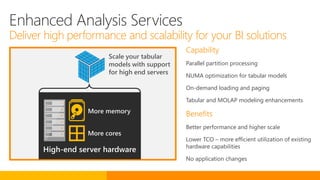
Enterprise grade
Analysis Services
Scale your tabular
models with support
for high end servers
More memory
More cores
Enhanced Analysis Services
Deliver high performance and scalability for your BI solutions
High-end server hardware
Capability
Parallel partition processing
NUMA optimization for tabular models
On-demand loading and paging
Tabular and MOLAP modeling enhancements
Benefits
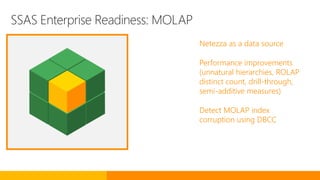
SSAS Enterprise Readiness: MOLAP
Netezza as a data source
Performance improvements
(unnatural hierarchies, ROLAP
distinct count, drill-through,
semi-additive measures)
Detect MOLAP index
corruption using DBCC
High-end Server Hardware
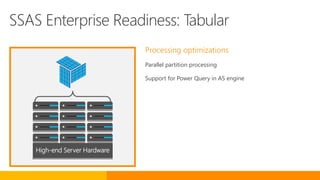
SSAS Enterprise Readiness: Tabular
Processing optimizations
Parallel partition processing
Support for Power Query in AS engine
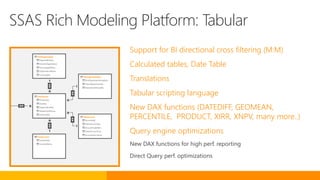
Support for BI directional cross filtering (M:M)
Calculated tables, Date Table
Translations
Tabular scripting language
New DAX functions (DATEDIFF, GEOMEAN,
PERCENTILE, PRODUCT, XIRR, XNPV, many more..)
Query engine optimizations
New DAX functions for high perf. reporting
Direct Query perf. optimizations
DimDepartmentGr…
DimDepartmentGroupKey…
ParentDepartmentGr…
DepartmentGroupNa…
DimAccount
AccountKey
ParenAccountKey
AccountCodeAlter…
ParenAccountCod…
AccountDescription
FactFinance
FinanceKey
DateKey
OrganizationKey
DepartmentGroup…
ScenarioKey
DimOrganization
OrganizationKey
ParnentOrganization
PercentageOfOwn…
OrganizationName
CurrencyKey
DimAccount
ScenarioKey
ScenarioName
SSAS Rich Modeling Platform: Tabular
Unified Visual
Studio Data Tools
(CTP3)
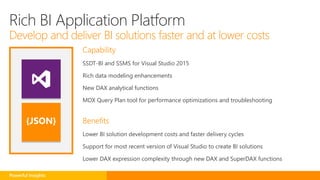
Capability
SSDT-BI and SSMS for Visual Studio 2015
Rich data modeling enhancements
New DAX analytical functions
MDX Query Plan tool for performance optimizations and troubleshooting
Benefits{JSON}
Powerful Insights
Rich BI Application Platform
Develop and deliver BI solutions faster and at lower costs
Master Data
Services
improvements
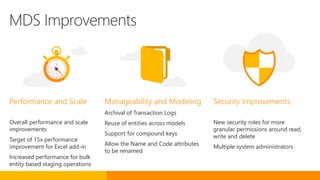
Performance and Scale
Overall performance and scale
improvements
Target of 15x performance
improvement for Excel add-in
Increased performance for bulk
entity based staging operations
Security Improvements
New security roles for more
granular permissions around read,
write and delete
Multiple system administrators
Manageability and Modeling
Archival of Transaction Logs
Reuse of entities across models
Support for compound keys
Allow the Name and Code attributes
to be renamed
MDS Improvements
Access any data Scale and manage Powerful Insights Advanced analytics
PolyBase
Insights from data across SQL
Server and Hadoop with simplicity
of T-SQL
Enhanced SSIS
Designer support for previous SSIS
versions
Support for Power Query
Enterprise-grade
Analysis Services
Enhanced performance and
scalability for analysis services
Single SSDT in Visual Studio
2015
Build richer analytics solutions as
part of your development projects
in Visual Studio
Enhanced MDS
Excel add-in 15x faster; more
granular security roles; archival
options for transaction logs; and
reuse entities across models
Mobile BI
Business insights for your on-
premises data through rich
visualization on mobile devices
with native apps for Windows, iOS
and Android
Enhanced Reporting
Services
New modern reports with rich
visualizations
R integration (CTP3)
Bringing predictive analytic
capabilities to your relational
database
Analytics libraries (CTP3)
Expand your “R” script library with
Microsoft Azure Marketplace
Deeper insights across data
Mobile BI
improvements
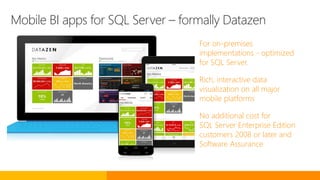
Mobile BI apps for SQL Server – formally Datazen
For on-premises
implementations - optimized
for SQL Server.
Rich, interactive data
visualization on all major
mobile platforms
No additional cost for
SQL Server Enterprise Edition
customers 2008 or later and
Software Assurance
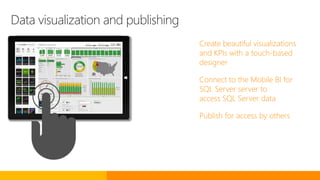
Data visualization and publishing
Create beautiful visualizations
and KPIs with a touch-based
designer
Connect to the Mobile BI for
SQL Server server to
access SQL Server data
Publish for access by others
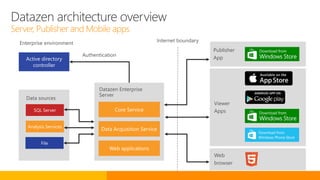
Datazen architecture overview
Server, Publisher and Mobile apps
SQL Server
Analysis Services
File
Data sources
Authentication
Internet boundary
Viewer
Apps
Publisher
App
Web
browser
Datazen Enterprise
Server
Enterprise environment
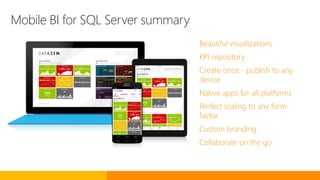
Mobile BI for SQL Server summary
Beautiful visualizations
KPI repository
Create once - publish to any
device
Native apps for all platforms
Perfect scaling to any form
factor
Custom branding
Collaborate on the go
Enhanced
Reporting
Services
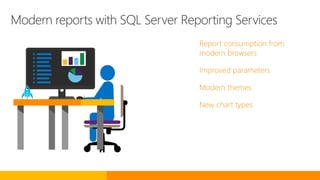
Modern reports with SQL Server Reporting Services
Report consumption from
modern browsers
Improved parameters
Modern themes
New chart types
Access any data Scale and manage Powerful Insights Advanced analytics
PolyBase
Insights from data across SQL
Server and Hadoop with simplicity
of T-SQL
Enhanced SSIS
Designer support for previous SSIS
versions
Support for Power Query
Enterprise-grade
Analysis Services
Enhanced performance and
scalability for analysis services
Single SSDT in Visual Studio
2015
Build richer analytics solutions as
part of your development projects
in Visual Studio
Enhanced MDS
Excel add-in 15x faster; more
granular security roles; archival
options for transaction logs; and
reuse entities across models
Mobile BI
Business insights for your on-
premises data through rich
visualization on mobile devices
with native apps for Windows, iOS
and Android
Enhanced Reporting
Services
New modern reports with rich
visualizations
R integration (CTP3)
Bringing predictive analytic
capabilities to your relational
database
Analytics libraries (CTP3)
Expand your “R” script library with
Microsoft Azure Marketplace
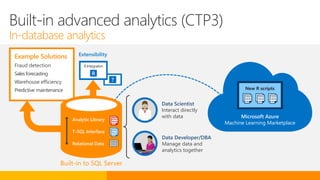
Deeper insights across data (CTP3)
R integration with
database engine
(CTP3)
Example Solutions
Fraud detection
Salesforecasting
Warehouse efficiency
Predictive maintenance
Extensibility
Microsoft Azure
Machine Learning Marketplace
New R scripts
010010
100100
010101
010010
100100
010101
010010
100100
010101
010010
100100
010101
Built-in advanced analytics (CTP3)
In-database analytics
Built-in to SQL Server
Analytic Library
T-SQL Interface
Relational Data
010010
100100
010101
010010
100100
010101
Data Scientist
Interact directly
with data
Data Developer/DBA
Manage data and
analytics together
?
R
RIntegration
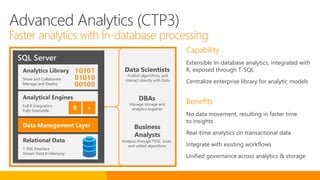
Capability
Extensible In-database analytics, integrated with
R, exposed through T-SQL
Centralize enterprise library for analytic models
Benefits
SQL Server
Analytical Engines
Full R Integration
Fully Extensible
Data Management Layer
Relational Data
T-SQL Interface
Stream Data In-Memory
Analytics Library
Share and Collaborate
Manage and Deploy
R +
Data Scientists
Business
Analysts
Publish algorithms, and
interact directly with Data
Analysis through TSQL, tools,
and vetted algorithms
DBAs
Manage storage and
analytics together
Advanced Analytics (CTP3)
Faster analytics with In-database processing
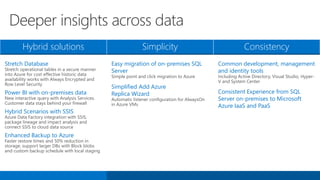
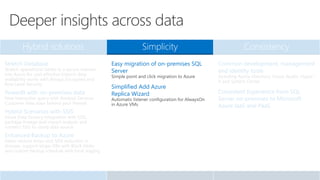
Hybrid solutions Simplicity Consistency
Stretch Database
Stretch operational tables in a secure manner
into Azure for cost effective historic data
availability works with Always Encrypted and
Row Level Security
Power BI with on-premises data
New interactive query with Analysis Services.
Customer data stays behind your firewall
Hybrid Scenarios with SSIS
Azure Data Factory integration with SSIS,
package lineage and impact analysis and
connect SSIS to cloud data source
Enhanced Backup to Azure
Faster restore times and 50% reduction in
storage, support larger DBs with Block blobs
and custom backup schedule with local staging
Easy migration of on-premises SQL
Server
Simple point and click migration to Azure
Simplified Add Azure
Replica Wizard
Automatic listener configuration for AlwaysOn
in Azure VMs
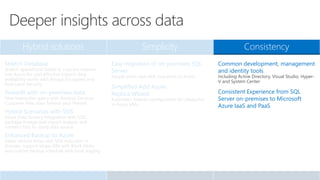
Common development, management
and identity tools
Including Active Directory, Visual Studio, Hyper-
V and System Center
Consistent Experience from SQL
Server on-premises to Microsoft
Azure IaaS and PaaS
Deeper insights across data
Hybrid solutions Simplicity Consistency
Stretch Database
Stretch operational tables in a secure manner
into Azure for cost effective historic data
availability works with Always Encrypted and
Row Level Security
Power BI with on-premises data
New interactive query with Analysis Services.
Customer data stays behind your firewall
Hybrid Scenarios with SSIS
Azure Data Factory integration with SSIS,
package lineage and impact analysis and
connect SSIS to cloud data source
Enhanced Backup to Azure
Faster restore times and 50% reduction in
storage, support larger DBs with Block blobs
and custom backup schedule with local staging
Easy migration of on-premises SQL
Server
Simple point and click migration to Azure
Simplified Add Azure
Replica Wizard
Automatic listener configuration for AlwaysOn
in Azure VMs
Common development, management
and identity tools
Including Active Directory, Visual Studio, Hyper-
V and System Center
Consistent Experience from SQL
Server on-premises to Microsoft
Azure IaaS and PaaS
Deeper insights across data
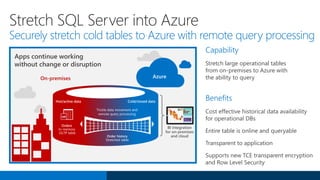
Stretch Database
Capability
Stretch large operational tables
from on-premises to Azure with
the ability to query
Benefits
BI integration
for on-premises
and cloud
Cold/closed data
Orders
In-memory
OLTP table
Hot/active data
Order history
Stretched table
Trickle data movement and
remote query processing
On-premises Azure
Stretch SQL Server into Azure
Securely stretch cold tables to Azure with remote query processing
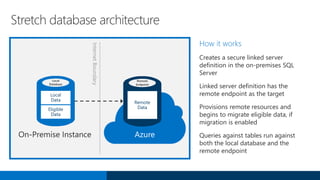
Stretch database architecture
How it works
Creates a secure linked server
definition in the on-premises SQL
Server
Linked server definition has the
remote endpoint as the target
Provisions remote resources and
begins to migrate eligible data, if
migration is enabled
Queries against tables run against
both the local database and the
remote endpoint
Remote
Endpoint
Remote
Data
Azure
InternetBoundary
Local
Database
Local
Data
Eligible
Data
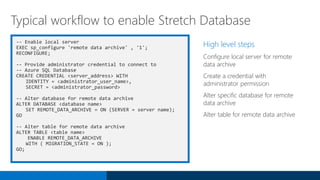
-- Enable local server
EXEC sp_configure 'remote data archive' , '1';
RECONFIGURE;
-- Provide administrator credential to connect to
-- Azure SQL Database
CREATE CREDENTIAL <server_address> WITH
IDENTITY = <administrator_user_name>,
SECRET = <administrator_password>
-- Alter database for remote data archive
ALTER DATABASE <database name>
SET REMOTE_DATA_ARCHIVE = ON (SERVER = server name);
GO
-- Alter table for remote data archive
ALTER TABLE <table name>
ENABLE REMOTE_DATA_ARCHIVE
WITH ( MIGRATION_STATE = ON );
GO;
High level steps
Configure local server for remote
data archive
Create a credential with
administrator permission
Alter specific database for remote
data archive
Alter table for remote data archive
Typical workflow to enable Stretch Database
On-premises
integration with
Power BI
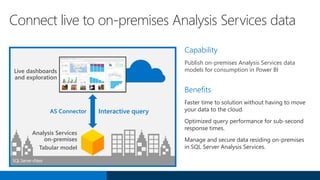
Live dashboards
and exploration
Analysis Services
on-premises
Tabular model
Interactive queryAS Connector
Capability
Publish on-premises Analysis Services data
models for consumption in Power BI
Benefits
SQLServer vNext
Connect live to on-premises Analysis Services data
SSIS for Azure
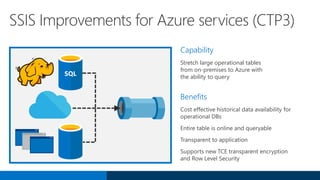
SSIS Improvements for Azure services (CTP3)
Capability
Stretch large operational tables
from on-premises to Azure with
the ability to query
Benefits
SQL
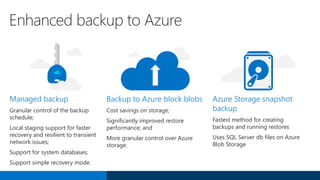
Enhanced
backup
Managed backup
Granular control of the backup
schedule;
Local staging support for faster
recovery and resilient to transient
network issues;
Support for system databases;
Support simple recovery mode.
Backup to Azure block blobs
Cost savings on storage;
Significantly improved restore
performance; and
More granular control over Azure
storage.
Azure Storage snapshot
backup
Fastest method for creating
backups and running restores
Uses SQL Server db files on Azure
Blob Storage
Enhanced backup to Azure
Hybrid solutions Simplicity Consistency
Stretch Database
Stretch operational tables in a secure manner
into Azure for cost effective historic data
availability works with Always Encrypted and
Row Level Security
PowerBI with on-premises data
New interactive query with Analysis Services.
Customer data stays behind your firewall
Hybrid Scenarios with SSIS
Azure Data Factory integration with SSIS,
package lineage and impact analysis and
connect SSIS to cloud data source
Enhanced Backup to Azure
Faster restore times and 50% reduction in
storage, support larger DBs with Block blobs
and custom backup schedule with local staging
Easy migration of on-premises SQL
Server
Simple point and click migration to Azure
Simplified Add Azure
Replica Wizard
Automatic listener configuration for AlwaysOn
in Azure VMs
Common development, management
and identity tools
Including Active Directory, Visual Studio, Hyper-
V and System Center
Consistent Experience from SQL
Server on-premises to Microsoft
Azure IaaS and PaaS
Deeper insights across data
Migrate
databases to
Azure
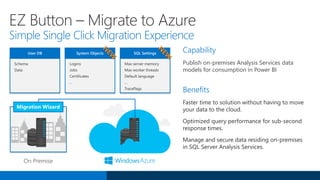
User DB System Objects SQL Settings
Migration Wizard
On Premise
EZ Button – Migrate to Azure
Simple Single Click Migration Experience
Capability
Publish on-premises Analysis Services data
models for consumption in Power BI
Benefits
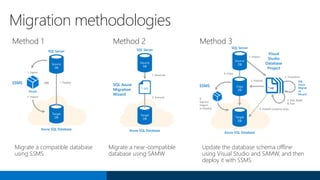
Method 1 Method 2 Method 3
Target
DB
Azure SQL Database
SQL Server
SSMS
2. Import
1. DeployOR
.bacpac
1. Export
Source
DB
Target
DB
Azure SQL Database
SQL Server
SQL Azure
Migration
Wizard
2. Execute
1. Generate
T-SQL
Source
DB
Target
DB
Azure SQL Database
SQL Server
SSMS
6.
Export/
Import
or Deploy
SQL
Azure
Migrati
on
Wizard
4. Copy
Copy
DB
Source
DB
5. Publish
1. Import
Visual
Studio
Database
Project
2. Transform
3. Edit, Build
& Test
*.sql
4. Publish (schema only)
Migrate a compatible database
using SSMS
Migrate a near-compatible
database using SAMW
Update the database schema offline
using Visual Studio and SAMW, and then
deploy it with SSMS
Migration methodologies
Migration Cookbook
Migrate an on-premises SQL
Server database to Azure SQL
Database (v12).
The Migration Cookbook
describes various approaches you
can use to migrate an on-
premises SQL Server database to
the latest Azure SQL Database
Update (v12).
Download:
http://aka.ms/azuresqlmigration
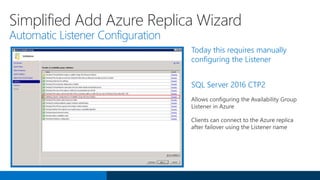
Simplified
AlwaysOn with
replicas on Azure
Today this requires manually
configuring the Listener
SQL Server 2016 CTP2
Simplified Add Azure Replica Wizard
Automatic Listener Configuration
Hybrid solutions Simplicity Consistency
Stretch Database
Stretch operational tables in a secure manner
into Azure for cost effective historic data
availability works with Always Encrypted and
Row Level Security
PowerBI with on-premises data
New interactive query with Analysis Services.
Customer data stays behind your firewall
Hybrid Scenarios with SSIS
Azure Data Factory integration with SSIS,
package lineage and impact analysis and
connect SSIS to cloud data source
Enhanced Backup to Azure
Faster restore times and 50% reduction in
storage, support larger DBs with Block blobs
and custom backup schedule with local staging
Easy migration of on-premises SQL
Server
Simple point and click migration to Azure
Simplified Add Azure
Replica Wizard
Automatic listener configuration for AlwaysOn
in Azure VMs
Common development, management
and identity tools
Including Active Directory, Visual Studio, Hyper-
V and System Center
Consistent Experience from SQL
Server on-premises to Microsoft
Azure IaaS and PaaS
Deeper insights across data
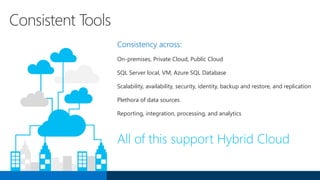
Consistent tools
and experience
Consistent Tools
Consistency across:
On-premises, Private Cloud, Public Cloud
SQL Server local, VM, Azure SQL Database
Scalability, availability, security, identity, backup and restore, and replication
Plethora of data sources
Reporting, integration, processing, and analytics
All of this support Hybrid Cloud
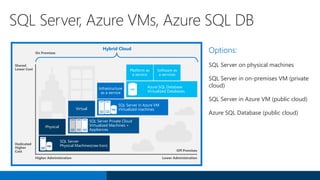
Options:
SQL Server on physical machines
SQL Server in on-premises VM (private
cloud)
SQL Server in Azure VM (public cloud)
Azure SQL Database (public cloud)
SQL Server, Azure VMs, Azure SQL DB
Shared
Lower Cost
Dedicated
Higher
Cost
Higher Administration Lower Administration
Off Premises
Hybrid Cloud
Physical
SQL Server
Physical Machines(raw Iron)SQL
Virtual
SQL Server Private Cloud
Virtualized Machines +
Appliances
Infrastructure
as a service
SQL Server in Azure VM
Virtualized machinesSQL
Platform as
a service
Software as
a services
Azure SQL Database
Virtualized Databases
SQL
On Premises
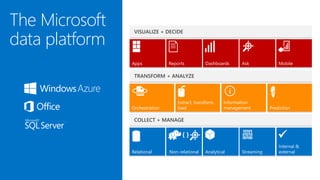
The Microsoft
data platform
Internal &
external
DashboardsReports Ask Mobile
Information
managementOrchestration
Extract, transform,
load Prediction
Relational Non-relational Analytical
Apps
Streaming

© 2015 Microsoft Corporation. All rights reserved. Microsoft, Windows, and other product names are or may be registered trademarks and/or trademarks in the U.S. and/or other countries.
The information herein is for informational purposes only and represents the current view of Microsoft Corporation as of the date of this presentation. Because Microsoft must respond to changing market conditions, it should not be interpreted to be a commitment on
the part of Microsoft, and Microsoft cannot guarantee the accuracy of any information provided after the date of this presentation. MICROSOFT MAKES NO WARRANTIES, EXPRESS, IMPLIED OR STATUTORY, AS TO THE INFORMATION IN THIS PRESENTATION.

Expert summit SQL Server 2016

  • 1.
    SQL Server 2016 Newinnovations Lukasz Grala Microsoft MVP Data Platform
  • 2.
    Operational Database Management Systems Data Warehouse Database Management Systems Business Intelligence and Analytics Platforms x86 Server Virtualization Cloud Infrastructure asa Service Enterprise Application Platform as a Service Public Cloud Storage Leader in 2014 for Gartner Magic Quadrants Microsoft platform leads the way on-premises and cloud
  • 3.
    Operational Database ManagementSystem – October 2015
  • 4.
  • 5.
  • 6.
    Performance Security AvailabilityScalability Operational analytics Insights on operational data; Works with in-memory OLTP and disk-based OLTP In-memory OLTP enhancements Greater T-SQL surface area, terabytes of memory supported, and greater number of parallel CPUs Query data store Monitor and optimize query plans Native JSON Expanded support for JSON data Temporal database support Query data as points in time Always encrypted Sensitive data remains encrypted at all times with ability to query Row-level security Apply fine-grained access control to table rows Dynamic data masking Real-time obfuscation of data to prevent unauthorized access Other enhancements Audit success/failure of database operations TDE support for storage of in- memory OLTP tables Enhanced auditing for OLTP with ability to track history of record changes Enhanced AlwaysOn Three synchronous replicas for auto failover across domains Round robin load balancing of replicas Automatic failover based on database health DTC for transactional integrity across database instances with AlwaysOn Support for SSIS with AlwaysOn Enhanced database caching Cache data with automatic, multiple TempDB files per instance in multi-core environments Mission-critical performance
  • 7.
    Performance Security AvailabilityScalability Operational analytics Insights on operational data; Works with in-memory OLTP and disk-based OLTP In-memory OLTP enhancements Greater T-SQL surface area, terabytes of memory supported, and greater number of parallel CPUs Query data store Monitor and optimize query plans Native JSON Expanded support for JSON data Temporal database support Query data as points in time Always encrypted Sensitive data remains encrypted at all times with ability to query Row-level security Apply fine-grained access control to table rows Dynamic data masking Real-time obfuscation of data to prevent unauthorized access Other enhancements Audit success/failure of database operations TDE support for storage of in- memory OLTP tables Enhanced auditing for OLTP with ability to track history of record changes Enhanced AlwaysOn Three synchronous replicas for auto failover across domains Round robin load balancing of replicas Automatic failover based on database health DTC for transactional integrity across database instances with AlwaysOn Support for SSIS with AlwaysOn Enhanced database caching Cache data with automatic, multiple TempDB files per instance in multi-core environments Mission-critical performance
  • 8.
    Operational Analytics What isoperational analytics and what does it mean to you? Operational analytics with disk-based tables Operational analytics with In-Memory OLTP IIS Server BI analysts
  • 9.
    Traditional operational/analytics architecture Keyissues Complex implementation Requires two servers (capital expenditures and operational expenditures) Data latency in analytics More businesses demand; requires real-time analytics IIS Server BI analysts
  • 10.
    Minimizing data latencyfor analytics Benefits No data latency No ETL No separate data warehouse Challenges Analytics queries are resource intensive and can cause blocking Minimizing impact on operational workloads Sub-optimal execution of analytics on relational schema IIS Server BI analysts
  • 11.
  • 12.
    Operational analytics for in-memory tables In-MemoryOLTP table Updateable CCI TailDRT Hash index Like Delta rowgroup
  • 13.
    Using Availability Groupsinstead of data warehouse Key points Mission Critical Operational Workloads typically configured for High Availability using AlwaysOn Availability Groups You can offload analytics to readable secondary replica Secondary Replica Secondary Replica Secondary Replica Primary Replica Always on Availability Group
  • 14.
  • 15.
    ALTER TABLE Sales.SalesOrderDetail ALTERINDEX PK_SalesOrderID REBUILD WITH (BUCKET_COUNT=100000000) T-SQL surface area: New {LEFT|RIGHT} OUTER JOIN Disjunction (OR, NOT) UNION [ALL] SELECT DISTINCT Subqueries (EXISTS, IN, scalar) ALTER support Full schema change support: add/alter/drop column/constraint Add/drop index supported Surface area improvements Almost full T-SQL coverage including scaler user-defined functions Improved scaling Increased size allowed for durable tables; more sockets Other improvements MARS support Lightweight migration reports
  • 16.
    Improved scaling In-memory OLTPengine has been enhanced to scale linearly on servers up to 4 sockets Other enhancements include:
  • 17.
    Data Source=MSSQL; InitialCatalog=AdventureWorks; Integrated Security=SSPI; MultipleActiveResultSets=True Setup MARS connection for memory optimized tables using the MultipleActiveResultsSets =True in your connection string Using multiple active result sets (MARS)
  • 18.
    In SQL Server2016 CTP2, the storage for memory-optimized tables will be encrypted as part of enabling TDE on the database Simply follow the same steps as you would for a disk-based database Support for Transparent Data Encryption Windows Operating System Level Data Protection SQL Server Instance Level User Database Level Database Encryption Key Service Master Key DPAPI encrypts the Service Master Key Master Database Level Database Encryption Key Service Master Key Encrypts the Database master Key for the master Database Database Master Key of the master Database creates a certificate in the master database The certificate encrypts the database Encryption Key in the user database The entire user database is secured by the Datbase Encryption Key (DEK) of the user database by using transparent database encryption Created at a time of SQL Server setup Statement: CREAT MASTER KEY… Statement: CREATE CERTIFICATE… Statement: CREATE DATABASE ENCRYPTION KEY… Statement: ALTER DATABSE… SET ENCRYPTION
  • 19.
    New Transaction PerformanceAnalysis Overview report New report replaces the need to use the Management Data Warehouse to analyze which tables and stored procedures are candidates for in- memory optimization
  • 20.
    Query Store Your flightdata recorder for your database
  • 21.
    Have You Ever…? …hadyour system down/slowed down and everyone waiting for you to magically fix the problem ASAP? …upgraded an application to the latest SQL Server version and had an issue with a plan change slowing your application down? …had a problem with your Azure SQL Database and been unable to determine what was going wrong?
  • 22.
    With Query Store… ICAN get full history of query execution I CAN quickly pinpoint the most expensive queries I CAN get all queries that regressed I CAN easily force better plan from history with a single line of T-SQL I CAN safely do server restart or upgrade
  • 23.
    Durability latency controlledby DB option DATA_FLUSH_INTERNAL_SECONDS Compile Execute Plan Store Runtime Stats Query Store Schema Query data store Collects query texts (+ all relevant properties) Stores all plan choices and performance metrics Works across restarts / upgrades / recompiles Dramatically lowers the bar for perf. Troubleshooting New Views Intuitive and easy plan forcing
  • 24.
    Monitoring Performance ByUsing the Query Store The query store feature provides DBAs with insight on query plan choice and performance
  • 25.
    Live query statistics Collectactual metrics about query while running View CPU/memory usage, execution time, query progress, etc. Enables rapid identification of potential bottlenecks for troubleshooting query performance issues. Allows drill down to live operator level statistics: Number of generated rows Elapsed time Operator progress Live warnings, etc.
  • 26.
  • 27.
    JSON became ubiquitous Compactand simple data exchange format The choice on the web Recommended scenario I CAN accept JSON, easily parse and store it as relational I CAN export relational easily as JSON I CAN correlate relational and non-relational
  • 28.
    [ { "Number":"SO43659", "Date":"2011-05-31T00:00:00" "AccountNumber":"AW29825", "Price":59.99, "Quantity":1 }, { "Number":"SO43661", "Date":"2011-06-01T00:00:00“ "AccountNumber":"AW73565“, "Price":24.99, "Quantity":3 } ] Number Date CustomerPrice Quantity SO43659 2011-05-31T00:00:00 AW29825 59.99 1 SO43661 2011-06-01T00:00:00 AW73565 24.99 3 SELECT * FROM myTable FOR JSON AUTO SELECT * FROM OPENJSON(@json) Data exchange with JSON
  • 29.
    CREATE TABLE SalesOrderRecord( Id int PRIMARY KEY IDENTITY, OrderNumber NVARCHAR(25) NOT NULL, OrderDate DATETIME NOT NULL, JSalesOrderDetails NVARCHAR(4000) CONSTRAINT SalesOrderDetails_IS_JSON CHECK ( ISJSON(JSalesOrderDetails)>0 ), Quantity AS CAST(JSON_VALUE(JSalesOrderDetails, '$.Order.Qty') AS int) ) GO CREATE INDEX idxJson ON SalesOrderRecord(Quantity) INCLUDE (Price); JSON and relational JSON is plain text ISJSON guarantees consistency Optimize further with computed column and INDEX
  • 30.
    SELECT t.Id, t.OrderNumber,t.OrderDate, JSON_VALUE(t.JSalesOrderDetails, '$.Order.ShipDate') AS ShipDate FROM SalesOrderRecord AS t WHERE ISJSON(t.JSalesOrderDetails) > 0 AND t.Price > 1000 Ability to load JSON text in tables Extract values from JSON text Index properties in JSON text stored in columns -- and more Querying JSON
  • 31.
    No new datatype If you need to store it raw, store it as NVARCHAR What is new: Easy export: FOR JSON Easy import: OPENJSON Easy handling: ISJSON, JSON_VALUE How to handle JSON?
  • 32.
    SELECT OrderNumber AS 'Order.Number', OrderDateAS 'Order.Date' FROM SalesOrder FOR JSON PATH For JSON path [ { "Order":{ "Number":"SO43659", "Date":"2011-05 31T00:00:00“ }, }, { "Order":{ "Number":"SO43660", "Date":"2011-06-01T00:00:00“ }, } ] Query Result (JSON array)
  • 33.
    SELECT SalesOrderNumber, OrderDate, UnitPrice, OrderQty FROM Sales.SalesOrderHeaderH INNER JOIN Sales.SalesOrderDetail D ON H.SalesOrderID = D.SalesOrderID FOR JSON AUTO For JSON AUTO [ { "SalesOrderNumber":"SO43659", "OrderDate":"2011-05-31T00:00:00", "D":[ {"UnitPrice":24.99, "OrderQty":1 } ] }, { "SalesOrderNumber":"SO43659" , "D":[ { "UnitPrice":34.40 }, { "UnitPrice":134.24, "OrderQty":5 } ] } ] Query Result
  • 34.
    CREATE TABLE OrderRecord( Id int PRIMARY KEY IDENTITY, OrderDetails NVARCHAR(25) CONSTRAINT OrderDetails_IS_JSON CHECK (ISJSON(OrderDetails)>1), Quantity AS CAST(JSON_VALUE(OrderDetails,'$. Order.Qty') AS int) ) JSON functions (CTP3) CREATE INDEX idxJson ON OrderRecord(Quantity); ISJSON (json_text) JSON_VALUE (json_text,json_path)
  • 35.
    OPENJSON OPENJSON (@json, N'$.Orders.OrdersArray') WITH( Number varchar(200) N'$.Order.Number', Date datetime N'$.Order.Date', Customer varchar(200) N'$.AccountNumber', Quantity int N'$.Item.Quantity' ) {"Orders": { "OrdersArray": [ { "Order": { "Number":"SO43659", "Date":"2011-05-31T00:00:00“ }, "AccountNumber":"AW29825“, "Item": { "Price":2024.9940, "Quantity":1 } }, { "Order":{ “Number":"SO43661", "Date":"2011-06-01T00:00:00“ }, "AccountNumber":"AW73565“, "Item": { "Price":2024.9940, "Quantity":3 } } ]} } Number Date Customer Quantity SO43659 2011-05-31T00:00:00 AW29825 1 SO43661 2011-06-01T00:00:00 AW73565 3
  • 36.
    SQL Server andAzure DocumentDB Schema-free NoSQL document store Scalable transactional processing for rapidly changing apps Premium relational DB capable to exchange data with modern apps & services Derives unified insights from structured/unstructured data JSON JS JSJSON
  • 37.
    Key takeaways Temporal: dataaudit and time-based analysis Query Store: performance troubleshooting and tuning JSON: interop with modern services and applications Available in the cloud and on-prem QUERY STORE JSON
  • 38.
  • 39.
    Real data sourcesare dynamic Historical data may be critical to business success Traditional databases fail to provide required insights Workarounds are… Complex, expensive, limited, inflexible, inefficient SQL Server 2016 makes life easy No change in programming model New Insights Why Temporal Time Travel Data Audit Slowly Changing Dimensions Repair record-level corruptions
  • 40.
    No change inprogramming model New Insights INSERT / BULK INSERT UPDATE DELETE MERGE DML SELECT * FROM temporal Querying How to start with temporal CREATE temporal TABLE PERIOD FOR SYSTEM_TIME… ALTER regular_table TABLE ADD PERIOD… DDL FOR SYSTEM_TIME AS OF FROM..TO BETWEEN..AND CONTAINED IN Temporal Querying
  • 41.
    Temporal table (actualdata) Insert / Bulk Insert * Old versions Update */ Delete * How system-time works? History Table
  • 42.
    Temporal table (actualdata) Temporal Queries * (Time travel,etc.) How system-time works? History Table Regular queries (current data) * Include Historical Version
  • 43.
    DepNum DepName MngrIDFrom To A001 Marketing 5 2005 2008 A002 Sales 2 2005 2007 A003 Consulting 6 2005 2006 A003 Consulting 10 2009 2012 DepNum DepName MngrID A001 Marketing 5 A001 Marketing 6 A002 Sales 2 A002 Sales 5 A003 Consulting 6 A003 Consulting 10 DepNum DepName MngrID From To A001 Marketing 6 2008 ∞ A002 Sales 5 2007 ∞ A001 A002 A003 period of validity current time ∞ ∞ Department (current) Department (history) Department (current + history) 2005 2015 SELECT * FROM DepartmentSELECT * FROM Department FOR SYSTEM_TIME BETWEEN '2006.01.01' AND '2007.01.01' SELECT * FROM Department FOR SYSTEM_TIME CONTAINED IN ('2007.01.01', '2009.01.01') SELECT * FROM Department FOR SYSTEM_TIME AS OF '2006.01.01' Getting insights from temporal – AS OF A001 A002 A003 “Get actual row versions”AS OFBETWEEN..ANDCONTAINED IN
  • 44.
    SELECT * FROMDepartment FOR SYSTEM_TIME AS OF '2010.01.01' Facts: 1. History is much bigger than actual data 2. Retained between 3 and 10 years 3. “Warm”: up to a few weeks/months 4. “Cold”: rarely queried Solution: History as a stretch table: PeriodEnd < “Now - 6 months” Azure SQL Database
  • 45.
    Provides correct information aboutstored facts at any point in time, or between 2 points in time. There are two orthogonal sets of scenarios with regards to temporal data: System(transaction)-time Application-time SELECT * FROM Person.BusinessEntityContact FOR SYSTEM_TIME BETWEEN @Start AND @End WHERE ContactTypeID = 17 Performance Temporal database support - BETWEEN
  • 46.
    Performance Security AvailabilityScalability Operational analytics Insights on operational data; Works with in-memory OLTP and disk-based OLTP In-memory OLTP enhancements Greater T-SQL surface area, terabytes of memory supported, and greater number of parallel CPUs Query data store Monitor and optimize query plans Native JSON Expanded support for JSON data Temporal database support Query data as points in time Always encrypted Sensitive data remains encrypted at all times with ability to query Row-level security Apply fine-grained access control to table rows Dynamic data masking Real-time obfuscation of data to prevent unauthorized access Other enhancements Audit success/failure of database operations TDE support for storage of in- memory OLTP tables Enhanced auditing for OLTP with ability to track history of record changes Enhanced AlwaysOn Three synchronous replicas for auto failover across domains Round robin load balancing of replicas Automatic failover based on database health DTC for transactional integrity across database instances with AlwaysOn Support for SSIS with AlwaysOn Enhanced database caching Cache data with automatic, multiple TempDB files per instance in multi-core environments Mission-critical performance
  • 47.
  • 48.
    Prevents Data Disclosure Client-side encryptionof sensitive data using keys that are never given to the database system. Queries on Encrypted Data Support for equality comparison, incl. join, group by and distinct operators. Application Transparency Minimal application changes via server and client library enhancements. Allows customers to securely store sensitive data outside of their trust boundary. Data remains protected from high-privileged, yet unauthorized users. Benefits of Always Encrypted
  • 49.
    dbo.Patients Jane Doe Name 243-24-9812 SSN USA Country Jim Gray198-33-0987 USA John Smith 123-82-1095 USA dbo.Patients Jane Doe Name 1x7fg655se2e SSN USA Jim Gray 0x7ff654ae6d USA John Smith 0y8fj754ea2c USA Country Result Set Jim Gray Name Jane Doe Name 1x7fg655se2e SSN USA Country Jim Gray 0x7ff654ae6d USA John Smith 0y8fj754ea2c USA dbo.Patients SQL Server Query Trusted Apps SELECT Name FROM Patients WHERE SSN=@SSN @SSN='198-33-0987' Result Set Jim Gray Name SELECT Name FROM Patients WHERE SSN=@SSN @SSN=0x7ff654ae6d Column Encryption Key Enhanced ADO.NET Library Column Master Key Client side Always Encrypted Help protect data at rest and in motion, on-premises & cloud ciphertext
  • 50.
    Randomized encryption Encrypt('123-45-6789') =0x17cfd50a Repeat: Encrypt('123-45-6789') = 0x9b1fcf32 Allows for transparent retrieval of encrypted data but NO operations More secure Deterministic encryption Encrypt('123-45-6789') = 0x85a55d3f Repeat: Encrypt('123-45-6789') = 0x85a55d3f Allows for transparent retrieval of encrypted data AND equality comparison E.g. in WHERE clauses and joins, distinct, group by Two types of encryption available Randomized encryption uses a method that encrypts data in a less predictable manner Deterministic encryption uses a method which always generates the same encrypted value for any given plain text value Types of Encryption for Always Encrypted
  • 51.
    Security Officer 1. Generate CEKsand Master Key 2. Encrypt CEK 3. Store Master Key Securely 4. Upload Encrypted CEK to DB CMK Store: Certificate Store HSM Azure Key Vault … Encrypted CEK Column Encryption Key (CEK) Column Master Key (CMK) Key Provisioning CMK Database Encrypted CEK
  • 52.
    Param Encryption Type/ Algorithm Encrypted CEK Value CMK Store Provider NameCMK Path @Name Non-DET/ AES 256 CERTIFICATE_ STORE Current User/ My/f2260… EXEC sp_execute_sql N'SELECT * FROM Customers WHERE SSN = @SSN' , @params = N'@SSN VARCHAR(11)', @SSN=0x7ff654ae6d Param Encryption Type/ Algorithm Encrypted CEK Value CMK Store Provider Name CMK Path @SSN DET/ AES 256 CERTIFICATE_ STORE Current User/ My/f2260… Enhanced ADO.NET Plaintext CEK Cache exec sp_describe_parameter_encryption @params = N'@SSN VARCHAR(11)' , @tsql = N'SELECT * FROM Customers WHERE SSN = @SSN' Result set (ciphertext) Name Jim Gray Result set (plaintext) using (SqlCommand cmd = new SqlCommand( "SELECT Name FROM Customers WHERE SSN = @SSN“ , conn)) { cmd.Parameters.Add(new SqlParameter( "@SSN", SqlDbType.VarChar, 11).Value = "111-22-3333"); SqlDataReader reader = cmd.ExecuteReader(); Client - Trusted SQL Server - Untrusted Encryptionmetadata Name 0x19ca706fbd9 Encryptionmetadata CMK Store Example
  • 53.
    Select columns to beencrypted Analyze schema and application queries to detect conflicts (build time)Set up the keys: master & CEK Static schema analysis tool (SSDT only) UI for selecting columns (no automated data classification) Key setup tool to automate selecting CMK, generating and encrypting CEK and uploading key metadata to the database Setup (SSMS or SSDT) User Experience: SSMS or SSDT (Visual Studio)
  • 54.
    Existing App –Setup User Experience: SSMS or SSDT (Visual Studio) UI for selecting columns (no automated data classification) Select candidate columns to be encrypted Analyze schema and application queries to detect conflicts and identify optimal encryption settings Set up the keys Encrypt selected columns while migrating the database to a target server (e.g. in Azure SQL Database Key Setup tool to streamline selecting CMK, generating and encrypting CEK and uploading key metadata to the database Encryption tool creating new (encrypted) columns, copying data from old (plain text) columns, swapping columns and re- creating dependencies Select desired encryption settings for selected columns UI for configuring encryption settings on selected columns (accepting/editing recommendations from the analysis tool) Schema/workload analysis tool analyzing the schema and profiler logs
  • 55.
    Data remains encrypted duringquery Summary: Always encrypted Protect data at rest and in motion, on-premises & cloud Capability ADO.Net client library provides transparent client-side encryption, while SQL Server executes T-SQL queries on encrypted data Benefits Apps TCE-enabled ADO .NET library SQL ServerEncrypted query Columnar key No app changes Master key
  • 56.
  • 57.
    Fine-grained access controlover specific rows in a database table Help prevent unauthorized access when multiple users share the same tables, or to implement connection filtering in multitenant applications Administer via SQL Server Management Studio or SQL Server Data Tools Enforcement logic inside the database and schema bound to the table. Protect data privacy by ensuring the right access across rows SQL Database Customer 1 Customer 2 Customer 3 Row-level security
  • 58.
    Fine-grained access control Keeping multi-tenant databasessecure by limiting access by other users who share the same tables. Application transparency RLS works transparently at query time, no app changes needed. Compatible with RLS in other leading products. Centralized security logic Enforcement logic resides inside database and is schema-bound to the table it protects providing greater security. Reduced application maintenance and complexity. Store data intended for many consumers in a single database/table while at the same time restricting row-level read & write access based on users’ execution context. Benefits of row-level security
  • 59.
    CREATE SECURITY POLICYmySecurityPolicy ADD FILTER PREDICATE dbo.fn_securitypredicate(wing, startTime, endTime) ON dbo.patients Predicate function User-defined inline table-valued function (iTVF) implementing security logic Can be arbitrarily complicated, containing joins with other tables Security predicate Applies a predicate function to a particular table (SEMIJOIN APPLY) Two types: filter predicates and blocking predicates Security policy Collection of security predicates for managing security across multiple tables RLS Concepts
  • 60.
    Dynamic Data Masking SQLServer 2016 SQL Database
  • 61.
    Configuration made easyin the new Azure portal Policy-driven at the table and column level, for a defined set of users Data masking applied in real-time to query results based on policy Multiple masking functions available (e.g. full, partial) for various sensitive data categories (e.g. Credit Card Numbers, SSN, etc.) SQL Database SQL Server 2016 CTP2 Table.CreditCardNo 4465-6571-7868-5796 4468-7746-3848-1978 4484-5434-6858-6550 Real-time data masking; partial masking Dynamic Data Masking Prevent the abuse of sensitive data by hiding it from users
  • 62.
    Audit success/failure of databaseoperations Enhanced auditing for OLTP with ability to track history of record changes Transparent Data Encryption support for storage of In-memory OLTP Tables Backup encryption now supported with compression Other security enhancements
  • 63.
    Performance Security AvailabilityScalability Operational analytics Insights on operational data; Works with in-memory OLTP and disk-based OLTP In-memory OLTP enhancements Greater T-SQL surface area, terabytes of memory supported, and greater number of parallel CPUs Query data store Monitor and optimize query plans Native JSON Expanded support for JSON data Temporal database support Query data as points in time Always encrypted Sensitive data remains encrypted at all times with ability to query Row-level security Apply fine-grained access control to table rows Dynamic Data Masking Real-time obfuscation of data to prevent unauthorized access Other enhancements Audit success/failure of database operations TDE support for storage of in- memory OLTP tables Enhanced auditing for OLTP with ability to track history of record changes Enhanced AlwaysOn Three synchronous replicas for auto failover across domains Round robin load balancing of replicas Automatic failover based on database health DTC for transactional integrity across database instances with AlwaysOn Support for SSIS with AlwaysOn Enhanced database caching Cache data with automatic, multiple TempDB files per instance in multi-core environments Mission-critical performance
  • 64.
  • 65.
    Greater scalability: Load balancingreadable secondaries Increased number of auto-failover targets Log transport performance Improved manageability: DTC support Database-level health monitoring Group managed service account AG_Listener New York (Primary) Asynchronous data Movement Synchronous data Movement Unified HA Solution Enhanced AlwaysOn Availability Groups AG Hong Kong (Secondary) AG New Jersey (Secondary) AG
  • 66.
    DR Site Computer2 Computer3 Computer4 Computer5 READ_ONLY_ROUTING_LIST= (('COMPUTER2','COMPUTER3', 'COMPUTER4'), 'COMPUTER5') Primary Site Computer1 (Primary) Readable Secondary load balancing
  • 67.
    Ability to rebuildonline indexes in a single partition provides partition-level control for users who need continual access to the database. Allows database administrators to specify whether or not to terminate processes that block their ability to lock tables. SQL Server 2016 CTP2 now provides 100% uptime with enhanced online database operations when conducting ALTER or TRUNCATE operations on tables. Enhanced online operations
  • 68.
    Performance Security AvailabilityScalability Operational analytics Insights on operational data; Works with in-memory OLTP and disk-based OLTP In-memory OLTP enhancements Greater T-SQL surface area, terabytes of memory supported, and greater number of parallel CPUs Query data store Monitor and optimize query plans Native JSON Expanded support for JSON data Temporal database support query data as points in time Always encrypted Sensitive data remains encrypted at all times with ability to query Row-level security Apply fine-grained access control to table rows Dynamic Data Masking Real-time obfuscation of data to prevent unauthorized access Other enhancements Audit success/failure of database operations TDE support for storage of in- memory OLTP tables Enhanced auditing for OLTP with ability to track history of record changes Enhanced AlwaysOn Three synchronous replicas for auto failover across domains Round robin load balancing of replicas Automatic failover based on database health DTC for transactional integrity across database instances with AlwaysOn Support for SSIS with AlwaysOn Enhanced database caching Cache data with automatic, multiple TempDB files per instance in multi-core environments Mission-critical performance
  • 69.
  • 70.
    Supports caching datawith automatic, multiple TempDB files per instance in multi-core environments Reduces metadata and allocation contention for TempDB workloads, improving performance and scalability Enhanced database caching
  • 71.
    Enhanced support forWindows Server Hardware Acceleration for TDE Encryption/Decryption Parallelizing the Decryption Built-in Function to Improve Read Performance Results in dramatically better response times for queries with encrypted data columns
  • 72.
    Switches Networking Compute Rack 2 Edge Storage Networking Compute Rack 1 Edge Storage ManagementSwitches Networking Compute Rack 3 Edge Storage Switches Networking Compute Rack 4 Edge Storage Cloud Platform System advantages Partnership with Dell. Combination of optimized hardware/software. Designed specifically to reduce the complexity and risk of implementing a self-service cloud. CPS can go from delivery to live within days—not months—and lets service providers and enterprises move up the stack to focus on delivering services to users
  • 73.
    Access any dataScale and manage Powerful Insights Advanced analytics PolyBase Insights from data across SQL Server and Hadoop with simplicity of T-SQL Enhanced SSIS Designer support for previous SSIS versions Support for Power Query Enterprise-grade Analysis Services Enhanced performance and scalability for analysis services Single SSDT in Visual Studio 2015 (CTP3) Build richer analytics solutions as part of your development projects in Visual Studio Enhanced MDS Excel add-in 15x faster; more granular security roles; archival options for transaction logs; and reuse entities across models Mobile BI Business insights for your on- premises data through rich visualization on mobile devices with native apps for Windows, iOS and Android Enhanced Reporting Services New modern reports with rich visualizations R integration (CTP3) Bringing predictive analytic capabilities to your relational database Analytics libraries (CTP3) Expand your “R” script library with Microsoft Azure Marketplace Deeper insights across data
  • 74.
    Access any dataScale and manage Powerful Insights Advanced analytics PolyBase Insights from data across SQL Server and Hadoop with simplicity of T-SQL Enhanced SSIS Designer support for previous SSIS versions Support for Power Query Enterprise-grade Analysis Services Enhanced performance and scalability for analysis services Single SSDT in Visual Studio 2015 Build richer analytics solutions as part of your development projects in Visual Studio Enhanced MDS Excel add-in 15x faster; more granular security roles; archival options for transaction logs; and reuse entities across models Mobile BI Business insights for your on- premises data through rich visualization on mobile devices with native apps for Windows, iOS and Android Enhanced Reporting Services New modern reports with rich visualizations R integration (CTP3) Bringing predictive analytic capabilities to your relational database Analytics libraries (CTP3) Expand your “R” script library with Microsoft Azure Marketplace Deeper insights across data
  • 75.
  • 76.
    Query relational and non-relational data,on-premises and in Azure Apps T-SQL query SQL Server Hadoop PolyBase Query relational and non-relational data with T-SQL
  • 77.
    Prerequisites for installingPolyBase 64-bit SQL Server Evaluation edition Microsoft .NET Framework 4.0. Oracle Java SE RunTime Environment (JRE) version 7.51 or higher NOTE: Java JRE version 8 does not work. Minimum memory: 4GB Minimum hard disk space: 2GB
  • 78.
    Using the installationwizard for PolyBase Run SQL Server Installation Center. (Insert SQL Server installation media and double-click Setup.exe.) Click Installation, then click New Standalone SQL Server installation or add features On the feature selection page, select PolyBase Query Service for External Data. On the Server Configuration Page, configure the PolyBase Engine Service and PolyBase Data Movement Service to run under the same account.
  • 79.
    -- Run sp_configure‘hadoop connectivity’ -- and set an appropriate value sp_configure @configname = 'hadoop connectivity', @configvalue = 7; GO RECONFIGURE GO -- List the configuration settings for -- one configuration name sp_configure @configname='hadoop connectivity'; GO Option values 0: Disable Hadoop connectivity 1: Hortonworks HDP 1.3 on Windows Server Azure blob storage (WASB[S]) 2: Hortonworks HDP 1.3 on Linux 3: Cloudera CDH 4.3 on Linux 4: Hortonworks HDP 2.0 on Windows Server Azure blob storage (WASB[S]) 5: Hortonworks HDP 2.0 on Linux 6: Cloudera 5.1 on Linux 7: Hortonworks 2.1 and 2.2 on Linux Hortonworks 2.2 on Windows Server Azure blob storage (WASB[S]) Choose Hadoop data source with sp_configure
  • 80.
    Start the PolyBaseservices After running for sp_configure, you must stop and restart the SQL Server engine service Run services.msc Find the services shown below and stop each one Restart the services
  • 81.
    -- Using credentialson database requires enabling -- traceflag DBCC TRACEON(4631,-1) -- Create a master key CREATE MASTER KEY ENCRYPTION BY PASSWORD = 'S0me!nfo'; CREATE CREDENTIAL WASBSecret ON DATABASE WITH IDENTITY = 'pdw_user', Secret = 'mykey=='; -- Create an external data source (Azure Blob Storage) -- with the credential CREATE EXTERNAL DATA SOURCE Azure_Storage WITH ( TYPE = HADOOP, LOCATION ='wasb[s]://mycontainer@test.blob.core.windows.net/pat h’, CREDENTIAL = WASBSecret ) Type methods for providing credentials Core-site.xml in installation path of SQL Server - <SqlBinRoot>PolybaseHadoopConf Credential object in SQL Server for higher security NOTE: The syntax for a database-scoped credential (CREATE CREDENTIAL … ON DATABASE) is temporary and will change in the next release. This new feature is documented only in the examples in the CTP2 content, and will be fully documented in the next release. Configure PolyBase for Azure blob storage
  • 82.
    -- Create anexternal data source (Hadoop) CREATE EXTERNAL DATA SOURCE hdp2 with ( TYPE = HADOOP, LOCATION ='hdfs://10.xxx.xx.xxx:xxxx', RESOURCE_MANAGER_LOCATION='10.xxx.xx.xxx:xxxx') CTP2 supports the following Hadoop distributions Hortonworks HDP 1.3, 2.0, 2.1, 2.2 for both Windows and Linux Cloudera CDH 4.3, 5.1 on Linux Create a reference to a Hadoop cluster
  • 83.
    -- Create anexternal file format -- (delimited text file) CREATE EXTERNAL FILE FORMAT ff2 WITH ( FORMAT_TYPE = DELIMITEDTEXT, FORMAT_OPTIONS (FIELD_TERMINATOR ='|', USE_TYPE_DEFAULT = TRUE)) CTP2 supports the following file formats Delimited text Hive RCFile Hive ORC Define the external file format
  • 84.
    -- Create anexternal table pointing to file stored in Hadoop CREATE EXTERNAL TABLE [dbo].[CarSensor_Data] ( [SensorKey] int NOT NULL, [CustomerKey] int NOT NULL, [GeographyKey] int NULL, [Speed] float NOT NULL, [YearMeasured] int NOT NULL ) WITH (LOCATION='/Demo/car_sensordata.tbl', DATA_SOURCE = hdp2, FILE_FORMAT = ff2, REJECT_TYPE = VALUE, REJECT_VALUE = 0 The external table provides a T- SQL reference to the data source used to: Query Hadoop or Azure blob storage data with Transact-SQL statements Import and store data from Hadoop or Azure blob storage into your SQL Server database Create an external table to the data source
  • 85.
    -- Create statisticson an external table. CREATE STATISTICS StatsForSensors ON CarSensor_Data(CustomerKey, Speed) In CTP2, you can optimize query execution against the external tables using statistics Optimize queries by adding statistics
  • 86.
    SELECT DISTINCT C.FirstName,C.LastName, C.MaritalStatus FROM Insurance_Customer_SQL INNER JOIN ( SELECT * FROM SensorData_ExternalHDP WHERE Speed > 35 UNION ALL SELECT * FROM SensorData_ExternalHDP2 WHERE Speed > 35 ) AS SensorD ON C.CustomerKey = SensorD.CustomerKey External tables referring to data in 2 HDP Hadoop clusters SQL Server table Query Capabilities (1) Joining relational and external data
  • 87.
    SELECT DISTINCT C.FirstName,C.LastName, C.MaritalStatus FROM Insurance_Customer_SQL -- table in SQL Server … OPTION (FORCE EXTERNALPUSHDOWN) – push-down computation CREATE EXTERNAL DATA SOURCES ds-hdp WITH .( TYPE = Hadoop, LOCATION = “hdfs://10.193.27.52:8020”, Resources_Manager_Location = ‘10.193.27.52:8032’); Query Capabilities (2) Push-Down Computation
  • 88.
  • 89.
    SSIS improvements forSQL Server 2016 CTP2 AlwaysOn support Incremental deployment of packages Improved project upgrade support CTP3 Designer improvements One designer multi-version support OData V4 support Power Query as a data source AlwaysOn Availability Groups Secondary for SSISDB New York (Primary) New Jersey (Secondary) SSIS DB SSIS DB SQL Server 2012 SSIS Project X SQL Server 2016 SSIS Project X Improved project upgrade
  • 90.
    AlwaysOn for SSISCatalog Steps to configure AlwaysOn for SSIS catalog Create Integrations Services catalog Add SSISDB to an AlwaysOn Availability Group Enable SSIS support for AlwaysOn
  • 91.
    private static voidMain(string[] args) { // Connection string to SSISDB var connectionString = "Data Source=.;Initial Catalog=SSISDB;Integrated Security=True;MultipleActiveResultSets=false"; using (var sqlConnection = new SqlConnection(connectionString)) { sqlConnection.Open(); var sqlCommand = new SqlCommand { Connection = sqlConnection, CommandType = CommandType.StoredProcedure, CommandText = "[catalog].[deploy_packages]" }; var packageData = Encoding.UTF8.GetBytes(File.ReadAllText(@"C:TestPackage.dtsx")); // DataTable: name is the package name without extension and package_data is byte array of package. var packageTable = new DataTable(); packageTable.Columns.Add("name", typeof(string)); packageTable.Columns.Add("package_data", typeof(byte[])); packageTable.Rows.Add("Package", packageData); // Set the destination project and folder which is named Folder and Project. sqlCommand.Parameters.Add(new SqlParameter("@folder_name", SqlDbType.NVarChar, ParameterDirection.Input, "Folder", -1)); sqlCommand.Parameters.Add(new SqlParameter("@project_name", SqlDbType.NVarChar, ParameterDirection.Input, "Project", -1)); sqlCommand.Parameters.Add(new SqlParameter("@packages_table", SqlDbType.Structured, ParameterDirection.Input, packageTable, -1)); var result = sqlCommand.Parameters.Add("RetVal", SqlDbType.Int); result.Direction = ParameterDirection.ReturnValue; sqlCommand.ExecuteNonQuery(); } } Deployment options in CTP2 Integration Services Deployment Wizard SQL Server Management Studio deploy_packages stored procedure Object model API Deployment options in CTP3 SQL Server Data Tools for Business Intelligence Deploy packages to Integration Services server
  • 92.
    Access any dataScale and manage Powerful Insights Advanced analytics PolyBase Insights from data across SQL Server and Hadoop with simplicity of T-SQL Enhanced SSIS Designer support for previous SSIS versions Support for Power Query Enterprise-grade Analysis Services Enhanced performance and scalability for analysis services Single SSDT in Visual Studio 2015 (CTP3) Build richer analytics solutions as part of your development projects in Visual Studio Enhanced MDS Excel add-in 15x faster; more granular security roles; archival options for transaction logs; and reuse entities across models Mobile BI Business insights for your on- premises data through rich visualization on mobile devices with native apps for Windows, iOS and Android Enhanced Reporting Services New modern reports with rich visualizations R integration (CTP3) Bringing predictive analytic capabilities to your relational database Analytics libraries (CTP3) Expand your “R” script library with Microsoft Azure Marketplace Deeper insights across data
  • 93.
  • 94.
    Scale your tabular modelswith support for high end servers More memory More cores Enhanced Analysis Services Deliver high performance and scalability for your BI solutions High-end server hardware Capability Parallel partition processing NUMA optimization for tabular models On-demand loading and paging Tabular and MOLAP modeling enhancements Benefits
  • 95.
    SSAS Enterprise Readiness:MOLAP Netezza as a data source Performance improvements (unnatural hierarchies, ROLAP distinct count, drill-through, semi-additive measures) Detect MOLAP index corruption using DBCC
  • 96.
    High-end Server Hardware SSASEnterprise Readiness: Tabular Processing optimizations Parallel partition processing Support for Power Query in AS engine
  • 97.
    Support for BIdirectional cross filtering (M:M) Calculated tables, Date Table Translations Tabular scripting language New DAX functions (DATEDIFF, GEOMEAN, PERCENTILE, PRODUCT, XIRR, XNPV, many more..) Query engine optimizations New DAX functions for high perf. reporting Direct Query perf. optimizations DimDepartmentGr… DimDepartmentGroupKey… ParentDepartmentGr… DepartmentGroupNa… DimAccount AccountKey ParenAccountKey AccountCodeAlter… ParenAccountCod… AccountDescription FactFinance FinanceKey DateKey OrganizationKey DepartmentGroup… ScenarioKey DimOrganization OrganizationKey ParnentOrganization PercentageOfOwn… OrganizationName CurrencyKey DimAccount ScenarioKey ScenarioName SSAS Rich Modeling Platform: Tabular
  • 98.
  • 99.
    Capability SSDT-BI and SSMSfor Visual Studio 2015 Rich data modeling enhancements New DAX analytical functions MDX Query Plan tool for performance optimizations and troubleshooting Benefits{JSON} Powerful Insights Rich BI Application Platform Develop and deliver BI solutions faster and at lower costs
  • 100.
  • 101.
    Performance and Scale Overallperformance and scale improvements Target of 15x performance improvement for Excel add-in Increased performance for bulk entity based staging operations Security Improvements New security roles for more granular permissions around read, write and delete Multiple system administrators Manageability and Modeling Archival of Transaction Logs Reuse of entities across models Support for compound keys Allow the Name and Code attributes to be renamed MDS Improvements
  • 102.
    Access any dataScale and manage Powerful Insights Advanced analytics PolyBase Insights from data across SQL Server and Hadoop with simplicity of T-SQL Enhanced SSIS Designer support for previous SSIS versions Support for Power Query Enterprise-grade Analysis Services Enhanced performance and scalability for analysis services Single SSDT in Visual Studio 2015 Build richer analytics solutions as part of your development projects in Visual Studio Enhanced MDS Excel add-in 15x faster; more granular security roles; archival options for transaction logs; and reuse entities across models Mobile BI Business insights for your on- premises data through rich visualization on mobile devices with native apps for Windows, iOS and Android Enhanced Reporting Services New modern reports with rich visualizations R integration (CTP3) Bringing predictive analytic capabilities to your relational database Analytics libraries (CTP3) Expand your “R” script library with Microsoft Azure Marketplace Deeper insights across data
  • 103.
  • 104.
    Mobile BI appsfor SQL Server – formally Datazen For on-premises implementations - optimized for SQL Server. Rich, interactive data visualization on all major mobile platforms No additional cost for SQL Server Enterprise Edition customers 2008 or later and Software Assurance
  • 105.
    Data visualization andpublishing Create beautiful visualizations and KPIs with a touch-based designer Connect to the Mobile BI for SQL Server server to access SQL Server data Publish for access by others
  • 106.
    Datazen architecture overview Server,Publisher and Mobile apps SQL Server Analysis Services File Data sources Authentication Internet boundary Viewer Apps Publisher App Web browser Datazen Enterprise Server Enterprise environment
  • 107.
    Mobile BI forSQL Server summary Beautiful visualizations KPI repository Create once - publish to any device Native apps for all platforms Perfect scaling to any form factor Custom branding Collaborate on the go
  • 108.
  • 109.
    Modern reports withSQL Server Reporting Services Report consumption from modern browsers Improved parameters Modern themes New chart types
  • 110.
    Access any dataScale and manage Powerful Insights Advanced analytics PolyBase Insights from data across SQL Server and Hadoop with simplicity of T-SQL Enhanced SSIS Designer support for previous SSIS versions Support for Power Query Enterprise-grade Analysis Services Enhanced performance and scalability for analysis services Single SSDT in Visual Studio 2015 Build richer analytics solutions as part of your development projects in Visual Studio Enhanced MDS Excel add-in 15x faster; more granular security roles; archival options for transaction logs; and reuse entities across models Mobile BI Business insights for your on- premises data through rich visualization on mobile devices with native apps for Windows, iOS and Android Enhanced Reporting Services New modern reports with rich visualizations R integration (CTP3) Bringing predictive analytic capabilities to your relational database Analytics libraries (CTP3) Expand your “R” script library with Microsoft Azure Marketplace Deeper insights across data (CTP3)
  • 111.
  • 112.
    Example Solutions Fraud detection Salesforecasting Warehouseefficiency Predictive maintenance Extensibility Microsoft Azure Machine Learning Marketplace New R scripts 010010 100100 010101 010010 100100 010101 010010 100100 010101 010010 100100 010101 Built-in advanced analytics (CTP3) In-database analytics Built-in to SQL Server Analytic Library T-SQL Interface Relational Data 010010 100100 010101 010010 100100 010101 Data Scientist Interact directly with data Data Developer/DBA Manage data and analytics together ? R RIntegration
  • 113.
    Capability Extensible In-database analytics,integrated with R, exposed through T-SQL Centralize enterprise library for analytic models Benefits SQL Server Analytical Engines Full R Integration Fully Extensible Data Management Layer Relational Data T-SQL Interface Stream Data In-Memory Analytics Library Share and Collaborate Manage and Deploy R + Data Scientists Business Analysts Publish algorithms, and interact directly with Data Analysis through TSQL, tools, and vetted algorithms DBAs Manage storage and analytics together Advanced Analytics (CTP3) Faster analytics with In-database processing
  • 114.
    Hybrid solutions SimplicityConsistency Stretch Database Stretch operational tables in a secure manner into Azure for cost effective historic data availability works with Always Encrypted and Row Level Security Power BI with on-premises data New interactive query with Analysis Services. Customer data stays behind your firewall Hybrid Scenarios with SSIS Azure Data Factory integration with SSIS, package lineage and impact analysis and connect SSIS to cloud data source Enhanced Backup to Azure Faster restore times and 50% reduction in storage, support larger DBs with Block blobs and custom backup schedule with local staging Easy migration of on-premises SQL Server Simple point and click migration to Azure Simplified Add Azure Replica Wizard Automatic listener configuration for AlwaysOn in Azure VMs Common development, management and identity tools Including Active Directory, Visual Studio, Hyper- V and System Center Consistent Experience from SQL Server on-premises to Microsoft Azure IaaS and PaaS Deeper insights across data
  • 115.
    Hybrid solutions SimplicityConsistency Stretch Database Stretch operational tables in a secure manner into Azure for cost effective historic data availability works with Always Encrypted and Row Level Security Power BI with on-premises data New interactive query with Analysis Services. Customer data stays behind your firewall Hybrid Scenarios with SSIS Azure Data Factory integration with SSIS, package lineage and impact analysis and connect SSIS to cloud data source Enhanced Backup to Azure Faster restore times and 50% reduction in storage, support larger DBs with Block blobs and custom backup schedule with local staging Easy migration of on-premises SQL Server Simple point and click migration to Azure Simplified Add Azure Replica Wizard Automatic listener configuration for AlwaysOn in Azure VMs Common development, management and identity tools Including Active Directory, Visual Studio, Hyper- V and System Center Consistent Experience from SQL Server on-premises to Microsoft Azure IaaS and PaaS Deeper insights across data
  • 116.
  • 117.
    Capability Stretch large operationaltables from on-premises to Azure with the ability to query Benefits BI integration for on-premises and cloud Cold/closed data Orders In-memory OLTP table Hot/active data Order history Stretched table Trickle data movement and remote query processing On-premises Azure Stretch SQL Server into Azure Securely stretch cold tables to Azure with remote query processing
  • 118.
    Stretch database architecture Howit works Creates a secure linked server definition in the on-premises SQL Server Linked server definition has the remote endpoint as the target Provisions remote resources and begins to migrate eligible data, if migration is enabled Queries against tables run against both the local database and the remote endpoint Remote Endpoint Remote Data Azure InternetBoundary Local Database Local Data Eligible Data
  • 119.
    -- Enable localserver EXEC sp_configure 'remote data archive' , '1'; RECONFIGURE; -- Provide administrator credential to connect to -- Azure SQL Database CREATE CREDENTIAL <server_address> WITH IDENTITY = <administrator_user_name>, SECRET = <administrator_password> -- Alter database for remote data archive ALTER DATABASE <database name> SET REMOTE_DATA_ARCHIVE = ON (SERVER = server name); GO -- Alter table for remote data archive ALTER TABLE <table name> ENABLE REMOTE_DATA_ARCHIVE WITH ( MIGRATION_STATE = ON ); GO; High level steps Configure local server for remote data archive Create a credential with administrator permission Alter specific database for remote data archive Alter table for remote data archive Typical workflow to enable Stretch Database
  • 120.
  • 121.
    Live dashboards and exploration AnalysisServices on-premises Tabular model Interactive queryAS Connector Capability Publish on-premises Analysis Services data models for consumption in Power BI Benefits SQLServer vNext Connect live to on-premises Analysis Services data
  • 122.
  • 123.
    SSIS Improvements forAzure services (CTP3) Capability Stretch large operational tables from on-premises to Azure with the ability to query Benefits SQL
  • 124.
  • 125.
    Managed backup Granular controlof the backup schedule; Local staging support for faster recovery and resilient to transient network issues; Support for system databases; Support simple recovery mode. Backup to Azure block blobs Cost savings on storage; Significantly improved restore performance; and More granular control over Azure storage. Azure Storage snapshot backup Fastest method for creating backups and running restores Uses SQL Server db files on Azure Blob Storage Enhanced backup to Azure
  • 126.
    Hybrid solutions SimplicityConsistency Stretch Database Stretch operational tables in a secure manner into Azure for cost effective historic data availability works with Always Encrypted and Row Level Security PowerBI with on-premises data New interactive query with Analysis Services. Customer data stays behind your firewall Hybrid Scenarios with SSIS Azure Data Factory integration with SSIS, package lineage and impact analysis and connect SSIS to cloud data source Enhanced Backup to Azure Faster restore times and 50% reduction in storage, support larger DBs with Block blobs and custom backup schedule with local staging Easy migration of on-premises SQL Server Simple point and click migration to Azure Simplified Add Azure Replica Wizard Automatic listener configuration for AlwaysOn in Azure VMs Common development, management and identity tools Including Active Directory, Visual Studio, Hyper- V and System Center Consistent Experience from SQL Server on-premises to Microsoft Azure IaaS and PaaS Deeper insights across data
  • 127.
  • 128.
    User DB SystemObjects SQL Settings Migration Wizard On Premise EZ Button – Migrate to Azure Simple Single Click Migration Experience Capability Publish on-premises Analysis Services data models for consumption in Power BI Benefits
  • 129.
    Method 1 Method2 Method 3 Target DB Azure SQL Database SQL Server SSMS 2. Import 1. DeployOR .bacpac 1. Export Source DB Target DB Azure SQL Database SQL Server SQL Azure Migration Wizard 2. Execute 1. Generate T-SQL Source DB Target DB Azure SQL Database SQL Server SSMS 6. Export/ Import or Deploy SQL Azure Migrati on Wizard 4. Copy Copy DB Source DB 5. Publish 1. Import Visual Studio Database Project 2. Transform 3. Edit, Build & Test *.sql 4. Publish (schema only) Migrate a compatible database using SSMS Migrate a near-compatible database using SAMW Update the database schema offline using Visual Studio and SAMW, and then deploy it with SSMS Migration methodologies
  • 130.
    Migration Cookbook Migrate anon-premises SQL Server database to Azure SQL Database (v12). The Migration Cookbook describes various approaches you can use to migrate an on- premises SQL Server database to the latest Azure SQL Database Update (v12). Download: http://aka.ms/azuresqlmigration
  • 131.
  • 132.
    Today this requiresmanually configuring the Listener SQL Server 2016 CTP2 Simplified Add Azure Replica Wizard Automatic Listener Configuration
  • 133.
    Hybrid solutions SimplicityConsistency Stretch Database Stretch operational tables in a secure manner into Azure for cost effective historic data availability works with Always Encrypted and Row Level Security PowerBI with on-premises data New interactive query with Analysis Services. Customer data stays behind your firewall Hybrid Scenarios with SSIS Azure Data Factory integration with SSIS, package lineage and impact analysis and connect SSIS to cloud data source Enhanced Backup to Azure Faster restore times and 50% reduction in storage, support larger DBs with Block blobs and custom backup schedule with local staging Easy migration of on-premises SQL Server Simple point and click migration to Azure Simplified Add Azure Replica Wizard Automatic listener configuration for AlwaysOn in Azure VMs Common development, management and identity tools Including Active Directory, Visual Studio, Hyper- V and System Center Consistent Experience from SQL Server on-premises to Microsoft Azure IaaS and PaaS Deeper insights across data
  • 134.
  • 135.
    Consistent Tools Consistency across: On-premises,Private Cloud, Public Cloud SQL Server local, VM, Azure SQL Database Scalability, availability, security, identity, backup and restore, and replication Plethora of data sources Reporting, integration, processing, and analytics All of this support Hybrid Cloud
  • 136.
    Options: SQL Server onphysical machines SQL Server in on-premises VM (private cloud) SQL Server in Azure VM (public cloud) Azure SQL Database (public cloud) SQL Server, Azure VMs, Azure SQL DB Shared Lower Cost Dedicated Higher Cost Higher Administration Lower Administration Off Premises Hybrid Cloud Physical SQL Server Physical Machines(raw Iron)SQL Virtual SQL Server Private Cloud Virtualized Machines + Appliances Infrastructure as a service SQL Server in Azure VM Virtualized machinesSQL Platform as a service Software as a services Azure SQL Database Virtualized Databases SQL On Premises
  • 137.
    The Microsoft data platform Internal& external DashboardsReports Ask Mobile Information managementOrchestration Extract, transform, load Prediction Relational Non-relational Analytical Apps Streaming 
  • 138.
    © 2015 MicrosoftCorporation. All rights reserved. Microsoft, Windows, and other product names are or may be registered trademarks and/or trademarks in the U.S. and/or other countries. The information herein is for informational purposes only and represents the current view of Microsoft Corporation as of the date of this presentation. Because Microsoft must respond to changing market conditions, it should not be interpreted to be a commitment on the part of Microsoft, and Microsoft cannot guarantee the accuracy of any information provided after the date of this presentation. MICROSOFT MAKES NO WARRANTIES, EXPRESS, IMPLIED OR STATUTORY, AS TO THE INFORMATION IN THIS PRESENTATION.

Editor's Notes

  • #3 Magic Quadrant leader in Operational Database Management Systems http://www.datastax.com/gartner-magic-quadrant-odbms https://www.gartner.com/doc/2877117/magic-quadrant-operational-database-management (paywall) Magic Quadrant leader in Data Warehouse Database Management Systems http://www.odbms.org/2014/03/2014-gartner-magic-quadrant-data-warehouse-database-management-systems/ https://www.gartner.com/doc/2678018/magic-quadrant-data-warehouse-database (paywall) Magic Quadrant leader in Business Intelligence and Analytics Platforms http://www.tableausoftware.com/gartner-magic-quadrant-2014 https://www.gartner.com/doc/2668318/magic-quadrant-business-intelligence-analytics (paywall) Magic Quadrant for x86 Server Virtualization http://tcwd.net/vblog/wp-content/uploads/2014/07/2014-3year.png http://www.gartner.com/technology/reprints.do?id=1-1WR6HLK&ct=140703&st=sb Magic Quadrant for Cloud Infrastructure as a Service http://www.gartner.com/technology/reprints.do?id=1-1UM941C&ct=140529&st=sb Magic Quadrant for Enterprise Application Platform as a Service http://www.gartner.com/technology/reprints.do?id=1-1P502BX&ct=140108&st=sb Gartner Magic Quadrant for Public Cloud Storage http://www.gartner.com/technology/reprints.do?id=1-1WWSLMM&ct=140709&st=sb
  • #6 With SQL Server v-next we are continuing to invest in three major areas. We are going to continue push the envelope on mission critical performance, with SQL Server 2014 we began to pull away from the Tier 1 competitors with innovative in-memory technology built-in. Next release we will further our lead with new innovations across many mission critical components. When it comes to providing insights on data, we are making significant investment both on premises and complimentary services via Azure to help you gain deeper insights across your data. Finally we are adding new hybrid capabilities that will compliment your on-prem investments and give you the ability to take advantage of our hyperscale cloud.
  • #7  Performance Enhanced in-memory performance with upto 30xfaster transactions, more than 100x faster queries than disk based relational databases and real-time operational analytics. Security Upgrades Always Encrypted technology helps protect your data at rest and in motion, on-premises and in the cloud, with master keys sitting with the application, without any application changes. High Availability Even higher availability and performance than SQL Server 2014 of your AlwaysOn secondaries with the ability to have up to 3 synchronous replicas, DTC support and round-robin load balancing of the secondaries. Scalability Enhanced database caching across multiple cores & support for Windows Server 2016 that efficiently scale compute, networking and storage in both physical and virtual environments.
  • #9 What is “operational”? Refers to operational workloads (OLTP) Examples Enterprise resource planning (ERP): Inventory, orders, and sales Machine data from operations on the factory floor Online stores such as Amazon or Expedia Stock/security trades Mission critical No downtime (high availability), avoiding negative impact on revenue Low latency and high transaction throughput What is “analytics”? Analytics Studying past data (like operational and social media) to identify potential trends Analyzing the effects of certain decisions or events, such as an ad campaign Analyze past and current data to predict outcomes (credit scores, for example) Goals Enhance the business by gaining knowledge to make improvements or changes
  • #11 Ability to run analytics queries concurrently with operational workloads using the same schema Not a replacement for: Extreme analytics queries performance possible using schemas customized (Star/Snowflake) and pre-aggregated cubes Data coming from non-relational sources Data coming from multiple relational sources requiring integrated analytics
  • #14 Source: https://msdn.microsoft.com/en-us/library/hh710054(v=sql.130).aspx To configure an AlwaysOn availability group to support read-only routing in SQL Server 2016, you can use either Transact-SQL or PowerShell. Read-only routing refers to the ability of SQL Server to route qualifying read-only connection requests to an available AlwaysOn readable secondary replica (that is, a replica that is configured to allow read-only workloads when running under the secondary role). To support read-only routing, the availability group must possess an availability group listener. Read-only clients must direct their connection requests to this listener, and the client's connection strings must specify the application intent as "read-only." That is, they must be read-intent connection requests.
  • #16 Source: https://msdn.microsoft.com/en-us/library/bb510411(v=sql.130).aspx#InMemory In SQL Server 2016 Community Technology Preview 2 (CTP2), improvements to In-Memory OLTP enable scaling to larger databases and higher throughput in order to support bigger workloads. In addition, a number of limitations concerning tables and stored procedures have been removed to make it easier to migrate your applications to and leverage the benefits of In-Memory OLTP.
  • #17 Source: https://msdn.microsoft.com/en-us/library/dn957573(v=sql.130).aspx In-memory OLTP engine has been enhanced to scale linearly on servers up to 4 sockets. Other enhancements include: Multiple threads to persist memory-optimized tables. In the previous release of SQL Server, there was a single offline checkpoint thread that scanned the transaction log for changes to memory-optimized tables and persisted them in checkpoint files (such as data and delta files). With larger number of COREs, the single offline checkpoint thread could fall behind. In SQL Server 2016 Community Technology Preview 2 (CTP2), there are multiple concurrent threads responsible to persist changes to memory-optimized tables. Multi-threaded recovery. In the previous release of SQL Server, the log apply as part of recovery operation was single threaded. In SQL Server 2016 Community Technology Preview 2 (CTP2), the log apply is multi-threaded. MERGE Operation. The MERGE operation is now multi-threaded. Dynamic management views. sys.dm_db_xtp_checkpoint_stats (Transact-SQL) and sys.dm_db_xtp_checkpoint_files (Transact-SQL)have been changed significantly. Manual Merge has been disabled as multi-threaded merge is expected to keep up with the load. The In-memory OLTP engine continues to use memory-optimized filegroup based on FILESTREAM, but the individual files in the filegroup are decoupled from FILESTREAM. These files are fully managed (such as for create, drop, and garbage collection) by the In-Memory OLTP engine. DBCC SHRINKFILE (Transact-SQL) is not supported.
  • #18 Source: https://msdn.microsoft.com/en-us/library/ms131686(v=sql.130).aspx SQL Server 2005 introduced support for multiple active result sets (MARS) in applications accessing the Database Engine. In earlier versions of SQL Server, database applications could not maintain multiple active statements on a connection. When using SQL Server default result sets, the application had to process or cancel all result sets from one batch before it could execute any other batch on that connection. SQL Server 2005 introduced a new connection attribute that allows applications to have more than one pending request per connection, and in particular, to have more than one active default result set per connection. MARS simplifies application design with the following new capabilities: Applications can have multiple default result sets open and can interleave reading from them. Applications can execute other statements (for example, INSERT, UPDATE, DELETE, and stored procedure calls) while default result sets are open. Applications using MARS will find the following guidelines beneficial: Default results sets should be used for short lived or short result sets generated by single SQL statements (SELECT, DML with OUTPUT, RECEIVE, READ TEXT, and so on). Server cursors should be used for longer lived or large result sets generated by single SQL statements. Always read to the end of results for procedural requests regardless of whether they return results or not, and for batches that return multiple results. Wherever possible, use API calls to change connection properties and manage transactions in preference to Transact-SQL statements. In MARS, session-scoped impersonation is prohibited while concurrent batches are running. In-Memory OLTP In-memory OLTP supports MARS using queries and natively compiled stored procedures. MARS enables requesting data from multiple queries without the need to completely retrieve each result set before sending a request to fetch rows from a new result set. To successfully read from multiple open result sets you must use a MARS enabled connection. MARS is disabled by default so you must explicitly enable it by adding MultipleActiveResultSets=True to a connection string. MARS with In-Memory OLTP is essentially the same as MARS in the rest of the SQL engine. The following lists the differences when using MARS in memory-optimized tables and natively compiled stored procedures. MARS and memory-optimized tables The following are the differences between disk-based and memory-optimized tables when using a MARS enabled connection: Two statements can modify data in the same target object but if they both attempt to modify the same record a write-write conflict will cause the new operation to fail. However, if both operations modify different records, the operations will succeed. Each statement runs under SNAPSHOT isolation so new operations cannot see changes made by the existing statements. Even if the concurrent statements are executed under the same transaction the SQL engine creates batch-scoped transactions for each statement that are isolated from each other. However, batch-scoped transactions are still bound together so rollback of one batch-scoped transaction affects other ones in the same batch. DDL operations are not allowed in user transactions so they will immediately fail. MARS and natively compiled stored procedures Natively compiled stored procedures can run in MARS enabled connections and can yield execution to another statement only when a yield point is encountered. A yield point requires a SELECT statement, which is the only statement within a natively compiled stored procedure that can yield execution to another statement. If a SELECT statement is not present in the procedure it will not yield, it will run to completion before other statements begin. MARS and In-memory OLTP transactions Changes made by statements and atomic blocks that are interleaved are isolated from each other. For example, if one statement or atomic block makes some changes, and then yields execution to another statement, the new statement will not see changes made by the first statement. In addition, when first statement resumes execution, it will not see any changes made by any other statements. Statements will only see changes that are finished and committed before the statement starts. A new user transaction can be started within the current user transaction using the BEGIN TRANSACTION statement – this is supported only in interop mode so the BEGIN TRANSACTION can only be called from a T-SQL statement, and not from within a natively compiled stored procedure.You can create a save point in a transaction using SAVE TRANSACTION or an API call to transaction.Save(save_point_name) to rollback to the savepoint. This feature is also enabled only from T-SQL statements, and not from within natively compiled stored procedures.
  • #19 Source: https://msdn.microsoft.com/en-us/library/dn688968(v=sql.130).aspx Encryption In SQL Server 2016 Community Technology Preview 2 (CTP2), the storage for memory-optimized tables will be encrypted as part of enabling TDE on the database. For more information, see Transparent Data Encryption (TDE).
  • #20 Note that in SQL Server 2014 you needed to set up a Management Data Warehouse (MDW) in order to run the In-Memory OLTP reports. SQL Server 2016 CTP2 now includes lightweight reports available in SSMS without setting up MDW. Open SSMS and right click on the AdventureWorks2016 database and select Reports | Standard Reports | Transaction Performance Analysis Overview. Select the Tables Analysis report link. This presents you with a prioritized plot chart that graphs the amounts of potential gain against the potential amount of work to migrate the top tables to In-Memory OLTP. This analysis is based upon the workload that we just ran with the batch file. This helps you see the highest potential gain with the lowest potential amount of migration work required. Select the SalesOrderDetail_ondisk to explore further. Note that this report contains information on latch statistics, lock statistics, recommended In-Memory index type, and more. Click the Navigate Backwards button twice in the upper left of the report bar (see illustration above) to go back to the main Report and click on Stored Procedure Analysis.
  • #22 How many of you had perf issues with SQL that slowed down the whole system – urgent to be fixed How many of you had upgrade issues with plan regressions? Give me examples? Had Azure perf issues? Query plan choice changes can cause these problems
  • #23 We built a feature that will help you easily go through troubleshooting and perf optimization scenarios It is much simpler than ever before Query Store makes your perf troubleshooting easy and fast - Saves your time and makes your work easier
  • #24 Query store is a new feature in that provides DBAs with insight on query plan choice and performance. It simplifies performance troubleshooting by enabling you to quickly find performance differences caused by changes in query plans. The feature automatically captures a history of queries, plans, and runtime statistics, and retains these for your review. It separates data by time windows, allowing you to see database usage patterns and understand when query plan changes happened on the server. The query store presents information by using a Management Studio dialog box, and lets you force the query to one of the selected query plans. For more information, see Monitoring Performance By Using the Query Store.
  • #25 Source: https://msdn.microsoft.com/en-us/library/dn817826(v=sql.130).aspx The point of this slide is to emphasize that Query Store comes with extraordinary UI that will help broader set of users to benefit from collected perf data immediately. SSMS is focused around handful really the most important scenarios making feature instantly useful in everyday activities of typical DBA. We want to encourage people to try out new UI and learn from it: it is a great knowledge source because people can easily learn first steps of using Query Store DMVs by analyzing queries generated by SSMS.
  • #26 Source: https://msdn.microsoft.com/en-us/library/dn831878(v=sql.130).aspx SQL Server Management Studio provides the ability to view the live execution plan of an active query. This live query plan provides real-time insights into the query execution process as the controls flow from one query plan operator to another. The live query plan displays the overall query progress and operator-level run-time execution statistics such as the number of rows produced, elapsed time, operator progress, etc. Because this data is available in real time without needing to wait for the query to complete, these execution statistics are extremely useful for debugging query performance issues. Remarks The statistics profile infrastructure must be enabled before live query statistics can capture information about the progress of queries. Specifying Include Live Query Statistics in Management Studio enables the statistics infrastructure for the current query session. There are two other ways to enable the statistics infrastructure which can be used to view the live query statistics from other sessions (such as from Activity Monitor). Execute SET STATISTICS XML ON; or SET STATISTICS PROFILE ON; in the target session. Enable the query_post_execution_showplan extended event. This is a server wide setting that enable live query statistics on all sessions. To enable extended events, see Monitor System Activity Using Extended Events. Limitations Queries using columnstore indexes are not supported. Queries with memory optimized tables are not supported. Natively compiled stored procedures are not supported.
  • #28 2 min
  • #29 Source: https://msdn.microsoft.com/en-us/library/dn921882(v=sql.130).aspx Format query results as JSON by adding the FOR JSON clause to a SELECT statement. Use the FOR JSON clause to delegate the formatting of JSON output from your client applications to SQL Server. For more info, see Use JSON output in SQL Server and in client apps (SQL Server).
  • #30 Source: https://msdn.microsoft.com/en-us/library/dn921882(v=sql.130).aspx
  • #32 2 minutes What is in scope, how do we enable the scenario mentioned? Mention the cross-feature aspect: it’s NVARCHAR so whatever works with NVARCHAR will work here as well  One sentence for each scope construct / function
  • #33 Source: https://msdn.microsoft.com/en-us/library/dn921882(v=sql.130).aspx When you select rows from a table, the results are formatted as an array of JSON objects. The number of elements in the array is equal to the number of rows in the results. Each row in the result set becomes a separate JSON object in the array. Each column in the result set becomes a property of the JSON object.
  • #34 Source: https://msdn.microsoft.com/en-us/library/dn921883(v=sql.130).aspx To format the JSON output automatically based on the structure of the SELECT statement, specify the AUTO option with the FOR JSON clause. A query that uses the FOR JSON AUTO option must have a FROM clause. With the AUTO option, the format of the JSON output is automatically determined based on the order of columns in the SELECT list and their source tables. You can't change this format. When you join tables, columns in the first table are generated as properties of the root object. Columns in the second table are generated as properties of a nested object.
  • #35 CTP3 – Source: http://blogs.msdn.com/b/jocapc/archive/2015/05/16/json-support-in-sql-server-2016.aspx Built-in functions for JSON processing We will also provide set of useful functions for parsing and processing JSON text. JSON built-in functions that will be available in SQL Server 2016 CTP3 are: ISJSON( jsonText ) that checks is the NVARCHAR text input properly formatted according to the JSON specification. You can use this function the create check constraints on NVARCHAR columns that contain JSON text, JSON_VALUE( jsonText, path ) that parses jsonText and extracts scalar value on the specified JavaScript-like path (see below some JSON path examples), So what is the syntax of the path that will be used in built-in functions? We are using some kind of JavaScript-like syntax for referencing properties in JSON text. Some examples are: '$' - references entire JSON object in the input text, '$.property1' – references property1 in JSON object, '$[5]' – references 5-th element in JSON array, '$.property1.property2.array1[5].property3.array2[15].property4' – references complex nested property in the JSON object. Dollar sign ($) represents the input JSON object (similar to starting / in XPath). You can add any JavaScript like property/array references after the context item to reference any nested property. One simple example of query where these built-in functions are used is:  SELECT t.Id, t.OrderNumber, t.OrderDate, JSON_VALUE(t.JOrderDetails, '$.Order.ShipDate') FROM SalesOrderRecord AS t WHERE ISJSON(t.JOrderDetails) > 0 AND JSON_VALUE(t.JOrderDetails, '$.Order.Type') = 'C'  Again if we compare this with PostgreSQL you will notice that JSON_VALUE is equivalent to json_extract_path_text, ->>, or #> operators.
  • #36 Source: http://blogs.msdn.com/b/jocapc/archive/2015/05/16/json-support-in-sql-server-2016.aspx Transform JSON text to relational table - OPENJSON OPENJSON is table-value function (TVF) that seeks into some JSON text, locate an array of JSON objects, iterate through the elements of array, and for each element generates one row in the output result. This feature will be available in CTP3. JSON text that is generated with FOR JSON clause can be transformed back to the relational form using OPENJSON. We will have the following types of OPENJSON TVF: OPENJSON with predefined result schema that will enable you to define schema of the table that will be returned, as well as mapping rules that will specify what properties will be mapped to the returned columns. OPENJSON without return schema where result of the TVF will be set of key-value pairs.
  • #37 See TechNet Virtual Lab “Exploring SQL Server 2016 support for JSON data” - http://go.microsoft.com/?linkid=9898458
  • #38 1 min
  • #40 Source: https://msdn.microsoft.com/en-us/library/dn935015(v=sql.130).aspx A temporal table is a new type of table that provides correct information about stored facts at any point in time. Each temporal table consists of two tables actually, one for the current data and one for the historical data. The system automagically ensures that when the data changes in the table with the current data the previous values are stored in the historical table. Querying constructs are provided to hide this complexity from users. For more information, see Temporal Tables. Introduction to Key Components and Concepts What is a Temporal Table? A temporal table is a table for which a PERIOD definition exists and which contains system columns with a datatype of datetime2 into which the period of validity is recorded by the system, and which has an associated history table into which the system records all prior versions of each record with their period of validity. With a temporal table, the value of each record at any point in time can be determined, rather than just the current value of each record. A temporal table is also referred to as a system-versioned table. Why Temporal? Real data sources are dynamic and more often than not business decisions rely on insights that analysts can get from data evolution. Use cases for temporal tables include: Understanding business trends over time Tracking data changes over time Auditing all changes to data Maintaining a slowly changing dimension for decision support applications Recovering from accidental data changes and application errors
  • #41 Source: https://msdn.microsoft.com/en-us/library/dn935015(v=sql.130).aspx How Does Temporal Work? System-versioning for a table is implemented as a pair of tables, a current table and a history table. Within each of these tables, two additional datetime (datetime2 datatype) columns are used to define the period of validity for each record – a system start time (SysStartTime) column and a system end time (SysEndTime) column. The current table contains the current value for each record. The history table contains the each previous value for each record, if any, and the start time and end time for the period for which it was valid. INSERTS: On an INSERT, the system sets the value for the SysStartTime column to the UTC time of the current transaction based on the system clock and assigns the value for the SysEndTime column to the maximum value of 9999-12-31 – this marks the record as open. UPDATES: On an UPDATE, the system stores the previous value of the record in the history table and sets the value for the SysEndTime column to the UTC time of the current transaction based on the system clock. This marks the record as closed, with a period recorded for which the record was valid. In the current table, the record is updated with its new value and the system sets the value for the SysStartTime column to the UTC time for the transaction based on the system clock. The value for the updated record in the current table for the SysEndTime column remains the maximum value of 9999-12-31. DELETES: On a DELETE, the system stores the previous value of the record in the history table and sets the value for the SysEndTime column to the UTC time of the current transaction based on the system clock. This marks this record as closed, with a period recorded for which the previous record was valid. In the current table, the record is removed. Queries of the current table will not return this value. Only queries that deal with history data return data for which a record is closed. MERGE: On a MERGE, MERGE behaves as an INSERT, an UPDATE, or a DELETE based on the condition for each record.
  • #42 Source: https://msdn.microsoft.com/en-us/library/dn935015(v=sql.130).aspx The SYSTEM_TIME period columns used to record the SysStartTime and SysEndTime values must be defined with a datatype of datetime2.
  • #43 Source: https://msdn.microsoft.com/en-us/library/dn935015(v=sql.130).aspx The SYSTEM_TIME period columns used to record the SysStartTime and SysEndTime values must be defined with a datatype of datetime2.
  • #44 Source: https://msdn.microsoft.com/en-us/library/dn935015(v=sql.130).aspx Returns a table with single record for each row containing the values that were actual (current) at the specified point in time in the past. Internally, a union is performed between the temporal table and its history table and the results are filtered to return the values in the row that was valid at the point in time specified by the <date_time> parameter. The value for a row is deemed valid if the system_start_time_column_name value is less than or equal to the <date_time> parameter value and the system_end_time_column_name value is greater than the <date_time> parameter value.
  • #45 Source: http://channel9.msdn.com/Shows/Data-Exposed/Temporal-in-SQL-Server-2016 Example of using temporal tables with Azure SQL Database stretch tables.
  • #46 Source: https://msdn.microsoft.com/en-us/library/dn935015(v=sql.130).aspx Returns a table with the values for all record versions that were active within the specified time range, regardless of whether they started being active before the <start_date_time> parameter value for the FROM argument or ceased being active after the <end_date_time> parameter value for the TO argument. Internally, a union is performed between the temporal table and its history table and the results are filtered to return the values for all row versions that were active at any time during the time range specified. Records that became active exactly on the lower boundary defined by the FROM endpoint are included and records that became active exactly on the upper boundary defined by the TO endpoint are also included.
  • #50 Source: https://msdn.microsoft.com/en-us/library/mt163865(v=sql.130).aspx Always Encrypted is a feature designed to protect sensitive data, such as credit card numbers or national identification numbers (e.g. U.S. social security numbers), stored in SQL Server databases. Always Encrypted allows clients to encrypt sensitive data inside client applications and never reveal the encryption keys to SQL Server. As a result, Always Encrypted provides a separation between those who own the data (and can view it) and those who manage the data (but should have no access). By ensuring on-premises database administrators, cloud database operators, or other high-privileged, but unauthorized users, cannot access the encrypted data, Always Encrypted enables customers to confidently store sensitive data outside of their direct control. This allows organizations to encrypt data at rest and in use for storage in Azure, to enable delegation of on-premises database administration to third parties, or to reduce security clearance requirements for their own DBA staff. Always Encrypted makes encryption transparent to applications. An Always Encrypted-enabled driver installed on the client computer achieves this by automatically encrypting and decrypting sensitive data in the SQL Server client application. The driver encrypts the data in sensitive columns before passing the data to SQL Server, and automatically rewrites queries so that the semantics to the application are preserved. Similarly, the driver transparently decrypts data, stored in encrypted database columns, contained in query results.
  • #51 Source: https://msdn.microsoft.com/en-us/library/mt163865(v=sql.130).aspx Selecting Deterministic or Randomized Encryption Always Encrypted supports two types of encryption: randomized encryption and deterministic encryption. Deterministic encryption uses a method which always generates the same encrypted value for any given plain text value. Using deterministic encryption allows grouping, filtering by equality, and joining tables based on encrypted values, but can also allow unauthorized users to guess information about encrypted values by examining patterns in the encrypted column. This weakness is increased when there is a small set of possible encrypted values, such as True/False, or North/South/East/West region. Deterministic encryption must use a column collation with a binary2 sort order for character columns. Randomized encryption uses a method that encrypts data in a less predictable manner. Randomized encryption is more secure, but prevents equality searches, grouping, indexing, and joining on encrypted columns. Use deterministic encryption for columns that will be used as search or grouping parameters, for example a government ID number. Use randomized encryption, for data such as confidential investigation comments, which are not grouped with other records, or used to join tables, and which are lthe row which contains the encrypted column of interest.
  • #52 Source: https://msdn.microsoft.com/en-us/library/mt147923(v=sql.130).aspx Creating and registering a custom Column Master Key Store Provider Information the driver receives from SQL Server for query parameters which need to be encrypted, and for query results which need to be decrypted, includes: An encrypted value of a column encryption key, which should be used to encrypt or decrypt a parameter or a result. The name of a key store provider that encapsulates a key store containing the column master key which was used to encrypt the column encryption key. A key path that specifies the location of the column master key in the key store. The name of the algorithm that was used to encrypt the column encryption key. The driver uses the above information to use the key store provider implementation to decrypt the retrieved encrypted value of the column encryption key, which is subsequently used to either encrypt a query parameter or to decrypt a query result. The driver comes with an implementation for one system provider: SqlColumnEncryptionCertificateStoreProvider which can be used to store column master keys in Windows Certificate Store. You can use a custom key store provider by extending the SqlColumnEncryptionKeyStoreProvider class and registering it using the SqlConnection.RegisterColumnEncryptionKeyStoreProviders() method.
  • #53 Source: https://msdn.microsoft.com/en-us/library/mt147923(v=sql.130).aspx
  • #54 Source: https://msdn.microsoft.com/en-us/library/mt163865(v=sql.130).aspx
  • #55 Source: https://msdn.microsoft.com/en-us/library/mt163865(v=sql.130).aspx
  • #56 Source: Source: https://msdn.microsoft.com/en-us/library/mt163865(v=sql.130).aspx When it comes to mission critical security we are introducing a unique encryption technology that protects data at rest and in motion and can be full queried while encrypted. The new ADO .NET library provide transparent client-side ecryption, while SQL Server executes T-SQL queries on encrypted data. The master keys stay with the application and not with SQL Server. This can work on-premises or SQL Server in Azure VM. So think about the hybrid scenarios where you wanted to take advantage of Azure cloud computing, but for certain data could not take advantage of cloud scale due to data security requirements. This technology ensures your data is always encrypted. Best of all no application changes are required.
  • #58 Row-Level Security (RLS) simplifies the design and coding of security in your application. RLS enables you to implement restrictions on data row access. For example ensuring that workers can access only those data rows that are pertinent to their department, or restricting a customer's data access to only the data relevant to their company. The access restriction logic is located in the database tier rather than away from the data in another application tier. The database system applies the access restrictions every time that data access is attempted from any tier. This makes your security system more reliable and robust by reducing the surface area of your security system. Implement RLS by using the CREATE SECURITY POLICY Transact-SQL statement, and predicates created as inline table valued functions. Limitations during the preview: RLS is incompatible with database export using Data Tier Application Framework (DACFx). You must drop all RLS policies before exporting. Security policies cannot target views. Certain query patterns using OR logic can trigger un-optimized table scans, decreasing query performance. No syntax highlighting in SQL Server tools.
  • #59 Source: https://msdn.microsoft.com/en-us/library/bb510411(v=sql.130).aspx#RLS Row level security introduces predicate based access control. It features a flexible, centralized, predicate-based evaluation that can take into consideration metadata (such as labels) or any other criteria the administrator determines as appropriate. The predicate is used as a criterion to determine whether or not the user has the appropriate access to the data based on user attributes. Label based access control can be implemented by using predicate based access control. For more information, see Row-Level Security.
  • #60 Source: https://msdn.microsoft.com/en-us/library/dn765131(v=sql.130).aspx Row-Level Security enables customers to control access to rows in a database table based on the characteristics of the user executing a query (e.g., group membership or execution context). Row-level filtering of data selected from a table is enacted through a security predicate filter defined as an inline table valued function. The function is then invoked and enforced by a security policy. The policy can restrict the rows that may be viewed (a filter predicate), but does not restrict the rows that can be inserted or updated from a table (a blocking predicate). There is no indication to the application that rows have been filtered from the result set; if all rows are filtered, then a null set will be returned. Filter predicates are applied while reading data from the base table, and it affects all get operations: SELECT, DELETE (i.e. user cannot delete rows that are filtered), and UPDATE (i.e. user cannot update rows that are filtered, although it is possible to update rows in such way that they will be subsequently filtered). Blocking predicates are not available in this version of RLS, but equivalent functionality (i.e. user cannot INSERT or UPDATE rows such that they will subsequently be filtered) can be implemented using check constraints or triggers. Filter predicates and security policies have the following behavior: Define a security policy that filters the rows of a table. The application is unaware that any rows have been filtered for SELECT, UPDATE, and DELETE operations, including situations where all the rows have been filtered out. The application can INSERT any rows, regardless of whether or not they will be filtered during any other operation. Define a predicate function that joins with another table and/or invokes a function. The join/function is accessible from the query and works as expected without any additional permission checks. Issue a query against a table that has a security predicate defined but disabled. Any rows that would have been filtered or restricted are not affected. The dbo user, a member of the db_owner role, or the table owner queries against a table that has a security policy defined and enabled. Rows are filtered/restricted as defined by the security policy. Attempts to alter the schema of a table bound by a security policy will result in an error. However, columns not referenced by the filter predicate can be altered. Attempts to add a predicate on a table that already has one defined (regardless of whether it is enabled or disabled) results in an error. Attempts to modify a function used as a predicate on a table within a security policy results in an error. Defining multiple active security policies that contain non-overlapping predicates, succeeds.
  • #62 Source: https://msdn.microsoft.com/en-us/library/mt130841(v=sql.130).aspx Dynamic data masking limits sensitive data exposure by masking it to non-privileged users. Dynamic data masking helps prevent unauthorized access to sensitive data by enabling customers to designate how much of the sensitive data to reveal with minimal impact on the application layer. It’s a policy-based security feature that hides the sensitive data in the result set of a query over designated database fields, while the data in the database is not changed. Dynamic data masking is easy to use with existing applications, since masking rules are applied in the query results, and there is no need to modify existing queries. For example, a call center support person may identify callers by several digits of their social security number or credit card number, but those data items should not be fully exposed to the support person. A developer can define a masking rule to be applied to each query result that masks all but the last four digits of any social security number or credit card number in the result set. For another example, by using the appropriate data mask to protect personally identifiable information (PII) data, a developer can query production environments for troubleshooting purposes without violating compliance regulations. Dynamic data masking limits the exposure of sensitive data and prevents accidental viewing by engineers that access directly databases for troubleshooting purposes or non-privileged application users. Dynamic data masking doesn’t aim to prevent privileged database users from connecting directly to the database and running exhaustive queries that expose pieces of the sensitive data. Dynamic data masking is complimentary to other SQL Server security features (auditing, encryption, row level security…) and it is highly recommended to enable them in addition in order to protect better the sensitive data in the database. Since data is masked just before being returned to the user, changing the data type to an unmasked type will return unmasked data. Dynamic data masking is available in SQL Server 2016 Community Technology Preview 2 (CTP2). However, to enable dynamic data masking, you must use trace flags 209 and 219. For Azure SQL Database, see Get started with SQL Database Dynamic Data Masking (Azure Preview portal).
  • #63 Source: https://msdn.microsoft.com/en-us/library/bb510411(v=sql.130).aspx#Security
  • #66 Source: https://msdn.microsoft.com/en-us/library/bb510411(v=sql.130).aspx#highavailability Load-balancing of read-intent connection requests is now supported across a set of read-only replicas. The previous behavior always directed connections to the first available read-only replica in the routing list. For more information, see Configure load-balancing across read-only replicas. The number of replicas that support automatic failover has been increased from two to three. Group Managed Service Accounts are now supported for AlwaysOn Failover Clusters. For more information, see Group Managed Service Accounts. For Windows Server 2012 R2, an update is required to avoid temporary downtime after a password change. To obtain the update, see gMSA-based services can't log on after a password change in a Windows Server 2012 R2 domain. AlwaysOn Availability Groups supports distributed transactions and the DTC on Windows Server 2016. For more information, see SQL Server 2016 Support for DTC and AlwaysOn Availablity Groups. You can now configure AlwaysOn Availability Groups to failover when a database goes offline. This change requires the setting the DB_FAILOVER option to ON in the CREATE AVAILABILITY GROUP (Transact-SQL) or ALTER AVAILABILITY GROUP (Transact-SQL) statements.
  • #71 Source: https://msdn.microsoft.com/en-us/library/bb510411(v=sql.130).aspx Multiple TempDB Databases Setup adds multiple tempdb data files during the installation of a new instance. Below are the pertinent details to consider: By default, setup adds as many tempdb files as the CPU count or 8, whichever is lower. You can configure the number of tempdb database files using the new command line parameter- /SQLTEMPDBFILECOUNT. It can be used for unattended and interactive installations. setup.exe /Q /ACTION="INSTALL" /IACCEPTSQLSERVERLICENSETERMS /FEATURES="SqlEngine" /INSTANCENAME="SQL15" .. /SQLTEMPDBDIR="D:\tempdb" /SQLTEMPDBFILECOUNT="4" SQLTEMPDBFILECOUNT only accepts an integer value. If the parameter is not given or the value <= 0, setup will use the default value that is the number of (logical) cores on the machine or 8, whichever is lower. If the value is greater than the maximum allowed (cpu count), the installation will fail with an error. Important The SQLTEMPDBFILECOUNT parameter is supported only in the following scenarios or actions: Install, InstallFailoverCluster, CompleteImage (sysprep), CompleteFailoverCluster (sysprep), and RebuildDatabase. You can configure the number of tempdb database files using the new UI input control on the Database Engine Configuration section. The primary database file for tempdb will still be tempdb.mdf. The additional tempdb files are named as tempdb_mssql_#.ndf where # where # represents a unique number for each additional tempdb database file created during setup. The purpose of this naming convention is to make them unique. Uninstalling an instance of SQL Server deletes the files with naming convention tempdb_mssql_#.ndf. Do not use tempdb_mssql_*.ndf naming convention for user database files. . RebuildDatabase scenario deletes system databases and installs them again in clean state. Because the setting of tempdb file count does not persist, the value of number of tempdb files is not known during setup. Therefore, RebuildDatabase scenario does not know the count of tempdb files to be re-added. You can provide the value of the number of tempdb files again with the SQLTEMPDBFILECOUNT parameter. If the parameter is not provided, RebuildDatabase will add a default number of tempdb files, which is as many tempdb files as the CPU count or 8, whichever is lower.
  • #72 Source: https://msdn.microsoft.com/en-us/library/bb510411(v=sql.130).aspx#TDE Transparent Data Encryption Transparent Data Encryption has been enhanced with support for Intel AES-NI hardware acceleration of encryption. This will reduce the CPU overhead of turning on Transparent Data Encryption.
  • #74 Access Any Data Query relational and non-relational data with the simplicity of T-SQL with PolyBase. Manage document data with native JSON support. Scale and Manage Enhanced performance, scalability and usability across SQL Server Enterprise Information Management tools and Analysis Services. Powerful Insights on any device Business insights through rich visualizations on mobile devices. Native apps for Windows, iOS and Android. New modern reports for all browsers. Advanced Analytics at massive scale Built-in advanced analytics provide the scalability and performance benefits of running your “R” algorithms directly in SQL Server. Expand your analytics library with Microsoft Azure Marketplace.
  • #77 When it comes to key BI investments we are making it much easier to manage relational and non-relational data with Polybase technology that allows you to query Hadoop data and SQL Server relational data through single T-SQL query. One of the challenges we see with Hadoop is there are not enough people out there with Hadoop and Map Reduce skillset and this technology simplifies the skillset needed to manage Hadoop data. This can also work across your on-premises environment or SQL Server running in Azure.
  • #78 Source: https://msdn.microsoft.com/en-us/library/mt163689(v=sql.130).aspx
  • #79 Source: https://msdn.microsoft.com/en-us/library/mt163689(v=sql.130).aspx
  • #80 Source: https://msdn.microsoft.com/en-us/library/mt163689(v=sql.130).aspx
  • #81 Source: https://msdn.microsoft.com/en-us/library/mt163689(v=sql.130).aspx
  • #82 Source: https://msdn.microsoft.com/en-us/library/mt163689(v=sql.130).aspx
  • #83 Source: https://msdn.microsoft.com/en-us/library/dn935022(v=sql.130).aspx Creates a PolyBase external data source for data stored in Hadoop File System (HDFS) or Azure blob storage (WASB). Use this for PolyBase scenarios that integrate SQL-based products with Hadoop or Azure blob storage (WASB).
  • #84 Source: https://msdn.microsoft.com/en-us/library/dn935026(v=sql.130).aspx Creates a PolyBase external file format definition for external data stored in Hadoop or Azure blob storage. Like the external data source, creating an external file format is a prerequisite for creating an external table. By creating an external file format, you specify the actual layout of the data referenced by an external table. PolyBase supports these file formats: Delimited text, Hive RCFile, and Hive ORC
  • #85 Source: https://msdn.microsoft.com/en-us/library/dn935021(v=sql.130).aspx Creates a PolyBase external table that references data stored in a Hadoop cluster or Azure blob storage. Use an external table to: Query Hadoop or Azure blob storage data with Transact-SQL statements. Import and store data from Hadoop or Azure blob storage into your SQL Server database.
  • #86 Source: https://msdn.microsoft.com/en-us/library/ms188038(v=sql.130).aspx Creates query optimization statistics on one or more columns of a table, an indexed view, or an external table. For most queries, the query optimizer already generates the necessary statistics for a high-quality query plan; in a few cases, you need to create additional statistics with CREATE STATISTICS or modify the query design to improve query performance. To learn more, see Statistics.
  • #90 Source: https://msdn.microsoft.com/en-us/library/bb522534(v=sql.130).aspx AlwaysOn Support Pain Point: There has not been any official Always-On Support for SSIS Scenario: DB/IT Admin can now easily configure high availability for SSIS catalog DB directly in SSMS, without the need to set it up manually as described in MSDN Blog Incremental Deployment Pain Points: Since the SSIS 2012 introduced the “project” concept, developer has to deploy the whole project each time even though they only change part of the project Scenario: Developer can deploy selected SSIS packages incrementally without deploying the whole project, therefore saving the deployment time Project Upgrade Pain Point: During the project upgrade, UX layout or shared connection manager may not be upgraded successfully Scenario: Developers can upgrade their SSIS 2012/2014 project to the new version of SSIS completely without manual adjustment after upgrade
  • #91 Source: https://msdn.microsoft.com/en-us/library/mt163864(v=sql.130).aspx The AlwaysOn Availability Groups feature is a high-availability and disaster-recovery solution that provides an enterprise-level alternative to database mirroring. An availability group supports a failover environment for a discrete set of user databases, known as availability databases that fail over together. For more information, please see AlwaysOn Availability Groups. In SQL Server 2016, SQL Server Integration Services (SSIS) introduces new capabilities that allow you to easily deploy to a centralized SSIS Catalog (i.e. SSISDB user database). In order to provide the high-availability for the SSISDB database and its contents (projects, packages, execution logs, etc.), you can add the SSISDB database (just the same as any other user database) to an AlwaysOn Availability Group. When a failover occurs, one of the secondary nodes automatically becomes the new primary node.
  • #92 Source: https://msdn.microsoft.com/en-us/library/mt143173(v=sql.130).aspx The Incremental Package Deployment feature introduced in SQL Server 2016 Integration Services (SSIS) allows you to deploy one or more packages to an existing or new project without deploying the whole project. You can incrementally deploy packages using: Deployment Wizard, SQL Server Management Studio (uses Deployment Wizard), stored procedures, and Management Object Model (MOM) API at this time.
  • #93 Access Any Data Query relational and non-relational data with the simplicity of T-SQL with PolyBase. Manage document data with native JSON support. Scale and Manage Enhanced performance, scalability and usability across SQL Server Enterprise Information Management tools and Analysis Services. Powerful Insights on any device Business insights through rich visualizations on mobile devices. Native apps for Windows, iOS and Android. New modern reports for all browsers. Advanced Analytics at massive scale Built-in advanced analytics provide the scalability and performance benefits of running your “R” algorithms directly in SQL Server. Expand your analytics library with Microsoft Azure Marketplace.
  • #95 One of the key feedback we received was to help you scale Analysis Services to larger data models both Multi-dimensional and Tabular. Tabular models will be able to scale by taking full advantage of high end servers with much higher memory capacity and cores. You will also be able to scale beyond physical memory size with hot data residing in-memory and cold data on disk or SSD. We will also be able to increase throughput with parallel partition processing capability. MOLAP – multi-dimensional online analytical processing models.
  • #96 Source: https://msdn.microsoft.com/en-us/library/bb522628(v=sql.130).aspx Netezza Data Source: Got data in a Netezza system you want to to slice and dice, great! Performance Improvements: again, similar to Tabular, not many details so I’d assume some query engine improvements. Below are the only 2 I’ve seen explicitly referenced so far… Un-natural Hierarchies: It is (or should be) widely known by now that natural hierarchies perform much better than unnatural ones (see Mosha’s very detailed explanation of why). Therefore, when faced with an unnatural hierarchies in the wild, developers can either “naturalize” the hierarchy (which requires changes to the model) or hand-craft the MDX (which doesn’t require changing the model but does require a reporting tool that allows custom MDX). I’m very curious to see what this looks like under the covers…and expect it will save some development time down the road. Distinct Count: there have been some very creative (and complex) optimizations over the years in order to overcome this hurdle (via partitioning, data modeling, partition/disk layout, etc). In some cases, I’ve heard of folks completely converting to Tabular to reach better distinct count performance. DBCC Support: essentially going to be the same as the relational database “DBCC” commands for consistency checks. Personally, I’ve never had a need for this until recently when working on a large scale-out query server solution involving a complex cube and robocopy scripts. At one point, we ran into an issue where the cube on several (but not all) of the read-only query servers was throwing a physical-file error for some (but not all) queries. This was a difficult problem to diagnose and we could only trace it back to a transient error in the robocopy logs …so we simply blamed it on the SAN admins and moved on (jk…sort of). As a result, we temporarily lost some trust in the process and needed to monitor it for a while until confidence was regained. If we had the capability to (programmatically) run a consistency check against the database, we could have built a more robust process and not wasted as much time (and grey hairs).
  • #97 Source: https://msdn.microsoft.com/en-us/library/bb522628(v=sql.130).aspx
  • #98 Source: https://msdn.microsoft.com/en-us/library/bb522628(v=sql.130).aspx
  • #103 Access Any Data Query relational and non-relational data with the simplicity of T-SQL with PolyBase. Manage document data with native JSON support. Scale and Manage Enhanced performance, scalability and usability across SQL Server Enterprise Information Management tools and Analysis Services. Powerful Insights on any device Business insights through rich visualizations on mobile devices. Native apps for Windows, iOS and Android. New modern reports for all browsers. Advanced Analytics at massive scale Built-in advanced analytics provide the scalability and performance benefits of running your “R” algorithms directly in SQL Server. Expand your analytics library with Microsoft Azure Marketplace.
  • #105 Source: http://blogs.technet.com/b/dbtechresource/archive/2015/04/26/business-intelligence-reporting-through-datazen.aspx Introduction Datazen Software – industry leader in mobile business intelligence and data analytics – was acquired by Microsoft in April of 2015. The acquisition accelerates Microsoft's strategy to help every company create a data culture and ensure insights reach every individual in every organization. Datazen’s product team has joined Microsoft as a part of this acquisition and continues to develop and evolve this technology. Datazen Windows 8 app enables dashboard creation and publishing based on Excel, cloud and enterprise data sources. After publishing to a Datazen Server, dashboards and KPIs are accessible on any device via its native app, or through any major browser.
  • #111 Advanced Analytics at massive scale Built-in advanced analytics provide the scalability and performance benefits of running your “R” algorithms directly in SQL Server. Expand your analytics library with Microsoft Azure Marketplace.
  • #114 Take out in initial version of NDA roadmap, until fully committed.
  • #115  Breakthrough hybrid scenarios Stretch Database technology keeps more of your customers’ historical data at your fingertips by transparently and stretching your warm and cold OLTP data to Microsoft Azure on-demand without application changes. Simplicity New tools that make SQL Server migration to Microsoft Azure and hybrid scenarios even easier. Consistency Consistent experience from on-premises to Microsoft Azure IaaS & PaaS.
  • #116  Breakthrough hybrid scenarios Stretch Database technology keeps more of your customers’ historical data at your fingertips by transparently and stretching your warm and cold OLTP data to Microsoft Azure on-demand without application changes. Simplicity New tools that make SQL Server migration to Microsoft Azure and hybrid scenarios even easier. Consistency Consistent experience from on-premises to Microsoft Azure IaaS & PaaS.
  • #118 Source: https://msdn.microsoft.com/en-us/library/dn935011(v=sql.130).aspx Stretch Database lets you archive your historical data transparently and securely. In SQL Server 2016 Community Technology Preview 2 (CTP2), Stretch Database stores your historical data in the Microsoft Azure cloud. After you enable Stretch Database, it silently migrates your historical data to an Azure SQL Database. You don't have to change existing queries and client apps. You continue to have seamless access to both local and remote data. Your local queries and database operations against current data typically run faster. You typically enjoy reduced cost and complexity.
  • #119 Source: https://msdn.microsoft.com/en-us/library/mt169378(v=sql.130).aspx Concepts and architecture for Stretch Database Terms Local database. The on-premises SQL Server 2016 Community Technology Preview 2 (CTP2) database. Remote endpoint. The location in Microsoft Azure that contains the database’s remote data. In SQL Server 2016 Community Technology Preview 2 (CTP2), this is an Azure SQL Database server. This is subject to change in the future. Local data. Data in a database with Stretch Database enabled that will not be moved to Azure based on the Stretch Database configuration of the tables in the database. Eligible data. Data in a database with Stretch Database enabled that has not yet been moved, but will be moved to Azure based on the Stretch Database configuration of the tables in the database. Remote data. Data in a database with Stretch Database enabled that has already been moved to Azure. Architecture Stretch Database leverages the resources in Microsoft Azure to offload archival data storage and query processing. When you enable Stretch Database on a database, it creates a secure linked server definition in the on-premises SQL Server. This linked server definition has the remote endpoint as the target. When you enable Stretch Database on a table in the database, it provisions remote resources and begins to migrate eligible data, if migration is enabled. Queries against tables with Stretch Database enabled automatically run against both the local database and the remote endpoint. Stretch Database leverages processing power in Azure to run queries against remote data by rewriting the query. You can see this rewriting as a "remote query" operator in the new query plan.
  • #120 Source: https://msdn.microsoft.com/en-us/library/mt163698(v=sql.130).aspx
  • #122 Available H1 2015. Works with any version of Analysis Services, so older versions of SQL Server work. Access, Analyze & Visualize On-prem Data from Power BI Connect Power BI live to a SQL Server Analysis Services cube that resides on-premises, and interactively querying as users are exploring data. With this scenario you will be able to leverage the convenience of a cloud based BI solution without any of the compromises. You can manage and secure your data on-premises using both Analysis Services Tabular and Multidimensional models.
  • #127  Breakthrough hybrid scenarios Stretch Database technology keeps more of your customers’ historical data at your fingertips by transparently and stretching your warm and cold OLTP data to Microsoft Azure on-demand without application changes. Simplicity New tools that make SQL Server migration to Microsoft Azure and hybrid scenarios even easier. Consistency Consistent experience from on-premises to Microsoft Azure IaaS & PaaS.
  • #129 Hide in Field deck. Today if you want to lift and shift of your on-prem instance and not the entire VM from on-prem, it is very complicated. No you can shift an instance of SQL Server. Before we just use to move the schema and data, but now we will package up system objects, SQL Settings. Did we leave anything out? Copy Instance settings & objects: Logins, jobs, memory, threads Wizard-driven recommendation: Gallery Image, VM Size, Cloud Service, etc.
  • #130 Deciding which method to use If you anticipate that a database can be migrated without change you should use recipe 1 which is quick and easy. If you are uncertain, start by exporting a schema-only BACPAC from the database, as described in method 1. If the export succeeds with no errors then you can use method 1 to migrate the database with its data. If you encounter errors during the export use the SQL Azure Migration Wizard (SAMW) to process the database in schema-only mode as described in method 2. If SAMW reports no errors then method 2 can be used. If SAMW reports that the schema needs additional work then, unless it needs only simple fixes, it is best to use method 3 and correct the database schema offline in Visual Studio using a combination of SAMW and manually applied schema changes. A copy of the source database is then updated in situ and then migrated to Azure using method 1.
  • #134  Breakthrough hybrid scenarios Stretch Database technology keeps more of your customers’ historical data at your fingertips by transparently and stretching your warm and cold OLTP data to Microsoft Azure on-demand without application changes. Simplicity New tools that make SQL Server migration to Microsoft Azure and hybrid scenarios even easier. Consistency Consistent experience from on-premises to Microsoft Azure IaaS & PaaS.