





Novell iPrint:     ®

Advanced Features on Linux


Ted Tronson            Kyle Bradford
iPrint Architect       Technical Support Engineer
ttronson@novell.com    kwbradford@novell.com
Agenda

    •   New Features:
         –   Windows 7 support
         –   Printer Driver Profiles
              >   Universal Print Driver Support
         –   Auto Driver/Profile Update
    •   Accounting
    •   iPrint troubleshooting tool – iPrintInfo Tool
    •   iPrint Mass Management
    •   iPrint Migration

2   © Novell, Inc. All rights reserved.
iPrint: Windows 7 Support

    •   Introduced in:
         –   NetWare 65 SP8 (post patches)
                                ®


         –   Linux Open Enterprise Server 2 SP1 (post updates)
         –   Linux Open Enterprise Server 2 SP2
    •   Updates required to:
         –   iPrint Client
         –   iPrint plug-in
    •   Server code (RPM or NLM)
    •   See TID 7004814 for detailed information

4   © Novell, Inc. All rights reserved.
Printer Driver Profile
Printer Driver Profile (PDP)

    •   Administrator can pre-configure print driver settings
        to be applied to end user iPrint printer installations.

    •   Support for UPD and bi-directional print drivers
         –   Introduced in Open Enterprise Server 2 SP2

    •   PDP data is stored in the print manager database file
        (psmdb.dat)


6   © Novell, Inc. All rights reserved.
PDP – How it works

    •   Print Driver:
         –   Is copied from the resdir to mod_ipp
         –   Is download to the workstation using iManager
         –   Is temporarily installed as a “hidden-printer”
              >   In the scenario of UPD or bi-di print driver, the installed print driver
                  communicates to the physical printer

         –   Options are presented to the administrator to configure
             available driver settings and features.
         –   Settings are saved in binary format to the Print Manager
             database file (psmdb.dat)


7   © Novell, Inc. All rights reserved.
PDP – How it works (continued...)

    Administrator can select a profile for any PA using the
    assigned print driver.

    Note: PDP creation requires administrator to run iManager from
    same Windows OS for which the driver is being configured.


8   © Novell, Inc. All rights reserved.
Universal Printer Driver Support
Universal Print Driver (UPD) Support

     •   What is a UPD?

     •   What is a bi-directional print driver?

     •   How does the iPrint Client work with UPD and bi-di
         driver types?

     •   How do UPD and bi-di drivers affect Printer Driver
         Profiles?


10   © Novell, Inc. All rights reserved.
Auto Driver Update
Auto Driver Update

     •   Push updated print drivers, with associated profile,
         to workstations.
     •   When invoked, the printer is re-installed to the
         workstation.
     •   Available with:
          –   NetWare 6.5 SP8 with iprntnw65sp8b-2 updates
                                 ®


          –   Open Enterprise Server 2 SP1 with post SP1 code
              (see TID 7002435)
          –   Open Enterprise Server 2 SP2
     •   See TID 7002435 for additional information.

12   © Novell, Inc. All rights reserved.
Accounting
Accounting

     •   Available through 3rd Party Vendors.
          –   Equitrac
          –   Papercut
          –   Pcounter
     •   Charge printing costs to users.
     •   Compatible with Open Enterprise Server 2 SP1
         and later.
     •   Accounting vs iPrint Auditing
          –   iPrint Auditing tracks who printed, how many pages,
              when, job name, which printer, and job size.

14   © Novell, Inc. All rights reserved.
iPrint Information Gathering Tool

     •   Novell Cool Solution
                         ®


          –   Google Search for: iPrint Information Gathering Tool
     •   Script creates an output file which includes:
          –   Files laid down by each iPrint RPM
          –   Ownership/permissions of all iPrint related files and directories
          –   iPrint related configuration files
          –   iPrint log files
          –   LUM, LDAP, Novell eDirectory configuration relevant to iPrint.
                                               ™


     •   Useful for identifying iPrint configuration problems by
         comparing working and non-working iPrint servers.


16   © Novell, Inc. All rights reserved.
iPrint Mass Management

     •   Print Manager periodically writes its database
         information to an XML file.
             /var/opt/novell/iprint/[printmanager].[ou].[o].psm/padbtxt.xml

     •   It is possible to import the XML data to a Print Manager
         database (psmdb.dat) using the --xml-import feature
             iprntman psm --xml-import ./customXML-input.xml

     •   --xml-import will create new objects, add new attributes,
         modify existing attributes, and ignore data that already
         exists in the Print Manager Database file. The import
         will not remove data.

18   © Novell, Inc. All rights reserved.
iPrint Migration
iPrint Migration: Procedure

     •   iPrint data migrated includes
          –   Printer objects, printer drivers, driver profiles, print managers,
              ACL's, banners and printer pools
     •   Using the GUI
          –   Select the active print managers on both the source and the
              target
          –   Select all or a subset of printers to migrate
     •   The printers can keep the same name and context in
         Novell eDirectory . The original printer agent objects in
                         ®
                                           ™


         eDirectory are renamed if selecting to migrate to the
         same context.

20   © Novell, Inc. All rights reserved.
iPrint Migration: Key Points

     •   TID 7004455 is the official iPrint migration best
         practices guide.
     •   The iPrint migration tool (miggui):
          –   requires iprntman authentication to succeed
          –   creates duplicate printer objects (NetWare to Linux)
                                                         ®


          –   option to “migrate” objects to same container (rename _NW)
          –   is a non-risk procedure if choosing 'Consolidate'.
          –   creates /opt/novell/iprint/bin/psmimport.xml.
          –   does not configure workstations to connect to the target
              print manager.


21   © Novell, Inc. All rights reserved.
iPrint Migration: NetWare preparation          ®


     •   iPrint Migration does not handle NetWare:
          –   Port Handler Gateway

          –   Public Access Printers

          –   Windows 2000 printer drivers auto-matching Windows XP
              printer drivers (unless you obtain updated code from the
              channel)


22   © Novell, Inc. All rights reserved.
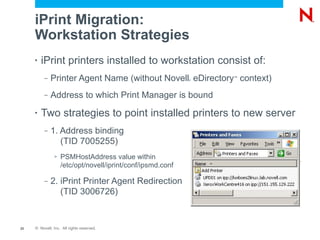
iPrint Migration:
     Workstation Strategies
     •   iPrint printers installed to workstation consist of:
          –   Printer Agent Name (without Novell eDirectory context)
                                                            ®
                                                                ™


          –   Address to which Print Manager is bound
     •   Two strategies to point installed printers to new server
          –   1. Address binding
                 (TID 7005255)
               >   PSMHostAddress value within
                   /etc/opt/novell/iprint/conf/ipsmd.conf

          –   2. iPrint Printer Agent Redirection
                 (TID 3006726)


23   © Novell, Inc. All rights reserved.
Question and Answer
Unpublished Work of Novell, Inc. All Rights Reserved.
This work is an unpublished work and contains confidential, proprietary, and trade secret information of Novell, Inc.
Access to this work is restricted to Novell employees who have a need to know to perform tasks within the scope
of their assignments. No part of this work may be practiced, performed, copied, distributed, revised, modified,
translated, abridged, condensed, expanded, collected, or adapted without the prior written consent of Novell, Inc.
Any use or exploitation of this work without authorization could subject the perpetrator to criminal and civil liability.


General Disclaimer
This document is not to be construed as a promise by any participating company to develop, deliver, or market a
product. It is not a commitment to deliver any material, code, or functionality, and should not be relied upon in
making purchasing decisions. Novell, Inc. makes no representations or warranties with respect to the contents
of this document, and specifically disclaims any express or implied warranties of merchantability or fitness for any
particular purpose. The development, release, and timing of features or functionality described for Novell products
remains at the sole discretion of Novell. Further, Novell, Inc. reserves the right to revise this document and to
make changes to its content, at any time, without obligation to notify any person or entity of such revisions or
changes. All Novell marks referenced in this presentation are trademarks or registered trademarks of Novell, Inc.
in the United States and other countries. All third-party trademarks are the property of their respective owners.

Novell iPrint: Advanced Features on Linux

  • 1.
    Novell iPrint: ® Advanced Features on Linux Ted Tronson Kyle Bradford iPrint Architect Technical Support Engineer ttronson@novell.com kwbradford@novell.com
  • 2.
    Agenda • New Features: – Windows 7 support – Printer Driver Profiles > Universal Print Driver Support – Auto Driver/Profile Update • Accounting • iPrint troubleshooting tool – iPrintInfo Tool • iPrint Mass Management • iPrint Migration 2 © Novell, Inc. All rights reserved.
  • 3.
  • 4.
    iPrint: Windows 7Support • Introduced in: – NetWare 65 SP8 (post patches) ® – Linux Open Enterprise Server 2 SP1 (post updates) – Linux Open Enterprise Server 2 SP2 • Updates required to: – iPrint Client – iPrint plug-in • Server code (RPM or NLM) • See TID 7004814 for detailed information 4 © Novell, Inc. All rights reserved.
  • 5.
  • 6.
    Printer Driver Profile(PDP) • Administrator can pre-configure print driver settings to be applied to end user iPrint printer installations. • Support for UPD and bi-directional print drivers – Introduced in Open Enterprise Server 2 SP2 • PDP data is stored in the print manager database file (psmdb.dat) 6 © Novell, Inc. All rights reserved.
  • 7.
    PDP – Howit works • Print Driver: – Is copied from the resdir to mod_ipp – Is download to the workstation using iManager – Is temporarily installed as a “hidden-printer” > In the scenario of UPD or bi-di print driver, the installed print driver communicates to the physical printer – Options are presented to the administrator to configure available driver settings and features. – Settings are saved in binary format to the Print Manager database file (psmdb.dat) 7 © Novell, Inc. All rights reserved.
  • 8.
    PDP – Howit works (continued...) Administrator can select a profile for any PA using the assigned print driver. Note: PDP creation requires administrator to run iManager from same Windows OS for which the driver is being configured. 8 © Novell, Inc. All rights reserved.
  • 9.
  • 10.
    Universal Print Driver(UPD) Support • What is a UPD? • What is a bi-directional print driver? • How does the iPrint Client work with UPD and bi-di driver types? • How do UPD and bi-di drivers affect Printer Driver Profiles? 10 © Novell, Inc. All rights reserved.
  • 11.
  • 12.
    Auto Driver Update • Push updated print drivers, with associated profile, to workstations. • When invoked, the printer is re-installed to the workstation. • Available with: – NetWare 6.5 SP8 with iprntnw65sp8b-2 updates ® – Open Enterprise Server 2 SP1 with post SP1 code (see TID 7002435) – Open Enterprise Server 2 SP2 • See TID 7002435 for additional information. 12 © Novell, Inc. All rights reserved.
  • 13.
  • 14.
    Accounting • Available through 3rd Party Vendors. – Equitrac – Papercut – Pcounter • Charge printing costs to users. • Compatible with Open Enterprise Server 2 SP1 and later. • Accounting vs iPrint Auditing – iPrint Auditing tracks who printed, how many pages, when, job name, which printer, and job size. 14 © Novell, Inc. All rights reserved.
  • 15.
  • 16.
    iPrint Information GatheringTool • Novell Cool Solution ® – Google Search for: iPrint Information Gathering Tool • Script creates an output file which includes: – Files laid down by each iPrint RPM – Ownership/permissions of all iPrint related files and directories – iPrint related configuration files – iPrint log files – LUM, LDAP, Novell eDirectory configuration relevant to iPrint. ™ • Useful for identifying iPrint configuration problems by comparing working and non-working iPrint servers. 16 © Novell, Inc. All rights reserved.
  • 17.
  • 18.
    iPrint Mass Management • Print Manager periodically writes its database information to an XML file. /var/opt/novell/iprint/[printmanager].[ou].[o].psm/padbtxt.xml • It is possible to import the XML data to a Print Manager database (psmdb.dat) using the --xml-import feature iprntman psm --xml-import ./customXML-input.xml • --xml-import will create new objects, add new attributes, modify existing attributes, and ignore data that already exists in the Print Manager Database file. The import will not remove data. 18 © Novell, Inc. All rights reserved.
  • 19.
  • 20.
    iPrint Migration: Procedure • iPrint data migrated includes – Printer objects, printer drivers, driver profiles, print managers, ACL's, banners and printer pools • Using the GUI – Select the active print managers on both the source and the target – Select all or a subset of printers to migrate • The printers can keep the same name and context in Novell eDirectory . The original printer agent objects in ® ™ eDirectory are renamed if selecting to migrate to the same context. 20 © Novell, Inc. All rights reserved.
  • 21.
    iPrint Migration: KeyPoints • TID 7004455 is the official iPrint migration best practices guide. • The iPrint migration tool (miggui): – requires iprntman authentication to succeed – creates duplicate printer objects (NetWare to Linux) ® – option to “migrate” objects to same container (rename _NW) – is a non-risk procedure if choosing 'Consolidate'. – creates /opt/novell/iprint/bin/psmimport.xml. – does not configure workstations to connect to the target print manager. 21 © Novell, Inc. All rights reserved.
  • 22.
    iPrint Migration: NetWarepreparation ® • iPrint Migration does not handle NetWare: – Port Handler Gateway – Public Access Printers – Windows 2000 printer drivers auto-matching Windows XP printer drivers (unless you obtain updated code from the channel) 22 © Novell, Inc. All rights reserved.
  • 23.
    iPrint Migration: Workstation Strategies • iPrint printers installed to workstation consist of: – Printer Agent Name (without Novell eDirectory context) ® ™ – Address to which Print Manager is bound • Two strategies to point installed printers to new server – 1. Address binding (TID 7005255) > PSMHostAddress value within /etc/opt/novell/iprint/conf/ipsmd.conf – 2. iPrint Printer Agent Redirection (TID 3006726) 23 © Novell, Inc. All rights reserved.
  • 24.
  • 26.
    Unpublished Work ofNovell, Inc. All Rights Reserved. This work is an unpublished work and contains confidential, proprietary, and trade secret information of Novell, Inc. Access to this work is restricted to Novell employees who have a need to know to perform tasks within the scope of their assignments. No part of this work may be practiced, performed, copied, distributed, revised, modified, translated, abridged, condensed, expanded, collected, or adapted without the prior written consent of Novell, Inc. Any use or exploitation of this work without authorization could subject the perpetrator to criminal and civil liability. General Disclaimer This document is not to be construed as a promise by any participating company to develop, deliver, or market a product. It is not a commitment to deliver any material, code, or functionality, and should not be relied upon in making purchasing decisions. Novell, Inc. makes no representations or warranties with respect to the contents of this document, and specifically disclaims any express or implied warranties of merchantability or fitness for any particular purpose. The development, release, and timing of features or functionality described for Novell products remains at the sole discretion of Novell. Further, Novell, Inc. reserves the right to revise this document and to make changes to its content, at any time, without obligation to notify any person or entity of such revisions or changes. All Novell marks referenced in this presentation are trademarks or registered trademarks of Novell, Inc. in the United States and other countries. All third-party trademarks are the property of their respective owners.