A Better Way to Print
Using the New Citrix Presentation
Server 4 Universal Printer Driver
Gary Barton
Sr. Software Engineer
Citrix Systems, Inc.
Scott Lane
Sales Engineer
Citrix Systems, Inc.
Dave Fiske
Citrix Architect
Eschelon Telecom, Inc.
2 © 2005 Citrix Systems, Inc.—All rights reserved.
Today’s Agenda
• Presentation Server 4 printing enhancements
– Reengineered printing subsystem
– Session Printers Policy rule
– Advanced Universal Printing
• Technical details
– UPD performance
– Printing subsystem customization
– Deploying and troubleshooting
• Customer case study
– Eschelon Telecom, Inc.
3 © 2005 Citrix Systems, Inc.—All rights reserved.
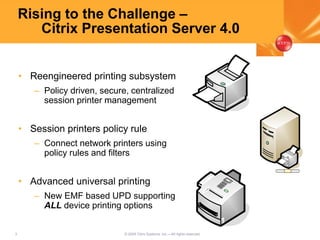
Rising to the Challenge –
Citrix Presentation Server 4.0
• Reengineered printing subsystem
– Policy driven, secure, centralized
session printer management
• Session printers policy rule
– Connect network printers using
policy rules and filters
• Advanced universal printing
– New EMF based UPD supporting
ALL device printing options
4 © 2005 Citrix Systems, Inc.—All rights reserved.
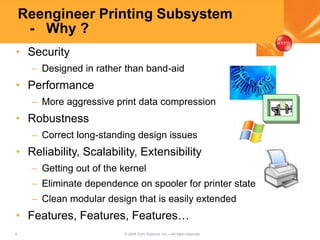
Reengineer Printing Subsystem
- Why ?
• Security
– Designed in rather than band-aid
• Performance
– More aggressive print data compression
• Robustness
– Correct long-standing design issues
• Reliability, Scalability, Extensibility
– Getting out of the kernel
– Eliminate dependence on spooler for printer state
– Clean modular design that is easily extended
• Features, Features, Features…
5 © 2005 Citrix Systems, Inc.—All rights reserved.
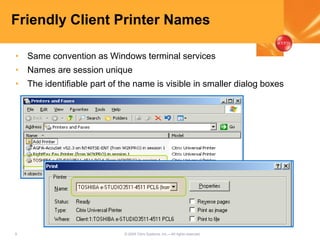
Friendly Client Printer Names
• Same convention as Windows terminal services
• Names are session unique
• The identifiable part of the name is visible in smaller dialog boxes
6 © 2005 Citrix Systems, Inc.—All rights reserved.
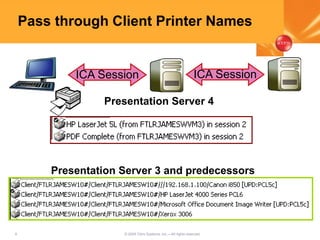
Pass through Client Printer Names
ICA Session ICA Session
Presentation Server 4
Presentation Server 3 and predecessors
7 © 2005 Citrix Systems, Inc.—All rights reserved.
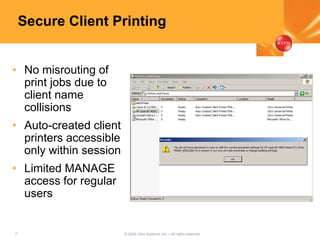
Secure Client Printing
• No misrouting of
print jobs due to
client name
collisions
• Auto-created client
printers accessible
only within session
• Limited MANAGE
access for regular
users
8 © 2005 Citrix Systems, Inc.—All rights reserved.
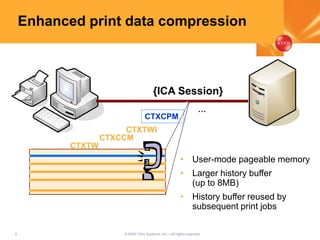
Enhanced print data compression
CTXCPM
CTXTWI
CTXCCM
CTXTW
…
{ICA Session}
• User-mode pageable memory
• Larger history buffer
(up to 8MB)
• History buffer reused by
subsequent print jobs
9 © 2005 Citrix Systems, Inc.—All rights reserved.
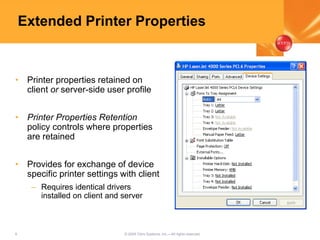
Extended Printer Properties
• Printer properties retained on
client or server-side user profile
• Printer Properties Retention
policy controls where properties
are retained
• Provides for exchange of device
specific printer settings with client
– Requires identical drivers
installed on client and server
10 © 2005 Citrix Systems, Inc.—All rights reserved.
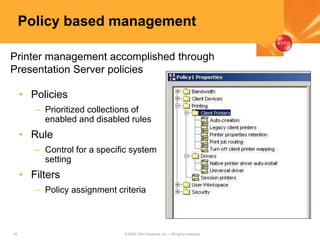
Policy based management
• Policies
– Prioritized collections of
enabled and disabled rules
• Rule
– Control for a specific system
setting
• Filters
– Policy assignment criteria
Printer management accomplished through
Presentation Server policies
11 © 2005 Citrix Systems, Inc.—All rights reserved.
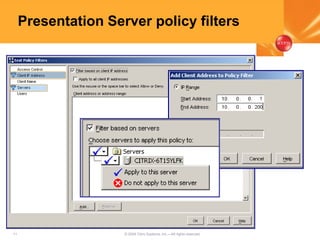
Presentation Server policy filters
12 © 2005 Citrix Systems, Inc.—All rights reserved.
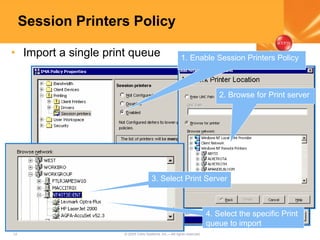
Session Printers Policy
• Import a single print queue
2. Browse for Print server
3. Select Print Server
4. Select the specific Print
queue to import
1. Enable Session Printers Policy
13 © 2005 Citrix Systems, Inc.—All rights reserved.
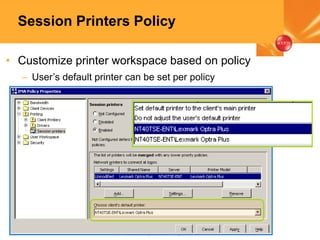
Session Printers Policy
• Customize printer workspace based on policy
– User’s default printer can be set per policy
Advanced Universal Printing
15 © 2005 Citrix Systems, Inc.—All rights reserved.
Driver management headaches
• Native Windows server drivers
– Availability
– Substituting older model native drivers
– Maintaining print driver mappings
• Vendor provided drivers
– Availability for Windows Server
– Terminal services compatibility
– Version change
– Replicating drivers throughout server farm
16 © 2005 Citrix Systems, Inc.—All rights reserved.
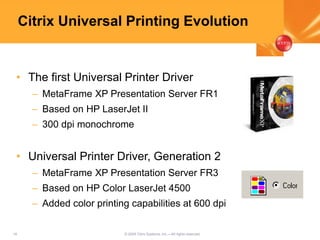
Citrix Universal Printing Evolution
• The first Universal Printer Driver
– MetaFrame XP Presentation Server FR1
– Based on HP LaserJet II
– 300 dpi monochrome
• Universal Printer Driver, Generation 2
– MetaFrame XP Presentation Server FR3
– Based on HP Color LaserJet 4500
– Added color printing capabilities at 600 dpi
17 © 2005 Citrix Systems, Inc.—All rights reserved.
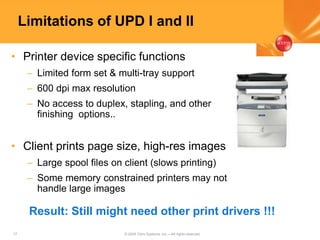
Limitations of UPD I and II
• Printer device specific functions
– Limited form set & multi-tray support
– 600 dpi max resolution
– No access to duplex, stapling, and other
finishing options..
• Client prints page size, high-res images
– Large spool files on client (slows printing)
– Some memory constrained printers may not
handle large images
Result: Still might need other print drivers !!!
18 © 2005 Citrix Systems, Inc.—All rights reserved.
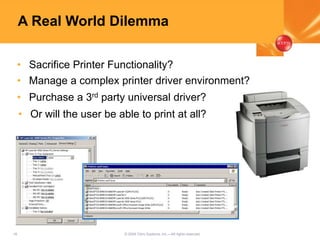
A Real World Dilemma
• Sacrifice Printer Functionality?
• Manage a complex printer driver environment?
• Purchase a 3rd party universal driver?
• Or will the user be able to print at all?
19 © 2005 Citrix Systems, Inc.—All rights reserved.
UPD v.3, Changing Your Strategy
• Ending headaches with “new printers”
• No more printer compatibility lists
• Eliminates the need to install standard drivers
– No more driver replication
– No more driver testing and certification
• Full printer functionality - any print device
• Full support for home users
20 © 2005 Citrix Systems, Inc.—All rights reserved.
Thinner, Faster, Better!
• Using Enhanced Metafile spool format
– Device independent
– No translation required on server
– Very efficient handling on client
• EMF UPD prints faster
– Prints two to four times faster
– Reduced overhead on both client and server
21 © 2005 Citrix Systems, Inc.—All rights reserved.
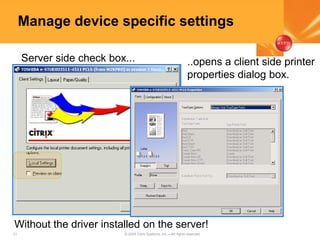
Manage device specific settings
Server side check box... ..opens a client side printer
properties dialog box.
Without the driver installed on the server!
22 © 2005 Citrix Systems, Inc.—All rights reserved.
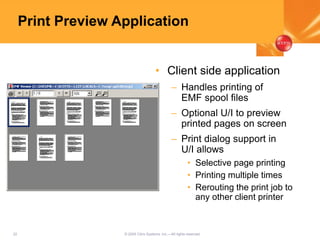
Print Preview Application
• Client side application
– Handles printing of
EMF spool files
– Optional U/I to preview
printed pages on screen
– Print dialog support in
U/I allows
• Selective page printing
• Printing multiple times
• Rerouting the print job to
any other client printer
23 © 2005 Citrix Systems, Inc.—All rights reserved.
Presentation Server 4 Printing
- Under the Hood
• In-depth
– UPD printing performance
– Print data compression
– Client printer security
• Tips & tricks
– Customizing print environment
– Retained and restored client printers
– Troubleshooting
24 © 2005 Citrix Systems, Inc.—All rights reserved.
In-Depth –
Advanced Universal Printing
• EMF – Enhanced MetaFile
– Windows native graphics metafile format
– A recording of graphics GDI (DDI) calls
• Windows EMF spool file format
– Job header and document settings
– EMF records for each page
– Embedded fonts
• Win32 network print provider also spools EMF
25 © 2005 Citrix Systems, Inc.—All rights reserved.
In Depth –
Universal printing architecture
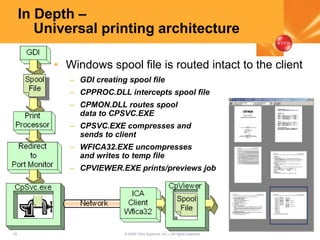
• Windows spool file is routed intact to the client
– GDI creating spool file
– CPPROC.DLL intercepts spool file
– CPMON.DLL routes spool
data to CPSVC.EXE
– CPSVC.EXE compresses and
sends to client
– WFICA32.EXE uncompresses
and writes to temp file
– CPVIEWER.EXE prints/previews job
26 © 2005 Citrix Systems, Inc.—All rights reserved.
0
100
200
300
400
500
600
Secs
DocA DocB DocC DocD
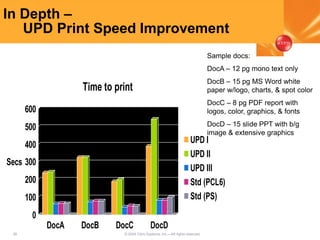
Time to print
UPD I
UPD II
UPD III
Std (PCL6)
Std (PS)
In Depth –
UPD Print Speed Improvement
Sample docs:
DocA – 12 pg mono text only
DocB – 15 pg MS Word white
paper w/logo, charts, & spot color
DocC – 8 pg PDF report with
logos, color, graphics, & fonts
DocD – 15 slide PPT with b/g
image & extensive graphics
27 © 2005 Citrix Systems, Inc.—All rights reserved.
In depth –
UPD Print Speed Improvement
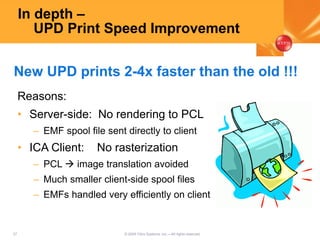
Reasons:
• Server-side: No rendering to PCL
– EMF spool file sent directly to client
• ICA Client: No rasterization
– PCL  image translation avoided
– Much smaller client-side spool files
– EMFs handled very efficiently on client
New UPD prints 2-4x faster than the old !!!
28 © 2005 Citrix Systems, Inc.—All rights reserved.
0
50
100
150
200
250
300
350
KB
Raw MPS3 CPS4 CPS4 #2
DocA
UPD1 (PCL4)
UPD2 (PCL5)
UPD3 (EMF)
PCL6
Postscript
0
1000
2000
3000
4000
5000
KB
Raw MPS3 CPS4 CPS4 #2
DocB
UPD1 (PCL4)
UPD2 (PCL5)
UPD3 (EMF)
PCL6
Postscript
0
5000
10000
15000
20000
25000
KB
Raw MPS3 CPS4 CPS4 #2
DocD
UPD1 (PCL4)
UPD2 (PCL5)
UPD3 (EMF)
PCL6
Postscript
In depth –
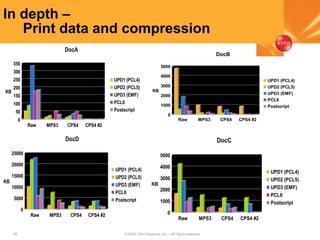
Print data and compression
0
1000
2000
3000
4000
5000
KB
Raw MPS3 CPS4 CPS4 #2
DocC
UPD1 (PCL4)
UPD2 (PCL5)
UPD3 (EMF)
PCL6
Postscript
29 © 2005 Citrix Systems, Inc.—All rights reserved.
In depth –
Client Printer Security
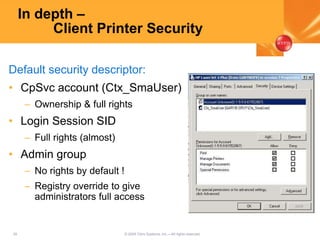
Default security descriptor:
• CpSvc account (Ctx_SmaUser)
– Ownership & full rights
• Login Session SID
– Full rights (almost)
• Admin group
– No rights by default !
– Registry override to give
administrators full access
30 © 2005 Citrix Systems, Inc.—All rights reserved.
Printing Customization –
Admin client printer permissions
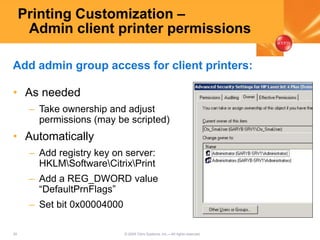
• As needed
– Take ownership and adjust
permissions (may be scripted)
• Automatically
– Add registry key on server:
HKLMSoftwareCitrixPrint
– Add a REG_DWORD value
“DefaultPrnFlags”
– Set bit 0x00004000
Add admin group access for client printers:
31 © 2005 Citrix Systems, Inc.—All rights reserved.
Printing Customization –
Overriding other defaults
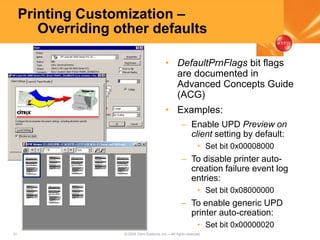
• DefaultPrnFlags bit flags
are documented in
Advanced Concepts Guide
(ACG)
• Examples:
– Enable UPD Preview on
client setting by default:
• Set bit 0x00008000
– To disable printer auto-
creation failure event log
entries:
• Set bit 0x08000000
– To enable generic UPD
printer auto-creation:
• Set bit 0x00000020
32 © 2005 Citrix Systems, Inc.—All rights reserved.
Printing Customization –
Generic UPD printer auto-creation
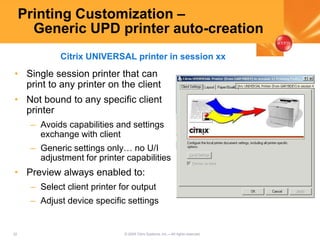
• Single session printer that can
print to any printer on the client
• Not bound to any specific client
printer
– Avoids capabilities and settings
exchange with client
– Generic settings only… no U/I
adjustment for printer capabilities
• Preview always enabled to:
– Select client printer for output
– Adjust device specific settings
Citrix UNIVERSAL printer in session xx
33 © 2005 Citrix Systems, Inc.—All rights reserved.
Printing Customization –
Retained client printers
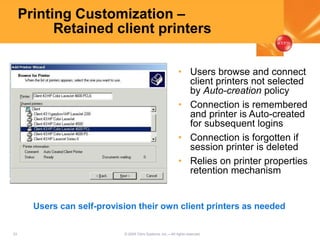
• Users browse and connect
client printers not selected
by Auto-creation policy
• Connection is remembered
and printer is Auto-created
for subsequent logins
• Connection is forgotten if
session printer is deleted
• Relies on printer properties
retention mechanism
Users can self-provision their own client printers as needed
34 © 2005 Citrix Systems, Inc.—All rights reserved.
Printing Customization –
Restored client printers
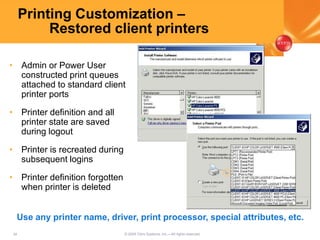
• Admin or Power User
constructed print queues
attached to standard client
printer ports
• Printer definition and all
printer state are saved
during logout
• Printer is recreated during
subsequent logins
• Printer definition forgotten
when printer is deleted
Use any printer name, driver, print processor, special attributes, etc.
35 © 2005 Citrix Systems, Inc.—All rights reserved.
Tips and Tricks –
Limit printer creations
• Unnecessary printer creations hurt scalability and
may limit user density
• Consider turning down Auto-creation policy to
Default printer only or None plus
– Deploy generic UPD printer -or-
– Allow users to provision client printers as needed with
retained printers feature
36 © 2005 Citrix Systems, Inc.—All rights reserved.
Tips And Tricks –
Known issues and Hotfixes
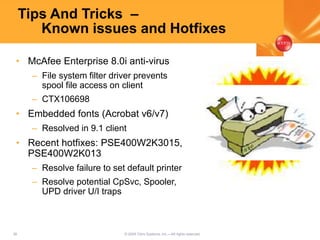
• McAfee Enterprise 8.0i anti-virus
– File system filter driver prevents
spool file access on client
– CTX106698
• Embedded fonts (Acrobat v6/v7)
– Resolved in 9.1 client
• Recent hotfixes: PSE400W2K3015,
PSE400W2K013
– Resolve failure to set default printer
– Resolve potential CpSvc, Spooler,
UPD driver U/I traps
37 © 2005 Citrix Systems, Inc.—All rights reserved.
Tips and Tricks –
Troubleshooting Auto-creation
• CTX107137- Troubleshooting Printing
Problems In Presentation Server 4.0
• Client version:
– Avoid Tech Preview, EAP clients
– UPD III  must use 9.x client
• Citrix Print Manager service running ?
– CTX106661
• Ctx_SmaUser account have correct
permissions?
– CTX106629, CTX106393, CTX106683
38 © 2005 Citrix Systems, Inc.—All rights reserved.
Tips and Tricks –
Troubleshooting Auto-creation
• Examine Auto-creation failed events in the
event log
• Verify required drivers are installed and
– not excluded by driver compatibility list
– not remapped (client printers only)
• Try manual printer connection within session.
If success, examine policies
• When all else fails, use CDF to trace printer
creation process. Trace components:
– MF_Service_Cpsvc
– MF_DLL_Cpmon
– MF_DLL_Cpprov
Eschelon Telecom Inc. -
Advanced Universal
Printing Rollout
Dave Fiske
Citrix Architect
Eschelon Telecom, Inc.
40 © 2005 Citrix Systems, Inc.—All rights reserved.
Eschelon Telecom
Who are we and why Citrix?
• Telecommunications provider to 56,000+ customers
• Coverage in 8 states
• 1200 Employees
• Centralized IT Dept
http://www.eschelon.com
NASDAQ: ESCH
41 © 2005 Citrix Systems, Inc.—All rights reserved.
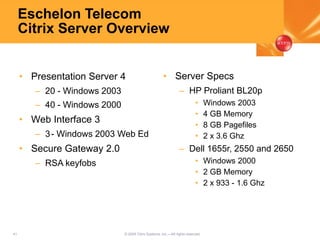
Eschelon Telecom
Citrix Server Overview
• Presentation Server 4
– 20 - Windows 2003
– 40 - Windows 2000
• Web Interface 3
– 3- Windows 2003 Web Ed
• Secure Gateway 2.0
– RSA keyfobs
• Server Specs
– HP Proliant BL20p
• Windows 2003
• 4 GB Memory
• 8 GB Pagefiles
• 2 x 3.6 Ghz
– Dell 1655r, 2550 and 2650
• Windows 2000
• 2 GB Memory
• 2 x 933 - 1.6 Ghz
42 © 2005 Citrix Systems, Inc.—All rights reserved.
Eschelon Telecom
Citrix Client Overview
• Client Specs
– Windows XP and 2000
Pro
– Mac OS X
– Wyse CE WBT Winterms
– ICA 6.x-9.x clients
– Internet Kiosks
– Java 9.x clients for
failback only
– Who knows what other
OS’s
• Printer Specs
– HP
– Canon
– Epson
– Xerox
– Dell
– Okidata
– Lexmark
– Who knows what else!!
43 © 2005 Citrix Systems, Inc.—All rights reserved.
Eschelon Telecom
Citrix Application Overview
• Published Applications
– 300+ Published Applications
• Nortel Access Care
• Metasolv TBS
• Onyx Employee Portal
• Microsoft Office 97/2000/2003
• Web Apps (IE 5.5, 6 and Netscape 4.72)
– 750+ Concurrent Users
– 2100+ Concurrent Sessions
• Published Desktops
44 © 2005 Citrix Systems, Inc.—All rights reserved.
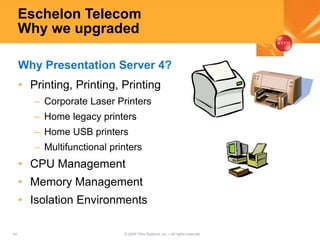
Eschelon Telecom
Why we upgraded
• Printing, Printing, Printing
– Corporate Laser Printers
– Home legacy printers
– Home USB printers
– Multifunctional printers
• CPU Management
• Memory Management
• Isolation Environments
Why Presentation Server 4?
45 © 2005 Citrix Systems, Inc.—All rights reserved.
Eschelon Telecom
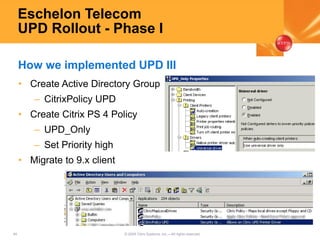
UPD Rollout - Phase I
• Create Active Directory Group
– CitrixPolicy UPD
• Create Citrix PS 4 Policy
– UPD_Only
– Set Priority high
• Migrate to 9.x client
How we implemented UPD III
46 © 2005 Citrix Systems, Inc.—All rights reserved.
Eschelon Telecom
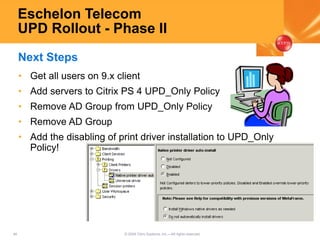
UPD Rollout - Phase II
• Get all users on 9.x client
• Add servers to Citrix PS 4 UPD_Only Policy
• Remove AD Group from UPD_Only Policy
• Remove AD Group
• Add the disabling of print driver installation to UPD_Only
Policy!
Next Steps
47 © 2005 Citrix Systems, Inc.—All rights reserved.
Eschelon Telecom
UPD Benefits
• Helpdesk
• Citrix Administrators
• End Users
• Our Customers
Who benefits from UPD technology
48 © 2005 Citrix Systems, Inc.—All rights reserved.
Eschelon Telecom Inc.
Cost Analysis
• As with any project cost associated with upgrade
– What are the costs?
• Subscription Advantage
• IT Time plus end user testing time
– How did we justify spending the time since MPS3 was
working just fine?
• 96 field technicians x 1 hr/day x hourly rate = a lot of
money saved by the company each day
• Potentially serving more customers per day
• Techs can create a more logical route thus eliminating
excess road time
49 © 2005 Citrix Systems, Inc.—All rights reserved.
Eschelon Telecom
Issues with PS4
• One application won’t print with UPD
– Don’t allow UPD on the servers that host that application
• If something is broken it must be the upgrade right
and not a coincidence?
– Citrix Print Manager Service randomly hanging
• Figure out what printer is hanging this?
• Have to kill process and restart service
• Wasn’t a bad print driver but bad network segment to a
mapped printer
• Users couldn’t print to it from their clients either
50 © 2005 Citrix Systems, Inc.—All rights reserved.
Eschelon Telecom
End User Feedback
• Test users loved how fast printing was and that it worked
• Easy to install for the Home users
• One tech said he’d never give up the new printer ability
51 © 2005 Citrix Systems, Inc.—All rights reserved.
Upgrade Now to Citrix
Presentation Server 4.0!
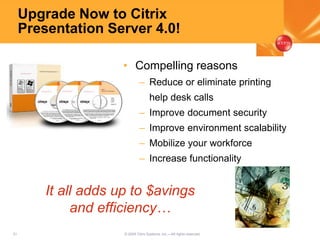
• Compelling reasons
– Reduce or eliminate printing
help desk calls
– Improve document security
– Improve environment scalability
– Mobilize your workforce
– Increase functionality
It all adds up to $avings
and efficiency…
52 © 2005 Citrix Systems, Inc.—All rights reserved.
Technology Lab
• Learn first-hand how Citrix leads the
industry in access products that
deliver the best access experience.
• Located in Ballroom I
• Hours
– Monday, October 10
• 12:00 PM - 3:00 PM
– Tuesday, October 11
• 10:00 AM - 4:00 PM
• “Meet the Architects”
– Monday & Tuesday
• 1:00 PM – 3:00PM
53 © 2005 Citrix Systems, Inc.—All rights reserved.
Reminders
• Related breakout sessions:
– 2103: Upgrading to Citrix Presentation Server 4.0
– 2117: Control Connection Settings with Citrix
Presentation Server 4.0 Policies
• Session surveys are available online at
www.citrixiforum.com Tuesday, October 11
(please provide feedback)
• Breakout session handouts are located at the
Breakers Registration Desk South
54 © 2005 Citrix Systems, Inc.—All rights reserved.
2123.a better waytoprint.universal print

2123.a better waytoprint.universal print

  • 1.
    A Better Wayto Print Using the New Citrix Presentation Server 4 Universal Printer Driver Gary Barton Sr. Software Engineer Citrix Systems, Inc. Scott Lane Sales Engineer Citrix Systems, Inc. Dave Fiske Citrix Architect Eschelon Telecom, Inc.
  • 2.
    2 © 2005Citrix Systems, Inc.—All rights reserved. Today’s Agenda • Presentation Server 4 printing enhancements – Reengineered printing subsystem – Session Printers Policy rule – Advanced Universal Printing • Technical details – UPD performance – Printing subsystem customization – Deploying and troubleshooting • Customer case study – Eschelon Telecom, Inc.
  • 3.
    3 © 2005Citrix Systems, Inc.—All rights reserved. Rising to the Challenge – Citrix Presentation Server 4.0 • Reengineered printing subsystem – Policy driven, secure, centralized session printer management • Session printers policy rule – Connect network printers using policy rules and filters • Advanced universal printing – New EMF based UPD supporting ALL device printing options
  • 4.
    4 © 2005Citrix Systems, Inc.—All rights reserved. Reengineer Printing Subsystem - Why ? • Security – Designed in rather than band-aid • Performance – More aggressive print data compression • Robustness – Correct long-standing design issues • Reliability, Scalability, Extensibility – Getting out of the kernel – Eliminate dependence on spooler for printer state – Clean modular design that is easily extended • Features, Features, Features…
  • 5.
    5 © 2005Citrix Systems, Inc.—All rights reserved. Friendly Client Printer Names • Same convention as Windows terminal services • Names are session unique • The identifiable part of the name is visible in smaller dialog boxes
  • 6.
    6 © 2005Citrix Systems, Inc.—All rights reserved. Pass through Client Printer Names ICA Session ICA Session Presentation Server 4 Presentation Server 3 and predecessors
  • 7.
    7 © 2005Citrix Systems, Inc.—All rights reserved. Secure Client Printing • No misrouting of print jobs due to client name collisions • Auto-created client printers accessible only within session • Limited MANAGE access for regular users
  • 8.
    8 © 2005Citrix Systems, Inc.—All rights reserved. Enhanced print data compression CTXCPM CTXTWI CTXCCM CTXTW … {ICA Session} • User-mode pageable memory • Larger history buffer (up to 8MB) • History buffer reused by subsequent print jobs
  • 9.
    9 © 2005Citrix Systems, Inc.—All rights reserved. Extended Printer Properties • Printer properties retained on client or server-side user profile • Printer Properties Retention policy controls where properties are retained • Provides for exchange of device specific printer settings with client – Requires identical drivers installed on client and server
  • 10.
    10 © 2005Citrix Systems, Inc.—All rights reserved. Policy based management • Policies – Prioritized collections of enabled and disabled rules • Rule – Control for a specific system setting • Filters – Policy assignment criteria Printer management accomplished through Presentation Server policies
  • 11.
    11 © 2005Citrix Systems, Inc.—All rights reserved. Presentation Server policy filters
  • 12.
    12 © 2005Citrix Systems, Inc.—All rights reserved. Session Printers Policy • Import a single print queue 2. Browse for Print server 3. Select Print Server 4. Select the specific Print queue to import 1. Enable Session Printers Policy
  • 13.
    13 © 2005Citrix Systems, Inc.—All rights reserved. Session Printers Policy • Customize printer workspace based on policy – User’s default printer can be set per policy
  • 14.
  • 15.
    15 © 2005Citrix Systems, Inc.—All rights reserved. Driver management headaches • Native Windows server drivers – Availability – Substituting older model native drivers – Maintaining print driver mappings • Vendor provided drivers – Availability for Windows Server – Terminal services compatibility – Version change – Replicating drivers throughout server farm
  • 16.
    16 © 2005Citrix Systems, Inc.—All rights reserved. Citrix Universal Printing Evolution • The first Universal Printer Driver – MetaFrame XP Presentation Server FR1 – Based on HP LaserJet II – 300 dpi monochrome • Universal Printer Driver, Generation 2 – MetaFrame XP Presentation Server FR3 – Based on HP Color LaserJet 4500 – Added color printing capabilities at 600 dpi
  • 17.
    17 © 2005Citrix Systems, Inc.—All rights reserved. Limitations of UPD I and II • Printer device specific functions – Limited form set & multi-tray support – 600 dpi max resolution – No access to duplex, stapling, and other finishing options.. • Client prints page size, high-res images – Large spool files on client (slows printing) – Some memory constrained printers may not handle large images Result: Still might need other print drivers !!!
  • 18.
    18 © 2005Citrix Systems, Inc.—All rights reserved. A Real World Dilemma • Sacrifice Printer Functionality? • Manage a complex printer driver environment? • Purchase a 3rd party universal driver? • Or will the user be able to print at all?
  • 19.
    19 © 2005Citrix Systems, Inc.—All rights reserved. UPD v.3, Changing Your Strategy • Ending headaches with “new printers” • No more printer compatibility lists • Eliminates the need to install standard drivers – No more driver replication – No more driver testing and certification • Full printer functionality - any print device • Full support for home users
  • 20.
    20 © 2005Citrix Systems, Inc.—All rights reserved. Thinner, Faster, Better! • Using Enhanced Metafile spool format – Device independent – No translation required on server – Very efficient handling on client • EMF UPD prints faster – Prints two to four times faster – Reduced overhead on both client and server
  • 21.
    21 © 2005Citrix Systems, Inc.—All rights reserved. Manage device specific settings Server side check box... ..opens a client side printer properties dialog box. Without the driver installed on the server!
  • 22.
    22 © 2005Citrix Systems, Inc.—All rights reserved. Print Preview Application • Client side application – Handles printing of EMF spool files – Optional U/I to preview printed pages on screen – Print dialog support in U/I allows • Selective page printing • Printing multiple times • Rerouting the print job to any other client printer
  • 23.
    23 © 2005Citrix Systems, Inc.—All rights reserved. Presentation Server 4 Printing - Under the Hood • In-depth – UPD printing performance – Print data compression – Client printer security • Tips & tricks – Customizing print environment – Retained and restored client printers – Troubleshooting
  • 24.
    24 © 2005Citrix Systems, Inc.—All rights reserved. In-Depth – Advanced Universal Printing • EMF – Enhanced MetaFile – Windows native graphics metafile format – A recording of graphics GDI (DDI) calls • Windows EMF spool file format – Job header and document settings – EMF records for each page – Embedded fonts • Win32 network print provider also spools EMF
  • 25.
    25 © 2005Citrix Systems, Inc.—All rights reserved. In Depth – Universal printing architecture • Windows spool file is routed intact to the client – GDI creating spool file – CPPROC.DLL intercepts spool file – CPMON.DLL routes spool data to CPSVC.EXE – CPSVC.EXE compresses and sends to client – WFICA32.EXE uncompresses and writes to temp file – CPVIEWER.EXE prints/previews job
  • 26.
    26 © 2005Citrix Systems, Inc.—All rights reserved. 0 100 200 300 400 500 600 Secs DocA DocB DocC DocD Time to print UPD I UPD II UPD III Std (PCL6) Std (PS) In Depth – UPD Print Speed Improvement Sample docs: DocA – 12 pg mono text only DocB – 15 pg MS Word white paper w/logo, charts, & spot color DocC – 8 pg PDF report with logos, color, graphics, & fonts DocD – 15 slide PPT with b/g image & extensive graphics
  • 27.
    27 © 2005Citrix Systems, Inc.—All rights reserved. In depth – UPD Print Speed Improvement Reasons: • Server-side: No rendering to PCL – EMF spool file sent directly to client • ICA Client: No rasterization – PCL  image translation avoided – Much smaller client-side spool files – EMFs handled very efficiently on client New UPD prints 2-4x faster than the old !!!
  • 28.
    28 © 2005Citrix Systems, Inc.—All rights reserved. 0 50 100 150 200 250 300 350 KB Raw MPS3 CPS4 CPS4 #2 DocA UPD1 (PCL4) UPD2 (PCL5) UPD3 (EMF) PCL6 Postscript 0 1000 2000 3000 4000 5000 KB Raw MPS3 CPS4 CPS4 #2 DocB UPD1 (PCL4) UPD2 (PCL5) UPD3 (EMF) PCL6 Postscript 0 5000 10000 15000 20000 25000 KB Raw MPS3 CPS4 CPS4 #2 DocD UPD1 (PCL4) UPD2 (PCL5) UPD3 (EMF) PCL6 Postscript In depth – Print data and compression 0 1000 2000 3000 4000 5000 KB Raw MPS3 CPS4 CPS4 #2 DocC UPD1 (PCL4) UPD2 (PCL5) UPD3 (EMF) PCL6 Postscript
  • 29.
    29 © 2005Citrix Systems, Inc.—All rights reserved. In depth – Client Printer Security Default security descriptor: • CpSvc account (Ctx_SmaUser) – Ownership & full rights • Login Session SID – Full rights (almost) • Admin group – No rights by default ! – Registry override to give administrators full access
  • 30.
    30 © 2005Citrix Systems, Inc.—All rights reserved. Printing Customization – Admin client printer permissions • As needed – Take ownership and adjust permissions (may be scripted) • Automatically – Add registry key on server: HKLMSoftwareCitrixPrint – Add a REG_DWORD value “DefaultPrnFlags” – Set bit 0x00004000 Add admin group access for client printers:
  • 31.
    31 © 2005Citrix Systems, Inc.—All rights reserved. Printing Customization – Overriding other defaults • DefaultPrnFlags bit flags are documented in Advanced Concepts Guide (ACG) • Examples: – Enable UPD Preview on client setting by default: • Set bit 0x00008000 – To disable printer auto- creation failure event log entries: • Set bit 0x08000000 – To enable generic UPD printer auto-creation: • Set bit 0x00000020
  • 32.
    32 © 2005Citrix Systems, Inc.—All rights reserved. Printing Customization – Generic UPD printer auto-creation • Single session printer that can print to any printer on the client • Not bound to any specific client printer – Avoids capabilities and settings exchange with client – Generic settings only… no U/I adjustment for printer capabilities • Preview always enabled to: – Select client printer for output – Adjust device specific settings Citrix UNIVERSAL printer in session xx
  • 33.
    33 © 2005Citrix Systems, Inc.—All rights reserved. Printing Customization – Retained client printers • Users browse and connect client printers not selected by Auto-creation policy • Connection is remembered and printer is Auto-created for subsequent logins • Connection is forgotten if session printer is deleted • Relies on printer properties retention mechanism Users can self-provision their own client printers as needed
  • 34.
    34 © 2005Citrix Systems, Inc.—All rights reserved. Printing Customization – Restored client printers • Admin or Power User constructed print queues attached to standard client printer ports • Printer definition and all printer state are saved during logout • Printer is recreated during subsequent logins • Printer definition forgotten when printer is deleted Use any printer name, driver, print processor, special attributes, etc.
  • 35.
    35 © 2005Citrix Systems, Inc.—All rights reserved. Tips and Tricks – Limit printer creations • Unnecessary printer creations hurt scalability and may limit user density • Consider turning down Auto-creation policy to Default printer only or None plus – Deploy generic UPD printer -or- – Allow users to provision client printers as needed with retained printers feature
  • 36.
    36 © 2005Citrix Systems, Inc.—All rights reserved. Tips And Tricks – Known issues and Hotfixes • McAfee Enterprise 8.0i anti-virus – File system filter driver prevents spool file access on client – CTX106698 • Embedded fonts (Acrobat v6/v7) – Resolved in 9.1 client • Recent hotfixes: PSE400W2K3015, PSE400W2K013 – Resolve failure to set default printer – Resolve potential CpSvc, Spooler, UPD driver U/I traps
  • 37.
    37 © 2005Citrix Systems, Inc.—All rights reserved. Tips and Tricks – Troubleshooting Auto-creation • CTX107137- Troubleshooting Printing Problems In Presentation Server 4.0 • Client version: – Avoid Tech Preview, EAP clients – UPD III  must use 9.x client • Citrix Print Manager service running ? – CTX106661 • Ctx_SmaUser account have correct permissions? – CTX106629, CTX106393, CTX106683
  • 38.
    38 © 2005Citrix Systems, Inc.—All rights reserved. Tips and Tricks – Troubleshooting Auto-creation • Examine Auto-creation failed events in the event log • Verify required drivers are installed and – not excluded by driver compatibility list – not remapped (client printers only) • Try manual printer connection within session. If success, examine policies • When all else fails, use CDF to trace printer creation process. Trace components: – MF_Service_Cpsvc – MF_DLL_Cpmon – MF_DLL_Cpprov
  • 39.
    Eschelon Telecom Inc.- Advanced Universal Printing Rollout Dave Fiske Citrix Architect Eschelon Telecom, Inc.
  • 40.
    40 © 2005Citrix Systems, Inc.—All rights reserved. Eschelon Telecom Who are we and why Citrix? • Telecommunications provider to 56,000+ customers • Coverage in 8 states • 1200 Employees • Centralized IT Dept http://www.eschelon.com NASDAQ: ESCH
  • 41.
    41 © 2005Citrix Systems, Inc.—All rights reserved. Eschelon Telecom Citrix Server Overview • Presentation Server 4 – 20 - Windows 2003 – 40 - Windows 2000 • Web Interface 3 – 3- Windows 2003 Web Ed • Secure Gateway 2.0 – RSA keyfobs • Server Specs – HP Proliant BL20p • Windows 2003 • 4 GB Memory • 8 GB Pagefiles • 2 x 3.6 Ghz – Dell 1655r, 2550 and 2650 • Windows 2000 • 2 GB Memory • 2 x 933 - 1.6 Ghz
  • 42.
    42 © 2005Citrix Systems, Inc.—All rights reserved. Eschelon Telecom Citrix Client Overview • Client Specs – Windows XP and 2000 Pro – Mac OS X – Wyse CE WBT Winterms – ICA 6.x-9.x clients – Internet Kiosks – Java 9.x clients for failback only – Who knows what other OS’s • Printer Specs – HP – Canon – Epson – Xerox – Dell – Okidata – Lexmark – Who knows what else!!
  • 43.
    43 © 2005Citrix Systems, Inc.—All rights reserved. Eschelon Telecom Citrix Application Overview • Published Applications – 300+ Published Applications • Nortel Access Care • Metasolv TBS • Onyx Employee Portal • Microsoft Office 97/2000/2003 • Web Apps (IE 5.5, 6 and Netscape 4.72) – 750+ Concurrent Users – 2100+ Concurrent Sessions • Published Desktops
  • 44.
    44 © 2005Citrix Systems, Inc.—All rights reserved. Eschelon Telecom Why we upgraded • Printing, Printing, Printing – Corporate Laser Printers – Home legacy printers – Home USB printers – Multifunctional printers • CPU Management • Memory Management • Isolation Environments Why Presentation Server 4?
  • 45.
    45 © 2005Citrix Systems, Inc.—All rights reserved. Eschelon Telecom UPD Rollout - Phase I • Create Active Directory Group – CitrixPolicy UPD • Create Citrix PS 4 Policy – UPD_Only – Set Priority high • Migrate to 9.x client How we implemented UPD III
  • 46.
    46 © 2005Citrix Systems, Inc.—All rights reserved. Eschelon Telecom UPD Rollout - Phase II • Get all users on 9.x client • Add servers to Citrix PS 4 UPD_Only Policy • Remove AD Group from UPD_Only Policy • Remove AD Group • Add the disabling of print driver installation to UPD_Only Policy! Next Steps
  • 47.
    47 © 2005Citrix Systems, Inc.—All rights reserved. Eschelon Telecom UPD Benefits • Helpdesk • Citrix Administrators • End Users • Our Customers Who benefits from UPD technology
  • 48.
    48 © 2005Citrix Systems, Inc.—All rights reserved. Eschelon Telecom Inc. Cost Analysis • As with any project cost associated with upgrade – What are the costs? • Subscription Advantage • IT Time plus end user testing time – How did we justify spending the time since MPS3 was working just fine? • 96 field technicians x 1 hr/day x hourly rate = a lot of money saved by the company each day • Potentially serving more customers per day • Techs can create a more logical route thus eliminating excess road time
  • 49.
    49 © 2005Citrix Systems, Inc.—All rights reserved. Eschelon Telecom Issues with PS4 • One application won’t print with UPD – Don’t allow UPD on the servers that host that application • If something is broken it must be the upgrade right and not a coincidence? – Citrix Print Manager Service randomly hanging • Figure out what printer is hanging this? • Have to kill process and restart service • Wasn’t a bad print driver but bad network segment to a mapped printer • Users couldn’t print to it from their clients either
  • 50.
    50 © 2005Citrix Systems, Inc.—All rights reserved. Eschelon Telecom End User Feedback • Test users loved how fast printing was and that it worked • Easy to install for the Home users • One tech said he’d never give up the new printer ability
  • 51.
    51 © 2005Citrix Systems, Inc.—All rights reserved. Upgrade Now to Citrix Presentation Server 4.0! • Compelling reasons – Reduce or eliminate printing help desk calls – Improve document security – Improve environment scalability – Mobilize your workforce – Increase functionality It all adds up to $avings and efficiency…
  • 52.
    52 © 2005Citrix Systems, Inc.—All rights reserved. Technology Lab • Learn first-hand how Citrix leads the industry in access products that deliver the best access experience. • Located in Ballroom I • Hours – Monday, October 10 • 12:00 PM - 3:00 PM – Tuesday, October 11 • 10:00 AM - 4:00 PM • “Meet the Architects” – Monday & Tuesday • 1:00 PM – 3:00PM
  • 53.
    53 © 2005Citrix Systems, Inc.—All rights reserved. Reminders • Related breakout sessions: – 2103: Upgrading to Citrix Presentation Server 4.0 – 2117: Control Connection Settings with Citrix Presentation Server 4.0 Policies • Session surveys are available online at www.citrixiforum.com Tuesday, October 11 (please provide feedback) • Breakout session handouts are located at the Breakers Registration Desk South
  • 54.
    54 © 2005Citrix Systems, Inc.—All rights reserved.

Editor's Notes

  • #2 Insert Version Number Here
  • #15 Insert Version Number Here
  • #19 Insert Version Number Here
  • #20 Insert Version Number Here
  • #40 Insert Version Number Here
  • #42 Insert Version Number Here
  • #43 Insert Version Number Here
  • #46 Insert Version Number Here
  • #47 Insert Version Number Here
  • #48 Insert Version Number Here