Scanning With NMAP


Spenser Reinhardt
mplsCTFgames.org
2­10­11
What is NMAP?
  Nmap or Network Mapper, is an open source
    utility designed to quickly scan and identify
    devices across networks. It can be used to
   simply locate machines or delve deeper into
    individual ports and services of each one.
How Does NMAP Work?

Through the use of raw sockets NMAP is able to identify:

    Hosts on a network
    Services enabled
    Likely operating systems
    Possible firewalls and IDSIPS

With raw sockets, NMAP is able to craft many different types of IP packets
that allow for enumeration of hosts and elicitation of information that would
not otherwise be available. These abilities is gained due to the way sockets
are able to create different packets and apply various flags to each as
needed. These sometimes strange or disallowed packets, are what cause an
application or machine to respond when otherwise it may not.
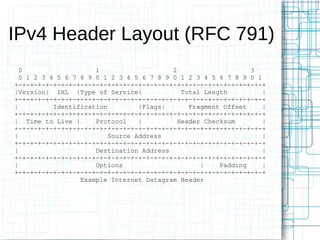
IPv4 Header Layout (RFC 791)
  0                   1                   2                    3
  0 1 2 3 4 5 6 7 8 9 0 1 2 3 4 5 6 7 8 9 0 1 2 3 4 5 6 7 8 9 0 1
+-+-+-+-+-+-+-+-+-+-+-+-+-+-+-+-+-+-+-+-+-+-+-+-+-+-+-+-+-+-+-+-+
|Version| IHL |Type of Service|              Total Length         |
+-+-+-+-+-+-+-+-+-+-+-+-+-+-+-+-+-+-+-+-+-+-+-+-+-+-+-+-+-+-+-+-+
|          Identification         |Flags|      Fragment Offset    |
+-+-+-+-+-+-+-+-+-+-+-+-+-+-+-+-+-+-+-+-+-+-+-+-+-+-+-+-+-+-+-+-+
| Time to Live |      Protocol    |         Header Checksum       |
+-+-+-+-+-+-+-+-+-+-+-+-+-+-+-+-+-+-+-+-+-+-+-+-+-+-+-+-+-+-+-+-+
|                         Source Address                          |
+-+-+-+-+-+-+-+-+-+-+-+-+-+-+-+-+-+-+-+-+-+-+-+-+-+-+-+-+-+-+-+-+
|                     Destination Address                         |
+-+-+-+-+-+-+-+-+-+-+-+-+-+-+-+-+-+-+-+-+-+-+-+-+-+-+-+-+-+-+-+-+
|                     Options                     |    Padding    |
+-+-+-+-+-+-+-+-+-+-+-+-+-+-+-+-+-+-+-+-+-+-+-+-+-+-+-+-+-+-+-+-+
                  Example Internet Datagram Header
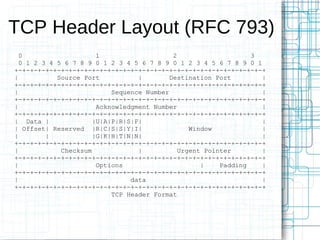
TCP Header Layout (RFC 793)
  0                    1                    2                    3
  0 1 2 3 4 5 6 7 8 9 0 1 2 3 4 5 6 7 8 9 0 1 2 3 4 5 6 7 8 9 0 1
+-+-+-+-+-+-+-+-+-+-+-+-+-+-+-+-+-+-+-+-+-+-+-+-+-+-+-+-+-+-+-+-+
|           Source Port           |        Destination Port        |
+-+-+-+-+-+-+-+-+-+-+-+-+-+-+-+-+-+-+-+-+-+-+-+-+-+-+-+-+-+-+-+-+
|                          Sequence Number                         |
+-+-+-+-+-+-+-+-+-+-+-+-+-+-+-+-+-+-+-+-+-+-+-+-+-+-+-+-+-+-+-+-+
|                      Acknowledgment Number                       |
+-+-+-+-+-+-+-+-+-+-+-+-+-+-+-+-+-+-+-+-+-+-+-+-+-+-+-+-+-+-+-+-+
| Data |              |U|A|P|R|S|F|                                |
| Offset| Reserved |R|C|S|S|Y|I|                 Window            |
|        |            |G|K|H|T|N|N|                                |
+-+-+-+-+-+-+-+-+-+-+-+-+-+-+-+-+-+-+-+-+-+-+-+-+-+-+-+-+-+-+-+-+
|            Checksum             |           Urgent Pointer       |
+-+-+-+-+-+-+-+-+-+-+-+-+-+-+-+-+-+-+-+-+-+-+-+-+-+-+-+-+-+-+-+-+
|                      Options                      |    Padding   |
+-+-+-+-+-+-+-+-+-+-+-+-+-+-+-+-+-+-+-+-+-+-+-+-+-+-+-+-+-+-+-+-+
|                               data                               |
+-+-+-+-+-+-+-+-+-+-+-+-+-+-+-+-+-+-+-+-+-+-+-+-+-+-+-+-+-+-+-+-+
                           TCP Header Format
Scan Types
-sS – TCP SYN
-sT – TCP Connect
-sA – TCP ACK
-sW – TCP Window
-sM – TCP Maimon
-sU – UDP Scan
-sN – TCP Null (No Flags)
-sF – TCP FIN (Just FIN Flag)
-sX – TCP Xmas (All Flags)
-sY – SCTP INIT
-sZ – SCTP COOKIE-ECHO
-sO – IP protocol scan
-b <FTP relay host> - FTP bounce scan
--scanflags <flags> - Customize TCP flags
-sI <zombie host[:probeport]> - Idle scan
Output Options
Output Types
-oN <file> – Normal
-oX <file> – XML
-oS <file> – s|<rIpt kIddi3
-oG <file> - Grepable
-oA      <file> - 3 Major Formats

Output Options
-v: Increase verbosity level (use twice or more for greater effect)
-d[level]: Set or increase debugging level (Up to 9 is meaningful)
--reason: Display the reason a port is in a particular state
--open: Only show open (or possibly open) ports
--packet-trace: Show all packets sent and received
--iflist: Print host interfaces and routes (for debugging)
--log-errors: Log errors/warnings to the normal-format output file
--append-output: Append to rather than clobber specified output files
--resume <filename>: Resume an aborted scan
--stylesheet <path/URL>: XSL stylesheet to transform XML output to HTML
--webxml: Reference stylesheet from Nmap.Org for more portable XML
--no-stylesheet: Prevent associating of XSL stylesheet w/XML output
Identify Hosts                                              U
nmap -v -sL 192.168.1.0/24
nmap -v -sP 192.168.1.0/24                                  S
Enumerate Services                                          I
nmap -v -sS -sV 192.168.1.250
                                                            N
Identify Operating Systems
nmap -v -sS -O 192.168.1.250                                G
Excluding Hosts
nmap -v -sS -A -exclude 192.168.1.5 192.168.1.0/24
nmap -v -sS -A -excludefile exclusions.lst 192.168.1.0/24   N
Advanced Scanning                                           M
Sudo nmap -T4 -sI 192.168.1.10 -A 192.168.1.250
                                                            A
                                                            P
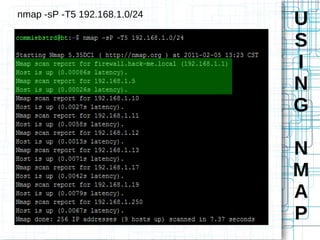
nmap -sP -T5 192.168.1.0/24
                              U
                              S
                              I
                              N
                              G

                              N
                              M
                              A
                              P
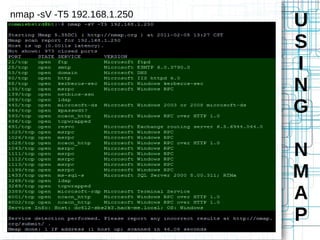
nmap -sV -T5 192.168.1.250
                             U
                             S
                             I
                             N
                             G

                             N
                             M
                             A
                             P
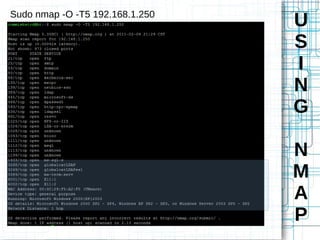
Sudo nmap -O -T5 192.168.1.250
                                 U
                                 S
                                 I
                                 N
                                 G

                                 N
                                 M
                                 A
                                 P
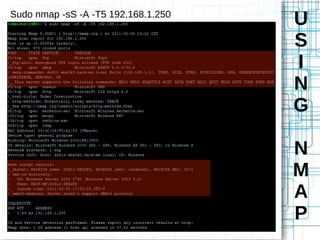
Sudo nmap -sS -A -T5 192.168.1.250
                                     U
                                     S
                                     I
                                     N
                                     G

                                     N
                                     M
                                     A
                                     P
Packet Alteration                                          D
  -f – Fragment packets (-f = 8 bytes -f -f = 16 bytes)
--mtu – Set maximum MTU size (Do not use with -f)
                                                           E
  -D <decoy1>[, <decoy2>] - Include decoys in scan         F
  -S <IP> - Spoof source IP
  -g <portnumber> - Specify source port
                                                           E
--data-length <number> - Append an amount of data          A
--ip-options - Specify IP layer options
--ttl – Set time to live
                                                           T
--randomize-hosts – Allow nmap to select random targets    I
--spoof-mac – Specify a mac address, vendor or random
--badsum – Force an invalid checksum
                                                           N
                                                           G
Timing Commands
--scan-delay <time> - Sets a minimum wait between probes
--max-scan-delay <time> - Sets max delay between probes    I
--min-rate --max-rate – Sets min and max packet per sec
 -T <0-5> - Set generic scan speeds
                                                           D
                                                           S
N
                              M
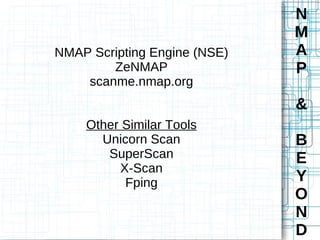
NMAP Scripting Engine (NSE)   A
        ZeNMAP                P
    scanme.nmap.org
                              &
    Other Similar Tools
      Unicorn Scan            B
       SuperScan              E
         X-Scan
          Fping               Y
                              O
                              N
                              D

Scanning with nmap

  • 1.
  • 2.
    What is NMAP? Nmap or Network Mapper, is an open source utility designed to quickly scan and identify devices across networks. It can be used to simply locate machines or delve deeper into individual ports and services of each one.
  • 3.
    How Does NMAPWork? Through the use of raw sockets NMAP is able to identify: Hosts on a network Services enabled Likely operating systems Possible firewalls and IDSIPS With raw sockets, NMAP is able to craft many different types of IP packets that allow for enumeration of hosts and elicitation of information that would not otherwise be available. These abilities is gained due to the way sockets are able to create different packets and apply various flags to each as needed. These sometimes strange or disallowed packets, are what cause an application or machine to respond when otherwise it may not.
  • 4.
    IPv4 Header Layout(RFC 791) 0 1 2 3 0 1 2 3 4 5 6 7 8 9 0 1 2 3 4 5 6 7 8 9 0 1 2 3 4 5 6 7 8 9 0 1 +-+-+-+-+-+-+-+-+-+-+-+-+-+-+-+-+-+-+-+-+-+-+-+-+-+-+-+-+-+-+-+-+ |Version| IHL |Type of Service| Total Length | +-+-+-+-+-+-+-+-+-+-+-+-+-+-+-+-+-+-+-+-+-+-+-+-+-+-+-+-+-+-+-+-+ | Identification |Flags| Fragment Offset | +-+-+-+-+-+-+-+-+-+-+-+-+-+-+-+-+-+-+-+-+-+-+-+-+-+-+-+-+-+-+-+-+ | Time to Live | Protocol | Header Checksum | +-+-+-+-+-+-+-+-+-+-+-+-+-+-+-+-+-+-+-+-+-+-+-+-+-+-+-+-+-+-+-+-+ | Source Address | +-+-+-+-+-+-+-+-+-+-+-+-+-+-+-+-+-+-+-+-+-+-+-+-+-+-+-+-+-+-+-+-+ | Destination Address | +-+-+-+-+-+-+-+-+-+-+-+-+-+-+-+-+-+-+-+-+-+-+-+-+-+-+-+-+-+-+-+-+ | Options | Padding | +-+-+-+-+-+-+-+-+-+-+-+-+-+-+-+-+-+-+-+-+-+-+-+-+-+-+-+-+-+-+-+-+ Example Internet Datagram Header
  • 5.
    TCP Header Layout(RFC 793) 0 1 2 3 0 1 2 3 4 5 6 7 8 9 0 1 2 3 4 5 6 7 8 9 0 1 2 3 4 5 6 7 8 9 0 1 +-+-+-+-+-+-+-+-+-+-+-+-+-+-+-+-+-+-+-+-+-+-+-+-+-+-+-+-+-+-+-+-+ | Source Port | Destination Port | +-+-+-+-+-+-+-+-+-+-+-+-+-+-+-+-+-+-+-+-+-+-+-+-+-+-+-+-+-+-+-+-+ | Sequence Number | +-+-+-+-+-+-+-+-+-+-+-+-+-+-+-+-+-+-+-+-+-+-+-+-+-+-+-+-+-+-+-+-+ | Acknowledgment Number | +-+-+-+-+-+-+-+-+-+-+-+-+-+-+-+-+-+-+-+-+-+-+-+-+-+-+-+-+-+-+-+-+ | Data | |U|A|P|R|S|F| | | Offset| Reserved |R|C|S|S|Y|I| Window | | | |G|K|H|T|N|N| | +-+-+-+-+-+-+-+-+-+-+-+-+-+-+-+-+-+-+-+-+-+-+-+-+-+-+-+-+-+-+-+-+ | Checksum | Urgent Pointer | +-+-+-+-+-+-+-+-+-+-+-+-+-+-+-+-+-+-+-+-+-+-+-+-+-+-+-+-+-+-+-+-+ | Options | Padding | +-+-+-+-+-+-+-+-+-+-+-+-+-+-+-+-+-+-+-+-+-+-+-+-+-+-+-+-+-+-+-+-+ | data | +-+-+-+-+-+-+-+-+-+-+-+-+-+-+-+-+-+-+-+-+-+-+-+-+-+-+-+-+-+-+-+-+ TCP Header Format
  • 6.
    Scan Types -sS –TCP SYN -sT – TCP Connect -sA – TCP ACK -sW – TCP Window -sM – TCP Maimon -sU – UDP Scan -sN – TCP Null (No Flags) -sF – TCP FIN (Just FIN Flag) -sX – TCP Xmas (All Flags) -sY – SCTP INIT -sZ – SCTP COOKIE-ECHO -sO – IP protocol scan -b <FTP relay host> - FTP bounce scan --scanflags <flags> - Customize TCP flags -sI <zombie host[:probeport]> - Idle scan
  • 7.
    Output Options Output Types -oN<file> – Normal -oX <file> – XML -oS <file> – s|<rIpt kIddi3 -oG <file> - Grepable -oA <file> - 3 Major Formats Output Options -v: Increase verbosity level (use twice or more for greater effect) -d[level]: Set or increase debugging level (Up to 9 is meaningful) --reason: Display the reason a port is in a particular state --open: Only show open (or possibly open) ports --packet-trace: Show all packets sent and received --iflist: Print host interfaces and routes (for debugging) --log-errors: Log errors/warnings to the normal-format output file --append-output: Append to rather than clobber specified output files --resume <filename>: Resume an aborted scan --stylesheet <path/URL>: XSL stylesheet to transform XML output to HTML --webxml: Reference stylesheet from Nmap.Org for more portable XML --no-stylesheet: Prevent associating of XSL stylesheet w/XML output
  • 8.
    Identify Hosts U nmap -v -sL 192.168.1.0/24 nmap -v -sP 192.168.1.0/24 S Enumerate Services I nmap -v -sS -sV 192.168.1.250 N Identify Operating Systems nmap -v -sS -O 192.168.1.250 G Excluding Hosts nmap -v -sS -A -exclude 192.168.1.5 192.168.1.0/24 nmap -v -sS -A -excludefile exclusions.lst 192.168.1.0/24 N Advanced Scanning M Sudo nmap -T4 -sI 192.168.1.10 -A 192.168.1.250 A P
  • 9.
    nmap -sP -T5192.168.1.0/24 U S I N G N M A P
  • 10.
    nmap -sV -T5192.168.1.250 U S I N G N M A P
  • 11.
    Sudo nmap -O-T5 192.168.1.250 U S I N G N M A P
  • 12.
    Sudo nmap -sS-A -T5 192.168.1.250 U S I N G N M A P
  • 13.
    Packet Alteration D -f – Fragment packets (-f = 8 bytes -f -f = 16 bytes) --mtu – Set maximum MTU size (Do not use with -f) E -D <decoy1>[, <decoy2>] - Include decoys in scan F -S <IP> - Spoof source IP -g <portnumber> - Specify source port E --data-length <number> - Append an amount of data A --ip-options - Specify IP layer options --ttl – Set time to live T --randomize-hosts – Allow nmap to select random targets I --spoof-mac – Specify a mac address, vendor or random --badsum – Force an invalid checksum N G Timing Commands --scan-delay <time> - Sets a minimum wait between probes --max-scan-delay <time> - Sets max delay between probes I --min-rate --max-rate – Sets min and max packet per sec -T <0-5> - Set generic scan speeds D S
  • 14.
    N M NMAP Scripting Engine (NSE) A ZeNMAP P scanme.nmap.org & Other Similar Tools Unicorn Scan B SuperScan E X-Scan Fping Y O N D