Networking Concepts
What is Network 
• When two or more computers are connected with 
each other in such a way so that they can exchange 
information, is called networks and this concept is 
called networking.
Types Of Network 
• LAN or Local Area Network is a computer network (or data 
communications network) which is confined in a limited 
geographical area such as building or college campus. 
• WAN or Wide Area Network spans a large geographic area, 
such as a state, province or country. 
• MAN or Metropolitan Area Network interconnects users with 
computer resources in a geographic area or region larger 
than that covered by even a large LAN but smaller than the 
area covered by a WAN
Network Topologies 
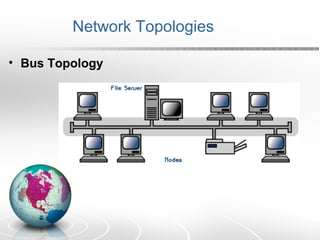
• Bus Topology
Bus Topology 
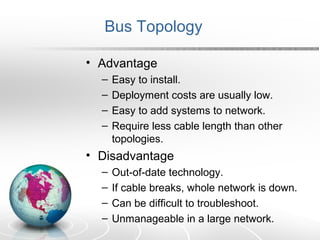
• Advantage 
– Easy to install. 
– Deployment costs are usually low. 
– Easy to add systems to network. 
– Require less cable length than other 
topologies. 
• Disadvantage 
– Out-of-date technology. 
– If cable breaks, whole network is down. 
– Can be difficult to troubleshoot. 
– Unmanageable in a large network.
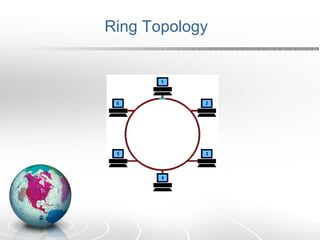
Ring Topology
Ring Topology 
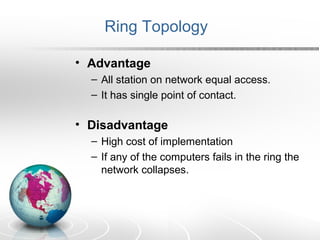
• Advantage 
– All station on network equal access. 
– It has single point of contact. 
• Disadvantage 
– High cost of implementation 
– If any of the computers fails in the ring the 
network collapses.
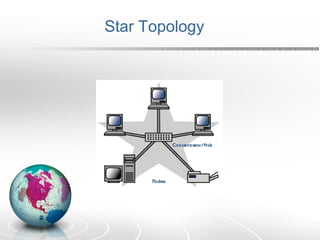
Star Topology
Star Topology 
• Advantages 
– Easy to install. 
– Easier to troubleshoot 
– Easy to add systems to network. 
– Widely used 
– Centralized management 
• Disadvantages 
– Costs are usually higher than with bus or 
ring networks. 
– If you have only one central device and it 
fails, it brings the network down.
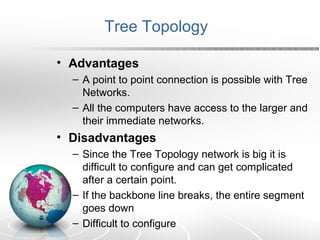
Tree Topology
Tree Topology 
• Advantages 
– A point to point connection is possible with Tree 
Networks. 
– All the computers have access to the larger and 
their immediate networks. 
• Disadvantages 
– Since the Tree Topology network is big it is 
difficult to configure and can get complicated 
after a certain point. 
– If the backbone line breaks, the entire segment 
goes down 
– Difficult to configure
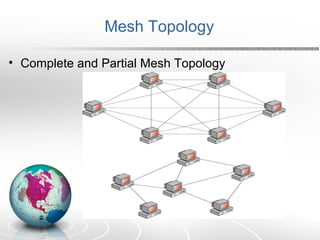
Mesh Topology 
• Complete and Partial Mesh Topology
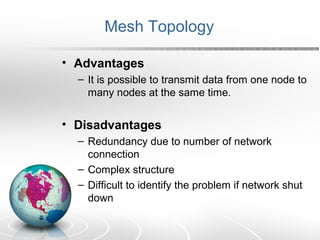
Mesh Topology 
• Advantages 
– It is possible to transmit data from one node to 
many nodes at the same time. 
• Disadvantages 
– Redundancy due to number of network 
connection 
– Complex structure 
– Difficult to identify the problem if network shut 
down
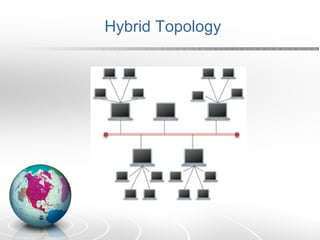
Hybrid Topology
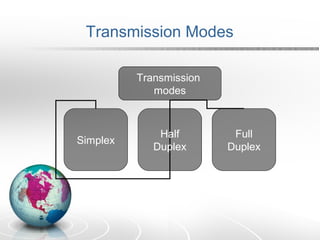
Transmission Modes 
Transmission 
modes 
Simplex Half 
Duplex 
Full 
Duplex
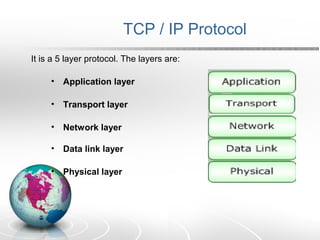
TCP / IP Protocol 
It is a 5 layer protocol. The layers are: 
• Application layer 
• Transport layer 
• Network layer 
• Data link layer 
• Physical layer
• Network Interface(Data Link + Physical Layer) - Specifies 
details of how data is physically sent through the network, 
including how bits are electrically signaled by hardware 
devices that interface directly with a network medium, such 
as coaxial cable, optical fiber, or twisted-pair copper wire. 
• Network Layer - Packages data into IP packets, which 
contain source and destination address information that is 
used to forward the packets between hosts and across 
networks. Performs routing of IP packets.
• Transport Layer - Provides communication session 
management between host computers. 
• Application Layer - Defines TCP/IP application protocols 
and how host programs interface with transport layer services 
to use the network like FTP, SMTP.
Connectivity Devices 
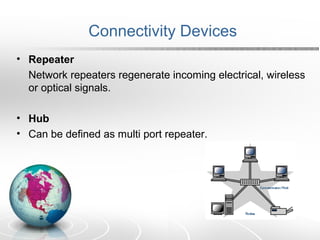
• Repeater 
Network repeaters regenerate incoming electrical, wireless 
or optical signals. 
• Hub 
• Can be defined as multi port repeater.
• Bridge 
A network bridge connects network segments. It 
can divide the large segment into smaller ones. 
• Switch 
It is used to transfer the packet from source to 
appropriate output port.
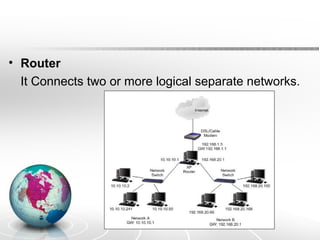
• Router 
It Connects two or more logical separate networks.
INTERNET
Introduction 
• The Internet, sometimes called simply "the Net," is a 
worldwide system of computer networks - a network of 
networks in which users at any one computer can, if they have 
permission, get information from any other computer. 
• A global network connecting millions of computers. More than 
100 countries are linked into exchanges of data, news and 
opinions. 
• Internet makes use of the internet protocol and the 
transmission Control protocol.
Introduction 
• There are various ways and means to access the internet. 
With the advancement in technology people can now access 
internet services through their cell phones, play stations and 
various gadgets. 
• With the development and the wide spread application of 
internet electronic mail people from all across the globe come 
together and communication has become much easier than 
ever before.
Internet Application 
• Communication 
• Information 
• Entertainment 
• Services 
• E-Commerce
Services Provided by the Internet 
• E-mail 
Electronic Mail is a method of sending a message from a 
user at a computer to a recipient on another computer. 
• Video Conferencing 
• FTP (File Transfer Protocol) 
This facility is a method of gaining limited access to another 
machine in the Internet, and obtaining files from it. You need 
full Internet connectivity, to do ftp interactively.
• Telnet 
Telnet is the Internet facility that allows you to execute 
commands on a remote host (another computer, most likely 
one to which you do not have physical access) as if you were 
logged in locally. 
• WWW 
The official description describes the World-Wide Web as a 
"wide-area *hypermedia* information retrieval initiative aiming 
to give universal access to a large universe of documents".
• Usenet and Mailing list 
If you want to receive periodically information about certain 
topics, there are two things you can do. The first possibility is 
to read the news groups of the Internet. 
If you do not have full Internet connectivity, you can 
subscribe to a mailing list. What you have to do is to send 
your name to some server, and every day you will receive an 
e-mail containing news concerning the topic you have 
subscribed to.
Commonly Protocol used by Internet 
• POP3 
– In computing, the Post Office Protocol (POP) 
is an application-layer Internet standard 
protocol used by local e-mail clients to retrieve 
e-mail from a remote server over a TCP/IP 
connection. POP and IMAP (Internet Message 
Access Protocol) are the two most prevalent 
Internet standard protocols for e-mail retrieval. 
• Hypertext Transfer Protocol (HTTP) an 
application-level protocol for distributed, 
collaborative, hypermedia information systems.
• SMTP 
– Simple Mail Transfer Protocol (SMTP) is an 
Internet standard for electronic mail (e-mail) 
transmission across Internet Protocol (IP) 
networks. SMTP is specified for outgoing mail 
transport. 
• UDP 
• With UDP, computer applications can send 
messages, in this case referred to as datagrams, 
to other hosts on an Internet Protocol (IP) network 
without requiring prior communications to set up 
special transmission channels or data paths.
WWW – World Wide Web 
• The World Wide Web is a system of interlinked hypertext 
documents contained on the Internet. With a web browser, 
one can view web pages that may contain text, images, 
videos, and other multimedia and navigate between them 
using hyperlinks. 
• There are several applications called Web browsers that 
make it easy to access the World Wide Web; Few most 
popular being: 
o Mozilla Firefox 
o Opera 
o Netscape Navigator 
o Microsoft's Internet Explorer.

Networking

  • 1.
  • 2.
    What is Network • When two or more computers are connected with each other in such a way so that they can exchange information, is called networks and this concept is called networking.
  • 3.
    Types Of Network • LAN or Local Area Network is a computer network (or data communications network) which is confined in a limited geographical area such as building or college campus. • WAN or Wide Area Network spans a large geographic area, such as a state, province or country. • MAN or Metropolitan Area Network interconnects users with computer resources in a geographic area or region larger than that covered by even a large LAN but smaller than the area covered by a WAN
  • 4.
  • 5.
    Bus Topology •Advantage – Easy to install. – Deployment costs are usually low. – Easy to add systems to network. – Require less cable length than other topologies. • Disadvantage – Out-of-date technology. – If cable breaks, whole network is down. – Can be difficult to troubleshoot. – Unmanageable in a large network.
  • 6.
  • 7.
    Ring Topology •Advantage – All station on network equal access. – It has single point of contact. • Disadvantage – High cost of implementation – If any of the computers fails in the ring the network collapses.
  • 8.
  • 9.
    Star Topology •Advantages – Easy to install. – Easier to troubleshoot – Easy to add systems to network. – Widely used – Centralized management • Disadvantages – Costs are usually higher than with bus or ring networks. – If you have only one central device and it fails, it brings the network down.
  • 10.
  • 11.
    Tree Topology •Advantages – A point to point connection is possible with Tree Networks. – All the computers have access to the larger and their immediate networks. • Disadvantages – Since the Tree Topology network is big it is difficult to configure and can get complicated after a certain point. – If the backbone line breaks, the entire segment goes down – Difficult to configure
  • 12.
    Mesh Topology •Complete and Partial Mesh Topology
  • 13.
    Mesh Topology •Advantages – It is possible to transmit data from one node to many nodes at the same time. • Disadvantages – Redundancy due to number of network connection – Complex structure – Difficult to identify the problem if network shut down
  • 14.
  • 15.
    Transmission Modes Transmission modes Simplex Half Duplex Full Duplex
  • 16.
    TCP / IPProtocol It is a 5 layer protocol. The layers are: • Application layer • Transport layer • Network layer • Data link layer • Physical layer
  • 17.
    • Network Interface(DataLink + Physical Layer) - Specifies details of how data is physically sent through the network, including how bits are electrically signaled by hardware devices that interface directly with a network medium, such as coaxial cable, optical fiber, or twisted-pair copper wire. • Network Layer - Packages data into IP packets, which contain source and destination address information that is used to forward the packets between hosts and across networks. Performs routing of IP packets.
  • 18.
    • Transport Layer- Provides communication session management between host computers. • Application Layer - Defines TCP/IP application protocols and how host programs interface with transport layer services to use the network like FTP, SMTP.
  • 19.
    Connectivity Devices •Repeater Network repeaters regenerate incoming electrical, wireless or optical signals. • Hub • Can be defined as multi port repeater.
  • 20.
    • Bridge Anetwork bridge connects network segments. It can divide the large segment into smaller ones. • Switch It is used to transfer the packet from source to appropriate output port.
  • 21.
    • Router ItConnects two or more logical separate networks.
  • 22.
  • 23.
    Introduction • TheInternet, sometimes called simply "the Net," is a worldwide system of computer networks - a network of networks in which users at any one computer can, if they have permission, get information from any other computer. • A global network connecting millions of computers. More than 100 countries are linked into exchanges of data, news and opinions. • Internet makes use of the internet protocol and the transmission Control protocol.
  • 24.
    Introduction • Thereare various ways and means to access the internet. With the advancement in technology people can now access internet services through their cell phones, play stations and various gadgets. • With the development and the wide spread application of internet electronic mail people from all across the globe come together and communication has become much easier than ever before.
  • 25.
    Internet Application •Communication • Information • Entertainment • Services • E-Commerce
  • 26.
    Services Provided bythe Internet • E-mail Electronic Mail is a method of sending a message from a user at a computer to a recipient on another computer. • Video Conferencing • FTP (File Transfer Protocol) This facility is a method of gaining limited access to another machine in the Internet, and obtaining files from it. You need full Internet connectivity, to do ftp interactively.
  • 27.
    • Telnet Telnetis the Internet facility that allows you to execute commands on a remote host (another computer, most likely one to which you do not have physical access) as if you were logged in locally. • WWW The official description describes the World-Wide Web as a "wide-area *hypermedia* information retrieval initiative aiming to give universal access to a large universe of documents".
  • 28.
    • Usenet andMailing list If you want to receive periodically information about certain topics, there are two things you can do. The first possibility is to read the news groups of the Internet. If you do not have full Internet connectivity, you can subscribe to a mailing list. What you have to do is to send your name to some server, and every day you will receive an e-mail containing news concerning the topic you have subscribed to.
  • 29.
    Commonly Protocol usedby Internet • POP3 – In computing, the Post Office Protocol (POP) is an application-layer Internet standard protocol used by local e-mail clients to retrieve e-mail from a remote server over a TCP/IP connection. POP and IMAP (Internet Message Access Protocol) are the two most prevalent Internet standard protocols for e-mail retrieval. • Hypertext Transfer Protocol (HTTP) an application-level protocol for distributed, collaborative, hypermedia information systems.
  • 30.
    • SMTP –Simple Mail Transfer Protocol (SMTP) is an Internet standard for electronic mail (e-mail) transmission across Internet Protocol (IP) networks. SMTP is specified for outgoing mail transport. • UDP • With UDP, computer applications can send messages, in this case referred to as datagrams, to other hosts on an Internet Protocol (IP) network without requiring prior communications to set up special transmission channels or data paths.
  • 31.
    WWW – WorldWide Web • The World Wide Web is a system of interlinked hypertext documents contained on the Internet. With a web browser, one can view web pages that may contain text, images, videos, and other multimedia and navigate between them using hyperlinks. • There are several applications called Web browsers that make it easy to access the World Wide Web; Few most popular being: o Mozilla Firefox o Opera o Netscape Navigator o Microsoft's Internet Explorer.