East Africa University
Faculty: Economic
Presentation Of
Networking System
The Computer Network
Arguably, the greatest advancement in technology and
communication over the past 20 years has been the development
and advancement of the computer network. From emailing a
friend to on-line bill paying to downloading data off the Internet to
e-commerce, networking has made our world much smaller and
changed the way we communicate forever.
The Computer Network
What is a Computer Network
net·work: [net-wurk] – noun, a system containing any
combination of computers, computer terminals, printers,
audio or visual display devices, or telephones
interconnected by telecommunication equipment or
cables: used to transmit or receive information.
Navigation Links
Network Diagram – Basic Layout and map of a traditional computer network.
Network Types – Computer networks vary in shape and size depending on usage.
- WAN
- LAN
- Peer to Peer
Fiber Optic Cable – One of the Latest innovations in network cabling.
Switches and Hubs – The central device within a network that transmit data.
Servers – The central storage device for the names and locations of various data.
- IP Addresses
Topologies – The layouts of various network designs.
- Star
- Bus
- Ring
Firewalls – The network software that keeps destructive forces from a network.
Routers – The device that let messages flow between networks.
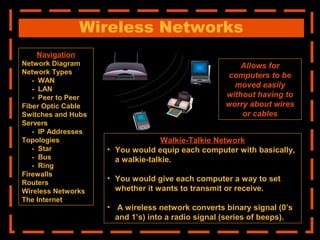
Wireless Networks - Allows computers to be moved without wires or cables.
The Internet – The world’s largest network.
References
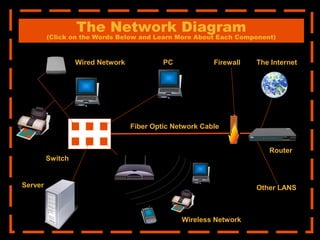
The Network Diagram
(Click on the Words Below and Learn More About Each Component)
The Internet
Other LANS
Firewall
Router
Fiber Optic Network Cable
Server
PC
Wireless Network
Wired Network
Switch
Navigation
Network Diagram
Network Types
- WAN
- LAN
- Peer to Peer
Fiber Optic Cable
Switches and Hubs
Servers
- IP Addresses
Topologies
- Star
- Bus
- Ring
Firewalls
Routers
Wireless Networks
The Internet
References
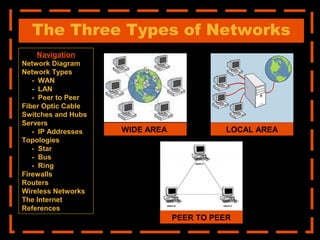
The Three Types of Networks
PEER TO PEER
WIDE AREA LOCAL AREA
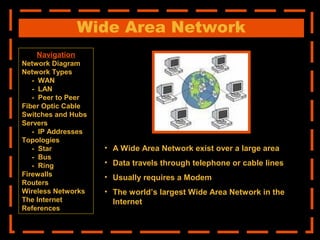
Wide Area Network
• A Wide Area Network exist over a large area
• Data travels through telephone or cable lines
• Usually requires a Modem
• The world’s largest Wide Area Network in the
Internet
Navigation
Network Diagram
Network Types
- WAN
- LAN
- Peer to Peer
Fiber Optic Cable
Switches and Hubs
Servers
- IP Addresses
Topologies
- Star
- Bus
- Ring
Firewalls
Routers
Wireless Networks
The Internet
References
Local Area Network
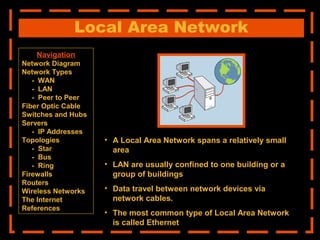
• A Local Area Network spans a relatively small
area
• LAN are usually confined to one building or a
group of buildings
• Data travel between network devices via
network cables.
• The most common type of Local Area Network
is called Ethernet
Navigation
Network Diagram
Network Types
- WAN
- LAN
- Peer to Peer
Fiber Optic Cable
Switches and Hubs
Servers
- IP Addresses
Topologies
- Star
- Bus
- Ring
Firewalls
Routers
Wireless Networks
The Internet
References
Peer to Peer Network
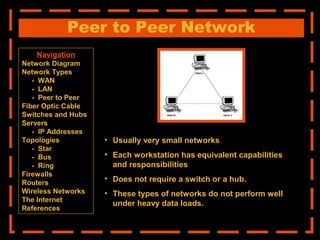
• Usually very small networks
• Each workstation has equivalent capabilities
and responsibilities
• Does not require a switch or a hub.
• These types of networks do not perform well
under heavy data loads.
Navigation
Network Diagram
Network Types
- WAN
- LAN
- Peer to Peer
Fiber Optic Cable
Switches and Hubs
Servers
- IP Addresses
Topologies
- Star
- Bus
- Ring
Firewalls
Routers
Wireless Networks
The Internet
References
Fiber Optic Cable
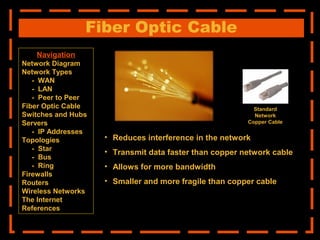
• Reduces interference in the network
• Transmit data faster than copper network cable
• Allows for more bandwidth
• Smaller and more fragile than copper cable
Standard
Network
Copper Cable
Navigation
Network Diagram
Network Types
- WAN
- LAN
- Peer to Peer
Fiber Optic Cable
Switches and Hubs
Servers
- IP Addresses
Topologies
- Star
- Bus
- Ring
Firewalls
Routers
Wireless Networks
The Internet
References
Switches and Hubs
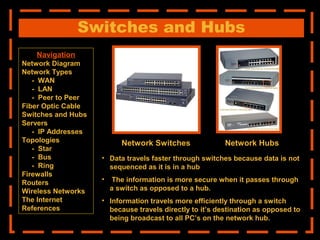
• Data travels faster through switches because data is not
sequenced as it is in a hub
• The information is more secure when it passes through
a switch as opposed to a hub.
• Information travels more efficiently through a switch
because travels directly to it’s destination as opposed to
being broadcast to all PC’s on the network hub.
Network Switches Network Hubs
Navigation
Network Diagram
Network Types
- WAN
- LAN
- Peer to Peer
Fiber Optic Cable
Switches and Hubs
Servers
- IP Addresses
Topologies
- Star
- Bus
- Ring
Firewalls
Routers
Wireless Networks
The Internet
References
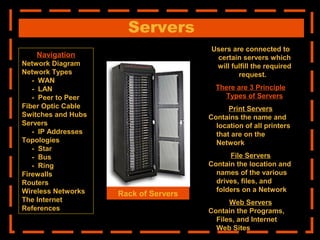
Servers
Users are connected to
certain servers which
will fulfill the required
request.
There are 3 Principle
Types of Servers
Print Servers
Contains the name and
location of all printers
that are on the
Network
File Servers
Contain the location and
names of the various
drives, files, and
folders on a Network
Web Servers
Contain the Programs,
Files, and Internet
Web Sites
Rack of Servers
Navigation
Network Diagram
Network Types
- WAN
- LAN
- Peer to Peer
Fiber Optic Cable
Switches and Hubs
Servers
- IP Addresses
Topologies
- Star
- Bus
- Ring
Firewalls
Routers
Wireless Networks
The Internet
References
Web Servers
IP Addresses
“IP” stands for Internet Protocol. IP Addresses serve as
the location of websites on the Internet as well as the
workstations that are connected to the web. IP addresses
are made up of four sets of numbers called “Octets”.
There are two types of IP Addresses: Static and
Temporary. Below is a description of both.
Static IP Addresses Temporary IP Addresses
Static IP addresses are
found only on servers and
remain the same.
A Domain Name Server
assigns a “human
readable” web address to
each static IP address to
make it more user friendly.
Temporary IP addresses
are found only on PC’s are
constantly changing each
time it is logged on.
Temporary IP addresses
are assigned by an ISP
(Internet Service Provider)
each time it is logged on to
the Internet.
Navigation
Network Diagram
Network Types
- WAN
- LAN
- Peer to Peer
Fiber Optic Cable
Switches and Hubs
Servers
- IP Addresses
Topologies
- Star
- Bus
- Ring
Firewalls
Routers
Wireless Networks
The Internet
References
Network Topologies
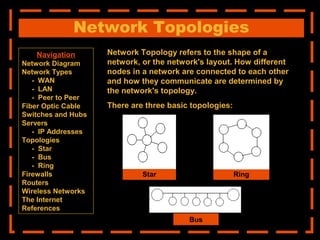
Network Topology refers to the shape of a
network, or the network's layout. How different
nodes in a network are connected to each other
and how they communicate are determined by
the network's topology.
There are three basic topologies:
Star Ring
Bus
Navigation
Network Diagram
Network Types
- WAN
- LAN
- Peer to Peer
Fiber Optic Cable
Switches and Hubs
Servers
- IP Addresses
Topologies
- Star
- Bus
- Ring
Firewalls
Routers
Wireless Networks
The Internet
References
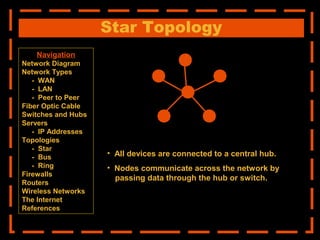
Star Topology
• All devices are connected to a central hub.
• Nodes communicate across the network by
passing data through the hub or switch.
Navigation
Network Diagram
Network Types
- WAN
- LAN
- Peer to Peer
Fiber Optic Cable
Switches and Hubs
Servers
- IP Addresses
Topologies
- Star
- Bus
- Ring
Firewalls
Routers
Wireless Networks
The Internet
References
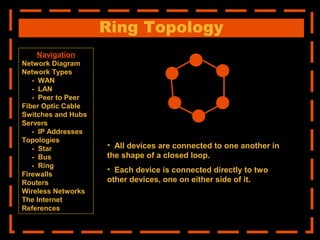
Ring Topology
• All devices are connected to one another in
the shape of a closed loop.
• Each device is connected directly to two
other devices, one on either side of it.
Navigation
Network Diagram
Network Types
- WAN
- LAN
- Peer to Peer
Fiber Optic Cable
Switches and Hubs
Servers
- IP Addresses
Topologies
- Star
- Bus
- Ring
Firewalls
Routers
Wireless Networks
The Internet
References
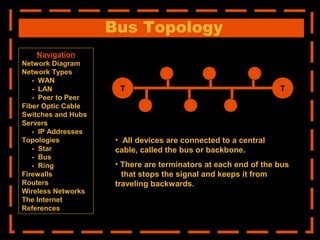
Bus Topology
TT
• All devices are connected to a central
cable, called the bus or backbone.
• There are terminators at each end of the bus
that stops the signal and keeps it from
traveling backwards.
Navigation
Network Diagram
Network Types
- WAN
- LAN
- Peer to Peer
Fiber Optic Cable
Switches and Hubs
Servers
- IP Addresses
Topologies
- Star
- Bus
- Ring
Firewalls
Routers
Wireless Networks
The Internet
References
Firewalls
• A firewall is a software that can be loaded on to
a network that can serve as a barrier that keeps
destructive forces away from a network of
computers.
• Packets of data are analyzed against a set of
criteria or standards called filters.
• Filters block certain designated IP addresses.
Navigation
Network Diagram
Network Types
- WAN
- LAN
- Peer to Peer
Fiber Optic Cable
Switches and Hubs
Servers
- IP Addresses
Topologies
- Star
- Bus
- Ring
Firewalls
Routers
Wireless Networks
The Internet
References
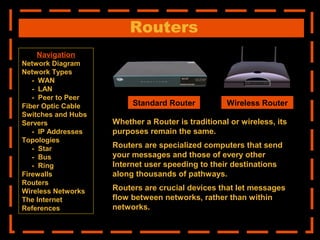
Routers
Whether a Router is traditional or wireless, its
purposes remain the same.
Routers are specialized computers that send
your messages and those of every other
Internet user speeding to their destinations
along thousands of pathways.
Routers are crucial devices that let messages
flow between networks, rather than within
networks.
Standard Router Wireless Router
Navigation
Network Diagram
Network Types
- WAN
- LAN
- Peer to Peer
Fiber Optic Cable
Switches and Hubs
Servers
- IP Addresses
Topologies
- Star
- Bus
- Ring
Firewalls
Routers
Wireless Networks
The Internet
References
Navigation
Network Diagram
Network Types
- WAN
- LAN
- Peer to Peer
Fiber Optic Cable
Switches and Hubs
Servers
- IP Addresses
Topologies
- Star
- Bus
- Ring
Firewalls
Routers
Wireless Networks
The Internet
Wireless Networks
Allows for
computers to be
moved easily
without having to
worry about wires
or cables
Walkie-Talkie Network
• You would equip each computer with basically,
a walkie-talkie.
• You would give each computer a way to set
whether it wants to transmit or receive.
• A wireless network converts binary signal (0’s
and 1’s) into a radio signal (series of beeps).
The Internet
The simplest definition of the Internet
is that it's a network of computer
networks
Navigation
Network Diagram
Network Types
- WAN
- LAN
- Peer to Peer
Fiber Optic Cable
Switches and Hubs
Servers
- IP Addresses
Topologies
- Star
- Bus
- Ring
Firewalls
Routers
Wireless Networks
The Internet
References
The Internet
How Information Travel Through the Internet
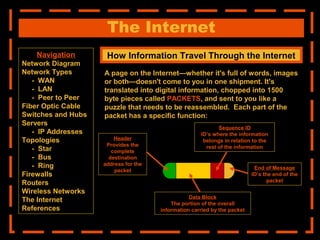
A page on the Internet—whether it's full of words, images
or both—doesn't come to you in one shipment. It's
translated into digital information, chopped into 1500
byte pieces called PACKETS, and sent to you like a
puzzle that needs to be reassembled. Each part of the
packet has a specific function:
Header
Provides the
complete
destination
address for the
packet
Data Block
The portion of the overall
information carried by the packet
Sequence ID
ID’s where the information
belongs in relation to the
rest of the information
End of Message
ID’s the end of the
packet
Navigation
Network Diagram
Network Types
- WAN
- LAN
- Peer to Peer
Fiber Optic Cable
Switches and Hubs
Servers
- IP Addresses
Topologies
- Star
- Bus
- Ring
Firewalls
Routers
Wireless Networks
The Internet
References
The Internet
How Information Travel Through the Internet
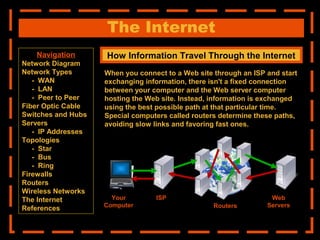
When you connect to a Web site through an ISP and start
exchanging information, there isn't a fixed connection
between your computer and the Web server computer
hosting the Web site. Instead, information is exchanged
using the best possible path at that particular time.
Special computers called routers determine these paths,
avoiding slow links and favoring fast ones.
Your
Computer
ISP
Routers
Web
Servers
Navigation
Network Diagram
Network Types
- WAN
- LAN
- Peer to Peer
Fiber Optic Cable
Switches and Hubs
Servers
- IP Addresses
Topologies
- Star
- Bus
- Ring
Firewalls
Routers
Wireless Networks
The Internet
References
1. Easy Communication and Speed
It is very easy to communicate through a network. People can communicate
efficiently using a network with a group of people. They can enjoy the benefit of
emails, instant messaging, telephony, video conferencing, chat rooms, etc.
2. Ability to Share Files, Data and Information
This is one of the major advantages of networking computers. People can find and
share information and data because of networking. This is beneficial for large
organizations to maintain their data in an organized manner and facilitate access for
desired people.
3. Sharing Hardware
Another important advantage of networking is the ability to share hardware. For an
example, a printer can be shared among the users in a network so that there’s no
need to have individual printers for each and every computer in the company. This
will significantly reduce the cost of purchasing hardware.
Advantage Of Networking
1. Breakdowns and Possible Loss of Resources
One major disadvantage of networking is the breakdown of the whole network due to
an issue of the server. Such breakdowns are frequent in networks causing losses of
thousands of dollars each year. Therefore once established it is vital to maintain it
properly to prevent such disastrous breakdowns. The worst scenario is such
breakdowns may lead to loss of important data of the server.
2. Expensive to Build
Building a network is a serious business in many occasions, especially for large scale
organizations. Cables and other hardware are very pricey to buy and replace.
3. Security Threats
Security threats are always problems with large networks. There are hackers who are
trying to steal valuable data of large companies for their own benefit. So it is
necessary to take utmost care to facilitate the required security measures.
Advantage Of Networking
4. Bandwidth Issues
In a network there are users who consume a lot more bandwidth than others.
Because of this some other people may experience difficulties.
Although there are disadvantages to networking, it is a vital need in today’s
environment. People need to access the Internet, communicate and share
information and they can’t live without that. Therefore engineers need to find
alternatives and improved technologies to overcome issues associated with
networking. Therefore we can say that computer networking is always
beneficial to have even if there are some drawbacks.
End
Thank you

The basics of computer networking

  • 1.
    East Africa University Faculty:Economic Presentation Of Networking System
  • 2.
    The Computer Network Arguably,the greatest advancement in technology and communication over the past 20 years has been the development and advancement of the computer network. From emailing a friend to on-line bill paying to downloading data off the Internet to e-commerce, networking has made our world much smaller and changed the way we communicate forever.
  • 3.
    The Computer Network Whatis a Computer Network net·work: [net-wurk] – noun, a system containing any combination of computers, computer terminals, printers, audio or visual display devices, or telephones interconnected by telecommunication equipment or cables: used to transmit or receive information.
  • 4.
    Navigation Links Network Diagram– Basic Layout and map of a traditional computer network. Network Types – Computer networks vary in shape and size depending on usage. - WAN - LAN - Peer to Peer Fiber Optic Cable – One of the Latest innovations in network cabling. Switches and Hubs – The central device within a network that transmit data. Servers – The central storage device for the names and locations of various data. - IP Addresses Topologies – The layouts of various network designs. - Star - Bus - Ring Firewalls – The network software that keeps destructive forces from a network. Routers – The device that let messages flow between networks. Wireless Networks - Allows computers to be moved without wires or cables. The Internet – The world’s largest network. References
  • 5.
    The Network Diagram (Clickon the Words Below and Learn More About Each Component) The Internet Other LANS Firewall Router Fiber Optic Network Cable Server PC Wireless Network Wired Network Switch
  • 6.
    Navigation Network Diagram Network Types -WAN - LAN - Peer to Peer Fiber Optic Cable Switches and Hubs Servers - IP Addresses Topologies - Star - Bus - Ring Firewalls Routers Wireless Networks The Internet References The Three Types of Networks PEER TO PEER WIDE AREA LOCAL AREA
  • 7.
    Wide Area Network •A Wide Area Network exist over a large area • Data travels through telephone or cable lines • Usually requires a Modem • The world’s largest Wide Area Network in the Internet Navigation Network Diagram Network Types - WAN - LAN - Peer to Peer Fiber Optic Cable Switches and Hubs Servers - IP Addresses Topologies - Star - Bus - Ring Firewalls Routers Wireless Networks The Internet References
  • 8.
    Local Area Network •A Local Area Network spans a relatively small area • LAN are usually confined to one building or a group of buildings • Data travel between network devices via network cables. • The most common type of Local Area Network is called Ethernet Navigation Network Diagram Network Types - WAN - LAN - Peer to Peer Fiber Optic Cable Switches and Hubs Servers - IP Addresses Topologies - Star - Bus - Ring Firewalls Routers Wireless Networks The Internet References
  • 9.
    Peer to PeerNetwork • Usually very small networks • Each workstation has equivalent capabilities and responsibilities • Does not require a switch or a hub. • These types of networks do not perform well under heavy data loads. Navigation Network Diagram Network Types - WAN - LAN - Peer to Peer Fiber Optic Cable Switches and Hubs Servers - IP Addresses Topologies - Star - Bus - Ring Firewalls Routers Wireless Networks The Internet References
  • 10.
    Fiber Optic Cable •Reduces interference in the network • Transmit data faster than copper network cable • Allows for more bandwidth • Smaller and more fragile than copper cable Standard Network Copper Cable Navigation Network Diagram Network Types - WAN - LAN - Peer to Peer Fiber Optic Cable Switches and Hubs Servers - IP Addresses Topologies - Star - Bus - Ring Firewalls Routers Wireless Networks The Internet References
  • 11.
    Switches and Hubs •Data travels faster through switches because data is not sequenced as it is in a hub • The information is more secure when it passes through a switch as opposed to a hub. • Information travels more efficiently through a switch because travels directly to it’s destination as opposed to being broadcast to all PC’s on the network hub. Network Switches Network Hubs Navigation Network Diagram Network Types - WAN - LAN - Peer to Peer Fiber Optic Cable Switches and Hubs Servers - IP Addresses Topologies - Star - Bus - Ring Firewalls Routers Wireless Networks The Internet References
  • 12.
    Servers Users are connectedto certain servers which will fulfill the required request. There are 3 Principle Types of Servers Print Servers Contains the name and location of all printers that are on the Network File Servers Contain the location and names of the various drives, files, and folders on a Network Web Servers Contain the Programs, Files, and Internet Web Sites Rack of Servers Navigation Network Diagram Network Types - WAN - LAN - Peer to Peer Fiber Optic Cable Switches and Hubs Servers - IP Addresses Topologies - Star - Bus - Ring Firewalls Routers Wireless Networks The Internet References
  • 13.
    Web Servers IP Addresses “IP”stands for Internet Protocol. IP Addresses serve as the location of websites on the Internet as well as the workstations that are connected to the web. IP addresses are made up of four sets of numbers called “Octets”. There are two types of IP Addresses: Static and Temporary. Below is a description of both. Static IP Addresses Temporary IP Addresses Static IP addresses are found only on servers and remain the same. A Domain Name Server assigns a “human readable” web address to each static IP address to make it more user friendly. Temporary IP addresses are found only on PC’s are constantly changing each time it is logged on. Temporary IP addresses are assigned by an ISP (Internet Service Provider) each time it is logged on to the Internet. Navigation Network Diagram Network Types - WAN - LAN - Peer to Peer Fiber Optic Cable Switches and Hubs Servers - IP Addresses Topologies - Star - Bus - Ring Firewalls Routers Wireless Networks The Internet References
  • 14.
    Network Topologies Network Topologyrefers to the shape of a network, or the network's layout. How different nodes in a network are connected to each other and how they communicate are determined by the network's topology. There are three basic topologies: Star Ring Bus Navigation Network Diagram Network Types - WAN - LAN - Peer to Peer Fiber Optic Cable Switches and Hubs Servers - IP Addresses Topologies - Star - Bus - Ring Firewalls Routers Wireless Networks The Internet References
  • 15.
    Star Topology • Alldevices are connected to a central hub. • Nodes communicate across the network by passing data through the hub or switch. Navigation Network Diagram Network Types - WAN - LAN - Peer to Peer Fiber Optic Cable Switches and Hubs Servers - IP Addresses Topologies - Star - Bus - Ring Firewalls Routers Wireless Networks The Internet References
  • 16.
    Ring Topology • Alldevices are connected to one another in the shape of a closed loop. • Each device is connected directly to two other devices, one on either side of it. Navigation Network Diagram Network Types - WAN - LAN - Peer to Peer Fiber Optic Cable Switches and Hubs Servers - IP Addresses Topologies - Star - Bus - Ring Firewalls Routers Wireless Networks The Internet References
  • 17.
    Bus Topology TT • Alldevices are connected to a central cable, called the bus or backbone. • There are terminators at each end of the bus that stops the signal and keeps it from traveling backwards. Navigation Network Diagram Network Types - WAN - LAN - Peer to Peer Fiber Optic Cable Switches and Hubs Servers - IP Addresses Topologies - Star - Bus - Ring Firewalls Routers Wireless Networks The Internet References
  • 18.
    Firewalls • A firewallis a software that can be loaded on to a network that can serve as a barrier that keeps destructive forces away from a network of computers. • Packets of data are analyzed against a set of criteria or standards called filters. • Filters block certain designated IP addresses. Navigation Network Diagram Network Types - WAN - LAN - Peer to Peer Fiber Optic Cable Switches and Hubs Servers - IP Addresses Topologies - Star - Bus - Ring Firewalls Routers Wireless Networks The Internet References
  • 19.
    Routers Whether a Routeris traditional or wireless, its purposes remain the same. Routers are specialized computers that send your messages and those of every other Internet user speeding to their destinations along thousands of pathways. Routers are crucial devices that let messages flow between networks, rather than within networks. Standard Router Wireless Router Navigation Network Diagram Network Types - WAN - LAN - Peer to Peer Fiber Optic Cable Switches and Hubs Servers - IP Addresses Topologies - Star - Bus - Ring Firewalls Routers Wireless Networks The Internet References
  • 20.
    Navigation Network Diagram Network Types -WAN - LAN - Peer to Peer Fiber Optic Cable Switches and Hubs Servers - IP Addresses Topologies - Star - Bus - Ring Firewalls Routers Wireless Networks The Internet Wireless Networks Allows for computers to be moved easily without having to worry about wires or cables Walkie-Talkie Network • You would equip each computer with basically, a walkie-talkie. • You would give each computer a way to set whether it wants to transmit or receive. • A wireless network converts binary signal (0’s and 1’s) into a radio signal (series of beeps).
  • 21.
    The Internet The simplestdefinition of the Internet is that it's a network of computer networks Navigation Network Diagram Network Types - WAN - LAN - Peer to Peer Fiber Optic Cable Switches and Hubs Servers - IP Addresses Topologies - Star - Bus - Ring Firewalls Routers Wireless Networks The Internet References
  • 22.
    The Internet How InformationTravel Through the Internet A page on the Internet—whether it's full of words, images or both—doesn't come to you in one shipment. It's translated into digital information, chopped into 1500 byte pieces called PACKETS, and sent to you like a puzzle that needs to be reassembled. Each part of the packet has a specific function: Header Provides the complete destination address for the packet Data Block The portion of the overall information carried by the packet Sequence ID ID’s where the information belongs in relation to the rest of the information End of Message ID’s the end of the packet Navigation Network Diagram Network Types - WAN - LAN - Peer to Peer Fiber Optic Cable Switches and Hubs Servers - IP Addresses Topologies - Star - Bus - Ring Firewalls Routers Wireless Networks The Internet References
  • 23.
    The Internet How InformationTravel Through the Internet When you connect to a Web site through an ISP and start exchanging information, there isn't a fixed connection between your computer and the Web server computer hosting the Web site. Instead, information is exchanged using the best possible path at that particular time. Special computers called routers determine these paths, avoiding slow links and favoring fast ones. Your Computer ISP Routers Web Servers Navigation Network Diagram Network Types - WAN - LAN - Peer to Peer Fiber Optic Cable Switches and Hubs Servers - IP Addresses Topologies - Star - Bus - Ring Firewalls Routers Wireless Networks The Internet References
  • 24.
    1. Easy Communicationand Speed It is very easy to communicate through a network. People can communicate efficiently using a network with a group of people. They can enjoy the benefit of emails, instant messaging, telephony, video conferencing, chat rooms, etc. 2. Ability to Share Files, Data and Information This is one of the major advantages of networking computers. People can find and share information and data because of networking. This is beneficial for large organizations to maintain their data in an organized manner and facilitate access for desired people. 3. Sharing Hardware Another important advantage of networking is the ability to share hardware. For an example, a printer can be shared among the users in a network so that there’s no need to have individual printers for each and every computer in the company. This will significantly reduce the cost of purchasing hardware. Advantage Of Networking
  • 25.
    1. Breakdowns andPossible Loss of Resources One major disadvantage of networking is the breakdown of the whole network due to an issue of the server. Such breakdowns are frequent in networks causing losses of thousands of dollars each year. Therefore once established it is vital to maintain it properly to prevent such disastrous breakdowns. The worst scenario is such breakdowns may lead to loss of important data of the server. 2. Expensive to Build Building a network is a serious business in many occasions, especially for large scale organizations. Cables and other hardware are very pricey to buy and replace. 3. Security Threats Security threats are always problems with large networks. There are hackers who are trying to steal valuable data of large companies for their own benefit. So it is necessary to take utmost care to facilitate the required security measures. Advantage Of Networking
  • 26.
    4. Bandwidth Issues Ina network there are users who consume a lot more bandwidth than others. Because of this some other people may experience difficulties. Although there are disadvantages to networking, it is a vital need in today’s environment. People need to access the Internet, communicate and share information and they can’t live without that. Therefore engineers need to find alternatives and improved technologies to overcome issues associated with networking. Therefore we can say that computer networking is always beneficial to have even if there are some drawbacks.
  • 27.