Abdullah El-Deeb
a.eldeeb93@gmail.com
1
Computer Networking
ENG224
INFORMATION TECHNOLOGY – Part II
5. Introduction to Networking
Who R We?? ‫شباب‬‫نفس‬ ‫دماغهم‬ ‫ف‬
‫فى‬ ‫دماغك‬ ‫ف‬ ‫بتجيى‬ ‫اللى‬ ‫الفكار‬
‫الجازه‬
Why We do that ?
... .. .. ..‫اكتب‬ ‫فيديو‬ ‫اشرح‬ ‫شير‬ ‫ترجم‬
‫أعلن‬ ...
2
ENG224
INFORMATION TECHNOLOGY – Part II
5. Introduction to Networking
Index:
ENG224
INFORMATION TECHNOLOGY – Part II
5. Introduction to Networking
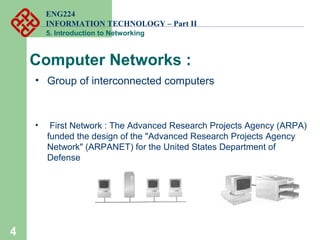
Computer Networks :
• Group of interconnected computers
• First Network : The Advanced Research Projects Agency (ARPA)
funded the design of the "Advanced Research Projects Agency
Network" (ARPANET) for the United States Department of
Defense
4
ENG224
INFORMATION TECHNOLOGY – Part II
5. Introduction to Networking
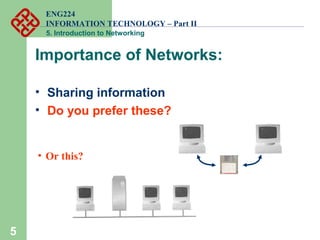
Importance of Networks:
• Sharing information
• Do you prefer these?
5
• Or this?
ENG224
INFORMATION TECHNOLOGY – Part II
5. Introduction to Networking
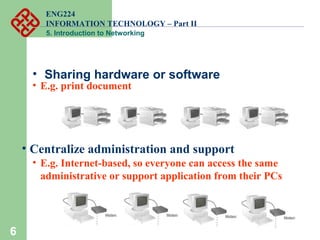
• Sharing hardware or software
6
• E.g. print document
6
• Centralize administration and support
• E.g. Internet-based, so everyone can access the same
administrative or support application from their PCs
ENG224
INFORMATION TECHNOLOGY – Part II
5. Introduction to Networking
7
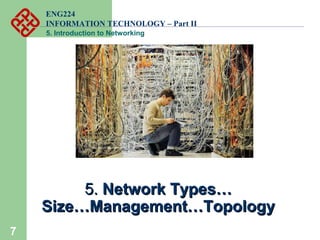
5.5. Network Types…Network Types…
Size…Management…TopologySize…Management…Topology
ENG224
INFORMATION TECHNOLOGY – Part II
5. Introduction to Networking
Network Classification : 1
• By Size or Scale
– LAN
– WAN
– MAN
– CAN
– PAN
8
ENG224
INFORMATION TECHNOLOGY – Part II
5. Introduction to Networking
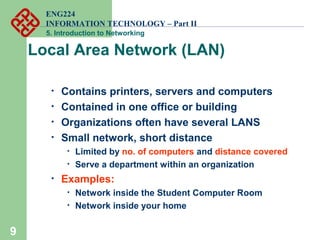
Local Area Network (LAN)
• Contains printers, servers and computers
• Contained in one office or building
• Organizations often have several LANS
• Small network, short distance
• Limited by no. of computers and distance covered
• Serve a department within an organization
• Examples:
• Network inside the Student Computer Room
• Network inside your home
9
ENG224
INFORMATION TECHNOLOGY – Part II
5. Introduction to Networking
10
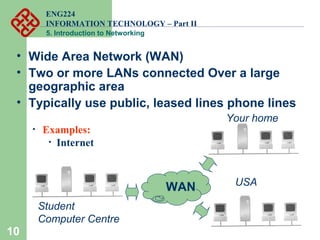
• Wide Area Network (WAN)
• Two or more LANs connected Over a large
geographic area
• Typically use public, leased lines phone lines
• Examples:
• Internet
WAN
Student
Computer Centre
Your home
USA
ENG224
INFORMATION TECHNOLOGY – Part II
5. Introduction to Networking
11
• Example WAN technologies:
• ISDN – Integrated Service Digital Network
• Basic rate: 192 Kbps Primary rate: 1.544Mbps
• ATM – Asynchronous Transfer Mode
• Support B-ISDN: 155Mbps or 622Mbps or higher
Large network that connects different
organizations
Shares regional resources
12
Metropolitan Area Network (MAN)
A LAN in one large geographic area
Resources related to the same organization
Each department shares the LAN
13
Campus Area Networks (CAN)
Very small scale network
Range is less than 2 meters
Cell phones, connectify :D
14
Personal Area Network (PAN)
ENG224
INFORMATION TECHNOLOGY – Part II
5. Introduction to Networking
Network Classification : 2
• By Structure / Functional / Management
Relationship :
1- Peer to Peer.
2- Client / Server.
15
ENG224
INFORMATION TECHNOLOGY – Part II
5. Introduction to Networking
16
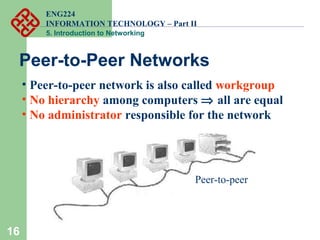
Peer-to-Peer Networks
• Peer-to-peer network is also called workgroup
• No hierarchy among computers ⇒ all are equal
• No administrator responsible for the network
Peer-to-peer
ENG224
INFORMATION TECHNOLOGY – Part II
5. Introduction to Networking
17
• Advantages of peer-to-peer networks:
• Low cost
• Simple to configure
• User has full accessibility of the computer
• Disadvantages of peer-to-peer networks:
• May have duplication in resources
• Difficult to uphold security policy
• Difficult to handle uneven loading
• Where peer-to-peer network is appropriate:
• 10 or less users
• No specialized services required
• Security is not an issue
• Only limited growth in the foreseeable future
ENG224
INFORMATION TECHNOLOGY – Part II
5. Introduction to Networking
18
Clients and Servers
• Network ClientsClients (WorkstationWorkstation)
• Computers that request network resources or services
• Network ServersServers
• Computers that manage and provide network resources and
services to clients
• Access to data controlled by server
• Server is the most important computer
• Usually have more processing power, memory and hard
disk space than clients
• Run Network Operating System that can manage not only
data, but also users, groups, security, and applications on
the network
ENG224
INFORMATION TECHNOLOGY – Part II
5. Introduction to Networking
19
• Advantages of client/server networks
• Facilitate resource sharing – centrally administrate and
control
• Facilitate system backup and improve fault tolerance
• Enhance security – only administrator can have access
to Server
• Support more users – difficult to achieve with peer-to-
peer networks
• Disadvantages of client/server networks
• High cost for Servers
• Need expert to configure the network
• Introduce a single point of failure to the system
ENG224
INFORMATION TECHNOLOGY – Part II
5. Introduction to Networking
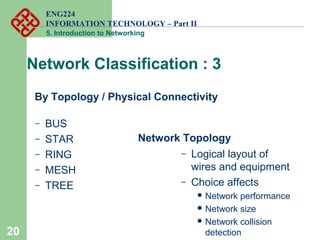
Network Classification : 3
By Topology / Physical Connectivity
– BUS
– STAR
– RING
– MESH
– TREE
Network Topology
– Logical layout of
wires and equipment
– Choice affects
 Network performance
 Network size
 Network collision
detection20
ENG224
INFORMATION TECHNOLOGY – Part II
5. Introduction to Networking
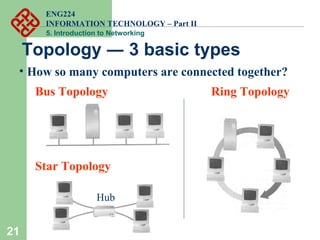
21
Topology ― 3 basic types
• How so many computers are connected together?
Bus Topology Ring Topology
Star Topology
Hub
ENG224
INFORMATION TECHNOLOGY – Part II
5. Introduction to Networking
22
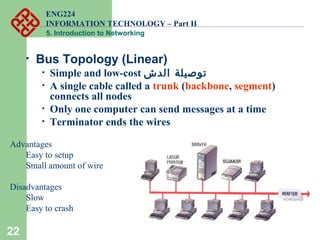
• Bus Topology (Linear)
• Simple and low-cost ‫الدش‬ ‫توصيلة‬
• A single cable called a trunk (backbone, segment)
connects all nodes
• Only one computer can send messages at a time
• Terminator ends the wires
Advantages
Easy to setup
Small amount of wire
Disadvantages
Slow
Easy to crash
ENG224
INFORMATION TECHNOLOGY – Part II
5. Introduction to Networking
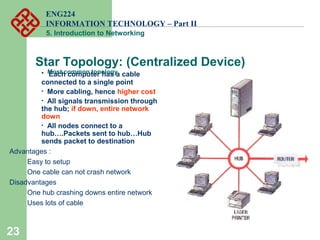
Star Topology: (Centralized Device)
Most common topology• Each computer has a cable
connected to a single point
• More cabling, hence higher cost
• All signals transmission through
the hub; if down, entire network
down
• All nodes connect to a
hub….Packets sent to hub…Hub
sends packet to destination
Advantages :
Easy to setup
One cable can not crash network
Disadvantages
One hub crashing downs entire network
Uses lots of cable
23
ENG224
INFORMATION TECHNOLOGY – Part II
5. Introduction to Networking
24
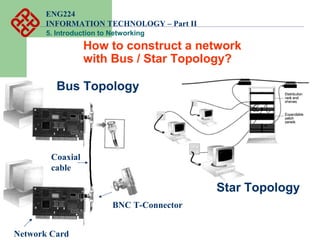
How to construct a network
with Bus / Star Topology?
Star Topology
Bus Topology
BNC T-Connector
Coaxial
cable
Network Card
ENG224
INFORMATION TECHNOLOGY – Part II
5. Introduction to Networking
25
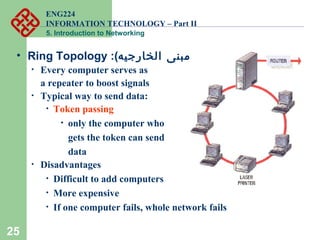
• Ring Topology :(‫الخارجيه‬ ‫)مبنى‬
• Every computer serves as
a repeater to boost signals
• Typical way to send data:
• Token passing
• only the computer who
gets the token can send
data
• Disadvantages
• Difficult to add computers
• More expensive
• If one computer fails, whole network fails
ENG224
INFORMATION TECHNOLOGY – Part II
5. Introduction to Networking
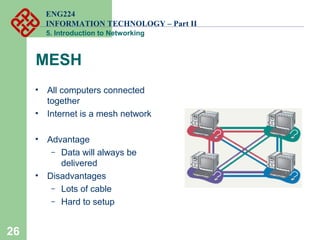
MESH
• All computers connected
together
• Internet is a mesh network
• Advantage
– Data will always be
delivered
• Disadvantages
– Lots of cable
– Hard to setup
26
ENG224
INFORMATION TECHNOLOGY – Part II
5. Introduction to Networking
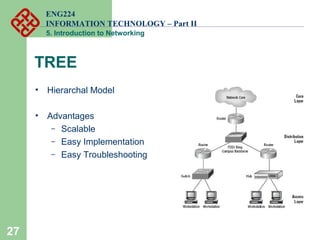
TREE
• Hierarchal Model
• Advantages
– Scalable
– Easy Implementation
– Easy Troubleshooting
27
28
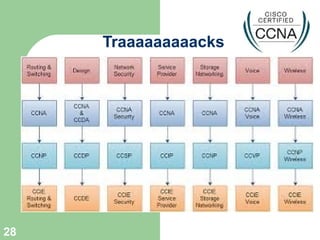
Traaaaaaaaacks
ENG224
INFORMATION TECHNOLOGY – Part II
5. Introduction to Networking
Vendors :
• http://www.cisco.com/
• http://www.nortel-us.com/
• http://www.avaya.com/usa/
• http://www.juniper.net/
• http://www8.hp.com/us/en/home.html
29
ENG224
INFORMATION TECHNOLOGY – Part II
5. Introduction to Networking
30
• Links that connect nodes with certain Speed, Security, and Size
• Two main categories:
– Guided ― wires, cables
– Unguided ― wireless transmission, e.g. radio,
microwave, infrared, sound, sonar
• We will concentrate on guided media first:
– Twisted-Pair cables:
 Unshielded Twisted-Pair (UTP) cables
 Shielded Twisted-Pair (STP) cables
– Coaxial cables
– Fiber-optic cables
Transmission Media
ENG224
INFORMATION TECHNOLOGY – Part II
5. Introduction to Networking
31
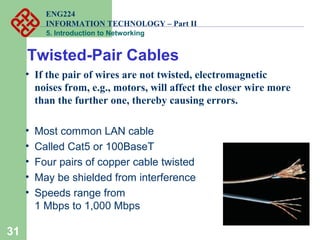
• If the pair of wires are not twisted, electromagnetic
noises from, e.g., motors, will affect the closer wire more
than the further one, thereby causing errors.
• Most common LAN cable
• Called Cat5 or 100BaseT
• Four pairs of copper cable twisted
• May be shielded from interference
• Speeds range from
1 Mbps to 1,000 Mbps
Twisted-Pair Cables
ENG224
INFORMATION TECHNOLOGY – Part II
5. Introduction to Networking
32
Unshielded Twisted-Pair (UTP)
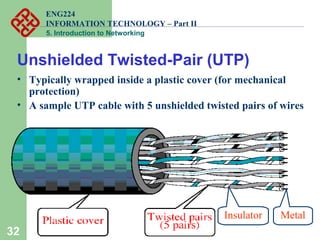
• Typically wrapped inside a plastic cover (for mechanical
protection)
• A sample UTP cable with 5 unshielded twisted pairs of wires
MetalInsulator
ENG224
INFORMATION TECHNOLOGY – Part II
5. Introduction to Networking
33
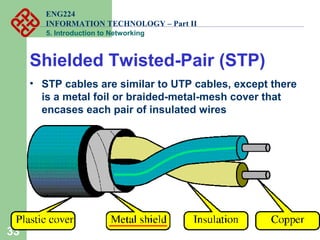
Shielded Twisted-Pair (STP)
• STP cables are similar to UTP cables, except there
is a metal foil or braided-metal-mesh cover that
encases each pair of insulated wires
ENG224
INFORMATION TECHNOLOGY – Part II
5. Introduction to Networking
34
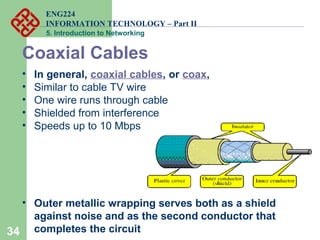
Coaxial Cables
• In general, coaxial cables, or coax,
• Similar to cable TV wire
• One wire runs through cable
• Shielded from interference
• Speeds up to 10 Mbps
• Outer metallic wrapping serves both as a shield
against noise and as the second conductor that
completes the circuit
ENG224
INFORMATION TECHNOLOGY – Part II
5. Introduction to Networking
35
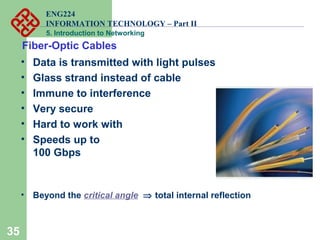
Fiber-Optic Cables
• Data is transmitted with light pulses
• Glass strand instead of cable
• Immune to interference
• Very secure
• Hard to work with
• Speeds up to
100 Gbps
• Beyond the critical angle ⇒ total internal reflection
ENG224
INFORMATION TECHNOLOGY – Part II
5. Introduction to Networking
36
Advantages and Disadvantages
 Noise resistance ― external light is blocked by outer
jacket
 Less signal attenuation ― a signal can run for miles
without regeneration (currently, the lowest measured
loss is about ~4% or 0.16dB per km)
 Higher bandwidth ― currently, limits on data rates come
from the signal generation/reception technology, not the
fiber itself
 Cost ― Optical fibers are expensive
 Installation/maintenance
ENG224
INFORMATION TECHNOLOGY – Part II
5. Introduction to Networking
Wireless Media:
• Data transmitted through the air
• LANs use radio waves
• WANs use microwave signals
• Easy to setup
• Difficult to secure
• Examples:
Wi-Fi
Wi-MAX
VSAT
37
ENG224
INFORMATION TECHNOLOGY – Part II
5. Introduction to Networking
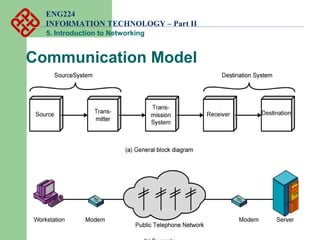
Communication Model
ENG224
INFORMATION TECHNOLOGY – Part II
5. Introduction to Networking
Communication Model
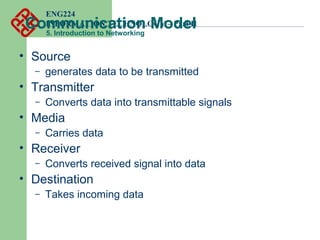
• Source
– generates data to be transmitted
• Transmitter
– Converts data into transmittable signals
• Media
– Carries data
• Receiver
– Converts received signal into data
• Destination
– Takes incoming data
ENG224
INFORMATION TECHNOLOGY – Part II
5. Introduction to Networking
Transmission Modes
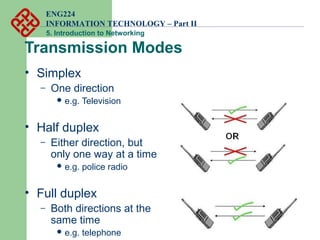
• Simplex
– One direction
 e.g. Television
• Half duplex
– Either direction, but
only one way at a time
 e.g. police radio
• Full duplex
– Both directions at the
same time
 e.g. telephone
ENG224
INFORMATION TECHNOLOGY – Part II
5. Introduction to Networking
Communication Types
• Unicasting (one-to-one)
• Multicasting (one-to-many)
• Broadcasting (one-to-all)
ENG224
INFORMATION TECHNOLOGY – Part II
5. Introduction to Networking
How to Start in IT ???
• ‫؟‬ ‫مجال‬ ‫كل‬ ‫بين‬ ‫الفرق‬ ‫وما‬ ‫المجال‬ ‫أختار‬ ‫محتار‬‫جاهزه‬ ‫متقسمه‬ ‫والمنتديات‬ ‫المواقع‬
• ‫؟‬ ‫الموجوده‬ ‫والشروحات‬ ‫الفيديوهات‬ ‫كل‬ ‫بين‬ ‫من‬ ‫أزاكر‬ ‫كيف‬... ..‫شركاته‬ ‫واعرف‬ ‫المجال‬ ‫عن‬ ‫سيرش‬ ‫الكتاب‬ ‫منهج‬ ‫قسم‬ ‫أسد‬ ‫خليك‬
...‫النجلش‬ ‫ع‬ ‫وبعدين‬ ‫العربى‬ ‫عفيديوهات‬ ‫خش‬ ‫بأول‬ ‫اول‬ ‫اكتب‬ ‫عنه‬ ‫ومعلومات‬
http://free4arab.com/
Network4all
Arabhardware
• ‫أ‬‫؟‬ ‫اللللللللللفيديوهات‬ ‫أخلص‬ ‫ما‬ ‫اول‬ ‫المتحان‬ ‫حجز‬‫تراجع‬ ‫ما‬ ‫بعد‬ ‫وزاكرها‬ ‫الدامبات‬ ‫نزل‬ ‫ل‬
• http://www.examcollection.com/
9tut
‫خبره‬ ‫معايا‬ ‫ومش‬ ‫مبتدئ‬ ‫وانا‬ ‫هشتغل‬ ‫ازاى‬‫الوظيفى‬ ‫السلم‬ ‫ع‬ ‫هتمر‬ ‫كده‬ ‫وكده‬ ‫؟الجروبات‬
‫ان‬ ‫؟لنكد‬ ‫مجالى‬ ‫ف‬ ‫اللى‬ ‫للشركات‬ ‫اوصل‬ ‫ازاى‬
http://www.egyptitjobs.com/
https://www.facebook.com/
http://www.bayt.com/en/egypt/
http://www.linkedin.com/nhome/?trk=
• ‫تراك‬ ‫لكل‬ ‫كمالمرتبات‬ ‫شائع‬ ‫سؤال‬‫المجال‬ ‫فى‬ ‫تخش‬ ‫انك‬ ‫مقياس‬ ‫؟مش‬
• ..‫بقه‬ ‫التنين‬ ‫كان‬ ‫لو‬ ‫يسلم‬ ‫خبره‬ ‫او‬ ‫شهاده‬ ‫بدون‬ ‫عمل‬ ‫هناك‬ ‫هل‬ :D
• ‫للشركه‬ ‫فلوس‬ ‫بتجيب‬ ‫لنها‬ ‫ألى‬ ‫الشهاده‬ ‫بس‬ ‫فى‬
..‫؟‬ ‫وفقط‬ ‫العمل‬ ‫المشور‬ ‫نهاية‬ ‫هل‬
• ‫والخبره‬ ‫للتعلم‬ ‫بدايه‬ ‫ده‬ ‫أصل‬ ‫تشتغل‬ ‫انك‬ ‫مجرد‬
42
ENG224
INFORMATION TECHNOLOGY – Part II
5. Introduction to Networking
• /Unified and Integration Inside
43

Computer Networks workshop

  • 1.
  • 2.
    ENG224 INFORMATION TECHNOLOGY –Part II 5. Introduction to Networking Who R We?? ‫شباب‬‫نفس‬ ‫دماغهم‬ ‫ف‬ ‫فى‬ ‫دماغك‬ ‫ف‬ ‫بتجيى‬ ‫اللى‬ ‫الفكار‬ ‫الجازه‬ Why We do that ? ... .. .. ..‫اكتب‬ ‫فيديو‬ ‫اشرح‬ ‫شير‬ ‫ترجم‬ ‫أعلن‬ ... 2
  • 3.
    ENG224 INFORMATION TECHNOLOGY –Part II 5. Introduction to Networking Index:
  • 4.
    ENG224 INFORMATION TECHNOLOGY –Part II 5. Introduction to Networking Computer Networks : • Group of interconnected computers • First Network : The Advanced Research Projects Agency (ARPA) funded the design of the "Advanced Research Projects Agency Network" (ARPANET) for the United States Department of Defense 4
  • 5.
    ENG224 INFORMATION TECHNOLOGY –Part II 5. Introduction to Networking Importance of Networks: • Sharing information • Do you prefer these? 5 • Or this?
  • 6.
    ENG224 INFORMATION TECHNOLOGY –Part II 5. Introduction to Networking • Sharing hardware or software 6 • E.g. print document 6 • Centralize administration and support • E.g. Internet-based, so everyone can access the same administrative or support application from their PCs
  • 7.
    ENG224 INFORMATION TECHNOLOGY –Part II 5. Introduction to Networking 7 5.5. Network Types…Network Types… Size…Management…TopologySize…Management…Topology
  • 8.
    ENG224 INFORMATION TECHNOLOGY –Part II 5. Introduction to Networking Network Classification : 1 • By Size or Scale – LAN – WAN – MAN – CAN – PAN 8
  • 9.
    ENG224 INFORMATION TECHNOLOGY –Part II 5. Introduction to Networking Local Area Network (LAN) • Contains printers, servers and computers • Contained in one office or building • Organizations often have several LANS • Small network, short distance • Limited by no. of computers and distance covered • Serve a department within an organization • Examples: • Network inside the Student Computer Room • Network inside your home 9
  • 10.
    ENG224 INFORMATION TECHNOLOGY –Part II 5. Introduction to Networking 10 • Wide Area Network (WAN) • Two or more LANs connected Over a large geographic area • Typically use public, leased lines phone lines • Examples: • Internet WAN Student Computer Centre Your home USA
  • 11.
    ENG224 INFORMATION TECHNOLOGY –Part II 5. Introduction to Networking 11 • Example WAN technologies: • ISDN – Integrated Service Digital Network • Basic rate: 192 Kbps Primary rate: 1.544Mbps • ATM – Asynchronous Transfer Mode • Support B-ISDN: 155Mbps or 622Mbps or higher
  • 12.
    Large network thatconnects different organizations Shares regional resources 12 Metropolitan Area Network (MAN)
  • 13.
    A LAN inone large geographic area Resources related to the same organization Each department shares the LAN 13 Campus Area Networks (CAN)
  • 14.
    Very small scalenetwork Range is less than 2 meters Cell phones, connectify :D 14 Personal Area Network (PAN)
  • 15.
    ENG224 INFORMATION TECHNOLOGY –Part II 5. Introduction to Networking Network Classification : 2 • By Structure / Functional / Management Relationship : 1- Peer to Peer. 2- Client / Server. 15
  • 16.
    ENG224 INFORMATION TECHNOLOGY –Part II 5. Introduction to Networking 16 Peer-to-Peer Networks • Peer-to-peer network is also called workgroup • No hierarchy among computers ⇒ all are equal • No administrator responsible for the network Peer-to-peer
  • 17.
    ENG224 INFORMATION TECHNOLOGY –Part II 5. Introduction to Networking 17 • Advantages of peer-to-peer networks: • Low cost • Simple to configure • User has full accessibility of the computer • Disadvantages of peer-to-peer networks: • May have duplication in resources • Difficult to uphold security policy • Difficult to handle uneven loading • Where peer-to-peer network is appropriate: • 10 or less users • No specialized services required • Security is not an issue • Only limited growth in the foreseeable future
  • 18.
    ENG224 INFORMATION TECHNOLOGY –Part II 5. Introduction to Networking 18 Clients and Servers • Network ClientsClients (WorkstationWorkstation) • Computers that request network resources or services • Network ServersServers • Computers that manage and provide network resources and services to clients • Access to data controlled by server • Server is the most important computer • Usually have more processing power, memory and hard disk space than clients • Run Network Operating System that can manage not only data, but also users, groups, security, and applications on the network
  • 19.
    ENG224 INFORMATION TECHNOLOGY –Part II 5. Introduction to Networking 19 • Advantages of client/server networks • Facilitate resource sharing – centrally administrate and control • Facilitate system backup and improve fault tolerance • Enhance security – only administrator can have access to Server • Support more users – difficult to achieve with peer-to- peer networks • Disadvantages of client/server networks • High cost for Servers • Need expert to configure the network • Introduce a single point of failure to the system
  • 20.
    ENG224 INFORMATION TECHNOLOGY –Part II 5. Introduction to Networking Network Classification : 3 By Topology / Physical Connectivity – BUS – STAR – RING – MESH – TREE Network Topology – Logical layout of wires and equipment – Choice affects  Network performance  Network size  Network collision detection20
  • 21.
    ENG224 INFORMATION TECHNOLOGY –Part II 5. Introduction to Networking 21 Topology ― 3 basic types • How so many computers are connected together? Bus Topology Ring Topology Star Topology Hub
  • 22.
    ENG224 INFORMATION TECHNOLOGY –Part II 5. Introduction to Networking 22 • Bus Topology (Linear) • Simple and low-cost ‫الدش‬ ‫توصيلة‬ • A single cable called a trunk (backbone, segment) connects all nodes • Only one computer can send messages at a time • Terminator ends the wires Advantages Easy to setup Small amount of wire Disadvantages Slow Easy to crash
  • 23.
    ENG224 INFORMATION TECHNOLOGY –Part II 5. Introduction to Networking Star Topology: (Centralized Device) Most common topology• Each computer has a cable connected to a single point • More cabling, hence higher cost • All signals transmission through the hub; if down, entire network down • All nodes connect to a hub….Packets sent to hub…Hub sends packet to destination Advantages : Easy to setup One cable can not crash network Disadvantages One hub crashing downs entire network Uses lots of cable 23
  • 24.
    ENG224 INFORMATION TECHNOLOGY –Part II 5. Introduction to Networking 24 How to construct a network with Bus / Star Topology? Star Topology Bus Topology BNC T-Connector Coaxial cable Network Card
  • 25.
    ENG224 INFORMATION TECHNOLOGY –Part II 5. Introduction to Networking 25 • Ring Topology :(‫الخارجيه‬ ‫)مبنى‬ • Every computer serves as a repeater to boost signals • Typical way to send data: • Token passing • only the computer who gets the token can send data • Disadvantages • Difficult to add computers • More expensive • If one computer fails, whole network fails
  • 26.
    ENG224 INFORMATION TECHNOLOGY –Part II 5. Introduction to Networking MESH • All computers connected together • Internet is a mesh network • Advantage – Data will always be delivered • Disadvantages – Lots of cable – Hard to setup 26
  • 27.
    ENG224 INFORMATION TECHNOLOGY –Part II 5. Introduction to Networking TREE • Hierarchal Model • Advantages – Scalable – Easy Implementation – Easy Troubleshooting 27
  • 28.
  • 29.
    ENG224 INFORMATION TECHNOLOGY –Part II 5. Introduction to Networking Vendors : • http://www.cisco.com/ • http://www.nortel-us.com/ • http://www.avaya.com/usa/ • http://www.juniper.net/ • http://www8.hp.com/us/en/home.html 29
  • 30.
    ENG224 INFORMATION TECHNOLOGY –Part II 5. Introduction to Networking 30 • Links that connect nodes with certain Speed, Security, and Size • Two main categories: – Guided ― wires, cables – Unguided ― wireless transmission, e.g. radio, microwave, infrared, sound, sonar • We will concentrate on guided media first: – Twisted-Pair cables:  Unshielded Twisted-Pair (UTP) cables  Shielded Twisted-Pair (STP) cables – Coaxial cables – Fiber-optic cables Transmission Media
  • 31.
    ENG224 INFORMATION TECHNOLOGY –Part II 5. Introduction to Networking 31 • If the pair of wires are not twisted, electromagnetic noises from, e.g., motors, will affect the closer wire more than the further one, thereby causing errors. • Most common LAN cable • Called Cat5 or 100BaseT • Four pairs of copper cable twisted • May be shielded from interference • Speeds range from 1 Mbps to 1,000 Mbps Twisted-Pair Cables
  • 32.
    ENG224 INFORMATION TECHNOLOGY –Part II 5. Introduction to Networking 32 Unshielded Twisted-Pair (UTP) • Typically wrapped inside a plastic cover (for mechanical protection) • A sample UTP cable with 5 unshielded twisted pairs of wires MetalInsulator
  • 33.
    ENG224 INFORMATION TECHNOLOGY –Part II 5. Introduction to Networking 33 Shielded Twisted-Pair (STP) • STP cables are similar to UTP cables, except there is a metal foil or braided-metal-mesh cover that encases each pair of insulated wires
  • 34.
    ENG224 INFORMATION TECHNOLOGY –Part II 5. Introduction to Networking 34 Coaxial Cables • In general, coaxial cables, or coax, • Similar to cable TV wire • One wire runs through cable • Shielded from interference • Speeds up to 10 Mbps • Outer metallic wrapping serves both as a shield against noise and as the second conductor that completes the circuit
  • 35.
    ENG224 INFORMATION TECHNOLOGY –Part II 5. Introduction to Networking 35 Fiber-Optic Cables • Data is transmitted with light pulses • Glass strand instead of cable • Immune to interference • Very secure • Hard to work with • Speeds up to 100 Gbps • Beyond the critical angle ⇒ total internal reflection
  • 36.
    ENG224 INFORMATION TECHNOLOGY –Part II 5. Introduction to Networking 36 Advantages and Disadvantages  Noise resistance ― external light is blocked by outer jacket  Less signal attenuation ― a signal can run for miles without regeneration (currently, the lowest measured loss is about ~4% or 0.16dB per km)  Higher bandwidth ― currently, limits on data rates come from the signal generation/reception technology, not the fiber itself  Cost ― Optical fibers are expensive  Installation/maintenance
  • 37.
    ENG224 INFORMATION TECHNOLOGY –Part II 5. Introduction to Networking Wireless Media: • Data transmitted through the air • LANs use radio waves • WANs use microwave signals • Easy to setup • Difficult to secure • Examples: Wi-Fi Wi-MAX VSAT 37
  • 38.
    ENG224 INFORMATION TECHNOLOGY –Part II 5. Introduction to Networking Communication Model
  • 39.
    ENG224 INFORMATION TECHNOLOGY –Part II 5. Introduction to Networking Communication Model • Source – generates data to be transmitted • Transmitter – Converts data into transmittable signals • Media – Carries data • Receiver – Converts received signal into data • Destination – Takes incoming data
  • 40.
    ENG224 INFORMATION TECHNOLOGY –Part II 5. Introduction to Networking Transmission Modes • Simplex – One direction  e.g. Television • Half duplex – Either direction, but only one way at a time  e.g. police radio • Full duplex – Both directions at the same time  e.g. telephone
  • 41.
    ENG224 INFORMATION TECHNOLOGY –Part II 5. Introduction to Networking Communication Types • Unicasting (one-to-one) • Multicasting (one-to-many) • Broadcasting (one-to-all)
  • 42.
    ENG224 INFORMATION TECHNOLOGY –Part II 5. Introduction to Networking How to Start in IT ??? • ‫؟‬ ‫مجال‬ ‫كل‬ ‫بين‬ ‫الفرق‬ ‫وما‬ ‫المجال‬ ‫أختار‬ ‫محتار‬‫جاهزه‬ ‫متقسمه‬ ‫والمنتديات‬ ‫المواقع‬ • ‫؟‬ ‫الموجوده‬ ‫والشروحات‬ ‫الفيديوهات‬ ‫كل‬ ‫بين‬ ‫من‬ ‫أزاكر‬ ‫كيف‬... ..‫شركاته‬ ‫واعرف‬ ‫المجال‬ ‫عن‬ ‫سيرش‬ ‫الكتاب‬ ‫منهج‬ ‫قسم‬ ‫أسد‬ ‫خليك‬ ...‫النجلش‬ ‫ع‬ ‫وبعدين‬ ‫العربى‬ ‫عفيديوهات‬ ‫خش‬ ‫بأول‬ ‫اول‬ ‫اكتب‬ ‫عنه‬ ‫ومعلومات‬ http://free4arab.com/ Network4all Arabhardware • ‫أ‬‫؟‬ ‫اللللللللللفيديوهات‬ ‫أخلص‬ ‫ما‬ ‫اول‬ ‫المتحان‬ ‫حجز‬‫تراجع‬ ‫ما‬ ‫بعد‬ ‫وزاكرها‬ ‫الدامبات‬ ‫نزل‬ ‫ل‬ • http://www.examcollection.com/ 9tut ‫خبره‬ ‫معايا‬ ‫ومش‬ ‫مبتدئ‬ ‫وانا‬ ‫هشتغل‬ ‫ازاى‬‫الوظيفى‬ ‫السلم‬ ‫ع‬ ‫هتمر‬ ‫كده‬ ‫وكده‬ ‫؟الجروبات‬ ‫ان‬ ‫؟لنكد‬ ‫مجالى‬ ‫ف‬ ‫اللى‬ ‫للشركات‬ ‫اوصل‬ ‫ازاى‬ http://www.egyptitjobs.com/ https://www.facebook.com/ http://www.bayt.com/en/egypt/ http://www.linkedin.com/nhome/?trk= • ‫تراك‬ ‫لكل‬ ‫كمالمرتبات‬ ‫شائع‬ ‫سؤال‬‫المجال‬ ‫فى‬ ‫تخش‬ ‫انك‬ ‫مقياس‬ ‫؟مش‬ • ..‫بقه‬ ‫التنين‬ ‫كان‬ ‫لو‬ ‫يسلم‬ ‫خبره‬ ‫او‬ ‫شهاده‬ ‫بدون‬ ‫عمل‬ ‫هناك‬ ‫هل‬ :D • ‫للشركه‬ ‫فلوس‬ ‫بتجيب‬ ‫لنها‬ ‫ألى‬ ‫الشهاده‬ ‫بس‬ ‫فى‬ ..‫؟‬ ‫وفقط‬ ‫العمل‬ ‫المشور‬ ‫نهاية‬ ‫هل‬ • ‫والخبره‬ ‫للتعلم‬ ‫بدايه‬ ‫ده‬ ‫أصل‬ ‫تشتغل‬ ‫انك‬ ‫مجرد‬ 42
  • 43.
    ENG224 INFORMATION TECHNOLOGY –Part II 5. Introduction to Networking • /Unified and Integration Inside 43