NETWORK TOPOLOGY
BY – KRITI SACHITA
SECTION - A
NetworkTopology
 In the networking world, the word topology is
widely used.
 Network topology refers to how various
nodes, devices, and connections on your
network are physically or logically arranged in
relation to each other.
 There are two approaches to network
topology:
1. Physical
2. Logical
Types of network
topology
• Bus Topology
• Ring Topology
• Star Topology
• Tree Topology
• Mesh topology
• Hybrid Topology
Advantages
1. It is easy to connect a device to the network.
2. It is cheaper than other network options.
3. The failure of one station does not affect the rest
of the network.
Disadvantages
1. Additional devices slow the network down.
2. Size limitations are always present.
3. Security options are limited with bus topology.
Ring Topology
• A ring topology is a network configuration
where device connections create a
circular data path. Each networked device is
connected to two others, like points on a circle.
Together, devices in a ring topology are referred
to as a ring network.
• In-ring topology packets of data is passed from
one device to the next device and so on until
the data reaches the destination.
• Most ring topologies allow packets to travel only
in one direction, called a unidirectional ring
network. Others permit data to move in either
direction, called bidirectional
Advantages
1. You don’t need to have a network
server.
2. High-speed data transfers are
possible with ring topology.
3. You can add new workstations without
difficulty.
Disadvantages
1. If you sever one point of the topology,
then the entire network malfunctions.
2. Ring topologies are one of the slowest
network designs.
3. It is more expensive to install a ring
topology network.
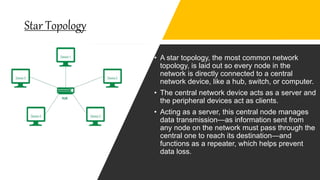
Star Topology
• A star topology, the most common network
topology, is laid out so every node in the
network is directly connected to a central
network device, like a hub, switch, or computer.
• The central network device acts as a server and
the peripheral devices act as clients.
• Acting as a server, this central node manages
data transmission—as information sent from
any node on the network must pass through the
central one to reach its destination—and
functions as a repeater, which helps prevent
data loss.
Advantages
Disadvantages
1. If the central core fails, then so does the entire system.
2. Star topology is very expensive to install.
3. Your mobility is adversely impacted by this system.
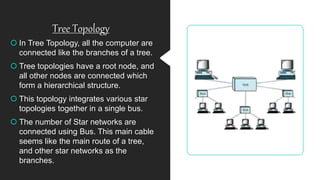
Tree Topology
 In Tree Topology, all the computer are
connected like the branches of a tree.
 Tree topologies have a root node, and
all other nodes are connected which
form a hierarchical structure.
 This topology integrates various star
topologies together in a single bus.
 The number of Star networks are
connected using Bus. This main cable
seems like the main route of a tree,
and other star networks as the
branches.
Advantages
1. If one segment gets damaged, the rest of the
network remains unaffected.
2. The expansion of the network is possible through a
simple process.
3. The whole network gets divided into segments.
Disadvantages
1. The installation of a tree topology is difficult.
2. There can be security issues with a tree topology.
3. A tree topology relies heavily on its main bus cable.
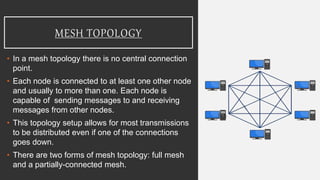
MESH TOPOLOGY
• In a mesh topology there is no central connection
point.
• Each node is connected to at least one other node
and usually to more than one. Each node is
capable of sending messages to and receiving
messages from other nodes.
• This topology setup allows for most transmissions
to be distributed even if one of the connections
goes down.
• There are two forms of mesh topology: full mesh
and a partially-connected mesh.
ADVANTAGES
1. A mesh topology doesn’t have a centralized
authority.
2. Flexibility is built into the system.
3. It can handle a large volume of data.
DISADVANTAGES
1. It takes a lot of time and effort to build and maintain
this topology.
2. There is a high risk of redundant connections.
3. Each node experiences an increased workload.
HYBRID TOPOLOGY
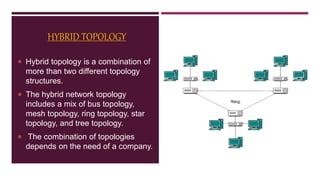
 Hybrid topology is a combination of
more than two different topology
structures.
 The hybrid network topology
includes a mix of bus topology,
mesh topology, ring topology, star
topology, and tree topology.
 The combination of topologies
depends on the need of a company.
ADVANTAGES
1. Reliable 2. Scalable 3. Flexible
DISADVANTAGES
1) Complexity of Design
2) Costly Hub
3) Costly Infrastructure

Network Topology

  • 1.
    NETWORK TOPOLOGY BY –KRITI SACHITA SECTION - A
  • 2.
    NetworkTopology  In thenetworking world, the word topology is widely used.  Network topology refers to how various nodes, devices, and connections on your network are physically or logically arranged in relation to each other.  There are two approaches to network topology: 1. Physical 2. Logical
  • 3.
    Types of network topology •Bus Topology • Ring Topology • Star Topology • Tree Topology • Mesh topology • Hybrid Topology
  • 5.
    Advantages 1. It iseasy to connect a device to the network. 2. It is cheaper than other network options. 3. The failure of one station does not affect the rest of the network.
  • 6.
    Disadvantages 1. Additional devicesslow the network down. 2. Size limitations are always present. 3. Security options are limited with bus topology.
  • 7.
    Ring Topology • Aring topology is a network configuration where device connections create a circular data path. Each networked device is connected to two others, like points on a circle. Together, devices in a ring topology are referred to as a ring network. • In-ring topology packets of data is passed from one device to the next device and so on until the data reaches the destination. • Most ring topologies allow packets to travel only in one direction, called a unidirectional ring network. Others permit data to move in either direction, called bidirectional
  • 8.
    Advantages 1. You don’tneed to have a network server. 2. High-speed data transfers are possible with ring topology. 3. You can add new workstations without difficulty.
  • 9.
    Disadvantages 1. If yousever one point of the topology, then the entire network malfunctions. 2. Ring topologies are one of the slowest network designs. 3. It is more expensive to install a ring topology network.
  • 10.
    Star Topology • Astar topology, the most common network topology, is laid out so every node in the network is directly connected to a central network device, like a hub, switch, or computer. • The central network device acts as a server and the peripheral devices act as clients. • Acting as a server, this central node manages data transmission—as information sent from any node on the network must pass through the central one to reach its destination—and functions as a repeater, which helps prevent data loss.
  • 11.
  • 12.
    Disadvantages 1. If thecentral core fails, then so does the entire system. 2. Star topology is very expensive to install. 3. Your mobility is adversely impacted by this system.
  • 13.
    Tree Topology  InTree Topology, all the computer are connected like the branches of a tree.  Tree topologies have a root node, and all other nodes are connected which form a hierarchical structure.  This topology integrates various star topologies together in a single bus.  The number of Star networks are connected using Bus. This main cable seems like the main route of a tree, and other star networks as the branches.
  • 14.
    Advantages 1. If onesegment gets damaged, the rest of the network remains unaffected. 2. The expansion of the network is possible through a simple process. 3. The whole network gets divided into segments.
  • 15.
    Disadvantages 1. The installationof a tree topology is difficult. 2. There can be security issues with a tree topology. 3. A tree topology relies heavily on its main bus cable.
  • 16.
    MESH TOPOLOGY • Ina mesh topology there is no central connection point. • Each node is connected to at least one other node and usually to more than one. Each node is capable of sending messages to and receiving messages from other nodes. • This topology setup allows for most transmissions to be distributed even if one of the connections goes down. • There are two forms of mesh topology: full mesh and a partially-connected mesh.
  • 17.
    ADVANTAGES 1. A meshtopology doesn’t have a centralized authority. 2. Flexibility is built into the system. 3. It can handle a large volume of data.
  • 18.
    DISADVANTAGES 1. It takesa lot of time and effort to build and maintain this topology. 2. There is a high risk of redundant connections. 3. Each node experiences an increased workload.
  • 19.
    HYBRID TOPOLOGY  Hybridtopology is a combination of more than two different topology structures.  The hybrid network topology includes a mix of bus topology, mesh topology, ring topology, star topology, and tree topology.  The combination of topologies depends on the need of a company.
  • 20.
    ADVANTAGES 1. Reliable 2.Scalable 3. Flexible
  • 21.
    DISADVANTAGES 1) Complexity ofDesign 2) Costly Hub 3) Costly Infrastructure