NETWORK TOPOLOGIES
NETWORK TOPOLOGY
 Network topology refers to the physical or logical layout of a computer
network.
 It defines how devices, such as computers, servers, switches, and routers, are
interconnected and how data flows within the network.
 There are several common network topologies, including:
 Bus Topology
 Ring Topology
 Star Topology
 Mesh Topology.
 Hybrid Topology
 Tree Topology
BUS TOPOLOGY.
 A bus physical topology is one in which all the devices connect to a common,
shared cable (sometimes called the backbone).
 Bus networks broadcast signals in both directions on the backbone cable,
enabling all devices to directly receive the signal.
 Example of Bus Topology.
ADVANTAGES OF BUS TOPOLOGY
 Easy to install and cost-effective, requiring less cabling than other topologies.
 Suitable for small networks with low to moderate traffic.
 Expansion and adding new nodes are relatively easy.
 Failure of a single node does not affect the rest of the network.
DISADVANTAGES OF BUS TOPOLOGY
 Network performance can degrade as the number of devices or network
traffic increases.
 The entire network can be brought down if the main bus cable fails.
 Difficult to identify and troubleshoot issues with cable faults.
 Limited scalability and maximum cable length due to signal degradation.
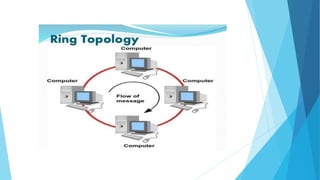
RING TOPOLOGY.
 Ring topologies are wired in a circle.
 Each node is connected to its neighbors on either side, and data passes
around the ring in one direction only. Ring topologies are ideally suited for
token-passing access methods.
 The token passes around the ring, and only the node that holds the token can
transmit data.
ADVANTAGES OF RING TOPOLOGY
 Easy to install and configure.
 Equal access to the network for all devices.
 Data transfer is efficient since each node has a dedicated time slot to
transmit.
 Suitable for small networks with low to moderate traffic.
DISADVANTAGES OF RING TOPOLOGY
 Failure of a single node can disrupt the entire network.
 Adding or removing nodes can be difficult, as it requires reconfiguring the
entire network.
 Limited scalability as the network size increases.
 Network performance decreases with the addition of more nodes.
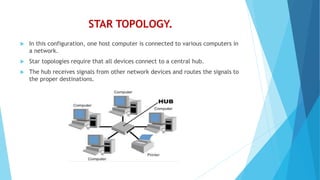
STAR TOPOLOGY.
 In this configuration, one host computer is connected to various computers in
a network.
 Star topologies require that all devices connect to a central hub.
 The hub receives signals from other network devices and routes the signals to
the proper destinations.
ADVANTAGES OF STAR TOPOLOGY
 Easy to install, configure, and manage.
 Failure of a single node does not affect the entire network; only that node is
affected.
 Easy to add or remove nodes without disrupting the rest of the network.
 Centralized control simplifies troubleshooting and maintenance.
DISADVANTAGES OF STAR TOPOLOGY
 Dependence on the central hub; if it fails, the entire network is affected.
 Requires more cabling than other topologies.
 Limited scalability due to the capacity of the central hub.
 Network performance can be affected if there is heavy traffic to and from the
central hub.
MESH TOPOLOGY.
 A mesh topology is really a hybrid model representing an all-channel sort of
physical topology.
 It is a hybrid because a mesh topology can incorporate all the topologies
covered to this point.
 Computers are interconnected.
ADVANTAGES OF MESH TOPOLOGY
 Redundant paths ensure high reliability and fault tolerance.
 Can handle heavy traffic loads effectively.
 Data can be transmitted simultaneously, making it suitable for real-time
applications.
 Adding or removing nodes does not disrupt the network.
DISADVANTAGES OF MESH TOPOLOGY
 Complex to install, configure, and manage.
 Requires a large number of physical connections and cabling.
 Costly to implement due to the high number of connections.
 Network scalability can be challenging as the number of nodes increases.
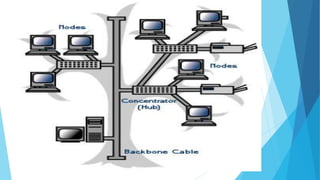
TREE TOPOLOGY
 Also known as Hierarchical Topology, this is the most common form of network
topology in use presently.
 This topology imitates as extended Star topology and inherits properties of
bus topology.
 This topology divides the network in to multiple levels/layers of network.
 Mainly in LANs, a network is bifurcated into three types of network devices.
 The lowermost is access-layer where computers are attached.
 The middle layer is known as distribution layer, which works as mediator
between upper layer and lower layer.
 The highest layer is known as core layer, and is central point of the network,
i.e. root of the tree from which all nodes fork.
ADVANTAGES OF TREE TOPOLOGY
1. Detection of error:
 Error detection in a tree topology becomes more accessible. In this tree topology, the central node
connects all the nodes present in it. The error in this node can be easily detected by the hub since
all the information transmitted through the node passes through the hub. By replacing the faulty
node in this network, we can easily replace the node which has a mistake in it.
2. Sturdiness:
 If a single node gets defective in the tree topology, it will not affect the other nodes. The tree
topology network is created based on the main backbone cable. Hence, the failure of 1 node would
not affect the other nodes, and the other nodes will regularly continue to function. The
performance of the network would not be affected by the removal of any node in it.
3. Easy expansion:
 The expansion of a tree topology is a straightforward method. Though this topology has no space, it
can be expanded. In this topology, without any issue, many secondary nodes can be attached to it
since this topology follows a hierarchy pattern. As long as enough cables and hubs are present, the
expansion won't be a problem.
4. Every support:
 A tree topology is the best considerable option at the time of the addition of new devices. Due to its
hybrid approach, various manufacturers support this type of network. For maintenance and other
work, he allowed the manufacturers to access the devices connected to the network easily.
5. Low cable requirement:
 Any cables are not required at the time of installation of a tree topology. The single cable in this
type of topology acts like the backbone of the network, and it runs joint for all the network
segments. every tree network is presented with a point to point wiring. This type of point-to-point
wiring in this network ensures high bandwidth and low latency.
DISADVANTAGES OF TREE TOPOLOGY
1. Difficulty in maintenance and configuration.
2. Difficult to install a tree topology network.
3. The cable length of a tree topology is minimal. If we expand the topology, the
excess cable is required, which results in increasing overall expense.
4. Tree topology poses high-security threats.
5. If the main cable of the topology collapses, the whole network will also
collapse.
HYBRID TOPOLOGY
 A network structure whose design contains more than one topology is said to
be hybrid topology.
 Hybrid topology inherits merits and demerits of all the incorporating
topologies.
TYPES OF HYBRID TOPOLOGY
1. Star-Ring Hybrid Topology
2. Star-Bus Hybrid Topology
3. Hierarchical Network Topology
1. Star-Ring Hybrid Topology
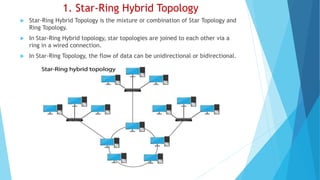
 Star-Ring Hybrid Topology is the mixture or combination of Star Topology and
Ring Topology.
 In Star-Ring Hybrid topology, star topologies are joined to each other via a
ring in a wired connection.
 In Star-Ring Topology, the flow of data can be unidirectional or bidirectional.
2. Star-Bus Hybrid Topology
 Star Bus Hybrid Topology is a combination of Star Topology and Bus Topology.
 Here, the star networks are connected to the cable of the Bus Topology.
 In the figure mentioned below, you can easily get to know how Star and Bus
are interconnected in Star Bus Hybrid Topology.
3. Hierarchical Network Topology
 Hierarchical Network Topology is simply a type of Network Topology that is
connected to multiple nodes present there.
 It is a type of hybrid topology, that is a combination of Star Ring Hybrid
Topology and Star-Bus Hybrid Topolgy.
 It also consists of Root Node, Child Node, and Leaf Node.
ADVANTAGES OF HYBRID TOPOLOGY
 Can be modified as per requirement.
 It is extremely flexible.
 It is very reliable.
 It is easily scalable as Hybrid networks are built in a fashion which enables
easy integration of new hardware components.
 Error detecting and troubleshooting are easy.
 Handles a large volume of traffic.
 It is used to create large networks.
 The speed of the topology becomes fast when two topologies are put
together.
DISADVANTAGES OF HYBRID TOPOLOGY
 It is an expensive type of network.
 The design of a hybrid network is very complex.
 There is a change in the hardware to connect one topology with another
topology.
 Usually, hybrid architectures are larger in scale so they require a lot of cables
in the installation process.
 Hubs which are used to connect two distinct networks are very costly. And
hubs are different from usual hubs as they need to be intelligent enough to
work with different architectures.
 Installation is a difficult process.
USES OF HYBRID TOPOLOGY
 Hybrid Topology helps in keeping the full diversity of the computer network.
 Hybrid Topology is helpful when we require more than one topology in the
system.
 Hybrid Topology helps in reducing the cost of the overall system.
 Hybrid Topology helps in easily running the system.
 Hybrid Topology is widely used in educational institutes, research
organizations, finance sectors, etc.

NETWORK TOPOLOGIES IN COMPUTER NETWORKING.pptx

  • 1.
  • 2.
    NETWORK TOPOLOGY  Networktopology refers to the physical or logical layout of a computer network.  It defines how devices, such as computers, servers, switches, and routers, are interconnected and how data flows within the network.  There are several common network topologies, including:  Bus Topology  Ring Topology  Star Topology  Mesh Topology.  Hybrid Topology  Tree Topology
  • 3.
    BUS TOPOLOGY.  Abus physical topology is one in which all the devices connect to a common, shared cable (sometimes called the backbone).  Bus networks broadcast signals in both directions on the backbone cable, enabling all devices to directly receive the signal.  Example of Bus Topology.
  • 4.
    ADVANTAGES OF BUSTOPOLOGY  Easy to install and cost-effective, requiring less cabling than other topologies.  Suitable for small networks with low to moderate traffic.  Expansion and adding new nodes are relatively easy.  Failure of a single node does not affect the rest of the network.
  • 5.
    DISADVANTAGES OF BUSTOPOLOGY  Network performance can degrade as the number of devices or network traffic increases.  The entire network can be brought down if the main bus cable fails.  Difficult to identify and troubleshoot issues with cable faults.  Limited scalability and maximum cable length due to signal degradation.
  • 6.
    RING TOPOLOGY.  Ringtopologies are wired in a circle.  Each node is connected to its neighbors on either side, and data passes around the ring in one direction only. Ring topologies are ideally suited for token-passing access methods.  The token passes around the ring, and only the node that holds the token can transmit data.
  • 8.
    ADVANTAGES OF RINGTOPOLOGY  Easy to install and configure.  Equal access to the network for all devices.  Data transfer is efficient since each node has a dedicated time slot to transmit.  Suitable for small networks with low to moderate traffic.
  • 9.
    DISADVANTAGES OF RINGTOPOLOGY  Failure of a single node can disrupt the entire network.  Adding or removing nodes can be difficult, as it requires reconfiguring the entire network.  Limited scalability as the network size increases.  Network performance decreases with the addition of more nodes.
  • 10.
    STAR TOPOLOGY.  Inthis configuration, one host computer is connected to various computers in a network.  Star topologies require that all devices connect to a central hub.  The hub receives signals from other network devices and routes the signals to the proper destinations.
  • 11.
    ADVANTAGES OF STARTOPOLOGY  Easy to install, configure, and manage.  Failure of a single node does not affect the entire network; only that node is affected.  Easy to add or remove nodes without disrupting the rest of the network.  Centralized control simplifies troubleshooting and maintenance.
  • 12.
    DISADVANTAGES OF STARTOPOLOGY  Dependence on the central hub; if it fails, the entire network is affected.  Requires more cabling than other topologies.  Limited scalability due to the capacity of the central hub.  Network performance can be affected if there is heavy traffic to and from the central hub.
  • 13.
    MESH TOPOLOGY.  Amesh topology is really a hybrid model representing an all-channel sort of physical topology.  It is a hybrid because a mesh topology can incorporate all the topologies covered to this point.  Computers are interconnected.
  • 14.
    ADVANTAGES OF MESHTOPOLOGY  Redundant paths ensure high reliability and fault tolerance.  Can handle heavy traffic loads effectively.  Data can be transmitted simultaneously, making it suitable for real-time applications.  Adding or removing nodes does not disrupt the network.
  • 15.
    DISADVANTAGES OF MESHTOPOLOGY  Complex to install, configure, and manage.  Requires a large number of physical connections and cabling.  Costly to implement due to the high number of connections.  Network scalability can be challenging as the number of nodes increases.
  • 16.
    TREE TOPOLOGY  Alsoknown as Hierarchical Topology, this is the most common form of network topology in use presently.  This topology imitates as extended Star topology and inherits properties of bus topology.  This topology divides the network in to multiple levels/layers of network.  Mainly in LANs, a network is bifurcated into three types of network devices.  The lowermost is access-layer where computers are attached.  The middle layer is known as distribution layer, which works as mediator between upper layer and lower layer.  The highest layer is known as core layer, and is central point of the network, i.e. root of the tree from which all nodes fork.
  • 18.
    ADVANTAGES OF TREETOPOLOGY 1. Detection of error:  Error detection in a tree topology becomes more accessible. In this tree topology, the central node connects all the nodes present in it. The error in this node can be easily detected by the hub since all the information transmitted through the node passes through the hub. By replacing the faulty node in this network, we can easily replace the node which has a mistake in it. 2. Sturdiness:  If a single node gets defective in the tree topology, it will not affect the other nodes. The tree topology network is created based on the main backbone cable. Hence, the failure of 1 node would not affect the other nodes, and the other nodes will regularly continue to function. The performance of the network would not be affected by the removal of any node in it. 3. Easy expansion:  The expansion of a tree topology is a straightforward method. Though this topology has no space, it can be expanded. In this topology, without any issue, many secondary nodes can be attached to it since this topology follows a hierarchy pattern. As long as enough cables and hubs are present, the expansion won't be a problem. 4. Every support:  A tree topology is the best considerable option at the time of the addition of new devices. Due to its hybrid approach, various manufacturers support this type of network. For maintenance and other work, he allowed the manufacturers to access the devices connected to the network easily. 5. Low cable requirement:  Any cables are not required at the time of installation of a tree topology. The single cable in this type of topology acts like the backbone of the network, and it runs joint for all the network segments. every tree network is presented with a point to point wiring. This type of point-to-point wiring in this network ensures high bandwidth and low latency.
  • 19.
    DISADVANTAGES OF TREETOPOLOGY 1. Difficulty in maintenance and configuration. 2. Difficult to install a tree topology network. 3. The cable length of a tree topology is minimal. If we expand the topology, the excess cable is required, which results in increasing overall expense. 4. Tree topology poses high-security threats. 5. If the main cable of the topology collapses, the whole network will also collapse.
  • 20.
    HYBRID TOPOLOGY  Anetwork structure whose design contains more than one topology is said to be hybrid topology.  Hybrid topology inherits merits and demerits of all the incorporating topologies.
  • 21.
    TYPES OF HYBRIDTOPOLOGY 1. Star-Ring Hybrid Topology 2. Star-Bus Hybrid Topology 3. Hierarchical Network Topology
  • 22.
    1. Star-Ring HybridTopology  Star-Ring Hybrid Topology is the mixture or combination of Star Topology and Ring Topology.  In Star-Ring Hybrid topology, star topologies are joined to each other via a ring in a wired connection.  In Star-Ring Topology, the flow of data can be unidirectional or bidirectional.
  • 23.
    2. Star-Bus HybridTopology  Star Bus Hybrid Topology is a combination of Star Topology and Bus Topology.  Here, the star networks are connected to the cable of the Bus Topology.  In the figure mentioned below, you can easily get to know how Star and Bus are interconnected in Star Bus Hybrid Topology.
  • 24.
    3. Hierarchical NetworkTopology  Hierarchical Network Topology is simply a type of Network Topology that is connected to multiple nodes present there.  It is a type of hybrid topology, that is a combination of Star Ring Hybrid Topology and Star-Bus Hybrid Topolgy.  It also consists of Root Node, Child Node, and Leaf Node.
  • 25.
    ADVANTAGES OF HYBRIDTOPOLOGY  Can be modified as per requirement.  It is extremely flexible.  It is very reliable.  It is easily scalable as Hybrid networks are built in a fashion which enables easy integration of new hardware components.  Error detecting and troubleshooting are easy.  Handles a large volume of traffic.  It is used to create large networks.  The speed of the topology becomes fast when two topologies are put together.
  • 26.
    DISADVANTAGES OF HYBRIDTOPOLOGY  It is an expensive type of network.  The design of a hybrid network is very complex.  There is a change in the hardware to connect one topology with another topology.  Usually, hybrid architectures are larger in scale so they require a lot of cables in the installation process.  Hubs which are used to connect two distinct networks are very costly. And hubs are different from usual hubs as they need to be intelligent enough to work with different architectures.  Installation is a difficult process.
  • 27.
    USES OF HYBRIDTOPOLOGY  Hybrid Topology helps in keeping the full diversity of the computer network.  Hybrid Topology is helpful when we require more than one topology in the system.  Hybrid Topology helps in reducing the cost of the overall system.  Hybrid Topology helps in easily running the system.  Hybrid Topology is widely used in educational institutes, research organizations, finance sectors, etc.