
Network Topologies
Presented by
Ali Haider
What is Network Topology?
Network topology defines the structure of network.
• One part of topology definition is the physical topology ,which is actual
layout of the wire or media.
• The other part is the logical topology ,which defines how the media is
accessed by the hosts for the sending data.
Types of Network topologies?
• There are basic five types of network topologies:
1. Bus Topology
2. Ring Topology
3. Mesh Topology
4. Star Topology
5. Hybrid Topology
photo source :
sliderplayer.com
Bus Topology
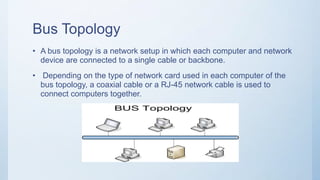
• A bus topology is a network setup in which each computer and network
device are connected to a single cable or backbone.
• Depending on the type of network card used in each computer of the
bus topology, a coaxial cable or a RJ-45 network cable is used to
connect computers together.
Advantages of bus Topology
• It works well when you have a small network.
• It's the easiest network topology for connecting computers or peripherals in a linear fashion.
• It requires less cable length than a star topology.
Disadvantages of Bus Topology
• Bus topology is not great for large networks.
• Terminators are required for both ends of the main cable.
• Additional devices slow the network down.
• If a main cable is damaged, the network fails or splits into two.
Star Topology
• star topology is one of the most common network setups. In this
configuration, every node connects to a central network device, like a
hub, switch, or computer.
• The central network device acts as a server and the peripheral devices
act as clients.
Advantage of star Topology
• Easy to add another computer to the network.
• If one computer on the network fails, the rest of the network continues to function normally.
Disadvantages of star Topology
• Can have a higher cost to implement, especially when using a switch or router as the central
network device.
• The central network device determines the performance and number of nodes the network can
handle.
Ring Topology
• In a ring network, packets of data travel from one device to the next
until they reach their destination.
• Most ring topologies allow packets to travel only in one direction, called
a unidirectional ring network.
• Others permit data to move in either direction, called bidirectional.
Advantages of Ring topology
• All data flows in one direction, reducing the chance of packet collisions.
• A network server is not needed to control network connectivity between each workstation.
• Data can transfer between workstations at high speeds.
Disadvantages of Ring Topology
• The major disadvantage of a ring topology is that if any individual connection in the ring is
broken, the entire network is affected.
• All data being transferred over the network must pass through each workstation on the
network, which can make it slower than a star topology.
Mesh topology
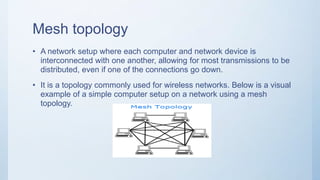
• A network setup where each computer and network device is
interconnected with one another, allowing for most transmissions to be
distributed, even if one of the connections go down.
• It is a topology commonly used for wireless networks. Below is a visual
example of a simple computer setup on a network using a mesh
topology.
Advantages of Mesh Topology
• Can handle high amounts of traffic, because multiple devices can transmit data simultaneously.
• A failure of one device does not cause a break in the network or transmission of data.
• Adding additional devices does not disrupt data transmission between other devices.
Disadvantages of Mesh Topology
• The cost to implement is higher than other network topologies, making it a less desirable
option.
• Building and maintaining the topology is difficult and time consuming.
• The chance of redundant connections is high, which adds to the high costs and potential for
reduced efficiency.
Hybrid Topology
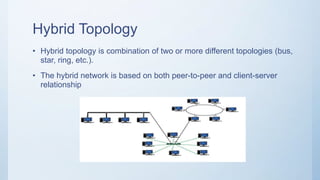
• Hybrid topology is combination of two or more different topologies (bus,
star, ring, etc.).
• The hybrid network is based on both peer-to-peer and client-server
relationship
Advantages of Hybrid Topology
• Very reliable and easy to detect the Faulty system.
• Troubleshooting is easy.
• It includes both wired and wireless network.
• It is expandable network.
Disadvantages of Hybrid topology
• It’s design is difficult to understand.
• The cost of this network design is high, because of requirement of lot of cables cooling
systems, etc.
• MAU ( Multi-station Access Unit) is required
End
Source of all content
https://computerhope.com

Network Topologies

  • 1.
  • 2.
    What is NetworkTopology? Network topology defines the structure of network. • One part of topology definition is the physical topology ,which is actual layout of the wire or media. • The other part is the logical topology ,which defines how the media is accessed by the hosts for the sending data.
  • 3.
    Types of Networktopologies? • There are basic five types of network topologies: 1. Bus Topology 2. Ring Topology 3. Mesh Topology 4. Star Topology 5. Hybrid Topology photo source : sliderplayer.com
  • 4.
    Bus Topology • Abus topology is a network setup in which each computer and network device are connected to a single cable or backbone. • Depending on the type of network card used in each computer of the bus topology, a coaxial cable or a RJ-45 network cable is used to connect computers together.
  • 5.
    Advantages of busTopology • It works well when you have a small network. • It's the easiest network topology for connecting computers or peripherals in a linear fashion. • It requires less cable length than a star topology. Disadvantages of Bus Topology • Bus topology is not great for large networks. • Terminators are required for both ends of the main cable. • Additional devices slow the network down. • If a main cable is damaged, the network fails or splits into two.
  • 6.
    Star Topology • startopology is one of the most common network setups. In this configuration, every node connects to a central network device, like a hub, switch, or computer. • The central network device acts as a server and the peripheral devices act as clients.
  • 7.
    Advantage of starTopology • Easy to add another computer to the network. • If one computer on the network fails, the rest of the network continues to function normally. Disadvantages of star Topology • Can have a higher cost to implement, especially when using a switch or router as the central network device. • The central network device determines the performance and number of nodes the network can handle.
  • 8.
    Ring Topology • Ina ring network, packets of data travel from one device to the next until they reach their destination. • Most ring topologies allow packets to travel only in one direction, called a unidirectional ring network. • Others permit data to move in either direction, called bidirectional.
  • 9.
    Advantages of Ringtopology • All data flows in one direction, reducing the chance of packet collisions. • A network server is not needed to control network connectivity between each workstation. • Data can transfer between workstations at high speeds. Disadvantages of Ring Topology • The major disadvantage of a ring topology is that if any individual connection in the ring is broken, the entire network is affected. • All data being transferred over the network must pass through each workstation on the network, which can make it slower than a star topology.
  • 10.
    Mesh topology • Anetwork setup where each computer and network device is interconnected with one another, allowing for most transmissions to be distributed, even if one of the connections go down. • It is a topology commonly used for wireless networks. Below is a visual example of a simple computer setup on a network using a mesh topology.
  • 11.
    Advantages of MeshTopology • Can handle high amounts of traffic, because multiple devices can transmit data simultaneously. • A failure of one device does not cause a break in the network or transmission of data. • Adding additional devices does not disrupt data transmission between other devices. Disadvantages of Mesh Topology • The cost to implement is higher than other network topologies, making it a less desirable option. • Building and maintaining the topology is difficult and time consuming. • The chance of redundant connections is high, which adds to the high costs and potential for reduced efficiency.
  • 12.
    Hybrid Topology • Hybridtopology is combination of two or more different topologies (bus, star, ring, etc.). • The hybrid network is based on both peer-to-peer and client-server relationship
  • 13.
    Advantages of HybridTopology • Very reliable and easy to detect the Faulty system. • Troubleshooting is easy. • It includes both wired and wireless network. • It is expandable network. Disadvantages of Hybrid topology • It’s design is difficult to understand. • The cost of this network design is high, because of requirement of lot of cables cooling systems, etc. • MAU ( Multi-station Access Unit) is required
  • 14.
    End Source of allcontent https://computerhope.com