A+
Lecture 1: CompTIAA+ Certification
Kabul Polytechnic University (KPU)
Information Technology Community College (ITCC)
Prepared by: S. Md. Ali Murtazawi
Contact: sma.eee@hotmail.com
Date: 10-September-2015
In this course you will learn how to build, maintain, troubleshoot, and repair PCs
Reference
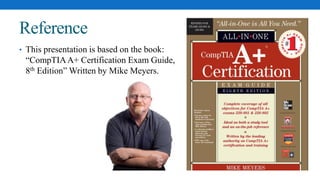
• This presentation is based on the book:
“CompTIAA+ Certification Exam Guide,
8th Edition” Written by Mike Meyers.
What Is CompTIAA+ Certification?
• CompTIAA+ certification is an industry-wide, vendor-neutral certification program
developed and sponsored by the Computing Technology Industry Association
(CompTIA).
• CompTIA sponsors CompTIAA+, CompTIA Network+, CompTIA Security+, and
other certifications.
• The CompTIAA+ certification shows that you have a basic competence in
supporting microcomputers.
• CompTIA began offering CompTIAA+ certification back in 1993.
• Many companies require CompTIAA+ certification for all of their PC support
technicians, and the CompTIAA+ certification is widely recognized both in the
United States and internationally.
The Basic Exam Structure
• You can achieve the CompTIAA+ certification by taking two computer-based,
multiple-choice exams.
• The two exams introduced by CompTIA in 2012 are:
• CompTIA A+ 220-801 (Hardware) and
• CompTIA A+ 220-802 (Operating Systems).
• The 220-801 exam concentrates on understanding terminology and technology, how
to do fundamental tasks such as upgrading RAM, and basic network and laptop
support.
• The 220-802 exam builds on the first exam, concentrating on Windows support,
advanced configuration, and troubleshooting scenarios.
• Both of the exams are extremely practical, with little or no interest in history.
Exam 220-801
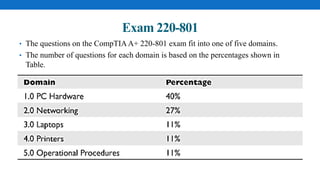
• The questions on the CompTIAA+ 220-801 exam fit into one of five domains.
• The number of questions for each domain is based on the percentages shown in
Table.
Exam 220-801
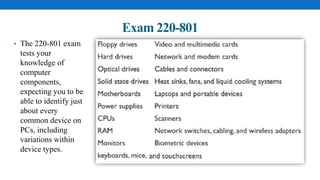
• The 220-801 exam
tests your
knowledge of
computer
components,
expecting you to be
able to identify just
about every
common device on
PCs, including
variations within
device types.
Exam 220-801
• The 220-801 exam tests your ability to install, configure, and maintain all the
hardware technology involved in a personal computer.
• You need to be able to install and set up a hard drive, for example, and configure
devices in Windows XP, Windows Vista, and Windows 7.
• You have to understand device drivers.
• Additionally, this exam puts a lot of emphasis on operational procedures, such as
safety and environmental issues, communication, and professionalism.
• You need to understand how to avoid hazardous situations.
• You need to understand professional behavior and demonstrate that you have tact,
discretion, and respect for others and their property.
Exam 220-802
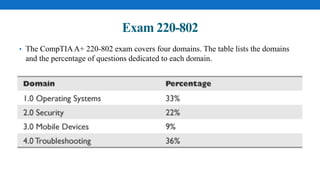
• The CompTIAA+ 220-802 exam covers four domains. The table lists the domains
and the percentage of questions dedicated to each domain.
Exam 220-802
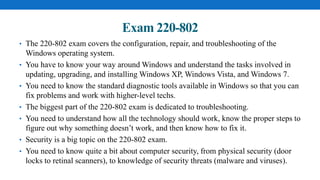
• The 220-802 exam covers the configuration, repair, and troubleshooting of the
Windows operating system.
• You have to know your way around Windows and understand the tasks involved in
updating, upgrading, and installing Windows XP, Windows Vista, and Windows 7.
• You need to know the standard diagnostic tools available in Windows so that you can
fix problems and work with higher-level techs.
• The biggest part of the 220-802 exam is dedicated to troubleshooting.
• You need to understand how all the technology should work, know the proper steps to
figure out why something doesn’t work, and then know how to fix it.
• Security is a big topic on the 220-802 exam.
• You need to know quite a bit about computer security, from physical security (door
locks to retinal scanners), to knowledge of security threats (malware and viruses).
Contact
• If you have any problems, any questions, or if you just want to argue about
something, feel free to send an e-mail to the author—michaelm@totalsem.com—or
to the editor—scottj@totalsem.com.
• For any other information you might need, contact CompTIA directly at their Web
site:
• http://www.comptia.org/.

Lecture 1: CompTIA A+ Certification

  • 1.
    A+ Lecture 1: CompTIAA+Certification Kabul Polytechnic University (KPU) Information Technology Community College (ITCC) Prepared by: S. Md. Ali Murtazawi Contact: sma.eee@hotmail.com Date: 10-September-2015 In this course you will learn how to build, maintain, troubleshoot, and repair PCs
  • 2.
    Reference • This presentationis based on the book: “CompTIAA+ Certification Exam Guide, 8th Edition” Written by Mike Meyers.
  • 3.
    What Is CompTIAA+Certification? • CompTIAA+ certification is an industry-wide, vendor-neutral certification program developed and sponsored by the Computing Technology Industry Association (CompTIA). • CompTIA sponsors CompTIAA+, CompTIA Network+, CompTIA Security+, and other certifications. • The CompTIAA+ certification shows that you have a basic competence in supporting microcomputers. • CompTIA began offering CompTIAA+ certification back in 1993. • Many companies require CompTIAA+ certification for all of their PC support technicians, and the CompTIAA+ certification is widely recognized both in the United States and internationally.
  • 4.
    The Basic ExamStructure • You can achieve the CompTIAA+ certification by taking two computer-based, multiple-choice exams. • The two exams introduced by CompTIA in 2012 are: • CompTIA A+ 220-801 (Hardware) and • CompTIA A+ 220-802 (Operating Systems). • The 220-801 exam concentrates on understanding terminology and technology, how to do fundamental tasks such as upgrading RAM, and basic network and laptop support. • The 220-802 exam builds on the first exam, concentrating on Windows support, advanced configuration, and troubleshooting scenarios. • Both of the exams are extremely practical, with little or no interest in history.
  • 5.
    Exam 220-801 • Thequestions on the CompTIAA+ 220-801 exam fit into one of five domains. • The number of questions for each domain is based on the percentages shown in Table.
  • 6.
    Exam 220-801 • The220-801 exam tests your knowledge of computer components, expecting you to be able to identify just about every common device on PCs, including variations within device types.
  • 7.
    Exam 220-801 • The220-801 exam tests your ability to install, configure, and maintain all the hardware technology involved in a personal computer. • You need to be able to install and set up a hard drive, for example, and configure devices in Windows XP, Windows Vista, and Windows 7. • You have to understand device drivers. • Additionally, this exam puts a lot of emphasis on operational procedures, such as safety and environmental issues, communication, and professionalism. • You need to understand how to avoid hazardous situations. • You need to understand professional behavior and demonstrate that you have tact, discretion, and respect for others and their property.
  • 8.
    Exam 220-802 • TheCompTIAA+ 220-802 exam covers four domains. The table lists the domains and the percentage of questions dedicated to each domain.
  • 9.
    Exam 220-802 • The220-802 exam covers the configuration, repair, and troubleshooting of the Windows operating system. • You have to know your way around Windows and understand the tasks involved in updating, upgrading, and installing Windows XP, Windows Vista, and Windows 7. • You need to know the standard diagnostic tools available in Windows so that you can fix problems and work with higher-level techs. • The biggest part of the 220-802 exam is dedicated to troubleshooting. • You need to understand how all the technology should work, know the proper steps to figure out why something doesn’t work, and then know how to fix it. • Security is a big topic on the 220-802 exam. • You need to know quite a bit about computer security, from physical security (door locks to retinal scanners), to knowledge of security threats (malware and viruses).
  • 10.
    Contact • If youhave any problems, any questions, or if you just want to argue about something, feel free to send an e-mail to the author—michaelm@totalsem.com—or to the editor—scottj@totalsem.com. • For any other information you might need, contact CompTIA directly at their Web site: • http://www.comptia.org/.